
Shopify stores designed and launched
Orders and events turned into team action
Shopify Project Management That Moves Orders Into Your Team's Workflow
Shopify project management for stores whose team lives in chat and task boards while orders arrive somewhere else. Choose the tools you use, see a fixed price first and launch alerts and tasks that fire on the right events and nothing else.
- A page for every chat, task and project tool
- Alerts and tasks only for the events you choose
- Owners, due dates and labels set by rule
- Noise tested out before your team sees it
Team tools covered100 integrations
From$390
Delivery3 to 14 working days
Our track record
Store Events That Reach the Right Person
A wholesale order, a stuck shipment or a refund request matters to a specific person. In most stores it reaches them late, through a forwarded email or a spreadsheet nobody opens. The packages below turn the events you pick into chat alerts and tasks with an owner, a due date and the order attached.
Average rating from verified clients
Building Shopify stores since
Secure checkout
Pay through a protected checkout and keep a full order record.
Two revision rounds
Included in every package, so the result matches what you pictured.
Backup before changes
We work on a duplicate of your theme, never on your live store.
Who this is for
Who Needs Shopify Project Management Integration
Teams rarely ask for integration. They ask why the packing team never saw the rush order. These are the teams that call us.
Teams that miss time-critical orders
Rush, pre-order and VIP orders sit in a queue. We post them to a chat channel with the key details so the right person acts.
Fulfilment teams that run on tasks
Packing, customisation and quality checks work best as tasks. We create them from order rules and close them when the order ships.
Agencies and multi-store owners
Several stores feed one team. We route events by store and tag so nobody wades through the wrong channel.
Owners who track time on custom work
Bespoke orders need time tracked per job. We create the project and the time entry when the order arrives.
Founders drowning in notifications
Too many alerts get ignored. We set thresholds, quiet hours and digests so alerts stay worth reading.
Teams with an internal tool
An in-house board or a niche project app can receive Shopify events through the API as a fixed build.
No integration matches “”. Send a quote request with the tool’s name and we will check its API and scope it.
Featured integrations
Choose Your Tools From 100 Shopify Project Management Integrations
Each card opens a service page for one team tool, with three packages and a fixed price. Whatever project management software Shopify owners choose, the featured tools here are the ones we are asked about most. More tools are in the A to Z list below, and the quote card covers the exceptions.
01Team chat
Team chat and alerts
For teams that want orders and events posted where they talk.
From $390
Slack
New orders, refunds and stock alerts posted to the right Slack channels, with the details a person needs and thresholds that keep noise down. A test order proves each message fires once.
Channels, thresholds and quiet hours are set per event type, so rush orders stand out and routine ones never drown the channel.
Best for: Teams that run the day in Slack
3 to 14 working days
View integrationFrom $390
Microsoft Teams
Order and fulfilment alerts delivered to Teams channels as clear cards, with rules for which events go where. We test on desktop and phone so alerts are readable.
Alert cards are tested on desktop and phone, and routing rules decide which team sees which kind of order.
Best for: Teams working in Microsoft 365
3 to 14 working days
View integrationFrom $390
Discord
Order notifications and store events posted to Discord channels, handy for community brands and small teams. Roles decide who sees what, and test posts never reach live channels.
Roles control who sees which channel, and test posts go to a private channel until the wording and volume feel right.
Best for: Community-led brands and small teams
3 to 14 working days
View integrationFrom $390
Google Chat
Shopify events delivered to Google Chat spaces with the fields your team needs, and rules that route rush orders to a dedicated space. A test day checks volume and wording.
Rush orders are routed to a dedicated space, and a test day measures volume so spaces are not flooded.
Best for: Teams inside Google Workspace
3 to 14 working days
View integration02Task
Task and project boards
For teams that run work as cards, tickets and projects.
From $390
Trello
Trello cards created from Shopify orders and moved across lists as the order is paid, packed and shipped, with labels from tags. We test rush, cancelled and partial orders.
Labels come from order tags, lists mirror your fulfilment stages, and partial and cancelled orders are tested as carefully as normal ones.
Best for: Small teams that manage fulfilment on boards
3 to 14 working days
View integrationFrom $390
Asana
Asana tasks and projects created from orders that meet your rules, such as wholesale or high value, with owners and due dates assigned. Fulfilment closes the task automatically.
Owners and due dates are set by rule, and fulfilment closes the task automatically, so open work always reflects open orders.
Best for: Teams that assign work in Asana
3 to 14 working days
View integrationFrom $390
ClickUp
ClickUp tasks created from Shopify orders with custom fields for the order number and customer, and statuses that follow the order. Edge cases such as edits are tested.
Custom fields carry the order number and customer, and edits to an order update the same task instead of creating another.
Best for: Teams that centralise work in ClickUp
3 to 14 working days
View integrationFrom $390
Jira Software Cloud
Jira issues created from store events such as refunds or product requests, with project, type and priority set by rule. We keep volume sensible so the backlog stays useful.
Issue type, priority and project are set by rule, with volume limits so the backlog stays worth reading.
Best for: Product and engineering teams using Jira
3 to 14 working days
View integrationFrom $390
Teamwork
Teamwork tasks and projects generated from orders for service-heavy or custom work, with milestones that follow the order. A test order walks the whole project template.
Project templates follow the order type, with milestones that move as the order moves, tested on a bespoke order.
Best for: Agencies and service-led sellers
3 to 14 working days
View integrationFrom $390
Pivotal Tracker
Pivotal Tracker stories created from store events that need development, such as a failing checkout report. Labels and owners are set by rule.
Stories are created only for events that need development, with labels and owners set so triage takes minutes.
Best for: Development teams that triage store issues
3 to 14 working days
View integrationFrom $390
Motion
Motion tasks created from Shopify events so work lands in a person's planned day with a due date. We test how new tasks reshuffle the schedule.
New tasks are tested against a real calendar so they slot into a planned day without reshuffling everything else.
Best for: Owners who plan their day automatically
3 to 14 working days
View integration03Time
Time, to-dos and shared files
For teams that track hours, personal tasks and documents beside the store.
From $390
Harvest
Harvest projects and time entries created from custom orders, so bespoke work is tracked from the first minute. Client and project names match the order.
Client and project names match the order, and a time entry starts when custom work begins, so billing and the store agree.
Best for: Stores that sell custom or service work
3 to 14 working days
View integrationFrom $390
Microsoft To Do
Personal task lists fed with Shopify events, so the owner sees reorder and follow-up reminders where they already look. Lists and priorities are agreed first.
Lists and priorities are agreed first, so reorder and follow-up reminders land where the owner already looks each morning.
Best for: Owners who live in Microsoft To Do
3 to 14 working days
View integrationFrom $390
Microsoft SharePoint
SharePoint lists and folders updated from Shopify orders and documents, so teams and auditors find records in the system they trust. Permissions are checked before anything is written.
Permissions are checked before anything is written, and lists and folders follow a naming rule auditors can follow.
Best for: Organisations that keep records in SharePoint
3 to 14 working days
View integrationFrom $390
Toodledo
Toodledo tasks created from store events with due dates and folders set by rule. We test that completed tasks do not recreate themselves.
Folders and due dates are set by rule, and we test that completing a task never recreates it.
Best for: Owners who run personal task lists
3 to 14 working days
View integrationIs your team tool missing?
Name the tool and the events that should reach it. We check what its API allows and send a fixed quote, or tell you plainly if a simpler route fits better.
Request a QuoteNeed chat plus tasks?
Alerts often start tasks, and tasks often post updates. Ask for a bundled quote and we treat the links as one project, tested together.
Request a QuoteEvery integration in this hub
All 100 Shopify Project Management Integrations, A to Z
Every chat, task, project and time tool we cover has its own page with packages and a fixed price. Search the list for your tool and open it to see what each package covers.
A8 integrations
B7 integrations
C10 integrations
CalendarFixFrom $390 · 3 to 14 dayscaptureFrom $390 · 3 to 14 daysChili PiperFrom $390 · 3 to 14 daysCigo TrackerFrom $390 · 3 to 14 daysClickTimeFrom $390 · 3 to 14 daysClickUpPopularFrom $390 · 3 to 14 daysClinkedFrom $390 · 3 to 14 daysClockifyFrom $390 · 3 to 14 daysConfluenceFrom $390 · 3 to 14 daysCycleFrom $390 · 3 to 14 days
D4 integrations
E1 integration
F7 integrations
G4 integrations
H3 integrations
I3 integrations
J1 integration
K5 integrations
L4 integrations
M7 integrations
N5 integrations
P7 integrations
Q1 integration
R5 integrations
S6 integrations
T5 integrations
V1 integration
Z1 integration
#1 integration
Events to action
How a Store Event Becomes Team Action
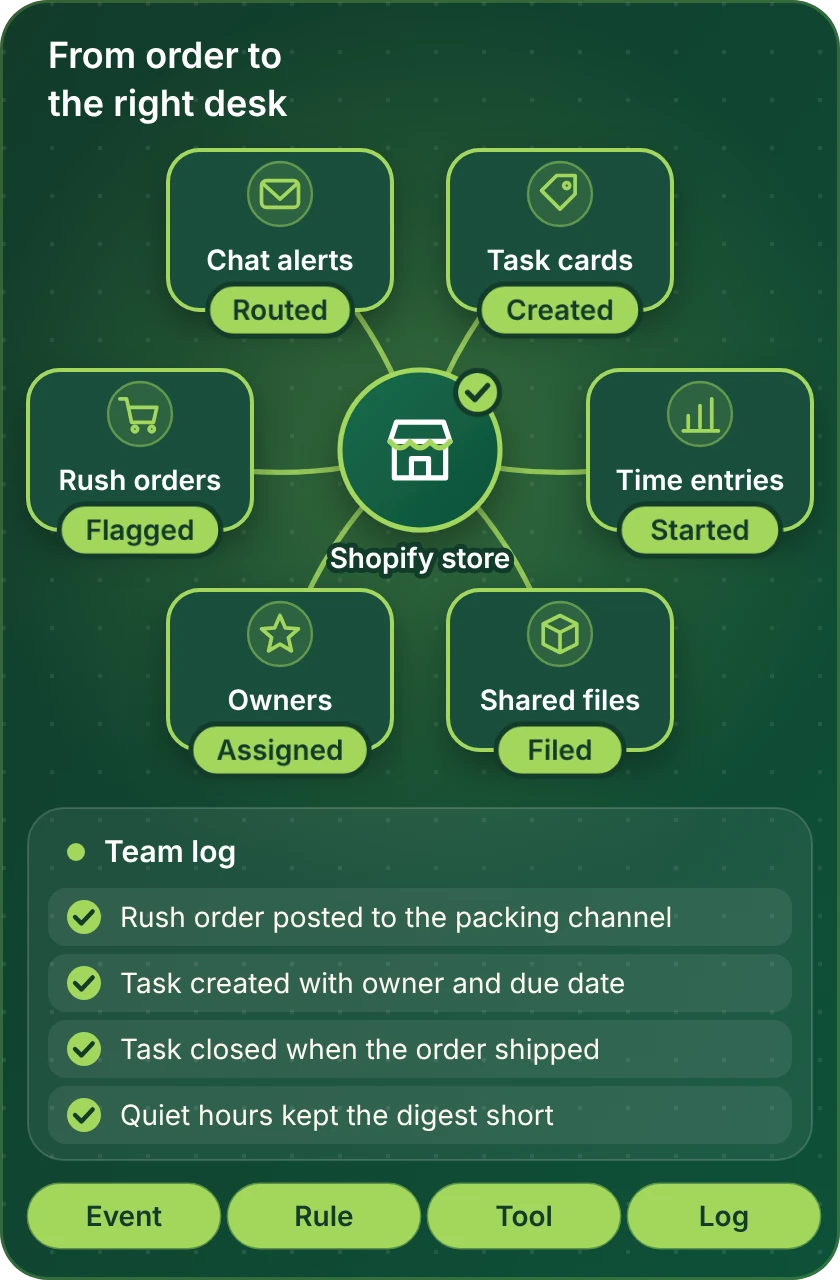
Every project follows the same path. The store sends the event, a rule decides whether it matters, the right tool receives it and the result is logged where you can read it. The map shows the connections we build and check.
Compare your options
Which Shopify Team Integration Route Fits You?
Team tools connect to Shopify three ways. Look down the left column for your goal and across to see how each route handles it.
| What matters | Tool's own Shopify link | No-code automation tool | Custom API build |
|---|---|---|---|
| Order alerts in a chat channel | Often available | Yes, with filters | Yes, any rule |
| A task created for qualifying orders | Sometimes | Yes | Yes |
| Tasks that close when the order ships | Rarely | Yes, as a second step | Yes, built in |
| Routing by store, tag or value | Basic | Yes | Any logic |
| Digests and quiet hours | Rarely | Possible | Designed per team |
| A tool with no Shopify link | Not available | If the platform lists it | Yes, through its API |
| Time and project templates per order | No | Partly | Yes |
| Typical fit for our packages | Setup and rules | Most single-tool builds | Larger or unusual builds |
Process and timeline
How a Shopify Project Management Integration Runs
A single alert and a full order-to-project workflow follow the same six steps. Only the scale differs, and nobody on your team sees a test message.
- 1
Choose the tools and package
Open the page for your chat or task tool and select a package. The price and the delivery estimate are shown up front.
- 2
Choose how we get access
Either invite us as store collaborators, or let us work in our Partner account and transfer ownership later, or share a staff login with limited permissions. In the team tool we use a user you create.
- 3
List the events and owners
We write which events create alerts or tasks, who owns each, how due dates are set and what closes them. You approve the list before we build.
- 4
Build with test channels
Alerts and tasks are built against private channels and a test board. Real channels stay quiet while wording and rules are tuned.
- 5
Run rush, cancel and edit cases
We place ordinary orders, rush orders, cancellations, edits and partial shipments and check that every alert and task behaves.
- 6
Go live and hand over
After approval the rules switch to real channels and boards. You receive a recorded walkthrough and notes on how to change thresholds.
Why Store Design Expert
Why Brands Hire Us for Shopify Project Management Integration
Posting an order to a channel is simple. Brands hire us for the rules, owners and tests that stop the channel turning into noise.
Nine years of Shopify only
We have focused on Shopify alone since 2015, with more than 450 launched stores. Order states, edits and partial shipments are familiar before your project starts.
A fixed price for every tool
Every team tool has a page with three packages, and the price comes first. Subscriptions remain between you and the vendors.
Alerts worth reading
Thresholds, routing and digests are part of the build, so the team trusts the channel.
Tested on awkward orders
We run cancellations, edits and partial shipments, not just the easy order.
Accounts stay yours
Your store and team tools remain under your logins, with access we use removed at handover.
Rated 4.9+ by verified clients
Those 4.9+ ratings come from verified clients, and the reviews below are in their words, covering how the job was defined, discussed and delivered.
Testimonials
What Clients Say After Launch
Verified clients describe working with Store Design Expert on builds, integrations and fixes.
Verified
The website development work was truly impressive. Their attention to detail and ability to exceed expectations made the project a success. Working with them was a breeze, thanks to quick responsiveness and a willingness to go above and beyond.
KD
Kevin D.United States
Verified
Store Design Expert was very knowledgeable about what I needed done to fix my Shopify store and how to improve the store layout. The project was completed very quickly, and I will definitely use them for support as my business grows.
ST
Samuel T.United States
Verified
Very satisfied with the work. Most importantly, Store Design Expert responded promptly to my questions and concerns. Thank you!
KB
Kyle B.United States
Verified
Outstanding work and outstanding customer service. Five stars! I will absolutely use Store Design Expert again for my next book.
KM
Katharine M.United States
Verified
Store Design Expert was great! They delivered exactly what I asked for and even offered helpful extra suggestions. Highly recommended.
PW
Paul W.United States
Verified
I request Store Design Expert every time I have a project. They are professional and give real attention to detail, which makes the work stand out.
LK
Laura K.United States
Verified
They kept communicating until the problem was fully resolved, and the result was great.
HJ
Henry J.United States
Verified
Super helpful and patient. I am new to ecommerce and Store Design Expert talked me through the whole process and even fixed my payment bridging for me!
LR
Lois R.United Kingdom
Verified
I am beyond satisfied! Store Design Expert went above and beyond on my project. Highly recommended!
MD
Michael D.United States
FAQ
Shopify Project Management FAQs
Direct answers on cost, tools, access and noise control.
How much does Shopify project management integration cost?
Packages start at $390 for a single alert or task workflow and rise with the number of workflows and the tool. Each team tool page shows three packages and a delivery estimate before payment. Team tool subscriptions are billed by the vendors.
Which project management software for Shopify do you connect?
We connect chat, task, project and time tools, from Slack and Teams to Asana, Trello, ClickUp, Jira and Harvest. The cards above show the main ones, and the index lists the rest.
Can I hire you just for the connection?
Yes. You can hire Shopify integration team support for one connection and nothing more, because each service is a fixed-price build with a written scope. There is no retainer.
How to collaborate on Shopify with an outside team?
The usual route is a collaborator request from your store settings, which gives us scoped access without sharing your password. We explain the permissions we need and remove access at handover.
How to add collaborators to Shopify safely?
Open your store settings, create a collaborator request code and share it with us, choosing only the permissions required. You can remove the collaborator at any time, and we confirm at handover.
Do you help a team that has no developer?
Yes. Our Shopify technical help team handles the technical work inside each package, and we write short notes so your team can change thresholds and owners without a developer.
How do you stop too many alerts?
We set thresholds, quiet hours and digests, and test the volume on a normal day and a sale day. You approve the settings before alerts reach real channels.
Can a task close itself when the order ships?
Yes. We link the task to the order and close it on fulfilment, cancellation or refund. We test each case so tasks do not stay open or reopen.
Can orders from several stores feed one board?
Yes. We tag each event with its store and route it by rule, so one team can work several stores without mixing them up.
How long does a team integration take?
A single alert or task workflow usually takes 3 to 5 working days. Multi-tool builds take longer, up to 14 working days, depending on the package.
Do I give you my Shopify or team tool password?
No. Most clients send a collaborator request, though a build in our Partner account that we transfer, or a restricted staff login, also works. In the team tool we use a user you create and remove at handover.
What if my team tool changes its connection later?
Vendors change connectors. Vendors change their connections. We document every build so it can be adjusted, and the automation maintenance page offers a repair or maintenance plan.
Ready when you are
Get Shopify Project Management Working for Your Team
Open the page for your chat or task tool, read what is included and see a fixed price before you commit. If your team uses several tools, send a short quote request and we will scope them as one project.
- Fixed price shown first
- Alerts tested before your team sees them
- Your accounts stay yours