
Shopify stores designed and launched
Multi-currency setup for Shopify
Shopify Currency Settings Set Up So Prices Look Local and Margins Hold
Shopify currency settings look simple until a conversion fee, an awkward rounded price or an unexpected payout currency shows up. We review your store currency, activate local currencies by market, set rounding and test an order in each. From $590, fixed scope.
- Store and local currencies chosen with payouts in mind
- Rounding rules so converted prices look natural
- Fees and exchange effects written down for you
- A test order placed in every currency you activate
From$590
Delivery3 to 12 working days
Revisions2 rounds
Our track record
450+ Shopify Stores Launched Since 2015. Your Currency Setup Gets the Same Care.
Currency choices are easy to make and awkward to undo. A change touches prices, payouts, apps and reports. We plan them before switching anything on, then test each currency with a real order so surprises happen on our side, not your customers'.
Average rating from verified clients
Building Shopify stores since
Secure checkout
Pay through a protected checkout and keep a full order record.
Two revision rounds
Included in every package, so the result matches what you pictured.
Backup before changes
We work on a duplicate of your theme, never on your live store.
Who this is for
Who Needs Help With a Multi-Currency Store Setup
Owners usually find the currency page, switch a few things on and then notice an odd price. These are the six situations behind most multi-currency store setup requests.
You are a good fit if
- You sell to shoppers in other countries
- You want a fixed price and written scope
- You will own the store and any plan or app fees
- You can approve rounding and price choices
Stores with their first foreign orders
Shoppers abroad see your home currency and hesitate. Local prices make them feel the store was meant for them.
Owners worried about fees
Conversion and payout effects change margins. We write down what applies to your plan and gateway.
Sellers whose prices look odd
A straight conversion gives prices like 47.38. Rounding rules make them look chosen.
Merchants changing store currency
Changing the base currency affects prices, apps and reports. It needs a plan, a backup and tests.
Teams confused by reports
Sales in several currencies need clear reporting. We explain how Shopify shows them.
Founders short on time
You would rather hand over access and receive a tested setup than click through every currency screen.
Problems solved
Why Multi-Currency Setups Surprise Store Owners
Switching on local currencies is quick. These six surprises appear afterwards.
The problem
Conversion fees reduce margin.
The outcome
Where fees apply, a sale in another currency leaves less than the same sale at home.
The problem
Rounded prices look random.
The outcome
Without a rounding rule, converted prices end in odd decimals and move with the exchange rate.
The problem
The gateway cannot charge that currency.
The outcome
Not every gateway or plan supports local currency charging, so orders fail or fall back to the store currency.
The problem
Payouts arrive in another currency.
The outcome
Payout currency may differ from what you expect, which affects bookkeeping.
The problem
Reports mix currencies.
The outcome
Without a clear view, sales in several currencies make revenue hard to read.
The problem
Shipping and discounts do not convert well.
The outcome
Flat rates and fixed discounts set in one currency look odd in another.
What we can do
What Our Multi-Currency Store Setup Covers
Six jobs make up the service. Your package decides how many currencies and markets are included.
Store currency and plan review
We review your store currency, plan and gateway and tell you what local currencies are possible and what each costs to run.
Local currency activation
Currencies are activated per market with the right countries attached, so every shopper sees one currency and no gaps.
Rounding and price rules
Rounding rules are chosen with you and tested on your best sellers and cheapest items, so prices look natural at every exchange rate.
Fees, payouts and exchange notes
We write down which conversion fees and payout rules apply to you, so margin decisions rest on facts.
Reports and bookkeeping notes
We explain how multi-currency sales appear in Shopify reports and what your accountant needs to see.
Test orders in every currency
An order is placed in each currency to compare shown and charged prices, taxes, shipping and emails.
What is included
What Is Inside Your Multi-Currency Setup
Each deliverable in Multi-Currency Store Setup sits in one of the six groups below. The comparison table below shows how far each group goes by package.
Review
- Store currency checked
- Plan and gateway review
- Eligibility listed
- Risks written down
Currencies
- Currencies activated
- Countries attached
- Default behaviour
- Switcher check
Pricing
- Rounding rules
- Top product tests
- Compare-at prices
- Free shipping thresholds
Fees
- Conversion fee note
- Payout currency note
- Margin table
- Exchange effect note
Reports
- Reporting notes
- Accountant summary
- Export tips
- Currency labels
Handover
- Test order log per currency
- Dashboard video
- Notes on adding currencies
- Two revision rounds
You provide access and approve prices. We handle review, configuration and testing.
Priced cart
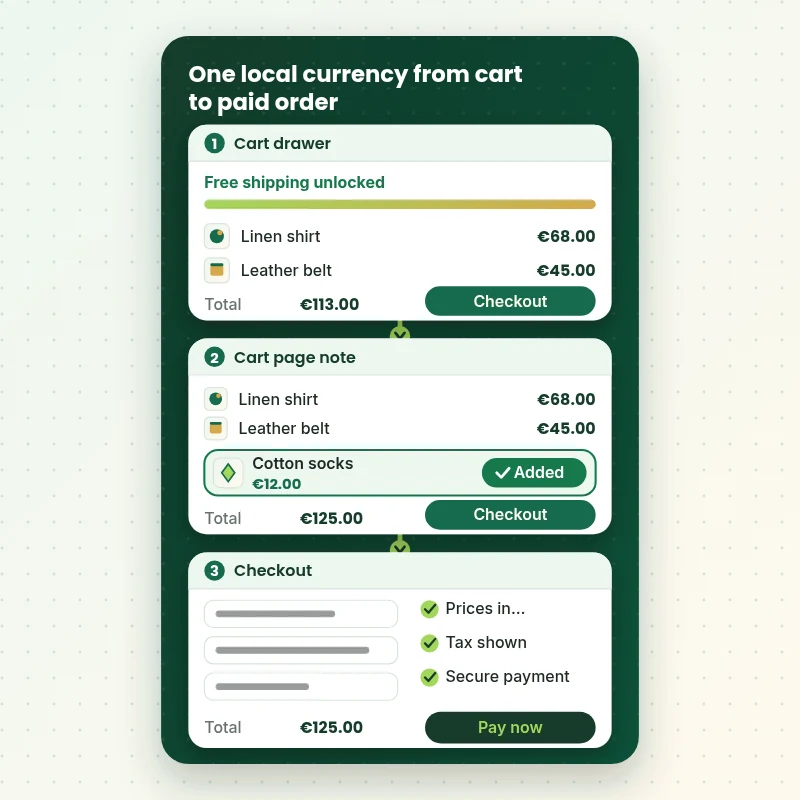
How a Local Currency Carries Through the Cart to Checkout
The walkthrough follows a basket in a local currency: the cart drawer, a threshold message and the checkout. The amount must be the same on every screen, with shipping and tax in the same currency, so the shopper never meets a different number at the end.
Portfolio
Shopify Storefront Designs by Niche
Multi-Currency Store Setup gets the same attention to layout, spacing and detail as each design below, every one built around a single catalog and one kind of buyer.

Jewelry store design
Jewelry
Coffee store design
Coffee
Specialty coffee store design
Specialty coffee
Jewelry store design
Jewelry
Design templates store design
Design templates
Outdoor drinkware store design
Outdoor drinkwareProcess and timeline
How a Multi-Currency Project Runs, Start to Finish
Six currency steps, with nothing changing on your live store until you approve it. Your calculator choices set the pace of every step.
- 1
Brief and currency list
You tell us where you sell and which currencies you want. We agree the order they go live.
- 2
Review plan and gateway
We check what your plan and gateway can do and write down fees and limits.
- 3
Activate currencies
Currencies are added per market with the right countries attached.
- 4
Set rounding and prices
Rounding rules are chosen and tested on your top and cheapest products.
- 5
Place a test order per currency
Orders are placed in each currency to compare shown and charged amounts.
- 6
Go live and hand over
After sign-off the currencies are switched on. You receive the currency test log and notes.
Compare your options
DIY, Marketplace Gig, Agency or Our Currency Setup?
Four usual routes to honest multi-currency prices. This comparison shows who checks the parts that decide currency margin and trust.
| What matters | Set it up yourself | Marketplace gig | Agency retainer | Store Design Expert |
|---|---|---|---|---|
| Plan and gateway limits checked first | You check | Rarely | Sometimes | Yes |
| Rounding rules chosen and tested | Defaults | Rarely | Yes | Yes |
| Fees and payouts written down | No | No | Extra cost | Yes |
| Shipping and discounts tested per currency | Spot check | Rarely | Yes | Yes |
| Test order in every currency | No | No | Sometimes | Yes |
| Price known before work begins | Yes | Yes | Quote only | Yes |
| Written test log | No | Rarely | Extra cost | Yes |
| No retainer or minimum spend | Yes | Yes | No | Yes |
Inside every project
What Protects Your Store and Your Shoppers During Currency Setup
Currency settings touch prices and payouts, so these six habits come with every package.
Preview before anything is live
Currencies are prepared and checked before shoppers see them.
Margins shown before you approve
We show cost, price and margin for sample products in each currency.
Least access needed
A collaborator request is enough. Card details and owner passwords are never requested during currency work.
No lock-in
You own the store and settings. Notes let anyone else add a currency.
Limits written down
Plan, gateway and country limits are listed in writing, so you know what is possible.
Fixed scope, two revision rounds
The price is agreed before work starts, and changes inside scope run in two structured rounds.
Interactive price calculator
Build Your Multi-Currency Package
Choose a package, then tell us how many currencies you want, your plan and your payment setup. The fixed price and delivery window update with every click.
Request a custom quote
Custom exchange rate rules, Shopify Plus expansion stores, multi-entity accounting, headless storefronts and pricing in more than ten currencies are scoped separately and quoted at a fixed price.
Request a QuoteChanged your mind? Choose Local Currency Start, Priced Per Market or Complete Currency System above to return to the instant calculator.
Packages and comparison
Multi-Currency Package Comparison
Line-by-line detail of what each package covers, useful when choosing between switching on currencies yourself and having them planned and tested.
| What is included | Local Currency Start $590 | Priced Per Market $1,190Recommended | Complete Currency System $1,990 |
|---|---|---|---|
| Store currency and plan review | Included | Included | Included |
| One local currency activated | Included | Included | Included |
| Rounding rule set | Included | Included | Included |
| Fee and payout notes | Included | Included | Included |
| Test log | Included | Included | Included |
| Up to 4 currencies | Not included | Included | Included |
| Rounding tested on top products | Not included | Included | Included |
| Margin table | Not included | Included | Included |
| Shipping and discount checks | Not included | Included | Included |
| Up to 8 currencies | Not included | Not included | Included |
| Reporting notes and accountant summary | Not included | Not included | Included |
| Currency change plan if needed | Not included | Not included | Included |
| Fixes after launch | Not included | Not included | 30 days |
| Typical delivery | 3 to 5 days | 5 to 9 days | 9 to 12 days |
Your Multi-Currency Store Setup price and delivery estimate come from the calculator above, so there is no surprise at checkout.
Why Store Design Expert
Why Owners Choose Us for Multi-Currency Work
Anyone can switch on a currency. Owners hire us for the planning, rounding and testing that keep prices honest.
Daily work inside Shopify stores
Pricing, checkout and payout settings are everyday material for us.
Rated 4.9+ by verified clients
Every review here was written by a verified Store Design Expert client.
Prices you can plan around
Each package, option and extra has a price you can see. Shopify and gateway fees go to those vendors, so check current terms.
A direct line to the builder
You speak with the person with your store open while currency is set up, not a ticket queue.
Honest advice on scope
If one local currency is all your volume justifies, we say so before you pay for more.
Experience since 2015
More than 450 Shopify stores launched means we have met most pricing and payout edge cases.
What we need to get started
What We Need Before We Open Your Store Settings for Currency
Three ways to give access, then a short list of decisions only you can make.
Accept our collaborator request
Tell us your store address and say yes to our access request. You stay the owner and can remove our access in one click.
No store yet? We build it first
We can create the store in our Partner account, set currencies up there and transfer ownership when finished.
Or share a staff login
A restricted staff account works too, though the collaborator route is easier to revoke.
Your countries and currencies
Tell us where you sell now and which currencies you want first.
Your plan and gateway
Tell us your Shopify plan and payment gateways so we can check what is possible.
Your rounding preferences
Tell us how you want prices to end, such as whole numbers or ending in 9.
Your owner password and card details stay with you for Multi-Currency Store Setup. Currency changes are prepared after a backup, and we log what changed.
Testimonials
What Store Owners Say Before You Order Multi-Currency Store Setup
Verified Store Design Expert clients describe the brief, the build and the handover in their own words.
Verified
Store Design Expert delivered an outstanding website development experience! Their professionalism and attention to detail exceeded my expectations, and their proactive communication kept everything running smoothly. Truly impressed by their deep understanding and dedication.
WG
Warren G.United States
Verified
Store Design Expert is the only one I use for all things WordPress. They have a high level of understanding, deliver quality work and are easy to deal with.
SC
Scott C.United States
Verified
A pleasure to work with. They did pretty much everything I asked and definitely exceeded my expectations. I will be working with Store Design Expert again soon.
JL
Jerry L.United States
Verified
Superb work! Store Design Expert is incredibly patient, and even when I did not fully understand my own questions, everything was explained again in detail. My vision was implemented perfectly, and the work is worth every cent I spent.
KB
Katrin B.Germany
Verified
Very impressed with the build-out. My store is ready to get started, and I am sure I will reach out for edits down the road, but this is everything I could ask for to get the party started. Thanks again, and I will be in touch for future projects.
DH
Dale H.United States
Verified
Very quick and detailed work! Store Design Expert does exactly what you want, in a very professional manner.
LF
Lena F.Germany
Verified
Store Design Expert did an outstanding job with top-notch professionalism on my website project. Everything was delivered quickly without compromising quality. I could not have asked for better!
JM
Jason M.United States
Verified
The website development work was nothing short of professional, with top-notch quality. Their exceptional level of cooperation made the collaboration seamless and enjoyable. Highly recommend working with Store Design Expert!
JC
Jeremy C.United States
Verified
Super great to work with, and super fair!
RO
Robert O.United States
Related searches
Searches That Bring Owners to Multi-Currency Store Setup
People describe Multi-Currency Store Setup in different ways when they search. These are the common ones.
“multi currency store setup”, “multi currency shopify store” or “shopify currency conversion” all point to the same job, which Multi-Currency Store Setup covers from start to finish.
If you searched for “shopify currency conversion fee”, “shopify currency options” or “shopify currency exchange rates”, Multi-Currency Store Setup is the work that answers it.
“how to change shop currency shopify”, “shopify auto currency conversion” or “shopify multi currency pricing” all point to the same job, which Multi-Currency Store Setup covers from start to finish.
If you searched for “shopify currency” or “how to change currency in shopify”, Multi-Currency Store Setup is the work that answers it.
FAQ
Shopify Currency Settings FAQs
Answers on cost, fees, rounding, payouts and changing currency.
How much does a multi-currency store setup cost?
Local Currency Start is $590, Priced Per Market $1,190 and Complete Currency System $1,990. Plan, gateway and catalog size add to that, and the calculator shows the total before you pay. Shopify and gateway fees are billed by those vendors.
What do Shopify currency settings control?
Shopify currency settings control your store currency, the local currencies shoppers can pay in and how prices are displayed and rounded. They also affect reports and payouts, so we plan them together.
How to do a multi currency store setup on Shopify?
A multi currency store setup on Shopify means choosing the store currency, adding local currencies per market, setting rounding and testing orders. We do each step and write down the results.
What is a multi currency Shopify store and does it need an app?
A multi currency Shopify store shows and charges prices in shoppers' own currencies. Many stores need no app, because Markets covers it. We tell you if yours does.
How does Shopify currency conversion work?
Shopify currency conversion turns your prices into local ones using an exchange rate, then applies your rounding rules. Rates move, so rounded and fixed prices keep things steady.
What is the Shopify currency conversion fee?
The Shopify currency conversion fee depends on your plan and gateway and may apply when you charge in a local currency. We list what applies to you before you switch anything on.
What Shopify currency options are available to me?
Shopify currency options depend on your plan, gateway and region. We list the currencies you can activate and any limits, so you choose with facts.
Where do Shopify currency exchange rates come from?
Shopify currency exchange rates are set by the platform and updated regularly. Rounding and fixed prices keep your displayed numbers steady between updates.
How long does a multi-currency setup take?
A first local currency takes 3 to 5 working days, up to four currencies 5 to 9 and up to eight currencies 9 to 12. Several gateways and large catalogs add days.
Do you need my Shopify password for Multi-Currency Store Setup?
No. A collaborator request keeps you as owner and can be revoked instantly. If you have no store yet we build it in our Partner account and transfer it.
How to change shop currency Shopify uses as the base?
How to change shop currency Shopify uses as the base: plan prices, check apps and reports and change it in settings at a quiet time. We plan and test the change.
Is Shopify auto currency conversion safe to switch on?
Shopify auto currency conversion by country is safe when rounding, gateway limits and shipping are checked first. We test before it is shown to shoppers.
Does Shopify multi currency pricing allow different prices per country?
Shopify multi currency pricing can include fixed prices or percentage adjustments per market. Our country pricing service covers that in more depth.
Shopify currency and how to change currency in Shopify for one market only?
Shopify currency can be set per market. How to change currency in Shopify for one market only: edit that market's currency, then test an order there. We check that nothing else shifts.
Ready when you are
Order Your Shopify Currency Settings Setup
Choose a package, watch the fixed price settle and have currencies, rounding and fees planned and tested by a team that has launched 450+ Shopify stores. An order is placed in every currency before you switch it on.
- Secure payment
- Two rounds of changes
- Test log and notes included