
Shopify stores designed and launched
Google Search Console setup and monitoring
Google Search Console Shopify Setup and Monitoring, Done and Then Watched
Google Search Console Shopify setup that survives a theme change, plus someone who actually reads the reports. We verify your domain with DNS, submit your sitemap, link your other tools, then check indexing, errors and Core Web Vitals and explain what matters in plain words, from $290. Our record is 450+ Shopify stores launched since 2015 with an average of 4.9+ from verified clients. Price your setup in the calculator.
- Domain property verified by DNS so a theme swap cannot unverify you
- Sitemap submitted and each child sitemap confirmed as read
- Indexing report explained: what is normal for Shopify and what is not
- Alerts, owners and linked tools set up before you need them
From$290
Delivery2 to 8 working days
Revisions2 rounds
Our track record
Over 450 Shopify Stores Launched Since 2015. Each One Needed to Be Found.
A store nobody can find has no use for a beautiful theme. After more than 450 launches we have learned how Google reads Shopify stores, which Search Console warnings are routine for the platform and which ones deserve action the same day.
Average rating from verified clients
Building Shopify stores since
Secure checkout
Pay through a protected checkout and keep a full order record.
Two revision rounds
Included in every package, so the result matches what you pictured.
Backup before changes
We work on a duplicate of your theme, never on your live store.
Who this is for
Who Needs Google Search Console Setup and Monitoring
Search Console is free, so most owners assume it is simple. These are the people who find out otherwise, and who get the most from having it set up and watched properly.
You are a good fit if
- You have a Shopify store, live or launching
- You want a setup that does not break when the theme changes
- You would like the reports explained to you
- You prefer a fixed price to hourly SEO billing
Owners about to launch
Your store is nearly live and you want to add google search console to Shopify before the first visitor arrives, so Google hears about it on day one, with the sitemap submitted, the property verified and the first indexing days observed rather than guessed at.
Stores that just changed theme or domain
A redesign can silently undo the google search console verification Shopify themes carry as an HTML tag, and a new domain starts a fresh property. You want continuity of data and a clean handover between the old setup and the new.
Merchants who set it up once and never looked
The property exists, but nobody reads the emails or the index report. You want a person to tell you which warnings are noise and which will cost you sales.
Anyone seeing indexing warnings
You have met phrases like crawled but not indexed or alternate page with proper canonical tag and cannot tell if they are harmless. You want a straight reading, page type by page type.
Brands selling in several markets
Subfolders or extra domains for other countries each need to land in the right property. You want a setup that covers them without fragmenting your reporting.
Founders tired of postponing the Search Console job
You have read how to set up google search console three times and still have not done it. You prefer to hand the job over and receive a short report you can act on.
Problems solved
Where a Do-It-Yourself Search Console Setup Goes Wrong
Anyone can set up google search console Shopify stores in minutes, which is why the weak spots are easy to miss. These are the ones that cost Shopify owners data, rankings or months of confusion.
- The HTML tag vanishes when the theme changes.
We verify through a DNS record on the domain, which survives any theme swap, and we leave the old tag only where you need it, so your data never goes dark after a redesign.
- The wrong sitemap gets submitted.
Owners often paste a child sitemap or a made-up path. We submit the main index at /sitemap.xml and confirm that products, collections, pages and blog posts are each read.
- Normal Shopify warnings are mistaken for disasters.
Shopify serves products at more than one address, so some warnings are expected. We label each report row as expected or actionable, so you stop chasing things that need no fix.
- The property is not linked to the tools that use it.
Analytics, Bing Webmaster Tools and Merchant Center can all lean on the same verified ownership. We connect them in one pass instead of repeating verification four times.
- Only one person can see the data.
If the account belongs to a former developer, you lose access when they leave. We add you as a full owner and set up restricted users for staff and contractors.
- History is lost by setting up late.
Search Console keeps about 16 months of performance data from the day a property exists. Verifying early starts that clock, and we help you start it today.
What we can do
What We Can Do for Your Shopify Store Inside Search Console
If you are searching for how to verify google search console Shopify owners need more than a checklist. These are the six areas where we carry the work, including the awkward cases.
Search console domain verification done the durable way
We create a Domain property and add its TXT record at your registrar, or in Shopify's domain settings when Shopify manages your DNS. One property then covers every protocol and subdomain, with no gaps between www and the bare domain.
Sitemap submission and sitemap reading
Shopify builds sitemap.xml as an index of child sitemaps. We submit it, then open each child to confirm Google reads products, collections, pages and blog posts, and we note anything that is discovered but not picked up.
Indexing report decoded for Shopify
We sort each status into expected and actionable. Alternate pages with a canonical, blocked cart and account paths and filtered duplicates are usually fine, while noindex tags and soft 404s on live products are not.
Linked tools and shared ownership
We associate the property with Analytics, import it into Bing Webmaster Tools and use it as proof of ownership for Merchant Center where available, so you do not juggle separate logins and codes.
Alerts and watch routine
Email alerts go to the right inboxes, and during the monitoring window we review indexing, errors and Core Web Vitals on a set rhythm. You receive plain-language notes, not screenshots of charts.
Fixes handed to the right person
When the data shows deleted products or broken links, we list the pages and the Shopify fix. Under the higher plan we implement 301 redirects and robots.txt.liquid changes ourselves, with before and after checks.
What is included
What Google Search Console Setup and Monitoring Includes
Six workstreams make up the service. The comparison table shows which tier carries which line item, and the calculator adds markets, tools and extra watching time.
Ownership and access
- Domain property created and verified with a DNS TXT record
- You added as full owner so the account never depends on us
- Restricted users added for staff or contractors
- Old or duplicate properties reviewed and tidied
Sitemap and crawl paths
- Main sitemap index submitted and child sitemaps confirmed
- Store checked for password mode or noindex that blocks Google
- Default robots.txt rules read against your real URL types
- Sitemap status recorded for the handover
Linked tools
- Analytics association where you use Analytics
- Bing Webmaster Tools imported from Search Console
- Merchant Center ownership route checked
- Extra domains or market folders brought into reporting
Indexing review
- Pages report read in full and sorted into expected or actionable
- Duplicate and canonical behaviour explained for your catalog
- Top pages and queries saved as a baseline
- Core Web Vitals and mobile usability status noted
Alerts and monitoring
- Email alerts routed to the right people
- Weekly checks during your monitoring window
- New errors explained with the likely cause
- A written summary at the end of the window
Handover
- Short written guide to your own reports
- Recorded walkthrough of the property
- Two revision rounds
- A list of fixes ranked by likely impact
Every tier follows the same order to configure google search console for a Shopify store: ownership first, sitemap second, tools third and reading the data last.
See the setup
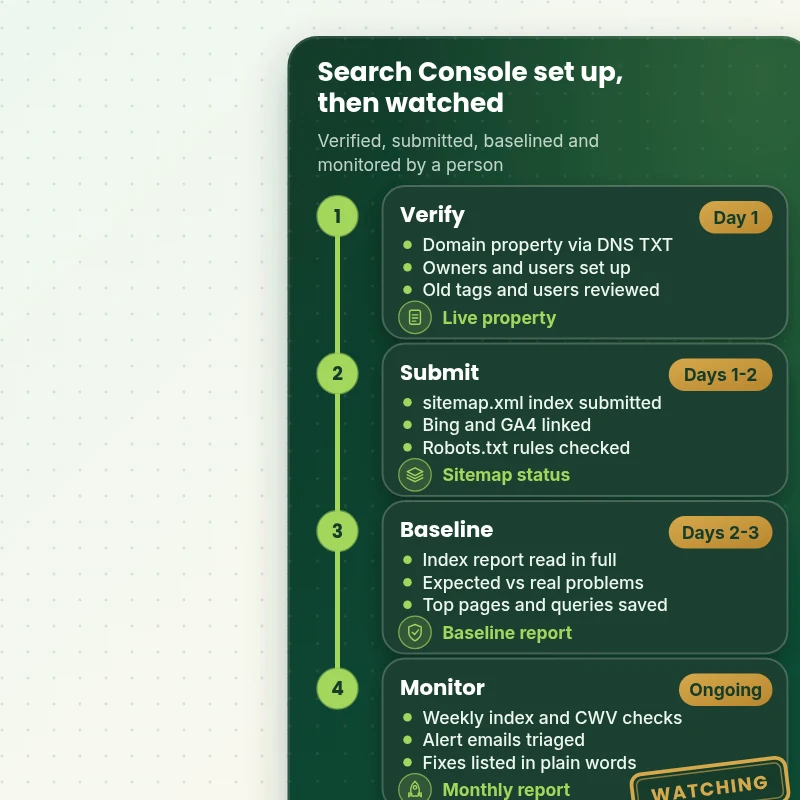
How We Set Up and Watch Google Search Console, Stage by Stage
Follow a store through four stages: the property is verified with DNS, the sitemap is submitted and confirmed, a baseline is recorded from the first reports, and monitoring then starts with a note after each check. Each stage ends in something you can see.
Portfolio
Store Design Styles We Build
Different niches need different layouts. These store designs show how we shape a storefront around its products, and Google Search Console Setup & Monitoring follows the same approach.

Electronics store design
Electronics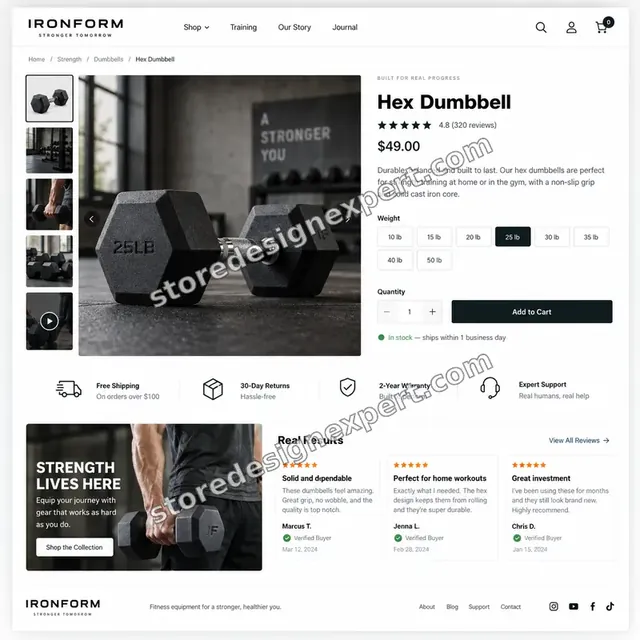
Fitness store design
Fitness
Streetwear store design
Streetwear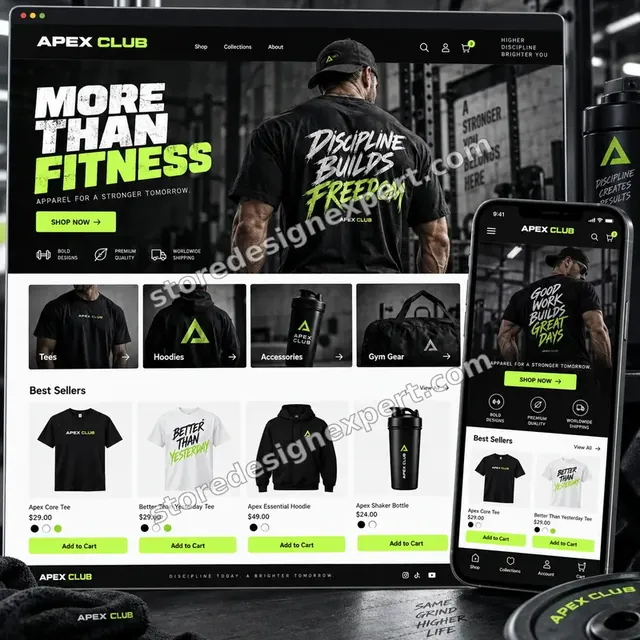
Fitness apparel store design
Fitness apparel
Fitness store design
Fitness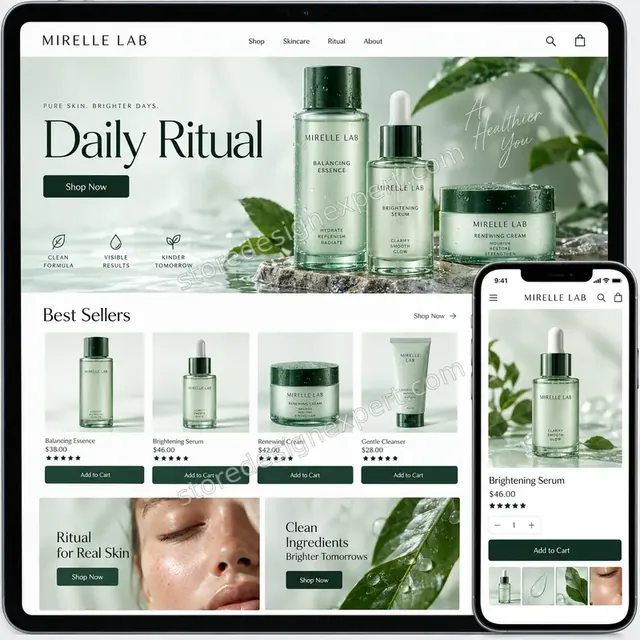
Premium skincare store design
Premium skincareProcess and timeline
How Search Console Setup Runs From Verification to Monitoring
Your store keeps trading while we work, because setup does not change what shoppers see. Verify and Submit usually finishes in 2 to 3 working days, and the calculator shows the window for larger plans.
- 1
Audit what exists
We check whether a property already exists, who owns it and which verification method it uses. Old properties and stale users are noted so we tidy rather than duplicate.
- 2
Verify the domain
We add the DNS TXT record for a Domain property, either in your registrar or in Shopify's domain settings. When DNS is slow to update, we recheck for you rather than leaving it half done.
- 3
Submit and confirm the sitemap
We submit sitemap.xml, then open each child sitemap to confirm Google has read it. We also confirm the store is not in password mode and that nothing blocks the crawl.
- 4
Link the other tools
Analytics, Bing Webmaster Tools and Merchant Center are connected through the same ownership, where your plan includes them, so you can find everything under one roof.
- 5
Baseline and review
We read the index, performance and experience reports, save a baseline and explain the findings. You review the notes and can request up to two rounds of changes.
- 6
Monitor and report
During your watch window we check weekly, triage alert emails and send plain notes. At the end, you receive a summary and a ranked list of fixes, whether we make them or you do.
Compare your options
Tutorial, Gig, SEO Retainer or Expert Search Console Setup and Monitoring?
Owners usually weigh four routes for getting Search Console working and watched: following a tutorial, a low-cost marketplace listing, a monthly SEO retainer or a specialist with a fixed scope. This table compares what each handles.
| What matters | DIY tutorial | Marketplace gig | SEO retainer | Store Design Expert |
|---|---|---|---|---|
| DNS Domain property verified | If you manage DNS | Often tag only | Usually | Yes |
| Correct sitemap submitted and confirmed | Easy to get wrong | Submitted only | Usually | Yes |
| Shopify-specific warnings explained | No | Rarely | Varies | Yes |
| Analytics, Bing and Merchant Center linked | You do it | Rarely | Varies | Yes |
| Reports read on a weekly rhythm | No | No | Monthly | Yes |
| Shopify-side fixes made for you | No | Rarely | Extra cost | Yes |
| You own the property and data | Yes | Check it | Check it | Yes |
| Fixed price known up front | Free, but your time | Yes | No | Yes |
Inside every project
What Protects Your Data and Your Rankings During Setup
Search Console holds your search history, so mistakes here are hard to undo. These safeguards come with every project, and they explain why a fixed fee beats a rushed gig.
Ownership stays with you
You are added as a full owner before anything else happens, so the property never belongs only to us. If our work ends, your access and your data stay exactly where they are.
No change to what shoppers see
Verification and sitemap work do not touch your storefront. Where a fix does need theme or redirect changes, we make them in a duplicate or with a rollback note before anything goes live.
Every setting confirmed, not assumed
After each step we check the result inside Search Console: the property shows as verified, the sitemap shows a success status and the child sitemaps list discovered URLs.
Source of every claim
Our notes always name the report and the row where we found an issue, so you or your next specialist can open the same view and see exactly what we saw.
Honest limits
We cannot make Google index a page or move a ranking on demand. We can remove the causes we control and explain the ones we do not, and our reports say clearly which is which.
Safe access handling
We work through collaborator access for the Shopify side and request Search Console access as a delegated user. We never need your Google password or a payment card.
Interactive price calculator
Build Your Search Console Setup and Monitoring Package
Choose a package, then tell us how many domains or markets you run, which tools should share the verification and how long you want us to keep watching. The price and delivery window follow every choice.
Request a custom quote
Shopify Plus stores with many storefront domains, several Shopify stores under one brand, headless fronts or API-based reporting needs receive a quoted scope with a fixed fee agreed before work starts.
Request a QuoteChanged your mind? Choose Verify and Submit, Index Watch or Search Console Care above to return to the instant calculator.
Packages and comparison
Search Console Setup and Monitoring Package Comparison
Further down, each tier is spelled out in a comparison table. Add domains, tools and extra watching time in the calculator to see the price and delivery time that fit your store.
| What is included | Verify and Submit $290 | Index Watch $590Recommended | Search Console Care $990 |
|---|---|---|---|
| Domain property verified by DNS | Included | Included | Included |
| You added as full owner | Included | Included | Included |
| Sitemap index submitted and confirmed | Included | Included | Included |
| Password and noindex blocks checked | Included | Included | Included |
| Short written guide to your reports | Included | Included | Included |
| Recorded handover and two revision rounds | Included | Included | Included |
| Analytics and Bing linked | Not included | Included | Included |
| Indexing report decoded for Shopify | Not included | Included | Included |
| Baseline of top pages and queries | Not included | Included | Included |
| 30 days of weekly checks | Not included | Included | Included |
| 90 days of weekly checks | Not included | Not included | Included |
| 301 and robots.txt.liquid fixes made for you | Not included | Not included | Included |
| Monthly written report | Not included | Not included | Included |
| 14 days of fixes | Not included | Not included | Included |
| Typical delivery | 2 to 3 days | 3 to 5 days | 5 to 8 days |
For Google Search Console Setup & Monitoring, the price and the delivery estimate shown in the calculator above are the ones that apply.
Why Store Design Expert
Why Owners Choose Us to Set Up and Watch Search Console
You get Shopify knowledge and plain English in the same person, at a fixed price, with a handover that leaves you better informed than you started.
Shopify builders, not generic SEO
We launch Shopify stores, so we know why a product has two addresses and why filters create near-duplicates. That context turns a puzzling warning into a two-line explanation.
Reports read, not forwarded
Plenty of services connect google search console to Shopify and walk away. We read the pages report, sort it into expected and actionable and put the result in writing.
Fixed fee, visible before you pay
The calculator shows the price and the delivery window for your exact markets and tools. Extra watching time is priced by the block, so there is no open meter.
Rated 4.9+ by verified clients
The reviews on this page are from real clients of Store Design Expert, so you can see how projects went before choosing a package.
Hire a Shopify expert for a defined job
If you want to hire a Shopify expert for one clear task without signing a retainer, this is built for that: a start, an end and notes you can keep.
You keep the keys
The property, the data and the access are yours from day one. We remove our own access when the monitoring window closes unless you ask us to stay.
What we need to get started
What We Need to Start Your Search Console Setup
You do not need to understand DNS or have a Google account ready. We need a way to reach your store and your domain, and a view of what you hope Search Console will tell you.
Approve a collaborator request
Share your store address and accept the collaborator request we send. You remain the owner, we never see a password and you can withdraw our access whenever you like.
Store not built yet
We can set the store up in our own Shopify Partner account and transfer ownership to you at the end, so a Shopify plan is something you choose only once the work is done.
Staff login if you prefer
A staff account also works. Collaborator access is simpler to remove, but we can begin from either route.
Domain registrar access
Tell us where your domain is registered, and add us as a delegate or send the DNS details. Without it, we give you the exact record to paste and confirm when it is live.
Your Google account for ownership
Tell us which Google account should own the property, and we send a delegated access request. If you have no account yet, we help you create one in a few minutes.
Markets, tools and a decision-maker
List your domains and country folders, name the tools you use and say who will read our notes, so the reports go to the person who will act on them.
We never ask for your Google password, registrar login or payment card. Search Console ownership is added in your name first, and every change we make is noted in your guide.
Testimonials
What Store Owners Say Before You Order Google Search Console Setup & Monitoring
Verified clients describe their experience with Store Design Expert on builds, fixes and launches.
Verified
Store Design Expert is the best. The work is very professional, they pay close attention to detail and, more importantly, they listen. Their level of cooperation is second to none, and everything was delivered in a very timely manner. I will keep them in mind for future projects.
BN
Barbara N.United States
Verified
The experience was tailored to my brand and specifications to the letter. I love the result.
EP
Eric P.United States
Verified
They definitely get the job done. Very patient and understanding throughout the whole project.
BS
Brian S.United States
Verified
Thank you so much to Store Design Expert and the team. My site looks far more appealing to customers, and I will happily recommend your services to other new small businesses.
JS
Jennifer S.United States
Verified
Very patient, informative and transparent, and they did exactly what they said they would do. Thanks for all the help!
RO
Raymond O.United States
Verified
Store Design Expert is the only one I use for all things WordPress. They have a high level of understanding, deliver quality work and are easy to deal with.
SC
Scott C.United States
Verified
A pleasure to work with. They did pretty much everything I asked and definitely exceeded my expectations. I will be working with Store Design Expert again soon.
JL
Jerry L.United States
Verified
Superb work! Store Design Expert is incredibly patient, and even when I did not fully understand my own questions, everything was explained again in detail. My vision was implemented perfectly, and the work is worth every cent I spent.
KB
Katrin B.Germany
Verified
Very impressed with the build-out. My store is ready to get started, and I am sure I will reach out for edits down the road, but this is everything I could ask for to get the party started. Thanks again, and I will be in touch for future projects.
DH
Dale H.United States
Related searches
Searches That Bring Owners to Google Search Console Setup & Monitoring
People describe Google Search Console Setup & Monitoring in different ways when they search. These are the common ones.
People who look up “google search console setup”, “how to set up google search console”, “set up google search console shopify” or “add google search console to shopify” usually want Google Search Console Setup & Monitoring; the calculator above shows the price and delivery estimate before you commit.
“connect google search console to shopify”, “google search console verification shopify”, “how to verify google search console shopify” or “search console domain verification” all point to the same job, which Google Search Console Setup & Monitoring covers from start to finish.
People who look up “google search console shopify sitemap”, “google search console shopify dns”, “google search console shopify app” or “google search console tutorial” usually want Google Search Console Setup & Monitoring; the calculator above shows the price and delivery estimate before you commit.
If you searched for “configure google search console” or “shopify seo google search console”, Google Search Console Setup & Monitoring is the work that answers it.
Related searches include “hire a shopify expert”.
FAQ
Google Search Console Shopify FAQs
Direct answers about price, DNS, sitemaps, warnings and what monitoring actually covers.
How much does Google Search Console setup for Shopify cost?
Packages start at $290 for Verify and Submit, $590 for Index Watch and $990 for Search Console Care. Domains, linked tools and extra watching time are added in the calculator, so most stores land between roughly $300 and $1,300. The fixed price shows before checkout.
How long does Google Search Console Setup & Monitoring take?
Verify and Submit takes 2 to 3 working days, Index Watch 3 to 5 and Search Console Care 5 to 8, before extras. DNS changes can take hours to register, which we allow for. The Sooner and Fastest options shorten the window when you launch soon.
How to set up Google Search Console on a Shopify store?
Create a Domain property, add the DNS TXT record Google gives you, wait for it to verify, then submit sitemap.xml. Most owners get stuck at DNS. We do all of it, confirm each step inside the dashboard and give you a short guide afterwards.
Do I need a Google Search Console Shopify app?
No. Searching for a google search console Shopify app is common, but the connection is made through DNS or a meta tag, not an app. Some Google apps help with feeds and ads, which is a separate job. We do not add apps for Search Console.
Should I verify with a DNS record or an HTML tag?
Prefer DNS. A tag placed in theme.liquid disappears if the theme is replaced, and the property goes unverified. A DNS record belongs to the domain, so a redesign cannot undo it. The google search console Shopify dns route is the one we use, with the tag only as a backup where DNS is out of reach.
What does search console domain verification need from me?
Access to wherever your domain's DNS is managed, which is either your registrar or Shopify if Shopify handles it. If you cannot give access, we send the exact TXT record to paste and recheck verification for you once it has spread.
Which sitemap should I submit to Google?
Submit sitemap.xml only, which is the index Shopify keeps up to date. It points to child sitemaps for products, collections, pages and blogs. Submitting the children separately adds nothing. The google search console Shopify sitemap report then shows whether each one was read.
Why does Search Console show Alternate page with proper canonical tag?
Shopify serves a product at its own address and also under each collection that holds it, with a canonical pointing to the main address. Google lists the extras as alternates, which is expected. We mark which warnings are routine and which need action.
Can you connect Search Console to Analytics and Bing too?
Yes, in Index Watch and Care, or as an option on Verify and Submit. We associate the property with Analytics, import it into Bing Webmaster Tools and check the Merchant Center route, so ownership is proved once and reused.
What does monitoring include?
During your window we check indexing, errors, performance and Core Web Vitals every week, triage alert emails and send plain notes. Care adds monthly written reports and makes Shopify-side fixes such as redirects. We do not run ads or write content as part of it.
Will Search Console improve my rankings?
Not by itself. It is a measuring tool, so it reveals problems that hold pages back, such as noindex tags or dead links. Fixing those can help, but rankings depend on competition, content and links, and nobody can promise a position.
What does Shopify seo google search console reporting cover for a new store?
For a new store, the first weeks show whether Google discovered your sitemap, which pages it chose to index and how it sees the mobile version. We set a baseline early, so you can compare later changes against something solid.
Why hire a Shopify expert for this instead of following a tutorial?
A google search console tutorial gets you connected. It does not tell you which of thirty warnings matter on Shopify. When you bring in a specialist, you pay for judgment on those warnings, the right verification method and a person who keeps checking.
What happens after the monitoring window ends?
You keep the property, the data and all access. We send a closing summary with a ranked list of fixes and remove our own access unless you extend. Extra watching time can be added in the calculator at any point.
Ready when you are
Get Google Search Console Shopify Setup Done and Watched
Choose a package, see your exact price and delivery estimate and order setup from a team that has launched over 450 Shopify stores. Your domain gets verified the durable way, your sitemap confirmed, and your reports read by a person who explains them.
Secure checkout · Two revision rounds · Written guide and recorded walkthrough