
Shopify stores designed and launched
Theme update service for Shopify
How to Update Shopify Theme Without Losing a Single Customization
How to update Shopify theme versions safely depends on what you changed. Editor settings usually carry over, but edits made in theme code do not. We list every customisation, port it to the new version, test it and publish with a backup. From $490, fixed price.
- Backup taken and every customisation listed
- Code edits ported to the new theme version
- Apps, embeds and tracking rechecked after the update
- Published only when tested, with a rollback step
Our track record
450+ Shopify Stores Launched Since 2015. Your Theme Update Gets the Same Care.
A theme update looks like a button and behaves like a migration. New versions change file structure and sections, and any code you or a past developer added can silently disappear. We treat it as the careful comparison job it is.
Average rating from verified clients
Building Shopify stores since
Secure checkout
Pay through a protected checkout and keep a full order record.
Two revision rounds
Included in every package, so the result matches what you pictured.
Backup before changes
We work on a duplicate of your theme, never on your live store.
Who this is for
Who Needs a Shopify Theme Update Service
Owners usually put off updates until something forces them. These are the six situations behind most Shopify theme update without breaking customizations requests.
You are a good fit if
- You want to move to a newer theme version
- You want a fixed price and written scope
- You will own the store and theme licence
- You can give us collaborator access
Stores several versions behind
Updates were skipped for years. The gap between versions is large and the risk of breakage is higher.
Owners with custom code in the theme
A past developer added sections, snippets and styles. They will not survive a simple update.
Teams worried about breaking the store
You cannot afford the checkout or the product page to break during a Black Friday run-up.
Merchants chasing speed and features
A newer version is faster or adds features you want, but you fear the cost of switching.
Stores with many apps
Apps inject code that depends on theme structure. An update can break their connection.
Founders with no developer
You would rather hand over the job and receive a tested theme than learn the process.
Problems solved
Why Theme Updates Break Stores
Shopify keeps your content safe, but your theme code is your responsibility. These six patterns cause most breakage.
Code edits are overwritten.
Outcome: Changes made directly in theme files are not part of the new version, so they vanish when it replaces the old.
Sections change structure.
Outcome: New versions rename or restructure sections, so saved settings no longer map to the right place.
App embeds disconnect.
Outcome: Apps that hooked into the old theme need to be reconnected, or their widgets silently disappear.
Tracking snippets are lost.
Outcome: Pixels and analytics added to the old theme code are missing in the new one.
Search settings change.
Outcome: Titles, descriptions and structured data can behave differently after a version change.
Nobody tested the whole buying path.
Outcome: A theme looks fine on the home page and breaks on a rarely visited template.
What we can do
How to Update Shopify Theme Versions: What Our Service Covers
Six steps make up every update. Your package decides how many templates and apps are covered.
Backup and safe copy
We duplicate your live theme, export key settings and work only in unpublished copies until you approve.
Customisation inventory
We compare your theme with the stock version to list every edit: sections, snippets, styles, scripts and settings.
Porting to the new version
Each edit is re-applied to the new version in its proper place, or replaced with a built-in feature where one now exists.
Apps, embeds and tracking
We reconnect app blocks and embeds, restore tracking snippets and check that each app still works.
Testing across templates
We test home, collection, product, cart and checkout on phone and desktop, plus a test order.
Safe publish with rollback
After your approval the new theme goes live with the old one kept as a backup, so reversal is one step.
What is included
What Is Inside Your Theme Update
The work for Shopify Theme Update Without Breaking Customizations is organised into six groups of deliverables. The comparison table below shows how far each group goes by package for theme updates.
Safety
- Live theme duplicated
- Settings exported
- Work in unpublished copies
- Rollback kept
Inventory
- Stock comparison
- List of code edits
- Sections and snippets
- Scripts and styles
Porting
- Edits re-applied
- Built-in replacements noted
- Settings mapped
- Version notes
Apps
- App blocks reconnected
- Embeds checked
- Tracking restored
- Conflicts fixed
Testing
- Templates tested
- Phone and desktop
- Test order
- Regression check
Handover
- Update log
- What changed
- Notes for next update
- Two revision rounds
You provide access and approve the preview. We handle comparison, porting and testing.
Update data flow
How Your Customisations Travel From the Old Theme to the New Version
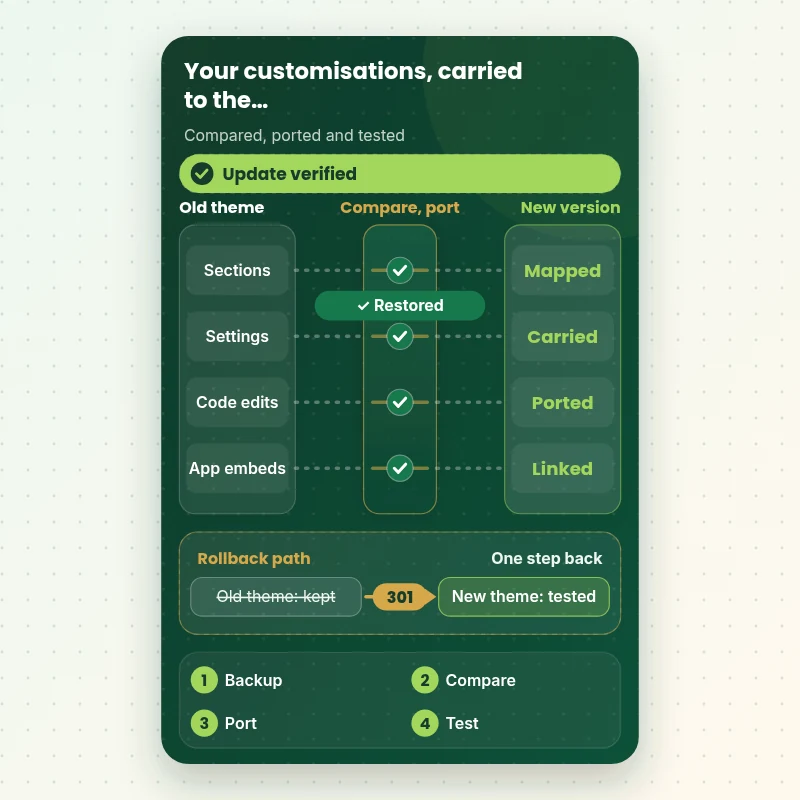
The walkthrough shows what moves in an update: sections, settings, code edits and app connections pass through a comparison gate, with a check that catches anything dropped. Content at store level stays where it is.
Portfolio
Shopify Storefront Designs by Niche
Different niches need different layouts. These store designs show how we shape a storefront around its products, and Shopify Theme Update Without Breaking Customizations follows the same approach.

Food store design
Food
School supplies store design
School supplies
Digital course store design
Digital course
Fitness technology store design
Fitness technology
Skincare store design
Skincare
Music samples store design
Music samplesProcess and timeline
How a Theme Update Runs, Start to Finish
Six steps, with your live theme untouched until the new version is tested and you approve it. Your calculator choices set the pace of every step.
- 01
Brief and access
You tell us which version you want and what must not break. You add us as a collaborator.
- 02
Backup and copy
We duplicate your live theme and export settings, so the original is always safe.
- 03
Inventory every edit
We compare your theme with the stock version and list each edit, snippet and script.
- 04
Port to the new version
Each edit is re-applied in its proper place, apps are reconnected and tracking restored.
- 05
Test the whole path
We test every key template on phone and desktop and place a test order.
- 06
Publish with rollback
After your approval the new theme goes live with the old one kept as a backup.
Compare your options
DIY, Marketplace Gig, Theme Maker Support or Our Update Service?
Four usual routes to a newer theme. This comparison shows who protects your customisations and tests the whole path.
| What matters | Do it yourself | Marketplace gig | Theme maker support | Store Design Expert |
|---|---|---|---|---|
| Backup before any change | Often skipped | Rarely | Advice only | Yes |
| Every code edit listed and ported | Hard | Partly | No | Yes |
| App embeds and tracking restored | You check | Rarely | No | Yes |
| Whole buying path tested | Spot check | Rarely | No | Yes |
| Old theme kept as rollback | If remembered | Sometimes | Advice only | Yes |
| Price known before work begins | Yes | Yes | Yes | Yes |
| Update log and edit documentation | No | Rarely | No | Yes |
| Works on themes built by others | Yes | Varies | No | Yes |
Inside every project
What Protects Your Store While We Update the Theme
A theme update touches every page, so these six habits come with every package.
Backup before any change
Your live theme is duplicated and settings exported before we touch anything.
Live theme untouched
All work happens in unpublished copies, so visitors never see a half-updated store.
Least access needed
A collaborator request is enough. Owner passwords and card details are never requested for theme updates.
No lock-in
You own the store and the theme licence. Our notes let any developer continue the work.
Every edit documented
You receive a list of each customisation, so the next update starts from knowledge, not a guess.
Fixed scope, two revision rounds
The price is agreed before work starts, and changes inside scope run in two structured rounds.
Interactive price calculator
Build Your Theme Update
Choose a package, then tell us how far behind your theme is, how much custom code it has and how many apps it uses. The fixed price and delivery window update with every click.
Request a custom quote
Themes built from scratch, headless storefronts, Shopify Plus checkout extensibility, multiple storefronts and migrations to a different theme family are scoped separately and quoted at a fixed price.
Request a QuoteChanged your mind? Choose Light Customisation Update, Code Port Update or Heavy Customisation Port above to return to the instant calculator.
Packages and comparison
Theme Update Package Comparison
Line-by-line detail of what each package covers, useful when choosing between clicking Update yourself and a tested port of your customisations.
| What is included | Light Customisation Update $490 | Code Port Update $990Recommended | Heavy Customisation Port $1,890 |
|---|---|---|---|
| Backup and unpublished copy | Included | Included | Included |
| Inventory of edits | Included | Included | Included |
| Settings carried over | Included | Included | Included |
| Up to 5 small code edits ported | Included | Included | Included |
| Update log | Included | Included | Included |
| Up to 20 code edits ported | Not included | Included | Included |
| App blocks and embeds reconnected | Not included | Included | Included |
| Tracking snippets restored | Not included | Included | Included |
| Test order | Not included | Included | Included |
| Up to 50 code edits ported | Not included | Not included | Included |
| Custom sections rebuilt | Not included | Not included | Included |
| Speed comparison before and after | Not included | Not included | Included |
| Fixes after launch | Not included | Not included | 30 days |
| Typical delivery | 3 to 5 days | 5 to 9 days | 9 to 12 days |
Your Shopify Theme Update Without Breaking Customizations price and delivery estimate come from the calculator above, so there is no surprise at checkout.
Why Store Design Expert
How to Update Shopify Theme Safely: Why Owners Choose Us
Anyone can press Update. Owners hire us for the comparison, the porting and the testing that keep a store intact.
Daily work inside Shopify themes
Theme code, sections and app embeds are everyday material for us, so edits are found and re-applied correctly.
Rated 4.9+ by verified clients
The reviews below come from verified Store Design Expert clients and are shown in their own words.
Prices you can plan around
Every package, option and extra has a visible price, sized by how much custom code you have.
A direct line to the person doing the work for theme updates
You write to the team member who has your theme open, not a ticket queue for theme updates.
Honest about whether to update
If staying on your current version is safer or switching themes is smarter, we say so.
Experience since 2015
More than 450 Shopify stores launched means we have met most theme structures.
What we need to get started
What We Need Before We Start Your Theme Update
Three ways to give access, then a short list of facts about your theme.
Accept our collaborator request
Give us your store address and approve the request we send. You stay the owner and can remove our access in one click for theme updates.
Built by someone else? That is fine
Tell us who built it and share any notes for theme updates. We compare the theme with the stock version regardless.
Or share a staff login
A restricted staff account works too, though the collaborator route is easier to revoke for theme updates.
Your theme name and version
Tell us which theme and version you run and which version you want to reach.
What must not break
List the features and pages that are most important, so we test them first.
Who approves the preview
Tell us who signs off, so we can publish quickly after testing.
Owner passwords and card details are never requested for theme updates. All work is done in unpublished copies after a backup, and we log what changed.
Testimonials
What Store Owners Say Before You Order Shopify Theme Update Without Breaking Customizations
Verified Store Design Expert clients describe the brief, the build and the handover in their own words.
Verified
Store Design Expert is the best. The work is very professional, they pay close attention to detail and, more importantly, they listen. Their level of cooperation is second to none, and everything was delivered in a very timely manner. I will keep them in mind for future projects.
BN
Barbara N.United States
Verified
The experience was tailored to my brand and specifications to the letter. I love the result.
EP
Eric P.United States
Verified
They definitely get the job done. Very patient and understanding throughout the whole project.
BS
Brian S.United States
Verified
Thank you so much to Store Design Expert and the team. My site looks far more appealing to customers, and I will happily recommend your services to other new small businesses.
JS
Jennifer S.United States
Verified
Very patient, informative and transparent, and they did exactly what they said they would do. Thanks for all the help!
RO
Raymond O.United States
Verified
Store Design Expert is the only one I use for all things WordPress. They have a high level of understanding, deliver quality work and are easy to deal with.
SC
Scott C.United States
Verified
A pleasure to work with. They did pretty much everything I asked and definitely exceeded my expectations. I will be working with Store Design Expert again soon.
JL
Jerry L.United States
Verified
Superb work! Store Design Expert is incredibly patient, and even when I did not fully understand my own questions, everything was explained again in detail. My vision was implemented perfectly, and the work is worth every cent I spent.
KB
Katrin B.Germany
Verified
Very impressed with the build-out. My store is ready to get started, and I am sure I will reach out for edits down the road, but this is everything I could ask for to get the party started. Thanks again, and I will be in touch for future projects.
DH
Dale H.United States
Related searches
Searches That Bring Owners to Shopify Theme Update Without Breaking Customizations
The searches below are the ones that lead people to Shopify Theme Update Without Breaking Customizations.
If you searched for “shopify theme update without breaking customizations”, “update shopify theme”, “how to update shopify theme without losing customization” or “how to update shopify theme version”, Shopify Theme Update Without Breaking Customizations is the work that answers it.
“update shopify theme to latest version”, “shopify theme update from 6.1.1 to 8.2”, “shopify theme updates in github” or “which shopify theme is the most updated” all point to the same job, which Shopify Theme Update Without Breaking Customizations covers from start to finish.
“how to change your shopify theme”, “how to change theme on shopify store” or “shopify theme update service”: owners type these when they need Shopify Theme Update Without Breaking Customizations, and the packages above are priced for that job.
Owners also search for “shopify working with themes” or “shopify help for themes”.
FAQ
How to Update Shopify Theme FAQs
Answers on cost, risk, code edits, versions and rollback.
How much does a Shopify theme update cost?
Light Customisation Update is $490, Code Port Update $990 and Heavy Customisation Port $1,890. How far behind your theme is, how many apps you have and who built your edits add to that, and the calculator shows the total before you pay.
How to update Shopify theme versions without breaking the store?
How to update Shopify theme versions safely: duplicate the live theme, add the new version as an unpublished theme, carry over settings, re-apply code edits and test before publishing. We do each step.
What does a Shopify theme update without breaking customizations include?
A Shopify theme update without breaking customizations includes a backup, a list of every edit, porting to the new version, app and tracking checks, testing and a safe publish with rollback.
Can I update Shopify theme by clicking Update?
To update Shopify theme settings only, the Update button may work if you never edited code. If code was edited, those edits will not carry over. We check which applies before touching anything.
How to update Shopify theme without losing customization in the theme editor?
How to update Shopify theme without losing customization made in the editor: use an updater tool or copy settings. Editor changes usually carry over, while code changes need porting by hand.
How to update Shopify theme version when I am many versions behind?
How to update Shopify theme version after a big gap: compare structure, map sections and port edits in stages. We assess the gap and give a fixed price before starting.
Can you update Shopify theme to the latest version for my theme maker?
Yes. We update Shopify theme to latest version releases from major theme makers. We read the release notes, list breaking changes and test them against your store.
Do you handle a Shopify theme update from 6.1.1 to 8.2 type jump?
A Shopify theme update from 6.1.1 to 8.2 style jump spans several structural changes. We review each release, list the breaking changes and port edits stage by stage.
Do you need my Shopify password for Shopify Theme Update Without Breaking Customizations?
No. A collaborator request keeps you as owner and can be revoked instantly for theme updates. A restricted staff login is a last resort for theme updates.
What about Shopify theme updates in GitHub?
Shopify theme updates in GitHub can make future changes safer through version control. We can connect your theme to GitHub as an extra, so each change is recorded and reversible.
Which Shopify theme is the most updated, and should I switch?
Which Shopify theme is the most updated changes over time. Frequent updates help, but switching themes is a bigger job. We compare staying and switching for your store.
How to change your Shopify theme instead of updating?
How to change your Shopify theme instead: add the new theme unpublished, rebuild sections and port needed code. How to change theme on Shopify store safely is a larger project, and we scope it separately.
What is Shopify working with themes like for custom code?
Shopify working with themes means sections, blocks and Liquid files. Custom code lives in those files, which is why updates need careful porting. Our notes list where each edit lives.
Where do I get Shopify help for themes and a Shopify theme update service?
Shopify help for themes from the platform covers general use. A Shopify theme update service like ours works inside your theme, ports your edits and tests the result.
Ready when you are
How to Update Shopify Theme Without Breaking Customizations
Choose a package, watch the fixed price settle and have a team that has launched 450+ Shopify stores compare, port and test your update. Your live theme is untouched until you approve a preview, and the old version stays as a backup.
Fixed price · Live theme untouched until approved · Rollback kept