
Shopify stores designed and launched
Shopify collection page task
Shopify Collection Banner Size: Open Every Collection With a Picture Worth Seeing
Wondering about the right Shopify collection banner size and how to show it at the top of each collection? We build it in a duplicate theme, crop it for phones and test it on real devices. From $39, fixed price.
- Banner from each collection image
- Cropped for phones and desktop
- Readable title on the image
- Fallback when no image is set
From$39
Delivery1 to 3 working days
Revisions2 rounds
Our track record
450+ Shopify Stores Launched Since 2015. Now Let Us Handle Your Collection Banner.
More than 450 Shopify stores launched since 2015 and a 4.9+ average from verified clients sit behind this task. Your collection banner is small in scope and handled with the same planning and testing as our biggest builds.
Average rating from verified clients
Building Shopify stores since
Secure checkout
Pay through a protected checkout and keep a full order record.
Two revision rounds
Included in every package, so the result matches what you pictured.
Backup before changes
We work on a duplicate of your theme, never on your live store.
Problem and result
Shopify Collection Banner Size: Give Each Collection Its Own First Impression
A collection page that starts with a bare title and a grid feels like a database. A banner image sets the mood, tells shoppers where they are and lets a seasonal range or a sale look different from the rest of the store. It has to be sized right, though, or it blurs on large screens and eats the whole phone screen.
A bare page with no sense of place
The collection opens with a plain heading and a grid, or with a banner that is stretched, blurred or three screens tall on a phone. Shoppers get no feel for the range and the products start too low.
A banner that sets the scene without the cost
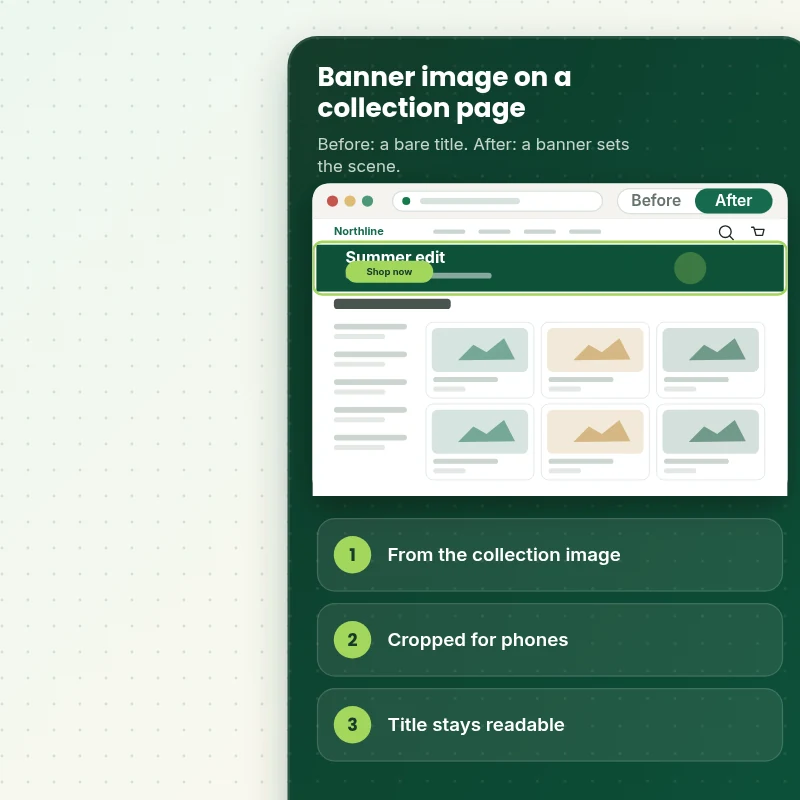
A sharp banner sits above the products, picked up from each collection's image and cropped for the device. The title stays readable, and collections without an image fall back to a clean heading.
What is included
What Your Collection Banner Includes
When you ask how to add a banner to a Shopify collection page, you get the banner built into the template and set up for every device.
Implementation checklist
- A banner section at the top of the collection template
- The banner image taken from each collection's own image
- Responsive sizes so phones receive a lighter file
- Height and focal point set separately for desktop and phones
- The collection title laid over or beside the image with contrast checked
- A clean fallback heading for collections with no image
- The banner loaded first so it does not delay the page
- Handover note listing the recommended banner size and how to change it
We build the banner and set it up, while the artwork itself is yours to supply. Designing banner graphics is a separate creative service, and we do not resize images beyond what the theme needs to serve them well.
See how it works
From a Bare Heading to a Collection With a Scene
Follow one visit. The shopper opens a collection, sees a banner that sets the scene and filters straight to the item they want.
Scope boundaries
Exactly What Is and Is Not Covered for Your Collection Banner
The collection banner has firm edges, and this section lists what falls inside, what sits outside, what you provide and what moves it to a custom quote.
Included
- A banner on your live collection template
- Responsive sizing and device crops
- Fallback and speed checks
- Two revision rounds and a written handover note
Not included
- Designing the banner artwork
- Banner animation or video
- Banners on other page types
- Checkout changes that Shopify itself controls
Access we need
- Collaborator access to your Shopify store
- Banner images or collection images
- Your overlay choice
Quote triggers
- A video banner
- A different layout per collection
- A theme that page builder apps have changed heavily
Typical turnaround
- 1 to 2 working days for most collection banner jobs
- Faster options in the calculator
- Timing confirmed before work starts
After launch
- Two revision rounds before go-live
- A short handover note for your collection banner
- Questions answered; larger changes quoted on their own
Compare your options
Shopify Collection Banner Size With a Theme Setting, an App or a Freelancer?
Compare the usual routes to a collection banner, from doing it yourself to hiring a specialist, on the points that matter most for this job.
| What matters | DIY or app | Freelance gig | General agency | Store Design Expert |
|---|---|---|---|---|
| Own image per collection | Often | Sometimes | Sometimes | Yes |
| Separate phone crop | Rarely | Sometimes | Sometimes | Yes |
| No monthly fee | Yes | No | Yes | Yes |
| Loaded first for speed | Sometimes | Rarely | Varies | Yes |
| Price known before work begins | Free but time-costly | Varies | Quote only | Yes |
| Theme backup before any change | No | Rarely | Usually | Yes |
| Two revision rounds included | No | Varies | Extra cost | Yes |
| Handover note for what changed | No | Rarely | Sometimes | Yes |
Price calculator
Price Your Collection Banner
Pick a package, adjust the options for your collection banner and set your speed. The fixed price and delivery estimate update with every click, with no hidden fees.
Request a custom quote
A video banner, a different layout per collection and themes heavily modified by page builder apps are scoped separately and quoted at a fixed price.
Request a QuoteChanged your mind? Choose Frame Basic, Frame Standard or Frame Plus above to return to the instant calculator.
How it works
How We Handle Your Collection Banner, Step by Step
Six clear steps take your collection banner from order to handover, with testing before anything touches your live theme and a clear view of what happens next.
- 1
Purchase
Configure the collection banner to your needs, confirm the fixed price and complete the secure checkout to start the job.
- 2
Access
Approve our collaborator request and fill in the short brief, and ownership never changes hands while we work on the collection banner.
- 3
Build in a duplicate theme
We make the collection banner in a duplicate of your theme, so your live store keeps selling while we work.
- 4
QA
We run the collection banner through a test pass on small phones, tablets and desktop screens and correct what we find.
- 5
Handover
On your go-ahead the collection banner is published, and you get a short document explaining where everything lives.
- 6
Support
Should the collection banner need a tweak once it is live, tell us and we will either fix it or quote it, never surprise you.
Compatibility and QA
Collection Banner Checks and Acceptance Criteria
These are the checks the collection banner must pass and the criteria you can hold us to, with a full backup of your current theme kept in case you want to go back.
What we test
- ImageThe banner shows the right image for each collection and stays sharp on large screens.
- FallbackCollections without an image show a clean heading.
- TextThe title is readable over the image on every device.
- DevicesFrom a 320 pixel handset to a wide monitor, the collection banner is checked at the widths shoppers really use.
- BrowsersChrome, Safari, Firefox and Edge, each in its current version.
- SpeedThe banner loads first and page speed is measured before and after.
Acceptance criteria
- The banner shows on every collection
- Each collection uses its own image
- The title is readable
- The banner is comfortable on small phones
- The handover note lists the recommended size
What we need to get started
What We Need to Get Add Banner Image to Collection Page Started
Choose how you want to give access, then send the few details that matter for the collection banner, and we never touch your live theme until you have approved the result.
Collaborator access
Send your store URL and approve our Shopify collaborator request for the collection banner, and you stay the owner, no password is shared and you can remove our access once the work is live.
No store yet? We build it first
Starting from scratch is fine, because we build the collection banner in our development store and hand ownership to you at the end, and you pick your Shopify plan only then.
Prefer to share a login?
Staff login details also work for the collection banner, while collaborator access remains the tidier choice because you can end it in one click.
Banner images
Tell us whether collections already have images or if you will send banners to upload.
Layout
Tell us whether the title should sit over the image or below it.
One decision maker
One person who signs off the collection banner, which keeps feedback tidy and inside the two revision rounds.
If you are not certain which access option suits the collection banner, the short form after checkout is the place to say so and we will point you to the easiest.
Testimonials
What Store Owners Say Before You Order Add Banner Image to Collection Page
Verified feedback from clients who trusted us with their Shopify stores and quick tasks alike.
Verified
Store Design Expert is the best. The work is very professional, they pay close attention to detail and, more importantly, they listen. Their level of cooperation is second to none, and everything was delivered in a very timely manner. I will keep them in mind for future projects.
BN
Barbara N.United States
Verified
They definitely get the job done. Very patient and understanding throughout the whole project.
BS
Brian S.United States
Verified
Thank you so much to Store Design Expert and the team. My site looks far more appealing to customers, and I will happily recommend your services to other new small businesses.
JS
Jennifer S.United States
Verified
Very patient, informative and transparent, and they did exactly what they said they would do. Thanks for all the help!
RO
Raymond O.United States
Verified
Store Design Expert is the only one I use for all things WordPress. They have a high level of understanding, deliver quality work and are easy to deal with.
SC
Scott C.United States
Verified
A pleasure to work with. They did pretty much everything I asked and definitely exceeded my expectations. I will be working with Store Design Expert again soon.
JL
Jerry L.United States
Verified
Superb work! Store Design Expert is incredibly patient, and even when I did not fully understand my own questions, everything was explained again in detail. My vision was implemented perfectly, and the work is worth every cent I spent.
KB
Katrin B.Germany
Verified
Very impressed with the build-out. My store is ready to get started, and I am sure I will reach out for edits down the road, but this is everything I could ask for to get the party started. Thanks again, and I will be in touch for future projects.
DH
Dale H.United States
Verified
Very quick and detailed work! Store Design Expert does exactly what you want, in a very professional manner.
LF
Lena F.Germany
Related searches
What People Search For Before Ordering Add Banner Image to Collection Page
People describe Add Banner Image to Collection Page in different ways when they search. These are the common ones.
“how to edit collection banner on shopify”, “shopify collection page banner” or “shopify collection page banner size”: owners type these when they need Add Banner Image to Collection Page, and the packages above are priced for that job.
People who look up “collection page banner size shopify” or “how to add banner in collection page shopify” usually want Add Banner Image to Collection Page; the calculator above shows the price and delivery estimate before you commit.
FAQ
Shopify Collection Banner Size Questions
Straight answers about cost, scope, timing, apps and what we need from you for your collection banner.
What is the right Shopify collection banner size, and can you set it up for me?
A banner of about 1600 pixels wide works well for most themes, and the theme crops it for phones. Yes, we set it up for you. Packages start at $39, and the calculator shows your exact price and delivery estimate.
How long should I plan for the collection banner?
Allow 1 to 3 working days for the collection banner after access is granted, and pick a quicker option in the calculator if your launch is close.
Is Add Banner Image to Collection Page safe for my live store?
Yes. A duplicate theme holds the whole collection banner until it passes testing, which means shoppers never see unfinished work and you always have the original to fall back on.
What do you need from me for Add Banner Image to Collection Page?
Collaborator access to your store, plus the images each collection should use for its banner. When a store is still to be created, we build the collection banner in our Partner account first and give you ownership once it is complete.
What does Add Banner Image to Collection Page cost?
Add Banner Image to Collection Page starts at $39. With every option switched on the total reaches $240.
How are the Add Banner Image to Collection Page packages different?
There are 3 Add Banner Image to Collection Page packages: Frame Basic at $39 (1 working day), Frame Standard at $69 (1 to 2 working days) and Frame Plus at $119 (2 to 3 working days).
What is in the Frame Basic package of Add Banner Image to Collection Page?
A banner image across the top of a collection page, set from the collection's own image and sized so it stays sharp on desktop and phones. It includes: Banner image on the collection page; Taken from the collection image; Sharp on desktop and phones; Title kept readable; Different banner per collection. Frame Basic costs $39 and takes 1 working day.
What does the Add Banner Image to Collection Page calculator ask me?
The Add Banner Image to Collection Page calculator asks for a package and 3 more choices: where does the image come from (One banner for every collection, Each collection's own image); how should phones look (The same crop on phones, A separate phone crop); how soon do you need it live (Standard, Sooner, Fastest).
What can I add on top of Add Banner Image to Collection Page?
Optional extras for Add Banner Image to Collection Page include Title and subtext over the image (+$10), A button on the banner (+$10), Branded fallback for empty collections (+$5), Speed check on the banner (+$10) and Fix a banner that blurs or crops badly (+$15).
Ready when you are
Shopify Collection Banner Size: Start Every Collection With a Strong Image
Pick your package, see the exact price and delivery estimate and get a sharp, well-sized banner on every collection page on every device. If you need a video banner or a different layout per collection, request a quote and we will scope it with you.
Fixed price · Two revision rounds · Backup before changes