
Shopify stores designed and launched
Minify JavaScript and CSS in Shopify
JavaScript and CSS Minification for Shopify, Aimed at What Shopify Leaves Unshrunk
JavaScript and CSS minification is only worth paying for when it targets the code that Shopify does not already shrink for you. We inspect what your store really serves, minify inline and custom code, clear out scripts left behind by old apps, defer what can wait and test every template before publishing. Fixed prices from $490, from developers with 450+ Shopify launches behind them since 2015 and a 4.9+ average from verified reviewers.
- Served files inspected so we only touch what is truly unminified
- Inline style and script blocks in Liquid minified or moved to assets
- Leftover app scripts and unused theme code removed safely
- Readable source and a backup kept so future edits stay easy
From$490
Delivery2 to 9 working days
Revisions2 rounds
Our track record
Over 450 Shopify Stores Launched. Yours Can Carry Less Code Too.
Anyone can paste a theme file into an online compressor, and plain javascript minification is a ten-minute task. The skill is knowing which files are already shrunk, which are not, and which can be changed without breaking a cart drawer or a variant picker that took months to get right.
Average rating from verified clients
Building Shopify stores since
Secure checkout
Pay through a protected checkout and keep a full order record.
Two revision rounds
Included in every package, so the result matches what you pictured.
Backup before changes
We work on a duplicate of your theme, never on your live store.
Who this is for
Who Needs JavaScript and CSS Minification on Shopify
Owners usually reach us after a speed report names scripts and stylesheets, or after an app promised a fix and nothing moved. These are the stores where careful code work pays off.
You are a good fit if
- Your report mentions unminified or unused code
- You want changes tested on a theme copy
- You prefer measured results to app promises
- You want the byte savings priced up front, with a date
Stores whose report lists unminified code
PageSpeed Insights flags files and you are unsure which are yours, which belong to apps and which Shopify handles. You want that sorted out and fixed where it can be.
Themes with years of custom edits
Snippets pasted by three developers, inline styles in templates and half-removed features. You want the code tidy, smaller and still working on every page.
Merchants who have tried many apps
Trials come and go, and each can leave a script tag behind. You want to know what still loads for nothing and have it removed without touching what you use.
Brands that rely on phone traffic
A shopper on a mid-range handset has to parse every kilobyte of script before the page responds. Less code to run means a sooner response to a tap.
Owners working on Core Web Vitals
Your INP or LCP group is flagged and long scripts are the likely cause. You want changes that move the metric and are tested on real templates.
Teams without a developer on call
Nobody in-house wants to edit theme.liquid on a live store. You want an experienced person to do it on a copy, test it and hand over notes.
Problems solved
Why Minifying Shopify Code Often Disappoints
Most advice stops at 'run it through a minifier'. On Shopify that misses the point, because the platform already does part of the job. These are the traps we see, and what we do instead.
- The files you minify are already minified.
Shopify shrinks CSS and valid ES5 JavaScript served from the assets folder. We check the live response first, so you do not pay for a change that moves nothing.
- Inline code in Liquid is never touched by the platform.
Style and script blocks written straight into templates reach shoppers as written. We minify these, or move large ones into asset files so they are shrunk and cached.
- App scripts come from servers you do not control.
Reviews, chat and pop-up tools load code from their own hosts. We cannot rewrite their files, but we can delay, limit or remove what loads, and tell you which cost the most.
- Dead code outlives the app that wrote it.
Uninstalling an app can leave script tags in theme.liquid or a snippet that still loads. We trace each reference to a live feature and remove the ones that point nowhere.
- Hand-minifying breaks things quietly.
A missing semicolon or a stripped Liquid tag can disable a drawer on one template only. We work with build tools on a duplicate theme and test every interaction before publishing.
- Smaller files do not fix scripts that run too long.
Unminified javascript and css files are only part of the story. Long tasks, large bundles and render-blocking tags matter as well, so we look at those too and report what is outside this scope.
What we can do
What Our JavaScript and CSS Minification Service Can Do
This job covers six kinds of work, from checking what the browser really receives to making sure the changes survive your next theme update. The list also explains where the limits are.
Served-code audit
We open your key pages in browser developer tools, list every script and stylesheet with its size and source, and mark each as Shopify-minified, ours to minify, an app's or removable.
Minification of inline and custom code
Large style and script blocks in templates, custom snippets and hand-written theme files are reduced with build tools, with comments and spacing removed and behaviour left unchanged.
Minify Liquid files and templates
Whitespace and comments in Liquid sections and snippets add weight to every page. We strip what is safe to strip and leave anything that depends on formatting, such as preformatted text.
Unused code removal
Using the Coverage panel and a manual read, we find stylesheets and scripts that never run on a given template and remove or conditionally load them, one template at a time.
Script loading order
Non-critical scripts are given the defer attribute or moved later, while code the first screen needs is left in place. This is the part that most affects how soon the page responds.
Regression testing and notes
Menus, filters, cart drawer, variants, search and checkout hand-off are tested on desktop and phone before publishing, and you receive a list of every file changed.
What is included
What JavaScript and CSS Minification Includes
Our minification project splits into six streams, each tied to part of the fee. Under the calculator, a comparison table shows the streams every package includes.
Audit of what loads
- Home, collection, product and cart pages inspected
- Every script and stylesheet listed with size and source
- Shopify-served, ours and third-party code separated
- A short report on what can and cannot be reduced
Minification
- Inline style and script blocks in templates minified
- Custom snippets and theme files reduced with build tools
- Whitespace and comments removed from Liquid where safe
- Readable originals kept as a backup in your theme
Dead code clean-up
- Script tags from uninstalled apps traced and removed
- Unused snippets and sections flagged for your approval
- Old tracking and chat code checked against live tools
- Duplicate libraries loaded twice identified
Load order
- Defer applied to scripts the first screen does not need
- Render-blocking stylesheets reviewed template by template
- Third-party tags delayed where the vendor allows
- Critical rules separated from the rest in higher tiers
Testing
- Menu, cart drawer, filters and variant picker tested
- Desktop and phone checks on each template
- Console checked for new script errors
- Forms and checkout hand-off confirmed
Proof and handover
- PageSpeed Insights readings before and after
- A list of files changed and why
- Recorded walkthrough and written notes
- Two revision rounds after your review
Every package starts by checking what is served. That audit is in the scope on purpose, so nobody pays to minify files that Shopify had already shrunk.
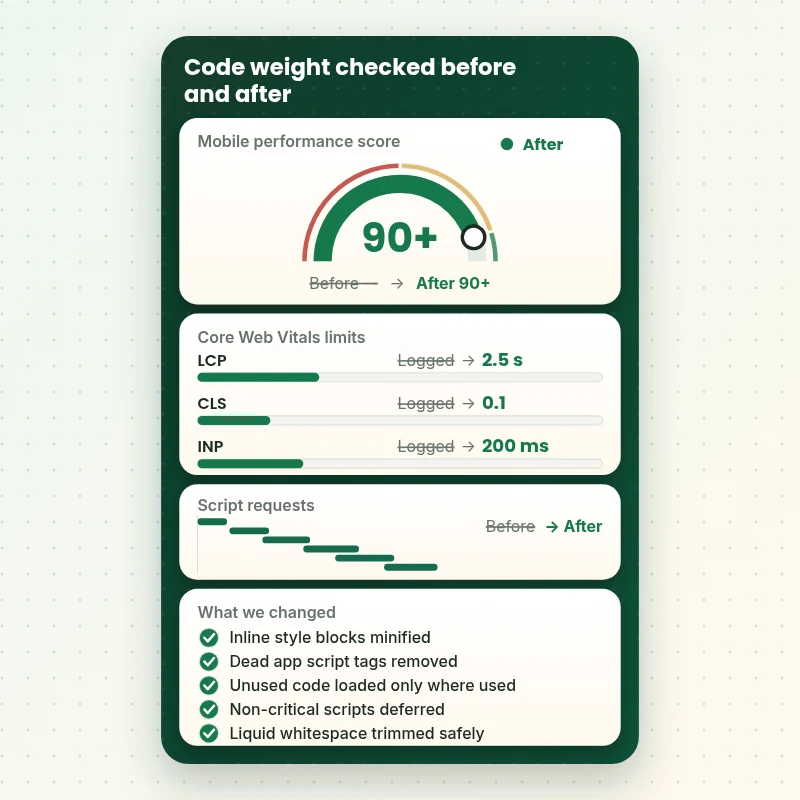
See the readings
How We Check the Effect of Smaller Code
We read the same pages in PageSpeed Insights before and after the work and compare the three Core Web Vitals against Google's published limits for a good score. You see which changes were made to reach them, and where a limit still depends on third-party scripts that we do not control.
Portfolio
Store Designs From Our Studio
A look at store designs across fashion, home, beauty, pets and gifts, to show the standard of layout and finish behind JavaScript and CSS Minification for Shopify.

Pet creator store design
Pet creator
Books store design
Books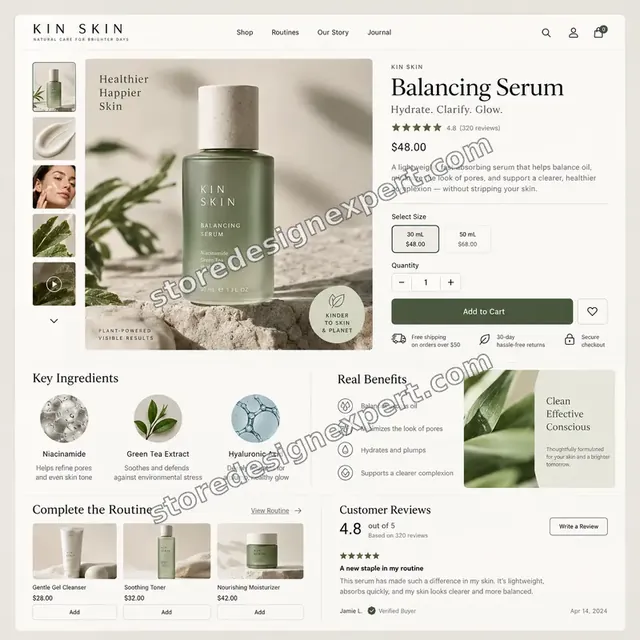
Skincare store design
Skincare
Interiors store design
Interiors
Stationery store design
Stationery
Outdoor camping gear store design
Outdoor camping gearProcess and timeline
How Our JavaScript and CSS Minification Runs, Step by Step
Every change is built in a cloned theme and only goes public once you sign it off. The entry package finishes in 2 to 4 working days, while bigger combinations show their window in the calculator.
- 1
Measure what is served
We load your key pages with developer tools open, record every script and stylesheet and note which of them arrive already minified from Shopify's servers.
- 2
Read the theme
We search theme.liquid, templates, sections and snippets for inline blocks, duplicate libraries and tags that refer to apps you no longer use.
- 3
Minify and clean
We reduce the inline and custom code with build tools, remove confirmed dead references and move large inline blocks to asset files where caching will help.
- 4
Reorder loading
Scripts that the first screen does not need get the defer attribute or move later, and render-blocking stylesheets are reviewed for each template.
- 5
Test and review
We click through menus, filters, cart drawer and variants on a phone and a desktop. You look over the cloned theme and can ask for two rounds of adjustments.
- 6
Publish and compare
The signed-off theme goes live, we take the same readings again and report which files changed and which were skipped because a third party owns them.
Compare your options
App, Gig, Freelancer or Our Code Minification Service?
People cutting theme code typically compare a speed app, a marketplace gig, a freelance Shopify developer and a specialist studio. The table rates each on the checks that tend to fail.
| What matters | Speed app | Marketplace gig | Freelance developer | Store Design Expert |
|---|---|---|---|---|
| Checks what Shopify already minifies | No | Rarely | Varies | Yes |
| Inline Liquid blocks minified | Some | Rarely | Varies | Yes |
| Dead app code removed | No | Rarely | Extra cost | Yes |
| Scripts deferred by template | Global only | Rarely | Varies | Yes |
| Cart drawer and filters tested | No | Rarely | Varies | Yes |
| Readable originals kept | Varies | Rarely | Varies | Yes |
| Before and after readings | Own score | Rarely | Varies | Yes |
| Fixed price known up front | Yes | Yes | Varies | Yes |
Inside every project
What Keeps Your Store Working While We Shrink the Code
A careless code edit can break the cart or a filter. Whichever package you choose, these rules are applied to the job.
Duplicate theme only
All edits go into a clone, so the published theme keeps taking orders while you test the new version on your own phone and laptop before saying yes.
Readable source kept
The Shopify code editor shows your files as written, so we keep an original of each edited file in the theme. Your next developer can still read and change them.
Every interaction clicked through
Menus, filters, search, variant pickers and the cart drawer are tested on a phone and a desktop, with the browser console open to catch errors a shopper would never report.
Careful access handling
Collaborator access is our default, and we never request a card or the store owner password. Once the job is done you can cut our access with one click.
Nothing removed on a guess
Before deleting a script tag we trace it to a feature, an app or nothing at all. Anything uncertain is listed for your decision instead of being removed.
Honest limits
We tell you what we cannot change, such as an app's own file or scripts Shopify adds to the checkout, so you can choose whether to keep, replace or remove that tool.
Interactive price calculator
Build Your Code Minification Package
Start with a package, then tell us the template count, how heavily the theme has been edited and how many apps were installed over time. Price and delivery dates update as you choose.
Request a custom quote
Headless builds, multi-theme Shopify Plus setups and themes compiled from a bundler repository get an individual quote, with the fee fixed in writing first.
Request a QuoteChanged your mind? Choose Trim and Verify, Code Weight Reset or Render Path Rebuild above to return to the instant calculator.
Packages and comparison
Code Minification Package Comparison
Package contents are laid out in the table beneath, one tier per row. The calculator takes templates, custom code and app count, then shows what your own theme would cost and how long it would take.
| What is included | Trim and Verify $490 | Code Weight Reset $890Recommended | Render Path Rebuild $1,590 |
|---|---|---|---|
| Audit of served scripts and styles | Included | Included | Included |
| Inline style and script blocks minified | Included | Included | Included |
| Custom snippets and theme files minified | Included | Included | Included |
| Core templates tested on desktop and phone | Included | Included | Included |
| Lighthouse readings before and after | Included | Included | Included |
| Handover video and two correction rounds | Included | Included | Included |
| Uninstalled app leftovers removed | Not included | Included | Included |
| Unused code loaded only where needed | Not included | Included | Included |
| Liquid whitespace trimmed | Not included | Included | Included |
| Duplicate libraries resolved | Not included | Included | Included |
| Defer plan for non-critical scripts | Not included | Not included | Included |
| Critical and non-critical styles split | Not included | Not included | Included |
| Third-party tags delayed where possible | Not included | Not included | Included |
| Fortnight of follow-up fixes | Not included | Not included | Included |
| Usual turnaround | 2 to 4 days | 3 to 6 days | 5 to 9 days |
Choose your options in the calculator above: the total and the delivery estimate it shows for JavaScript and CSS Minification for Shopify are final.
Why Store Design Expert
Why Owners Choose Our Shopify Speed Optimization Services
What you get is a written scope, a candid audit and a straightforward handover from people who only work on Shopify. Clients return for the following reasons.
Shopify specialists since 2015
Shopify themes are all we build and tune, so we know which optimisations the platform does by itself. After 450+ launches, quirks in your theme will probably look familiar.
We start with what is actually served
Many quotes minify files that were already shrunk. We inspect the live response first and charge only for work that can change the result.
Rated 4.9+ by verified clients
Every rating and comment above was left by a verified client of Store Design Expert, which lets you judge earlier jobs before choosing a package.
A set fee listing exactly which scripts and stylesheets we touch
Packages spell out their contents and the calculator adds options before checkout, so the total is settled before any payment.
You speak directly to whoever edits your code
Your questions reach the developer on your theme, with no account manager in between. When a script has to stay, you get the reason in plain language.
Your code and your store stay yours
All of it sits in your own theme, with notes describing every edit. If we begin a new store in our Partner account, ownership passes to you at the end.
What we need to get started
Before We Begin Minifying Your Code
You need not export or send any files. Give us a route into the theme and name the pages that drive revenue. Three routes are open, and the quickest one for you is the right one.
Send us a collaborator request
Already trading? Send the store URL and approve the collaborator request that follows, and we edit your theme from inside your admin. You remain owner, nobody exchanges a password and our access ends when you say so.
We can build it in our Partner account
With no store yet, we set one up in our Shopify Partner account, do the optimisation there and hand ownership over when it is done, so a plan is chosen only at the end.
Or share staff login details
A staff account works if that is simpler for you. Collaborator access is easier to withdraw later, but we can start from either.
Your key page addresses
List your home page, top collection, best-selling products and any landing page that receives paid clicks.
Reports you already have
If you hold PageSpeed Insights or Search Console reports, send them with dates. They show the warnings you already see and set a baseline for comparison.
A list of apps, current and past
Tell us which apps you use now and which you have tried, plus any code a previous developer pasted into the theme, so nothing is removed that you still rely on.
Neither a payment card nor your owner password is ever asked for. Publishing waits for your review of the cloned theme, and we keep each original file so any edit can be undone.
Testimonials
What Store Owners Say After Launch
Verified clients describe working with Store Design Expert on builds, fixes and speed work.
Verified
Store Design Expert was very knowledgeable about what I needed done to fix my Shopify store and how to improve the store layout. The project was completed very quickly, and I will definitely use them for support as my business grows.
ST
Samuel T.United States
Verified
Very satisfied with the work. Most importantly, Store Design Expert responded promptly to my questions and concerns. Thank you!
KB
Kyle B.United States
Verified
Outstanding work and outstanding customer service. Five stars! I will absolutely use Store Design Expert again for my next book.
KM
Katharine M.United States
Verified
Store Design Expert was great! They delivered exactly what I asked for and even offered helpful extra suggestions. Highly recommended.
PW
Paul W.United States
Verified
I request Store Design Expert every time I have a project. They are professional and give real attention to detail, which makes the work stand out.
LK
Laura K.United States
Verified
They kept communicating until the problem was fully resolved, and the result was great.
HJ
Henry J.United States
Verified
Super helpful and patient. I am new to ecommerce and Store Design Expert talked me through the whole process and even fixed my payment bridging for me!
LR
Lois R.United Kingdom
Verified
I am beyond satisfied! Store Design Expert went above and beyond on my project. Highly recommended!
MD
Michael D.United States
Verified
The experience was tailored to my brand and specifications to the letter. I love the result.
EP
Eric P.United States
Related searches
What People Search For Before Ordering JavaScript and CSS Minification for Shopify
People describe JavaScript and CSS Minification for Shopify in different ways when they search. These are the common ones.
“how to minify javascript”, “unminified javascript and css files”, “what is minified javascript” or “javascript minification” all point to the same job, which JavaScript and CSS Minification for Shopify covers from start to finish.
If you searched for “minify javascript and css in shopify” or “how to remove unused javascript in shopify”, JavaScript and CSS Minification for Shopify is the work that answers it.
Related searches include “minify css and js”, “how to minimize main thread work shopify”, “minify liquid files” or “shopify speed optimization app”.
Related searches include “shopify speed optimization services”, “shopify speed optimization tutorial” or “shopify freelance developer”.
FAQ
JavaScript and CSS Minification FAQs
Straight answers about cost, timing, what Shopify handles already, what we change and how we confirm it.
How much does JavaScript and CSS minification cost?
Packages start at $490 for Trim and Verify, $890 for Code Weight Reset and $1,590 for Render Path Rebuild. Templates, custom code and app count are added in the calculator, so most stores land between roughly $700 and $2,200. The total is fixed and visible before payment, with no hourly top-up.
What is minified JavaScript?
Minified JavaScript is the same code with spaces, comments and line breaks removed and long names shortened, so the file is smaller and downloads sooner. It behaves the same but is hard for people to read, which is why we keep originals.
Does Shopify already minify CSS and JavaScript?
Partly. Shopify's performance documentation says it minifies CSS and valid ES5 JavaScript and compresses files with Brotli and gzip. Inline code in templates, scripts from app servers and some injected code are outside that, which is where our work focuses.
How to minify JavaScript in a Shopify theme safely?
Work on a duplicate theme, use a build tool such as Terser rather than editing by hand, keep the readable original and test every interaction afterwards. We also check first whether the file is already minified by Shopify, since repeating that gains nothing.
Can you minify CSS and JS from apps I have installed?
We cannot rewrite files hosted on an app's own servers. We can delay them, load them only on pages that need them or remove the app's leftover code. We also rank each by its effect so you can decide whether the tool is worth keeping.
Can you minify Liquid files as well?
Yes, carefully. Removing whitespace and comments from Liquid sections and snippets trims every response. We leave alone anything that depends on formatting, such as preformatted blocks, and we compare the rendered page before and after.
How to remove unused JavaScript in Shopify without breaking the store?
Start with what each template actually runs, using the Coverage panel, then trace every script to a feature or app. Remove only what is confirmed dead, or load code on the template that needs it. We test on a copy before anything goes live.
How to minimize main thread work Shopify themes cause?
Main thread work comes mostly from large scripts running at load. Reduce it by removing unused apps, deferring scripts the first screen does not need and splitting big bundles. We list the heaviest scripts and fix those we control.
Will minification make my store much faster?
On its own, usually modestly, because Shopify already shrinks most theme files. Gains come from the code it does not shrink, from removing dead scripts and from load order. We measure before and after, and we say so if the audit shows little to gain.
Should I use a Shopify speed optimization app instead?
An app suits a simple theme and a small budget, and it can minify files for a one-time fee of about $25 to $100. It will not read your theme, remove dead app code or test your cart drawer. Choose a person when custom code is involved.
Is a Shopify speed optimization tutorial enough to do this myself?
A Shopify speed optimization tutorial can cover the steps, and a confident owner can follow them on a copy of the theme. The risk lies in subtle breakage, such as a menu failing on one template. If the store earns daily, hand it to someone who tests.
How do your Shopify speed optimization services differ from a Shopify freelance developer?
A Shopify freelance developer may charge by the hour and decide scope as the work goes. Our packages have a fixed scope, written audit, defined testing and a recorded handover, so the price and the result are known before you commit.
Will this fix every unminified javascript and css files warning?
Not every one. We clear warnings for code that is ours to change. Files from apps and scripts that Shopify adds to the checkout remain outside our control, and we list them with options, such as replacing or removing the tool.
What happens after the changes are published?
The same readings are taken again on your main pages and sent to you as a comparison. Render Path Rebuild bundles 14 days of fixes, and a 30-day regression check can be added to cover theme or app updates.
Ready when you are
Start Your JavaScript and CSS Minification on the Code That Counts
Pick a package, read your exact price and delivery estimate, then order javascript and css minification. You receive a candid audit, tested changes and comparison readings, backed by 450+ Shopify launches.
Encrypted checkout · Two rounds of corrections · Screen recording plus notes