
Shopify stores designed and launched
Shopify checkout optimization service
Shopify Checkout Optimization: Fewer Steps, Clearer Totals, Orders You Can Trust
Shopify checkout optimization built around your plan, your payment methods and your markets, with every change proven by test orders before it reaches shoppers, from $890. Store Design Expert has worked on Shopify since 2015, has launched over 450 stores and holds a 4.9+ average rating from verified clients.
- Cart-to-payment path walked on real phones and desktops
- Guest checkout, wallets, fields and shipping display set deliberately
- Plus Extensibility work: UI extensions, Functions, Scripts migration
- Test-order matrix and tracking check before sign-off
From$890
Delivery4 to 22 working days
Revisions2 rounds
Our track record
450+ Shopify Stores Launched, So We Know Where Their Checkouts Break
Shopify checkout optimization is the one job where a small mistake costs real orders by the hour. We have built more than 450 stores since 2015 and have seen how themes, apps and payment settings collide on the buying path.
Average rating from verified clients
Building Shopify stores since
Secure checkout
Pay through a protected checkout and keep a full order record.
Two revision rounds
Included in every package, so the result matches what you pictured.
Backup before changes
We work on a duplicate of your theme, never on your live store.
Who this is for
Stores That Need a Checkout Specialist, Not Another App
The checkout is where interest turns into a paid order, and it is also the part of Shopify you control least. Owners come to us when the cart fills up but the orders do not follow.
Carts fill up and payments never arrive
Analytics show healthy add-to-cart numbers and then a cliff at the first checkout step. We trace the step where people leave and tell you whether the cause is cost, trust, a form or a bug.
Plus stores still carrying old checkout code
Your checkout may lean on checkout.liquid leftovers or Shopify Scripts. We list every piece of custom logic and rebuild it with Extensibility so nothing silently falls back to default.
International stores selling in several currencies
Prices, duties, languages and payment methods vary by market, and one weak market can hide inside a good average. We check each one the way a local shopper would.
Brands whose traffic arrives on phones
Small screens punish long forms and hidden totals. We walk the whole path with a thumb, test wallets and autofill, and fix what makes people give up.
Merchants on Basic, Shopify or Advanced plans
Searching Shopify customize checkout page brings up Plus-only advice. Without Plus you cannot edit the core steps with code, but the settings, branding, accounts and thank-you page still matter a lot. We make the most of every option your plan really gives you.
Teams about to spend on a sale or a launch
A broken discount, shipping rate or payment method is cheapest to find before the traffic arrives. We run the test orders so you find it first.
Problems solved
Why Good Stores Lose Orders in the Last Three Screens
By the time someone reaches payment they have already decided to buy, so every lost order at this stage has a specific, findable cause. These are the ones we meet most often, and each one can be confirmed from your own orders and sessions before anything is changed. We would rather show you the evidence than hand you a list of tips you have already read elsewhere.
- Totals appear too late.
Shipping, tax or fees that first show on the final step feel like a trick. We move cost information earlier and check the figures match from cart to payment.
- Forced sign-in blocks first-time buyers.
Asking a stranger to create an account before paying is a common reason to leave. We review account and guest settings and what each choice does to returning customers.
- Forms ask for more than the order needs.
Company lines, phone numbers and optional fields add effort. We keep what fulfilment and compliance require and drop or relax the rest.
- The payment methods people expect are missing.
Wallets, local methods and buy-now-pay-later options are checked per market, so the first choice a shopper wants is available and in a sensible order.
- Scripts and apps disagree with each other.
A discount app, a shipping rule and a theme tweak can contradict one another at the final step. We map every rule that touches the total and remove clashes.
- Nobody tests like a customer anymore.
Teams edit settings and assume they work. We place real orders across devices, methods, codes and addresses, and record exactly what a buyer would see.
What we can do
What Shopify Checkout Optimization From Us Covers
This is a mix of Shopify admin knowledge, front-end craft and careful testing. Here are the six areas we work in, with the edge cases we look for in each.
Shopify checkout settings done on purpose
We go through every Shopify checkout settings screen: customer accounts, contact method, name and address lines, marketing opt-in, tipping, order processing, policies and language, and set each for your customers and fulfilment, not for the default.
Shopify checkout customization within your plan
On any plan we use the checkout and accounts editor for branding, layout and thank-you page content. On Plus, Shopify plus checkout design goes further through Extensibility: UI extensions, Functions and Pixels, and we say plainly which request needs which plan.
Payment and wallet order
We review Shop Pay, Apple Pay, Google Pay, PayPal, local methods and buy-now-pay-later per market, check which appear on each device, and look at how a failed card or a declined payment is shown to the buyer.
Shipping rate presentation
We read your rates, thresholds, pickup and delivery estimates the way a shopper does, then check that names, order and free-shipping messages stay consistent between cart and checkout.
Scripts, Functions and legacy cleanup
Old Script logic for discounts, shipping and payment rules is inventoried and rebuilt as Shopify Functions where possible, with a note of anything that cannot be reproduced exactly so there are no surprises.
Tracking and thank-you page
We confirm the purchase event fires once with the correct value, that the order status page loads quickly and that post-purchase apps do not break attribution or duplicate orders.
What is included
Your Shopify Checkout Optimization Deliverables, Group by Group
Every project follows one written scope, so you know what is reviewed, what is changed and what is handed back. The packages below reach different depths, and the table further down shows exactly where.
Buying-path review
- Cart, cart drawer and every checkout step walked on phone and desktop
- Analytics funnel read from cart to paid order
- Notes on the points where each device loses people
- Annotated screenshots for every finding
Settings and branding
- Accounts, contact, address and field settings reviewed
- Checkout and accounts editor branding applied
- Policies, language and support links in place
- Before and after screenshots of each change
Payments and shipping
- Wallet and payment method order per market
- Shipping rates, thresholds and delivery messages aligned
- Tax and duty display checked against orders
- Discount code and gift card behaviour verified
Extensibility work (Plus)
- UI extensions for fields, banners and trust content
- Functions for discount, shipping or payment logic
- Scripts inventory and migration
- Custom fields saved correctly to the order
Test orders and QA
- Test-order matrix across devices, methods and addresses
- Rollback notes for every changed setting
- Tracking events confirmed once per order
- Final checklist signed off with you
Handover
- Written change log with every setting and extension
- Recorded walkthrough of the final flow
- Suggested tests to run on cart and landing pages
- Two rounds of revision after you review
Findings and changes are written for the person who will own the store afterwards. Each one names the screen, shows what the shopper sees, states the setting or code involved and explains why it was chosen.
See how it connects
Every Step of the Buying Path, Connected and Checked
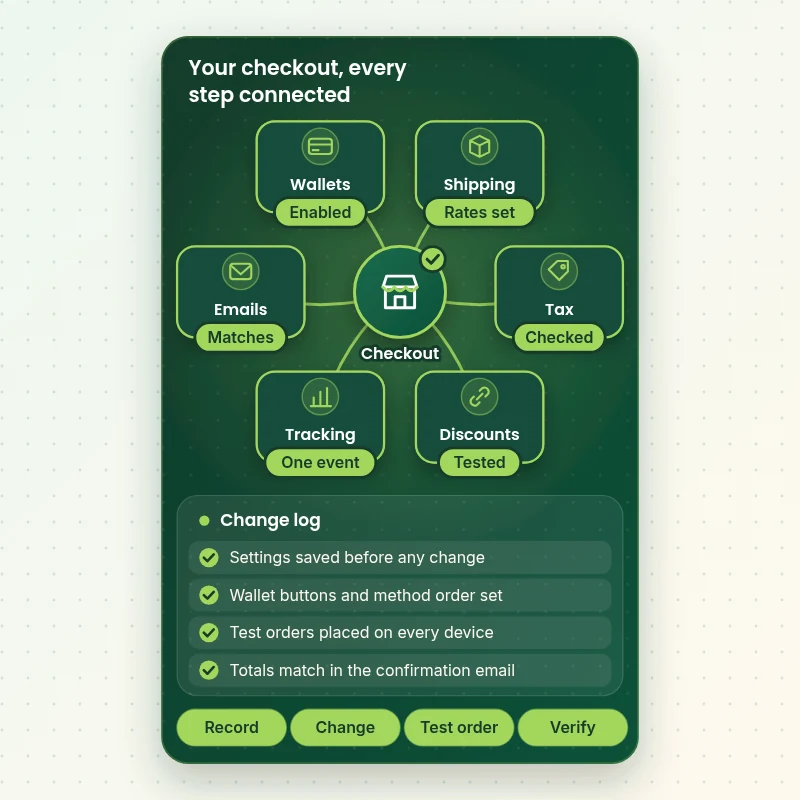
A checkout is a chain of small systems: payment methods, shipping rates, taxes, discounts, tracking and emails. The graphic shows the parts we review, the order we change them in and the log we keep, ending with orders that have been verified from cart to confirmation.
Portfolio
Store Design Styles We Build
Different niches need different layouts. These store designs show how we shape a storefront around its products, and Shopify Checkout Optimization follows the same approach.

Barber store design
Barber
Travel creator store design
Travel creator
Skincare store design
Skincare
Technology store design
Technology
Jewelry store design
Jewelry
Outdoor apparel store design
Outdoor apparelProcess and timeline
How Shopify Checkout Optimization Runs, Stage by Stage
Six stages take the work from access to a signed-off checkout. Nothing is edited on the live store until the plan is agreed, and a Checkout Check-Up usually finishes in 4 to 6 working days.
- 1
Access and plan check
You approve collaborator access, and we confirm your plan, markets and payment methods. This decides which changes are possible, so the scope is set honestly before any work starts.
- 2
Walk the whole path
We place orders as a shopper would on phone, tablet and desktop, noting every field, message and delay from cart to the order status page.
- 3
Read the numbers
Shopify reports and analytics show where each device and source drops off, so we change the step that loses people rather than the one that looks untidy.
- 4
Change in a safe copy
Settings are recorded before they change, theme edits are made in a duplicate, and extensions are built in a development store where Plus allows it.
- 5
Test orders
A matrix of real or test orders covers devices, methods, codes, addresses and markets. Every result is written down, and failures are fixed and rerun.
- 6
Hand over
You receive the change log, the walkthrough recording and the revision rounds, then publish together with us or let us do it at an agreed quiet time.
Technical approach
Technical Map of a Shopify Checkout Project
Here is how each layer of the buying path is handled, what we do inside it and what you receive. It doubles as a checklist you can hold us to when the work is signed off. Not every row applies to every plan: on Basic, Shopify and Advanced the Plus rows are skipped and the written scope says so, so you are never billed for work that your plan cannot carry.
| Area | What we do | What you receive |
|---|---|---|
| Admin checkout settings | Customer accounts, contact method, name and address options, tipping, marketing consent and order processing are read and set. Each choice is recorded with the previous value, so any change can be reversed in a minute. | Settings sheet with old and new values |
| Checkout and accounts editor | Logo, colours, type, buttons, banners and the order summary are configured in the checkout editor, using only options that Shopify supports on your plan. | Branded checkout and screenshots |
| UI extensions (Plus) | Custom blocks such as trust text, delivery notes and a consent tick-box are built as checkout UI extensions that Shopify renders, so they survive platform updates. | Extension code and a test log |
| Shopify Functions (Plus) | Discount, delivery customisation and payment customisation rules are rewritten as Functions, replacing Script logic that had a published end date of 30 June 2026. | Function list and rule table |
| Payments and wallets | Providers, wallet buttons, BNPL messaging and local methods are tested per market and device, including failed cards, 3-D Secure prompts and refunds. | Payment test sheet |
| Markets and currency | Currency display, rounding, duties and taxes, languages and shipping zones are compared across markets so the same basket means the same thing in every one. | Per-market comparison |
| Pixels and tracking | Customer events are checked in Shopify's Pixels and in GA4 or ad platforms, so begin checkout and purchase fire once with the right value. | Event verification report |
| Release and rollback | Changes go live at a quiet hour with the previous settings written down. We watch orders for a defined window and revert quickly if anything misbehaves. | Release runbook and rollback notes |
Risk, dependencies and success plan
Checkout Risks, Dependencies and Release Plan
Because checkout carries your revenue, every dependency and gate is agreed in writing before work starts. This is what we need from you, how the work is paced, which checks must pass and how the release is handled. The release is the least dramatic part of the project by design, because everything risky has been tried on a copy and rehearsed with test orders by then.
Your responsibilities
- Approve our Shopify collaborator request, and confirm your plan
- Name one person who approves each stage and the release time
- Share the payment providers, wallets and installment tools you use
- List your apps that touch the cart, discounts or shipping
- Tell us your busiest trading hours and any sale dates
- Place a test order with us on request from a real card or test mode
- Review each milestone in the agreed window so the schedule holds
Milestones
- Plan and scope confirmedYour plan, markets, payment methods and the changes it allows are set down in writing.
- Buying path walkedEvery screen on three devices is logged with screenshots and findings.
- Changes built in a safe copySettings, branding and extensions are ready on a duplicate theme or a development store.
- Test orders passedThe matrix of devices, methods, codes and addresses has been run and signed off.
- Release and watchChanges go live at an agreed time and orders are watched for a defined period.
QA gates
- Every payment method completes a test order on phone and desktop
- Totals match from cart to the confirmation email
- Discount codes and gift cards behave as written
- Tax, duty and shipping are right for each market tested
- The purchase event fires once with the correct value
- Previous settings and theme are saved for rollback
- Nothing is published before you have approved the final walkthrough
Launch criteria and support
- Publish outside your busiest trading hours
- Place a live order straight after release to confirm payment and emails
- Watch orders and error reports for the agreed window
- Keep the previous theme and settings sheet ready to revert
- Record the final state in the change log
- Send you a short summary once the window closes
- Optional 30-day question window is one tick in the calculator
Compare your options
Free Checkout Tips, Marketplace Gig, Agency Retainer or Fixed Shopify Checkout Optimization?
There are four ways to get help with a checkout. Guides are free, gigs are cheap, retainers are continuous and a fixed project sits between them. This table shows what each usually delivers.
| What matters | Free guides | Marketplace gig | Agency retainer | Store Design Expert |
|---|---|---|---|---|
| Checks which changes your plan allows | No | Rarely | Yes | Yes |
| Walks the buying path on three devices | No | Sometimes | Yes | Yes |
| Places test orders across methods and markets | No | Rarely | Sometimes | Yes |
| Builds Plus extensions and Functions | No | Code only | Yes | Top package |
| Rebuilds old Scripts logic | No | Sometimes | Yes | Top package |
| Settings recorded and rollback ready | No | Rarely | Sometimes | Yes |
| Fixed price and defined end | Free | Yes | Monthly fee | Yes |
| Written change log for your next developer | No | Rarely | Sometimes | Yes |
Inside every project
What Protects Your Orders While We Change the Checkout
You should never have to choose between improving the checkout and keeping sales safe. These are the working habits behind every project.
A copy of everything before it changes
We save a duplicate of the live theme and a written sheet of the current checkout settings before touching either, so a revert never depends on memory. If a change misbehaves after release, putting the old value back is a matter of minutes and not a debugging session.
Least access, nothing shared
Collaborator access gives us what the work needs and nothing more, and you can remove it in Shopify at any time. Payment credentials stay with you.
Test orders before and after
Each stage ends with orders placed across devices and methods, so what we hand over has been used, not just viewed.
A change log written for whoever comes next
Every setting, extension and rule is listed with its purpose, so a future developer can maintain it without reverse engineering. It also gives your team a plain record of why each choice was made when someone asks about it a year from now.
Updates at every milestone
You hear from us when the review is done, when changes are staged and when tests pass, so the release time is never a surprise.
Fixed scope and two revision rounds
The price covers the scope you chose and two rounds of revisions after you review, with no meter running behind it.
Interactive price calculator
Build Your Shopify Checkout Optimization Package
Choose how deep the work goes, then tell us your plan, how many markets you sell in and how payments are set up. Your fixed total and delivery date update with each choice.
Request a custom quote
Stores with several Plus expansion stores, headless or custom checkouts, B2B company checkout rules or deeply customised Script estates get a written quote after a scoping call.
Request a QuoteChanged your mind? Choose Checkout Check-Up, Buying Path Rebuild or Plus Extensibility Overhaul above to return to the instant calculator.
Packages and comparison
Shopify Checkout Optimization Packages Compared Line by Line
Every row below is something you can hold us to. Your final fee depends on your plan, markets and payment setup, which the calculator above adds up as you choose.
| What is included | Checkout Check-Up $890 | Buying Path Rebuild $1,890Recommended | Plus Extensibility Overhaul $3,490 |
|---|---|---|---|
| Cart to payment path walked on three devices | Included | Included | Included |
| Funnel read from cart to paid order | Included | Included | Included |
| Checkout settings reviewed and set | Included | Included | Included |
| Wallet and payment order checked | Included | Included | Included |
| Written findings and recorded walkthrough | Included | Included | Included |
| Checkout and accounts editor branding | Not included | Included | Included |
| Cart page or drawer tidy-up | Not included | Included | Included |
| Shipping and free-shipping messages aligned | Not included | Included | Included |
| Thank-you page rebuilt | Not included | Included | Included |
| Test-order matrix and change log | Not included | Included | Included |
| UI extensions for fields and trust content | Not included | Not included | Included |
| Shopify Functions for custom rules | Not included | Not included | Included |
| Scripts inventory and migration | Not included | Not included | Included |
| Per-market payment and currency tests | Not included | Not included | Included |
| Typical delivery | 4 to 6 days | 8 to 12 days | 14 to 22 days |
The calculator above gives the exact price and delivery estimate for your Shopify Checkout Optimization order, and that is what you pay.
Why Store Design Expert
Shopify Checkout Conversion Work Without Guesswork or Retainers
You get specialist attention on the part of the store that earns the money, priced as a fixed project with a defined end.
We build whole stores
Having launched more than 450 Shopify stores since 2015, we know which checkout problems start in the theme, the app stack or the payment settings.
Plan-aware advice
We tell you early what your plan can and cannot change, so you never pay for something Shopify will not allow.
Between a gig and a retainer
Marketplace gigs are quick and generic, while monthly retainers continue for months. A fixed project with test orders sits between them.
One person owns the work
The specialist who reads your funnel is the one who makes the changes and runs the tests, so nothing is lost in a hand-off.
You keep the documentation
The change log, settings sheet and recording are yours and make sense to any developer you hire later.
No promised percentages
No honest agency can promise a lift in advance. We promise the scope, the testing and a checkout you can verify yourself.
What we need to get started
What We Need From You to Start on Your Checkout
No brief is needed. We need a safe way into the store and a short list of how you take payments and who you sell to.
Collaborator access
Send your store address and approve our collaborator request in Shopify. You stay the owner, no password is passed on and you can end our access with one click.
No store yet? We build it and hand it over
If the store does not exist, we assemble it in our Shopify Partner account, then transfer ownership to you at the end, so your only task is choosing a plan.
Staff login if you prefer
You can instead create a staff account for us. Collaborator access is easier to withdraw, which is why we suggest it first.
Payment and wallet list
List the providers, wallets and installment tools you use, and whether any require approval from you before we place test orders.
Markets and shipping rules
Tell us which countries and currencies you sell in and any free-shipping thresholds, so each market is tested with its own address.
Apps, codes and key dates
Share the apps that touch the cart or discounts, any live codes we should try, and the dates of sales when a release must not happen.
We never ask for payment card numbers or your owner login. Test orders use test mode or a card you approve in advance.
Testimonials
What Store Owners Say About Working With Us
Verified clients describe their experience with Store Design Expert on rebuilds, fixes and conversion work.
Verified
Super helpful and patient. I am new to ecommerce and Store Design Expert talked me through the whole process and even fixed my payment bridging for me!
LR
Lois R.United Kingdom
Verified
Very satisfied with the work. Most importantly, Store Design Expert responded promptly to my questions and concerns. Thank you!
KB
Kyle B.United States
Verified
Outstanding work and outstanding customer service. Five stars! I will absolutely use Store Design Expert again for my next book.
KM
Katharine M.United States
Verified
Store Design Expert was great! They delivered exactly what I asked for and even offered helpful extra suggestions. Highly recommended.
PW
Paul W.United States
Verified
I request Store Design Expert every time I have a project. They are professional and give real attention to detail, which makes the work stand out.
LK
Laura K.United States
Verified
They kept communicating until the problem was fully resolved, and the result was great.
HJ
Henry J.United States
Verified
I am beyond satisfied! Store Design Expert went above and beyond on my project. Highly recommended!
MD
Michael D.United States
Verified
The experience was tailored to my brand and specifications to the letter. I love the result.
EP
Eric P.United States
Verified
They definitely get the job done. Very patient and understanding throughout the whole project.
BS
Brian S.United States
Related searches
Related Searches for Shopify Checkout Optimization
Owners reach this page from different searches. Here is how the common ones relate to Shopify Checkout Optimization.
If you searched for “shopify checkout optimisation”, “shopify plus checkout optimization”, “shopify checkout customization” or “shopify checkout page customization”, Shopify Checkout Optimization is the work that answers it.
“shopify customize checkout page”, “how to change checkout page in shopify”, “how to test shopify checkout” or “shopify checkout conversion”: owners type these when they need Shopify Checkout Optimization, and the packages above are priced for that job.
If you searched for “shopify plus checkout design”, “shopify plus checkout examples”, “shopify checkout settings” or “shopify apps custom checkout”, Shopify Checkout Optimization is the work that answers it.
If you searched for “shopify multi currency checkout”, “shopify add checkbox to checkout” or “shopify conversion rate optimization”, Shopify Checkout Optimization is the work that answers it.
FAQ
Shopify Checkout Optimization FAQs
Straight answers on price, plan limits, testing, timing, access and what you receive at the end.
How much does Shopify checkout optimization cost?
Packages start at $890 for the Checkout Check-Up, $1,890 for the Buying Path Rebuild and $3,490 for the Plus Extensibility Overhaul. Your plan, markets and payment setup add their own prices, so most projects land between about $1,100 and $5,000. The calculator shows the fixed total before you pay.
What does Shopify checkout optimization include?
We review your cart and checkout on three devices, read the funnel, set your checkout settings, check wallet and payment order, and write up findings with screenshots. Higher tiers add editor branding, shipping messages, a thank-you page rebuild, Plus extensions, Functions and Scripts migration.
Can you optimise a checkout on a non-Plus plan?
Yes, with limits we state upfront. Without Plus you cannot change the information, shipping and payment steps with code, but settings, the checkout and accounts editor, wallets, shipping presentation, the cart and the thank-you page are all open to improvement.
What is different about Shopify Plus checkout optimization?
Plus adds Checkout Extensibility for those core steps: UI extensions, Functions for discount, delivery and payment logic, and branding options. If you have old Scripts or checkout.liquid leftovers, we inventory them and rebuild what can be rebuilt.
How to change checkout page in Shopify without breaking it?
Record the current settings, work in a duplicate theme or a development store, change one thing at a time and place test orders after each change. We follow that routine, then publish at a quiet hour with the previous setup ready to restore.
Can you do Shopify checkout page customization with custom fields?
Yes. On Plus we build checkout UI extensions for gift messages, delivery notes or consent boxes and save the values to the order. On other plans the options are narrower, and we explain what a thank-you page or cart field can do instead.
How to test Shopify checkout properly?
Place orders on phone and desktop with each payment method, code and address type, in every market, then check the totals, the emails and the tracking. We keep a matrix of the results. Note that checkout itself cannot be A/B tested by script any more, so tests move to the cart and landing pages.
Will you improve my Shopify checkout conversion with a guarantee?
We do not, and a firm that does is guessing. Conversion depends on traffic, price, trust and offer. We guarantee the scope, the fixed price, the evidence for each change and two revision rounds, and we prove that the checkout works through test orders.
Do you have Shopify Plus checkout examples?
We do not publish client checkouts or results. What we can show is the kinds of change we make, such as a branded editor layout, a consent field, a rewritten shipping rule or a rebuilt thank-you page, and we walk you through them during the project.
Do apps solve this, or do I need custom work?
Apps can cover simple jobs such as upsells or order notes, but each adds scripts and a monthly fee. Before you install more, we compare Shopify apps custom checkout options with a native setting or a small extension, and recommend the lightest one that does the job. A native setting costs nothing to run and adds no scripts, so it wins whenever it can do the same work.
Can you set up a Shopify multi currency checkout?
Yes. We check that prices, rounding, duties, languages, shipping zones and payment methods make sense in every market and place test orders with local addresses. Setting up new markets from scratch is separate, and we can quote it if you need it.
Can you handle a Shopify add checkbox to checkout request?
On Plus we can add a tick-box through a checkout UI extension and store the answer on the order. On other plans we suggest a cart note, a thank-you page or an account setting, since the core steps cannot be edited with code.
Do I have to give you access to my store?
You can approve a collaborator request and stay the owner, or share a staff login if you prefer. A store that does not exist yet is built in our own Partner account and handed over to you afterwards. Changes are made in a copy first, and nothing reaches the live checkout until you approve.
How long does Shopify checkout optimisation take?
A Checkout Check-Up takes 4 to 6 working days, a Buying Path Rebuild 8 to 12 and a Plus Overhaul 14 to 22. More markets, extra gateways and Scripts to migrate add days, and the calculator shows the date as you choose.
Is Shopify conversion rate optimization retainer work better?
A retainer suits stores with enough traffic to test continuously. A fixed checkout project suits owners who want the buying path fixed and proven now. Many finish a project with us, then decide on ongoing testing elsewhere or in-house.
Ready when you are
Order Your Shopify Checkout Optimization Today
Pick a package, see your fixed fee and delivery date, and order Shopify checkout optimization from a team that has launched over 450 Shopify stores. You receive a tested checkout, a change log and a recorded walkthrough, with the previous setup saved in case you ever need it.
Secure checkout · Two revision rounds · Previous setup saved