
Shopify stores designed and launched
Shopify product page task
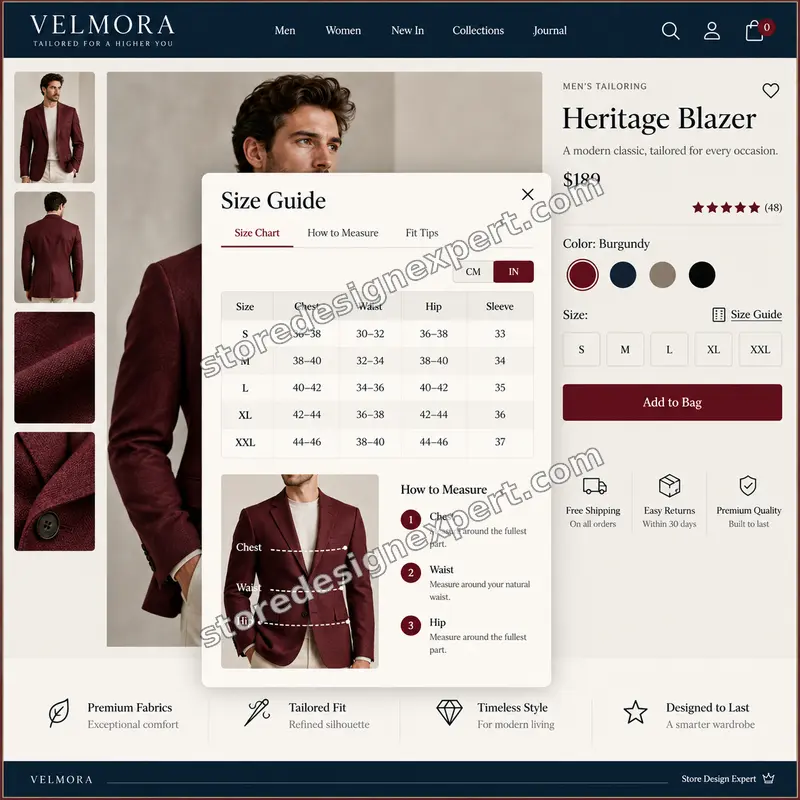
Add Size Guide Size Chart Popup to Shopify Store and Stop Size-Related Returns
Want to add size guide size chart popup to Shopify store pages without installing another app? We build a clean, readable popup into your theme so shoppers pick the right size with confidence on desktop and on mobile, and you see fewer returns for the wrong fit.
- Built into your theme, so it loads with the page
- Matches your fonts, colors and button style
- Opens as a modal on desktop and a bottom sheet on phones
- Tested on real devices before handover
From$79
Delivery1 to 3 working days
Revisions2 rounds
Our track record
Over 450 Shopify Stores Launched Since 2015. Now Let Us Fix Your Size Chart.
Store Design Expert has designed and launched more than 450 Shopify stores, and our verified clients rate us 4.9+ on average. A size guide is a small task, but it sits on the page where fit decides the sale, so it gets senior attention.
Average rating from verified clients
Building Shopify stores since
Secure checkout
Pay through a protected checkout and keep a full order record.
Two revision rounds
Included in every package, so the result matches what you pictured.
Backup before changes
We work on a duplicate of your theme, never on your live store.
Problem and result
Add Size Guide Size Chart Popup to Shopify Store and Turn Guesswork into Confident Add to Cart
Fit is the question shoppers cannot answer by looking at a photo. A missing, tiny or badly formatted size chart is one of the most common reasons apparel, footwear and accessory stores lose product page visitors and pay for returns. Shopify product page size guide size chart popup customization puts the answer exactly where the decision happens.
Shoppers cannot tell which size fits
They open a second tab, squint at a pasted image that is unreadable on a phone, or message your support inbox and wait. Many simply leave. Those who do buy often order two sizes and send one back, which costs you shipping, restocking time and margin on every order.
A clear popup right where the decision happens
One tap opens a readable chart, the right row is easy to find, and the shopper returns to the product page ready to pick a size and add to cart. Your Shopify product page user experience size guide size chart popup stays fast, branded and accessible, with no clutter added to the page itself.
What is included
What Your Shopify Size Guide Popup Includes
When you add size guide size chart popup to Shopify store themes through us, you get a custom size guide size chart popup for Shopify product page templates, written against your theme's real structure, checked on real devices and documented so you can edit the chart yourself without calling a developer.
Implementation checklist
- Size guide link placed beside or above your size selector, using your theme's own variant picker markup
- Responsive popup: a centered modal on desktop and a bottom sheet on mobile with comfortable tap targets
- Your size chart table formatted for readability, with sticky header row and sensible column widths on narrow screens
- Close button, overlay tap and Escape key support, with scroll locked behind the popup
- Focus trap, focus return to the link and screen-reader labels so the popup works for keyboard users
- Styling that inherits your fonts, colors, border radius and button style from the theme settings
- Lightweight code with no third-party app, no external script and no monthly fee
- Handover note showing exactly where the chart lives and how to edit rows, units and wording
Prefer to avoid subscriptions? We build a Shopify size guide size chart popup without app dependencies, so there is nothing to renew, no vendor to depend on and nothing slowing your product pages.
See how it works
From a Tap on Size Guide to a Confident Add to Cart
Follow one shopper through the finished popup. Every step below happens on your own product page, with your own chart, your own styling and no third-party app in the way.
Animated walkthrough
- 1
The shopper taps Size guide
A link sits beside the size selector, exactly where the question forms, so nobody has to hunt for it.
- 2
Your chart opens in a popup
A centered modal on desktop and a bottom sheet on mobile, with easy close, locked background scroll and keyboard support.
- 3
The right row is easy to find
Clear columns, spacing and a readable header help shoppers match their measurements in seconds.
- 4
They return and choose a size
The popup closes, focus returns to the page and the size is ready to select and add to cart.
Scope boundaries
Exactly What Is and Is Not Covered
Clear boundaries keep this a fixed-price task with no surprises. Before you add size guide size chart popup to Shopify store pages, here is what the package covers, what it does not, what we need from you, and when a custom quote is fairer than forcing a task to fit.
Included
- One size chart popup on your product template
- Desktop, tablet and mobile styling
- The number of charts you choose in the calculator
- Two revision rounds and a written handover note
Not included
- Measuring products or writing your size data for you
- Redesigning the product page
- Size recommendation engines unless you add the helper
- Changes to a heavily modified third-party theme without a quote
Access we need
- Collaborator access to your Shopify store
- Your size chart data in any readable format
- The products or collections each chart applies to
Quote triggers
- More than six charts or unusual layouts
- Custom size calculators or fit quizzes
- Multi-store or multi-language setups beyond one extra language
Typical turnaround
- One to three working days for most stores
- Faster options in the calculator
- Timing confirmed before work starts
After launch
- Two revision rounds before go-live
- A handover note for editing charts
- Questions about Add Size Guide / Size Chart Popup to Shopify Store answered; larger changes priced as small tasks
Compare your options
Shopify Size Guide Size Chart Popup Without App, DIY Code or a Freelancer?
Four ways to add a size chart to your store. Here is how they compare for speed, cost, quality control and long-term upkeep, so you can judge where your money works hardest.
| What matters | Size guide app | DIY theme code | Freelancer marketplace | Store Design Expert |
|---|---|---|---|---|
| Monthly fee | Yes, often recurring | None | None | None |
| Extra script slowing pages | Usually | No | Varies | No |
| Matches your theme styling | Basic templates | If you can code | Varies | Yes |
| Tested on mobile and desktop | You check | You check | Rarely | Yes |
| Keyboard and screen-reader support | Varies | If you add it | Rarely | Yes |
| Theme backup before changes | No | Up to you | Rarely | Yes |
| Handover note for editing charts | No | No | Rarely | Yes |
| Two revision rounds included | No | No | Varies | Yes |
Price calculator
Price Your Shopify Size Guide Popup
Pick a package, choose how many charts you need and where the popup appears, then set your speed. Your Shopify size guide size chart popup installation cost and delivery estimate update instantly, with no hidden fees.
Request a custom quote
Multi-language size guides, interactive size calculators, bundles with other product page tasks or unusual theme structures receive a custom quote with agreed acceptance criteria.
Request a QuoteChanged your mind? Choose Basic, Standard or Plus above to return to the instant calculator.
How it works
How We Add Size Guide Size Chart Popup to Shopify Store, Step by Step
Six clear steps to add size guide size chart popup to Shopify store themes safely, with testing before anything touches your live theme. You always know what happens next, who needs to do what and when to expect the next update.
- 1
Purchase
Choose your package and options in the calculator and check out securely. Your order locks the scope and the price, so there are no surprise invoices later.
- 2
Access
Send collaborator access and your size chart data using the short form we email you. You stay the store owner and no password is shared.
- 3
Build in a duplicate theme
We write the size guide size chart popup Shopify theme code in a duplicate of your theme, so your live store keeps selling while we work.
- 4
QA
We test devices, browsers, keyboard use and your real size data against the acceptance criteria before you see anything.
- 5
Handover
We publish the popup to your live theme, confirm it with you and send a short note on editing your charts.
- 6
Support
Questions about the popup are answered after launch, and larger changes are quoted as small tasks with a fixed price.
Compatibility and QA
Professional Shopify Size Guide Size Chart Popup Setup: Checks and Acceptance Criteria
Every size guide is tested before you see it, and we keep a backup of your theme so changes are always reversible. Here is what we verify and what counts as done.
What we test
- ThemesShopify 2 0 size guide size chart popup builds for Online Store 2.0 themes including Dawn, plus most well-structured older themes.
- DevicesRecent iPhone, Android, tablet and desktop widths, including small phones at 320 pixels.
- BrowsersThe current versions of Chrome, Safari, Firefox and Edge.
- BackupsWe duplicate your theme first, so you can roll back at any time.
- PerformanceNo extra apps or external scripts, so page speed and Core Web Vitals are protected.
- AccessibilityKeyboard operation, focus return and labels for screen readers.
Acceptance criteria
- The popup opens and closes by tap, click, overlay and Escape key
- The chart is readable on a small phone without sideways page scrolling
- Focus returns to the Size guide link after closing
- Fonts, colors and spacing match your brand
- You can edit the chart using the handover note
What we need to get started
What We Need to Get Add Size Guide / Size Chart Popup to Shopify Store Started
Pick the access route that suits you. Most owners simply approve a collaborator request, and whichever route you choose, we work in a duplicate of your theme and tell you before anything goes live. To hire Shopify expert for size guide size chart popup work, you only need to send the items below.
Collaborator access
Send us your store URL and approve our Shopify collaborator request. You stay the owner, no password is shared, and you can remove our access with one click once the popup is live.
No store yet? We build it first
We set the store up in our own Shopify Partner account as a development store and transfer ownership to you when the work is finished, so you only pick a Shopify plan at the end.
Prefer to share a login?
You can send staff login details instead. We recommend collaborator access because it is easier to revoke, but a staff account works if you prefer.
Your size chart data
A table, spreadsheet, PDF or clear image of your sizes and units. If you sell more than one product type, send one chart per type and tell us which is which.
Products to cover
The collections, product types or tags that should show each chart, plus a note on any products that should not show a size guide at all.
One decision maker
Someone who can approve the finished popup and wording, so revisions stay inside the two included rounds and launch is not delayed.
Not sure which route fits? Tell us your situation in the short form after checkout and we will recommend one.
Testimonials
What Store Owners Say Before You Order Add Size Guide / Size Chart Popup to Shopify Store
Verified feedback from clients who trusted us with their Shopify stores and quick tasks alike.
Verified
Thank you so much to Store Design Expert and the team. My site looks far more appealing to customers, and I will happily recommend your services to other new small businesses.
JS
Jennifer S.United States
Verified
Outstanding work and outstanding customer service. Five stars! I will absolutely use Store Design Expert again for my next book.
KM
Katharine M.United States
Verified
Store Design Expert was great! They delivered exactly what I asked for and even offered helpful extra suggestions. Highly recommended.
PW
Paul W.United States
Verified
I request Store Design Expert every time I have a project. They are professional and give real attention to detail, which makes the work stand out.
LK
Laura K.United States
Verified
They kept communicating until the problem was fully resolved, and the result was great.
HJ
Henry J.United States
Verified
Super helpful and patient. I am new to ecommerce and Store Design Expert talked me through the whole process and even fixed my payment bridging for me!
LR
Lois R.United Kingdom
Verified
I am beyond satisfied! Store Design Expert went above and beyond on my project. Highly recommended!
MD
Michael D.United States
Verified
The experience was tailored to my brand and specifications to the letter. I love the result.
EP
Eric P.United States
Verified
They definitely get the job done. Very patient and understanding throughout the whole project.
BS
Brian S.United States
Related searches
Related Searches for Add Size Guide / Size Chart Popup to Shopify Store
The searches below are the ones that lead people to Add Size Guide / Size Chart Popup to Shopify Store.
People who look up “add size guide size chart popup shopify service”, “shopify product page size guide size chart popup customization” or “shopify developer for size guide size chart popup” usually want Add Size Guide / Size Chart Popup to Shopify Store; the calculator above shows the price and delivery estimate before you commit.
“custom size guide size chart popup for shopify product page”, “size guide size chart popup shopify theme code” or “size guide size chart popup on shopify mobile” all point to the same job, which Add Size Guide / Size Chart Popup to Shopify Store covers from start to finish.
If you searched for “hire shopify expert for size guide size chart popup”, “professional shopify size guide size chart popup setup” or “shopify size guide size chart popup without app”, Add Size Guide / Size Chart Popup to Shopify Store is the work that answers it.
“shopify size guide size chart popup installation cost”, “shopify product page user experience size guide size chart popup” or “shopify 2 0 size guide size chart popup”: owners type these when they need Add Size Guide / Size Chart Popup to Shopify Store, and the packages above are priced for that job.
FAQ
Size Guide Popup Questions
Straight answers about cost, apps, mobile behavior, timing and what we need from you.
How much does it cost to add a size guide popup to Shopify?
Packages start at $79. Extra charts, placements, speed and optional features are added in the calculator, which shows your exact Shopify size guide size chart popup installation cost before checkout. The price is fixed for the scope you choose.
Can you add size guide size chart popup to Shopify store themes without an app?
Yes. We build the popup into your theme code, so there is no monthly subscription, no vendor login and no extra script slowing your product pages. Many size guide apps charge every month for something a few dozen lines of theme code can do.
Do you offer an add size guide size chart popup Shopify service for stores that already have a chart image?
Yes. If your chart is currently a pasted image, we convert it into a clean, readable table inside the popup, so it works on small screens and can be edited without graphics software.
Does the size chart popup work on mobile?
Yes. A size guide size chart popup on Shopify mobile opens as a bottom sheet that is easy to read and close with one thumb. We check small and large phones, and we make sure the page behind does not scroll while the chart is open.
Can I show different charts for different products?
Yes. Choose up to three or six charts in the calculator, or pick the Plus package to manage per-product charts from the Shopify admin using metafields. A fallback chart covers products you have not assigned.
Why hire a Shopify developer for size guide size chart popup work instead of using an app?
A developer writes to your exact theme, keeps the page fast and leaves you with no subscription. We have launched more than 450 Shopify stores since 2015, so we know how product forms differ between themes and where popups break.
Which themes do you support for Add Size Guide / Size Chart Popup to Shopify Store?
Online Store 2.0 themes such as Dawn and most clearly structured older themes. Heavily modified or unsupported themes are quoted before work starts, so you never pay for work we cannot stand behind.
How long does Add Size Guide / Size Chart Popup to Shopify Store take?
Most popups are live within one to three working days after we receive access and your chart data. Sooner and Fastest options are available in the calculator if you have a launch or campaign date.
What do you need from me for Add Size Guide / Size Chart Popup to Shopify Store?
Collaborator access to your store (or staff login details), your size chart data and the products or collections it applies to. If you have no store yet, we can build in our Partner account and transfer ownership to you.
Will the popup hurt my page speed?
No. The code is small, loads with the page and uses no external libraries. We compare the page before and after, and the popup content is not rendered until a shopper opens it.
Is Add Size Guide / Size Chart Popup to Shopify Store safe for my live store?
Yes. We work in a duplicate of your theme and only publish after testing. Your original theme stays as a backup, so you can roll back in a minute if you ever need to.
What if I want changes to Add Size Guide / Size Chart Popup to Shopify Store afterwards?
Every order includes two revision rounds before launch. Later changes are quoted as small tasks with a fixed price.
Ready when you are
Add Size Guide Size Chart Popup to Shopify Store: Give Shoppers the Size Answer They Need
Pick your package, see your exact price and delivery estimate and get a size guide popup that works on every device. If your catalog or theme is unusual, request a quote and we will scope it with you.
Secure checkout · Two revision rounds · Backup made before any change