
Shopify stores designed and launched
Shopify brand guidelines implementation
Shopify Brand Guidelines Implementation: Your Style Guide, Built Into the Theme
Shopify brand guidelines only work when the theme obeys them. We translate your guide into theme settings, reusable styles and tested templates, so colors, type, buttons and imagery match on every page and phone. Fixed packages start at $390, with most rollouts finished in 2 to 9 working days.
- Colors, fonts and logo rules applied across every template
- Buttons, forms, badges and cards styled to one standard
- Built in a duplicate theme, checked on real phone widths
- A one-page brand-in-theme handover for your team
Our track record
450+ Shopify Stores Launched Since 2015, Each One Taught Us How Brands Slip
A guide that lives in a PDF protects nothing. After more than 450 stores and a 4.9+ rating from verified clients, we know where a brand drifts once it meets a real theme: buttons, badges, forms, emails and mobile menus. We close those gaps one by one.
Average rating from verified clients
Building Shopify stores since
Secure checkout
Pay through a protected checkout and keep a full order record.
Two revision rounds
Included in every package, so the result matches what you pictured.
Backup before changes
We work on a duplicate of your theme, never on your live store.
Who this is for
Who Needs Shopify Brand Guidelines Applied by a Specialist
You do not need a famous brand to need this. You need a guide, or at least a logo and a feeling, and a store that does not quite match it yet. These are the owners who come to us.
You are a good fit if
- You have a guide, a PDF or at least a logo and colors
- You want the whole store consistent, not just the home page
- You would rather know the total before work begins
- You need a store your team can edit without breaking the look
Brands with a fresh identity
A designer handed you a PDF with palette, type and logo rules. Your store still runs the theme's default orange and a stock heading font, and nobody on your side can bridge the two.
Stores after a rebrand
The logo and packaging changed last quarter, but the store carries three shades of the old green and a footer from two designs ago. We find every leftover and replace it.
A Shopify clothing brand website
Fashion and apparel stores live on mood: model photography, a precise type voice and tight color use. We make the theme serve the lookbook instead of fighting it.
Founders who have a logo and nothing else
You are about to Shopify design your own brand from a single mark. We pull a working palette, font pair and button style from it, written down on one page you can approve.
Teams with several people editing the store
Marketing adds banners, a merchandiser adds sections, an assistant uploads blogs. Locked-in styles stop each of them from inventing a slightly different button.
Agencies and designers handing off a design
You delivered the identity and now need a Shopify specialist to carry it into the theme without compromises. We work from your files and report back with a before-and-after.
Problems solved
Why Shopify Store Branding Breaks Down Between Guide and Theme
Shopify store branding usually fails in small places, not in the big hero image. Each problem below looks minor alone, and together they make a store feel assembled rather than designed.
Theme settings only cover part of the palette, so leftover default colors show up in links, badges and focus rings.
Outcome: We map each guide color to a role, then test every state a visitor can trigger: hover, focus, sale, sold out, error and disabled. Nothing is left to the theme's own guess.
The guide names fonts the theme cannot load, so a fallback quietly replaces your typeface.
Outcome: We check licenses and formats, load the right weights and set a fallback stack close in width, so a slow connection does not reflow your headings.
Pages look right on a laptop and slightly off on phones, where most visitors arrive.
Outcome: We review every template at phone, tablet and desktop widths and adjust spacing, line length and button size until the identity holds up at each one.
Apps inject their own widgets with their own colors, which cuts straight through the design.
Outcome: We restyle the app blocks you actually use, including reviews, popups and upsells, where the app allows it, and tell you plainly where it does not.
Order emails, the customer login page and checkout still carry Shopify's defaults.
Outcome: We brand the surfaces that sit outside the theme editor, so a customer's journey from ad to receipt keeps the same face.
Every editor on your team interprets the guide differently when adding content.
Outcome: We leave reusable section presets and a short usage sheet, so new banners and pages inherit the right styles without a designer in the room.
What we can do
What Our Brand Style Guide Implementation Into Shopify Theme Work Covers
Brand style guide implementation into Shopify theme work spans settings, code and judgment. Here are the six areas we work through, and what each one means for your store day to day.
Shopify logo color code handling and palette mapping
We take your HEX, RGB or CMYK values, convert them for screen, check contrast ratios against accessibility targets and assign each color a role: background, text, accent, button, alert. Wrong swatches get caught before they spread.
Custom styles for Shopify that survive theme updates
Where theme settings run out, we add styles as design tokens in a dedicated stylesheet or snippet, not scattered overrides. That keeps your look intact when the theme releases a new version.
Typography applied across headings, body and interface text
Heading, subheading, body, caption and button text each get their own size, weight and spacing, at three widths. The result reads like the printed guide rather than the theme's default scale.
Components built to one standard
Buttons, inputs, selects, tags, cards, accordions and announcement bars share the same radius, border, shadow and motion. We document that standard so later sections follow it automatically.
Imagery, icon and logo rules respected
We set logo clear space, minimum size and the correct variant for light and dark headers, then match icon weight and image treatment such as aspect ratio and cropping to what the guide specifies.
Brand protection at the edges
Favicon, social share image, 404 page, password page and email headers all follow the guide, so a link shared on social or a lost visitor still meets your brand instead of a stock screen.
What is included
What You Receive With Every Brand Rollout
The deliverables fall into six groups, so you can check them off against your own guide. Package differences are laid out in the comparison table further down.
Color system
- Guide palette mapped to named roles
- Theme color schemes configured
- Contrast checked on text and buttons
- Hover, focus and disabled states styled
Type system
- Brand fonts loaded in correct formats
- Heading and body scale set per device
- Fallback fonts matched in width
- Button and menu text styled
Components
- Buttons, inputs and cards unified
- Announcement bar and header styled
- Product badges and labels recolored
- Optional custom sections in Rollout
Logo and imagery
- Logo variants placed at correct sizes
- Favicon and share image set
- Icon style aligned
- Image ratios and cropping standardized
Safe working method
- Built in a duplicate theme
- Backup of your live theme first
- Phone, tablet and desktop review
- Every template walked through
Handover
- One-page brand-in-theme usage sheet
- Short recorded walkthrough
- Two revision rounds
- Publish help on the day
Each package leaves the store with Shopify store design services logic you can reuse: tokens, section presets and a usage sheet, not just a one-off paint job.
See how it works
From Guide Page to a Storefront That Wears Your Brand
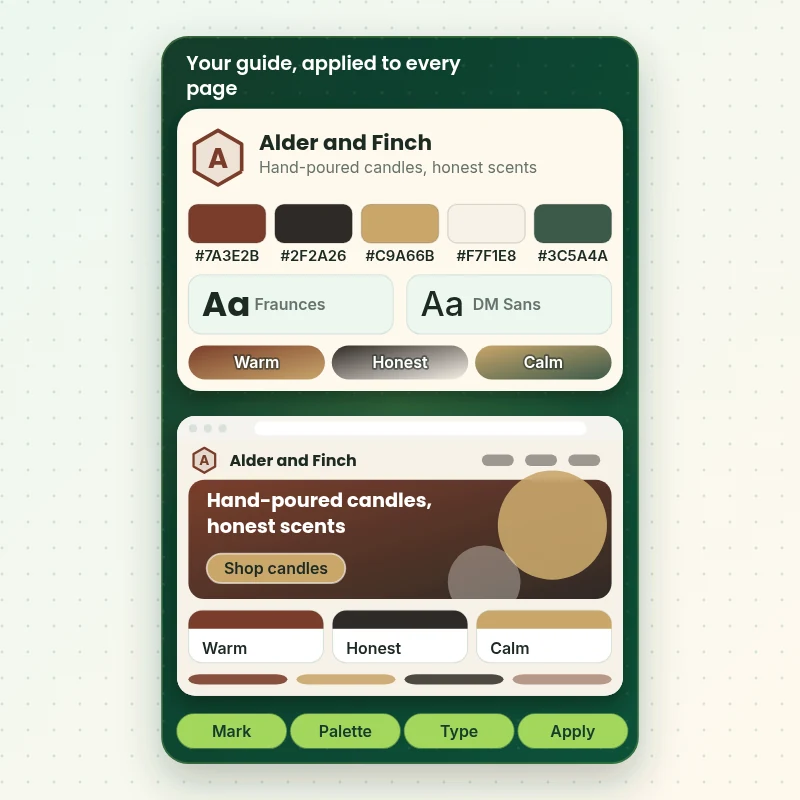
A style guide is only a promise until it reaches a storefront. Follow one identity from its mark and palette through type choices to the finished page, and see how each rule becomes a setting, a style or a component you can edit, test and trust at launch.
Portfolio
Shopify Storefront Designs by Niche
A look at store designs across fashion, home, beauty, pets and gifts, to show the standard of layout and finish behind Shopify Brand Guidelines Implementation.

Specialty coffee store design
Specialty coffee
Jewelry store design
Jewelry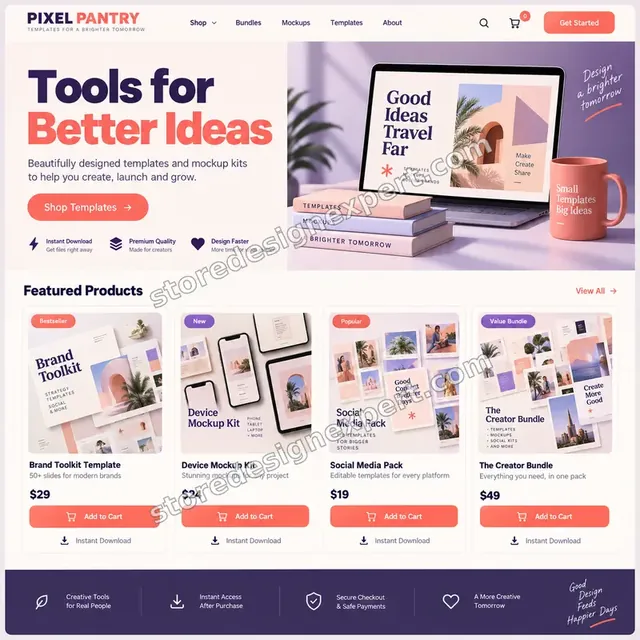
Design templates store design
Design templates
Outdoor drinkware store design
Outdoor drinkware
Barber store design
Barber
Travel creator store design
Travel creatorProcess and timeline
Brand Style Guide Implementation Into Shopify Theme: Our Six Steps
Every rollout runs in a duplicate theme so your live store stays untouched until you approve. A Brand Sync project takes 2 to 4 working days; the calculator estimates larger scopes.
- 01
Guide review
We read your guide against your live store and list every place the two disagree, from heading size to the shade of a sale badge.
- 02
Role mapping
Each color, font and logo rule becomes a named role, such as primary action or muted text. You approve the sheet before code starts.
- 03
Build in a copy
Styles go into a duplicate theme through settings first, then into code only where the theme runs out.
- 04
Your review
You open the copy on your own phone and laptop, then send up to two rounds of changes.
- 05
Edge-case QA
We test states, empty carts, long product names, sold-out items, translated text and every device width, then fix what breaks.
- 06
Publish and hand over
We publish the copy, send the usage sheet and walkthrough, and stay on hand while the new look goes live.
Compare your options
Theme Settings, Gig, Agency or Store Design Expert for Brand Rollout?
Owners usually weigh four routes: tweak theme settings alone, buy a low-cost gig, hire a full agency or choose a specialist at a fixed price. Here is how they stack up on the points that matter for brand work.
| What matters | Theme settings alone | Marketplace gig | Full agency | Store Design Expert |
|---|---|---|---|---|
| Every guide color mapped to a role | Partly | Sometimes | Yes | Yes |
| Hover, focus and error states styled | No | Rarely | Yes | Yes |
| Custom styles that survive theme updates | No | Varies | Yes | Yes |
| Emails, checkout and password page branded | No | Rarely | Yes | Optional |
| Tested at phone, tablet and desktop widths | You do it | Rarely | Yes | Yes |
| Written usage sheet for your team | No | No | Sometimes | Yes |
| Fixed price shown before you pay | Yes | Yes | Often hourly | Yes |
| Typical starting cost | Free | $30 to $100 | $3,000+ | $390 |
Inside every project
What Protects Your Store While We Restyle It
Changing every color and font touches nearly every page, so we work with guard rails. These come with every project and are part of what the price covers.
A duplicate theme carries all the work
Your live store keeps trading while we restyle a private copy. Nothing reaches customers until you have looked at it on your own devices.
Collaborator access, nothing more
You approve a collaborator request with only the permissions we need, and can remove it later. Owner passwords and payment details stay with you.
A saved copy of what you have now
Before publishing we back up your current theme, so going back to the old look takes minutes if you decide you prefer it.
A written definition of done
We check the finished store against the role sheet you approved, state by state and width by width, instead of relying on a glance.
Handover notes in plain English
The usage sheet explains which settings control which colors, where custom styles live and what to avoid when adding content later.
Fixed scope with two change rounds
You pay the price shown at the start. Two rounds of changes are included, and anything beyond the agreed scope is quoted before we touch it.
Interactive price calculator
Price Your Shopify Brand Guidelines Implementation
Pick a package, then tell us how many templates should carry the brand, what guide you start from and how deep the styling goes. The total and the delivery date recalculate as you click.
Request a custom quote
Multi-store or multi-brand setups, headless storefronts, Shopify Plus checkout extensibility work and full design-system builds are scoped and quoted separately with fixed deliverables.
Request a QuoteChanged your mind? Choose Brand Sync, Style Kit or Brand Rollout above to return to the instant calculator.
Packages and comparison
Shopify Brand Guidelines Package Comparison
Compare the three packages row by row to see exactly where each added dollar goes. Anything outside a package is added in the calculator at a fixed price.
| What is included | Brand Sync $390 | Style Kit $690Recommended | Brand Rollout $1,190 |
|---|---|---|---|
| Palette mapped to named roles | Included | Included | Included |
| Brand fonts loaded and set | Included | Included | Included |
| Logo, favicon and header placement | Included | Included | Included |
| Core templates reviewed | Included | Included | Included |
| Phone and desktop checks | Included | Included | Included |
| One-page usage sheet | Included | Included | Included |
| Custom component styles | Not included | Included | Included |
| Hover, focus and disabled states | Not included | Included | Included |
| Blog, search and 404 pages | Not included | Included | Included |
| Share image set | Not included | Included | Included |
| Recorded walkthrough | Not included | Included | Included |
| Custom brand sections | Not included | Not included | Included |
| Section presets for editors | Not included | Not included | Included |
| Account and password pages | Not included | Not included | Included |
| Publish-day help | Not included | Not included | Included |
| 14 days of fixes | Not included | Not included | Included |
| Typical delivery | 2 to 4 days | 3 to 6 days | 5 to 9 days |
For Shopify Brand Guidelines Implementation, the price and the delivery estimate shown in the calculator above are the ones that apply.
Why Store Design Expert
Why Brands Choose Store Design Expert for Shopify Done for You Design
Shopify store design services come in every size. We sit between a gig and a retainer: a specialist team, a fixed price and a finished result you can sign off.
Shopify only, since 2015
We have launched more than 450 stores on the platform, so we know how each theme, app and settings page will behave when your guide hits it.
We design and we code
Many developers can edit CSS and many designers can read a guide. Our team does both, so decisions about a color or a font are made once instead of passed back and forth.
Shopify done for you design at a fixed price
You see the total before paying and it does not grow by the hour. Extra scope is listed in the calculator, not discovered halfway through.
Tested at the edges
Sold-out badges, long titles, error states, translated text and slow phones are all in our checks, which is where most brand rollouts quietly fail.
Clear updates, no guessing
You receive the role sheet, a preview link and a review window with dates, so you always know what stage the project is in.
You keep the store and the code
Everything we build lives in your theme. If we started the store, we transfer ownership to you at the end.
What we need to get started
How to Get Started With Shopify Theme Customization for Your Brand
Send us the guide you have, even if it is only a logo and two colors. We will tell you what is missing and quote around it.
Add us as collaborators
If your store exists, send its web address and accept our collaborator request. You remain the owner, and you can end our access whenever you like.
No store yet? We create it first
We build in our own Shopify Partner development store and transfer ownership to you after sign-off, so you choose a plan only at the very end.
Prefer a staff login instead?
You can send staff details if that is easier. We lean toward collaborator access because it is simpler to switch off afterwards.
Your guide and source files
Send the PDF, Figma or Canva links, logo files in SVG or PNG, and font files with their license. Missing pieces we propose and you approve.
Color values and examples
Give us your HEX codes or a screenshot of the identity in use, plus two or three store pages you like and one you dislike.
Who approves, and when
Name the person who signs off on the look and any launch date, so we can plan reviews around real availability.
We do not need your owner password or card numbers. Each rollout is prepared in a copy of the theme, with a backup taken before anything near the live store changes.
Testimonials
What Store Owners Say Before You Order Shopify Brand Guidelines Implementation
Verified clients describe how Store Design Expert handled their store builds, fixes and redesigns.
Verified
Store Design Expert is the best. The work is very professional, they pay close attention to detail and, more importantly, they listen. Their level of cooperation is second to none, and everything was delivered in a very timely manner. I will keep them in mind for future projects.
BN
Barbara N.United States
Verified
The experience was tailored to my brand and specifications to the letter. I love the result.
EP
Eric P.United States
Verified
They definitely get the job done. Very patient and understanding throughout the whole project.
BS
Brian S.United States
Verified
Thank you so much to Store Design Expert and the team. My site looks far more appealing to customers, and I will happily recommend your services to other new small businesses.
JS
Jennifer S.United States
Verified
Very patient, informative and transparent, and they did exactly what they said they would do. Thanks for all the help!
RO
Raymond O.United States
Verified
Store Design Expert is the only one I use for all things WordPress. They have a high level of understanding, deliver quality work and are easy to deal with.
SC
Scott C.United States
Verified
A pleasure to work with. They did pretty much everything I asked and definitely exceeded my expectations. I will be working with Store Design Expert again soon.
JL
Jerry L.United States
Verified
Superb work! Store Design Expert is incredibly patient, and even when I did not fully understand my own questions, everything was explained again in detail. My vision was implemented perfectly, and the work is worth every cent I spent.
KB
Katrin B.Germany
Verified
Very impressed with the build-out. My store is ready to get started, and I am sure I will reach out for edits down the road, but this is everything I could ask for to get the party started. Thanks again, and I will be in touch for future projects.
DH
Dale H.United States
Related searches
Searches That Bring Owners to Shopify Brand Guidelines Implementation
Owners reach this page from different searches. Here is how the common ones relate to Shopify Brand Guidelines Implementation.
If you searched for “brand style guide implementation into shopify theme”, “shopify design your own brand”, “how to protect your brand on shopify” or “shopify clothing brand website”, Shopify Brand Guidelines Implementation is the work that answers it.
Owners also search for “shopify store branding”, “customize shopify website colors”, “how to change color scheme in shopify” or “shopify logo color code”.
Related searches include “custom styles for shopify”, “how to customize your shopify store design”, “shopify done for you design” or “cost shopify theme customization”.
Owners also search for “get started with shopify theme customization” or “shopify store design services”.
FAQ
Shopify Brand Guidelines Implementation FAQs
Honest answers on pricing, timing, fonts, colors and keeping your brand consistent after we finish.
How much does Shopify brand guidelines implementation cost?
Packages start at $390 for Brand Sync, $690 for Style Kit and $1,190 for Brand Rollout. Templates covered, guide completeness and styling depth add fixed amounts in the calculator, so most projects land between about $550 and $1,900. You see the exact total before checkout.
Cost Shopify theme customization: what do agencies charge for brand work?
Published guides put branded theme work at roughly $600 to $3,500 from freelancers and $3,000 to $8,000 from agencies, while gig listings run $30 to $100. We charge a fixed $390 to $1,190 plus options, with a duplicate-theme build and written handover.
How to change color scheme in Shopify without breaking the theme?
Theme settings hold named color schemes you can edit in the theme editor. Changing one swatch can ripple into buttons, badges and links you did not expect. We map each color to a role first, change them in a copy and check every state before publishing.
How to customize your Shopify store design to match a brand guide?
Start with theme settings for colors, fonts and buttons, then add custom styles where the theme stops. We do both in a duplicate theme, review every template at phone and desktop widths with you and publish only when the store matches the guide.
Where do I find my Shopify logo color code?
Your logo color code lives in your brand guide or logo file, usually as HEX, RGB or CMYK. If you only have the artwork, we sample the colors, convert them for screens, check contrast and write them down for your approval before they go into the theme.
What are custom styles for Shopify and do I need them?
Custom styles are small blocks of CSS or theme variables that add what theme settings cannot, such as precise button states or card shadows. You need them when your guide is stricter than the theme. We keep them organized so theme updates do not undo them.
Can you customize Shopify website colors from a PDF guide?
Yes. Send the PDF and any logo files. We translate the palette into theme color schemes, assign each shade a role, test contrast for readability and apply it across every template in your chosen package, including email and checkout if you add them.
How to protect your brand on Shopify after the project is done?
Lock the look in with section presets, a usage sheet and limited staff permissions. Our handover explains which settings control which styles and what to avoid. Anything you later add inherits the right fonts and colors rather than inventing new ones.
Do you work on a Shopify clothing brand website?
Yes, and fashion stores are a common fit. Apparel brands depend on tightly controlled imagery, type voice and color, so we pay extra attention to product cards, size and swatch controls, lookbook sections and the way model photography sits on each template.
I only have a logo. Can you still help with Shopify design your own brand?
Yes. Choose the logo-only option and we propose a palette, a font pair and button rules based on your mark, shown on one page for approval. Once agreed, that page becomes your guide and we implement it exactly like a designer-supplied one.
What does Shopify done for you design include and exclude?
It includes the planning, styling, testing and handover for your agreed templates. It excludes logo design, photography, custom app development and full redesigns of page layout, though several of those are available as quoted add-ons or separate services.
How long does it take to get started with Shopify theme customization for a brand?
Once we have your guide and access, work begins within a day or two. Brand Sync takes 2 to 4 working days, Style Kit 3 to 6 and Brand Rollout 5 to 9. Faster delivery options in the calculator shorten the range.
Is my live store at risk while you change it?
No. We work in a duplicate theme and take a backup before publishing. Customers keep seeing your current store until you approve the copy, and if you ever want the old look back, restoring it takes only a few minutes.
Do you offer Shopify store design services beyond brand rollout?
Yes. We design and build whole stores, product pages, collection layouts and navigation, and we can continue after the rollout. This page covers the focused job of putting a brand guide into a theme at a fixed price.
Ready when you are
Put Your Shopify Brand Guidelines Into the Store This Month
Pick a package, see your exact price and delivery date and book your Shopify brand guidelines implementation now. You work with a team that has launched 450+ Shopify stores, and you get a store that matches your guide on every screen.
Secure checkout · Two revision rounds · Usage sheet included