
Shopify stores designed and launched
Recharge subscriptions setup for Shopify
Recharge Shopify Setup That Takes Subscribers From First Order to Renewal
Installing Recharge Shopify merchants rely on is quick; making the plans, the customer portal and the first renewal behave takes care. We configure selling plans, connect the payment processor, set up the portal and test a real subscription from checkout to the next charge. From $790, fixed scope, with a written test log.
- Selling plans and widget set up on your product pages
- Customer portal ready, including Shopify customer account extensions
- Migration plan if you are leaving another subscription app
- Test subscription run through checkout and renewal
From$790
Delivery4 to 16 working days
Revisions2 rounds
Our track record
450+ Shopify Stores Launched Since 2015. Your Subscription Launch Gets the Same Care.
A subscription store is judged on the third order, not the first: did the renewal charge, did the box ship, could the customer pause? We build with that in mind, because every Recharge setup is only as good as the first renewal it survives.
Average rating from verified clients
Building Shopify stores since
Secure checkout
Pay through a protected checkout and keep a full order record.
Two revision rounds
Included in every package, so the result matches what you pictured.
Backup before changes
We work on a duplicate of your theme, never on your live store.
Who this is for
Who Needs Help With a Recharge Subscription Shopify Setup
Owners come to us at three moments: before launch, after a rough first month, or when they are leaving another app. These are the six Recharge situations we meet most.
You are a good fit if
- You sell products people reorder
- You want a fixed price and written Recharge scope
- You will own the Recharge account and its monthly fees
- You can approve plan names and frequencies quickly
Brands launching a first subscription
Coffee, supplements, pet food, razors: products people reorder. You want plans that read clearly on the product page and a checkout that never confuses a first-time subscriber.
Stores moving from another subscription app
You already have subscribers and cannot afford a gap in their billing. We plan the move so existing customers carry across and renew on their usual date.
Merchants whose customers cannot manage plans
People email to skip or cancel because the portal link is missing or the account pages are half set up. We wire the portal in properly so support tickets fall.
Owners weighing Recharge against alternatives
You have read the Recharge vs Skio posts and still want a straight answer for your catalog, billing model and budget before you pay any monthly fee.
Brands selling across countries
Currencies, shipping zones and languages complicate subscriptions. We test the plan, the portal and the charge in the markets you actually serve.
Teams without a developer on call
Your theme has a custom product template and nobody wants to touch it. We do the placement, the testing and the handover so you keep selling.
Problems solved
Why a Recharge Subscription Shopify Launch Stumbles
Most failed launches share the same few faults. They are easy to avoid once you know to look, and expensive to unpick after customers are already subscribed.
- The widget is missing or sits on the wrong template.
Recharge shows plans through a widget or theme block. If it is not on the template your product actually uses, shoppers only ever see a normal Add to cart button.
- Customers cannot log in to manage their subscription.
The portal depends on how Shopify customer accounts are configured. Without the right extensions the Manage subscription page is empty or sends people to an error.
- The first renewal fails quietly.
A payment processor that is not correctly connected, or a card that cannot be reused, shows up only on day thirty. We test the flow that produces the second charge.
- Plans and discounts clash.
Subscription discounts stack oddly with sale prices, codes and free shipping if nobody tests them together. The cart ends up showing a price the plan never promised.
- A migration leaves subscribers stranded.
Moving customers between apps goes wrong when payment tokens, next-charge dates or bundles are mapped by hand. One missing field can stop a renewal.
- The plan picker is clumsy on a phone.
Frequency dropdowns, radio buttons and discount labels often overflow small screens. We tidy spacing and order so the choice reads at a glance.
What we can do
What Our Recharge App Shopify Setup Covers
Six jobs make up the service. Your package decides how many products, plans and migrations are included; the notes below explain the edge cases we deal with up front.
Install, permissions and processor
We install the Recharge app, approve the product, customer and order permissions and connect the payment processor you use, checking which processors your Recharge plan supports before anything is live.
Selling plans and discounts
Frequencies, prepaid options and discount rules are created and attached to the right products. We test each plan with a real checkout so the discount, tax and shipping lines agree with the plan name.
Widget and theme placement
The subscription widget is placed on every product template that needs it, styled to match your theme and tested on phone, tablet and desktop. Older themes get a small snippet in a duplicate copy first.
Customer portal and account pages
We switch on the portal and, where you use Shopify customer accounts, add the Subscription page, Upcoming Orders, Payment Methods and Addresses extensions so customers can skip, swap, pause and update.
Migration from another app
Existing subscribers are exported, mapped to Recharge's data format and imported in a planned sequence, with the old app switched off only after the new one has charged successfully. Historical analytics are not carried across.
Renewal and notification testing
We run a live test subscription through its first renewal, then check the emails customers receive, the order that lands in Shopify and the way failed payments are retried.
What is included
What Is Inside Your Recharge Subscriptions App Setup
Every Recharge deliverable belongs to one of six groups. The comparison table further down shows how far each group goes in each package.
App and billing
- Recharge installed and permissions approved
- Payment processor connected
- Checkout and Shop Pay behaviour checked
- Plan and fee questions answered in writing
Plans
- Selling plans created per product
- Discount and prepaid rules configured
- Plan names and frequencies approved by you
- Mixed carts tested
Storefront
- Widget placed on each product template
- Styling matched to the theme
- Phone and desktop tested
- Snippet fallback for older themes
Customer portal
- Portal switched on and branded
- Account extensions added where needed
- Skip, swap, pause and cancel tested
- Login path confirmed
Migration
- Subscriber export reviewed
- Data mapped to Recharge's schema
- Staged import and parallel run
- Old app retired after a clean charge
Handover
- Written test log
- Recorded walkthrough of the dashboard
- Notes on editing plans later
- Two revision rounds
You provide access, approve plan names and look at previews. We handle configuration, wiring and testing.
Setup stages
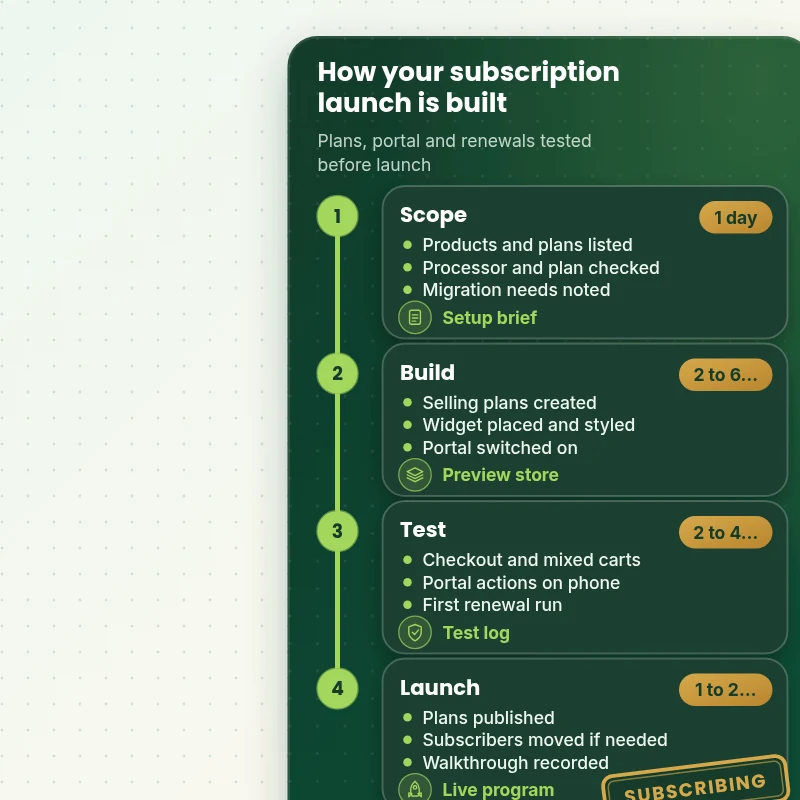
From Install to First Renewal, Stage by Stage
The walkthrough shows how a Recharge project moves: scope, build, test and go live, with a named deliverable at each stage. The test stage is where most subscription problems are found and fixed, long before a customer meets them.
Portfolio
Shopify Storefront Designs by Niche
These storefront designs show how layout, product detail and trust cues change from one niche to the next, which is the same care that goes into Recharge Subscriptions App Setup for Shopify.

Coffee store design
Coffee
Photography presets store design
Photography presets
Home lighting store design
Home lighting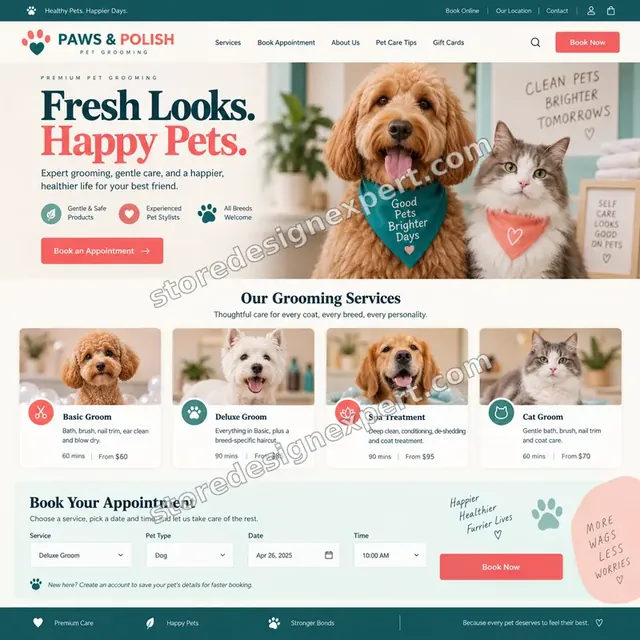
Pet grooming store design
Pet grooming
Beauty creator store design
Beauty creator
Garden supplies store design
Garden suppliesProcess and timeline
How a Recharge App Shopify Project Runs, Start to Finish
Six steps, with nothing changing on your live theme until you have approved a preview. Your calculator choices decide how long each Recharge step takes.
- 1
Brief and plan design
You tell us what you sell, how often it ships and how you want it priced. We turn that into a plan table you approve before anything is built.
- 2
Install and connect
Recharge is installed in a safe order: permissions, payment processor, shipping and tax settings, all checked against your Recharge plan's limits.
- 3
Create plans and widget
Selling plans are created and attached to products, then the widget is placed and styled in a duplicate theme so live visitors see nothing half-finished.
- 4
Portal and accounts
The customer portal is switched on and wired to your customer account type. We click through every action a subscriber can take.
- 5
Migrate and test
If subscribers are moving, we import in stages and compare totals. Then a live test subscription runs through its first renewal and the emails it triggers.
- 6
Publish and hand over
After sign-off the preview becomes the live theme. You receive a recorded walkthrough, a written test log and notes on changing plans safely.
Compare your options
DIY, Marketplace Gig, Agency or Our Recharge Setup?
Four usual routes to a working subscription program. This comparison shows who checks the parts that decide whether renewals actually charge.
| What matters | Set it up yourself | Marketplace gig | Agency retainer | Store Design Expert |
|---|---|---|---|---|
| Selling plans tested in a real checkout | Spot check | Rarely | Yes | Yes |
| Customer portal and account extensions | Often missed | Rarely | Yes | Yes |
| First renewal run before launch | No | No | Sometimes | Yes |
| Migration with a parallel run | Risky | Rarely | Yes | Yes |
| Phone layout of the plan picker checked | You test | Varies | Yes | Yes |
| Price known before work begins | Yes | Yes | Quote only | Yes |
| Written test log and walkthrough | No | Rarely | Extra cost | Yes |
| No retainer or minimum spend | Yes | Yes | No | Yes |
Inside every project
What Protects Your Store and Your Subscribers During Recharge Setup
Subscriptions touch billing, so extra care is built into every package. These six habits are not optional extras.
Changes made in a duplicate theme
Your live theme stays untouched by Recharge work until you approve a preview. A backup is saved first, so a rollback is a single step.
A written definition of finished
The job is done when plans display, checkout charges correctly, the portal works on a phone and a test subscription completes its first renewal.
Least access needed
We ask for collaborator access or a limited staff account. Card details and the owner password never enter the picture.
No lock-in
You own the Recharge account, the theme and the data. Our notes explain every setting so another developer could take over.
Documentation that stays useful
The test log and recorded walkthrough show what was configured, why, and what to check each month.
Fixed scope, two revision rounds
The price is agreed before work begins. Changes to wording, placement and styling inside scope are handled in two structured rounds.
Interactive price calculator
Build Your Recharge Setup Package
Choose a package, then tell us your theme type, how many subscribers must move and which markets you sell in. The fixed price and Recharge delivery window update with every click.
Request a custom quote
Headless storefronts, Shopify Plus checkout extensibility, custom subscription bundles, multi-store setups and migrations of several thousand active subscribers are scoped separately and quoted at a fixed price.
Request a QuoteChanged your mind? Choose Recharge Ready, Portal and Plans or Subscription Launch System above to return to the instant calculator.
Packages and comparison
Recharge Setup Package Comparison
Line-by-line detail of what each package covers, useful if you are deciding between configuring the app yourself and having the work done and tested.
| What is included | Recharge Ready $790 | Portal and Plans $1,490Recommended | Subscription Launch System $2,490 |
|---|---|---|---|
| App installed and processor connected | Included | Included | Included |
| Up to 3 products with selling plans | Included | Included | Included |
| Widget placed and styled | Included | Included | Included |
| Checkout and mobile test | Included | Included | Included |
| Handover video | Included | Included | Included |
| Up to 12 products with selling plans | Not included | Included | Included |
| Discount and prepaid rules | Not included | Included | Included |
| Customer portal and account extensions | Not included | Included | Included |
| Test subscription through renewal | Not included | Included | Included |
| Up to 40 products with selling plans | Not included | Not included | Included |
| Migration from one existing app | Not included | Not included | Included |
| Failed-payment flow review | Not included | Not included | Included |
| Fixes after launch | Not included | Not included | 30 days |
| Typical delivery | 4 to 7 days | 7 to 11 days | 11 to 16 days |
Your Recharge Subscriptions App Setup for Shopify price and delivery estimate come from the calculator above, so there is no surprise at checkout.
Why Store Design Expert
Why Owners Choose Us for Recharge Shopify Work
Plenty of people can click Install. Owners hire us for the decisions and testing wrapped around it, because the cost of a mistake lands on real customers.
Daily work inside Shopify themes
Product templates, account pages and cart drawers are everyday material for us, so we spot theme conflicts early.
Rated 4.9+ by verified clients
The reviews on this page come from verified Store Design Expert clients, so you can see how past projects felt before you commit.
Prices you can plan around
Every package, option and extra carries a visible price. Recharge's own fees go to Recharge, so check its current pricing page.
A direct line to the builder
You talk to the person with your theme open, not a ticket queue.
Honest comparisons
If another subscription app fits your billing model better, we say so before you pay for setup.
Experience since 2015
More than 450 Shopify stores launched means we have met most of the theme and app conflicts that break subscription flows.
What we need to get started
What We Need Before We Open Recharge and Your Theme
Three ways to give us access, then a short list of decisions only you can make.
Accept our collaborator request
Send your store address and approve the collaborator request. You remain the owner, our role is limited, and one click removes us.
No store yet? We build it first
We can create the store in our own Shopify Partner account, set subscriptions up there and transfer ownership to you when it is finished. You choose a Shopify plan afterwards.
Or share a staff login
A restricted staff account works too. We lean towards the collaborator route because it is easier to revoke and no password travels.
Your products and plans
List the products that will be subscribed and the frequencies and discounts you want. If unsure, we propose a plan table for you to edit.
Your Recharge account and processor
Tell us whether you already pay for Recharge, which payment processor you use and whether you are migrating from another app.
Your brand and email voice
Send logo files, colours and any wording rules so the portal and the renewal emails sound like you.
For Recharge work, owner passwords and card details are never requested. Edits happen in a duplicate theme after a backup, and we log what changed.
Testimonials
What Store Owners Say Before You Order Recharge Subscriptions App Setup for Shopify
Verified Store Design Expert clients describe the brief, the build and the handover in their own words.
Verified
Store Design Expert delivered an outstanding website development experience! Their professionalism and attention to detail exceeded my expectations, and their proactive communication kept everything running smoothly. Truly impressed by their deep understanding and dedication.
WG
Warren G.United States
Verified
Very quick and detailed work! Store Design Expert does exactly what you want, in a very professional manner.
LF
Lena F.Germany
Verified
Store Design Expert did an outstanding job with top-notch professionalism on my website project. Everything was delivered quickly without compromising quality. I could not have asked for better!
JM
Jason M.United States
Verified
The website development work was nothing short of professional, with top-notch quality. Their exceptional level of cooperation made the collaboration seamless and enjoyable. Highly recommend working with Store Design Expert!
JC
Jeremy C.United States
Verified
Super great to work with, and super fair!
RO
Robert O.United States
Verified
The website development work was truly impressive. Their attention to detail and ability to exceed expectations made the project a success. Working with them was a breeze, thanks to quick responsiveness and a willingness to go above and beyond.
KD
Kevin D.United States
Verified
Store Design Expert was very knowledgeable about what I needed done to fix my Shopify store and how to improve the store layout. The project was completed very quickly, and I will definitely use them for support as my business grows.
ST
Samuel T.United States
Verified
Very satisfied with the work. Most importantly, Store Design Expert responded promptly to my questions and concerns. Thank you!
KB
Kyle B.United States
Verified
Outstanding work and outstanding customer service. Five stars! I will absolutely use Store Design Expert again for my next book.
KM
Katharine M.United States
Related searches
Searches That Bring Owners to Recharge Subscriptions App Setup for Shopify
The searches below are the ones that lead people to Recharge Subscriptions App Setup for Shopify.
If you searched for “recharge app shopify”, “recharge subscription shopify”, “shopify recharge subscriptions” or “recharge app shopify cost”, Recharge Subscriptions App Setup for Shopify is the work that answers it.
People who look up “recharge subscriptions app setup”, “recharge pricing”, “recharge vs skio” or “subscriptions app for shopify” usually want Recharge Subscriptions App Setup for Shopify; the calculator above shows the price and delivery estimate before you commit.
“how to set up subscriptions on shopify”, “recharge customer portal” or “migrate to recharge” all point to the same job, which Recharge Subscriptions App Setup for Shopify covers from start to finish.
You may also have come across “best shopify subscription app”, “setting up a subscription service on shopify” or “shopify subscription app comparison” while reading about Recharge Subscriptions App Setup for Shopify.
FAQ
Recharge Shopify Setup FAQs
Answers on cost, timing, access, migration and the customer portal.
How much does Recharge Shopify setup cost?
Recharge Ready is $790, Portal and Plans $1,490 and Subscription Launch System $2,490. Theme type, account type and migration size add to that, and the calculator shows the total before you pay. Most projects land between $790 and about $4,500. Shopify Recharge subscriptions carry their own app fees, which are separate.
How much does the Recharge app Shopify cost every month?
That is Recharge's pricing, billed to you directly, and it changes, so read the current plan page before choosing. Our fee is a one-off for the setup. We tell you which plan your catalog needs, since some portal and migration features depend on the plan.
What does the Recharge pricing page not tell me?
Recharge pricing combines a monthly plan with a per-transaction fee, so your real cost rises with revenue. We work out a rough monthly figure for your volume during the brief, so the app cost is a known number before you commit.
How long does a Recharge subscription Shopify setup take?
A single product takes 4 to 7 working days, a full program with portal 7 to 11 and a migration project 11 to 16. Extra subscribers, an older theme or two account types add days, shown beside each option. Sooner and Fastest speed up the schedule.
How to set up subscriptions on Shopify with Recharge?
Install the app, approve its permissions, connect a supported payment processor, create selling plans, attach them to products, place the widget and switch on the portal. Then run a test subscription through its first renewal. We do all of this and write down what we tested.
Is setting up a subscription service on Shopify difficult?
The install is easy; the details are not. Plans, discounts, taxes, account pages and failed payments all interact. A small catalog can be done by a careful owner, while larger stores usually save time and avoid mistakes by handing the work over.
How does the Recharge customer portal work with Shopify accounts?
When you use Shopify customer accounts, the portal needs four extensions on the account pages: Subscription page, Upcoming Orders, Payment Methods and Addresses. We add and test them so customers can skip, swap, pause and update details without contacting you.
Can you migrate to Recharge from another subscription app?
Yes. Recharge has a self-service migration tool for eligible payment processors. We export your subscribers, map the data, import in stages and run both apps side by side until the first charges succeed. Historical analytics are not carried across, and migrated subscribers show as new customers.
Recharge vs Skio: which should I choose?
It depends on your billing model, bundles, theme and budget. We compare two or three options against your catalog, then recommend one in writing. We are not tied to any vendor, and if Recharge is the wrong fit we will tell you before you pay for setup.
Which is the best Shopify subscription app?
There is no universal winner. The best Shopify subscription app is the one that fits your plan types, your payment processor, your theme and your support load. We run a short Shopify subscription app comparison against your needs before any configuration begins.
What should a subscriptions app for Shopify be tested for?
Test the plan picker on a phone, a mixed cart, a discount code, a failed card, a skipped delivery and the first renewal charge. Most problems appear in those six moments. Our test log records each one as passed or fixed.
Do you need my Shopify password for Recharge Subscriptions App Setup for Shopify?
No. We prefer a collaborator request, which keeps you as owner and can be revoked instantly. If you have no store yet we build the Recharge setup in our Partner account and transfer it. A limited staff login is a last resort, and the owner password stays with you.
Will Recharge slow my product pages?
Any app adds some script, so we review what Recharge loads and keep placement lean. We will not quote a percentage because it depends on your theme and other apps. The larger packages include a page speed check, and we report what we observe on your store.
What happens if a renewal payment fails?
Recharge retries failed charges on a schedule and emails the customer. We review the retry timing and message wording, make sure customers can update their card in the portal, and show you where to see failed charges so nothing is silently lost.
Ready when you are
Order Your Recharge Shopify Setup
Choose a package, watch the fixed price settle and have plans, portal and checkout built and tested by a team that has launched 450+ Shopify stores. Your first renewal is rehearsed before any customer sees it.
Secure payment · Two rounds of changes · Recharge test log and walkthrough included