
Shopify stores designed and launched
Reports and analytics for Shopify owners
Shopify Custom Reports Built Around the Questions You Actually Ask
Shopify custom reports turn a wall of default screens into the five views you review each week. We find your questions, build and save the reports, set up scheduled delivery and show you how to read them. From $340, fixed price.
- Reports chosen from your real questions
- Sales, product, fee and customer views saved
- Scheduled delivery to the people who need it
- A short guide to reading each number
Our track record
450+ Shopify Stores Launched Since 2015. Your Reports Get the Same Care.
Reports are only useful when they answer a question someone asks. We start with the question, build the report that answers it and check each total against the store before you rely on it.
Average rating from verified clients
Building Shopify stores since
Secure checkout
Pay through a protected checkout and keep a full order record.
Two revision rounds
Included in every package, so the result matches what you pictured.
Backup before changes
We work on a duplicate of your theme, never on your live store.
Who this is for
Who Needs Custom Shopify Reports
Owners come to us when the default reports bury the answer. Here are the six situations that bring owners to custom Shopify reports & analytics setup.
You are a good fit if
- You have a Shopify store with order history
- You want a fixed price and written scope for reporting work
- You can tell us the questions you ask
- You accept that reports reflect store data as recorded
Owners who cannot find the numbers
The data is somewhere in Shopify, but you cannot reproduce a view next week.
Stores watching margin and fees
You want to see sales, discounts, refunds and payment fees in one place.
Merchants managing large catalogs
You need sales by product, variant and collection, with slow movers clear.
Teams that share numbers weekly
Several people need the same figures delivered on a schedule.
Stores reconciling with accounting
Your bookkeeper asks for exports that match payouts and tax.
Founders who dislike spreadsheets
You would rather receive a clean set of reports and a short guide.
Problems solved
Why the Default Shopify Reports Do Not Answer Your Questions
Default reports are broad on purpose. These six patterns are what we usually find for reporting work.
The right report is hard to find.
Outcome: Dozens of reports exist, and owners do not know which one answers their question.
Reports are rebuilt every week.
Outcome: Without saved views, the same filters are set up again and again.
Fees and margin are invisible.
Outcome: Sales totals show revenue, but not what remained after discounts, refunds and fees.
Totals do not match other tools.
Outcome: Timezone, refund timing and attribution rules make Shopify differ from accounting or ad platforms.
Nobody else sees the numbers.
Outcome: Only the owner logs in, so the team works without the figures.
Plan limits block the view.
Outcome: Some reports and custom building depend on your plan, which owners learn late.
What we can do
What Our Custom Reporting Set-up Covers
Six jobs make up the service. Your package decides how many reports and dashboard pages are built.
Questions workshop
We list the decisions you make and the numbers each needs, so each report has a purpose.
Saved custom reports
We build the reports on sales, products, customers, discounts and refunds, and save them for reuse.
Fees and margin views
We set up views of payment fees, discounts and refunds, so profit is closer to what you see in the bank.
Looker Studio overview
We bring key figures from your sources into one overview page that updates by itself.
Scheduled delivery
Reports are set to arrive by email or a shared link to the people who need them.
Reading guide
A short guide explains each number, how it is counted and where it may differ from other tools.
What is included
What Is Inside Your Reporting Set-up
Six groups cover every deliverable in Custom Shopify Reports & Analytics Setup. The comparison table below shows how far each group goes by package for reporting work.
Questions
- Reporting needs list
- Decision map
- Metric definitions
- Priority order
Reports
- Sales by product
- Sales by channel
- Customer and repeat views
- Discount and refund views
Finance views
- Fees report
- Payout reconciliation notes
- Tax export check
- Margin view
Overview
- Looker Studio page
- Source connections
- Date range controls
- Sharing set up
Delivery
- Scheduled email
- Recipient list
- Share links
- Export formats
Handover
- Reading guide
- Walkthrough recording
- Differences notes
- Fix list
You provide access and tell us your questions. We handle the building, checking and handover.
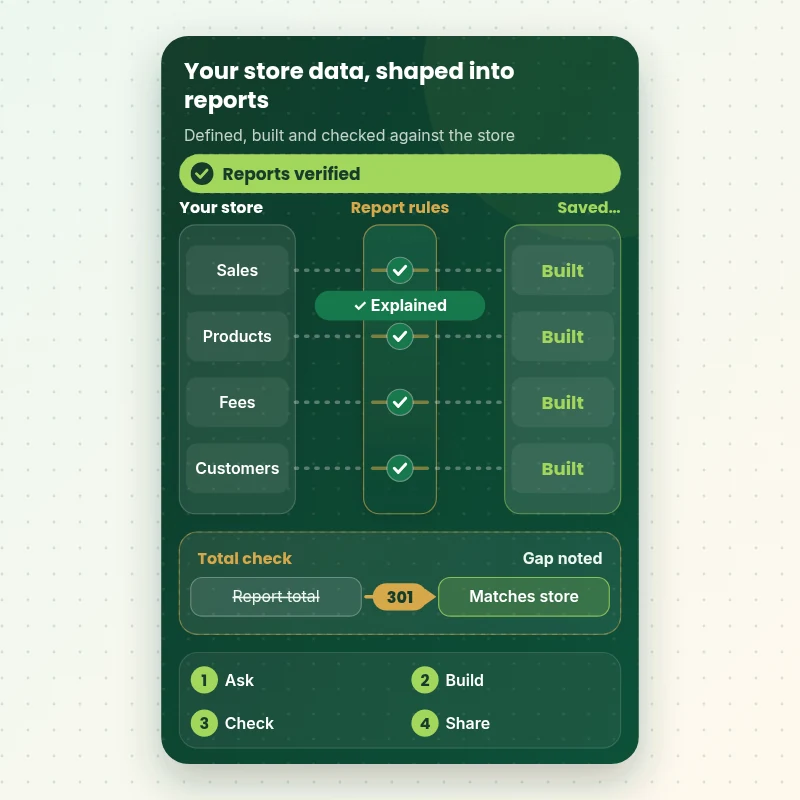
Reporting data flow
How Your Store Data Becomes Reports You Can Trust
The walkthrough shows data moving from your store through reporting rules into saved reports. Each total is compared with the store itself, and any gap is flagged and explained before the report is handed over.
Portfolio
Store Design Styles We Build
Different niches need different layouts. These store designs show how we shape a storefront around its products, and Custom Shopify Reports & Analytics Setup follows the same approach.
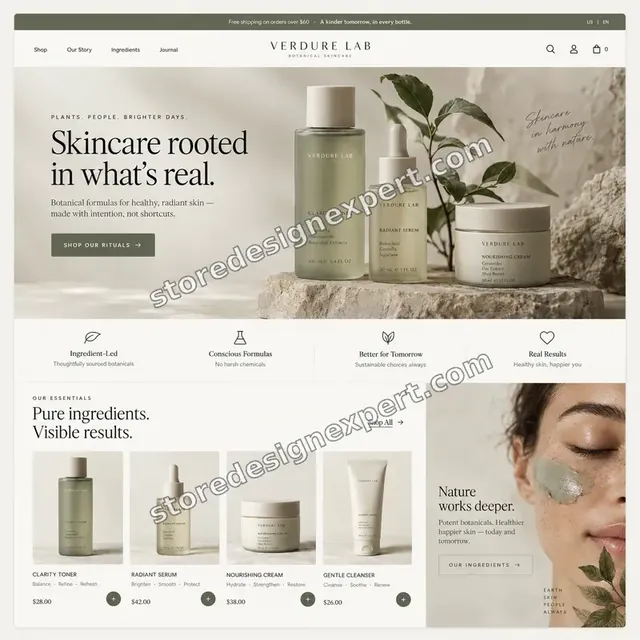
Skincare store design
Skincare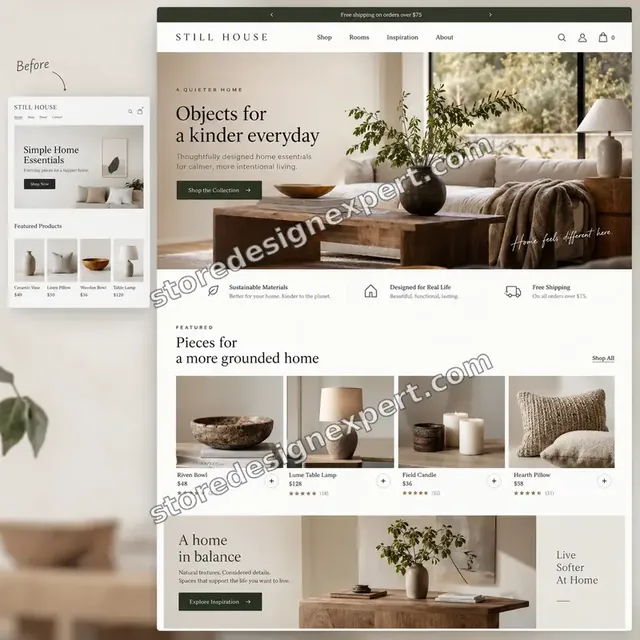
Home decor store design
Home decor
Jewelry store design
Jewelry
Coffee store design
Coffee
Specialty coffee store design
Specialty coffee
Jewelry store design
JewelryProcess and timeline
How Reporting Set-up Runs, Start to Finish
Six steps, with every total checked against the store. Your calculator choices decide how long each step takes for reporting work.
- 01
Brief and questions
You tell us the decisions you make and who needs which numbers.
- 02
Access
You add us as a collaborator with reports access. We never ask for passwords.
- 03
Review what exists
We read your plan, current reports and any exports your team already uses.
- 04
Build the reports
We build and save each report, using your definitions.
- 05
Check the totals
We compare each total with the store and note the known differences.
- 06
Deliver and hand over
We set up delivery, record a walkthrough and send the guide.
Compare your options
DIY, Marketplace Gig, Data Analyst or Our Reporting Set-up?
Four usual routes to useful reports. This comparison shows who defines, checks and schedules them.
| What matters | Do it yourself | Marketplace gig | Data analyst | Store Design Expert |
|---|---|---|---|---|
| Reports chosen from your questions | You decide | Rarely | Yes | Yes |
| Totals checked against the store | Rarely | Rarely | Yes | Yes |
| Fees and margin views | Hard to find | Extra cost | Yes | Yes |
| Scheduled delivery to your team | No | Rarely | Yes | Yes |
| Written metric definitions | No | No | Sometimes | Yes |
| Price known before work begins | Free | Yes | Quote only | Yes |
| Shopify admin expertise | Learning | Varies | General | Yes |
| Recorded walkthrough | No | Rarely | Extra cost | Yes |
Inside every project
What Protects Your Data While We Build Your Reports
Reports contain sales and customer data, so these six habits come with every package.
Least access needed
We ask only for reports access, and remove our access when we finish.
Customer data kept minimal
We build views from totals wherever possible, and we do not copy customer lists outside your accounts.
Every total checked
We compare each report with the store before we call it done.
Definitions written down
Each metric has a written definition, so two people read the same number the same way.
No financial or tax advice
We build reports. We do not advise on accounting or tax, and we explain known differences.
Fixed scope, two revision rounds
The price is agreed before work starts, and changes inside scope run in two structured rounds for reporting work.
Interactive price calculator
Build Your Reporting Package
Choose a package, then tell us how many reports you need, how many sales channels feed them and who should receive them. The fixed price and delivery window update with every click for reporting work.
Request a custom quote
Shopify Plus data exports, BigQuery warehouses, multi-store consolidated reporting, custom cohort analysis and finance-system integrations are scoped separately and quoted at a fixed price.
Request a QuoteChanged your mind? Choose Report Starter Set, Report Suite and Overview or Reporting System above to return to the instant calculator.
Packages and comparison
Reporting Package Comparison
Line-by-line detail of what each package covers, useful when choosing between a few saved reports and a complete reporting system.
| What is included | Report Starter Set $340 | Report Suite and Overview $740Recommended | Reporting System $1,390 |
|---|---|---|---|
| Questions workshop | Included | Included | Included |
| Saved custom reports | 5 | 10 | 10+ |
| Sales by product view | Included | Included | Included |
| Fees view | Included | Included | Included |
| Short reading guide | Included | Included | Included |
| Looker Studio overview page | Not included | Included | Included |
| Scheduled delivery | Not included | Included | Included |
| Payout reconciliation notes | Not included | Included | Included |
| Walkthrough recording | Not included | Included | Included |
| Margin and discount views | Not included | Not included | Included |
| Dashboard pages per team | Not included | Not included | Included |
| Written metric definitions | Not included | Not included | Included |
| 30-day numbers check | Not included | Not included | Included |
| Typical delivery | 3 to 5 days | 5 to 7 days | 7 to 9 days |
What the calculator above shows for Custom Shopify Reports & Analytics Setup, the total and the estimated delivery, is what your order will use.
Why Store Design Expert
Why Owners Choose Us for Shopify Custom Reports
Anyone can filter a report. Owners hire us for the questions, the saved views and the checking that follow.
Daily work inside Shopify stores
We know which report answers which question, and where plan limits apply.
Rated 4.9+ by verified clients
Every review here was written by a verified Store Design Expert client.
Prices you can plan around
Every package, option and extra has a visible price, sized by reports, channels and readers.
A direct line to the person doing the work for reporting work
You write to the team member building the reports, not a ticket queue.
Honest about plan limits
If a report needs a higher plan, we tell you before you pay for the build.
Experience since 2015
More than 450 Shopify stores launched means we have seen most reporting questions.
What we need to get started
What We Need Before We Build Your Reports
Three ways to give access, then a short list of facts about your questions.
Accept our collaborator request
Send your store address, then approve the access request for Custom Shopify Reports & Analytics Setup. The owner can grant what we need and remove us in one click for reporting work.
Taking over a store? That is fine
Tell us what reports your previous team used. We start by listing them.
Or have the owner add us as staff for reporting work
A restricted staff account with reports access works too.
Your key questions
List the decisions you make each week and the numbers they need.
Examples you already use
Share any spreadsheets or exports your team relies on.
Who receives reports
Tell us the people and the frequency for each report.
Passwords are never requested. Access is granted through the store's own tools and removed when we finish.
Testimonials
What Store Owners Say Before You Order Custom Shopify Reports & Analytics Setup
Verified Store Design Expert clients describe the brief, the build and the handover in their own words.
Verified
Store Design Expert delivered an outstanding website development experience! Their professionalism and attention to detail exceeded my expectations, and their proactive communication kept everything running smoothly. Truly impressed by their deep understanding and dedication.
WG
Warren G.United States
Verified
Very quick and detailed work! Store Design Expert does exactly what you want, in a very professional manner.
LF
Lena F.Germany
Verified
Store Design Expert did an outstanding job with top-notch professionalism on my website project. Everything was delivered quickly without compromising quality. I could not have asked for better!
JM
Jason M.United States
Verified
The website development work was nothing short of professional, with top-notch quality. Their exceptional level of cooperation made the collaboration seamless and enjoyable. Highly recommend working with Store Design Expert!
JC
Jeremy C.United States
Verified
Super great to work with, and super fair!
RO
Robert O.United States
Verified
The website development work was truly impressive. Their attention to detail and ability to exceed expectations made the project a success. Working with them was a breeze, thanks to quick responsiveness and a willingness to go above and beyond.
KD
Kevin D.United States
Verified
Store Design Expert was very knowledgeable about what I needed done to fix my Shopify store and how to improve the store layout. The project was completed very quickly, and I will definitely use them for support as my business grows.
ST
Samuel T.United States
Verified
Very satisfied with the work. Most importantly, Store Design Expert responded promptly to my questions and concerns. Thank you!
KB
Kyle B.United States
Verified
Outstanding work and outstanding customer service. Five stars! I will absolutely use Store Design Expert again for my next book.
KM
Katharine M.United States
Related searches
Searches That Bring Owners to Custom Shopify Reports & Analytics Setup
Owners reach this page from different searches. Here is how the common ones relate to Custom Shopify Reports & Analytics Setup.
If you searched for “custom shopify reports and analytics setup”, “how to run reports in shopify”, “schedule reports in shopify” or “shopify overview dashboard reports”, Custom Shopify Reports & Analytics Setup is the work that answers it.
People who look up “shopify best features for analytics” usually want Custom Shopify Reports & Analytics Setup; the calculator above shows the price and delivery estimate before you commit.
Owners also search for “how to create a custom report in shopify”, “shopify sales report by product”, “sales report in shopify” or “shopify report that shows fees”.
Owners also search for “how to get sales report from shopify”, “shopify overview dashboard tutorial”, “shopify overview dashboard examples” or “shopify overview dashboard features”.
FAQ
Shopify Custom Reports FAQs
Answers on cost, report types, scheduling, fees and plan limits.
How much does custom Shopify reports and analytics setup cost?
Report Starter Set is $340, Report Suite and Overview $740 and Reporting System $1,390. Reports, channels and readers add to that, and the calculator shows the total before you pay.
What are Shopify custom reports?
Shopify custom reports are views you define, with chosen metrics, filters and date ranges, saved for reuse. Availability depends on your plan, and we tell you what yours allows.
How to create a custom report in Shopify?
How to create a custom report in Shopify: open Analytics, pick a report close to your question, change the metrics and filters and save it. We do this for each question you give us.
How to get a Shopify sales report by product?
A Shopify sales report by product shows units, sales and discounts for each item. We build and save it with the filters you need, such as variant, collection or channel.
How to run reports in Shopify each week?
How to run reports in Shopify each week is easier once they are saved. We save your set and show you where each one lives, so a weekly check takes minutes.
Where do I find a sales report in Shopify?
A sales report in Shopify lives under Analytics and Reports. We create views for sales over time, by channel and by product, and explain what each number includes.
Is there a Shopify report that shows fees?
A Shopify report that shows fees comes from the finance reports, covering payments, payouts and fees. We set up a view, and we note which fees it excludes.
Can you schedule reports in Shopify?
To schedule reports in Shopify, some plans allow scheduled exports or emails, and Looker Studio can email a dashboard. We set up whichever your plan supports.
What is the Shopify overview dashboard reports section?
The Shopify overview dashboard reports area shows headline totals and links into detail. We use it as the front page of your set and link each tile to a saved report.
How to get sales report from Shopify for my accountant?
How to get sales report from Shopify for an accountant: export orders, payouts and tax summaries by date range. We build the exports and match them to payouts.
Which Shopify best features for analytics should I use?
The Shopify best features for analytics are saved reports, ShopifyQL explorations and scheduled exports where your plan has them. We use the ones that answer your questions.
Is there a Shopify overview dashboard tutorial I can follow?
A Shopify overview dashboard tutorial from us is part of the handover: a recorded walkthrough of every report, filter and tile, so your team can use it without us.
Do you have Shopify overview dashboard examples?
Shopify overview dashboard examples we build show sales, orders, top products and sources on one page. We tailor the tiles to your questions.
Which Shopify overview dashboard features can you customise?
Shopify overview dashboard features such as date ranges, comparisons and tiles are customisable within your plan. For anything more, we add a Looker Studio page.
Ready when you are
Order Your Shopify Custom Reports Set-up
Choose a package, watch the fixed price settle and have a team that has launched 450+ Shopify stores build, check and schedule the reports you read each week.
Fixed price · Every total checked · Reading guide included