
Shopify stores designed and launched
Custom Shopify theme design from scratch
Shopify Custom Theme Development: Custom Shopify Theme Design From Scratch
Shopify custom theme development for brands that have outgrown template tweaks. We design and code a lean Online Store 2.0 theme around your products and brand: our own sections, your own layouts, clean Liquid and editor settings your team can use, from $2,190. Since 2015 we have shipped 450+ stores, and verified clients rate us 4.9+ on average.
- A theme written for your brand, not adapted from a template
- Editable sections and blocks in the Shopify theme editor
- Built on a staging theme, tested on phones, tablets and desktop
- Bundles with a defined scope and an instant cost calculator

From$2,190
Delivery12 to 45 working days
Revisions2 rounds
Our track record
Over 450 Shopify Stores Launched Since 2015. Now Let Us Write Yours a Theme of Its Own.
Templates are built for everybody, so they fit nobody exactly. A theme made for your catalog, your voice and your customers removes the workarounds, and we bring the pattern memory of a team that has launched hundreds of Shopify stores to the job.
Average rating from verified clients
Building Shopify stores since
Secure checkout
Pay through a protected checkout and keep a full order record.
Two revision rounds
Included in every package, so the result matches what you pictured.
Backup before changes
We work on a duplicate of your theme, never on your live store.
Who this is for
For Brands Ready for a Theme That Fits Them, Not the Other Way Round
Thinking about trying to create your own Shopify theme is a bigger decision than picking one, and it pays off in particular situations. If any of these sound familiar, a from-scratch build is probably worth pricing.
You are a good fit if
- You can describe the look but no template delivers it
- Your current theme limits your layouts or speed
- You want a fixed cost before design begins
- You need clean, documented code you can hand to any developer
Brands with a distinctive identity
Your look relies on unusual grids, typography or motion that no template quite supports. We build those patterns directly instead of fighting a theme's defaults.
Stores buried under years of patches
Layers of custom code and app injections make every change risky. A fresh theme with clean structure gives you something maintainable again.
Catalogs with unusual product data
Configurable goods, bundles, ingredients, materials or sizing tables need layouts that match how the data is shaped. We design around your metafields and variants.
Stores held back by heavy themes
Premium themes ship features you never use, and every script costs load time. A theme with only what you need is lighter and quicker.
Brands scaling to several markets
Language, currency and regional content call for sections that flex without rewrites. We plan for those variations in the section settings.
Founders launching a flagship brand
The first store is a statement. You want a theme that looks nothing like the next template-based competitor, and that you fully own and control.
Problems solved
Where Template Themes Fall Short and a Custom Build Fixes It
Plenty of stores run well on a purchased theme. The trouble starts when the business needs something the theme was never designed to do, and the workarounds begin. These are the patterns we see most.
The problem
Every change needs a workaround.
The outcome
Adding a layout the theme lacks means injected code, hidden settings or an app. Our sections are written for the layouts you need, so changes stay simple.
The problem
Unused theme features slow the pages.
The outcome
Large templates load scripts and styles for sliders, animations and options you do not use. We ship only the code your design requires.
The problem
The code is hard for anyone to maintain.
The outcome
Years of edits leave conflicting rules and duplicated snippets. We write consistent, commented Liquid, CSS and JavaScript with a logical structure.
The problem
Your brand looks like a theme demo.
The outcome
Template layouts are recognisable. A custom design sets your spacing, type and product presentation apart from shops using the same theme.
The problem
Updates from the theme author clash with your edits.
The outcome
Customised templates often break when updated. A theme you own has no vendor update cycle to merge, so changes follow your own schedule.
The problem
Your team cannot edit pages without a developer.
The outcome
We expose the right settings and blocks in the theme editor, so merchandisers can rearrange sections, swap images and adjust copy themselves.
What we can do
What Shopify Custom Theme Development Covers, From Design Tokens to Theme Settings
A theme is a design system turned into code. These are the six capabilities that carry a from-scratch build from a blank folder to a store your team can run.
Design system and tokens first
Colours, type scale, spacing, radius and shadow become named variables before layouts exist. That keeps every section consistent and lets one setting restyle the entire store later.
Online Store 2.0 sections and blocks
Every page is composed from sections with blocks, defined through schema, so your team can add, reorder and hide content in the editor without touching code.
Clean Liquid, CSS and JavaScript
We write semantic markup, scoped styles and small, dependency-light scripts, with comments where logic is not obvious, so another developer can pick the theme up without a decoder ring.
Metafields and metaobjects in the layout
Special product data such as materials, care notes or size charts is surfaced through metafields, with section settings that show or hide each block per product.
App blocks and integration points
Reviews, subscriptions and search tools slot into dedicated app blocks and theme app extension points, which avoids code injection and keeps uninstalling an app clean.
Performance budgets and accessibility
We set a script and image budget, use responsive images and defer non-critical code, and check contrast, focus order and labels so the theme holds up for every visitor.
What is included
What Your Custom Shopify Theme Design Includes
The work is grouped into six streams, from the first design token to the last handover note. The package table below shows how scope grows across the three tiers.
Design direction
- Written brief covering brand, audience and page priorities
- Design tokens for colour, type, spacing and corners
- Layouts for home, collection and product in Figma or a clickable preview
- Your approval at the design step before code starts
Templates and sections
- JSON templates for core page types
- Custom sections and blocks with editor settings
- Header, footer, announcement bar and mobile drawer
- Cart, search, 404 and password page styled to match
Theme code
- Liquid, CSS and JavaScript written from a clean structure
- Theme settings and settings schema organised by topic
- Locales file prepared for translation
- Theme Check run to catch common errors
Data and apps
- Metafield-driven blocks on product pages
- App blocks added where your apps support them
- Shopify's native filtering, search and cart behaviours wired in
- Tracking snippets re-attached and verified
Quality assurance
- Phone, tablet and desktop checks in current browsers
- Keyboard and focus review of menus and forms
- Page speed readings on key templates
- Test order from product page to payment step
Launch and handover
- Backup of your current theme before publishing
- Recorded walkthrough of the editor and settings
- Written theme guide with section list and settings map
- Two rounds of revisions after review
A theme is more than its homepage. Settings, empty states, error pages and the editor experience all count as deliverables on this list.
See how it works
A Theme Assembled From Sections You Can Rearrange
A from-scratch theme starts empty and is built one section at a time, each with settings your team can change without code. Follow the homepage of a sample brand as the header, hero, benefits, product grid and footer are added and wired to the editor, then published.
Portfolio
Shopify Storefront Designs by Niche
Custom Shopify Theme Design from Scratch gets the same attention to layout, spacing and detail as each design below, every one built around a single catalog and one kind of buyer.
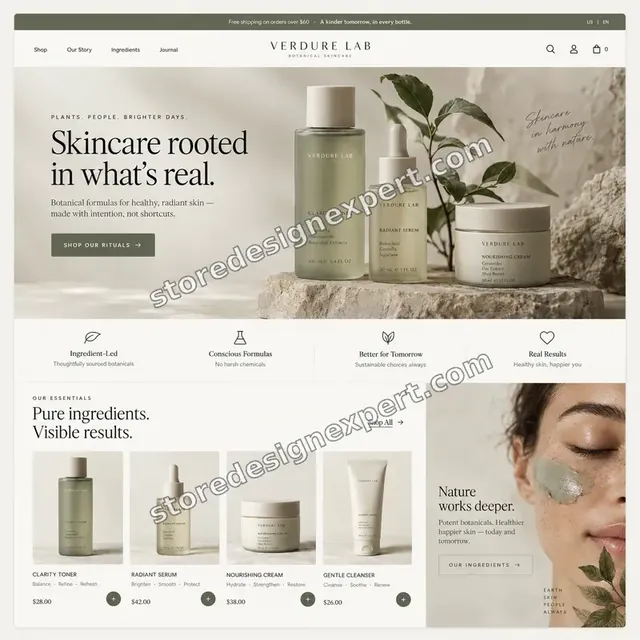
Skincare store design
Skincare
Furniture store design
Furniture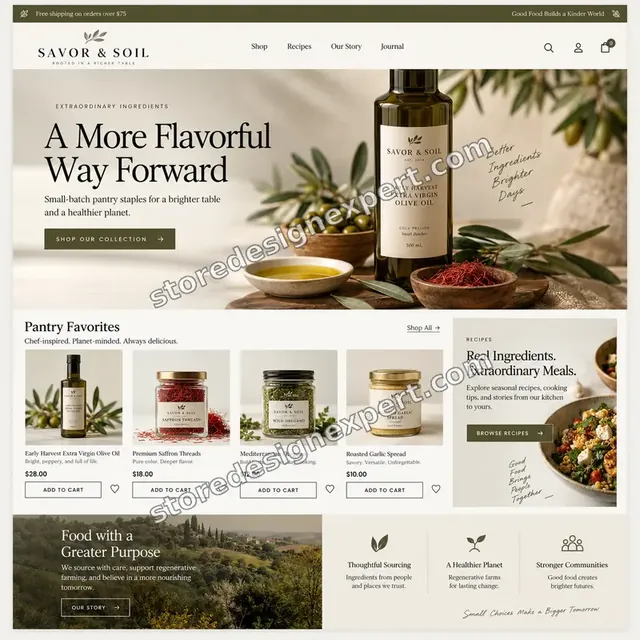
Food store design
Food
Audio store design
Audio
Jewelry store design
Jewelry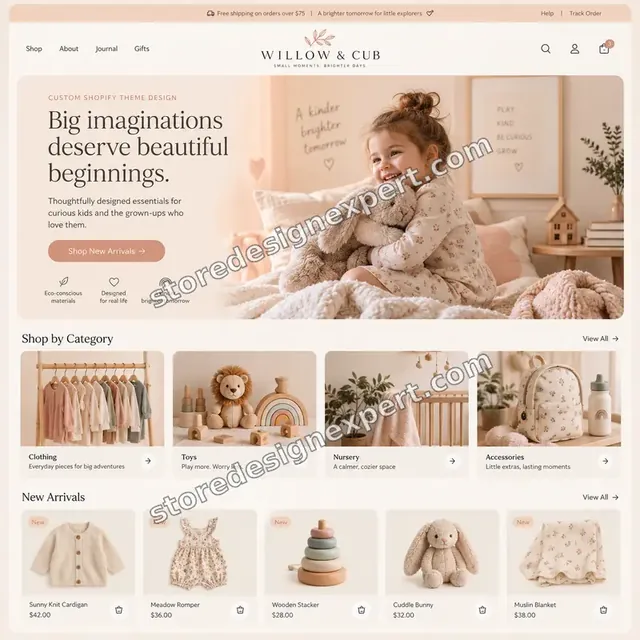
Children store design
ChildrenProcess and timeline
Our Custom Theme Build Process From First Brief to Launch
A from-scratch theme runs in six stages, and the work is staged on an unpublished theme so your live store is never touched. Blueprint takes 12 to 18 working days, and the calculator shows how scope and design source stretch the schedule.
- 1
Brief and discovery
We study your brand, catalog, competitors and analytics, then write a short brief with page priorities and must-have features. You confirm the scope before any design begins.
- 2
Design system and layouts
Design tokens and key layouts are produced for home, collection and product pages on phone and desktop, then sent for your review and approval.
- 3
Theme build
We create the theme structure, write the sections and blocks, wire settings into the editor and connect product data. Previews are shared on an unpublished theme.
- 4
Integrations and data
Apps, metafields, tracking and any special product logic are connected inside the theme, using app blocks wherever the app allows them.
- 5
QA and revisions
We test across devices and browsers, run Theme Check, review speed and accessibility basics and work through your two revision rounds.
- 6
Publish and handover
After approval, the theme is published, your previous theme stays as a rollback, and you receive a recorded walkthrough and a written theme guide.
Technical approach
The Technical Map of a Shopify Theme Built From Nothing
Here is how a theme is assembled, layer by layer. Each row names what we build, what usually goes wrong and what you receive. It is the same map we follow whether the theme runs a small store or a thousand-product catalog.
| Area | What we do | What you receive |
|---|---|---|
| Theme structure and Liquid | Create the folder structure for layout, templates, sections, snippets, assets and config. Keep the theme file small and organise snippets by purpose, so a single change never ripples across unrelated templates. | Clean theme folder with a structure note |
| Design tokens and CSS | Define colour, type, spacing and radius as CSS custom properties linked to theme settings. Write scoped, mobile-first styles with no leftover rules, so restyling later means changing a value, not hunting through files. | Token sheet and a documented style layer |
| Sections, blocks and schema | Build each section with a schema that exposes only meaningful controls. Blocks cover repeatable content, and defaults give an editor a sensible starting point, so a new page can be composed in minutes. | Section library with a settings reference |
| Metafields and product data | Surface material notes, size charts, badges or specifications from metafields into optional blocks. Check what happens with empty values, so a product with no data shows no ugly gap. | Mapped metafield list and tested empty states |
| Cart, search and filters | Style and wire the cart drawer or page, predictive search and collection filtering using Shopify's native behaviours. Test with long product names, many variants and discount codes. | Working cart, search and filter flows |
| Performance and loading | Serve responsive images, defer non-critical scripts, preload only the key font files and avoid layout shift. Take readings on the main templates before and after each stage to catch regressions early. | Speed readings for key templates |
| Accessibility and security basics | Check contrast, visible focus, labelled controls and skip links. Avoid inline scripts that expose secrets and keep form handling inside Shopify's native routes. | Accessibility checklist with results |
| Version control and handover | Keep the build in version control during the project, run Theme Check before each preview and package the finished theme with a guide that names every section, setting and snippet. | Source copy, theme guide and walkthrough video |
Risk, dependencies and success plan
Custom Theme Risks, Dependencies and Our Success Plan
A custom theme touches everything customers see, so we agree the design in writing, build in a staging theme and hold the release behind a quality gate. Here is what we need from you, how the project is paced, what must pass and what launch involves.
Your responsibilities
- Share brand guidelines, logo files and any design references you admire
- Provide product data, collections and the list of apps you rely on
- Name one approver for design and a review window for each stage
- Give access to analytics and tracking tags that must survive the move
- Tell us which features are essential at launch and which can follow
- Supply copy and imagery for key pages, or ask us to quote for them
- Confirm the Shopify plan and any markets or languages in scope
Milestones
- Brief and scope signed offGoals, page list, features and budget are agreed in one short document.
- Design approvedTokens and key layouts are reviewed and signed off on phone and desktop.
- Build preview readySections and templates run on an unpublished theme for your review.
- Integrations connectedApps, metafields and tracking work inside the theme.
- QA passedDevices, speed, accessibility basics and a test order all pass.
- Launch and handoverThe theme is published and your walkthrough and guide are delivered.
QA gates
- Every template renders correctly at phone, tablet and desktop widths
- Editor settings change what they claim to change
- Empty and long-content states look intentional
- Cart, search and filters work with real products
- Tracking events fire as before the move
- Theme Check reports no blocking errors
- Page speed readings are shared and reviewed with you
Launch criteria and support
- Your previous theme is kept untouched as a rollback
- The new theme is published during a quiet traffic window
- A live test order confirms the checkout path
- Redirects and URLs are checked so nothing disappears
- Handover guide lists every section, setting and snippet
- We name any known limits so nothing surprises you later
- A 30-day support window can be added in the calculator
Compare your options
Premium Template, Freelancer, Agency or Custom Shopify Theme Design From Scratch by Us?
There are four sensible routes to a store's look. A template is quickest, a freelancer is flexible, a large agency is thorough and a focused specialist build sits between. Here is how they compare when code quality and ownership matter.
| What matters | Premium template | Freelancer | Large agency | Store Design Expert |
|---|---|---|---|---|
| Layouts written for your brand | No | Varies | Yes | Yes |
| Section library with editor settings | Generic | Varies | Yes | Yes |
| Clean, documented code you own | Vendor code | Varies | Yes | Yes |
| Performance budget and speed readings | Heavy | Rarely | Yes | Yes |
| Built on an unpublished theme | No | Sometimes | Yes | Yes |
| Written QA gate before launch | No | Rarely | Yes | Yes |
| Fixed price shown before you pay | Yes | Varies | Quote only | Yes |
| Typical starting cost | Low | $3,000+ | $10,000+ | $2,190 |
Inside every project
What Protects Your Store and Your Budget During a Theme Build
A from-scratch theme is a large piece of work with real exposure. These safeguards are built into every project and explain why a fixed price is possible.
Everything is built unpublished
The theme lives as an unpublished copy until you approve it. Customers see and buy from the current theme until the day you choose to switch.
Collaborator access only
We use Shopify's collaborator permissions scoped to the project. You stay the owner, and you can withdraw access with a click when the project ends.
A written QA gate
A single checklist covers widths, browsers, editor settings, empty states, speed, accessibility and a test order, and the theme only ships once each line passes.
A rollback that is ready
The previous theme remains in your library after launch. If something unexpected appears, you can switch back without involving a developer.
Reviews at fixed checkpoints
You review at brief, design, build and QA, with clear questions at each step, so approvals are quick and nobody is left guessing.
Fixed scope, two revision rounds
The price covers the scope in your order and two rounds of changes after review. Anything beyond is quoted before work starts, never added silently.
Interactive price calculator
Build Your Shopify Custom Theme Development Package
Choose a package, then tell us how many templates and sections you need and where the design starts. The fixed price and timeline update as you click.
Request a custom quote
Headless storefronts, Shopify Plus checkout customisation, custom apps, multi-store theme families or more than 40 custom sections receive a custom quote with a written scope.
Request a QuoteChanged your mind? Choose Blueprint, Bespoke or Signature above to return to the instant calculator.
Packages and comparison
Compare Custom Theme Packages Side by Side
Every line below is a deliverable. Your final price depends on templates, design starting point and product data, which the calculator totals in real time.
| What is included | Blueprint $2,190 | Bespoke $3,790Recommended | Signature $5,990 |
|---|---|---|---|
| Written brief and design tokens | Included | Included | Included |
| Core templates built | Included | Included | Included |
| Up to 12 custom sections | Included | Included | Included |
| Mobile drawer, header and footer | Included | Included | Included |
| Test order and device checks | Included | Included | Included |
| Recorded handover and two revision rounds | Included | Included | Included |
| Figma design review | Not included | Included | Included |
| Up to 24 custom sections | Not included | Included | Included |
| Metafield-driven product blocks | Not included | Included | Included |
| App blocks and tracking wired in | Not included | Included | Included |
| Speed and accessibility checks | Not included | Included | Included |
| Up to 40 custom sections | Not included | Not included | Included |
| Language and market-ready settings | Not included | Not included | Included |
| Design system documentation | Not included | Not included | Included |
| 21 days of post-launch fixes | Not included | Not included | Included |
| Typical delivery | 12 to 18 days | 20 to 30 days | 30 to 45 days |
Your Custom Shopify Theme Design from Scratch price and delivery estimate come from the calculator above, so there is no surprise at checkout.
Why Store Design Expert
Why Brands Choose Shopify Experts for Hire Over a Generic Web Studio
Building Shopify website from scratch demands a close understanding of how Shopify renders, caches and extends its storefronts. This is what you get when a Shopify-only team builds yours.
Shopify only, since 2015
We have worked inside themes, sections and the editor for years, so we know which patterns scale and which collapse under real catalogs.
A Shopify theme development company without agency bloat
You hire the people who write the Liquid. There is no account layer between your brief and the code, and the price stays fixed.
Design and code under one roof
The designer's spacing and the developer's markup come from the same team, so what is approved on screen is what ships.
Hire someone to build my Shopify store, with a plan
A written brief, defined stages and set review points mean you always know what is happening and what is due from you.
Above freelance floors, under agency minimums
Packages sit above freelance floors because QA and documentation are included, and well below agency minimums because you pay for the build itself.
The theme and the code are yours
You receive the full theme in your own store, with a guide, with no licence fees or lock-in to us afterwards.
What we need to get started
What We Need From You Before the Theme Build Starts
You do not need a finished design or a developer brief. We need access, brand material and a handful of decisions, and we guide you through the rest.
Invite us as a collaborator
With an existing store, share its web address and accept the collaborator request we send. Ownership is yours throughout, nobody hands over a password and you can drop our access when you choose.
Building before you have a store
If there is no store yet, we start in our Partner account on a development store and transfer ownership to you at the end, so choosing a plan is your final step.
Prefer a staff login instead?
Staff credentials also work. Collaborator access is easier to revoke, but a staff account is fine if it suits your team better.
Brand material and references
Send logos, colours, fonts, photography and a few sites or stores whose look you admire, along with anything you dislike about your current store.
Product data and apps
Share a product export and a list of the apps you use, plus any special product information such as materials or size charts that must appear on pages.
Features, priorities and approver
Tell us the must-haves at launch, the nice-to-haves for later, and the one person who approves design and builds, so decisions stay quick.
Owner passwords and card details never need to be shared with us. The new theme stays unpublished while we build it, and every stage closes with written notes.
Testimonials
What Store Owners Say Before You Order Custom Shopify Theme Design from Scratch
Verified clients describe working with Store Design Expert on builds, redesigns and fixes.
Verified
Store Design Expert delivered an outstanding website development experience! Their professionalism and attention to detail exceeded my expectations, and their proactive communication kept everything running smoothly. Truly impressed by their deep understanding and dedication.
WG
Warren G.United States
Verified
Store Design Expert did an outstanding job with top-notch professionalism on my website project. Everything was delivered quickly without compromising quality. I could not have asked for better!
JM
Jason M.United States
Verified
The website development work was nothing short of professional, with top-notch quality. Their exceptional level of cooperation made the collaboration seamless and enjoyable. Highly recommend working with Store Design Expert!
JC
Jeremy C.United States
Verified
Super great to work with, and super fair!
RO
Robert O.United States
Verified
The website development work was truly impressive. Their attention to detail and ability to exceed expectations made the project a success. Working with them was a breeze, thanks to quick responsiveness and a willingness to go above and beyond.
KD
Kevin D.United States
Verified
Store Design Expert was very knowledgeable about what I needed done to fix my Shopify store and how to improve the store layout. The project was completed very quickly, and I will definitely use them for support as my business grows.
ST
Samuel T.United States
Verified
Very satisfied with the work. Most importantly, Store Design Expert responded promptly to my questions and concerns. Thank you!
KB
Kyle B.United States
Verified
Outstanding work and outstanding customer service. Five stars! I will absolutely use Store Design Expert again for my next book.
KM
Katharine M.United States
Verified
Store Design Expert was great! They delivered exactly what I asked for and even offered helpful extra suggestions. Highly recommended.
PW
Paul W.United States
Related searches
Searches That Bring Owners to Custom Shopify Theme Design from Scratch
The searches below are the ones that lead people to Custom Shopify Theme Design from Scratch.
“custom shopify theme design from scratch”, “custom shopify theme design”, “build shopify theme from scratch” or “how to make your own shopify theme”: owners type these when they need Custom Shopify Theme Design from Scratch, and the packages above are priced for that job.
People who look up “create your own shopify theme”, “shopify design your own theme”, “how to create a theme on shopify” or “what is shopify theme development” usually want Custom Shopify Theme Design from Scratch; the calculator above shows the price and delivery estimate before you commit.
“shopify theme development company”, “building shopify website from scratch” or “shopify website development cost”: owners type these when they need Custom Shopify Theme Design from Scratch, and the packages above are priced for that job.
Related searches include “hire someone to build my shopify store”, “shopify experts for hire”, “shopify developer near me” or “freelance shopify website designer”.
FAQ
Shopify Custom Theme Development FAQs
Answers on cost, timing, ownership, code quality and what happens once your new theme is live.
How much does Shopify custom theme development cost?
Packages start at $2,190 for Blueprint, $3,790 for Bespoke and $5,990 for Signature. Templates, design starting point and catalog complexity add their own prices, so most complete builds land between about $4,000 and $9,500. Your exact fixed figure appears in the calculator before you pay.
What is Shopify theme development?
Shopify theme development means writing the code that controls how a store looks and behaves: Liquid templates, sections, blocks, styles and scripts. A custom theme is written for one brand rather than sold to many, so its layouts and settings match your catalog and your team's workflow.
Build Shopify theme from scratch or customise a template: which do you do?
Yes. We build the structure, design tokens, sections and settings ourselves on Shopify's Online Store 2.0 architecture. We may borrow proven patterns for things like the cart, but the layouts, code and editor controls are written for you and not adapted from a purchased template.
How to make your own Shopify theme without learning to code?
You do not need to. We design and write the theme, then hand it over with an editor you can use without code. If you would like to learn, our written guide explains every section and setting, so you understand what each part of the theme does.
How to create a theme on Shopify, and how long does it take?
A custom theme moves through brief, design, build, integrations, QA and launch. Blueprint takes 12 to 18 working days, Bespoke 20 to 30 and Signature 30 to 45 before options. Extra templates, a Figma design step and complex catalogs add days, which the calculator shows.
Do you do Shopify design your own theme projects from my Figma designs?
Yes. If you already have approved designs, choose the Figma option in the calculator. We translate them into sections and settings faithfully, flag anything that will not work in Shopify, and check each template against your files before it goes to review.
Is a custom theme better than a premium template?
Not always. A well-chosen template suits many stores and costs less. A custom theme earns its price when you need unusual layouts, tighter performance, cleaner code or a look no competitor can copy. We tell you honestly if a template would serve you better.
Who owns the theme and the code?
You do. The finished theme lives in your Shopify store, and you receive a written guide along with it. There are no licence fees, and nothing ties the theme to us. Any developer can pick it up later, because the code is structured and commented.
Do you work as a Shopify theme development company or as a freelancer?
We are a focused Shopify agency, working since 2015, with defined packages and a repeatable process. You get the structure of an agency, with fixed scopes and written QA, without hourly billing or a layer of account managers between you and the people writing code.
How does your price compare with Shopify website development cost elsewhere?
Freelancers commonly quote $3,000 to $7,000 and agencies often begin around $10,000, with typical custom themes reaching $10,000 to $25,000. Our packages sit under agency minimums, include QA and documentation, and show every price in the calculator before you commit.
Can I hire someone to build my Shopify store if I do not have one yet?
Yes. We create the store in our Partner account, build the theme there and transfer ownership to you at the end, so picking a plan is the last step. If you already have a store, a collaborator request is all that we need.
Are your Shopify experts for hire available for ongoing work after launch?
Our core service is fixed-scope projects. After launch you can add the 30-day support extra, and Signature includes 21 days of fixes. For larger changes later, such as new templates or sections, you order another scoped project when you need it.
Is there a Shopify developer near me, or do you work remotely?
We work remotely with stores in many countries, using shared preview links and recorded walkthroughs instead of meetings in person. You get the same staging process, written notes and review checkpoints wherever your team happens to be.
How is hiring you different from a freelance Shopify website designer?
A single freelancer can be excellent but is also a single point of failure and often skips testing and documentation. We combine design and code, run a written QA gate and deliver a handover guide, so your theme does not depend on one person.
Will a new theme affect my SEO or existing URLs?
We keep page addresses and content, and check headings, metadata, structured data and redirects against your current store before publishing. Because the theme is lean, load times often improve, which helps. We never remove pages without telling you first.
What happens after my custom theme goes live?
You receive a recorded walkthrough and a written theme guide, and your previous theme stays available as a rollback. Signature includes 21 days of fixes, and the 30-day support extra covers questions and small adjustments for other packages.
Ready when you are
Start Your Shopify Custom Theme Development Today
Choose a package, see your fixed price and timeline, and order Shopify custom theme development from a team that has launched over 450 Shopify stores. You get a theme made for your brand, documented for your team and owned by you from day one.
- Protected payment
- Half upfront on larger orders
- Two rounds of changes
- Walkthrough video included