
Shopify stores designed and launched
BigCommerce to Shopify
BigCommerce to Shopify Migration Services That Move the Data, the URLs and the Revenue Together
BigCommerce to Shopify migration services should leave nothing behind: not the option sets, not the customer groups, not the root-level URLs Google has already indexed. We map every record into Shopify's model, rehearse the import on a development store and switch the domain in one planned window. Fixed packages from $1,190, built by a team with 450+ Shopify launches since 2015. Price your own move in the calculator below.
- Products, option sets, customers, orders and reviews mapped into Shopify fields
- Every root-level BigCommerce URL given a 301 destination before cutover
- Stencil design rebuilt as an editable Shopify theme, not a lookalike template
- Fixed price, rehearsed import and a cutover window with the old store kept as fallback

Our track record
Over 450 Shopify Stores Launched Since 2015. Yours Can Be the Next One Moved Cleanly.
A BigCommerce store that already sells has orders, rankings and customer habits that a careless import would erase. Ten years of Shopify-only delivery and a 4.9+ average from verified clients is the track record behind every move we take on.
Average rating from verified clients
Building Shopify stores since
Secure checkout
Pay through a protected checkout and keep a full order record.
Two revision rounds
Included in every package, so the result matches what you pictured.
Backup before changes
We work on a duplicate of your theme, never on your live store.
Who this is for
Who Our BigCommerce to Shopify Migration Services Suit
Plenty of owners decide to migrate from BigCommerce to Shopify for the same few reasons, and each one needs a slightly different plan. Six scenarios cover nearly every BigCommerce exit we handle.
Merchants tired of plan-tier revenue limits
BigCommerce moves stores up a plan as annual sales climb. If that ladder feels like a tax on growth, a flat Shopify plan and a predictable fee schedule can be a calmer base to scale from.
Teams who want a larger app marketplace
You keep hitting a missing integration or paying for a bespoke connector. Shopify's app store covers reviews, subscriptions, loyalty and shipping with ready-made options we install and configure.
Brands running a Stencil theme nobody can edit
The developer who built your Handlebars templates is gone, and every change costs a ticket. We rebuild the design on Online Store 2.0 so your team edits sections in the theme editor.
Wholesale sellers on B2B Edition
Company accounts, customer-group pricing and quote flows must survive the move. We map them to Shopify's company profiles, catalogs and price lists and test each buyer type.
Owners chasing a better checkout rate
Shopify's checkout and wallet buttons are a common reason to switch. We carry over your payment methods, shipping zones and taxes so the faster checkout is ready on day one.
Stores selling in several countries
Separate BigCommerce storefronts, currencies and languages can collapse into one Shopify store using Markets. We plan the structure first so SEO signals stay attached to the right regional URLs.
Problems solved
BigCommerce to Shopify Migration Without Losing SEO: The Traps and Our Fixes
A BigCommerce to Shopify migration without losing SEO depends on a handful of platform quirks that generic importers ignore. Here is what goes wrong when they are missed and what we do about each one.
The problem
Root-level URLs have no pattern to redirect by.
The outcome
BigCommerce serves products and categories straight off the domain with a trailing slash, so /blue-mug/ and /mugs/ look identical in structure. We crawl the live site and read the URL fields to tell them apart before writing a single rule.
The problem
Product images vanish when the old plan is cancelled.
The outcome
Descriptions often embed pictures hosted on BigCommerce's own CDN. We find those links, upload the files to Shopify and rewrite each reference, so nothing breaks the day your old subscription ends.
The problem
Option sets and modifiers do not fit Shopify variants.
The outcome
Text fields, file uploads and checkbox add-ons have no variant equivalent, and Shopify limits products to three options. We decide per product whether to flatten, split or use line item properties, then test the cart.
The problem
Customer passwords cannot travel.
The outcome
Shopify cannot import password hashes. We import accounts, addresses and tags, then plan a welcome email so returning customers can sign in with a one-time code or set a new password without friction.
The problem
Customer groups quietly lose their pricing.
The outcome
Group discounts and price lists on BigCommerce become tags, catalogs or company price lists on Shopify. We map each group to the right mechanism and verify a sample price per group before launch.
The problem
Scripts, redirects and tracking stop firing unnoticed.
The outcome
Script Manager snippets and tracking pixels live outside the theme. We inventory them, rebuild what you still need on Shopify and confirm purchase events reach analytics on a test order.
What we can do
What a BigCommerce to Shopify Migration Expert Handles
Moving a store involves data, design, search and integrations at once. These six capabilities show where our hours go, and why a fixed fee below an agency retainer can still cover the whole job.
Catalog export and field mapping
We export the catalog from the BigCommerce control panel and API, map SKUs, brands, custom fields and categories to Shopify products, vendors, metafields and collections, and import it first into a development store for rehearsal.
A bigcommerce to Shopify migration expert for URLs
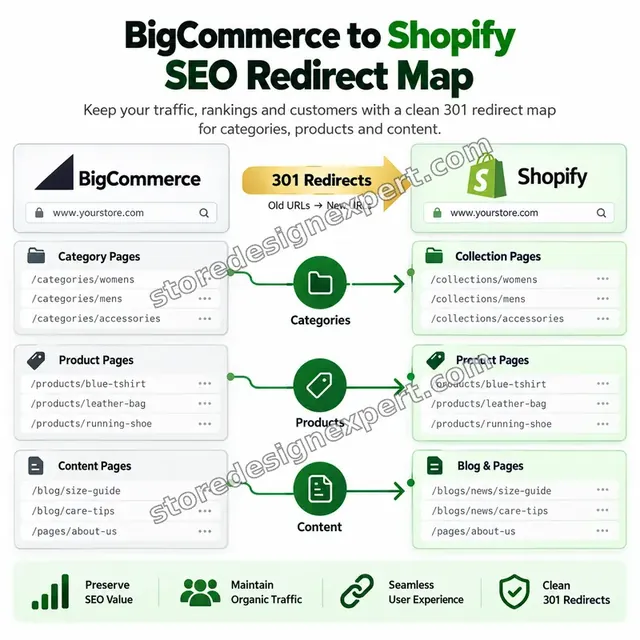
We take every indexed address from a crawl and the export, classify it as product, category, brand, blog or page, and write a one-to-one 301 file. Retired pages get a deliberate destination rather than a blanket homepage redirect.
Stencil to Online Store 2.0 rebuild
Handlebars templates cannot be moved, so we rebuild your layout using Liquid sections and blocks. Header, product page, filters and footer match your brand, and your staff can reorder content afterwards without a developer.
Customer, group and order history import
Accounts, addresses, tags and historical orders are loaded with original dates and order numbers kept in the order name or a tag. Imported orders do not touch stock or send emails, so customers never receive false notifications.
Shopify Plus and B2B configuration
For a bigcommerce to Shopify plus migration we set up companies, catalogs and price lists, checkout customization with current extensibility tools, and Markets for regional storefronts, then test each buyer type against its expected price.
POS and tool connections
We cover bigcommerce pos integration with Shopify by installing Shopify POS, creating locations, syncing inventory counts and connecting shipping, tax and accounting apps, so your counter and your online shop draw from the same stock.
What is included
What Your BigCommerce to Shopify Migration Includes
The work is split into six deliverable groups. Packages differ in how much of each group they cover, and the comparison table lower on the page lines every item up by package.
Catalog and options
- Products, SKUs, images, weights and inventory counts
- Brands converted into vendors and brand collections
- Custom fields written to metafields
- Option sets and modifiers mapped in the higher packages
Customers and orders
- Accounts, addresses, marketing consent and tags
- Customer groups mapped to tags or price lists
- Historical orders with original dates
- Reviews and gift certificates in the higher packages
URLs and SEO
- Crawl of every indexed address on the old store
- Product, category, brand, blog and page redirects
- Titles, descriptions and alt text carried across
- Sitemap resubmission and a post-launch crawl
Design and theme
- Premium or custom Online Store 2.0 theme set up
- Header, footer and menu rebuilt from your structure
- Product and collection templates matched to your brand
- Stencil-specific features recreated in Storefront Move and above
Settings and apps
- Payments, shipping zones, taxes and notifications
- App equivalents installed for reviews, search and email
- Tracking pixels and analytics events rebuilt
- POS and B2B setup in Plus Transition
Testing and cutover
- Test orders in every payment method
- Device, browser and speed checks
- Rehearsed domain switch with the old store kept as fallback
- Recorded walkthrough and two revision rounds
Each group ends with a written checkpoint, so you always know which part of your store has been moved, tested and signed off.
Watch the data move
How a BigCommerce Catalog Lands in Shopify, Step by Step
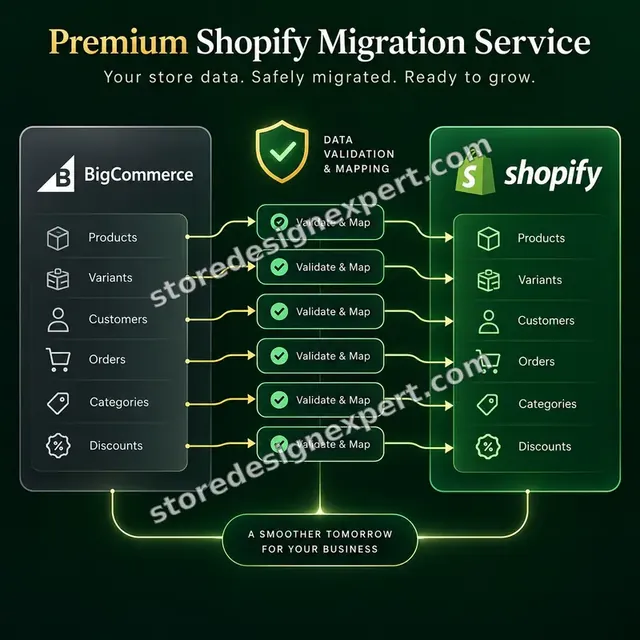
Follow a catalog from the old control panel to the new store. Records pass through a mapping gate where option sets are matched, a flagged conflict is resolved, and every old address gains a matching 301 destination before the switch.
Portfolio
Store Design Styles We Build
A look at store designs across fashion, home, beauty, pets and gifts, to show the standard of layout and finish behind BigCommerce to Shopify Migration Services.

Pet store design
Pet
Wellness ebooks store design
Wellness ebooks
Wall art store design
Wall art
Beauty tools store design
Beauty tools
Food creator store design
Food creator
Salon supplies store design
Salon suppliesProcess and timeline
How We Migrate BigCommerce to Shopify, Step by Step
Anyone wondering how to migrate BigCommerce to Shopify safely will find the order matters more than the tools. We follow six stages with written sign-off between each, and the calculator shows how catalog size and option complexity move the schedule.

- 1
Audit the old store
We export the catalog, crawl every indexed address and list your apps, groups and scripts. You get a written scope showing exactly what moves and what is replaced.
- 2
Map and stage
Fields, options and groups are mapped to Shopify, then a full trial import runs on a development store so problems appear before anything is live.
- 3
Rebuild the storefront
Your Stencil layout is redrawn as a Shopify theme using your brand, with preview links so you can review pages on your own devices.
- 4
Write the redirects
Each old address is paired with its closest Shopify page, tested in a single hop and prepared as a file for import on cutover day.
- 5
Test like a customer
We place orders in every payment method, check discounts, shipping and tax, and compare product and customer totals with the source.
- 6
Switch and monitor
We repeat the delta import, change the domain, import redirects and crawl the live store, then watch Search Console for early warnings.
Technical approach
Technical Map of a BigCommerce to Shopify Move
Here is how each layer is handled, what we do inside it and what you receive. Treat it as a bigcommerce to Shopify migration checklist you can hold us to, from the first export to the final crawl.
| Area | What we do | What you receive |
|---|---|---|
| Export and staging | Export products with the bulk edit template and API, customers, orders and blog content. Load everything into a Shopify development store first, so duplicates, broken rows and oversized variant sets show up while nothing is live. | Staged store with a data issue log |
| Products, options and variants | Convert product rows, SKU rows and rule rows into Shopify's handle-and-variant format. Reduce options to Shopify's three-option limit, move custom fields to metafields and turn brands into vendors. | Mapping sheet and import files |
| URL inventory and redirects | Merge crawl results, sitemap and export URLs, classify every root-level path and write 301 rules to /products/, /collections/, /blogs/ and /pages/. Avoid chains and never redirect retired URLs blindly to the homepage. | Redirect CSV and a mapping sheet |
| Customers and groups | Import accounts with tags and consent flags, translate customer groups into tags, catalogs or company price lists, and plan the first-sign-in email because password hashes cannot move. | Customer import log and group rule table |
| Orders, reviews and gift balances | Load historical orders as archived records without stock effects, keep the original order number visible, import reviews into your chosen review app and reissue gift certificate balances by agreed method. | Order reconciliation report |
| Theme and content | Rebuild the Stencil layout on Online Store 2.0, rehost images from BigCommerce's CDN, recreate banners and navigation, and port blog posts with their dates and authors. | Staged theme and a content log |
| Apps, checkout and tracking | Replace BigCommerce apps and Script Manager snippets with Shopify equivalents, configure payments, shipping and tax, and check purchase events in analytics and ad platforms. | App map and tracking verification |
| Cutover and aftercare | Lower DNS time-to-live, freeze orders briefly, sync last-minute changes, import redirects, switch the domain and crawl the live site. The old store stays untouched for a defined fallback period. | Cutover runbook and a crawl report |
Risk, dependencies and success plan
Migration Risks, Dependencies and Cutover Plan
A live store cannot afford surprises, so each dependency and gate is agreed in writing. Below you can see what we need from you, how the project is paced, which checks must pass and what happens during the switch.
Your responsibilities
- Provide BigCommerce admin access or API credentials, and Shopify collaborator access
- Name a decision-maker for approvals and the cutover date
- Share brand assets and a list of apps you actively depend on
- Tell us about payment processors, subscriptions and saved cards in use
- Confirm which customer groups carry special pricing
- Agree an order freeze window with your fulfilment team
- Review each milestone inside the agreed time so the schedule holds
Milestones
- Scope and data audit approvedCatalog size, options, groups and URL counts are confirmed in writing.
- Staged import acceptedA sample of products, customers and orders is checked against the source.
- Design approved on stagingTheme, navigation and key templates are reviewed on a preview link.
- Redirect file verifiedEvery sampled old URL resolves to the right Shopify page in one hop.
- QA passedTest orders, devices, tracking and speed meet the checklist.
- Cutover and monitoringDomain switch, live crawl and Search Console review.
QA gates
- Every indexed BigCommerce URL has a tested one-hop redirect
- Product counts, variants and stock match the source export
- Customer and order totals reconcile with the old control panel
- Test orders succeed in each payment method with correct tax and shipping
- Purchase and cart events reach analytics and ad platforms
- Images no longer load from BigCommerce's CDN
- The old store remains intact as a fallback
Launch criteria and support
- Switch the domain outside your busiest trading hours
- Final delta import for orders placed during the freeze
- 301 rules loaded and sampled by hand before visitors are let back in
- Live crawl immediately after cutover and again after a week
- Updated sitemap submitted and Search Console watched for errors
- Old plan cancelled only after you confirm everything works
- Optional 30 days of aftercare is a single tick in the calculator
Compare your options
App, Gig, Freelancer or Agency for a BigCommerce Move?
Owners usually weigh four routes before leaving BigCommerce. This table compares them on the factors that decide whether the new store keeps its traffic, its customers and its pricing.
| What matters | Migration app | Low-cost gig | Freelancer | Store Design Expert |
|---|---|---|---|---|
| Redirect file for root-level URLs | Add-on | Rarely | Varies | Yes |
| Option sets and modifiers mapped | Partly | Rarely | Sometimes | Yes |
| Customer groups turned into pricing rules | No | No | Sometimes | Yes |
| Theme rebuilt from Stencil | No | Rarely | Varies | Yes |
| Images rehosted from BigCommerce CDN | No | Rarely | Sometimes | Yes |
| Rehearsal import into a sandbox store | You do it | Rarely | Varies | Yes |
| Checkout and analytics test run | No | Rarely | Sometimes | Yes |
| Old store kept as fallback | Your risk | Varies | Varies | Yes |
Inside every project
What Protects Your Orders During the Move
A store that takes money every day needs a controlled transfer. These safeguards are in every package and are the reason a fixed fee from us is safer than a weekend with an import tool.
Rehearsal before reality
The whole import runs on a development store first. Duplicates, bad rows and variant overflows are found and fixed there, long before any customer can see them.
Your BigCommerce store stays untouched
We only read from the old store, never edit it. If something unexpected happens at cutover, your original shop is still intact and can resume trading.
Redirects are tested, not assumed
Sample URLs from every type are requested and verified in one hop before launch, then the whole list is crawled again after the domain moves.
Access you control
Collaborator access can be revoked by you whenever you wish, and we never ask for the owner password, so nobody keeps a standing key to your store.
A checklist that defines done
Counts, prices, groups, test orders, tracking events, devices and speed are all checked and shown to you before we ask for approval to switch.
Documentation you can reuse
A recorded tour and written notes explain the new theme, the redirect list, the app map and how to add products and edit sections.
Interactive price calculator
Build Your BigCommerce to Shopify Migration Package
Pick a package, then say how large the catalog is, how complex the options are and how much order history must come across. Your fixed total and delivery estimate change with every choice.
Request a custom quote
Catalogs beyond 10,000 products, multi-storefront BigCommerce setups, ERP or OMS integration, headless builds, subscription token transfers and BigCommerce Enterprise moves get a custom estimate and a written deliverables list.
Request a QuoteChanged your mind? Choose Catalog Move, Storefront Move or Plus Transition above to return to the instant calculator.
Packages and comparison
BigCommerce to Shopify Migration Package Comparison
Each deliverable is listed against the package that includes it. Use the calculator to add catalog size, option complexity and history depth and see your fixed price and schedule.
| What is included | Catalog Move $1,190 | Storefront Move $2,290Recommended | Plus Transition $4,490 |
|---|---|---|---|
| Crawl and URL inventory | Included | Included | Included |
| Products, images and inventory import | Included | Included | Included |
| Customers with tags and addresses | Included | Included | Included |
| Historical orders import | Included | Included | Included |
| 301 sheet covering every legacy URL | Included | Included | Included |
| Theme rebuilt from your Stencil layout | Not included | Included | Included |
| Option sets and modifiers mapped | Not included | Included | Included |
| App equivalents installed and configured | Not included | Included | Included |
| Payments, shipping and tax configured | Not included | Included | Included |
| Tracking and analytics verified | Not included | Included | Included |
| Company accounts, catalogs and price lists | Not included | Not included | Included |
| Markets for regions and currencies | Not included | Not included | Included |
| POS locations and stock sync | Not included | Not included | Included |
| Post-launch crawl and 14 days of fixes | Not included | Not included | Included |
| Typical delivery | 6 to 10 days | 12 to 20 days | 22 to 38 days |
What the calculator above shows for BigCommerce to Shopify Migration Services, the total and the estimated delivery, is what your order will use.
Why Store Design Expert
Why Brands Choose Our BigCommerce to Shopify Migration Agency
We pair an agency's discipline with a small team's directness. These are the reasons verified clients mention most often when they talk about a migration with us.

Shopify is all we do
Since 2015 we have designed and launched 450+ stores on one platform, so we know exactly where BigCommerce data needs extra care.
Design and data in one team
The people who map your catalog also rebuild your theme, so no detail slips through a gap between technical and visual work.
Rated 4.9+ by verified clients
Scores are left by clients who have already been through a move with us, which lets you look at past results first.
A price you can plan around
Each tier, option and extra carries a visible cost and day count, and anything over $2,500 is paid in two halves.
Direct contact with the builders
You talk to the people doing the work, so questions about a modifier or a redirect get answered quickly and clearly.
The finished store belongs to you
Everything lives in your Shopify account. Anything we build in our Partner account is transferred to you when the work is done.
What we need to get started
What We Need to Start Your Migration
A BigCommerce login, a list of what must not break and a single approver are enough to begin. Pick the access route that feels safest to you.
Accept our collaborator request
Got a Shopify store set up already? Share its web address and accept the collaborator invitation we send. You stay the owner, no password changes hands and you can end our access in one click.
Start fresh in our Partner account
Nothing on Shopify yet? Our own Partner account hosts the build, ownership passes to you at completion, and your plan choice is the final step.
Share staff login details instead
You can create a staff account for us as an alternative. We prefer collaborator access because it is simple to revoke, but a staff login lets us begin the audit immediately.
BigCommerce access or exports
Give us a read-only admin user or API credentials for the old store, so we can export the catalog, customers, orders, reviews and redirects directly.
Apps, payments and special features
List the apps, payment processors, subscription tools and customer groups you rely on, so each one is replaced or rebuilt on purpose.
Dates, freeze window and approver
Tell us about peak sale periods, how long orders can pause during the switch and who approves each stage and the final cutover.
Owner passwords and card numbers are never requested from you. Work happens on a development store, and your BigCommerce shop stays exactly as it is until you approve the switch.
Testimonials
What Store Owners Say After Launch
Verified clients describe working with Store Design Expert on migrations, builds and fixes.
Verified
Thank you so much to Store Design Expert and the team. My site looks far more appealing to customers, and I will happily recommend your services to other new small businesses.
JS
Jennifer S.United States
Verified
Outstanding work and outstanding customer service. Five stars! I will absolutely use Store Design Expert again for my next book.
KM
Katharine M.United States
Verified
Store Design Expert was great! They delivered exactly what I asked for and even offered helpful extra suggestions. Highly recommended.
PW
Paul W.United States
Verified
I request Store Design Expert every time I have a project. They are professional and give real attention to detail, which makes the work stand out.
LK
Laura K.United States
Verified
They kept communicating until the problem was fully resolved, and the result was great.
HJ
Henry J.United States
Verified
Super helpful and patient. I am new to ecommerce and Store Design Expert talked me through the whole process and even fixed my payment bridging for me!
LR
Lois R.United Kingdom
Verified
I am beyond satisfied! Store Design Expert went above and beyond on my project. Highly recommended!
MD
Michael D.United States
Verified
The experience was tailored to my brand and specifications to the letter. I love the result.
EP
Eric P.United States
Verified
They definitely get the job done. Very patient and understanding throughout the whole project.
BS
Brian S.United States
Related searches
Searches That Bring Owners to BigCommerce to Shopify Migration Services
People describe BigCommerce to Shopify Migration Services in different ways when they search. These are the common ones.
If you searched for “bigcommerce to shopify migration”, “migrate from bigcommerce to shopify”, “migrate bigcommerce to shopify” or “how to migrate from bigcommerce to shopify”, BigCommerce to Shopify Migration Services is the work that answers it.
People who look up “bigcommerce to shopify plus migration”, “bigcommerce to shopify migration guide”, “bigcommerce to shopify migration agency” or “bigcommerce to shopify migration cost” usually want BigCommerce to Shopify Migration Services; the calculator above shows the price and delivery estimate before you commit.
“bigcommerce vs shopify plus”, “bigcommerce to shopify migration without losing seo”, “bigcommerce to shopify migration expert” or “shopify store migration app” all point to the same job, which BigCommerce to Shopify Migration Services covers from start to finish.
“bigcommerce to shopify migration checklist”, “shopify plus migration guide” or “bigcommerce pos integration with shopify”: owners type these when they need BigCommerce to Shopify Migration Services, and the packages above are priced for that job.
FAQ
BigCommerce to Shopify Migration FAQs
Straight answers on cost, timing, SEO, what moves, what does not, and how the switch is handled.
How much do BigCommerce to Shopify migration services cost with you?
Packages start at $1,190 for Catalog Move, $2,290 for Storefront Move and $4,490 for Plus Transition. Catalog size, option complexity, order history and extras are added in the calculator, so most moves land between $1,200 and $7,000. You see the fixed total before you pay anything.
What is the bigcommerce to Shopify migration cost compared with doing it myself?
A tool such as Matrixify, Cart2Cart or LitExtension costs roughly $20 to $400, but the redirects, option mapping, theme rebuild and testing stay on you. Large agencies often open at $15,000 and above. Our fixed tiers land in the gap and still include the whole job.
How long does it take to migrate from BigCommerce to Shopify?
Catalog Move takes 6 to 10 working days, Storefront Move 12 to 20 and Plus Transition 22 to 38, before options. Bigger catalogs, complex modifiers and deeper order history add days that the calculator shows. Choose a faster schedule if you have a firm launch date.
How to migrate from BigCommerce to Shopify without downtime?
Keep the old store trading while we build and rehearse the new one on a development store. At cutover we repeat a delta import for recent orders, switch the domain, import redirects and crawl the result. Customers keep shopping throughout, apart from a short, agreed order freeze.
Will I lose my SEO if I migrate BigCommerce to Shopify?
Not if the redirect work is done properly, though a short wobble while Google recrawls is normal. We crawl the old site, map each product, category, brand, blog and page URL, carry over titles and descriptions and verify one-hop redirects. No agency can guarantee positions, but a mapped and verified redirect file removes the self-inflicted losses.
What does not transfer in a BigCommerce to Shopify migration?
Customer passwords, your Stencil theme, Script Manager snippets, app settings, discount codes and gift certificate balances do not move automatically. We rebuild or reissue each of these on purpose, and the scope document lists them one by one so there are no surprises at launch.
Do you offer a bigcommerce to Shopify plus migration?
Yes. Plus Transition adds company accounts, catalogs and price lists for wholesale buyers, Markets for regional storefronts, POS locations and a monitored cutover. Enterprise-scale catalogs, ERP links or headless storefronts receive an individual quote with agreed deliverables.
BigCommerce vs Shopify Plus: which one fits a growing store?
It depends on your channels and team. Shopify Plus offers a deep app ecosystem, checkout extensibility, B2B tools and Markets, while BigCommerce suits some catalog-heavy builds. We can compare both against your features and revenue plan before you commit to the move.
Is there a bigcommerce to Shopify migration guide I can follow myself?
Yes, the process is documented widely, and the steps are export, map, import, redirect, test and switch. Small catalogs with simple options can be done by an owner with patience. The difficult parts are redirects, modifiers and the theme, which is where most owners ask us to step in.
Is a Shopify store migration app enough for my BigCommerce store?
An app moves the easy 80 percent: products, customers and orders. It does not write your redirect file, rebuild your theme, replace your apps or reissue gift balances. We often use the same tools internally, then add the mapping, rebuild and testing around them.
Can you handle bigcommerce pos integration with Shopify?
Yes. We install Shopify POS, create your locations, load stock counts, set staff roles and connect your payment hardware, so counter and online sales draw from one inventory. The extra is available in the calculator, and Plus Transition includes it.
What goes into a bigcommerce to Shopify migration checklist?
Our checklist covers a catalog export, URL crawl, field mapping, trial import, theme rebuild, app replacements, payment and tax settings, test orders, tracking checks, redirect import and a post-launch crawl. You receive the signed-off version at handover, with every item marked.
Can I migrate BigCommerce to Shopify and keep my domain?
Yes, and we recommend it. Keeping the same domain preserves link equity. We lower the DNS time-to-live ahead of time, connect the domain to Shopify at cutover and confirm the certificate is active, so visitors arrive on the new store without noticing a change.
Why hire a Shopify Plus migration guide specialist instead of a general developer?
A general developer may know code but not the replatforming traps: URL classification, option limits, customer group pricing and order imports that do not touch stock. We have launched 450+ Shopify stores since 2015, so these problems are routine for us, not new each time.
What do I need to do before ordering?
Order a package, send read-only BigCommerce access and add us as collaborators on Shopify or let us build in our Partner account. Then list the apps and customer groups you use and name an approver. We send a written audit and scope for approval before any import begins.
Ready when you are
Order Your BigCommerce to Shopify Migration Services Today
Choose a package, see your fixed price and delivery estimate and book BigCommerce to Shopify migration services from a team that has launched over 450 stores. You get a verified catalog, tested redirects and a cutover you can trust.
- Secure checkout
- Two revision rounds
- Old store kept as fallback