
Shopify stores designed and launched
Shopify popup task
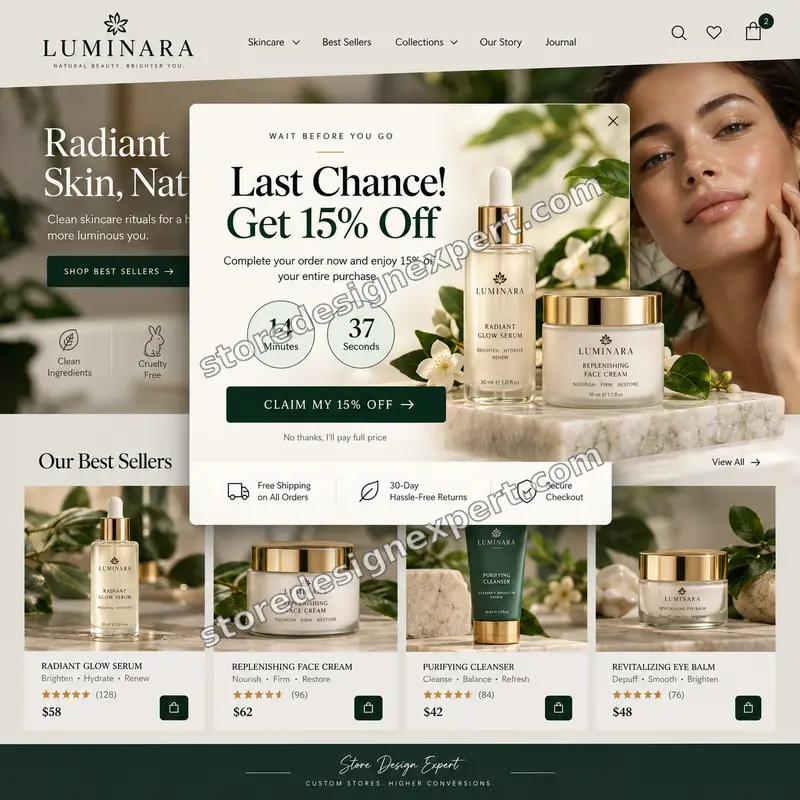
Add Exit Intent Popup to Shopify Store and Catch the Visitor Who Is About to Leave
Add exit intent popup to Shopify store themes with a polished offer that appears as visitors head for the door. Most visitors leave without buying or subscribing. As a Shopify developer for exit intent popup work, we build the offer into your theme instead of a heavy app, so it works on desktop and mobile, matches your design and shows once per visitor.
- Triggers on cursor exit, plus fast scroll-up and back gesture on phones
- Written into your theme, matched to your fonts, colors and buttons
- Email capture wired to your list, or a discount code reveal
- Tested on real devices before handover
From$89
Delivery1 to 4 working days
Revisions2 rounds
Our track record
Over 450 Shopify Stores Launched Since 2015, Ready to Add Exit Intent Popup to Shopify Store Themes the Right Way
Popups, theme sections and lead capture forms are everyday work for us. We have built them into hundreds of themes, so we know how to make an exit offer load fast, behave on phones and match the rest of your design.
Average rating from verified clients
Building Shopify stores since
Secure checkout
Pay through a protected checkout and keep a full order record.
Two revision rounds
Included in every package, so the result matches what you pictured.
Backup before changes
We work on a duplicate of your theme, never on your live store.
Problem and result
Shopify Store Exit Intent Popup Customization That Turns Silent Exits Into Captured Emails
An exit intent popup is a last, polite question asked as a visitor reaches for the tab bar. Done well, it protects the Shopify store user experience exit intent popup rules demand: it shows once, it is easy to close and it never blocks someone who is still shopping. Done badly, it feels like a trap. We build the first kind.
Visitors leave and you never hear from them
Paid and organic traffic arrives, browses a product or two and closes the tab. With no email captured and no reason to stay, there is nothing to follow up on and the advertising spend is gone. Every one of those visits cost you something to earn.
One well-timed offer at the exit
The popup appears once, at the right moment, with a clear offer and a single field. Wording, timing, design and the destination of each signup are tuned to your store. Visitors who want a reason to stay get one, and the rest leave without being nagged.
What is included
What You Get When We Add Exit Intent Popup to Shopify Store
This is a custom exit intent popup for Shopify store themes, written to your theme's structure with exit intent popup Shopify theme code that loads with the page and respects your design. Every item below is part of the fixed price, so there are no add-ons hiding behind the headline number.
Implementation checklist
- Exit trigger tuned for desktop cursor movement toward the browser edge, with a short arming delay
- Mobile triggers on fast scroll-up or the back gesture, so it never fires on arrival
- Popup design with headline, offer, one field and a clear button, matched to your theme
- Show once rules using a cookie, so the same visitor is never interrupted twice
- Suppression on checkout, the cart and for existing subscribers
- Close button, overlay tap and Escape key support with screen reader labels
- Email field connected to Shopify customers, Klaviyo, Mailchimp or your list tool
- Handover note showing how to change the offer and wording
Want to avoid monthly fees? A Shopify exit intent popup without app dependencies has no subscription to renew and no third party script slowing your pages. Because it is built as a theme section, it stays editable in the theme editor.
See how it works
From a Cursor Heading for the Exit to a Captured Email
Follow one visitor through the finished popup. It watches for the moment they are about to leave, asks once, confirms the signup and then steps out of the way for the rest of the visit.
Animated walkthrough
- 1
Leaving is detected
The cursor races toward the browser edge, or a phone shopper scrolls up fast or taps Back.
- 2
Your offer slides in once
A themed popup appears with a short headline, a single email field and a clear button.
- 3
They enter an email and tap the button
The field validates the address and the button sends it to your list tool.
- 4
A success state closes the loop
The visitor sees a confirmation and their code, and will not be interrupted again on this visit.
Scope boundaries
Add Exit Intent Popup Shopify Service: Exactly What Is and Is Not Covered
Our add exit intent popup Shopify service has clear edges, which keeps it a fixed price task with no surprises. If your idea needs more than the scope below, we tell you first and quote it separately.
Included
- One exit intent popup design on your storefront
- Desktop and mobile triggers and styling
- Show once and suppression rules
- Connection to one email tool or a code reveal
Not included
- Writing your whole email welcome series
- Designing a full brand identity
- Guaranteeing signup rates or sales lifts
- Changes to a heavily modified third party theme without a quote
Access we need
- Collaborator access to your Shopify store
- The offer and discount code you want to show
- Your email platform details, if connecting signups
- Your preferred wording, or let us propose it
Quote triggers
- More than three popup variants or A/B setups
- Multi language or multi store popups
- Dynamic offers based on cart contents
Typical turnaround
- Basic popups in 1 to 2 working days
- Standard popups in 2 to 3 working days
- Plus popups in 3 to 4 working days
- Faster options available in the calculator
After launch
- Handover note on changing the offer
- Two revision rounds included
- Backup theme kept so changes are reversible
- Thirty-day fix window on the Plus package
Compare your options
Popup App, DIY Code, Marketplace Freelancer or a Professional Shopify Exit Intent Popup Setup?
There are four common ways to put an exit offer on your store. Compare them on cost model, page weight, mobile handling, testing and upkeep, because the cheapest option on day one is rarely the cheapest after a year of subscription fees.
| What matters | Popup app | DIY theme code | Freelancer marketplace | Store Design Expert |
|---|---|---|---|---|
| Ongoing fee | Often monthly | None | None | None |
| Extra third-party script | Usually | No | Varies | No |
| Mobile triggers handled | Varies | You build | Varies | Yes |
| Hidden on checkout and for subscribers | Setting | You build | Rarely | Yes |
| Tested on real devices | You check | You check | Rarely | Yes |
| Theme backup first | No | Up to you | Rarely | Yes |
| Handover note | No | No | Rarely | Yes |
| Editable in the theme editor | App dashboard | No | Varies | Yes |
Price calculator
Price to Add Exit Intent Popup to Shopify Store
Pick a package, choose your offer type and where signups connect, then set your speed. Your fixed price and delivery estimate update instantly.
Request a custom quote
Multi-step offers, A/B testing, cart-aware targeting, multi-language popups or bundles with other store tasks receive a custom quote with agreed acceptance criteria.
Request a QuoteChanged your mind? Choose Basic, Standard or Plus above to return to the instant calculator.
How it works
How We Add Exit Intent Popup to Shopify Store, Step by Step
Six clear steps, with testing before anything touches your live theme. Your store keeps selling while we build and check.
- 1
Purchase
Choose your package and options and check out securely. The price you see is the price you pay.
- 2
Access
Send collaborator access and your offer details using the short form we email you.
- 3
Implementation
We build the popup in a duplicate of your theme so your live store is never touched while we work.
- 4
QA
We test triggers, devices, browsers, keyboard use and your signup connection end to end.
- 5
Review
You see the popup working and can request up to two rounds of changes to wording, timing or design.
- 6
Handover
We publish the popup and send a short note on changing the offer later.
Compatibility and QA
Theme Compatibility for a Shopify 2 0 Exit Intent Popup, Device Checks and Acceptance Criteria
Every popup is tested before you see it, and we keep a backup of your theme so changes are always reversible. The popup is only handed over when every acceptance criterion below passes.
What we test
- ThemesOnline Store 2.0 themes including Dawn, plus most well structured older themes.
- DevicesRecent iPhone, Android, tablet and desktop widths.
- BrowsersAdd Exit Intent Popup to Shopify Store is checked in current Chrome, Safari, Firefox and Edge.
- BackupsWe duplicate your theme first, so you can roll back at any time.
- PerformanceSmall, deferred code with no external script, so page speed is protected.
- AccessibilityFocus moves into the popup, returns when it closes and the Escape key works.
Acceptance criteria
- The popup appears once on exit intent and not on page load
- It stays hidden on checkout and for visitors who already signed up
- The form submits, validates and shows a success state
- The popup is readable on a small phone without sideways scrolling
- You can edit the offer using the handover note
What we need to get started
What We Need to Get Started on Your Exit Popup
To hire Shopify expert for exit intent popup work, you only need to give us a way into your store and tell us what the offer is. Choose the access route that suits you.
Collaborator access
If you already have a store, send us the store URL and approve our Shopify collaborator request. You stay the owner, no password is shared and you can remove our access at any time.
No store yet? We build it for you
If the store does not exist yet, we build it in our own Shopify Partner account as a development store and transfer ownership to you when the work is done, so you only pick a plan at the end.
Or send staff login details
You can send staff login details instead. We recommend collaborator access because it is easy to revoke, but a staff account works if you prefer it.
Your offer
Tell us what visitors receive: a discount code, free shipping, or a guide. Send the code or file and any limits such as minimum spend.
Your email tool
Name the platform that should receive signups, such as Klaviyo or Mailchimp, and the list or tags to use. Shopify customers works with no extra access.
Brand and wording
Send logo, colors and any preferred wording. If you have none, we propose a headline and button text that fit your store and your offer.
We never need your Shopify owner password. The popup is built in a duplicate theme, and every change is listed in the handover note.
Testimonials
What Store Owners Say About Quick Shopify Tasks
Verified clients describe working with Store Design Expert, from first message to finished result.
Verified
Store Design Expert delivered an outstanding website development experience! Their professionalism and attention to detail exceeded my expectations, and their proactive communication kept everything running smoothly. Truly impressed by their deep understanding and dedication.
WG
Warren G.United States
Verified
Superb work! Store Design Expert is incredibly patient, and even when I did not fully understand my own questions, everything was explained again in detail. My vision was implemented perfectly, and the work is worth every cent I spent.
KB
Katrin B.Germany
Verified
Very impressed with the build-out. My store is ready to get started, and I am sure I will reach out for edits down the road, but this is everything I could ask for to get the party started. Thanks again, and I will be in touch for future projects.
DH
Dale H.United States
Verified
Very quick and detailed work! Store Design Expert does exactly what you want, in a very professional manner.
LF
Lena F.Germany
Verified
Store Design Expert did an outstanding job with top-notch professionalism on my website project. Everything was delivered quickly without compromising quality. I could not have asked for better!
JM
Jason M.United States
Verified
The website development work was nothing short of professional, with top-notch quality. Their exceptional level of cooperation made the collaboration seamless and enjoyable. Highly recommend working with Store Design Expert!
JC
Jeremy C.United States
Verified
Super great to work with, and super fair!
RO
Robert O.United States
Verified
The website development work was truly impressive. Their attention to detail and ability to exceed expectations made the project a success. Working with them was a breeze, thanks to quick responsiveness and a willingness to go above and beyond.
KD
Kevin D.United States
Verified
Store Design Expert was very knowledgeable about what I needed done to fix my Shopify store and how to improve the store layout. The project was completed very quickly, and I will definitely use them for support as my business grows.
ST
Samuel T.United States
Related searches
Searches That Bring Owners to Add Exit Intent Popup to Shopify Store
The searches below are the ones that lead people to Add Exit Intent Popup to Shopify Store.
People who look up “add exit intent popup shopify service”, “shopify store exit intent popup customization” or “shopify developer for exit intent popup” usually want Add Exit Intent Popup to Shopify Store; the calculator above shows the price and delivery estimate before you commit.
People who look up “custom exit intent popup for shopify store”, “exit intent popup shopify theme code” or “exit intent popup on shopify mobile” usually want Add Exit Intent Popup to Shopify Store; the calculator above shows the price and delivery estimate before you commit.
If you searched for “hire shopify expert for exit intent popup”, “professional shopify exit intent popup setup” or “shopify exit intent popup without app”, Add Exit Intent Popup to Shopify Store is the work that answers it.
“shopify exit intent popup installation cost”, “shopify store user experience exit intent popup” or “shopify 2 0 exit intent popup”: owners type these when they need Add Exit Intent Popup to Shopify Store, and the packages above are priced for that job.
FAQ
Exit Intent Popup Questions
Quick answers about cost, timing, mobile behavior, apps and what we need from you.
How much does it cost to add exit intent popup to Shopify store themes?
Packages start at $89. Your offer type, email connection, speed and extras are added in the calculator, which shows a fixed price before you pay. Most single popups land well under $200 with no monthly fee, because the popup is written into your theme.
What is the Shopify exit intent popup installation cost compared with an app?
Apps charge a monthly fee that never ends, and the fee often rises with traffic. Our Shopify exit intent popup installation cost is a one time price from $89, with nothing to renew. Over a year, a one time build is usually cheaper.
How long does installation take?
Most popups are live within one to four working days, depending on the package. The Sooner and Fastest options shorten the range if you need the offer live for a sale or campaign.
Can I hire Shopify expert for exit intent popup work without an app?
Yes. When you hire Shopify expert for exit intent popup work, you get the popup written into your theme. That means no subscription and no extra third party script on your pages, and it stays editable in the theme editor.
Does an exit intent popup on Shopify mobile even work?
Phones have no cursor, so an exit intent popup on Shopify mobile uses fast scroll-up and the back gesture with a short delay instead. Standard and Plus include them, and we test on real screen sizes in both orientations.
Will Google penalize the popup?
Google's guidance targets popups that cover content as soon as a page opens. An exit popup that appears only when someone is leaving, and is easy to close, avoids that problem. We also keep it off checkout.
Do you build a Shopify 2 0 exit intent popup for Dawn and other themes?
Yes. We support Online Store 2.0 themes such as Dawn and most clearly structured older themes. A heavily modified or unsupported theme is quoted before work starts, so you never pay for something we cannot deliver.
Can it connect to Klaviyo or Mailchimp?
Yes. Choose Klaviyo or Mailchimp in the calculator and signups go straight to your list with the tags you ask for. Other tools can be quoted. If you pick Shopify customers, no extra access is needed.
Do you offer a professional Shopify exit intent popup setup with A/B tests?
A single popup with one design is covered by the packages. Two or more variants, or A/B testing, is a custom quote. We can build the variants, but measuring the winner is done in your email or analytics tool.
What if I want changes afterward?
Every order includes two revision rounds before launch, covering wording, timing and design. Later changes are quoted as small tasks. The handover note also shows how to change the offer yourself in the theme editor.
Will it slow my store down?
The code is small and deferred, with no external script, so it adds almost nothing to page weight. We check page speed before and after, and we avoid loading anything until the visitor shows a sign of leaving.
Ready when you are
Add Exit Intent Popup to Shopify Store and Give Leaving Visitors a Reason to Stay
Pick your package, see your exact price and delivery estimate and get an exit offer that feels helpful on every device. We will add exit intent popup to Shopify store themes cleanly, test it on real phones and hand over notes you can use.
- Secure checkout
- Two revision rounds
- Backup made before any change