
Shopify stores designed and launched
301 redirects and broken link fix
Shopify 301 Redirect and Broken Link Fix, Every Dead URL Sent Somewhere Useful
A Shopify 301 redirect and broken link fix from a team that has launched over 450 Shopify stores since 2015: we list every URL returning an error, pair each with the closest live page, load clean redirects, repair the links that caused the errors and prove the outcome with a crawl. Fixed packages start at $290 and finish in 2 to 9 working days, backed by a 4.9+ average rating from verified clients.
- Dead URLs found in Search Console, a live crawl and your analytics
- Each address paired with the most relevant page, never dumped on the home page
- Menus, blog links and theme code repaired so errors stop coming back
- Fixed price, written redirect map, you stay the owner
From$290
Delivery2 to 9 working days
Revisions2 rounds
Our track record
450+ Shopify Stores Launched Since 2015. We Know Where Their Links Break.
Every store we have built has eventually met a deleted product, a renamed collection or a retired campaign page. We know which of those quietly bleed traffic and which are harmless, and we fix the first kind first.
Average rating from verified clients
Building Shopify stores since
Secure checkout
Pay through a protected checkout and keep a full order record.
Two revision rounds
Included in every package, so the result matches what you pictured.
Backup before changes
We work on a duplicate of your theme, never on your live store.
Who this is for
Who Needs Redirects and Link Repair Most Often
Most owners arrive after noticing a symptom: a red 404 count in Search Console, a drop on a page that used to rank, or a customer complaining about a dead email link. These are the usual stories behind it.
You are a good fit if
- You can give us Search Console access or a recent export
- You know roughly when the errors began
- You want pages sent to relevant destinations rather than the home page
- You prefer a fixed price over open hourly billing
Stores that deleted products over the years
Discontinued lines were removed from the catalogue, but the old product addresses still sit in Google, in old emails and on other sites. Each one now lands on an error page instead of a related item.
Owners who renamed collections or handles
A tidy-up changed /collections/mens-tees to something shorter. Shopify only offers the redirect when you tick a box at that moment, and that box is easy to miss.
Brands that moved platform or domain
The migration shipped, yet some old paths were never mapped. Rankings slid in the weeks after and nobody could say which pages lost their way.
Teams chasing a Search Console error list
The page indexing report shows hundreds of not found rows and you cannot tell which matter. You need them ranked by links and traffic, then fixed in order.
Marketers with old campaign links in circulation
Retired landing pages, expired discount URLs and newsletter links keep getting clicked. Every dead click is a lost visitor you already paid for.
Merchants whose app redirects stopped working
A redirect app was installed, then uninstalled or downgraded, and rules vanished with it. You want the rules held in your store itself, with no monthly dependency.
Problems solved
Fix Broken Links Shopify Stores Collect Before They Cost Rankings
A broken link is rarely one problem. It is a lost visitor, a wasted crawl visit and sometimes the end of a ranking page. These are the faults we see most and the way each one is closed.
- Shopify 404 page not found, on pages that still attract links
Other websites, old emails and Google keep sending people to deleted pages. The authority those links carry is thrown away unless a 301 hands it to a relevant live page.
- Shopify URL redirect rules that never fire
Shopify only redirects an address that returns a 404. If a page, even an unpublished draft with that handle, still resolves, the rule is ignored and the owner sees nothing wrong.
- Chains and loops from years of patching
One tidy-up redirected A to B, a later one sent B to C. Every extra hop slows visitors and wastes crawl time, and a loop shows browsers an error page.
- Everything sent to the home page
Pointing every dead URL at the front page is quick, but Google treats an irrelevant destination as a soft 404, so you keep the lost visit and gain no equity.
- Hard-coded links inside theme files and blog posts
A link typed by hand into a footer, a banner or an old article never updates when a handle changes. The error returns the next time someone renames a page.
- Product feeds and sitemaps pointing at dead URLs
Merchant Center items, email blocks and third-party listings keep a copy of old addresses. Fixing only the store leaves those sources producing fresh 404s every day.
What we can do
What Our Redirect and Link Repair Work Covers
This is a data job, a Liquid job and a search job at once. These six capabilities are where results are decided, along with the edge cases that usually trip people up.
Shopify broken link checker built from three sources
A single crawler misses pages nobody links to internally. We combine a full-site crawl, the Search Console page indexing report and your analytics landing pages, then merge them into one list with the number of links and visits each dead URL still earns.
Redirect map with relevance rules, not guesswork
Each dead address is paired by hand or by rule with the closest live product, collection, article or page. Where nothing relevant exists, we choose the parent collection or the best search-friendly alternative and note why.
404 not found Shopify cases that need code
Some errors come from theme links, section settings or app blocks, not from deleted pages. We trace them to the template or setting that outputs them and repair the source, using dynamic routes so a handle change cannot break them again.
Shopify domain redirect and host variants
The myshopify.com address, www and bare domain, http and https, plus any secondary domains, are checked so each one reaches your primary domain in one hop. Subdomains and retired domains get their own mapping plan.
Edge rules the native manager cannot hold
Shopify's redirect screen takes exact relative paths only, with no wildcards. For patterns such as a whole retired folder or tracking parameters, we design a rule set that stays crawlable, rather than leaning on slow script redirects.
Crawl-proven results and a handover file
After loading, we re-crawl every old address and record its status code and landing page. You receive the full map as a spreadsheet so any future developer or app can see which rule did what and why.
What is included
What Your 301 Redirect and Link Repair Includes
Six streams sit inside the fixed price. The comparison table further down shows which package carries each line, and the calculator adjusts for larger lists.
Discovery and ranking
- Full-site crawl of internal links and status codes
- Search Console not found and soft 404 rows reviewed
- Analytics landing pages with errors listed
- Dead URLs ranked by backlinks and visits
Redirect map
- Each address paired with a relevant live page
- Chains and loops removed before loading
- Reserved paths and conflicts flagged for you
- Bulk CSV prepared in Shopify's import format
Link repair
- Menus and footer links corrected
- Blog and page body links updated
- Theme and section links switched to dynamic routes
- Product, email and feed links reported for update
Domain and host checks
- Primary domain setting verified
- www, bare, http and https variants tested
- myshopify.com address behaviour confirmed
- Extra domain redirects mapped
Error page quality
- 404 page template reviewed for useful links
- Search box and collection links added where missing
- Soft 404 behaviour checked on removed products
- Out-of-stock policy agreed for retired items
Testing and handover
- Re-crawl of every old URL after loading
- Status code and landing page recorded per URL
- Redirect map spreadsheet and short walkthrough video
- Two revision rounds
We work on a copy of your redirect list and a duplicate theme, so nothing changes in your live store until the checks are green and you have seen them.
See how it works
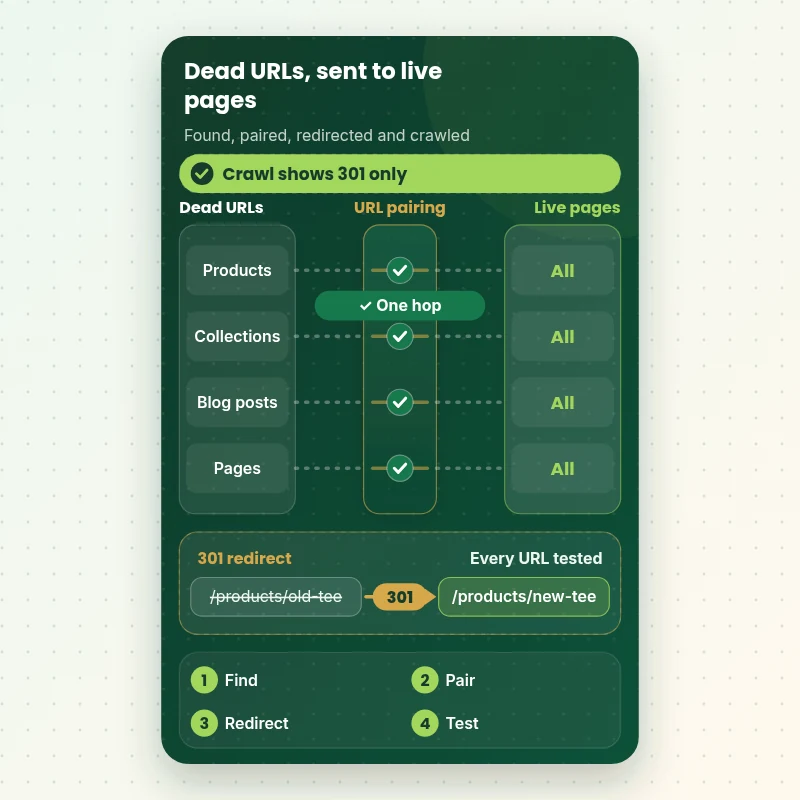
How a Shopify 301 Redirect Fix Sends Dead URLs to Live Pages
Follow a list of broken addresses from discovery to proof. Every dead URL is collected from Search Console, a crawl and analytics, paired with the closest live page, checked for chains, loaded as a single 301 and tested again so each old link lands where a shopper expects.
Portfolio
Store Designs From Our Studio
301 Redirects and Broken Link Fix gets the same attention to layout, spacing and detail as each design below, every one built around a single catalog and one kind of buyer.

Coffee creator store design
Coffee creator
Artisan snacks store design
Artisan snacks
Pet store design
Pet
Wellness ebooks store design
Wellness ebooks
Wall art store design
Wall art
Beauty tools store design
Beauty toolsProcess and timeline
How We Run a Redirect and Broken Link Project
Six stages, with Shopify redirects loaded only after the whole list has passed review on a copy. A Dead Link Rescue usually finishes in 2 to 4 working days, and the calculator estimates larger jobs.
- 1
Collect every dead URL
We crawl the store, export the not found rows from Search Console and pull error landing pages from analytics, then merge the three into one deduplicated list.
- 2
Rank by what each URL still earns
Backlink counts and recent visits decide the order, so the pages with real equity are paired first and the long tail follows.
- 3
Pair each address with a destination
Every row gets a relevant target. You approve the pairs that are judgement calls, such as discontinued items with no direct replacement.
- 4
Fix the source of the errors
Menus, theme links, blog bodies and sections that produce errors are repaired, so the same faults do not refill the list next month.
- 5
Load redirects and test them
The approved pairs are imported through Shopify's CSV tool. A fresh crawl confirms each old address answers with a single 301 to the right page.
- 6
Hand over and watch
You get the redirect map, a short video tour and guidance for Search Console, where the not found count should fall over the following weeks.
Compare your options
Native Screen, Redirect App, Gig Seller or a Managed Fix?
Four routes can clear a 404 list. They differ in who maps the destinations, who checks the result and who cares where links ought to land.
| What matters | Shopify redirect screen | Redirect app | Gig seller | Store Design Expert |
|---|---|---|---|---|
| Finds dead URLs from three sources | You find them | Tracks new ones | Rarely | Yes |
| Pairs URLs with relevant pages | You decide | Auto or manual | Often home page | Yes |
| Handles chains and loops | No warning | Some alerts | Rarely | Yes |
| Repairs the source of errors | No | No | Rarely | Yes |
| Wildcard and pattern planning | No | Paid tier | Varies | Yes |
| Rules held in your own store | Yes | Depends on app | Yes | Yes |
| Crawl proof for each rule | No | No | Rarely | Yes |
| Typical cost | Your time | From $8 a month | From $5 | From $290 |
Inside every project
Safeguards Behind Every Redirect We Load
A redirect list is a live routing table for your store. Each job follows the habits below, and they are the reason the fixed price holds.
Duplicate theme before any code change
Link repairs in templates are made on a copy of your theme and previewed first. The live theme is only replaced after you approve the preview.
Your current redirects exported first
We download the existing list before touching it, so any rule can be restored if you ever need to roll back.
Every rule tested for its status code
A rule is not finished until a request to the old address returns a single 301 and lands on the intended page, with no loop or second hop.
Judgement calls shown to you
Where a dead page has no clear successor, you see our proposed destination and the reason before it is loaded.
Reserved and live paths protected
We never try to redirect paths Shopify reserves, and we check that a live page is not being shadowed by a rule that would never fire.
Fixed scope, two revision rounds
The list agreed in the plan is delivered at the quoted price, with two rounds of changes before handover.
Interactive price calculator
Price Your Shopify 301 Redirect and Link Fix
Pick a package, say how many dead addresses there are and where the problem started, then add any extra domains that should point at the store. The fixed price and timing refresh with every click.
Request a custom quote
More than 2,500 dead addresses, several stores or storefronts, or a catalogue that has changed platform more than once need a custom quote, with the scope agreed in writing before work starts.
Request a QuoteChanged your mind? Choose Dead Link Rescue, Redirect Map Build or Full Link Equity Recovery above to return to the instant calculator.
Packages and comparison
Redirect and Link Fix Package Comparison
Each line shows exactly what a package carries. The calculator above raises the price only when your list is longer, older or spread across more domains.
| What is included | Dead Link Rescue $290 | Redirect Map Build $690Recommended | Full Link Equity Recovery $1,290 |
|---|---|---|---|
| Up to 100 dead URLs redirected | Included | Included | Included |
| Search Console and live crawl review | Included | Included | Included |
| Chains and loops removed | Included | Included | Included |
| Status code proof per rule | Included | Included | Included |
| Analytics and backlink ranking of URLs | Not included | Included | Included |
| Blog, page and theme link repair | Not included | Included | Included |
| 404 page template improvements | Not included | Included | Included |
| Redirect map spreadsheet | Not included | Included | Included |
| Retired-product policy in Liquid | Not included | Not included | Included |
| Wildcard-style pattern plan | Not included | Not included | Included |
| Feed and sitemap source review | Not included | Not included | Included |
| 14 days of fixes | Not included | Not included | Included |
| Typical delivery | 2 to 4 days | 3 to 6 days | 5 to 9 days |
The calculator above gives the exact price and delivery estimate for your 301 Redirects and Broken Link Fix order, and that is what you pay.
Why Store Design Expert
Why Owners Choose Us Over a Redirect App or a Cheap Gig
A Shopify 301 redirect app and a gig seller both cover the typing. We cover the thinking about where each visitor and each link should land.
Shopify only, since 2015
More than 450 Shopify stores launched means we know how handles, collections, blogs and menus break links, and where Shopify gives no warning.
Equity first, tidiness second
We start with the dead URLs that carry backlinks and traffic, because that is where lost value actually sits.
We repair the cause
Redirects treat the symptom. We also trace which template, menu or section keeps creating the error and change it.
Cheaper than an agency, sturdier than a gig
Gigs start near $5 and agency audit projects begin around $2,000. A $290 start with a verified result sits sensibly between them.
Proof you can open
A spreadsheet shows each old address, its destination and the status code returned, so nothing depends on trust.
Rules live in your store
Redirects sit in your own Shopify admin, so there is no app subscription or vendor you must keep paying to stop errors.
What we need to get started
What We Need to Begin Your Link Fix
You do not need to export lists or learn Search Console first. We need a way into the store and a view of what Google reports.
Send a collaborator request
Share your store address and approve our request. You remain the owner, we ask only for the permissions redirect and theme work require, and you can withdraw us whenever you wish.
No store of your own yet?
We assemble it in our Shopify Partner account, apply the redirect plan there and transfer ownership once you are happy, so you pick a plan only at the end.
Prefer a staff login instead?
A staff account created for us works too. Collaborator access is easier to revoke, but either route is acceptable.
Search Console and analytics access
Add us as a user in Search Console and, if you can, grant read access to analytics so we can see which dead URLs still get visits.
History of the store
Tell us about past migrations, deleted ranges, renamed collections and old domains. Even a rough timeline helps us reconstruct old paths.
Decisions and sign-off
Name the person who approves judgement-call destinations, and tell us about any campaign, sale or launch that depends on the links.
We never need your owner password, hosting login or payment details. Your live store keeps running while we work on copies.
Testimonials
What Store Owners Say Before You Order 301 Redirects and Broken Link Fix
Verified clients describe their projects with Store Design Expert, from first brief to launch.
Verified
Store Design Expert is the best. The work is very professional, they pay close attention to detail and, more importantly, they listen. Their level of cooperation is second to none, and everything was delivered in a very timely manner. I will keep them in mind for future projects.
BN
Barbara N.United States
Verified
Super helpful and patient. I am new to ecommerce and Store Design Expert talked me through the whole process and even fixed my payment bridging for me!
LR
Lois R.United Kingdom
Verified
I am beyond satisfied! Store Design Expert went above and beyond on my project. Highly recommended!
MD
Michael D.United States
Verified
The experience was tailored to my brand and specifications to the letter. I love the result.
EP
Eric P.United States
Verified
They definitely get the job done. Very patient and understanding throughout the whole project.
BS
Brian S.United States
Verified
Thank you so much to Store Design Expert and the team. My site looks far more appealing to customers, and I will happily recommend your services to other new small businesses.
JS
Jennifer S.United States
Verified
Very patient, informative and transparent, and they did exactly what they said they would do. Thanks for all the help!
RO
Raymond O.United States
Verified
Store Design Expert is the only one I use for all things WordPress. They have a high level of understanding, deliver quality work and are easy to deal with.
SC
Scott C.United States
Verified
A pleasure to work with. They did pretty much everything I asked and definitely exceeded my expectations. I will be working with Store Design Expert again soon.
JL
Jerry L.United States
Related searches
Searches That Bring Owners to 301 Redirects and Broken Link Fix
The searches below are the ones that lead people to 301 Redirects and Broken Link Fix.
“shopify broken link checker”, “fix broken links shopify”, “how to fix broken links in shopify” or “create a url redirect in shopify”: owners type these when they need 301 Redirects and Broken Link Fix, and the packages above are priced for that job.
“shopify redirects”, “how to redirect url in shopify”, “shopify url redirect” or “shopify 301 redirect app” all point to the same job, which 301 Redirects and Broken Link Fix covers from start to finish.
“shopify redirect not working”, “what is a 301 redirect” or “shopify domain redirect”: owners type these when they need 301 Redirects and Broken Link Fix, and the packages above are priced for that job.
Related searches include “how to fix 404 error on shopify”, “shopify 404 page not found”, “404 not found shopify” or “shopify expert near me”.
FAQ
Shopify Redirect and Broken Link FAQs
Short answers about cost, limits, DIY routes, what we can and cannot fix and how long results take to show.
How much does a Shopify 301 redirect and broken link fix cost?
Our packages start at $290 for Dead Link Rescue, $690 for Redirect Map Build and $1,290 for Full Link Equity Recovery. The number of dead addresses, where they came from and any extra domains are priced in the calculator, so you see an exact fixed price before paying.
What is a 301 redirect and why does my store need them?
A 301 is a permanent forwarding instruction. When someone, or Google, requests an old address, your store answers with the new one. Visitors reach a live page, and ranking signals from old links are largely passed along instead of being lost to an error.
How do I create a URL redirect in Shopify myself?
Open the URL redirects screen under Navigation, add the old path as a relative address, add the new path and save. For many at once, import a CSV with a Redirect from and a Redirect to column. It works for a handful of pages. Large lists need checking.
How to redirect URL in Shopify when the old page still exists?
A redirect will not fire while the old address still loads a page. Delete the page, unpublish it so it returns a 404 or change its handle, then add the rule. We check for this conflict across your whole list so rules do not silently sit unused.
Why is my Shopify redirect not working?
The common causes are a live page still answering at the old address, a full domain typed in the source box, a loop between two rules or a browser that cached an earlier answer. We test each rule as a status code from a clean request, which separates a real fault from a cached one.
How to fix broken links in Shopify without losing traffic?
Find every dead URL, rank them by links and visits, redirect each to the most relevant live page and repair the menu, theme or article link that produced the error. Then crawl again to confirm. We do each of those steps and document the result.
How to fix 404 error on Shopify for deleted products?
Decide per product. A close replacement gets a 301. A discontinued line with no replacement can redirect to its collection. A product that is only out of stock should usually stay live. We write these rules down, so the decision is the same next time.
What counts as a Shopify 404 page not found, and does every one need fixing?
No. A 404 on a mistyped address that nobody links to is harmless and Google expects some. The ones worth fixing are those with backlinks, internal links or recent visits. We separate the two groups so you pay for the work that matters.
Which Shopify broken link checker do you use?
We combine a full-site crawler, Search Console's page indexing report and your analytics landing pages. A crawler alone only finds links inside your store, while Search Console shows what Google remembers from outside. Merging the three produces one honest list.
Is a Shopify 301 redirect app enough?
For a few redirects, an app is fine, and some offer wildcard rules for a monthly fee. They still leave the mapping to you, and script-based redirects are less reliable for search than server-side ones. We use the native manager where we can, so your rules stay in your store.
Can you handle a Shopify domain redirect to my primary domain?
Yes. We check that your primary domain is set, that www, bare, http and https variants each reach it in one hop and that the myshopify.com address does not serve a second copy. Retired or secondary domains are mapped to relevant pages, not only the home page.
What can you not fix with redirects?
Redirects cannot restore a deleted page's content, change Shopify's fixed /products and /collections paths, redirect reserved paths such as /cart, or make Google reindex instantly. We tell you plainly which errors can be solved, which should be left and which need a content decision.
Do I need a Shopify expert near me for this?
No. The work is remote and uses collaborator access, so location makes no difference. What matters is Shopify-specific experience. We have launched over 450 stores since 2015 and communicate through written updates, with calls available whenever a decision needs talking through.
How long until Google reflects the new redirects?
Googlebot picks up redirects the next time it crawls each old address, which can take days for busy pages and weeks for the long tail. The not found count in Search Console usually falls gradually. We give you a checklist for tracking it.
Ready when you are
Start Your Shopify 301 Redirect and Broken Link Fix
Pick a package, tell us how many dead addresses you have and see a fixed price and delivery estimate straight away. Your Shopify 301 redirect clean-up is done by a team that has launched over 450 Shopify stores, and you receive a full redirect map at handover.
Secure checkout · Two revision rounds · Written redirect map included