
Shopify stores designed and launched
Heatmap and session recording setup
Shopify Heatmap and Session Recording Setup, Installed Cleanly With Clarity or Hotjar
A Shopify heatmap shows where shoppers click, scroll and stall; recordings show why. We pick between Microsoft Clarity and Hotjar, install it without slowing your pages, mask what must stay private and tag the sessions that matter. From $590, backed by 450+ stores launched since 2015 and a 4.9+ rating from verified clients.
- Tool chosen for your plan and traffic, not by habit
- Private fields masked and cookie consent respected
- Segments tagged: cart adders, rage clicks, abandoned checkouts
- A written routine for reading heatmaps each week
From$590
Delivery3 to 12 working days
Revisions2 rounds
Our track record
Over 450 Shopify Stores Launched Since 2015. Now See How Shoppers Actually Use Yours.
Pasting a tracking script takes a minute. Deciding what to capture, what to hide and what to do with the footage is where a store learns something, and that is the part we have practised across years of Shopify builds.
Average rating from verified clients
Building Shopify stores since
Secure checkout
Pay through a protected checkout and keep a full order record.
Two revision rounds
Included in every package, so the result matches what you pictured.
Backup before changes
We work on a duplicate of your theme, never on your live store.
Who this is for
Made for Stores That Have Traffic but No Idea Why It Leaves
Analytics tells you a page loses people. A heatmap and a recording tell you what they did first. These are the owners who usually ask for the setup, with the first thing each needs.
Owners guessing at redesigns
Every idea about the homepage or product page is an opinion. We install the recording layer so the next change starts from what visitors really do on the page.
Brands paying for clicks
When paid visitors land and vanish, you need to see the first ten seconds of their visit. We tag paid sessions so they can be watched on their own.
Stores with mobile bounce
Phone visitors tap things that are not buttons and miss ones that are. Tap maps and replays on small screens expose it faster than any report.
Owners who tried and gave up
A Hotjar trial ran out, or a Clarity script sits unused. We rescue the half-finished install, fix what it records and show you where to look first.
Agencies and freelancers
You manage client stores and want a repeatable, privacy-safe recording setup you can hand over, not a snippet pasted in a hurry.
Teams before a redesign
Capture a few weeks of behaviour on the current theme first, so the new design answers real problems and has a fair before-and-after to be judged against.
Problems solved
Why Heatmaps Installed in a Hurry Teach Nothing
A script on every page produces thousands of recordings and almost no answers. This is what we find when a store already has a tool and cannot get value from it.
The problem
Nobody knows which sessions to watch.
The outcome
We tag cart adders, checkout starters, rage clicks and dead clicks, so you open ten useful recordings rather than scroll through a random thousand.
The problem
Card digits and emails can appear in recordings.
The outcome
We turn on masking for form fields, review what each tool captures by default and confirm that nothing personal is stored that should not be.
The problem
Consent was never wired in.
The outcome
Recording scripts that run before a visitor agrees can break your own cookie policy. We connect the tool to your consent banner or Shopify's customer privacy settings.
The problem
The script makes pages heavier.
The outcome
We install through the lightest route available, check the effect on loading and remove the duplicate snippets that earlier attempts left in the theme.
The problem
A heatmap is read as proof.
The outcome
Colours show behaviour, not intent. We teach what a click map can and cannot say, and pair each map with recordings and funnel numbers before anyone changes a layout.
The problem
Checkout is a blind spot.
The outcome
Shopify does not allow third-party scripts in checkout on most plans, so recordings stop at the button. We tell you what your plan can capture there instead of leaving a silent gap.
What we can do
What Our Shopify Heatmap Setup Covers
The work sits across tool choice, installation, privacy and interpretation. These are the six areas where our hours go, with the awkward cases we meet regularly.
Choosing between Clarity and Hotjar
Microsoft Clarity costs nothing and has no traffic cap, while Hotjar adds surveys, feedback widgets and a long retention period at a monthly fee. We lay both against your volume and questions, then recommend one, or both for different jobs.
Installation that fits Shopify
For Clarity we use its Shopify app, which relies on Shopify's pixel, and migrate any old theme.liquid snippet so nothing runs twice. For Hotjar we add its script through the safest route your theme permits and verify that it fires.
Masking and consent
Form inputs, account pages and any sensitive text are masked before the first recording is stored. The tool is then tied to your consent setup so recording follows what the visitor has agreed to.
Heatmaps on the pages that matter
We create click, scroll and move views for the homepage, top collections, best-selling product pages and the cart, split by desktop and phone, because the two behave differently and averaging them hides both.
Segments and filters
Saved filters for rage clicks, dead clicks, quick backs, cart without checkout and sessions from paid campaigns turn an endless library into a short watch list.
A reading routine
You receive a one-page method for a weekly review: what to open, what to note, when a pattern is real and when to leave it alone, plus a log you can keep.
What is included
What Your Shopify Heatmap and Recording Package Includes
The work is split into six deliverables. Each ends with something you can open and check, from a verified install to a written reading guide.
Tool decision
- Short comparison of Microsoft Clarity and Hotjar for your store
- Review of traffic, plan and questions to answer
- Recommendation and the reasoning behind it
- Your approval before anything is installed
Clean installation
- App or script installed through the lightest route
- Old duplicate snippets removed from the theme
- Firing verified on home, collection, product and cart
- Project and team access set up
Privacy controls
- Field masking turned on and checked
- Sensitive pages excluded from recording
- Link to your consent banner or privacy settings
- Plain-English note on what is stored and for how long
Heatmaps and views
- Click, scroll and move maps for key pages
- Desktop and phone views kept separate
- Saved filters for rage clicks and dead clicks
- Segments for cart, checkout and campaign traffic
Reading guide
- One-page weekly review routine
- Examples of patterns worth acting on
- Log template for findings
- Notes on what a heatmap cannot prove
Handover
- Recorded walkthrough of the dashboard
- Written settings summary
- Rollback note for anything changed in the theme
- Two revision rounds after your review
Nothing here depends on guesswork: every item is a setting, a saved view or a document that you can confirm after delivery.
See how it works
From Every Click to a Recording You Can Watch
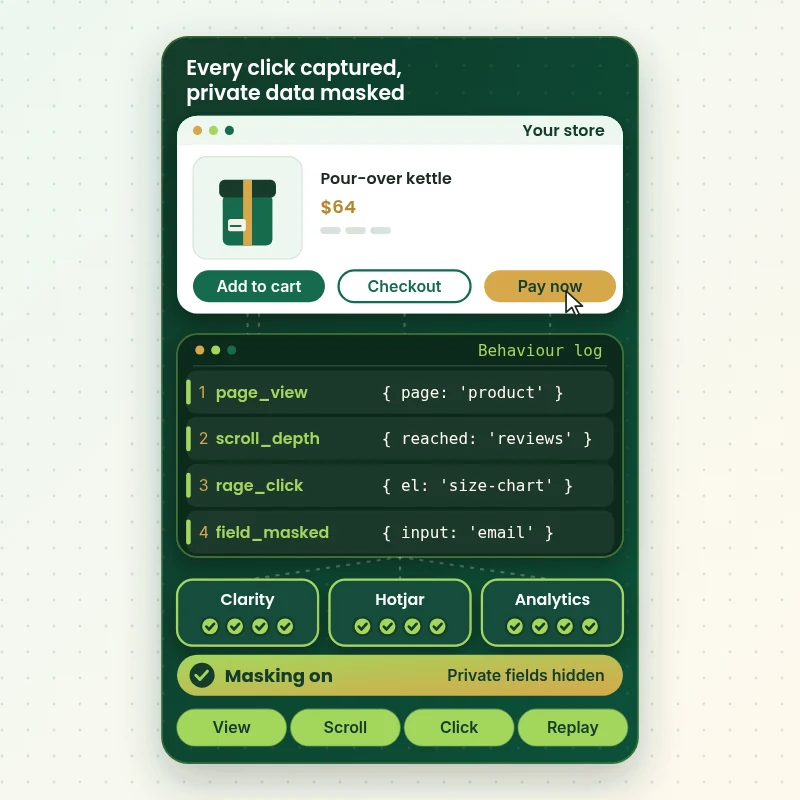
A heatmap is built from small events: a tap, a scroll, a frustrated repeat click. In this walkthrough a shopper moves through a product page while the tracking console captures each action and sends it to Clarity, Hotjar and Analytics, with private fields masked before anything is stored.
Portfolio
Shopify Store Designs We Create
A look at store designs across fashion, home, beauty, pets and gifts, to show the standard of layout and finish behind Shopify Heatmap and Session Recording Setup (Hotjar / Microsoft Clarity).

Photography store design
Photography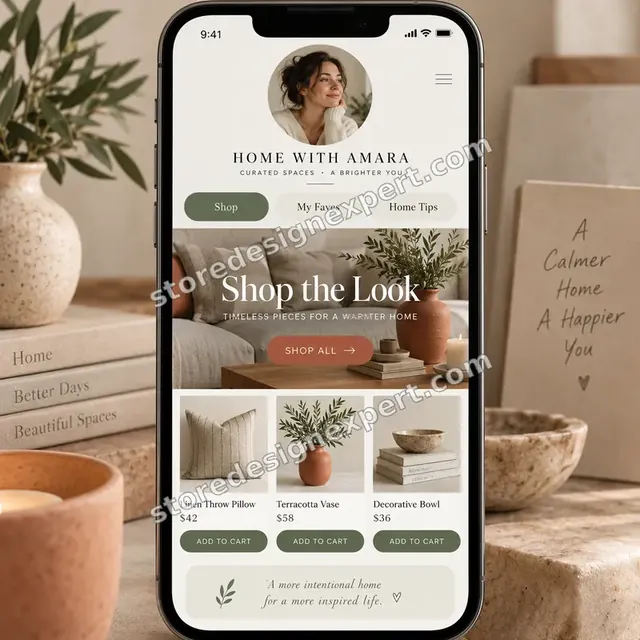
Home decor creator store design
Home decor creator
Furniture store design
Furniture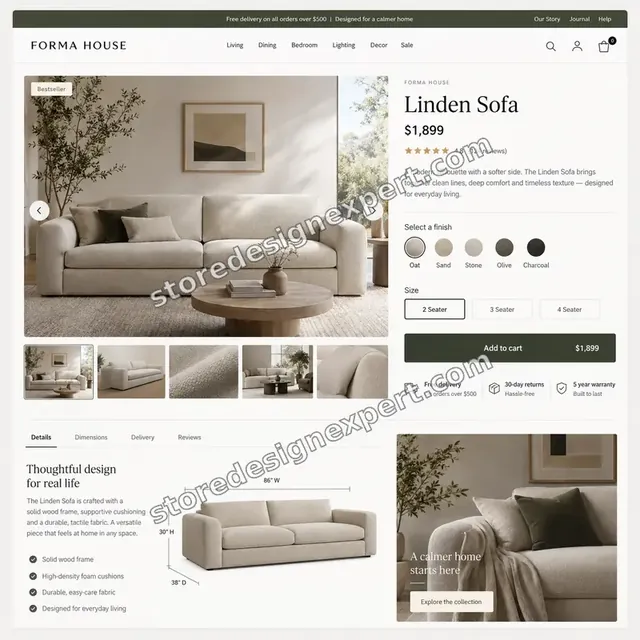
Furniture store design
Furniture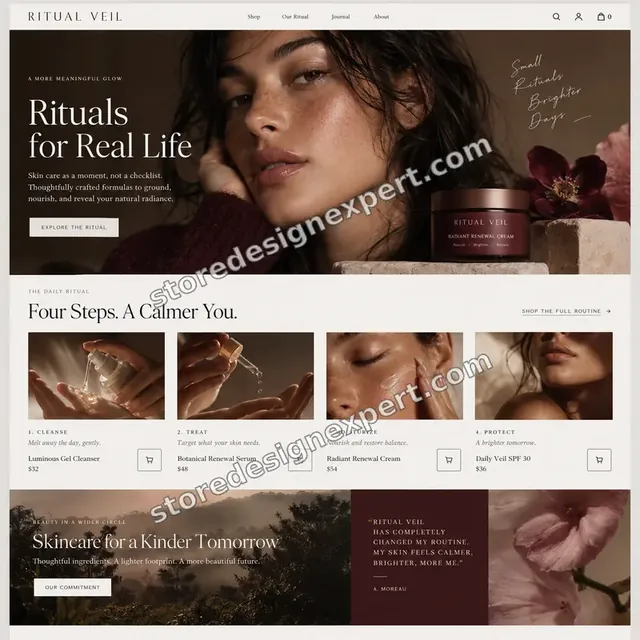
Beauty store design
Beauty
Kids clothing store design
Kids clothingProcess and timeline
From Tool Choice to Your First Useful Recording
Six stages take a store from no behaviour data to a watch list worth opening. Everything happens on a theme copy first. Tracking Install usually takes 3 to 5 working days, while the calculator shows how options extend that.
- 1
Questions and tool choice
We ask what you need to know, check traffic and plan, then recommend Clarity, Hotjar or both and explain why before touching your theme.
- 2
Installation
We add the app or script, clear out any older snippet and confirm it loads once on each template and on mobile, with nothing doubled.
- 3
Masking and consent
Sensitive fields are masked, private pages excluded and the tool linked to your consent setting, then we record a test visit to prove none of it leaks.
- 4
Heatmaps and segments
We create the Microsoft Clarity heatmap Shopify pages need, split by device, and save the filters that surface rage clicks, dead clicks and cart abandoners.
- 5
Test and review
A test session goes through browse, cart and checkout so we can show you what appears in the dashboard and where Shopify's checkout limits begin.
- 6
Handover
You get a recorded walkthrough, a settings summary and the weekly routine. Higher tiers add reviewed recordings and a ranked list of problems.
Compare your options
Free Tool Alone, a Paid App, a Freelance Gig or Store Design Expert?
Four routes lead to behaviour data. A free tool costs nothing but your time, a paid app adds features for a monthly fee, a gig installs a script cheaply, and a specialist setup adds privacy, segments and a reading method.
| What matters | Free tool alone | Paid heatmap app | Freelance gig | Store Design Expert |
|---|---|---|---|---|
| Tool chosen for your plan and traffic | You decide | Vendor's own | Rarely | Yes |
| Old duplicate snippets removed | No | No | Rarely | Yes |
| Masking of private fields checked | You do it | Defaults | Rarely | Yes |
| Consent banner connection | No | Sometimes | No | Yes |
| Saved segments for rage clicks and carts | You do it | Some plans | No | Yes |
| Weekly reading routine written down | No | No | No | Yes |
| Recorded handover and revisions | No | Support chat | Varies | Yes |
| Fixed price up front | Yes | Monthly fee | Varies | Yes |
Inside every project
What Keeps Your Visitors' Data and Your Store Safe
Recording tools see what shoppers type and tap. These safeguards sit inside every project, and they are the reason a careful setup is worth more than a pasted snippet.
Masking before collection
Inputs, account areas and anything personal are hidden before the first session is stored, not scrubbed afterwards.
Consent respected
Recording is tied to your consent choices so scripts do not run ahead of a visitor's agreement.
Theme copy first
Script changes are made on a duplicate theme and previewed, so a bad edit never reaches shoppers.
Verified on a real visit
We browse as a customer on phone and desktop and open the resulting recording to prove the setup works.
Access that you control
We work through collaborator permissions or a staff account of your choice. You own the tool accounts and can remove us whenever you like.
Fixed scope and two revisions
The price covers the pages and tool in your package, plus two rounds of changes after review. Extra ideas are quoted before any work starts.
Interactive price calculator
Price Your Shopify Heatmap and Recording Setup
Choose a package, then tell us which tool you want, how much of the store to cover and how far to take the analysis. Your fixed price and timeline refresh with every choice.
Request a custom quote
Headless storefronts, several stores or domains, Shopify Plus checkout pixels with custom events, or compliance reviews for regulated products receive a custom quote with a written scope.
Request a QuoteChanged your mind? Choose Tracking Install, Insight Setup or Behaviour Lab above to return to the instant calculator.
Packages and comparison
Compare Heatmap and Recording Packages Row by Row
Each row is a deliverable, not a promise of results. The calculator above totals your price once tool, coverage and analysis depth are chosen.
| What is included | Tracking Install $590 | Insight Setup $990Recommended | Behaviour Lab $1,690 |
|---|---|---|---|
| Tool recommendation and clean install | Included | Included | Included |
| Masking and consent link | Included | Included | Included |
| Heatmaps on four key pages | Included | Included | Included |
| Verification on every template | Included | Included | Included |
| Recorded handover and two revision rounds | Included | Included | Included |
| Settings summary | Not included | Included | Included |
| Saved segments and filters | Not included | Included | Included |
| Separate phone and desktop maps | Not included | Included | Included |
| Weekly reading routine and log | Not included | Included | Included |
| Both tools set up | Not included | Not included | Included |
| First batch of recordings reviewed | Not included | Not included | Included |
| Ranked friction list | Not included | Not included | Included |
| Funnel numbers paired with maps | Not included | Not included | Included |
| 14 days of questions answered | Not included | Not included | Included |
| Typical delivery | 3 to 5 days | 5 to 8 days | 8 to 12 days |
For Shopify Heatmap and Session Recording Setup (Hotjar / Microsoft Clarity), the price and the delivery estimate shown in the calculator above are the ones that apply.
Why Store Design Expert
Shopify Specialists Who Read Behaviour as Part of Design
Behaviour tools are only as good as the person who sets and reads them. Here is how our approach compares with a script-only gig or a general analytics freelancer.
Shopify only, since 2015
We know how themes, pixels and checkout restrictions interact, so the install fits Shopify rather than fighting it.
Questions before tools
We decide what you need to learn first. The tool follows, whether that is Hotjar for Shopify stores wanting surveys or Clarity for the rest, which prevents paying monthly for features you never open.
Privacy built in
Masking and consent are part of the standard job, not a paid afterthought.
Designers who read the results
The people who set up your tracking can also redesign the page it points at, so findings turn into changes.
Fixed price, honest about free
If Clarity is enough, we say so and keep your costs low. We do not push a paid tool because it earns us more.
You own it all
Tool accounts, projects and settings belong to you. Anything built in our Partner account is transferred at the end.
What we need to get started
What We Need From You to Start the Setup
You do not need to know which tool you want. Give us access and a list of questions, and pick the route that suits you.
Accept our collaborator request
Share your store address and approve our invitation in Shopify admin. Ownership stays with you, and you can remove us at any point.
No store yet
We can build it in our own Shopify Partner account with tracking ready, then transfer ownership so you only pick a plan once it is finished.
Send staff login details
If you would rather share a staff account, that works too. Collaborator access is simply easier to withdraw later.
Your biggest questions
List what puzzles you most: where do visitors drop, why do carts stall, do phones struggle. These shape the segments.
Existing tools and codes
Tell us about any Hotjar, Clarity, GA4 or tag manager accounts and any snippets in your theme, so we reuse and tidy them.
Consent and privacy setup
Name your cookie banner app and your markets, such as EU or California, so recording follows the rules that apply to you.
We never need your owner password or payment details. Changes are made on a theme copy, with a backup and a written handover.
Testimonials
What Store Owners Say About Working With Us
Verified clients describe their experience with Store Design Expert on builds, fixes and conversion work.
Verified
Store Design Expert delivered an outstanding website development experience! Their professionalism and attention to detail exceeded my expectations, and their proactive communication kept everything running smoothly. Truly impressed by their deep understanding and dedication.
WG
Warren G.United States
Verified
Store Design Expert did an outstanding job with top-notch professionalism on my website project. Everything was delivered quickly without compromising quality. I could not have asked for better!
JM
Jason M.United States
Verified
The website development work was nothing short of professional, with top-notch quality. Their exceptional level of cooperation made the collaboration seamless and enjoyable. Highly recommend working with Store Design Expert!
JC
Jeremy C.United States
Verified
Super great to work with, and super fair!
RO
Robert O.United States
Verified
The website development work was truly impressive. Their attention to detail and ability to exceed expectations made the project a success. Working with them was a breeze, thanks to quick responsiveness and a willingness to go above and beyond.
KD
Kevin D.United States
Verified
Store Design Expert was very knowledgeable about what I needed done to fix my Shopify store and how to improve the store layout. The project was completed very quickly, and I will definitely use them for support as my business grows.
ST
Samuel T.United States
Verified
Very satisfied with the work. Most importantly, Store Design Expert responded promptly to my questions and concerns. Thank you!
KB
Kyle B.United States
Verified
Outstanding work and outstanding customer service. Five stars! I will absolutely use Store Design Expert again for my next book.
KM
Katharine M.United States
Verified
Store Design Expert was great! They delivered exactly what I asked for and even offered helpful extra suggestions. Highly recommended.
PW
Paul W.United States
Related searches
Searches That Bring Owners to Shopify Heatmap and Session Recording Setup (Hotjar / Microsoft Clarity)
Owners reach this page from different searches. Here is how the common ones relate to Shopify Heatmap and Session Recording Setup (Hotjar / Microsoft Clarity).
People who look up “microsoft clarity shopify”, “hotjar shopify”, “heatmap for shopify” or “microsoft clarity shopify app” usually want Shopify Heatmap and Session Recording Setup (Hotjar / Microsoft Clarity); the calculator above shows the price and delivery estimate before you commit.
“hotjar and shopify”, “hotjar for shopify”, “how to install hotjar on shopify” or “how to connect microsoft clarity to shopify” all point to the same job, which Shopify Heatmap and Session Recording Setup (Hotjar / Microsoft Clarity) covers from start to finish.
People who look up “best shopify heatmap app”, “free shopify heatmap”, “microsoft clarity heatmap shopify” or “is microsoft clarity free” usually want Shopify Heatmap and Session Recording Setup (Hotjar / Microsoft Clarity); the calculator above shows the price and delivery estimate before you commit.
People who look up “session replay platforms for shopify” or “how to set up microsoft clarity” usually want Shopify Heatmap and Session Recording Setup (Hotjar / Microsoft Clarity); the calculator above shows the price and delivery estimate before you commit.
Owners also search for “does shopify have heatmaps”.
FAQ
Shopify Heatmap and Session Recording FAQs
Direct answers on cost, tools, privacy, checkout limits and what to do with the recordings.
How much does Shopify heatmap setup cost?
Packages start at $590 for Tracking Install, $990 for Insight Setup and $1,690 for Behaviour Lab. Tool choice, store coverage and analysis depth add their own prices, so most projects land between roughly $1,000 and $2,900. Hotjar subscriptions are billed by Hotjar. Pick your options in the calculator and the total is fixed before payment.
Does Shopify have heatmaps built in?
No. Shopify's reports show sessions, conversion and funnels, but not where visitors click or scroll. For that you add a tool such as Microsoft Clarity or Hotjar. We install the one that suits your plan, tie it to your consent settings and save the views that answer your questions.
Is Microsoft Clarity free?
Yes. Clarity has no paid plan and no traffic cap, and its heatmaps and recordings are included, though recordings are kept for around a month. For a Microsoft Clarity Shopify store that makes licence cost zero and it is our default recommendation for most stores. The cost you pay is the setup and the time spent reading the results.
How to connect Microsoft Clarity to Shopify?
Install the Microsoft Clarity Shopify app from the App Store, switch on Clarity JS in its settings and let the dashboard fill, which takes a few hours. If an old snippet sits in theme.liquid, the app can migrate it. We handle this and confirm that nothing fires twice.
How to set up Microsoft Clarity so it is actually useful?
Installing is the easy half. Useful setup means masked fields, saved filters for rage clicks and dead clicks, tagged segments and a routine for watching. We configure all of that and write a one-page guide, so your first recordings answer real questions.
How to install Hotjar on Shopify?
A Hotjar Shopify install can be a script in your theme or its Shopify app. We choose the lighter route for your theme, remove leftover snippets, set up the heatmaps and any feedback widgets, and check that it loads once. The Hotjar subscription is paid directly to Hotjar.
Should I use Hotjar and Shopify together with Clarity?
Sometimes. Clarity covers unlimited recordings at no cost, while Hotjar adds surveys, feedback widgets and a longer retention window. Running both is worthwhile when you need those extras and your traffic suits Hotjar's limits. Otherwise one tool is simpler and lighter. We recommend before installing.
What is the best Shopify heatmap app?
The best heatmap for Shopify depends on your questions and budget. Clarity suits most stores on cost and volume, Hotjar suits teams that want surveys, and paid apps such as Lucky Orange or Mouseflow sit in between. We compare the short list against your plan and install your choice properly.
Is there a free Shopify heatmap that is good enough?
Yes. Microsoft Clarity is free and offers click, scroll and recording views without a visitor cap. Free is enough for most stores. A paid tool becomes worth it when you need surveys, longer retention or a particular integration, and we tell you honestly when you do not.
Does a Microsoft Clarity heatmap on Shopify record checkout?
Only partly. Shopify does not allow third-party scripts in checkout on most plans, so recordings stop when the shopper clicks to check out. On Shopify Plus, checkout and post-checkout pages are tracked through Shopify's pixel. We explain what your plan captures and where the gap begins.
Which session replay platforms for Shopify do you work with?
Mainly Microsoft Clarity and Hotjar, because they cover most stores well, and we can configure other replay tools you already pay for. We install, mask, tag and document whichever platform you use, then review the results with you if you choose a package that includes it.
Will a heatmap or recording tool slow my store down?
It can, which is why the install route matters. Published comparisons show Clarity's script is much lighter than Hotjar's. We load tools through the lightest method, remove duplicates, check page speed before and after, and mention the cost of any tool that adds weight.
Is it legal to record visitors on my Shopify store?
Usually yes, with care. You should mask personal input, disclose recording in your privacy policy and honour consent where your markets require it. We set masking and link the tool to your banner, but we are not lawyers, so confirm obligations for your regions.
What do I get once the tracking is live?
You get a recorded walkthrough, a settings summary and a weekly reading routine, and Behaviour Lab includes 14 days of questions. A 30-day support extra is available in the calculator. After that, the tool belongs to you and keeps running without us.
Ready when you are
Start Your Shopify Heatmap Setup Today
Pick a package, see your fixed price and delivery date, and order your Shopify heatmap and session recording setup from a team that has launched over 450 Shopify stores. You receive a clean install, masked private data, saved segments and a plain guide to reading it all.
- Secure payment
- Two revision rounds
- Recorded handover included