
Shopify stores designed and launched
Shopify to CRM, built and tested for you
Shopify CRM Integration That Puts Every Customer in One Record
Shopify CRM integration for stores whose sales team, support desk and store admin each hold a different version of the same customer. Choose your CRM, see a fixed price first and get a sync that has been tested on a real order.
- One page per CRM, each with its own fixed-price packages
- Duplicates, owners and custom fields agreed before data moves
- Tested with a real order, a refund and a new lead
- Your CRM account and data stay yours from day one
CRM and sales tools124 integrations
From$390
Delivery3 to 30 working days
Our track record
Customer Records That Match, Whoever Opens Them
A store usually knows what a customer bought, while the CRM knows who spoke to them and what was promised. When the two never meet, someone retypes an order into a deal at the end of the day. A Shopify integration with CRM tools closes that gap one CRM at a time, with a price you can read before you ask.
Average rating from verified clients
Building Shopify stores since
Secure checkout
Pay through a protected checkout and keep a full order record.
Two revision rounds
Included in every package, so the result matches what you pictured.
Backup before changes
We work on a duplicate of your theme, never on your live store.
Who this is for
Who Needs a Shopify CRM Integration
The need rarely starts with the word CRM. It starts with a missed follow-up, a wholesale buyer lost in an inbox or a refund nobody on the sales side knew about. These are the stores that come to us.
Teams with a sales rep and a store
Your rep chases leads in the CRM while orders arrive in Shopify. We make sure a buyer's order history is visible on the deal before the next call.
Wholesale and B2B sellers
Trade accounts, quotes and repeat orders belong on a company record. We sync companies, contacts and order totals so reps stop asking the store team for figures.
Stores switching CRMs
Moving from one CRM to another means a second set of mappings and a window where both hold data. We plan that overlap and retire the old link only after the new one proves itself.
Support-led brands
Agents answer faster when a ticket shows the customer's orders and tags. We pass the right fields into the CRM so the history is there without a Shopify login.
Owners with messy contact data
Duplicate customers, mixed-case emails and blank phone fields poison any CRM. We set matching rules first, then let the sync run.
Operators with an unusual setup
A CRM without a Shopify app, a self-hosted system or a custom pipeline can still be connected through the API, and we scope that as a fixed build.
No integration matches “”. Send a quote request with the tool’s name and we will check its API and scope it.
Featured integrations
Pick Your CRM From 124 Shopify CRM Integrations
Each card opens a service page for one CRM, with three packages and a fixed price. These ecommerce CRM solutions for Shopify are the ones we are asked about most. If yours is not featured, the full index below lists every CRM and contact tool, and the quote card handles anything else.
01Sales CRMs
Sales CRMs and pipelines
Shopify CRM apps for sales management, for teams that work deals, quotes and follow-ups.
From $1,190
Salesforce
Shopify customers and orders mapped to Salesforce accounts, contacts and opportunities, with duplicate rules checked before anything is written. We agree which side owns each field and test with a real order.
Before launch we agree which Salesforce objects hold orders, who owns each field and what the sandbox run must prove, so sales and the store team read the same numbers.
Best for: B2B teams on Salesforce
5 to 30 working days
View integrationFrom $390
Pipedrive
Shopify customers turned into Pipedrive people and deals, with stages that move when an order is paid, fulfilled or refunded. A test order walks the deal across the pipeline.
We also set the pipeline stage rules for paid, shipped and refunded orders, so a deal never sits in the wrong column after the store has moved on.
Best for: Small sales teams running a pipeline
3 to 14 working days
View integrationFrom $390
Zoho CRM
A Zoho CRM Shopify integration that keeps contacts and deals in step with the store, including custom fields where your plan allows them. Lead source and order value reach the record so reps see the buyer, not just the name.
Lead source, order value and repeat-purchase flags are mapped into fields your reps can filter on, and we document which Zoho plan limits apply to custom fields.
Best for: Stores already inside the Zoho suite
3 to 14 working days
View integrationFrom $390
Close
Shopify buyers and quote requests created as Close leads, with call and email history left alone. We map statuses to order events and test the handoff from lead to paying customer.
Calling and emailing stay exactly as they are; we only add the order history beside each lead and make sure a won deal and a paid order agree.
Best for: Inside-sales teams that live in Close
3 to 14 working days
View integrationFrom $390
Copper
Copper people and opportunities linked to Shopify customers, so a rep sees order totals beside the contact. Matching is by email and checked for duplicates first.
Contact matching runs on email with a clear rule for aliases and shared mailboxes, which keeps one buyer from becoming three people in the pipeline.
Best for: Teams that sell from a shared inbox or email
3 to 14 working days
View integrationFrom $390
Keap
Keap contacts tagged from Shopify purchases, so follow-up campaigns start from what the customer really bought. Tags and campaigns are tested on a live order before launch.
Purchase tags are named so campaigns can target by product, and we test the unsubscribe and re-subscribe path so consent stays accurate in both systems.
Best for: Owners who sell and follow up by campaign
3 to 14 working days
View integrationFrom $390
Salesmate
Salesmate contacts and deals created from Shopify orders and form leads, with activity prompts for the rep. Field mapping is written down so a new hire can read it.
Activity prompts for reps are tied to order events, such as a first purchase or a refund, so follow-up happens while the customer still remembers the order.
Best for: Teams wanting a lightweight sales CRM
3 to 14 working days
View integration02Contact
Contact, relationship and messaging platforms
Shopify CRM apps for customer service and messaging, for teams that run on contacts, conversations and lightweight records.
From $390
Attio
Shopify customers and orders written to Attio records and lists with a data model that fits how you sell. We design the objects first so the sync does not create clutter.
We sketch the objects and lists first, then sync only what belongs in them, so the workspace stays clean as the order history grows.
Best for: Teams building a flexible CRM data model
3 to 14 working days
View integrationFrom $390
Kommo
Kommo leads created from Shopify carts, forms and chats, with a pipeline that follows the order state. Messenger conversations are linked to the customer once they buy.
Chat conversations are matched to buyers by phone or email, and the pipeline stage follows the order, so a message from a customer always meets their history.
Best for: Stores that sell through chat apps
3 to 14 working days
View integrationFrom $390
Bitrix24
Bitrix24 contacts, deals and tasks fed by Shopify orders, with an order-to-task rule for your fulfilment staff. We keep CRM and task flows separate so nothing is created twice.
We keep the CRM deal and the task for your packing team as separate records, with a rule that stops one order from creating duplicates in either.
Best for: Teams using Bitrix24 for CRM and tasks
3 to 14 working days
View integrationFrom $390
Google Contacts
Shopify buyers saved to Google Contacts with a label for their first purchase, so the phone and the inbox recognise them. Opt-in handling is agreed before any contact is saved.
Labels mark first-time and repeat buyers, and we record what consent each contact gave, so the address book stays useful instead of cluttered.
Best for: Owners who run the store from Google Workspace
3 to 14 working days
View integrationFrom $390
HoneyBook
Shopify enquiries and purchases turned into HoneyBook clients and projects, so service work that follows a product order starts with the details filled in. The path is tested end to end.
Product orders and service projects share one client record, with the order total and notes attached, so a follow-up booking starts from full context.
Best for: Service brands that sell products on the side
3 to 14 working days
View integrationFrom $390
respond.io
Shopify orders attached to respond.io contacts so agents on WhatsApp or Messenger see what a buyer ordered. Conversation tags are updated when the order moves.
Agents see order status inside the conversation, and tags added in the chat flow back to the customer profile, so support and sales share one view.
Best for: Support teams that work in messaging apps
3 to 14 working days
View integrationFrom $390
Superchat
Shopify order details shown beside Superchat conversations, so an agent answering on WhatsApp or SMS has the order in front of them. Customer matching is tested with real numbers.
Customer matching is tested with real phone formats from your markets, because a number written two ways is the usual cause of split conversations.
Best for: Teams selling and supporting by messaging
3 to 14 working days
View integration03Data enrichment around the CRM
Data enrichment around the CRM
For teams that clean or enrich records before a rep sees them.
From $390
Apollo
Apollo prospects matched against Shopify customers, so reps do not email people who already buy. Enrichment fields flow back only where you want them.
A suppression check runs before outreach, so people who already bought are removed from prospecting lists and never receive a cold email by mistake.
Best for: Outbound teams selling to businesses
3 to 14 working days
View integrationFrom $390
Clearbit
Company and role data added to new Shopify customers before they reach the CRM, so B2B buyers are recognised on day one. We test with a work email and a personal one.
Enrichment runs only for work addresses and never overwrites data your team has edited, with a log that shows what was added and when.
Best for: Wholesale stores that need company data
3 to 14 working days
View integrationFrom $390
Hunter
Email verification placed between Shopify signups and your CRM, so bad addresses are caught before a rep spends time on them. Rules for risky addresses are written with you.
Risky and unverifiable addresses are tagged rather than deleted, so a rep can decide, and genuine customers with unusual domains are not lost.
Best for: Stores with fake or mistyped signups
3 to 14 working days
View integrationFrom $390
Dropcontact
Contact data cleaned and enriched as Shopify customers are written to the CRM, with names and companies standardised. We check what is overwritten before switching it on.
Name and company clean-up follows a short list of rules we write with you, and a before-and-after sample proves nothing important is overwritten.
Best for: Teams that want tidy records at the source
3 to 14 working days
View integrationIs your CRM not on the list?
Name the CRM and what should happen when a customer buys, refunds or asks for a quote. We check what its API allows and send a fixed quote, or tell you plainly if another route fits better.
Request a QuoteNeed a CRM plus an email tool?
A CRM often shares customers with an email or messaging tool. Ask for a combined quote and we scope both links as one project, with one test plan.
Request a QuoteEvery integration in this hub
All 124 Shopify CRM Integrations, A to Z
Every CRM, contact tool and enrichment service we cover has its own page with packages and a fixed price. Find yours below and open it to see exactly what is included.
A10 integrations
AEventFrom $390 · 3 to 14 daysAffinityFrom $390 · 3 to 14 daysAgencyjoyFrom $390 · 3 to 14 daysAgencyZoomFrom $390 · 3 to 14 daysAgile CRMFrom $390 · 3 to 14 daysApolloPopularFrom $390 · 3 to 14 daysAtomFrom $390 · 3 to 14 daysAttachFrom $390 · 3 to 14 daysAttioPopularFrom $390 · 3 to 14 daysAxonautFrom $390 · 3 to 14 days
B3 integrations
C18 integrations
CalldripFrom $390 · 3 to 14 daysCalleyFrom $390 · 3 to 14 daysCallRailFrom $390 · 3 to 14 daysCapsuleFrom $390 · 3 to 14 daysCentralStationCRMFrom $390 · 3 to 14 dayschatterswiftFrom $390 · 3 to 14 daysCirclePopularFrom $390 · 3 to 14 daysClearbitPopularFrom $390 · 3 to 14 daysClosePopularFrom $390 · 3 to 14 daysClozeFrom $390 · 3 to 14 daysCoffeeFrom $390 · 3 to 14 daysCommasFrom $390 · 3 to 14 daysCompassFrom $390 · 3 to 14 daysCopperPopularFrom $390 · 3 to 14 daysCRM ConnectorFrom $390 · 3 to 14 daysCRM.ioFrom $390 · 3 to 14 dayscrowd.devFrom $390 · 3 to 14 daysCrunchbaseFrom $390 · 3 to 14 days
D3 integrations
E3 integrations
F6 integrations
G7 integrations
H4 integrations
I3 integrations
J1 integration
K3 integrations
L7 integrations
M5 integrations
N5 integrations
O5 integrations
P6 integrations
R3 integrations
S18 integrations
SalesBlinkFrom $390 · 3 to 14 daysSalescaptainFrom $390 · 3 to 14 daysSalesforcePopularFrom $1,190 · 5 to 30 daysSalesmaaFrom $390 · 3 to 14 daysSalesmatePopularFrom $390 · 3 to 14 daysServiceformFrom $390 · 3 to 14 daysServiceM8From $390 · 3 to 14 daysSolid Performers CRMFrom $390 · 3 to 14 daysSoloFrom $390 · 3 to 14 daysSolve CRMFrom $390 · 3 to 14 daysSOS InventoryFrom $690 · 3 to 14 daysSpektrixFrom $390 · 3 to 14 daysSphereFrom $390 · 3 to 14 daysStreakFrom $390 · 3 to 14 daysSuperchatPopularFrom $390 · 3 to 14 daysSuperfoneFrom $390 · 3 to 14 daysSuperOffice CRMFrom $390 · 3 to 14 daysSwipe OneFrom $390 · 3 to 14 days
T5 integrations
U1 integration
V3 integrations
The customer record
How a Shopify Order Becomes a CRM Record
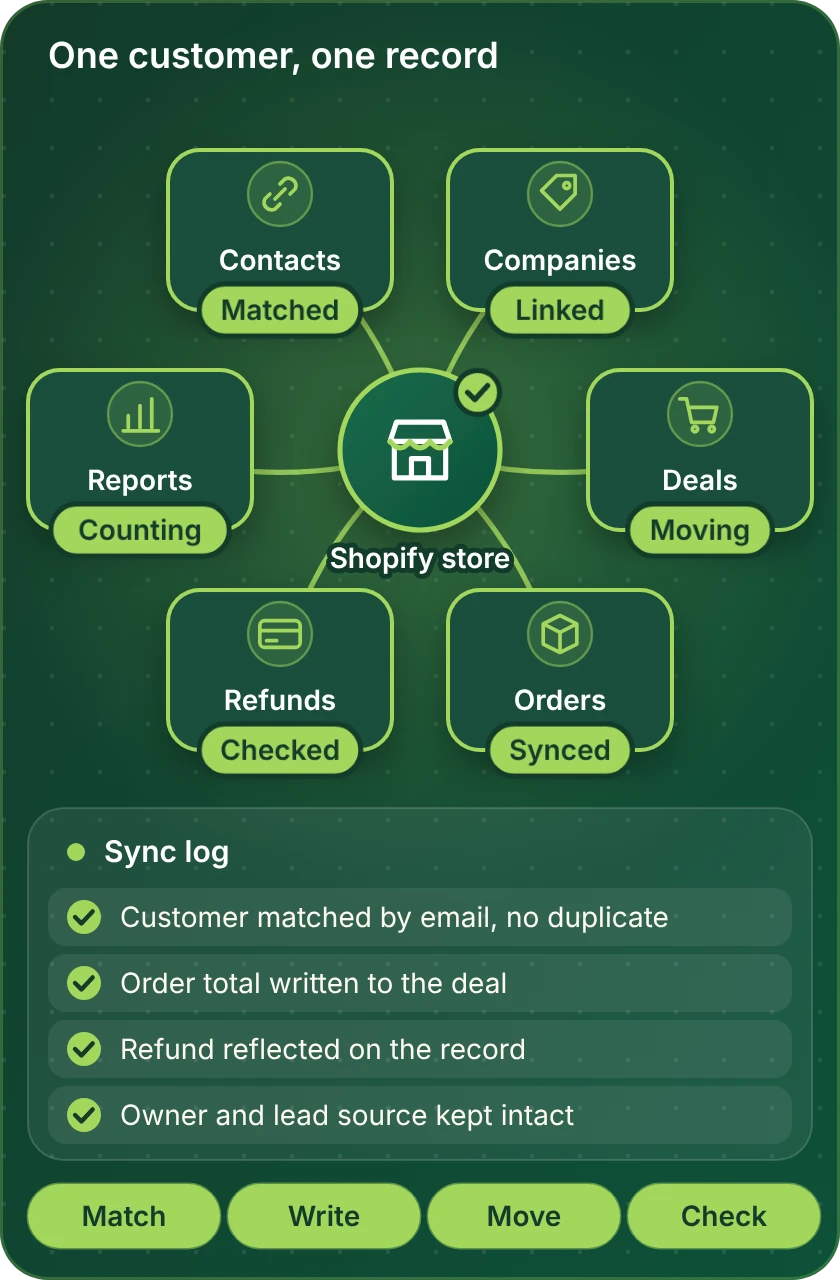
Every CRM project follows the same path. The store sends the order, we match it to the right person and company, the CRM record is updated and the change is logged where your team can see it. This map shows the pieces we connect and check before you rely on them.
Compare your options
Which Shopify CRM Integration Route Fits You?
There are three honest ways to run a Shopify CRM app integration. Read across the row that describes your situation to see which fits, and which we would scope for you.
| What matters | CRM's own Shopify app | No-code automation tool | Custom API build |
|---|---|---|---|
| Orders and customers on the contact | Often enough, one direction | Yes, with field mapping | Yes, any field |
| Custom fields and tags in both directions | Frequently limited | Possible, per field | Fully controlled |
| Quotes or leads create Shopify customers | Rarely | Yes | Yes |
| Refunds and cancellations update deals | Check the vendor | Yes, as extra steps | Yes, built in |
| A CRM with no Shopify app | Not available | If the tool lists it | Yes, through its API |
| Matching rules to avoid duplicates | Basic | Per workflow | Any rule you define |
| Ongoing cost you will carry | App or plan fee | Tool subscription | Hosting if self-run |
| Typical fit for our packages | Setup and testing | Most single-CRM builds | Larger or unusual builds |
Process and timeline
How a Shopify CRM Integration Project Runs
A single-CRM link and a Salesforce build follow the same six steps. The depth changes, the order does not, and nothing is switched on in your live CRM until you have seen it work in a test.
- 1
Pick your CRM and package
Open the page for your CRM and pick a package, with the price and delivery estimate shown before any payment.
- 2
Choose how we get access
Add us as collaborators, let us build in our own Shopify Partner account and transfer ownership afterwards, or share a restricted staff login. In the CRM we use a user you create for the project.
- 3
Agree the data rules
We write down which side owns each field, how a customer is matched, what happens to duplicates and which events create or update a deal. You approve the page before anything moves.
- 4
Build and map in a test space
The sync is built against a sandbox or a copy of your pipeline where the CRM allows one. Live records stay untouched while we map fields and run sample data.
- 5
Test the awkward cases
We run a paid order, a refund, a cancelled order, a guest checkout and a repeat customer. We check owners, tags, totals and what happens when a field is empty.
- 6
Go live and hand over
Once you approve, we switch the sync on for real records and record a short walkthrough with written notes. The CRM and the store stay in your accounts.
Why Store Design Expert
Why Brands Hire Us for Shopify CRM Integration
Anyone can paste an API key into a connector. Brands come to us for the matching rules, field decisions and tests that decide whether a CRM can be trusted a month later.
Built on Shopify alone
Since 2015 we have built only on Shopify, with more than 450 launched stores. Customer, order and refund quirks are familiar before your project starts.
A price before a conversation
Every CRM page shows three packages and a fixed price. Tool subscriptions are billed to you by the vendor.
Duplicates handled first
Most CRM clean-up work comes from duplicates created in the first week. We set matching rules before the first record is written.
Tested on awkward orders
A paid order is easy. We also run refunds, cancellations and guest checkouts so your reps do not find the gaps for us.
You keep every account
The CRM, the store and the automation tool stay in your name, with the access you give us removed at handover.
Rated 4.9+ by verified clients
The average comes from verified clients, and the reviews below are theirs. They talk about clear scope, steady communication and a handover that made sense.
Testimonials
What Clients Say After Launch
Verified clients describe working with Store Design Expert on integrations, builds and fixes.
Verified
Store Design Expert is the best. The work is very professional, they pay close attention to detail and, more importantly, they listen. Their level of cooperation is second to none, and everything was delivered in a very timely manner. I will keep them in mind for future projects.
BN
Barbara N.United States
Verified
Thank you so much to Store Design Expert and the team. My site looks far more appealing to customers, and I will happily recommend your services to other new small businesses.
JS
Jennifer S.United States
Verified
Very patient, informative and transparent, and they did exactly what they said they would do. Thanks for all the help!
RO
Raymond O.United States
Verified
Store Design Expert is the only one I use for all things WordPress. They have a high level of understanding, deliver quality work and are easy to deal with.
SC
Scott C.United States
Verified
A pleasure to work with. They did pretty much everything I asked and definitely exceeded my expectations. I will be working with Store Design Expert again soon.
JL
Jerry L.United States
Verified
Superb work! Store Design Expert is incredibly patient, and even when I did not fully understand my own questions, everything was explained again in detail. My vision was implemented perfectly, and the work is worth every cent I spent.
KB
Katrin B.Germany
Verified
Very impressed with the build-out. My store is ready to get started, and I am sure I will reach out for edits down the road, but this is everything I could ask for to get the party started. Thanks again, and I will be in touch for future projects.
DH
Dale H.United States
Verified
Very quick and detailed work! Store Design Expert does exactly what you want, in a very professional manner.
LF
Lena F.Germany
Verified
Store Design Expert did an outstanding job with top-notch professionalism on my website project. Everything was delivered quickly without compromising quality. I could not have asked for better!
JM
Jason M.United States
FAQ
Shopify CRM Integration FAQs
Straight answers on cost, data, access and choosing the right CRM link.
How much does a Shopify CRM integration cost?
Packages start at $390 for a single workflow and rise with the number of workflows, the CRM and the amount of mapping. Enterprise CRMs such as Salesforce sit in the higher band. Each CRM page lists its three packages and delivery estimate before you pay. Any Shopify CRM app pricing set by the vendor, such as plan fees, is billed to you directly.
Does Shopify have CRM integration built in?
Shopify holds customer and order records, and many CRMs publish their own Shopify app or connector. What differs is direction, fields and tagging. We check what the vendor offers first and tell you plainly if the native option already does what you need.
What is the best CRM to integrate with Shopify?
The best one is the CRM your team already works in daily. We do not push a CRM, and the pages here cover sales CRMs, contact platforms and enrichment tools so you can compare what each link involves before choosing.
How do you connect CRM to Shopify when it has no Shopify app?
Usually yes. If the CRM has an API, we connect it through an automation tool or a custom build. Send a quote request with the CRM name and the events you care about, and we scope it at a fixed price.
Will my CRM show Shopify orders and customers on the same record?
That is the aim of most projects. We map customers to contacts, order totals and dates to fields or deals, and test the result with a real order. Custom fields depend on your CRM plan and are listed in the plan we write with you.
Do you sync data in both directions?
We can, but we agree it first. Two-way sync needs a clear owner for each field, otherwise the two systems overwrite each other. We write those rules down and test them with edits made on each side.
How do you stop duplicate customers in the CRM?
We choose a matching key, usually the email address, normalise it and test with variations in case, spacing and guest checkouts. Where a CRM supports duplicate rules, we set them before the first record is written.
Can the CRM create Shopify customers or draft orders?
Yes. Quotes, form leads and wholesale requests can create customers or draft orders in Shopify. We cover that in the related lead capture and B2B pages and scope it with your CRM link.
Do I give you my Shopify or CRM password?
No. You can add us as collaborators, let us build in our Partner account and transfer ownership, or share a restricted staff login. In the CRM we use a user you create for the project and you remove it afterwards.
How long does a Shopify CRM integration take?
A single-CRM link usually takes 3 to 8 working days. Multi-workflow builds take longer, and enterprise systems such as Salesforce or Dynamics can take up to 30 working days depending on mapping and approvals.
Do you build a Shopify POS CRM integration?
Yes. POS customers and orders can be matched to CRM contacts with the same rules as online orders. We check how in-store customers are identified before building, since that decides how well matching works.
Do you handle business CRM integration with Shopify for larger teams?
Yes. Larger teams usually need role-based access, sandboxes and an approval step, so we scope those into the build. Enterprise systems sit in the higher price band and take longer.
Can you build a Microsoft Dynamics Shopify integration?
Yes. Dynamics 365 CRM has its own page in the index above. We map customers, orders and refunds to Dynamics records, agree who owns each field and test in a sandbox before live data moves.
What happens if my CRM changes its API later?
A vendor change can affect any connector. We document each build so it can be fixed, and a follow-on repair or a maintenance plan is available from the automation maintenance page.
Ready when you are
Get Your Shopify CRM Integration Working Properly
Open the page for your CRM, read what is included and see a fixed price before you commit. If you are still deciding between routes, send a short quote request and we will recommend the simplest option that meets your needs.
- Fixed price shown first
- Tested on a real order
- Your accounts stay yours