
Shopify stores designed and launched
Bookings and orders kept in one story
Shopify Booking Integration That Ties Every Slot to an Order
Shopify booking integration for stores that sell sessions, tours, classes or deliveries beside products. Choose your scheduler or event tool, see a fixed price first and launch a path where payment, calendar and confirmation agree.
- A page for every scheduler, calendar and event tool
- Payment and booking linked, not run in parallel
- Calendar entries, reminders and cancellations in step
- Tested with a real booking from request to attendance
Booking tools covered57 integrations
From$390
Delivery3 to 14 working days
Our track record
Bookings That Match What Was Paid For
Many stores sell something that happens at a time: a fitting, a class, a tasting, a delivery slot. The booking lives in a scheduler, the payment lives in Shopify and the customer sees two confirmations that do not agree. The packages below connect the two so one booking is one record.
Average rating from verified clients
Building Shopify stores since
Secure checkout
Pay through a protected checkout and keep a full order record.
Two revision rounds
Included in every package, so the result matches what you pictured.
Backup before changes
We work on a duplicate of your theme, never on your live store.
Who this is for
Who Needs a Shopify Booking Integration
Booking problems appear as double-booked slots, missing payments and customers who turn up for something that was cancelled. These are the owners who ask us for help.
Stores that sell timed sessions
Classes, consultations and fittings need a slot and a payment. We link the scheduler to the order so neither exists without the other.
Brands running events and tastings
Tickets and capacity are tracked in an event tool while sales happen in Shopify. We keep both counts in agreement.
Sellers with delivery or pickup slots
Customers choose a window at checkout. We create the calendar entry and tell your team what is due and when.
Studios and salons adding retail
A booking system runs the diary while Shopify sells products. We link customers so a retail order and an appointment sit on one profile.
Owners with cancellations and changes
A moved or cancelled booking should update the order and the calendar. We build both directions and test each case.
Teams with an unusual booking tool
A niche scheduler or an in-house diary can send and receive events through the API as a fixed build.
No integration matches “”. Send a quote request with the tool’s name and we will check its API and scope it.
Featured integrations
Choose Your Tool From 57 Shopify Booking Integrations
Each card opens a service page for one scheduler, calendar or event tool, with three packages and a fixed price. The featured tools are the ones we are asked about most, whether you want a Shopify booking system or only a calendar link. You will find the rest in the index below, with the quote card for anything unlisted.
01Appointment schedulers
Appointment schedulers
For stores that sell sessions and want a Shopify online booking system with payment attached.
From $390
Calendly
Calendly embedded or linked from product and thank-you pages, with a booking turned into a Shopify customer or order tag. We decide where payment happens before building.
We decide first whether payment happens in Shopify or in Calendly, then test the booking, the order and the confirmation together.
Best for: Stores selling consultations and calls
3 to 14 working days
View integrationFrom $390
Acuity Scheduling
Acuity bookings connected to Shopify, creating customers or orders and passing intake answers across. Payment routing and cancellations are tested with real bookings.
Intake answers travel with the booking, and payment routing, rescheduling and cancellation are tested with real bookings.
Best for: Service sellers with intake forms
3 to 14 working days
View integrationFrom $390
Cal.com
Cal.com event types connected to Shopify, including self-hosted installs, with bookings creating customers and tags. Webhooks and retries are tested.
Event types, webhooks and retries are tested, including a self-hosted install restarting during a booking.
Best for: Teams that prefer open-source scheduling
3 to 14 working days
View integrationFrom $390
SavvyCal
SavvyCal links connected to Shopify so a booked call can create or tag a customer and follow a purchase. Team routing rules are written down first.
Team routing rules are written down, and a booked call is linked to the customer record so follow-up knows what was bought.
Best for: Sales-led stores that book calls
3 to 14 working days
View integrationFrom $390
YouCanBookMe
YouCanBookMe pages linked to store customers, with confirmation and reminder wording aligned to your order emails. We test rescheduling end to end.
Confirmation and reminder wording is aligned with your order emails, so the customer receives one coherent story.
Best for: Small teams that book one-to-one
3 to 14 working days
View integrationFrom $390
Appointlet
Appointlet scheduling tied to Shopify orders so a purchase can unlock a booking link, and a booking can create a customer. Edge cases such as no-shows are covered.
No-shows, cancellations and rebookings are tested, so an order and its slot never fall out of step.
Best for: Stores that sell time with a product
3 to 14 working days
View integrationFrom $390
Bookeo
Bookeo bookings connected to Shopify, so retail sales and activities share a customer record. Capacity and cancellation rules are tested.
Capacity limits and cancellation rules are checked on both sides, so a sold-out session cannot be bought twice.
Best for: Activity and class businesses
3 to 14 working days
View integration02Calendars
Calendars
For teams that need every booking and delivery on a shared calendar.
From $390
Google Calendar
Orders, deliveries and bookings written to Google Calendar with a clear title, colour and notes, so staff see what is due. Updates and cancellations edit the same event.
Titles, colours and notes follow one convention, and an edited or cancelled order edits the same event instead of adding another.
Best for: Teams that plan the week in Google Calendar
3 to 14 working days
View integrationFrom $390
Microsoft Outlook
Order and booking events placed in Outlook calendars with attendees and reminders as you choose. A moved order moves the event instead of creating a second.
Attendees and reminders are set as you choose, and a moved order moves the calendar event with it.
Best for: Teams on Microsoft 365
3 to 14 working days
View integrationFrom $390
AddEvent
Add-to-calendar links generated for booked sessions and delivery windows, so customers save the time with one click. We test links on phones and desktop calendars.
Add-to-calendar links are tested on phones and desktop calendars, so the customer saves the right date and time zone.
Best for: Brands that want customers to keep the date
3 to 14 working days
View integrationFrom $390
Timely
Timely diaries connected to Shopify customers and orders so salon or studio bookings and retail sales share one profile. Staff and service names are mapped and tested.
Staff and service names are mapped, and a customer who books and buys is recognised as one person.
Best for: Salons adding online retail
3 to 14 working days
View integration03Events
Events, tours and ticketing
For brands that sell tickets, tours and limited capacity beside products.
From $390
Eventbrite
Eventbrite attendee and ticket data connected to Shopify, so a ticket buyer can also see merchandise offers and counts stay aligned. Test orders cover refunds.
Ticket and merchandise counts are kept aligned, and refunds are tested so capacity returns to the event when it should.
Best for: Brands selling tickets and merch
3 to 14 working days
View integrationFrom $390
FareHarbor
FareHarbor bookings linked to Shopify for gift cards, add-ons or merchandise sold around a tour. Customer records are matched so one guest is one profile.
Guests are matched to customer profiles, so a tour booking, a gift card and a retail order sit on one record.
Best for: Tour and activity operators with a shop
3 to 14 working days
View integrationFrom $390
Rezdy
Rezdy reservations connected to Shopify products and customers, so experiences and retail sit together. Availability and refund rules are tested with real bookings.
Availability and refund rules are tested with real bookings, so experiences and products can be sold together without conflicts.
Best for: Experience providers selling products too
3 to 14 working days
View integrationFrom $390
Humanitix
Humanitix tickets connected to Shopify customers and tags, so event buyers can be followed up after the event. Refund and transfer cases are tested.
Ticket buyers are tagged for follow-up after the event, and refund and transfer cases are tested end to end.
Best for: Organisers selling tickets and merchandise
3 to 14 working days
View integrationFrom $390
RegFox
RegFox registrations linked to Shopify so registrants are tagged as customers, with merch or add-ons offered through the store. Group registrations are tested.
Group registrations are tested alongside single ones, and merchandise offered at registration is tied to the right order.
Best for: Registration-led events and races
3 to 14 working days
View integrationFrom $390
Eventzilla
Eventzilla attendees synced to Shopify customers with ticket type as a tag, so follow-up and offers can be targeted. Cancellations flow back to the record.
Ticket type becomes a customer tag, and cancellations flow back so the record always reflects who is still attending.
Best for: Organisers who sell tickets and products
3 to 14 working days
View integrationFrom $390
Occasion
Occasion bookings connected to Shopify orders for tastings, classes and tours, with capacity checked on both sides. We test sold-out and cancelled cases.
Capacity is checked on both sides, with sold-out and cancelled bookings tested before tastings and tours go on sale.
Best for: Venues that sell experiences and bottles
3 to 14 working days
View integration04Salons
Salons, service teams and rentals
For businesses that run a diary or a crew beside a Shopify retail store.
From $390
Mindbody
Mindbody clients and appointments linked to Shopify customers, so wellness retail and bookings share a profile. Duplicate clients are handled before any data moves.
Duplicate clients are resolved before any data moves, so retail purchases and class bookings land on a single profile.
Best for: Studios that sell products beside classes
3 to 14 working days
View integrationFrom $390
Zenoti
Zenoti guests and appointments connected to Shopify customers and orders, so spa and salon retail is visible beside the diary. Mapping is agreed with your team first.
Mapping is agreed with your front-desk team first, so guest, appointment and retail data match how the spa actually works.
Best for: Spas and salons with online retail
3 to 14 working days
View integrationFrom $390
Boulevard
Boulevard clients linked to Shopify so a product purchase and a visit sit on one profile, with tags that drive follow-up. We test new and returning clients.
New and returning clients are both tested, with tags that drive follow-up after a visit or a product purchase.
Best for: Salons and studios with an online shop
3 to 14 working days
View integrationFrom $390
Jobber
Jobber clients, quotes and jobs fed by Shopify orders for installation or service-led products, with a job created when a qualifying order arrives. Edits are tested.
A job is created only for qualifying orders, and edits or cancellations update the job instead of leaving it orphaned.
Best for: Field-service sellers that install what they sell
3 to 14 working days
View integrationFrom $390
Housecall Pro
Housecall Pro customers and jobs created from Shopify orders for install and repair work, with scheduling rules agreed first. Cancelled orders cancel the job.
Scheduling rules are agreed first, and a cancelled order cancels the job, so crews never drive to a sale that no longer exists.
Best for: Home-service brands that sell products
3 to 14 working days
View integrationFrom $390
Lodgify
Lodgify bookings connected to Shopify gift cards, extras or merchandise, with guests matched to customer profiles. Date changes are tested both ways.
Guests are matched to customer profiles, and a date change is tested in both directions so extras follow the booking.
Best for: Rental owners selling extras or merch
3 to 14 working days
View integrationFrom $390
Deputy
Deputy shifts and tasks created from Shopify order volume or events, so staffing reflects what is being sold. Rules are tested on a busy day.
Staffing rules are tested on a busy day, so volume from the store becomes shifts without manual spreadsheets.
Best for: Retail and venue teams planning staff
3 to 14 working days
View integrationIs your booking tool missing?
Name the scheduler, calendar or event tool and what should happen when someone books, pays or cancels. We find out what its API allows and send a fixed quote, or tell you if a different route would be cheaper.
Request a QuoteNeed booking plus reminders or CRM?
Bookings usually trigger reminders and customer records. Send one request for both and we scope them as a single project with one test run.
Request a QuoteEvery integration in this hub
All 57 Shopify Booking Integrations, A to Z
Every scheduler, calendar, ticketing and diary tool we cover has its own page with packages and a fixed price. Pick yours from the list below and open its page for the packages.
A6 integrations
B6 integrations
C6 integrations
D4 integrations
E6 integrations
G3 integrations
H3 integrations
J1 integration
O1 integration
R7 integrations
S1 integration
T1 integration
Y1 integration
Z1 integration
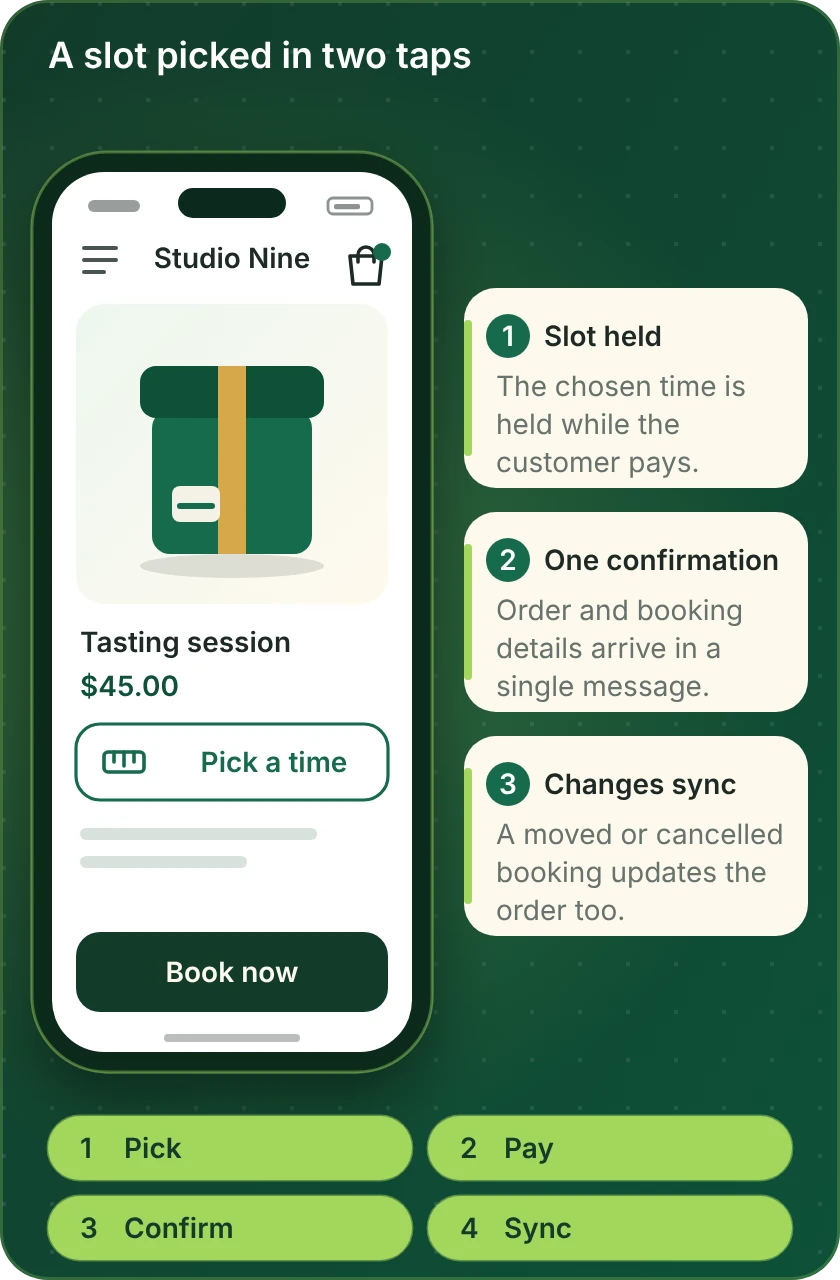
A booking on a phone
How a Booking Works From Tap to Confirmation
Most customers book on a phone. The preview shows a time slot chosen on a product page, with the payment and confirmation behind it. These are the steps we build and test before your booking path goes live.
Compare your options
Which Shopify Booking Route Fits Your Business?
Bookings reach Shopify in three ways. Find your situation in the left column and read across to see which route handles it.
| What matters | Scheduler's own Shopify app | Scheduler plus automation tool | Custom API build |
|---|---|---|---|
| Payment taken in Shopify checkout | Check the vendor | Yes, via order creation | Yes, designed per flow |
| A booking that creates a customer | Often | Yes | Yes |
| Cancellations updating the order | Rarely | Yes, as extra steps | Yes, built in |
| Capacity shared with product stock | No | Partly | Yes |
| Easy appointment booking Shopify for staff | Staff limits possible | Per tool | Custom rules |
| Calendar entries for deliveries | No | Yes | Yes |
| A booking tool with no Shopify app | Not available | If the platform lists it | Yes, through its API |
| Typical fit for our packages | Setup and checks | Most single-tool builds | Larger or unusual builds |
Process and timeline
How a Shopify Booking Integration Project Runs
A single scheduler link and a full booking-and-payment path follow the same six steps. The detail changes but the order does not, and no real customer is charged during testing.
- 1
Choose the tool and package
Choose your scheduler, calendar or event tool, open its page and pick a package. Price and delivery time show before payment.
- 2
Choose how we get access
We work with a collaborator request, with a build in our own Partner account that moves to you at the end, or with a restricted staff login you create. In the booking tool we use a user you create.
- 3
Decide where payment happens
We settle whether the customer pays in Shopify checkout or in the booking tool, and how refunds, deposits and cancellations work. You confirm the plan before anything is built.
- 4
Connect and build in test mode
The booking tool and the store are linked in a test setup, with test products, test slots and no real charges.
- 5
Book, move and cancel
We book, reschedule, cancel and no-show through every path and check the order, calendar, emails and customer record after each one.
- 6
Go live and hand over
After approval the path goes live. You receive a recorded walkthrough and written notes covering what to do when a customer changes a booking.
Why Store Design Expert
Why Brands Hire Us for Shopify Booking Integration
Embedding a booking page takes minutes. Brands hire us for the payment decisions, calendar rules and tests that keep orders and bookings in agreement.
One platform, since 2015
Shopify is the single platform we build on, with more than 450 launched stores since 2015. Checkout, draft orders and customer records are familiar before your project starts.
Prices shown first
Each booking tool has a page with three packages. Scheduler subscriptions remain between you and the vendors.
Slots and payments kept honest
A held slot, a paid order and a confirmed booking are tested together, so customers do not arrive for something unpaid.
Every change tested
We reschedule and cancel on purpose, so the awkward case is solved before a customer meets it.
Accounts stay yours
Your store and booking tools remain under your logins, with access we use removed at handover.
Rated 4.9+ by verified clients
Verified clients rate us 4.9+ on average. Their reviews below describe the scoping, the communication and the way each project was wrapped up.
Testimonials
What Clients Say After Launch
Verified clients describe working with Store Design Expert on builds, integrations and fixes.
Verified
Super helpful and patient. I am new to ecommerce and Store Design Expert talked me through the whole process and even fixed my payment bridging for me!
LR
Lois R.United Kingdom
Verified
Very satisfied with the work. Most importantly, Store Design Expert responded promptly to my questions and concerns. Thank you!
KB
Kyle B.United States
Verified
Outstanding work and outstanding customer service. Five stars! I will absolutely use Store Design Expert again for my next book.
KM
Katharine M.United States
Verified
Store Design Expert was great! They delivered exactly what I asked for and even offered helpful extra suggestions. Highly recommended.
PW
Paul W.United States
Verified
I request Store Design Expert every time I have a project. They are professional and give real attention to detail, which makes the work stand out.
LK
Laura K.United States
Verified
They kept communicating until the problem was fully resolved, and the result was great.
HJ
Henry J.United States
Verified
I am beyond satisfied! Store Design Expert went above and beyond on my project. Highly recommended!
MD
Michael D.United States
Verified
The experience was tailored to my brand and specifications to the letter. I love the result.
EP
Eric P.United States
Verified
They definitely get the job done. Very patient and understanding throughout the whole project.
BS
Brian S.United States
FAQ
Shopify Booking Integration FAQs
Direct answers on cost, tools, payment and changes.
How much does a Shopify booking integration cost?
Packages start at $390 for a single booking path and rise with the number of paths, the tool and the payment rules involved. Every booking tool page gives three packages and a delivery estimate before you pay. Scheduler subscriptions are billed by the vendors.
Does Shopify have a booking system built in?
Shopify sells products and manages orders, and booking is usually handled by an app or an outside scheduler connected to it. We check the options for your needs and build the connection that is missing.
Can you book appointments on Shopify and take payment?
Yes. Shopify appointment booking works in one of two ways: either the customer pays in Shopify checkout and the booking is created from the order, or the booking tool takes payment and an order is created for the record. We help you pick and test the one that suits you.
What is the best Shopify online booking system?
The right one depends on staff, capacity and payment rules. We connect the main schedulers, calendars and event tools, so whichever Shopify scheduling app you favour, you can compare what each integration involves before choosing.
Is there an online booking plugin for Shopify that is easy to run?
Several apps and connectors exist. Easy appointment booking for Shopify depends on staff counts, locations and payment rules, so we check those first and tell you plainly if a simple app is enough.
Can you set up a booking a call app for Shopify integration?
Yes. A call-booking tool such as Calendly can be linked to product pages, thank-you pages and customer tags, so a purchase can unlock a booking link or a booking can create a customer.
How do you handle Shopify calendar booking for deliveries?
We create calendar entries from orders that carry a delivery or pickup window, and edit the same entry when the order changes. We test moves and cancellations before launch.
Can you make Shopify create forms for booking appointments?
Yes. A booking request form can create a customer, a draft order or a scheduler entry. We map the answers, test spam and duplicate handling and agree what staff see.
Which Shopify booking apps do you integrate with?
The main schedulers, calendars, event tools and diary systems are in the cards above and the index. If yours is missing, send a quote request with the name and what should happen on booking.
How long does a booking integration take?
A single scheduler link usually takes 3 to 5 working days. Systems with payments, several staff and events take longer, up to 14 working days, depending on the package.
Do I give you my Shopify or scheduler password?
No. We ask for a collaborator invite, a staff login with limited rights or a build in our own Partner account that moves to you at the end. In the booking tool we use a user you create and remove at handover.
What if my booking tool changes its connection later?
Vendors change connectors. Scheduler vendors change their connections now and then. Each build is documented, and the automation maintenance page lists repair and maintenance plans.
Ready when you are
Get Your Shopify Booking Integration Working
Open the page for your scheduler, calendar or event tool, read what is included and see a fixed price before you commit. If you also sell products around the booking, send a short quote request and we will scope the whole path.
- Fixed price shown first
- Bookings tested end to end
- Your accounts stay yours