
Shopify stores designed and launched
Invoices, contracts and files created from orders
Shopify PDF Invoice and Document Integration That Files Itself
Shopify PDF invoice automation for stores that still build invoices, contracts and packing slips by hand. Choose your document, signature or storage tool, see a fixed price first and launch a path where each order produces the right file in the right place.
- A page for every document, e-signature and storage tool
- Branded templates with correct numbering and tax lines
- Contracts signed against the order, files kept in your storage
- Access rules set so only the right people open them
Document tools covered48 integrations
From$390
Delivery3 to 14 working days
Our track record
Documents Created Where the Order Happens
A wholesale order needs an invoice, a custom order needs a signed quote and every parcel needs a packing slip. When people build these by hand, numbers repeat, logos go missing and files end up in personal folders. The packages below create each document from the order and file it where your team looks.
Average rating from verified clients
Building Shopify stores since
Secure checkout
Pay through a protected checkout and keep a full order record.
Two revision rounds
Included in every package, so the result matches what you pictured.
Backup before changes
We work on a duplicate of your theme, never on your live store.
Who this is for
Who Needs Shopify Document Integration
The need shows up as a customer asking for a proper invoice, an auditor asking for a signed contract or a team losing time to templates. These are the sellers we help.
Stores asked for proper invoices
Business buyers expect a numbered PDF with tax details. We generate it from the order and email or store it as you choose.
Sellers of custom or quoted work
A quote needs a signature before production starts. We create the document from the draft order and attach the signed copy to the order.
Teams printing packing slips
Slips should carry the right logo, notes and barcodes. We generate them on order and send them to a printer or folder.
Merchants who handle regulated paperwork
Waivers, age declarations and terms need proof. We record who signed what, and when, against the customer.
Stores collecting customer files
Print files, photos or documents arrive with orders. We move uploads into organised storage with the order number attached.
Teams with a document system of their own
An internal template engine or archive can receive Shopify orders through the API as a fixed build.
No integration matches “”. Send a quote request with the tool’s name and we will check its API and scope it.
Featured integrations
Choose Your Tool From 48 Shopify Document Integrations
Each card opens a service page for one document, signature or storage tool, with three packages and a fixed price. These are the tools we are asked about most, whether you want a PDF invoice Shopify app alternative or a full signing flow. The index below holds the remaining tools, and the quote card covers any we have not listed.
01Document
Document and PDF generation
For stores that want to generate a PDF invoice from Shopify orders with their own branding and numbering.
From $390
PDFMonkey
PDFMonkey templates filled from Shopify orders to produce branded invoices, quotes or slips, with numbering and tax lines tested. Generated files are stored or emailed as you choose.
Numbering, tax lines and long item lists are tested, so a generated PDF never overflows or repeats an invoice number.
Best for: Stores that want custom-designed PDFs
3 to 14 working days
View integrationFrom $390
APITemplate.io
APITemplate.io layouts populated from orders for invoices, labels or certificates. We test long item lists and special characters so nothing overflows the page.
Long product names, special characters and large orders are used as test cases so layouts hold up on real data.
Best for: Stores producing varied documents from one tool
3 to 14 working days
View integrationFrom $390
PDF.co
PDF.co used to generate, merge and extract data from PDFs tied to orders, such as combining an invoice and a slip. Workflows are tested with unusual orders.
Merge and extract jobs are tested with unusual orders, so a combined invoice and packing slip always carries the right pages.
Best for: Teams that manipulate PDFs in bulk
3 to 14 working days
View integrationFrom $390
Docupilot
Docupilot templates merged with order data into contracts, invoices and letters, with output saved to your storage. Merge fields are checked for blanks.
Merge fields are checked for blanks and output is saved to your storage with the order number in the file name.
Best for: Teams producing templated documents
3 to 14 working days
View integrationFrom $390
Formstack Documents
Formstack Documents populated from Shopify orders to produce branded paperwork, with delivery by email or storage. Template changes are documented for your team.
Template changes are documented for your team, and delivery by email or storage is tested for each document type.
Best for: Teams already using Formstack
3 to 14 working days
View integrationFrom $390
Plumsail Documents
Plumsail templates in Word or PDF filled from order data, with output filed by rule. We test with multi-line items and discount codes.
Word templates are tested with multi-line items and discount codes, and output is filed by rule.
Best for: Teams who prefer Word-based templates
3 to 14 working days
View integrationFrom $390
Nitro
Nitro PDF tools connected so order paperwork can be created, edited and signed within a controlled flow. Roles and approvals are agreed first.
Roles and approvals are agreed first, so a document can be created, edited and signed inside a controlled flow.
Best for: Teams that already use Nitro for PDFs
3 to 14 working days
View integration02E-signature
E-signature and contracts
For brands that need quotes, waivers or terms signed against an order.
From $390
Docusign
Docusign envelopes sent from Shopify draft orders or quote requests, with the signed copy attached to the order. Reminders and expiry are tested.
Reminders and expiry are tested, and the signed copy is attached to the order so nobody hunts for it later.
Best for: Brands with formal signing requirements
3 to 14 working days
View integrationFrom $390
PandaDoc
PandaDoc quotes and contracts created from Shopify orders and sent for signature, with payment terms taken from the order. A signed document updates the order status.
Payment terms come from the order, and a signed document updates the order status so production starts on time.
Best for: Sellers of quoted or custom products
3 to 14 working days
View integrationFrom $390
DocuSeal
DocuSeal forms and signatures connected to Shopify orders, including self-hosted installs, with signed files stored beside the order. Webhooks are tested.
Webhooks are tested on a self-hosted install, and signed files are stored beside the order they belong to.
Best for: Teams that prefer open-source signing
3 to 14 working days
View integrationFrom $390
Foxit eSign
Foxit eSign requests created from Shopify events, with signed copies filed by order number. We test decline, expiry and resend paths.
Decline, expiry and resend paths are tested, and signed copies are filed by order number.
Best for: Teams using Foxit for PDF and signing
3 to 14 working days
View integrationFrom $390
pdfFiller
pdfFiller forms filled from order data and sent for signature where required, with completed forms stored by rule. Field mapping is checked line by line.
Field mapping is checked line by line against the source form, and completed forms are stored by rule.
Best for: Businesses with regulated forms
3 to 14 working days
View integrationFrom $390
BoloForms
BoloForms signing requests created from Shopify orders and customers, with completed documents returned to the order. Templates and fields are tested before launch.
Templates and signing fields are tested before launch, and completed documents return to the order automatically.
Best for: Small teams wanting simple e-signature
3 to 14 working days
View integrationFrom $390
Juro
Juro contracts generated from Shopify deals and wholesale orders, with approvals and signing tracked against the customer. Template logic is agreed with your team.
Approval and signing steps are tracked against the customer, with template logic agreed with your team first.
Best for: Teams managing contracts at scale
3 to 14 working days
View integration03Storage
Storage, delivery and file handling
For teams that file documents or move customer uploads into organised storage.
From $390
Google Drive
Documents and customer uploads saved to Google Drive in a folder per order or customer, with permissions set by rule. Naming is consistent so files can be found later.
Folders follow one naming convention per order or customer, and permissions are tested with the roles that need access.
Best for: Teams that file in Google Drive
3 to 14 working days
View integrationFrom $390
Dropbox
Order documents and uploads saved to Dropbox with a clear folder structure and sharing rules. A test order proves the right people can open the right files.
The folder structure and sharing rules are tested with a real order, so the right people can open the right files.
Best for: Teams that store and share in Dropbox
3 to 14 working days
View integrationFrom $390
Microsoft Onedrive
Shopify documents and uploads saved to OneDrive or SharePoint libraries with naming and permissions defined. Retention rules are noted for your admin.
Naming and permissions are defined, and retention notes are handed to your admin so nothing is lost by accident.
Best for: Teams on Microsoft 365
3 to 14 working days
View integrationFrom $390
BOX
Order documents and customer files saved to Box with folder templates, permissions and retention noted, so teams and auditors can find them. Access is tested with several roles.
Folder templates, permissions and retention are noted for auditors, and access is tested with several roles.
Best for: Organisations that govern files in Box
3 to 14 working days
View integrationFrom $690
Amazon S3
Documents and uploads written to your own S3 bucket with a clean key structure and limited access, so files stay under your control. Costs and retention are agreed first.
Keys follow a clean structure, access is limited, and cost and retention are agreed before files start to accumulate.
Best for: Teams that store files in their own cloud
3 to 14 working days
View integrationFrom $390
BookFunnel
BookFunnel delivery connected so a Shopify purchase sends the right ebook or audio file, with delivery issues visible to your team. Test orders cover resend and refund.
Resend and refund cases are tested, so a customer who loses a link can recover it and a refund withdraws access.
Best for: Authors and publishers selling digital files
3 to 14 working days
View integrationFrom $390
Docparser
Docparser rules that read supplier PDFs and send structured data to Shopify workflows, such as stock or cost updates. Rules are tested on real documents.
Parsing rules are tested on real supplier documents, so the data that reaches Shopify is structured and correct.
Best for: Teams reading data from incoming PDFs
3 to 14 working days
View integrationIs your document tool missing?
Name the tool and the documents you create from orders. We check what it can read and write and send a fixed quote, or say plainly if another route fits better.
Request a QuoteNeed documents plus accounting or CRM?
Documents usually travel with invoices and customer records. Request one quote for both and we plan them as a single build with shared tests.
Request a QuoteEvery integration in this hub
All 48 Shopify Document Integrations, A to Z
Every document, e-signature, storage and file tool we cover has its own page with packages and a fixed price. Find your tool in the list and open its page for packages and prices.
A2 integrations
B4 integrations
C4 integrations
D8 integrations
E1 integration
F5 integrations
G6 integrations
J1 integration
N1 integration
O1 integration
P10 integrations
PandaDocFrom $390 · 3 to 14 daysPapyrsFrom $390 · 3 to 14 daysParseurFrom $390 · 3 to 14 daysPDF-appFrom $390 · 3 to 14 daysPDF.coFrom $390 · 3 to 14 dayspdfFillerFrom $390 · 3 to 14 daysPDFGateFrom $390 · 3 to 14 daysPDFMonkeyFrom $390 · 3 to 14 daysPlumsail DocumentsFrom $390 · 3 to 14 daysProoferFrom $390 · 3 to 14 days
W1 integration
Ready before it ships
How a Document Path Is Checked Before Orders Use It
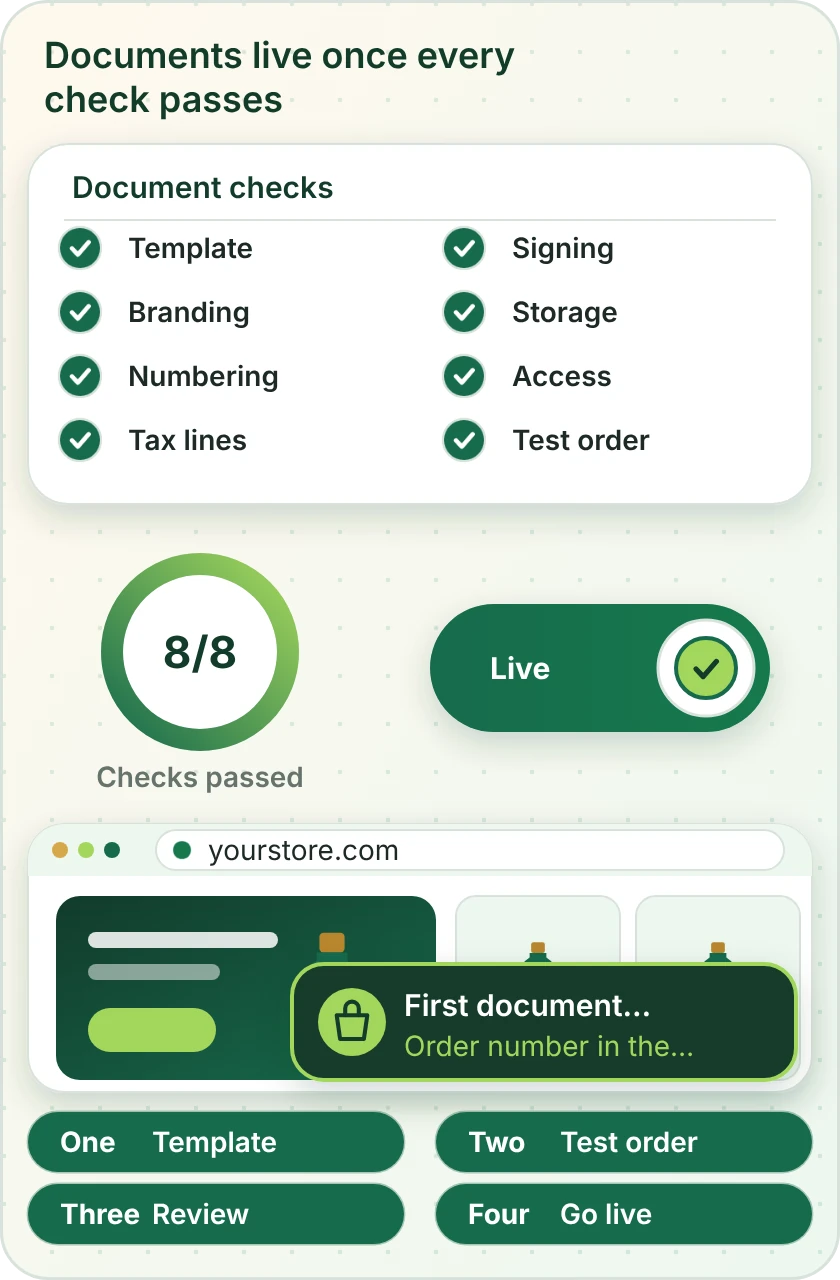
A document flow is switched on only when every item on the checklist passes. The card shows the sort of checks we run: template, branding, numbering, tax lines, signing, storage and access, followed by a real test order.
Compare your options
Which Shopify Document Route Fits You?
Documents reach Shopify orders in three ways. Find your need on the left and follow the row across to see the best fit.
| What matters | Shopify's own templates and apps | Document tool plus automation | Custom API build |
|---|---|---|---|
| A branded invoice with your numbering | Basic templates | Yes | Yes, any layout |
| PDF invoice templates for Shopify with tax lines | Limited | Yes, per template | Fully custom |
| Packing slips with logo, notes and barcodes | Template editing | Yes | Yes |
| Signed quote or contract tied to an order | No | Yes | Yes, with approvals |
| Files saved in your own storage by order | No | Yes | Yes, with permissions |
| Customer uploads moved out of the store | App dependent | Yes | Yes, via API |
| A tool with no Shopify app | Not available | If the platform lists it | Yes, through its API |
| Typical fit for our packages | Setup and templates | Most single-tool builds | Larger or regulated builds |
Process and timeline
How a Shopify Document Integration Project Runs
A single invoice template and a full quote-to-signature flow follow the same six steps. Depth changes with the package, the sequence does not, and no customer receives a test document.
- 1
Choose the tool and package
Open your document tool's page and pick a package. The page shows price and delivery estimate before you commit.
- 2
Choose how we get access
There are three ways in: a collaborator request, a build in our Partner account that we transfer to you or a staff login you restrict. In the document tool we use a user you create.
- 3
List the documents and rules
We write each document, what triggers it, what it contains, how it is numbered, who signs and where it is filed. You approve the list first.
- 4
Build templates and the flow
Templates are designed with your branding and the flow is connected in a test setup. Live customers receive nothing while we tune layout and fields.
- 5
Test long, odd and failed orders
We test long item lists, foreign characters, refunds, declined signatures and expired links, then check each file and where it was stored.
- 6
Go live and hand over
After approval the flow goes live. You receive a recorded walkthrough and notes on editing templates and finding files.
Why Store Design Expert
Why Brands Hire Us for Shopify Document Integration
Generating a PDF takes a few clicks. Brands hire us for the numbering, tax lines, signing proof and filing rules that make documents usable later.
Shopify and nothing else
We have built on Shopify alone since 2015, with more than 450 launched stores. Order, draft order and customer data are familiar before your project starts.
Fixed pricing for each tool
Every document tool has a page with three packages and its price first. Plans remain between you and the vendors.
Documents you can rely on
Numbering, tax lines and branding are tested, so your invoices stand up to a customer's accounts team.
Odd orders tested
We test long carts, special characters and refunds, because that is where templates break.
Files and accounts stay yours
Your storage, signing accounts and store remain under your logins, with access we use removed at handover.
Rated 4.9+ by verified clients
Verified client ratings average 4.9+, and the reviews below are theirs, with notes on scoping, communication and how the work was passed over.
Testimonials
What Clients Say After Launch
Verified clients describe working with Store Design Expert on builds, integrations and fixes.
Verified
Store Design Expert is the best. The work is very professional, they pay close attention to detail and, more importantly, they listen. Their level of cooperation is second to none, and everything was delivered in a very timely manner. I will keep them in mind for future projects.
BN
Barbara N.United States
Verified
They definitely get the job done. Very patient and understanding throughout the whole project.
BS
Brian S.United States
Verified
Thank you so much to Store Design Expert and the team. My site looks far more appealing to customers, and I will happily recommend your services to other new small businesses.
JS
Jennifer S.United States
Verified
Very patient, informative and transparent, and they did exactly what they said they would do. Thanks for all the help!
RO
Raymond O.United States
Verified
Store Design Expert is the only one I use for all things WordPress. They have a high level of understanding, deliver quality work and are easy to deal with.
SC
Scott C.United States
Verified
A pleasure to work with. They did pretty much everything I asked and definitely exceeded my expectations. I will be working with Store Design Expert again soon.
JL
Jerry L.United States
Verified
Superb work! Store Design Expert is incredibly patient, and even when I did not fully understand my own questions, everything was explained again in detail. My vision was implemented perfectly, and the work is worth every cent I spent.
KB
Katrin B.Germany
Verified
Very impressed with the build-out. My store is ready to get started, and I am sure I will reach out for edits down the road, but this is everything I could ask for to get the party started. Thanks again, and I will be in touch for future projects.
DH
Dale H.United States
Verified
Very quick and detailed work! Store Design Expert does exactly what you want, in a very professional manner.
LF
Lena F.Germany
FAQ
Shopify PDF Invoice and Document FAQs
Direct answers on cost, tools, signing and filing.
How much does a Shopify PDF invoice integration cost?
Packages start at $390 for a single document flow and rise with the number of documents, the tool and the approvals involved. Every document tool page shows three packages with a delivery estimate before you pay. Document tool plans are billed by the vendors.
How to create a PDF invoice using Shopify?
Shopify offers basic order documents, and an app or document tool can produce a branded PDF from the order. A Shopify PDF receipt is simpler than a full invoice, and we can produce either. We build the template, numbering and delivery, and test it with long carts and refunds.
Is there a PDF invoice Shopify app I should use instead?
Apps exist and many suit simple needs. If you need custom layout, tax detail, signatures or filing in your own storage, a document tool connected to Shopify is more flexible, and we build it.
Can you set up PDF invoice templates for Shopify with my branding?
Yes. We design the layout, add your logo and numbering and test long item lists and special characters, so every invoice looks the same and prints cleanly.
Can you make Shopify generate PDF invoice files and send them automatically?
Yes, through a connected tool. The invoice is created when an order is paid or fulfilled, then emailed or stored. We test each trigger and what happens on a refund.
Is there a Shopify download invoice PDF option for customers?
That depends on the setup. We can email the PDF, add a link to the order status page or store it in a shared folder, and we test the route you choose.
How does Shopify send PDF invoice emails to business buyers?
Not on its own in a branded form. A connected document tool creates the PDF when the order is paid or fulfilled, and an email step sends it to the buyer. We build and test the trigger and the message.
Can you send a Shopify order invoice PDF to my accountant?
Yes. Documents can be filed in a shared folder or sent to a dedicated inbox on each order, with the order number in the file name so they are easy to match.
Do you build a Shopify packing slip template?
Yes. We design a slip with your logo, notes and barcodes and generate it on each order. A printer or folder route is set up and tested.
Is there a Shopify file upload app that stores files safely?
Several apps accept uploads. We can route uploaded files into your own storage with the order number in the name, and we test file size and type limits.
Can you use the Shopify file upload API for customer documents?
Yes. The API can store files in Shopify, and we can also route them to your storage. We choose by size, access and retention needs, and write down the choice.
Do you set up a Shopify PDF catalog app or a custom catalog?
A PDF catalog can be generated from product data by a document tool. We build the template, set what products and prices are included and test the output.
Do I give you my Shopify or document tool password?
No. Choose a collaborator invite, a staff account with limited permissions, or a build in our Partner account with an ownership transfer. In the document tool we use a user you create and remove at handover.
Ready when you are
Get Your Shopify PDF Invoice and Documents Working
Open the page for your document, signature or storage tool, read what is included and see a fixed price before you commit. If you create several kinds of document, send a short quote request and we will scope them as one project.
- Fixed price shown first
- Odd orders tested
- Your files and accounts stay yours