
Shopify stores designed and launched
Analytics tools that agree with the store
Shopify Analytics Integration That Makes Every Dashboard Match the Store
Shopify analytics integration for stores whose analytics, dashboards and ad reports each tell a different story. Choose your tool, see a fixed price first and launch events and reports that have been checked against real orders.
- A page for every analytics, dashboard and BI tool
- Events named once and sent the same way everywhere
- Dashboards built on store data you can trace
- Every number checked against real orders
Analytics tools covered32 integrations
From$390
Delivery3 to 14 working days
Our track record
Numbers You Can Trace Back to an Order
Revenue in the analytics tool differs from revenue in Shopify, and both differ from what the ad platforms claim. Usually it is events sent twice, missed or named differently. The packages below set up each tool, agree one set of events and check the totals against real orders.
Average rating from verified clients
Building Shopify stores since
Secure checkout
Pay through a protected checkout and keep a full order record.
Two revision rounds
Included in every package, so the result matches what you pictured.
Backup before changes
We work on a duplicate of your theme, never on your live store.
Who this is for
Who Needs a Shopify Analytics Integration
The question is rarely which tool. It is why the numbers disagree. These are the stores we work with.
Stores whose reports disagree
Analytics, Shopify and ad platforms show different revenue. We find duplicate, missing and misnamed events and fix them.
Owners who want one dashboard
Sales, ads and stock live in separate tools. We build a dashboard from data you can trace, with sources labelled.
Teams analysing by market and channel
Segments by country, channel and campaign need clean parameters. We set naming rules and test them through checkout.
Brands studying behaviour on the site
Session tools and funnels show where shoppers leave. We connect them to order data so behaviour and revenue meet.
Merchants careful about consent
Tracking has rules. We test consent settings so tools only record what they are allowed to.
Teams with a data warehouse
Store data can flow to a warehouse and then to any dashboard. We build and document that pipeline as a fixed build.
No integration matches “”. Send a quote request with the tool’s name and we will check its API and scope it.
Featured integrations
Choose Your Tool From 32 Shopify Analytics Integrations
Each card opens a service page for one analytics, dashboard or reporting tool, with three packages and a fixed price. These are the top Shopify integrations for analytics we are asked about most. The rest are in the A to Z index below, and the quote card handles anything else.
01Web
Web and product analytics
For stores that want Google Analytics in Shopify and behaviour tools reading the same events.
From $390
Google Analytics
GA4 connected with ecommerce events named once and sent from checkout, then compared against Shopify orders on a test day. Duplicate purchase events and missing refunds are found and fixed.
Duplicate purchase events and missing refunds are the usual faults, and we test for both against real orders on a test day.
Best for: Stores that rely on GA4 for traffic and sales
3 to 14 working days
View integrationFrom $390
Mixpanel
Mixpanel events and user properties mapped from Shopify activity, with a tracking plan your team can read. We test identity across guest and logged-in shoppers.
Identity is tested across guest and logged-in shoppers, so one person is one profile through the whole funnel.
Best for: Teams that analyse funnels and cohorts
3 to 14 working days
View integrationFrom $390
PostHog
PostHog events and feature data connected to store activity, including self-hosted installs, with a clear event dictionary. Consent and masking settings are tested.
Consent and masking settings are tested, including self-hosted installs, and the event dictionary is documented.
Best for: Teams that want product analytics they control
3 to 14 working days
View integrationFrom $390
Hotjar
Hotjar recordings and surveys connected so behaviour can be filtered by order and customer type, with sensitive fields masked. We check what is captured at checkout.
We check what is captured at checkout and mask sensitive fields, so recordings help without exposing anything private.
Best for: Stores studying why shoppers leave
3 to 14 working days
View integrationFrom $390
Fullstory
Fullstory sessions tied to Shopify customers and orders, with privacy masking and event names agreed first. We test that checkout fields are protected.
Privacy masking is verified on checkout fields, and event names are agreed before sessions are tied to orders.
Best for: Teams that analyse sessions at depth
3 to 14 working days
View integrationFrom $390
Segment
Segment connected as a hub so Shopify events reach every analytics and marketing tool through one tracking plan. Destinations are tested for matching counts.
Each destination is tested for matching counts, so the same purchase is counted once in every tool it reaches.
Best for: Teams routing events to many tools
3 to 14 working days
View integrationFrom $790
Google Search Console
Search Console data connected to reports so organic queries sit beside store sales, with property and permissions set up correctly. We check that product pages are indexed as expected.
Permissions are set correctly, and we check that product pages are indexed as expected before reporting on them.
Best for: Stores that grow through search
3 to 14 working days
View integration02Dashboards
Dashboards and business intelligence
For teams that want a Shopify Power BI integration or another dashboard built on traceable store data.
From $790
Looker Studio
Looker Studio dashboards built on Shopify orders and, where wanted, ad and analytics data, with every metric defined in plain words. A shopify analytics integration like this is checked against Shopify reports.
Each metric has a plain-language definition on the dashboard, and totals are compared with Shopify before it is shared.
Best for: Teams that want free, shareable dashboards
3 to 14 working days
View integrationFrom $790
Power BI
Power BI reports built on Shopify data through a connector or a warehouse, with a model that explains each measure. We scope the route first because it differs by setup.
The route is scoped first because it differs by setup, then the model is built with measures explained in plain words.
Best for: Teams standardised on Microsoft reporting
3 to 14 working days
View integrationFrom $390
Tableau
Tableau workbooks built on Shopify data with a tidy model, defined measures and refresh rules. We test totals against Shopify before the workbook is shared.
Refresh rules and measures are documented, and totals are tested against Shopify before the workbook is shared.
Best for: Analysts who work in Tableau
3 to 14 working days
View integrationFrom $390
Looker
Looker models built on Shopify data in your warehouse, with explores your team can use and measures defined once. Governance and access are agreed first.
Governance and access are agreed first, and measures are defined once so every explore answers the same way.
Best for: Data teams on Looker
3 to 14 working days
View integrationFrom $390
Databox
Databox scorecards connected to Shopify sales and your marketing tools, with goals and alerts set. Sources are labelled so numbers can be traced.
Goals and alerts are set with sources labelled, so every number on a scorecard can be traced back.
Best for: Owners who want a simple scorecard
3 to 14 working days
View integrationFrom $390
Geckoboard
Geckoboard wall displays showing live Shopify sales and key counts, with refresh checked and thresholds agreed. We test that the numbers match Shopify.
Refresh timing and thresholds are tested, and the numbers on the wall display are compared with Shopify.
Best for: Teams that show live numbers on a screen
3 to 14 working days
View integrationFrom $390
Datadeck
Datadeck reports and presentations fed with Shopify data, so weekly decks update themselves. Layouts and metric definitions are agreed with you.
Layouts and metric definitions are agreed with you, so a weekly deck updates itself without surprises.
Best for: Teams that report in slide decks
3 to 14 working days
View integration03Performance
Performance, SEO and revenue tools
For teams that watch speed, search and subscription revenue beside store sales.
From $390
PageVitals
PageVitals monitoring connected so speed regressions raise an alert, with key store pages tracked over time. We pick pages that matter for revenue.
We choose the pages that matter for revenue, and alert thresholds are set so a regression reaches a person quickly.
Best for: Stores that watch page speed
3 to 14 working days
View integrationFrom $390
Raven Tools
Raven Tools reports connected to store data so SEO work and sales sit in one report, with sources labelled. We agree what the client report should show.
The client report is agreed in advance, with sources labelled so sales and SEO numbers sit side by side honestly.
Best for: Agencies reporting on SEO and sales
3 to 14 working days
View integrationFrom $390
Profitwell
ProfitWell subscription metrics connected to Shopify subscription orders, with plans mapped and refunds handled. We compare totals with your subscription app.
Plans are mapped and refunds handled, and totals are compared with your subscription app before you trust the metrics.
Best for: Stores with subscription revenue
3 to 14 working days
View integrationFrom $390
Plecto
Plecto dashboards showing store sales next to team goals, with live updates and clear definitions. We check each feed against Shopify.
Each feed is checked against Shopify, and definitions are written so team goals reflect real store numbers.
Best for: Teams that run on live goals
3 to 14 working days
View integrationFrom $390
Insites
Insites site checks connected to alerts and reports so problems on store pages are seen early. We set what counts as an issue for your site.
What counts as an issue is agreed for your site, so alerts are about problems that cost you money.
Best for: Teams that audit sites regularly
3 to 14 working days
View integrationFrom $390
Hexometer
Hexometer monitoring connected to alerts for uptime and performance, so a failing page reaches a person. Thresholds are agreed and tested.
Uptime and performance thresholds are tested, so a failing page reaches a person rather than a dashboard nobody opens.
Best for: Stores that need uptime and speed alerts
3 to 14 working days
View integrationFrom $390
Howuku
Howuku behaviour and goal tracking connected to store activity, with events mapped to orders. We test that goals fire once per purchase.
Goals are tested to fire once per purchase, so conversion figures are not inflated by repeat events.
Best for: Small teams that want simple behaviour tracking
3 to 14 working days
View integrationIs your analytics tool missing?
Name the tool and the questions you want it to answer. We check what it can read from Shopify and send a fixed quote, or say plainly if another route fits better.
Request a QuoteNeed analytics plus ads or a warehouse?
Analytics, ad platforms and warehouses share events. Ask for one quote across both and we plan them together with a single test run.
Request a QuoteEvery integration in this hub
All 32 Shopify Analytics Integrations, A to Z
Every analytics, dashboard and reporting tool we cover has its own page with packages and a fixed price. Look for your tool in the list and open its page to see the scope.
A1 integration
B1 integration
C1 integration
G3 integrations
H5 integrations
I1 integration
M3 integrations
O1 integration
P5 integrations
Q1 integration
R1 integration
T1 integration
Events checked end to end
How Every Shopify Event Is Checked Before You Trust a Report
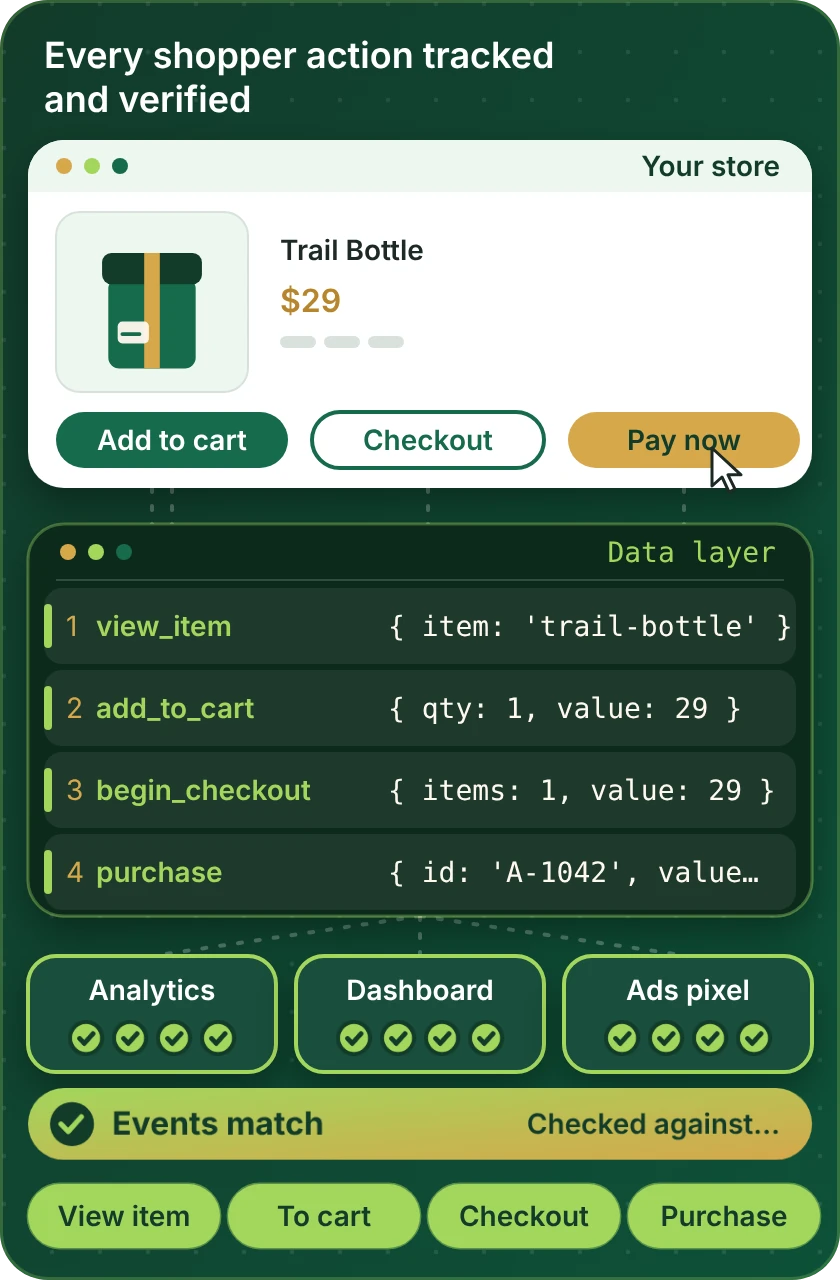
Analytics is only as good as the events behind it. The debugger shows the shopper steps we test, the destinations that should receive each event and the check that every one arrives once and matches Shopify.
Compare your options
Which Shopify Analytics Route Fits Your Team?
Analytics tools reach Shopify data in three ways. Find your question in the left column and read across to see which route answers it.
| What matters | Tool's own Shopify connector | Dashboard connector or automation tool | Warehouse and custom build |
|---|---|---|---|
| Ecommerce events in GA4 | Often available | Yes | Yes, server-side if needed |
| Revenue that matches Shopify | Check the tool | Checked per source | Reconciled by design |
| One dashboard for sales and ads | Rare | Yes | Yes |
| Order-level profit and costs | Rare | Partly | Yes, from your cost data |
| Sales report in Shopify with history kept | Within plan limits | Yes, via export | Yes, in your warehouse |
| Consent-aware tracking | Per tool | Per tool | Designed for your rules |
| A tool with no Shopify connector | Not available | If the platform lists it | Yes, through your data |
| Typical fit for our packages | Setup and events | Most single-tool builds | Larger or unusual builds |
Process and timeline
How a Shopify Analytics Integration Project Runs
A single GA4 setup and a warehouse with dashboards follow the same six steps. The scale varies, the process is the same, and no decision is based on a number we have not checked.
- 1
Choose the tool and package
Open the page for your analytics or dashboard tool and select a package, with price and delivery estimate visible before you pay.
- 2
Choose how we get access
Share access as collaborators, or let us build in our own Partner account and pass ownership to you, or open a restricted staff login for the project. In the analytics tool we use a user you create with limited rights.
- 3
Write the tracking plan
We list each event, its name, its fields and where it goes, along with consent rules and the metrics each report will show. You approve it before the build.
- 4
Implement and connect in a test setup
Events and connectors are built against a test property or a copy of your report. Live data stays untouched while names and fields settle.
- 5
Compare against real orders
We place orders, refunds and edits and compare each tool's records with Shopify. Differences are traced to a cause and fixed.
- 6
Go live and hand over
After approval the plan switches to live properties and dashboards. You receive a recorded walkthrough and a plain-language metric dictionary.
Why Store Design Expert
Why Brands Hire Us for Shopify Analytics Integration
Adding a tracking tag takes minutes. Brands hire us for the event plan, the reconciliation and the dashboards that can be trusted.
Dedicated to Shopify
We have worked only on Shopify since 2015, with more than 450 launched stores. Checkout, order and customer events are familiar before your project starts.
A clear price for each tool
Every analytics tool has a page with three packages and a visible price. Subscriptions are between you and the vendors.
Reconciled, not assumed
We compare each tool with Shopify on real test orders, so disagreements are found before a decision relies on them.
Definitions written down
Every metric on a dashboard has a plain-language definition, so nobody argues about what a number means.
Accounts and data stay yours
Your analytics properties, dashboards and store remain under your logins, with access we use removed at handover.
Rated 4.9+ by verified clients
The 4.9+ average is earned from verified clients. Their reviews below cover how we scoped the work, talked to them and handed it back.
Testimonials
What Clients Say After Launch
Verified clients describe working with Store Design Expert on builds, integrations and fixes.
Verified
Store Design Expert delivered an outstanding website development experience! Their professionalism and attention to detail exceeded my expectations, and their proactive communication kept everything running smoothly. Truly impressed by their deep understanding and dedication.
WG
Warren G.United States
Verified
Superb work! Store Design Expert is incredibly patient, and even when I did not fully understand my own questions, everything was explained again in detail. My vision was implemented perfectly, and the work is worth every cent I spent.
KB
Katrin B.Germany
Verified
Very impressed with the build-out. My store is ready to get started, and I am sure I will reach out for edits down the road, but this is everything I could ask for to get the party started. Thanks again, and I will be in touch for future projects.
DH
Dale H.United States
Verified
Very quick and detailed work! Store Design Expert does exactly what you want, in a very professional manner.
LF
Lena F.Germany
Verified
Store Design Expert did an outstanding job with top-notch professionalism on my website project. Everything was delivered quickly without compromising quality. I could not have asked for better!
JM
Jason M.United States
Verified
The website development work was nothing short of professional, with top-notch quality. Their exceptional level of cooperation made the collaboration seamless and enjoyable. Highly recommend working with Store Design Expert!
JC
Jeremy C.United States
Verified
Super great to work with, and super fair!
RO
Robert O.United States
Verified
The website development work was truly impressive. Their attention to detail and ability to exceed expectations made the project a success. Working with them was a breeze, thanks to quick responsiveness and a willingness to go above and beyond.
KD
Kevin D.United States
Verified
Store Design Expert was very knowledgeable about what I needed done to fix my Shopify store and how to improve the store layout. The project was completed very quickly, and I will definitely use them for support as my business grows.
ST
Samuel T.United States
FAQ
Shopify Analytics Integration FAQs
Direct answers on cost, tools, events and reports.
How much does a Shopify analytics integration cost?
Packages start at $390 for a single tool setup and rise with the number of events, dashboards and sources involved. Each analytics tool page shows three packages and a delivery estimate before you pay. Analytics plans are billed by the vendors.
What are the top Shopify integrations for analytics?
That depends on your questions. Web analytics, behaviour tools and dashboards answer different ones, and the cards above show the main options so you can compare what each needs from your store.
How do I connect Google Analytics in Shopify properly?
Install the tracking, name ecommerce events once and test a purchase end to end. A Shopify integration app for Google Analytics may cover the basics, and we check what it sends and fix gaps.
How do I connect your Shopify analytics to a dashboard?
Choose a dashboard tool, connect it to Shopify data directly or through a warehouse and define each metric. We build and test it against Shopify reports, so the totals can be trusted.
Is there a Shopify integration platform for analytics that does everything?
No single platform covers every need. Hubs such as Segment route events to many tools, and warehouses hold history. We pick the lightest route for your questions.
Can you recommend Shopify free apps for analytics?
Free options exist, and Looker Studio and Google Analytics are common starting points, alongside great Shopify apps for analytics that charge a modest fee. We help you set them up properly and say plainly if a paid tool would save you time.
Which must have apps for Shopify analytics should I install first?
A web analytics tool, a way to see sales trends and a way to check ad platform revenue against orders. Beyond that, it depends on what you need to decide.
How to run reports on Shopify beyond the built-in ones?
Export data to a sheet or warehouse and build reports there, or connect a dashboard tool. We build the pipeline and a first set of reports you can extend.
Can you set up a Shopify Power BI integration?
Yes. The route depends on your setup, such as a connector or a warehouse, so we scope it first, then build a model and test totals against Shopify.
Can you handle Shopify data integration into a warehouse?
Yes. We load orders, customers and products into your warehouse, document the tables and check counts. Dashboards can then be built on top without hitting Shopify every time.
How long does an analytics integration take?
A single tool setup usually takes 3 to 5 working days. Dashboards and warehouse builds take longer, up to 14 working days, depending on the package.
Do I give you my Shopify or analytics password?
No. You can invite us as collaborators, or let us build in our Partner account and transfer ownership, or set up a limited staff login. In the analytics tool we use a user you create and remove at handover.
Ready when you are
Get Your Shopify Analytics Integration Working
Open the page for your analytics or dashboard tool, read what is included and see a fixed price before you commit. If your numbers disagree across several tools, send a short quote request and we will scope the fix as one project.
- Fixed price shown first
- Events checked against orders
- Your accounts stay yours