
Shopify stores designed and launched
WhatsApp and SMS wired into your store
Shopify WhatsApp Integration That Reaches Customers Where They Read
Shopify WhatsApp integration for stores that want order updates, cart reminders and replies on a customer's phone. Choose your messaging tool, see a fixed price first and launch a flow with consent, templates and delivery tested in advance.
- A page for every WhatsApp, SMS, voice and chat tool
- Consent captured and stored before the first message
- Approved templates and fallbacks tested live
- Quiet hours and opt-out handled properly
Messaging tools covered85 integrations
From$390
Delivery3 to 14 working days
Our track record
Messages Customers Open Because They Asked for Them
Order updates and delivery alerts get read when they arrive as a text or a WhatsApp message. They only work when the customer has agreed to receive them, the wording suits the channel and the trigger fires once. The packages below build and test all three for the tool you use.
Average rating from verified clients
Building Shopify stores since
Secure checkout
Pay through a protected checkout and keep a full order record.
Two revision rounds
Included in every package, so the result matches what you pictured.
Backup before changes
We work on a duplicate of your theme, never on your live store.
Who this is for
Who Needs Shopify WhatsApp and SMS Integration
The ask often begins as add a chat button and ends as send the right message at the right time. These are the businesses we work with.
Stores with where-is-my-order traffic
Shipping updates by text or WhatsApp cut the questions. We send tracking links on dispatch and delivery, with rules for delays.
Brands recovering abandoned carts
A reminder on a phone can beat an email. We build it with consent checks and a stop rule once the customer buys.
Teams that sell by conversation
Customers ask on WhatsApp before they order. We link conversations to customer and order records so an agent has context.
Sellers in markets that live on WhatsApp
In some regions it is the main channel. We set up templates, languages and numbers for the markets you sell in.
Merchants careful about consent
Messaging has rules. We capture opt-in at checkout and forms, store proof and honour opt-outs on every channel.
Teams with their own messaging stack
A provider API or an in-house gateway can receive Shopify events through a fixed build.
No integration matches “”. Send a quote request with the tool’s name and we will check its API and scope it.
Featured integrations
Choose Your Tool From 85 Shopify Messaging Integrations
Each card opens a service page for one WhatsApp, SMS or messaging tool, with three packages and a fixed price. The featured tools are the ones we are asked about most. The remaining providers are in the index below, and the quote card handles the rest.
01WhatsApp tools
WhatsApp tools
For stores that want to know how to add WhatsApp to Shopify properly, with templates and order data behind it.
From $390
WhatsApp Business
WhatsApp Business connected to Shopify events so approved templates can send order and shipping updates, with consent checks first. We confirm template approval with you before launch.
Template approval is confirmed with you before launch, and every order status is tested with a real order on a number we control.
Best for: Stores sending order updates on WhatsApp
3 to 14 working days
View integrationFrom $390
WhatsApp Notifications
Order notifications sent over WhatsApp from Shopify events, with a template for each status and a fallback when a message cannot be delivered. Every status is tested with a real order.
Each status has its own template and a fallback for undelivered messages, and the full set is sent once during testing.
Best for: Stores that want status messages by WhatsApp
3 to 14 working days
View integrationFrom $390
Wati
Wati connected to Shopify for templates, shared inbox and order lookups, so agents answer with the order in view. Opt-in and template rules are written with you.
Opt-in capture and template rules are written with you, and order lookups are tested so agents answer with the order in view.
Best for: Teams running support on WhatsApp
3 to 14 working days
View integrationFrom $390
Gallabox
Gallabox linked to Shopify orders and carts for notifications and conversations, with tags that start follow-up flows. We test templates in each language you use.
Templates are checked in every language you sell in, and tags from conversations start the follow-up flows you choose.
Best for: Stores selling by WhatsApp in several languages
3 to 14 working days
View integrationFrom $390
Gupshup
Gupshup messaging connected to Shopify events for notifications and conversational flows, with routing for each country. Delivery reports are checked against real orders.
Routing is set per country, and delivery reports are compared with real orders so you can trust the numbers.
Best for: Brands messaging at scale across regions
3 to 14 working days
View integrationFrom $390
Aisensy
Aisensy campaigns and automations connected to Shopify so carts, orders and shipments trigger the right template. We test opt-in and unsubscribe paths.
Campaign and automation triggers are tested with unsubscribes, so the opt-out path works before the first campaign.
Best for: Stores running WhatsApp campaigns
3 to 14 working days
View integrationFrom $390
Interakt
Interakt linked to Shopify for order alerts, cart recovery and customer chat, with customer data kept in step. Templates are checked before they go live.
Cart recovery and order alerts share one customer record, and templates are reviewed before they go anywhere near a real customer.
Best for: Stores that sell and support on WhatsApp
3 to 14 working days
View integration02SMS platforms
SMS platforms
For brands that want an SMS marketing tool for Shopify with consent and quiet hours built in.
From $390
Twilio
Twilio SMS and WhatsApp connected to Shopify events, with sender setup, templates and logging in your own account. A test order sends every message type once.
Sender setup, templates and logs live in your own Twilio account, and one test order sends every message type exactly once.
Best for: Teams that want API-level control of messages
3 to 14 working days
View integrationFrom $390
Postscript
Postscript connected to Shopify so subscribers, orders and abandoned carts drive texts, with consent captured at checkout. We test compliance wording and quiet hours.
Consent wording, quiet hours and country rules are tested, so texts only go to people who agreed and only at sensible times.
Best for: Stores running SMS marketing
3 to 14 working days
View integrationFrom $390
EZ Texting
EZ Texting contacts and campaigns fed by Shopify customers and orders, with opt-in keywords and list rules agreed first. Send windows are tested before launch.
Opt-in keywords and list rules are agreed first, and send windows are tested so promotions never arrive at night.
Best for: Brands that text offers and updates
3 to 14 working days
View integrationFrom $390
SimpleTexting
SimpleTexting connected to Shopify so purchases and carts trigger texts, with segments built from order data. Opt-out handling is tested end to end.
Segments are built from order data, and the opt-out path is tested end to end before a campaign is switched on.
Best for: Small teams texting customers
3 to 14 working days
View integrationFrom $390
Textmagic
Textmagic set up for transactional and marketing texts from Shopify events, with sender names and templates agreed first. We test delivery in the countries you sell to.
Sender names and templates are checked per country, and delivery is tested in the markets you actually sell to.
Best for: Stores texting in several countries
3 to 14 working days
View integrationFrom $390
ClickSend SMS
ClickSend SMS wired to Shopify orders for confirmations and dispatch alerts, with sender IDs and country rules checked. Failed deliveries raise an alert.
Sender IDs and country rules are verified, and failed deliveries raise an alert instead of disappearing.
Best for: Stores sending simple order texts
3 to 14 working days
View integrationFrom $390
Msg91
Msg91 messages sent from Shopify events, including regional sender and template requirements, with logs that show each send. We confirm provider rules with you first.
Regional sender and template requirements are confirmed first, and logs show each send against the order that caused it.
Best for: Stores messaging customers in India
3 to 14 working days
View integrationFrom $390
Infobip
Infobip channels connected to Shopify for SMS, WhatsApp and more, with one customer record behind them. We design channel fallbacks and test each.
Fallbacks between channels are designed and tested, so a message that fails on one channel reaches the customer on another.
Best for: Brands that need many channels from one provider
3 to 14 working days
View integration03Voice
Voice, chat and push
For teams that talk to customers by call, chat app or push notification.
From $390
Telegram
Telegram bots and channels connected to Shopify, for team alerts or customer updates, with commands that look up an order. Access is limited to named users.
Access is limited to named people, and commands that look up an order are tested with wrong numbers as well as right ones.
Best for: Teams and communities that live on Telegram
3 to 14 working days
View integrationFrom $390
Line
LINE messages connected to Shopify orders and customers for markets where LINE leads, with templates and rich replies tested on phones. Account rules are confirmed first.
Rich replies and templates are tested on phones, and account rules for your market are confirmed before anything is sent.
Best for: Stores selling in LINE-heavy markets
3 to 14 working days
View integrationFrom $390
Quo
Quo numbers, calls and texts connected to Shopify customers, so a call shows the order history. Call and text logs are attached to the right profile.
Call and text history is attached to the right customer, so a call from a known number opens with their orders in view.
Best for: Small teams that call and text customers
3 to 14 working days
View integrationFrom $390
RingCentral
RingCentral calls and messages tied to Shopify customers and orders, so agents see context when a call arrives. Routing rules are agreed with your team first.
Routing rules are agreed with your team, and a test call from a known customer proves the order context appears.
Best for: Teams running a phone-based support desk
3 to 14 working days
View integrationFrom $390
Dialpad
Dialpad connected to Shopify so incoming calls and texts show the customer's orders, and follow-up tasks can be created. We test with new and returning callers.
New and returning callers are both tested, and follow-up tasks are created only for the outcomes you choose.
Best for: Teams handling calls and texts in one app
3 to 14 working days
View integrationFrom $390
JustCall
JustCall dialling and texting connected to Shopify customers, with call outcomes written back as tags. Do-not-contact rules are tested before any campaign.
Do-not-contact lists are enforced before any campaign, and call outcomes come back to the customer as tags.
Best for: Sales and support teams that dial from the store list
3 to 14 working days
View integrationFrom $390
Pushover
Pushover alerts triggered by Shopify events for owners and staff, with priority levels for urgent orders. We test sound, priority and quiet-hours behaviour.
Priority levels, sounds and quiet hours are tested, so only urgent orders interrupt a phone and routine ones wait.
Best for: Owners who want instant phone alerts
3 to 14 working days
View integrationFrom $390
OneSignal
OneSignal web and mobile push connected to Shopify events, with segments from order data and consent captured first. Delivery is tested on common browsers and phones.
Consent is captured before the first push, and delivery is tested on the common browsers and phones.
Best for: Stores sending push notifications
3 to 14 working days
View integrationIs your messaging tool missing?
Name the tool, the channel and the events that should trigger a message. We confirm what its API allows and send a fixed quote, or say plainly if a simpler route would work.
Request a QuoteEvery integration in this hub
All 85 Shopify Messaging Integrations, A to Z
Every WhatsApp, SMS, voice, chat and push tool we cover has its own page with packages and a fixed price. Locate your provider below, then open its page to see what is included.
A3 integrations
B4 integrations
C7 integrations
D3 integrations
E3 integrations
K3 integrations
L1 integration
M3 integrations
N1 integration
O1 integration
P9 integrations
PairfonFrom $390 · 3 to 14 daysPlivoFrom $390 · 3 to 14 daysPostscriptPopularFrom $390 · 3 to 14 daysProntoFrom $390 · 3 to 14 daysPureSMSFrom $390 · 3 to 14 daysPush by TechulusFrom $390 · 3 to 14 daysPushbulletFrom $390 · 3 to 14 daysPushcutFrom $390 · 3 to 14 daysPushoverPopularFrom $390 · 3 to 14 days
R4 integrations
S14 integrations
Sakari SMSFrom $390 · 3 to 14 dayssendSMSFrom $390 · 3 to 14 daysSentFrom $390 · 3 to 14 daysSimpleTextingFrom $390 · 3 to 14 daysSMS AlertPopularFrom $390 · 3 to 14 daysSMS Gateway HubFrom $390 · 3 to 14 daysSMS.dkFrom $390 · 3 to 14 daysSMSAPIFrom $390 · 3 to 14 daysSMSEagleFrom $390 · 3 to 14 daysSMSFactorFrom $390 · 3 to 14 dayssmsmodeFrom $390 · 3 to 14 daysSpaceFrom $390 · 3 to 14 daysSpokiFrom $390 · 3 to 14 daysSuperPhoneFrom $390 · 3 to 14 days
T7 integrations
V1 integration
W9 integrations
WA Notifications and Alerts by SyncMateFrom $390 · 3 to 14 daysWapikonFrom $390 · 3 to 14 daysWatiPopularFrom $390 · 3 to 14 daysWebpushrFrom $390 · 3 to 14 daysWhatChimpPopularFrom $390 · 3 to 14 daysWhatsAbleFrom $390 · 3 to 14 daysWhatsApp BusinessFrom $390 · 3 to 14 daysWhatsApp NotificationsPopularFrom $390 · 3 to 14 daysWOZTELLFrom $390 · 3 to 14 days
Z1 integration
#1 integration
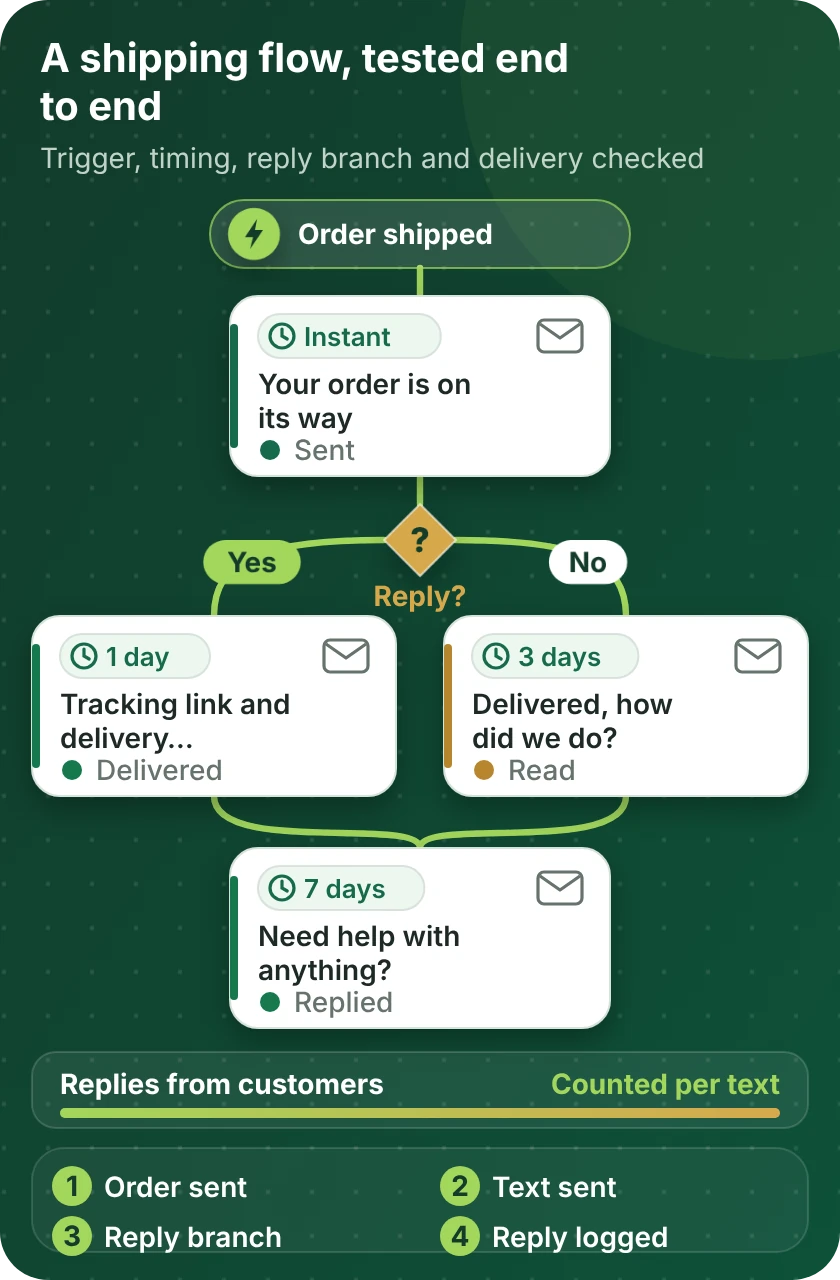
Messages on a timeline
How a Shopify Message Flow Is Built and Proven
Each message flow starts with a store event, waits for the right moment, branches on what the customer does and records the result. The timeline shows the order we build and test every flow in, using a sample shipping sequence.
Compare your options
Which Shopify Messaging Route Fits You?
Messaging tools reach Shopify in three ways. Start from what you need in the first column and read across to compare the options.
| What matters | Messaging tool's Shopify app | No-code automation tool | Custom API build |
|---|---|---|---|
| Order and shipping updates by text | Often built in | Yes, per status | Yes, any event |
| Abandoned cart reminders with consent | Platform dependent | Yes, with rules | Yes, designed per market |
| Shopify WhatsApp API integration with templates | Check the vendor | Yes, via provider | Yes, direct |
| Conversations linked to customers and orders | Sometimes | Partly | Yes |
| Quiet hours and country rules | Basic | Per workflow | Fully controlled |
| Opt-out honoured across channels | Per tool | With care | Designed in |
| A provider with no Shopify app | Not available | If the platform lists it | Yes, through its API |
| Typical fit for our packages | Setup and templates | Most single-tool builds | Larger or unusual builds |
Process and timeline
How a Shopify Messaging Integration Project Runs
A single status message and a full multi-channel flow follow the same six steps. The work gets bigger, not different, and no customer receives a test message.
- 1
Choose the tool and package
Open the page for your messaging tool and pick a package. You will see the price and delivery estimate before paying.
- 2
Choose how we get access
Give us a collaborator request, or let us build in a Partner account of ours and transfer the store afterwards, or set up a staff login with narrow rights. In the messaging tool we use a user you create.
- 3
Settle consent and templates
We write which events send which messages, how opt-in is captured and stored, which templates need provider approval and what happens on opt-out. We wait for your sign-off on the plan.
- 4
Build with internal numbers
The flows are built and sent to numbers we control. Customers receive nothing while wording, timing and fallbacks are tuned.
- 5
Test every status and failure
We place orders, ship, deliver, refund and cancel, and test failed deliveries and opt-outs. We check logs and the customer record after each.
- 6
Go live and hand over
After approval the flows go live in stages. You receive a recorded walkthrough and written notes on changing templates and quiet hours.
Why Store Design Expert
Why Brands Hire Us for Shopify WhatsApp Integration
Sending a text from an order event is easy. Brands hire us for the consent handling, template approval and testing that keep the channel working and the account safe.
Shopify experts since 2015
Our focus has been Shopify alone since 2015, and more than 450 stores have launched with us. Order states and checkout consent are familiar before your project starts.
A set price per messaging tool
Every messaging tool has a page with three packages and a visible price. Message fees and plans stay with the providers.
Consent treated as data
Opt-in is captured at checkout and forms, stored with proof and honoured on opt-out, across every channel we connect.
Every status tested
We trigger each message from a real test order, so you read wording rather than hunt for missing sends.
Accounts and numbers stay yours
Your messaging accounts, numbers and store remain under your logins, with access we use removed at handover.
Rated 4.9+ by verified clients
Our 4.9+ average is a verified-client figure, and the reviews below are theirs, mostly about clear scopes, quick replies and tidy handovers.
Testimonials
What Clients Say After Launch
Verified clients describe working with Store Design Expert on builds, integrations and fixes.
Verified
Store Design Expert is the best. The work is very professional, they pay close attention to detail and, more importantly, they listen. Their level of cooperation is second to none, and everything was delivered in a very timely manner. I will keep them in mind for future projects.
BN
Barbara N.United States
Verified
Store Design Expert was great! They delivered exactly what I asked for and even offered helpful extra suggestions. Highly recommended.
PW
Paul W.United States
Verified
I request Store Design Expert every time I have a project. They are professional and give real attention to detail, which makes the work stand out.
LK
Laura K.United States
Verified
They kept communicating until the problem was fully resolved, and the result was great.
HJ
Henry J.United States
Verified
Super helpful and patient. I am new to ecommerce and Store Design Expert talked me through the whole process and even fixed my payment bridging for me!
LR
Lois R.United Kingdom
Verified
I am beyond satisfied! Store Design Expert went above and beyond on my project. Highly recommended!
MD
Michael D.United States
Verified
The experience was tailored to my brand and specifications to the letter. I love the result.
EP
Eric P.United States
Verified
They definitely get the job done. Very patient and understanding throughout the whole project.
BS
Brian S.United States
Verified
Thank you so much to Store Design Expert and the team. My site looks far more appealing to customers, and I will happily recommend your services to other new small businesses.
JS
Jennifer S.United States
FAQ
Shopify WhatsApp Integration FAQs
Direct answers on cost, consent, templates and channels.
How much does a Shopify WhatsApp integration cost?
Packages start at $390 for a single message flow and rise with the number of flows, the provider and the markets involved. Each messaging tool page lists three packages and an estimated delivery time before you pay. Message fees and subscriptions are billed by the providers.
How to add WhatsApp to Shopify for order updates?
A WhatsApp integration in Shopify starts with a WhatsApp Business provider, then registers message templates for each order status and triggers them from Shopify events. We build and test that path, including what happens when a message fails.
How to add WhatsApp button on Shopify without a heavy app?
A chat button is a small theme change linking to your WhatsApp number. We can add it as a small job, and if you also want messages sent from orders, that is a separate integration with consent and templates.
How to add SMS to Shopify for order and cart messages?
Choose an SMS platform, capture consent at checkout, connect it to store events and build the messages. Any Shopify SMS integration we build follows that order. We handle the connection, the consent and the testing in a fixed-price package.
How do I choose an SMS app for my Shopify store?
The best SMS app for Shopify depends on your markets, volume and consent rules. We connect the main SMS platforms, so you can compare what each integration involves before you choose.
Do you offer SMS marketing software for Shopify as well as notifications?
We connect the platforms and build the flows, such as welcome texts and cart reminders. Campaign strategy and copy stay with you, and we keep consent and quiet hours tight.
Is there an SMS marketing tool for Shopify that handles consent?
Shopify SMS marketing depends on consent, and most platforms have consent features. We check how consent is captured in your checkout and forms, test opt-ins and opt-outs, and write down where proof is stored.
Can you set up Shopify SMS notifications for shipping?
Yes. Dispatch, out-for-delivery and delivered messages can fire from fulfilment events with a tracking link. We test delays, partial shipments and cancelled orders.
Can Shopify text message marketing run alongside email?
Yes. We connect both to the same customer events and keep separate consent for each, so a customer who opts out of one is not removed from the other by mistake.
How long does a messaging integration take?
A single status flow usually takes 3 to 5 working days. Multi-channel builds and templates that need provider approval take longer, up to 14 working days, depending on the package.
Do I give you my Shopify or messaging account password?
No owner password is ever needed. A collaborator request, a Partner-account build with transfer or a narrow staff login all work. In the messaging tool we use a user you create and remove at handover.
What if WhatsApp or my provider changes its rules?
Providers update templates, pricing and policies. Providers revise templates, pricing and policies. We document each build so it can be adjusted, and the automation maintenance page offers repair and maintenance plans.
Ready when you are
Get Your Shopify WhatsApp Integration Working
Open the page for your WhatsApp, SMS or messaging tool, read what is included and see a fixed price before you commit. If you are choosing between channels, send a short quote request and we will suggest the simplest start.
- Fixed price shown first
- Consent and templates tested
- Your accounts stay yours