
Shopify stores designed and launched
XML sitemap generation and submission for Shopify
Shopify Sitemap Setup and Submission, Checked URL by URL
Your Shopify sitemap is built by the platform, yet products still go missing, Search Console still shows errors and nobody can say why. We read the file Shopify serves, trace every missing or flagged page to its cause, correct the settings behind it and submit it to Google and Bing from $290. Over 450 Shopify launches since 2015 sit behind this service, with a 4.9+ rating from clients we can verify. Price your check in the calculator.
- Every child file of /sitemap.xml read and compared with your catalog
- Each missing page traced to its status, channel, metafield or theme tag
- Search Console property verified on the right domain and the sitemap submitted
- A written list of what Shopify controls and what no one can change
From$290
Delivery2 to 8 working days
Revisions2 rounds
Our track record
Over 450 Shopify Stores Launched Since 2015, Each With Search in Mind
We build stores before we fix them, so we know which theme settings, app installs and product statuses quietly change what a search engine is told about your pages. That experience is what the sitemap check draws on.
Average rating from verified clients
Building Shopify stores since
Secure checkout
Pay through a protected checkout and keep a full order record.
Two revision rounds
Included in every package, so the result matches what you pictured.
Backup before changes
We work on a duplicate of your theme, never on your live store.
Who this is for
Who Needs a Shopify Sitemap Specialist
Most owners who ask us for sitemap help have already found the address and pressed submit. What brought them to us is a number in Search Console that does not match their catalog, or a status they cannot decode.
You are a good fit if
- Your store runs on Shopify, not a headless front end
- You want your pages discoverable by Google and Bing
- You prefer a fixed price to an hourly estimate
- You want the reasons explained in plain language
Stores with fewer pages indexed than products
Google reports far fewer discovered pages than you actually sell. You want to know whether the file is incomplete or whether Google is simply not choosing to index what it finds.
Owners staring at a red status
The Sitemaps report says it could not be read, or flags submitted pages as noindex or blocked. You need the cause named and fixed, not another round of resubmitting.
Brands just out of a theme change or relaunch
A new theme, a migration or a redesign changed handles, templates and meta tags in one weekend. You want the sitemap re-verified before the old signals fade.
Sellers on several domains or languages
Markets, a second domain or translated storefronts multiply the files Google must read. Each variant needs its own property, and one wrong host leaves a whole region unseen.
Catalogs with drafts, archives and hidden items
Seasonal products come and go, and some pages are deliberately hidden. You want the file to list exactly what should rank and nothing you retired last year.
Anyone who wants it done once, properly
Searching forums for sitemap threads costs evenings. You would rather hand over the access, receive a plain report and watch the Sitemaps report turn green.
Problems solved
What Goes Wrong With a Shopify Sitemap, and What We Do About It
A sitemap for Shopify store catalogs is written by the platform, so the file itself is rarely the culprit. Trouble comes from what feeds it and from how it was submitted, and each of these causes can be found and corrected.
- Products are absent from the file.
A draft, archived or unlisted status, a missing Online Store channel or a hidden-page metafield removes a product silently. We export your catalog, compare it against the child files and list each gap with its cause.
- The sitemap lists pages that tell Google not to index.
A theme condition or an SEO app can add noindex to pages that are still listed. We locate the template or app rule responsible and decide with you which signal should win.
- Submitted pages return 404 or redirect.
Deleted products and changed handles leave stale addresses in Google's memory. We map them to live equivalents with 301 redirects so crawlers land somewhere useful.
- Search Console watches the wrong address.
A myshopify.com property or a www mismatch makes the file look unreadable, because Shopify redirects to your primary domain. We create the correct domain property and verify it through DNS.
- An old app left its own file behind.
A sitemap app that was removed can leave an extra submission returning errors beside the real one. We remove the dead entry and keep one clean index as the single source.
- Expectations that no setting can meet.
The index cannot be uploaded or edited by hand, and individual pages cannot be dropped except through status or the hidden metafield. We explain the limits up front so no money goes into impossible edits.
What we can do
What Our Shopify Sitemap Service Can Do
If you are searching for a Shopify sitemap generator, the useful answer is that Shopify already generates one and that the real work is verification, cleanup and submission. These are the six areas where we carry the weight for you.
Reading your Shopify sitemap URL and every child file
We open the Shopify sitemap xml at /sitemap.xml and follow each child, including the numbered product files that large catalogs get, the pages, collections, blogs and any locale-prefixed or hreflang files. Nothing is assumed from the index alone.
Reconciling the file against your real catalog
We export products, collections, pages and articles from the admin, then compare the lists with what the sitemap serves. Each difference gets a labelled cause, such as draft status or a missing sales channel.
Fixing the settings that decide what is listed
We correct product status, publishing, the seo.hidden metafield and theme-level robots meta rules, so the sitemap, the page tags and your intentions all say the same thing.
Search Console, Bing and the right property
We verify a Domain property through DNS, submit the index in Indexing, then Sitemaps, and import the property into Bing Webmaster Tools. A Shopify sitemap google search console setup done once, and done on the correct host.
Clearing 404s and stale addresses
Dead URLs reported against the sitemap are traced to deleted products or renamed handles and redirected with 301s, so the Sitemaps report and the Pages report stop disagreeing.
Markets, languages and extra domains
For multi-region stores we check each domain and language path, confirm hreflang entries and make sure every variant has a verified property, so international pages are read and not skipped.
What is included
What a Shopify Sitemap Check and Submission Includes
The work falls into six workstreams. The package table below the calculator shows which of them belong to each tier.
Read and map
- Index file and every child sitemap opened and recorded
- Numbered product files and locale files traced
- Catalog export prepared from the admin
- Differences between file and catalog listed
Settings and tags
- Draft, archived and unlisted products reviewed
- Sales channel publishing confirmed for each item
- Hidden-page metafield found wherever it is set
- Theme noindex conditions located and explained
Search Console and Bing
- Domain property verified through a DNS record
- Parent sitemap submitted to Google
- Property imported into Bing Webmaster Tools
- Stale submissions from removed apps deleted
Errors and redirects
- Every Sitemaps report status explained in writing
- 404 addresses mapped to live pages
- 301 redirects added and tested in a browser
- Pages report rechecked after crawling
Markets and domains
- Each domain and language path identified
- hreflang entries compared with published languages
- One property per host verified
- Regional gaps listed with fixes
Report and handover
- Plain-language findings document
- Checklist for future product launches
- Recorded walkthrough of the Sitemaps report
- Two revision rounds on the written report
Searchers type how to find sitemap on Shopify and how to submit Shopify sitemap to google as if both were one-line jobs. In practice the two sit at either end of a longer chain, and every link in it is covered here.
See the path
How Your Sitemap Reaches Search Console
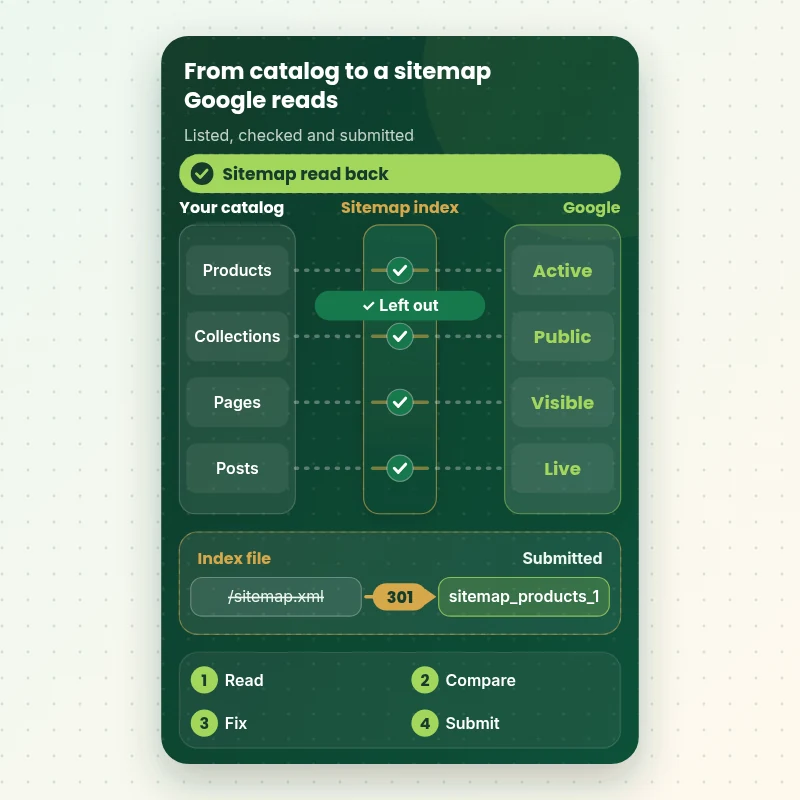
Follow the file from your catalog to Google. Active, published items feed Shopify's index, draft items drop out, the parent file points to its children and the whole set is submitted to the right property. The last step is the Sitemaps report reading it back.
Portfolio
Store Designs From Our Studio
A look at store designs across fashion, home, beauty, pets and gifts, to show the standard of layout and finish behind Shopify Sitemap Setup, Fix and Submission.

Furniture store design
Furniture
Furniture store design
Furniture
Beauty store design
Beauty
Kids clothing store design
Kids clothing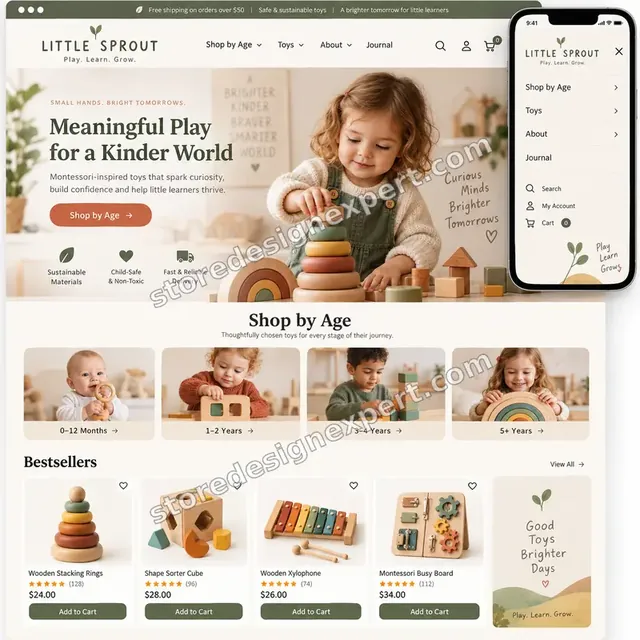
Montessori toys store design
Montessori toys
Podcast creator store design
Podcast creatorProcess and timeline
How a Shopify Sitemap Check Runs, Step by Step
We read your store without changing anything live until the findings are agreed. Sitemap Check finishes in 2 to 3 working days, and the calculator shows the window for larger stores.
- 1
Open the index and every child
We load the parent file, then each child it lists, and record the number of files, their order and any locale or hreflang entries. This is the baseline for everything that follows.
- 2
Export and compare
A catalog export from the admin is lined up against the URLs the file contains. Every product, page or article that is missing, or listed unexpectedly, goes on a sheet with the reason.
- 3
Correct the causes
With your approval we change statuses, publishing, hidden-page metafields and theme tags. Each change is logged so you can see which setting moved and why.
- 4
Verify and submit
We create or confirm the Domain property, add the DNS record, submit the index file and import the property into Bing. Old submissions that no longer apply are removed.
- 5
Read the reports back
After Google has had time to crawl, we open the Sitemaps and Pages reports and compare them with the plan. Anything still flagged is investigated, not guessed at.
- 6
Hand over the routine
You receive the findings, a checklist for adding products without breaking the file, and a recorded tour of where each status lives in Search Console.
Compare your options
Sitemap App, Gig, Freelancer or Our Shopify Sitemap Service?
Anyone repairing a sitemap tends to pick between an app, a cheap gig, a contract developer and an agency. These rows show how each copes with the steps that usually decide whether Search Console turns green.
| What matters | Sitemap app | Marketplace gig | Freelance developer | Store Design Expert |
|---|---|---|---|---|
| Every child file read and compared with the catalog | No | Rarely | Varies | Yes |
| Missing products traced to status or channel | No | Rarely | Varies | Yes |
| Theme and app noindex tags checked | Partly | No | Varies | Yes |
| Domain property verified through DNS | No | Sometimes | Varies | Yes |
| 404 and redirect clean-up included | No | Rarely | Extra cost | Yes |
| Honest note on what cannot be changed | No | Rarely | Varies | Yes |
| Fixed price known before you pay | Subscription | Yes | Varies | Yes |
Inside every project
What Protects Your Store While We Work on Search Settings
Altering what search engines see is safe when the steps run in a fixed order. Every project carries the safeguards below, which is why a specialist at a set price beats a hurried plugin install.
Read first, change second
Nothing in your store is edited until you have seen the findings sheet and agreed which gaps are intentional. A product you hid on purpose stays hidden.
A before-and-after log
Every status, metafield or tag we alter is written down with its old value, so any change can be reversed in minutes if you decide you prefer the original.
Redirects tested in a browser
We open a sample of each redirected address and confirm a permanent response and a sensible destination, instead of trusting an import report.
Limited, revocable access
We join as a collaborator or use a staff login you set up, and your owner password and card details stay with you. Access ends when the job does.
Honest limits
We will tell you plainly what no one can change on Shopify, such as uploading your own index, and we will not sell hours against an impossible task.
Notes you can reuse
The findings, the checklist and the recorded tour stay with you, so a future team member can keep the file healthy without calling anyone.
Interactive price calculator
Build Your Shopify Sitemap Package
Pick a package, then tell us how large the catalog is, how many domains or languages you run and what Search Console shows today. The fixed price and delivery window update with each answer.
Request a custom quote
Stores with a headless front end, spread across several Shopify accounts or holding more than 10,000 products get an individual scope, and we fix the fee before work starts.
Request a QuoteChanged your mind? Choose Sitemap Check, Coverage Clean-Up or Index Handover above to return to the instant calculator.
Packages and comparison
Shopify Sitemap Package Comparison
The table below puts the three tiers next to each other. Enter your catalog size, domain count and Search Console state in the calculator, and it returns your own price and schedule.
| What is included | Sitemap Check $290 | Coverage Clean-Up $490Recommended | Index Handover $890 |
|---|---|---|---|
| Index and child files read | Included | Included | Included |
| Catalog compared with the sitemap | Included | Included | Included |
| Domain property verified and index submitted | Included | Included | Included |
| Written findings and plain-language summary | Included | Included | Included |
| Two revision rounds on the report | Included | Included | Included |
| Statuses, channels and hidden pages corrected | Not included | Included | Included |
| 404 addresses redirected with 301s | Not included | Included | Included |
| Bing property imported | Not included | Included | Included |
| Stale app submissions removed | Not included | Included | Included |
| Markets and hreflang review | Not included | Not included | Included |
| One verified property per host | Not included | Not included | Included |
| Recheck after Google crawls | Not included | Not included | Included |
| Launch checklist for new products | Not included | Not included | Included |
| Usual turnaround | 2 to 3 days | 3 to 5 days | 5 to 8 days |
Choose your options in the calculator above: the total and the delivery estimate it shows for Shopify Sitemap Setup, Fix and Submission are final.
Why Store Design Expert
Why Owners Choose Us for Technical SEO on Shopify
You get a specialist's attention without a monthly retainer. These are the reasons clients mention most often when they compare us with plugins and one-off gigs.
We build Shopify stores, not only audit them
With 450+ launches since 2015 behind us, we know how themes and apps alter tags, handles and statuses, so we find causes that an outside crawler only hints at.
Causes explained, not just symptoms listed
A scanner prints a red row. We tell you whether the row means a status, a channel, a metafield or a template, and what changing it does to the rest of your store.
Rated 4.9+ by verified clients
Each review further down was written by a genuine Store Design Expert client, so you can see how search work like this turned out for them.
Fixed prices from $290
Each package displays its fee and delivery window, and the calculator prices every option. Tracing a missing product does not start an hourly meter.
You deal with the person doing the work
Questions go to the specialist handling your sitemap, so a confusing status in Search Console is explained the same day.
Your store stays yours
Settings, data and admin access stay yours throughout. Anything built in our Partner account is signed over when the work ends.
What we need to get started
What We Need to Start Your Sitemap Check
Nothing has to be prepared beforehand. Tell us how you prefer to let us in, and send the Search Console details if you already have them.
Add us as a collaborator
Give us the store URL and accept the collaborator invite we raise, so the sitemap work happens inside your admin. Nobody gets your password and revoking us takes one click.
Still building the store
If you have no store yet, we create one inside our Shopify Partner account, configure the search settings there and pass ownership across to you, so a plan is chosen only when everything is finished.
Or create a staff login
A staff account with catalog and theme permissions works too. Collaborator access is easier to withdraw, though either route lets us begin.
Search Console access
Invite us to your existing property as a user, or say you have none and we will verify the domain using a DNS record at your registrar.
Domain and registrar details
Let us know your primary domain, any extra domains and who manages DNS, so the verification record and the www or non-www choice are right the first time.
Pages you want left out
List any products, collections or pages you intentionally keep out of search, so we do not mistake a deliberate choice for a fault.
Your Shopify owner password and payment card are never required. Live settings change only once you approve the findings, and the log keeps every original value.
Testimonials
What Store Owners Say After Launch
Verified clients describe working with Store Design Expert on builds, fixes and search work.
Verified
Store Design Expert delivered an outstanding website development experience! Their professionalism and attention to detail exceeded my expectations, and their proactive communication kept everything running smoothly. Truly impressed by their deep understanding and dedication.
WG
Warren G.United States
Verified
A pleasure to work with. They did pretty much everything I asked and definitely exceeded my expectations. I will be working with Store Design Expert again soon.
JL
Jerry L.United States
Verified
Superb work! Store Design Expert is incredibly patient, and even when I did not fully understand my own questions, everything was explained again in detail. My vision was implemented perfectly, and the work is worth every cent I spent.
KB
Katrin B.Germany
Verified
Very impressed with the build-out. My store is ready to get started, and I am sure I will reach out for edits down the road, but this is everything I could ask for to get the party started. Thanks again, and I will be in touch for future projects.
DH
Dale H.United States
Verified
Very quick and detailed work! Store Design Expert does exactly what you want, in a very professional manner.
LF
Lena F.Germany
Verified
Store Design Expert did an outstanding job with top-notch professionalism on my website project. Everything was delivered quickly without compromising quality. I could not have asked for better!
JM
Jason M.United States
Verified
The website development work was nothing short of professional, with top-notch quality. Their exceptional level of cooperation made the collaboration seamless and enjoyable. Highly recommend working with Store Design Expert!
JC
Jeremy C.United States
Verified
Super great to work with, and super fair!
RO
Robert O.United States
Verified
The website development work was truly impressive. Their attention to detail and ability to exceed expectations made the project a success. Working with them was a breeze, thanks to quick responsiveness and a willingness to go above and beyond.
KD
Kevin D.United States
Related searches
Related Searches for Shopify Sitemap Setup, Fix and Submission
The searches below are the ones that lead people to Shopify Sitemap Setup, Fix and Submission.
If you searched for “shopify sitemap url”, “shopify sitemap generator”, “how to submit shopify sitemap to google” or “sitemap for shopify store”, Shopify Sitemap Setup, Fix and Submission is the work that answers it.
People who look up “how to find sitemap on shopify”, “shopify sitemap google search console”, “shopify sitemap xml” or “shopify sitemap error” usually want Shopify Sitemap Setup, Fix and Submission; the calculator above shows the price and delivery estimate before you commit.
If you searched for “shopify sitemap could not be read”, “shopify sitemap app” or “shopify sitemap edit”, Shopify Sitemap Setup, Fix and Submission is the work that answers it.
You may also have come across “shopify seo audit”, “hire shopify seo expert”, “technical seo shopify” or “shopify seo services” while reading about Shopify Sitemap Setup, Fix and Submission.
FAQ
Shopify Sitemap FAQs
Straight answers about price, timing, what can and cannot be changed and what you will see in Search Console afterwards.
How much does a Shopify sitemap check and submission cost?
Sitemap Check starts at $290, Coverage Clean-Up is $490 and Index Handover is $890. Catalog size, extra domains and the state of your Search Console account add to the total in the calculator. The final fixed price shows before you pay, with no hourly billing.
What do your Shopify seo services include for the sitemap?
We read the index and every child file, compare them with your catalog, explain each gap, correct the causes where you approve and submit the file to Google and Bing. Larger tiers add redirects, multi-domain checks and a recheck after crawling.
How long does Shopify Sitemap Setup, Fix and Submission take?
Sitemap Check takes 2 to 3 working days, Coverage Clean-Up 3 to 5 and Index Handover 5 to 8. Big catalogs or several domains add days because each file must be compared line by line. The Sooner and Fastest options shorten the timeline.
How to find sitemap on Shopify for my own store?
Add /sitemap.xml to your primary domain, for example yourdomain.com/sitemap.xml. It opens a parent index that lists child files for products, collections, pages and blogs. If it shows a password page, the store is still locked and search engines cannot read it.
How to submit Shopify sitemap to Google?
Verify your domain in Search Console, open Indexing, then Sitemaps, type sitemap.xml and press Submit. Submit only the parent file, because Google follows its children. Use a Domain property for your real domain, not the myshopify.com address.
Why does my Shopify sitemap show a could not be read message?
A Shopify sitemap could not be read status often means the property points to the myshopify.com address, which redirects, or that robots.txt rules or a password page block the request. We check each cause in order, fix the property and resubmit.
Can I use a Shopify sitemap generator, or do a Shopify sitemap edit by hand?
No. Shopify generates the index itself and keeps it current, and it cannot be uploaded or edited manually. What you can change is what feeds it: product status, publishing, the hidden-page metafield and theme tags. That is the part we handle.
Do I need a Shopify sitemap app?
Usually not. Apps cannot replace the native /sitemap.xml, so they add an extra file or just repackage the same data. Some are useful for HTML sitemap pages for visitors. We tell you after the audit whether yours adds anything or only creates noise.
Why are some of my products missing from the sitemap?
Products drop out when they are draft, archived or unlisted, when they are not published to the Online Store channel or when the seo.hidden metafield equals 1. Out-of-stock products stay listed, since inventory is separate. We list each missing product with its cause.
Does a Shopify sitemap error mean my pages will not rank?
Not automatically. A Shopify sitemap error tells you the file and the page tags disagree, or that Google had trouble reading something. Fixing it removes avoidable confusion, but rankings still depend on content, links and competition, and nobody can promise positions.
What is the difference between a Shopify SEO audit and your sitemap service?
A Shopify seo audit covers titles, speed, structure and more, and usually ends with a report. Our service focuses on crawl and index signals, ends with fixes and a submission, and costs less. Many clients add a wider audit later.
Do you handle technical SEO on Shopify for stores with several languages?
Yes. For technical seo Shopify work across languages and domains, we check each language path, the hreflang entries Shopify writes and one verified property per host, because a single missing host can leave a region unread.
Why hire a Shopify SEO expert instead of following a guide?
A guide shows the clicks, but not why your pages are absent. When you hire Shopify seo expert help, you pay for the diagnosis: reading the files, matching them to your catalog and knowing which setting to change without breaking something else.
Ready when you are
Get Your Shopify Sitemap Read, Fixed and Submitted Properly
Select a package, read the price and date the calculator shows and order a Shopify sitemap check from a team with 450+ Shopify launches behind it. You get every gap explained in writing, the fixes you approve and a clean submission to Google and Bing.
Secure checkout · Two revision rounds · Written report and recorded walkthrough