
Shopify stores designed and launched
Keep the video, lose the weight
Compress Video for Website: Light Files That Still Look Sharp on Every Screen
Heavy video is a common reason a store feels slow. Our compress video for website service shrinks your clips without ruining them, then places them correctly on your pages. From $120, fixed price.
- Web-ready MP4 and WebM files
- Mobile and desktop versions
- Poster images and looping backgrounds
- A before-and-after size report
From$120
Delivery2 to 10 working days
Revisions2 rounds

Our track record
450+ Shopify Stores Built Since 2015. Here Is What That Means for Video File Optimisation.
Video sells, and unoptimised video slows the page that sells it. We compress every file to the lightest version that still looks right, then check the page that carries it.
Average rating from verified clients
Building Shopify stores since
Secure checkout
Pay through a protected checkout and keep a full order record.
Two revision rounds
Included in every package, so the result matches what you pictured.
Backup before changes
We work on a duplicate of your theme, never on your live store.
Who this is for
Compress Video for Website: Who We Work For
Video optimisation suits particular situations. These are the six we meet most.
You are a good fit if
- You have videos that slow your store
- You want a fixed price and a written scope for Video Compression & Optimization for Shopify
- You can share your original files
- You own the store and approve the changes
Stores with a slow homepage
A heavy hero video drags the first screen.
Owners with raw footage
Phone or camera files are far too large.
Brands with background video
Looping clips must be small and muted.
Stores with many product videos
A standard keeps them all consistent.
Mobile-heavy audiences
Phone viewers need smaller versions.
Owners watching page speed
Video is the heaviest item on the page.
Problems solved
Why Store Videos Slow the Page
Video is the heaviest media on most stores. These six problems explain why it hurts speed.
- Files are too large.
Raw footage is uploaded as it came off the camera.
- One version serves all.
A desktop file is sent to a phone on mobile data.
- Background video is heavy.
A hero clip loads before anything else.
- No poster image.
The video area shows blank until it loads.
- Autoplay with sound.
Browsers block it and visitors are annoyed.
- Nothing is measured.
Nobody checked the page before and after.
What we can do
Compress Video for Website: What the Work Covers
Six jobs make up the work. Your package decides how many videos each one covers.
Video audit
We list every video, its size and where it appears.
Compression
Bitrate and resolution are chosen for each use.
Device versions
Mobile and desktop files are made where needed.
Format copies
MP4 and WebM copies are produced for supported browsers.
Placement
Clips are set up with poster images and muted loops.
Speed check
The page is tested before and after.
What is included
What Is Inside Your Video File Optimisation Package
Each deliverable in Video Compression & Optimization for Shopify sits in one of the six groups below. The comparison table below shows how far each group goes by package for video file optimisation.
Audit
- Video list
- Size and length
- Where each appears
- Priority order
Compress
- Bitrate choice
- Resolution choice
- Audio settings
- Quality check
Versions
- Mobile version
- Desktop version
- Muted loop
- WebM copy
Page
- Poster images
- Placement
- Autoplay rules
- Lazy-loading advice
Check
- Before size report
- After size report
- Page test
- Notes
Hand-over
- Final files
- Written video standard
- Written notes
- Recorded walkthrough
Your part: products, brand assets and approvals for Video Compression & Optimization for Shopify. We handle the video file optimisation work and the checks.
Video weight audit
How a Video Audit Finds Weight and Fixes It
The walkthrough shows a video audit working through the places video appears on a store. Each row is checked for file weight, versions and placement, flagged where it is too heavy and re-tested after the fix.
Portfolio
Shopify Store Designs We Create
Different niches need different layouts. These store designs show how we shape a storefront around its products, and Video Compression & Optimization for Shopify follows the same approach.
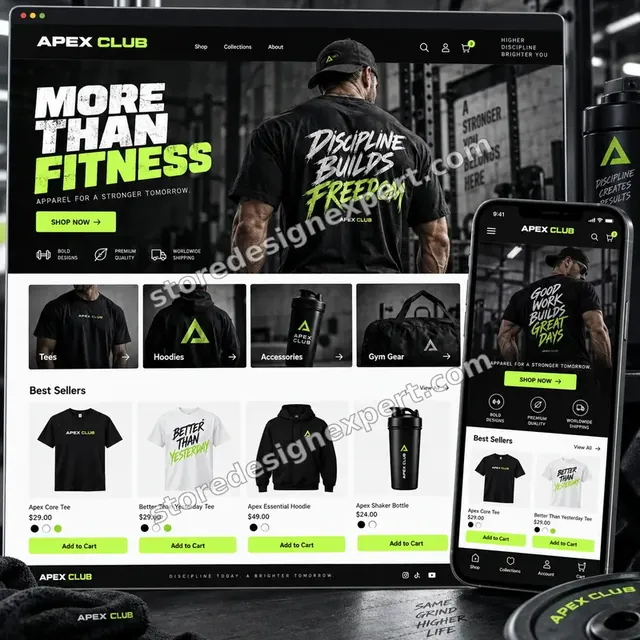
Fitness apparel store design
Fitness apparel
Fitness store design
Fitness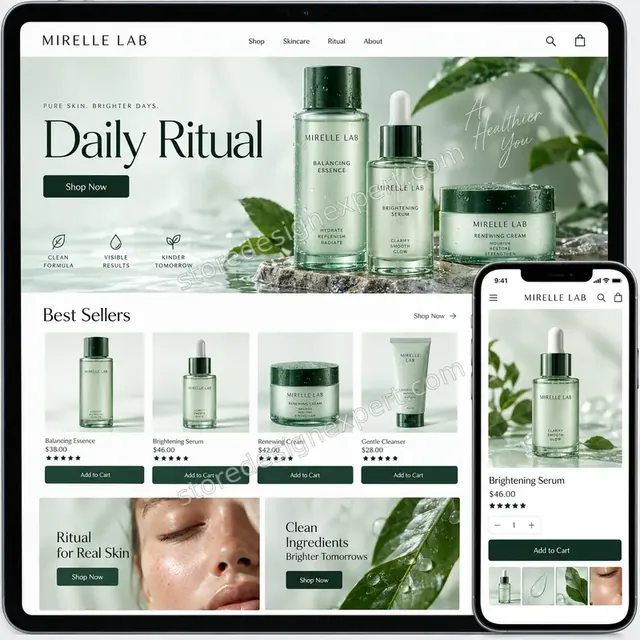
Premium skincare store design
Premium skincare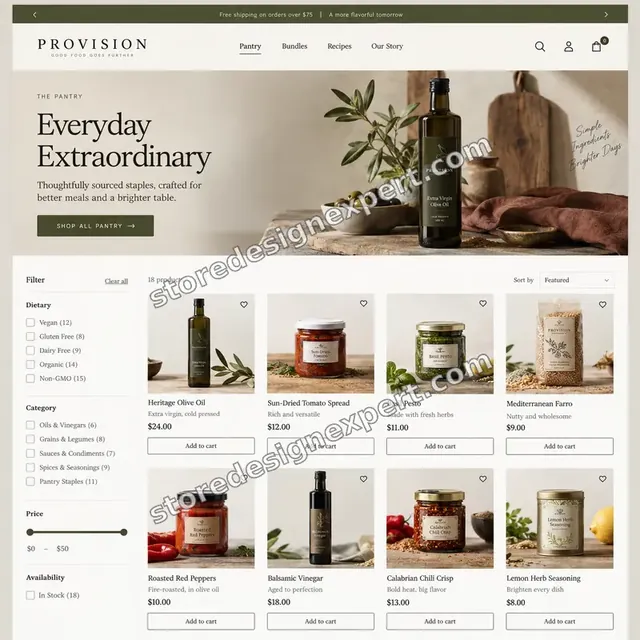
Food store design
Food
Audio store design
Audio
Baby store design
BabyProcess and timeline
How Your Video File Optimisation Is Delivered, Start to Finish
Six clear steps. Nothing goes live without your approval, and your calculator choices set how long each one runs for the video file optimisation.
- 1
Brief and asset review
You describe what good video file optimisation looks like for your store and customers. We write the plan down.
- 2
Choose how we get access
A collaborator request is all it takes, though a Partner-account build and transfer is fine too. We never ask for your password during the video file optimisation job.
- 3
Audit every video and set the targets
We list each video, where it appears and how heavy it is, then set a size and quality target for each use so nothing is shrunk more than it needs to be.
- 4
Compress, place and measure
We convert each file, make mobile and looping versions, add poster images, place the clips on your pages and test the pages before and after so you can see the change.
- 5
Check against your brief and your store
Every video file optimisation item is compared with the brief, and anything that lands in your store is checked across devices. Anything that is off is corrected before you see it.
- 6
Deliver and hand over
We hand over the video file optimisation after sign-off with files and written notes. Your revisions are included and you are never locked in.
Compare your options
Free tool alone, Gig marketplace, Generalist studio or Our Video File Optimisation Service?
Four usual ways to shrink store video. This comparison shows who tests the page and keeps your originals.
| What matters | Free tool alone | Gig marketplace | Generalist studio | Store Design Expert |
|---|---|---|---|---|
| Audit of every video and place | Guess which is heavy | Sometimes | Sometimes | Yes |
| Setting chosen per use | One preset | Sometimes | Yes | Yes |
| Mobile, loop and WebM versions | No | Extra cost | Sometimes | Yes |
| Before and after page test | No | No | Sometimes | Yes |
| Price known before work begins | Cheap but open-ended | Yes | Quote only | Yes |
| Shopify store and checkout expertise | Learning | Varies | General | Yes |
| Two structured revision rounds | No | Varies | Extra cost | Yes |
| Source files and written notes handed to you | No | Rarely | Sometimes | Yes |
Inside every project
What Protects Your Store and Your Budget During Video Compression & Optimization for Shopify
Six habits keep your store, your brand and your budget safe while we handle the video file optimisation.
Quality over blind shrinking
We check each file by eye after compression, keep your originals untouched and tell you if a video cannot be made lighter without a visible loss.
Least access needed
We ask only for the access your video file optimisation needs, through Shopify's own sharing tools where a store is involved, and remove it when we finish.
Working files are yours
Final and working files for your video file optimisation are handed over, so another person could use them later.
Checked before you look
Every video file optimisation item is checked against the brief first, so your review covers taste and wording, not faults.
No promised sales
We make video file optimisation to help shoppers decide, and we never promise revenue, rankings or reach.
Rights respected
We only use images, fonts, music and text you own or that are properly licensed in your video file optimisation, and we say which.
Interactive price calculator
Build Your Video File Optimisation Package
Choose a package, then tell us about your volume, your video compression needs and how soon you want it. The fixed price and delivery window update with every click.
Request a custom quote
Very large volumes, several brands or stores, rush schedules and unusual formats for video file optimisation are scoped separately and quoted at a fixed price.
Request a QuoteChanged your mind? Choose Slimframe Essential, Slimframe Plus or Slimframe Premier above to return to the instant calculator.
Packages and comparison
Video File Optimisation Package Comparison
Line-by-line detail of what each package covers, useful when choosing between a light pass and a full video file optimisation service.
| What is included | Slimframe Essential $120 | Slimframe Plus $320Recommended | Slimframe Premier $790 |
|---|---|---|---|
| Up to five videos | Included | Included | Included |
| Web-ready MP4 files | Included | Included | Included |
| Bitrate and resolution choice | Included | Included | Included |
| Poster image for each | Included | Included | Included |
| Size report | Included | Included | Included |
| Up to fifteen videos | Not included | Included | Included |
| Mobile and desktop versions | Not included | Included | Included |
| Muted looping background clips | Not included | Included | Included |
| Captions kept intact | Not included | Included | Included |
| Placement on your pages | Not included | Included | Included |
| Up to forty videos | Not included | Not included | Included |
| Written video standard | Not included | Not included | Included |
| WebM copies | Not included | Not included | Included |
| Lazy-loading advice | Not included | Not included | Included |
| Page-speed check for each page | Not included | Not included | Included |
| Typical delivery | 2 to 4 days | 3 to 6 days | 6 to 10 days |
What the calculator above shows for Video Compression & Optimization for Shopify, the total and the estimated delivery, is what your order will use.
Why Store Design Expert
Compress Video for Website: Why Brands Choose Us
Anyone can run a converter. Store owners hire us for the audit, the right setting for each use and the page testing that proves the video is lighter.
Targets per use, not one setting
A hero loop and a product demo are compressed differently.
Daily work on Shopify page speed
Theme media slots and loading behaviour are everyday material for us.
Rated 4.9+ by verified clients
These reviews come from verified Store Design Expert clients, in their own words, and your video file optimisation follows the same process.
Prices you can plan around
Every package, option and extra has a visible price, sized by volume, detail and speed for your video file optimisation.
You talk directly to the person doing your Video Compression & Optimization for Shopify work
You write to the person handling your video file optimisation, not a ticket queue.
Experience since 2015
More than 450 Shopify stores launched means few catalog, content or launch problems are new to us, video file optimisation included.
What we need to get started
What We Need Before We Start Your Video File Optimisation
Three ways to give access, then a short list of facts about your video file optimisation.
Your original videos
Share files through a folder link.
Where they appear
List the pages that carry video.
Your priorities
Tell us which pages matter most.
Accept our collaborator request
Share your store address and accept our request so Video Compression & Optimization for Shopify can begin. The owner can grant what we need for your video file optimisation and remove us in one click.
Taking over existing work? That is fine
Tell us what exists today and who made it. We review your video file optimisation first and agree what to keep.
Or share a restricted staff login
A staff account with limited permissions works too for video file optimisation, though the collaborator route is easier to revoke.
Owner passwords and card details are never requested for your video file optimisation. Shopify's own access tools are used for Video Compression & Optimization for Shopify, and we are removed when we finish.
Testimonials
What Store Owners Say Before You Order Video Compression & Optimization for Shopify
Verified Store Design Expert clients describe the brief, the work and the handover in their own words, and your video file optimisation follows the same path.
Verified
Thank you so much to Store Design Expert and the team. My site looks far more appealing to customers, and I will happily recommend your services to other new small businesses.
JS
Jennifer S.United States
Verified
Outstanding work and outstanding customer service. Five stars! I will absolutely use Store Design Expert again for my next book.
KM
Katharine M.United States
Verified
Store Design Expert was great! They delivered exactly what I asked for and even offered helpful extra suggestions. Highly recommended.
PW
Paul W.United States
Verified
I request Store Design Expert every time I have a project. They are professional and give real attention to detail, which makes the work stand out.
LK
Laura K.United States
Verified
They kept communicating until the problem was fully resolved, and the result was great.
HJ
Henry J.United States
Verified
Super helpful and patient. I am new to ecommerce and Store Design Expert talked me through the whole process and even fixed my payment bridging for me!
LR
Lois R.United Kingdom
Verified
I am beyond satisfied! Store Design Expert went above and beyond on my project. Highly recommended!
MD
Michael D.United States
Verified
The experience was tailored to my brand and specifications to the letter. I love the result.
EP
Eric P.United States
Verified
They definitely get the job done. Very patient and understanding throughout the whole project.
BS
Brian S.United States
Related searches
Searches That Bring Owners to Video Compression & Optimization for Shopify
Owners reach this page from different searches. Here is how the common ones relate to Video Compression & Optimization for Shopify.
People who look up “video compression and optimization for shopify”, “how to compress video for website” or “compress video for website background” usually want Video Compression & Optimization for Shopify; the calculator above shows the price and delivery estimate before you commit.
“shopify video size”, “video compression for web” or “upload video to shopify” all point to the same job, which Video Compression & Optimization for Shopify covers from start to finish.
“how to add video to shopify store”, “compress video high quality” or “upload video files to shopify” all point to the same job, which Video Compression & Optimization for Shopify covers from start to finish.
If you searched for “how to compress video size” or “video seo tool for shopify”, Video Compression & Optimization for Shopify is the work that answers it.
FAQ
Compress Video for Website: Your Questions Answered
Answers on cost, timing, access, files and what happens after delivery for video file optimisation.
How long does video compression take?
Most projects take 2 to 10 working days, depending on package, video count and original size. The price and timing for Video Compression & Optimization for Shopify are on screen in the calculator before you pay.
Will compression make my videos look worse?
Some loss is unavoidable, but we choose the lightest setting that still looks right at the size shown, check each file by eye and keep your originals untouched.
What do you need from me to start Video Compression & Optimization for Shopify?
Send your original video files, a list of the pages that carry them and a collaborator request for your store. We begin with the audit.
What does Video Compression & Optimization for Shopify cost?
You can order Video Compression & Optimization for Shopify from $120; the most it reaches, with all options selected, is $2,710.
Which Video Compression & Optimization for Shopify package should I choose?
There are 3 Video Compression & Optimization for Shopify packages: Slimframe Essential at $120 (2 to 4 working days), Slimframe Plus at $320 (3 to 6 working days) and Slimframe Premier at $790 (6 to 10 working days).
What is in the Slimframe Essential package of Video Compression & Optimization for Shopify?
Up to five existing videos compressed to web-ready MP4 files, with sensible bitrates, a poster image for each and a before-and-after size report. It includes: Up to five videos; Web-ready MP4 files; Bitrate and resolution choice; Poster image for each; Size report. Slimframe Essential costs $120 and takes 2 to 4 working days.
Which choices do I make for Video Compression & Optimization for Shopify?
When you order Video Compression & Optimization for Shopify you pick a package and then answer 4 short questions in the calculator: how many videos need work (Up to 5 videos, Up to 15 videos, Up to 40 videos); how large are the originals (Under 200 MB each, Up to 1 GB each, Over 1 GB each); where will the videos play (Product pages, Pages and a looping background, Pages, backgrounds and email); how soon do you need it live (Standard, Sooner, Fastest).
What can I add on top of Video Compression & Optimization for Shopify?
Extras available with Video Compression & Optimization for Shopify: WebM copies (+$90), Designed poster frames (+$100), Caption files (+$110), Hosting advice (+$120), Full page-speed review (+$240) and Recorded walkthrough (+$90).
What if Video Compression & Optimization for Shopify is not quite what I need?
If Video Compression & Optimization for Shopify needs more than the packages cover, use Request a custom quote on this page. We write the scope for your job and quote one fixed price before any work starts.
Ready when you are
Compress Video for Website: Order Your Package
Choose a package, watch the fixed price settle and have a team that has launched 450+ Shopify stores slim your videos down and prove the pages load lighter.
Fixed price · Two revision rounds · Files handed over