
Shopify stores designed and launched
Unused app script cleanup for Shopify
Remove Leftover App Code From Shopify and Stop Paying for Apps You Deleted
Remove leftover app code from Shopify without guessing which line is safe to delete. We trace every orphan script, snippet, pixel and stylesheet that your uninstalled apps left in the theme, clear them in a duplicate copy, retest your key pages and hand back a short written log, from $390. Since 2015 we have launched 450+ Shopify stores, and verified clients rate our work 4.9+ on average. Price your cleanup in the calculator.
- Orphan tags, snippets and asset files traced to the app that left them
- Everything changed in a duplicate theme, never on the live one
- Remaining apps checked for page-by-page loading
- Before and after PageSpeed Insights runs on your key templates
From$390
Delivery3 to 12 working days
Revisions2 rounds
Our track record
Over 450 Shopify Stores Launched Since 2015. We Know What Apps Leave Behind.
Every store we have built or rescued carries the same quiet history: apps tried, apps dropped, code left over. After 450+ launches we recognise those fingerprints quickly and know which ones are harmless and which ones are still costing you a render-blocking request.
Average rating from verified clients
Building Shopify stores since
Secure checkout
Pay through a protected checkout and keep a full order record.
Two revision rounds
Included in every package, so the result matches what you pictured.
Backup before changes
We work on a duplicate of your theme, never on your live store.
Who this is for
Who Needs Unused App Script Cleanup
You do not have to be a developer to see the symptoms. If your store has been through a few rounds of app trials, one of these situations is probably yours.
You are a good fit if
- You have installed and removed several apps
- Your pages request files from services you no longer use
- You want a fixed price instead of an hourly audit
- You want your live theme left untouched until you approve
Owners who uninstalled apps and saw no speed change
You deleted three apps expecting a faster store and PageSpeed barely moved. Leftover code from uninstalled app trials is usually still requested by the theme, and nobody has looked there.
Stores with strange console errors
The browser console shows failed requests to domains of services you cancelled long ago. Each one is a dead call your visitors' phones still attempt on every page view.
Anyone inheriting a store
You bought a store or took over from an agency. Years of trials sit in the theme with no documentation, and you need a map of what is live, what is dead and what is safe.
Merchants about to run paid traffic
Before ad money goes in, you want the landing pages free of redundant requests, so clicks are not lost to a page still waiting on a review widget you removed.
Stores on a heavily edited old theme
Your theme was customised before app embeds existed, so apps wrote straight into Liquid files. Those edits stay in place until someone removes them by hand.
Owners planning to switch apps
You want to replace a reviews or popup app. Cleaning the old one first stops the new app and the leftover code from fighting over the same elements.
Problems solved
Why Deleting an App Does Not Delete Its Code
Most owners search how to uninstall apps on Shopify, press Delete and assume the job is done. For apps that edited the theme directly, only the connection is cut, and the files stay. These are the traps we clear on almost every job.
- Script tags stay in the theme head after the app is gone.
We search theme.liquid and the layout files for external script and link tags, match each domain to an app, and remove the ones that point at services you cancelled.
- Snippets and sections remain, and render calls keep pointing at them.
We find every render or include call for a removed app, take out the call and the file together, and check no live section still depends on it before deleting.
- Dead requests slow every page while delivering nothing.
A request to a closed service still costs a connection attempt. We remove the request itself, so the browser stops spending time on something that returns an error.
- Tracking pixels from old marketing apps keep firing.
We check the theme, Customer events, any Tag Manager container and the legacy additional scripts box, and remove pixels that belong to tools you no longer pay for.
- Half-removed code can break the page when the app is reinstalled.
Reinstalling on top of leftovers is a common reason an app shows twice or refuses to load. We clean first, so a returning app starts from a blank slate.
- Careless deletion breaks the store.
A snippet still rendered by a section takes the page down when it disappears. Our duplicate-theme process catches that before the change ever reaches your visitors.
What we can do
What Our Unused App Script Cleanup Can Do
If you are searching for how to edit code on Shopify safely, the answer is a method rather than a single trick. These are the six areas where we do the careful work, with the cases that call for judgment.
Orphan hunt across every theme file
We search the layout files, snippets, sections, templates and assets for app names, vendor domains and tell-tale class names, then list each hit with the app that owns it. Anything uncertain is tested in isolation before it is touched.
Safe removal in a duplicate theme
Each deletion happens in a copy of your live theme. We remove the render call first, reload, then delete the file, so a dependency shows up as one failing page in preview rather than a broken storefront.
Pixels, tags and customer events
Tracking outlives apps. We open Customer events, Tag Manager and the legacy additional scripts area, and retire pixels for tools you stopped using, while leaving live purchase tracking untouched and tested.
App embeds and blocks reviewed
Apps built on a Shopify theme app extension appear in the theme editor as embeds and blocks. We check which are switched on, which belong to apps you still use and which sit dormant in your template files.
Remaining apps loaded only where needed
For apps you keep, we look for pages where their scripts run for no reason, such as a reviews widget loading on the cart, and limit loading to the templates that use it where the app allows.
A plain-language removal log
You receive a file-by-file list of what was removed, which app it came from, and what each change did on a test page, so any future developer can see the history instead of reading the theme blind.
What is included
What Unused App Script Cleanup Includes
Six workstreams make up every cleanup. The package table further down shows which of them each tier covers, and the calculator adds depth for larger stacks. The aim is simple: remove unused apps and scripts completely, not halfway.
Discovery and mapping
- Search of all layout, snippet, section, template and asset files
- Each hit matched to the app or vendor that created it
- Live versus dead status checked in the browser network panel
- A map of what is removable, what is shared and what stays
Duplicate theme work
- Your live theme duplicated before any change
- Render calls removed first, files deleted second
- Preview checked page by page after each batch
- Original theme kept available for rollback
Tracking and tags
- Customer events and custom pixels reviewed
- Tag Manager tags with no owner flagged
- Legacy additional scripts reviewed
- Live purchase tracking confirmed after cleanup in higher tiers
App stack review
- Every installed app listed with its footprint
- Keep, replace or remove recommendation for each
- Embed switches reviewed in the theme editor
- Page-by-page loading limits for apps you keep in higher tiers
Before and after
- PageSpeed Insights before and after on your key templates
- Unused JavaScript and third-party diagnostics compared
- Browser console errors cleared
- Network request list saved for the handover
Handover
- Written removal log with file names
- Recorded walkthrough of the changes
- Two revision rounds
- Advice on installing future apps without leftovers
Every tier is built around how to remove app from Shopify properly: code, files, pixels and leftovers together, instead of only pressing the uninstall button.
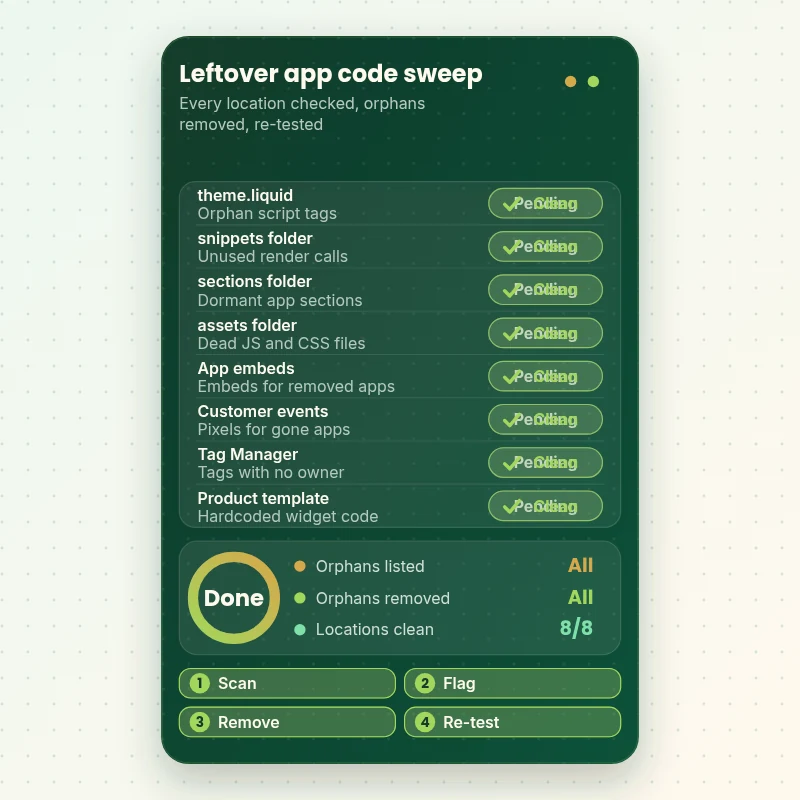
See the sweep
How a Leftover App Code Sweep Works, Location by Location
Watch one store checked in eight places where uninstalled apps hide their code. Each location is scanned, anything orphaned is flagged, the fix goes into a duplicate theme, and the page is verified again before the change is approved for the live store.
Portfolio
Shopify Storefront Designs by Niche
Unused App Script Cleanup gets the same attention to layout, spacing and detail as each design below, every one built around a single catalog and one kind of buyer.

Furniture and interiors store design
Furniture and interiors
Electronics store design
Electronics
Children store design
Children
Beauty technology store design
Beauty technology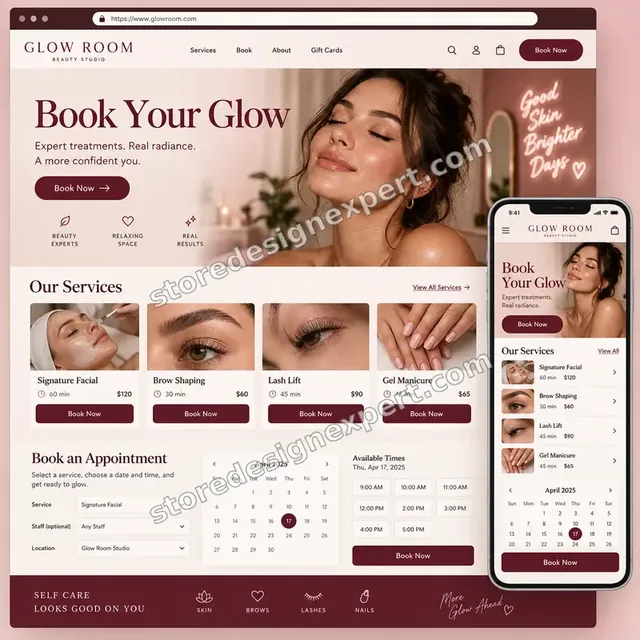
Beauty studio store design
Beauty studio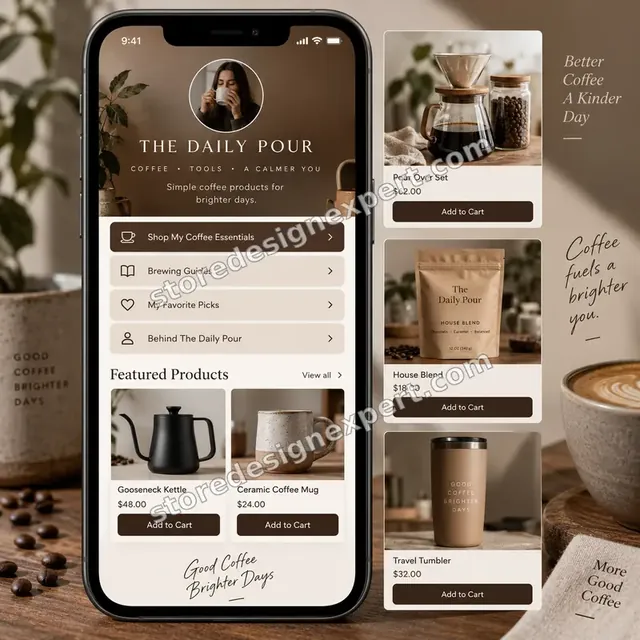
Coffee creator store design
Coffee creatorProcess and timeline
How We Remove Leftover App Code From Shopify Themes, Step by Step
The live theme stays as it is while we work in a copy. Orphan Sweep is usually finished in 3 to 5 working days, and the calculator shows the window for bigger stacks.
- 1
Inventory and baseline
We list every app you have installed and removed, record your key page templates in PageSpeed Insights and capture the browser network list, so every later change can be compared to a known starting point.
- 2
Trace the orphans
We search the theme for app names, vendor domains and class names, then match each hit to the app that created it. Uncertain code is flagged for testing rather than deleted on a guess.
- 3
Clean the duplicate
In your copied theme we remove render calls first, reload the pages, then delete the files. Tags, pixels and unused sections go in small batches so any problem is easy to trace.
- 4
Review the apps you keep
Each remaining app gets a verdict: keep, replace or remove. Where an app loads everywhere for no reason, we limit it to the templates that use it if the app supports that.
- 5
Your review
You preview the cleaned theme on your phone and computer and ask for up to two rounds of changes. We turn them around quickly and keep notes of what moved.
- 6
Publish and re-measure
After your approval we publish the cleaned theme, run PageSpeed Insights again on the same templates and send the log. Your original theme stays in the library for rollback.
Compare your options
Delete It Yourself, Gig, Speed App or a Hire a Shopify Expert Cleanup?
Four routes exist for getting rid of old app code: working through it yourself, a low-cost marketplace listing, a speed-optimiser app or a specialist. This table compares what each does about the parts that usually go wrong.
| What matters | Do it yourself | Marketplace gig | Speed app | Store Design Expert |
|---|---|---|---|---|
| Orphans traced to the app that left them | If you know where | Rarely | No | Yes |
| Changes made in a duplicate theme | Often not | Varies | Not applicable | Yes |
| Pixels and Tag Manager checked | Rarely | Rarely | No | Yes |
| Render calls removed before files | If you know the order | Varies | No | Yes |
| Before and after PageSpeed comparison | You run it | Varies | Own score only | Yes |
| Written removal log | No | Rarely | No | Yes |
| Keep, replace or remove verdict per app | No | Rarely | No | Yes |
| Fixed price known up front | Free, but your time | Yes | No | Yes |
Inside every project
What Keeps Your Store Safe While We Clean It
Deleting code is easy, and deleting the right code is the skill, especially when you remove leftover app code from Shopify themes that other people edited. These safeguards come with every project, and they are the reason a fixed fee is worth more than a quick edit on the live theme.
Nothing is edited on the live theme
All work is done in a duplicate. The theme your customers see is replaced only after you approve the preview, and the original remains in your library as an instant rollback.
Render calls before files
We remove the call that uses a snippet, reload the page, and only then delete the snippet. If something still depended on it, the failure shows up in preview and not on your storefront.
Every deletion has an owner
Each removed line is tied to a named app or vendor in the log. Code we cannot attribute is tested in isolation or left alone and listed, never removed on a hunch.
Safe access handling
We work through collaborator access, so you remain the owner and never share a password. You can remove our access in one click, and we ask only for what the cleanup needs.
Measured, not assumed
We run PageSpeed Insights on the same templates before and after, and we report what changed in plain words. If a change did nothing measurable, the log says so.
A log your next developer can read
The removal log lists file names, apps and reasons, so future work starts from facts. Combined with the recorded walkthrough, you are never dependent on us to understand your theme.
Interactive price calculator
Build Your Unused App Script Cleanup Package
Pick a package, then say how many apps have passed through your store, where your tracking lives and how many page types we should test. The price and the delivery window follow every choice.
Request a custom quote
Shopify Plus stores with several live themes, custom checkout scripts, headless storefronts or stacks of more than 60 apps receive a quoted scope with a fixed fee agreed before work starts.
Request a QuoteChanged your mind? Choose Orphan Sweep, App Stack Audit or Clean Slate above to return to the instant calculator.
Packages and comparison
Unused App Script Cleanup Package Comparison
The table below sets out each tier in turn. Add app count, tracking spread and page types in the calculator to see the price and delivery time for your own store.
| What is included | Orphan Sweep $390 | App Stack Audit $690Recommended | Clean Slate $1,190 |
|---|---|---|---|
| Search of every theme file | Included | Included | Included |
| Orphans traced to the app that left them | Included | Included | Included |
| Removal in a duplicate theme | Included | Included | Included |
| PageSpeed runs before and after | Included | Included | Included |
| Written removal log | Included | Included | Included |
| Recorded handover and two revision rounds | Included | Included | Included |
| Verdict on every installed app | Not included | Included | Included |
| Customer events and Tag Manager review | Not included | Included | Included |
| Embed switches reviewed in the theme editor | Not included | Included | Included |
| Reinstall-safe notes | Not included | Included | Included |
| Page-scoped loading for kept apps | Not included | Not included | Included |
| Legacy additional scripts reviewed | Not included | Not included | Included |
| Purchase tracking retested | Not included | Not included | Included |
| 14 days of fixes | Not included | Not included | Included |
| Typical delivery | 3 to 5 days | 5 to 8 days | 8 to 12 days |
The calculator above gives the exact price and delivery estimate for your Unused App Script Cleanup order, and that is what you pay.
Why Store Design Expert
Why Owners Choose Our Shopify App Cleanup Over a Quick Gig
You get the care of an agency audit without the hourly meter: one person who reads your theme, a fixed scope and a plain explanation of what changed.
Shopify builders first
We design and launch Shopify stores for a living, so we know why a theme was built the way it was. More than 450 launches since 2015 means the odd structures in your files are likely familiar.
We trace, we do not guess
A cheap listing deletes whatever looks old. We tie each line to an app, test it in isolation and remove it only when we can show nothing else relies on it.
A fixed price before you pay
The calculator shows the cost and the delivery window for your exact stack. Nothing is billed by the hour, so an unexpectedly messy theme does not change the fee.
Rated 4.9+ by verified clients
The reviews on this page come from real clients of Store Design Expert, so you can read how projects went before choosing a package.
Hire a Shopify expert without the retainer
For a small, defined job with no retainer attached, this is it: a clear start, a clear finish and a handover you can keep.
Your theme stays yours
Files, content, settings and admin access remain yours throughout. We leave the original theme in place so you can always return to where you started.
What we need to get started
What We Need to Start Your App Code Cleanup
You do not have to know which apps left what behind. We need a way into the store and a list of the tools you have tried, and we take it from there.
Request us as a collaborator
Send your store address and approve the collaborator request we send. The store stays in your name, we never see a password and you can end our access whenever you want.
No store of your own yet
We can build the store in our own Shopify Partner account and hand it over to you at the end, so you only choose a Shopify plan once the work is finished.
Staff login as an alternative
A staff account you create for us also works. Collaborator access is easier to revoke, yet both routes let the app cleanup start.
A list of apps you have tried
Write down every app you remember installing, removed or not. Names are enough, since we match them to code in the theme and fill in the gaps ourselves.
Tracking and tag access
Tell us whether you use Tag Manager, Meta or TikTok pixels or Customer events, and add us to the container if you do, so we can judge which tags still serve you.
A decision-maker and your priorities
Name who approves the final theme and which pages matter most to your revenue, so we measure and protect those first.
We never ask for your owner password or payment card details. The live theme is untouched until you approve, and your original stays in the library for rollback.
Testimonials
What Store Owners Say Before You Order Unused App Script Cleanup
Verified clients describe their experience with Store Design Expert on builds, fixes and clean-ups.
Verified
Store Design Expert is the best. The work is very professional, they pay close attention to detail and, more importantly, they listen. Their level of cooperation is second to none, and everything was delivered in a very timely manner. I will keep them in mind for future projects.
BN
Barbara N.United States
Verified
I request Store Design Expert every time I have a project. They are professional and give real attention to detail, which makes the work stand out.
LK
Laura K.United States
Verified
They kept communicating until the problem was fully resolved, and the result was great.
HJ
Henry J.United States
Verified
Super helpful and patient. I am new to ecommerce and Store Design Expert talked me through the whole process and even fixed my payment bridging for me!
LR
Lois R.United Kingdom
Verified
I am beyond satisfied! Store Design Expert went above and beyond on my project. Highly recommended!
MD
Michael D.United States
Verified
The experience was tailored to my brand and specifications to the letter. I love the result.
EP
Eric P.United States
Verified
They definitely get the job done. Very patient and understanding throughout the whole project.
BS
Brian S.United States
Verified
Thank you so much to Store Design Expert and the team. My site looks far more appealing to customers, and I will happily recommend your services to other new small businesses.
JS
Jennifer S.United States
Verified
Very patient, informative and transparent, and they did exactly what they said they would do. Thanks for all the help!
RO
Raymond O.United States
Related searches
Related Searches for Unused App Script Cleanup
People describe Unused App Script Cleanup in different ways when they search. These are the common ones.
People who look up “how to remove app from shopify”, “remove unused code after uninstalling apps”, “leftover code from uninstalled app” or “shopify app uninstalled but code still there” usually want Unused App Script Cleanup; the calculator above shows the price and delivery estimate before you commit.
If you searched for “reduce unused javascript shopify”, “remove unused apps and scripts” or “how to edit code on shopify”, Unused App Script Cleanup is the work that answers it.
Owners also search for “how to uninstall apps on shopify”, “shopify apps slowing down your site”, “shopify app bloat” or “shopify theme app extension”.
Owners also search for “minimize third-party usage”, “shopify app wont reinstall after uninstalling”, “shopify app not working” or “hire a shopify expert”.
FAQ
Shopify App Code Cleanup FAQs
Direct answers about price, timing, safety and what an uninstalled app actually leaves behind.
How much does it cost to remove leftover app code from Shopify?
Packages start at $390 for Orphan Sweep, $690 for App Stack Audit and $1,190 for Clean Slate. App count, tracking spread and page types are added in the calculator, so most stores land between roughly $400 and $1,600. The fixed price shows before checkout, and nothing is billed hourly.
How long does a cleanup take?
Orphan Sweep takes 3 to 5 working days, App Stack Audit 5 to 8 and Clean Slate 8 to 12, before extras. A store with dozens of old apps needs more tracing, and the calculator shows the estimate. The Sooner and Fastest options shorten the window when you have a campaign date.
Why is there still code on my store after I uninstalled an app?
Apps built with a Shopify theme app extension clean up after themselves, but older apps wrote Liquid, scripts or files straight into the theme, and uninstalling only cuts the account link. That is the usual story behind a Shopify app uninstalled but code still there.
How to remove app from Shopify so nothing is left behind?
Open the app's embed switch in the theme editor first, then uninstall from Apps in the admin. After that, search the theme for the app's name and vendor domain and remove what remains. We do exactly this in a duplicate theme and log every file.
Is it safe to remove unused code after uninstalling apps?
It is safe when the order is right. Delete the call that renders a snippet, reload the page, then delete the snippet. Cutting a file that a section still uses breaks the page. We test every batch in a duplicate theme and publish only after you approve.
Will this make my store faster?
Usually it removes requests, which helps, but the size of the gain depends on what was left. We measure the same templates in PageSpeed Insights before and after and show you the difference. If a change gains nothing, we say so instead of overselling it.
Can you reduce unused JavaScript on Shopify without removing apps I need?
Often, yes. To reduce unused javascript Shopify stores can restrict heavy scripts to the templates that use them, delay non-critical ones and replace a bloated widget with a small native section. Whether it is possible depends on whether the app allows page-level loading.
Do you delete my reviews or customer data?
No. Reviews, lists and settings live in the app's own account, not in your theme, so removing orphan code does not touch them. If you reinstall the app later, it reconnects to that stored data. We only remove theme code and tags.
What if my Shopify app won't reinstall after uninstalling?
A Shopify app wont reinstall after uninstalling cleanly when old files or tags collide with the new install, or the app expects its previous state. Clearing the leftovers first usually fixes it. If the app itself is at fault, we point you to its support with specifics.
Do you also remove old tracking pixels?
Yes, when they belong to tools you no longer use. We look in the theme, Customer events, Tag Manager and the legacy additional scripts area, remove dead pixels and retest live purchase tracking so your reporting does not break.
Why hire a Shopify expert instead of removing the code myself?
You can, and many owners do. The risk is deleting something a live section still needs, with no rollback plan. When you bring in an expert for this job, you pay for the order of operations, the duplicate theme and the written log.
My Shopify app is not working after removal. Can you fix it?
If a Shopify app not working problem started right after a removal, we check for a deleted snippet, a missing embed or a broken render call, restore what is needed in the duplicate and re-test. Tell us which page misbehaves and when it started.
What does Shopify app bloat actually look like?
Shopify apps slowing down your site usually leave signs: many third-party domains in the network list, large script files on pages that do not use the app and console errors, plus a PageSpeed warning to minimize third-party usage. We turn those signs into a short list of what to keep, replace or remove.
What happens after the cleanup?
You receive a recorded walkthrough, the written removal log and notes on installing future apps cleanly. Clean Slate includes 14 days of fixes, and a 30-day support extra is available if you would like a month of questions and small corrections.
Ready when you are
Remove Leftover App Code From Shopify and Get Your Theme Back
Choose a package, see your exact price and delivery estimate and order a cleanup from a team that has launched over 450 Shopify stores. Your orphan code gets traced, removed in a safe copy and re-measured, and you keep a log of every change.
Secure checkout · Two revision rounds · Removal log and walkthrough included