
Shopify stores designed and launched
Shopify collection page task
Show Second Image on Product Card Hover on Shopify: Make Every Card in the Store Worth Pointing At
Want to show second image on product card hover on Shopify in every grid and row, not just one page? We add it once in the shared card in a duplicate theme and test on real devices. From $39, fixed price.
- Second image on every card type
- Switch on per collection
- Optional zoom and lift
- A phone-friendly option
From$39
Delivery1 to 3 working days
Revisions2 rounds
Our track record
450+ Shopify Stores Launched Since 2015. Now Let Us Handle Your Card Hover Image.
Our team has launched more than 450 Shopify stores and holds a 4.9+ rating from verified clients. That experience goes into a task as small as a card hover image, which is why the scope and price are fixed up front.
Average rating from verified clients
Building Shopify stores since
Secure checkout
Pay through a protected checkout and keep a full order record.
Two revision rounds
Included in every package, so the result matches what you pictured.
Backup before changes
We work on a duplicate of your theme, never on your live store.
Problem and result
Show Second Image on Product Card Hover on Shopify: One Change That Reaches Every Product Grid
Products appear in cards all over a store: collections, search, featured rows and recommendations. A hover effect built into the shared card reaches them all at once, so every browsing moment gets a little more life without repeating the work in each place.
Flat cards in every grid
Each card shows one still photo wherever it appears, and the extra angles exist only on the product page. Shoppers browse with less information than you could easily give them.
Cards that reveal more across the store
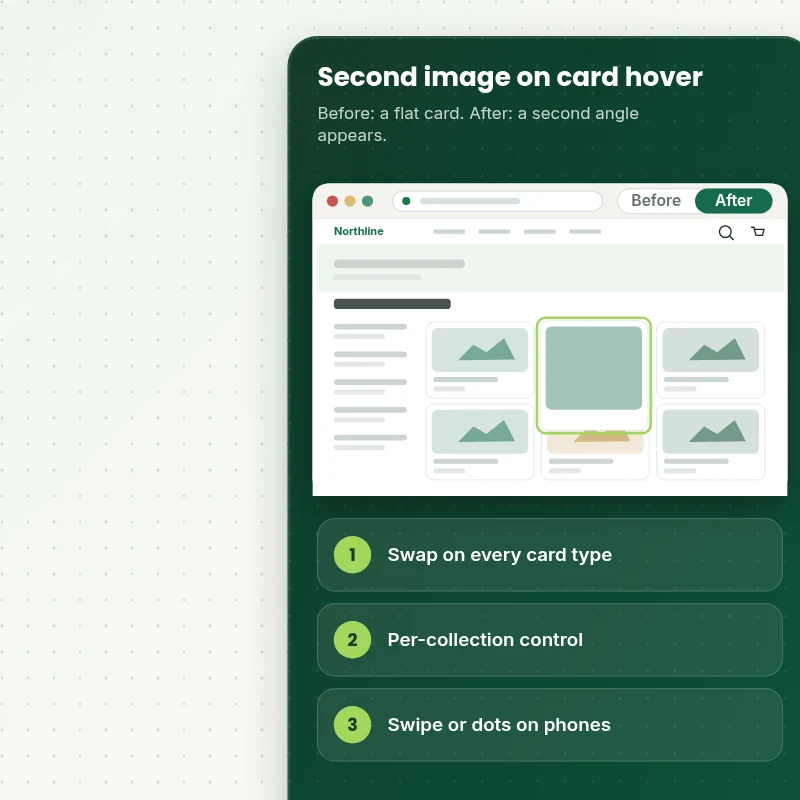
Pointing at a card swaps to the second photo in every grid and row. You can switch it on or off per collection, add a gentle zoom, and give phones a swipe or dots.
What is included
What Your Card Hover Includes
When you want to show the second image on product card hover in Shopify, you get the effect added once in the shared card and tested in every place it appears.
Implementation checklist
- A second image swap added to the shared product card
- The effect shown in collection grids, search results, featured sections and recommendation rows
- A smooth fade with no layout shift
- A fallback to the first image when no second image exists
- A switch to turn the effect off for chosen collections
- An optional gentle zoom and card lift
- A phone option of swipe, dots or no effect, as you choose
- Handover note showing how to switch it per collection
Hover needs a pointer, so phones follow the option you choose. We do not edit, crop or add photos, and the second image is simply the second item in your product media.
See how it works
From Flat Cards to Cards That Reveal More
Follow one visit. The shopper moves across the grid, sees a second angle on each card and adds a product with quick add.
Scope boundaries
Exactly What Is and Is Not Covered for Your Card Hover Image
To keep the card hover image predictable, this is what is included, what is not, what we ask of you and which situations call for a tailored quote.
Included
- A card hover swap in your live shared card
- Per-collection switch and fallback
- Phone option and loading checks
- Handover note plus two revision rounds
Not included
- Taking or editing photos
- Hover video
- A full card redesign
- Changes to the part of checkout that Shopify controls
Access we need
- Collaborator access to your Shopify store
- A few products with a second photo
- Your phone choice
Quote triggers
- Hover video on cards
- A different effect per collection
- A theme heavily rebuilt with page builder apps
Typical turnaround
- 1 to 2 working days for most card hover image jobs
- Faster options in the calculator
- Timing confirmed before work starts
After launch
- Two revision rounds before go-live
- A short handover note for your card hover image
- Questions answered; anything bigger than Show Second Image on Product Card Hover quoted as a separate task
Compare your options
Show Second Image on Product Card Hover on Shopify With a Theme Option, an App or a Freelancer?
If you are deciding how to approach a card hover image, this comparison shows what you get from each route and what you do not.
| What matters | Free app or DIY | Gig marketplace | Large agency | Store Design Expert |
|---|---|---|---|---|
| Works in grids, search and rows | Sometimes | Often | Sometimes | Yes |
| Per-collection switch | No | Sometimes | If coded | Yes |
| No monthly fee | Yes | No | Yes | Yes |
| No layout shift | Often | Often | Varies | Yes |
| Price known before work begins | Free but time-costly | Varies | Quote only | Yes |
| Theme backup before any change | No | Rarely | Usually | Yes |
| Two revision rounds included | No | Varies | Extra cost | Yes |
| Handover note for what changed | No | Rarely | Sometimes | Yes |
Price calculator
Price Your Card Hover Image
Pick a package, adjust the options for your card hover image and set your speed. The fixed price and delivery estimate update with every click, with no hidden fees.
Request a custom quote
Hover video on cards, a different effect per collection and themes heavily modified by page builder apps are scoped separately and quoted at a fixed price.
Request a QuoteChanged your mind? Choose Hovercard Basic, Hovercard Standard or Hovercard Plus above to return to the instant calculator.
How it works
How We Handle Your Card Hover Image, Step by Step
Six steps take the card hover image from your order to a live, tested result, and nothing changes on the live store until you approve it.
- 1
Purchase
Pick a package, set the options for your card hover image and pay at checkout, and the price you see is the price you pay.
- 2
Access
Invite us as a collaborator and complete the quick brief for the card hover image, which keeps your account and passwords entirely under your control.
- 3
Build in a duplicate theme
A separate copy of your theme holds the card hover image while we build, which leaves the live store untouched.
- 4
QA
We run the card hover image through a test pass on small phones, tablets and desktop screens and correct what we find.
- 5
Handover
When you approve the card hover image we move it to the live theme and give you a plain summary of what was done.
- 6
Support
After launch you can ask us about the card hover image, and any extra work is priced before it begins.
Compatibility and QA
Card Hover Checks and Acceptance Criteria
To call the card hover image done we verify the points below on real devices, and your untouched theme backup lets you reverse the work whenever you like.
What we test
- SwapThe second image appears on hover and returns on exit with no flicker.
- PlacesThe effect shows in every grid and row you chose.
- FallbackCards with one photo stay unchanged.
- DevicesPhones, tablets and desktops are all used to test the card hover image, down to a 320 pixel screen.
- BrowsersThe current versions of Chrome, Safari, Firefox and Edge.
- SpeedPage weight is compared before and after, on a grid of sixty cards.
Acceptance criteria
- The second image appears on hover
- It works in every place you chose
- One-photo cards are unchanged
- Phones behave as agreed
- The handover note explains the per-collection switch
What we need to get started
What We Need to Get Show Second Image on Product Card Hover Started
We need a way into the store and a few facts about the card hover image, and the options below keep both simple and reversible.
Collaborator access
Approve our collaborator request for the card hover image from your Shopify admin, and you remain the owner and can revoke access the moment the work is finished.
No store yet? We build it first
No store yet means we build the card hover image in our Partner account and you take over the finished store, picking your plan at that point.
Prefer to share a login?
For the card hover image you may share a staff login instead, though the collaborator route is easier to revoke and is what we usually advise.
Photos
Tell us whether the second photo in each product is the one you want to show.
Phones
Tell us whether phones should show no effect or swipe with dots.
One decision maker
A named person to approve the card hover image helps us finish it within the two revision rounds that come with every package.
If you are not sure which route fits your card hover image, tell us in the short form after checkout and we will recommend one.
Testimonials
What Store Owners Say Before You Order Show Second Image on Product Card Hover
Verified feedback from clients who trusted us with their Shopify stores and quick tasks alike.
Verified
Store Design Expert delivered an outstanding website development experience! Their professionalism and attention to detail exceeded my expectations, and their proactive communication kept everything running smoothly. Truly impressed by their deep understanding and dedication.
WG
Warren G.United States
Verified
A pleasure to work with. They did pretty much everything I asked and definitely exceeded my expectations. I will be working with Store Design Expert again soon.
JL
Jerry L.United States
Verified
Superb work! Store Design Expert is incredibly patient, and even when I did not fully understand my own questions, everything was explained again in detail. My vision was implemented perfectly, and the work is worth every cent I spent.
KB
Katrin B.Germany
Verified
Very impressed with the build-out. My store is ready to get started, and I am sure I will reach out for edits down the road, but this is everything I could ask for to get the party started. Thanks again, and I will be in touch for future projects.
DH
Dale H.United States
Verified
Very quick and detailed work! Store Design Expert does exactly what you want, in a very professional manner.
LF
Lena F.Germany
Verified
Store Design Expert did an outstanding job with top-notch professionalism on my website project. Everything was delivered quickly without compromising quality. I could not have asked for better!
JM
Jason M.United States
Verified
The website development work was nothing short of professional, with top-notch quality. Their exceptional level of cooperation made the collaboration seamless and enjoyable. Highly recommend working with Store Design Expert!
JC
Jeremy C.United States
Verified
Super great to work with, and super fair!
RO
Robert O.United States
Verified
The website development work was truly impressive. Their attention to detail and ability to exceed expectations made the project a success. Working with them was a breeze, thanks to quick responsiveness and a willingness to go above and beyond.
KD
Kevin D.United States
FAQ
Show Second Image on Product Card Hover on Shopify Questions
Straight answers about cost, scope, timing, apps and what we need from you for your card hover image.
Can you show second image on product card hover on Shopify, and what does it cost?
Yes. Packages start at $39. The calculator adds options such as a zoom, a card lift, a per-collection switch and a speed check, and shows your exact price and delivery estimate before checkout.
How many days does the card hover image usually take?
Our usual turnaround for a card hover image is 1 to 3 working days from receiving access, with expedited choices available in the calculator.
Is Show Second Image on Product Card Hover safe for my live store?
Yes. Nothing about the card hover image touches your live theme until you approve the tested copy, and your original theme is kept as a fallback.
What do you need from me for Show Second Image on Product Card Hover?
Collaborator access to your store, plus the products that already carry a second photo. Starting without a store is fine: we build the card hover image in our development store and transfer it to you when the work is finished.
What packages are available for Show Second Image on Product Card Hover?
Show Second Image on Product Card Hover comes in 3 packages: Hovercard Basic at $39 (1 working day), Hovercard Standard at $69 (1 to 2 working days) and Hovercard Plus at $119 (2 to 3 working days).
What is in the Hovercard Basic package of Show Second Image on Product Card Hover?
A second image shown when the pointer reaches any product card, in collection grids, search results, featured sections and recommendations. It includes: Second image on every card type; Smooth swap; Grid, search and featured rows; Desktop and mobile tested; On for chosen collections. Hovercard Basic costs $39 and takes 1 working day.
What do I choose when I order Show Second Image on Product Card Hover?
The Show Second Image on Product Card Hover calculator asks for a package and 3 more choices: where should it show (Collection grids, Grids, search and featured rows); what should phones do (No effect on phones, Swipe with dots); how soon do you need it live (Standard, Sooner, Fastest).
Which extras can I add to Show Second Image on Product Card Hover?
For Show Second Image on Product Card Hover you can add Subtle zoom on hover (+$5), Card lift and shadow (+$5), Per-collection switch (+$10), Grid speed check (+$10) and Fix a hover that flickers (+$15).
How quickly can Show Second Image on Product Card Hover be delivered?
Delivery for Show Second Image on Product Card Hover takes 1 to 3 working days depending on the package. Faster scheduling is offered in the calculator: Sooner (+$21), Fastest (+$41).
Ready when you are
Show Second Image on Product Card Hover on Shopify: Give Every Card a Second Angle
Pick your package, see the exact price and delivery estimate and get a card hover that works in every grid and row on every device. Wanting video on hover, or a different effect for each collection, is quoted separately at a fixed price.
Fixed price · Two revision rounds · Backup before changes