
Shopify stores designed and launched
Shopify theme installation and configuration
Shopify Theme Installation Service That Leaves Your Theme Configured, Not Just Uploaded
Our Shopify theme installation service takes a theme from the download or the Theme Store to a store that looks like your brand and passes a real test order. We install it on an unpublished copy, set up the brand layer, menus, sections and key pages, and only then do you decide to publish. Fixed prices start at $490, from a team that has launched 450+ Shopify stores since 2015 and holds a 4.9+ average rating from verified clients.
- Theme installed on a safe copy, never over a live store
- Logo, colors, fonts, menus and key pages configured for you
- Phone, tablet and desktop checks plus a test checkout
- Three fixed packages with a live price calculator
Our track record
450+ Shopify Stores Launched Since 2015. The Theme Is the Easy Part. We Do the Rest.
Anyone can press Add theme. What separates a tidy store from a half-finished one is the long tail afterwards: the header that wraps on a phone, the collection template nobody assigned, the demo image still showing. We have cleared that tail on hundreds of launches, and you get the benefit of it.
Average rating from verified clients
Building Shopify stores since
Secure checkout
Pay through a protected checkout and keep a full order record.
Two revision rounds
Included in every package, so the result matches what you pictured.
Backup before changes
We work on a duplicate of your theme, never on your live store.
Who this is for
Who Needs a Shopify Theme Installed and Configured for Them
Most people who hire this service are not unable to click a button. They are short of time, unsure which setting does what, or worried about breaking something that already earns money. These are the six situations we see most.
You are a good fit if
- You have chosen a theme or want help to choose one
- You would rather approve a finished result than learn every setting
- You want the old theme kept safe until the new one passes testing
- You prefer one fixed price over an hourly clock
Founders with a theme chosen and a launch date
You picked a theme and paid for it, then discovered the editor has hundreds of settings. You want a finished store by the date you promised your first customers, without a weekend of trial and error.
Owners switching to a newer theme
Your current theme is several years old and slow. You want the new one installed beside it, matched to your brand and checked, so the swap on launch day takes one click.
Sellers who bought a marketplace theme
You have a zip file from a third-party marketplace and a demo you love. You want the demo layout reproduced with your products, and none of the leftover demo content published.
Agencies and consultants with overflow
A client project needs a standard theme set up cleanly and you have no hands free. We configure it to your brief and hand back a store your team can present as its own.
Merchants opening a second store or market
You already know what works on store one. You want the same theme logic reproduced on a new store, adapted to a new language, currency and catalog.
Anyone afraid of breaking a live store
You have sales coming in and do not want to experiment on the theme customers see. You would rather have someone else do the careful part and show you the result privately first.
Problems solved
Why a Plain Upload Rarely Gives You a Store You Can Launch
Adding a theme takes a minute. Shopify store theme setup, the part that turns it into your store, takes decisions, and most of the trouble owners report afterwards comes from steps that were skipped. These are the six problems this service exists to prevent, with how we handle each.
The theme looks nothing like its demo once your own photos are in.
Outcome: Demos use staged imagery and hidden settings. We reproduce the parts of the demo that matter, resize your images to the ratios the theme expects and set the section options that make the layout hold.
Menus, banners and buttons break on a phone.
Outcome: We check the header, announcement bar, product grid and checkout buttons at several widths, then correct wrapping, tap sizes and hero crops inside the theme settings.
Leftover demo wording, dead links and stock images stay published.
Outcome: We clear every leftover demo section, rewrite the visible labels you approve and test each link, so no visitor meets filler wording or a dead menu entry.
Apps, snippets and tracking from the old theme vanish after the switch.
Outcome: Before the switch we list what the old theme carried, such as pixels, app blocks and custom snippets, and rebuild each item in the new theme or tell you plainly it cannot move across.
Titles, headings and image alt text are left at theme defaults.
Outcome: We set page titles, heading order and sensible default alt text patterns so the new theme does not quietly weaken what your pages already earned in search.
Nobody checks a full order until the first customer does.
Outcome: We place a real test checkout on the finished theme, with a discount code and a shipping rate, so the first buyer meets a path that has already been walked.
What we can do
Shopify Theme Installation and Configuration: What We Do Hands On
This is the detailed work behind the headline, written as scenarios so you can match it to your own store. Where a task needs more than configuration, we say so before any cost is added.
Safe installation on an unpublished copy
The theme is added to your library and left unpublished, or built on a development store when you have no store yet. If you already sell, your live theme keeps serving customers until you approve, and a copy of it stays available for rollback.
Brand settings that actually carry through
We load your logo and favicon at the right sizes, set color schemes for buttons, badges and backgrounds, and pair fonts so headings and body text stay readable at phone width. If you only have a logo, we propose a restrained palette first.
Home page sections built to your plan
We assemble the home page from the theme's own sections: announcement bar, hero, featured collection, benefits, reviews area and footer. If the theme offers fewer sections than the demo, we say so and choose the closest equivalent.
Menus, collections and templates assigned
We build the main menu and footer menus, link collections, and assign templates to product, collection and page types. Where your catalog has deep categories we test the menu on a phone before polishing it for desktop.
Product page and cart configuration
We set up the gallery style, variant pickers, add-to-cart behavior, the cart drawer or page, and the trust and delivery blocks the theme supports. Long titles, many variants and mixed image ratios are tested rather than assumed.
Light code fixes where settings run out
When a missing setting is the only obstacle, a few lines of Liquid or CSS often solve it. We keep those edits small, comment them and list them in the handover notes so future theme updates do not surprise you.
What is included
What Is Included in Your Theme Installation and Configuration
The work is arranged in six groups. The packages differ in how far each group goes, and the table below the calculator marks which line belongs to which package.
Installation and safety
- Theme added to your library, unpublished until you approve
- Copy of the current theme kept for rollback
- Theme version and source recorded in the handover notes
- Demo content imported only where you ask for it
Brand settings
- Logo, favicon and checkout branding at the right sizes
- Color schemes assigned to sections, buttons and badges
- Heading and body fonts paired and size-checked
- Button, form and badge styling made consistent
Pages and sections
- Home page sections ordered around your offer
- About, contact, FAQ and policy pages created or restyled
- Header, announcement bar and footer configured
- Page templates assigned to every page type
Products and collections
- Product page layout and gallery style set
- Collections linked to menus and the home page
- Product import up to the limit of your package
- Cart drawer or cart page configured
Devices and speed
- Phone, tablet and laptop widths checked
- Hero and product images set to sensible sizes
- Unused theme features switched off
- Obvious script and app weight flagged to you
Testing and handover
- Test checkout with a discount code and shipping rate
- Every menu link and form tested
- Recorded walkthrough and a short written editing guide
- Two revision rounds before you publish
If you ask how to install a Shopify theme yourself, the answer is a few clicks. What you are buying here is everything after those clicks: configuration, checking and a finished handover.
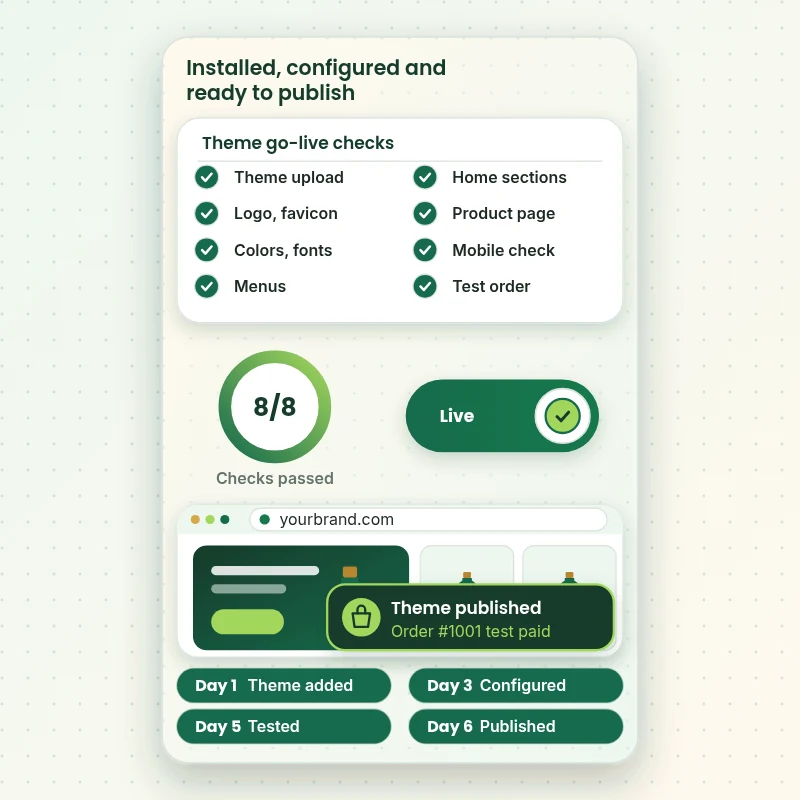
From theme file to live store
How a Newly Installed Theme Is Checked Before It Goes Live
Every installation ends the same way: a checklist that has to be fully ticked before we suggest publishing. Watch the theme go through upload, brand settings, menus, sections and devices, then a real test order, and see what the moment of going live looks like.
Portfolio
Shopify Store Designs We Create
Different niches need different layouts. These store designs show how we shape a storefront around its products, and Shopify Theme Installation & Configuration follows the same approach.

Wall art store design
Wall art
Beauty tools store design
Beauty tools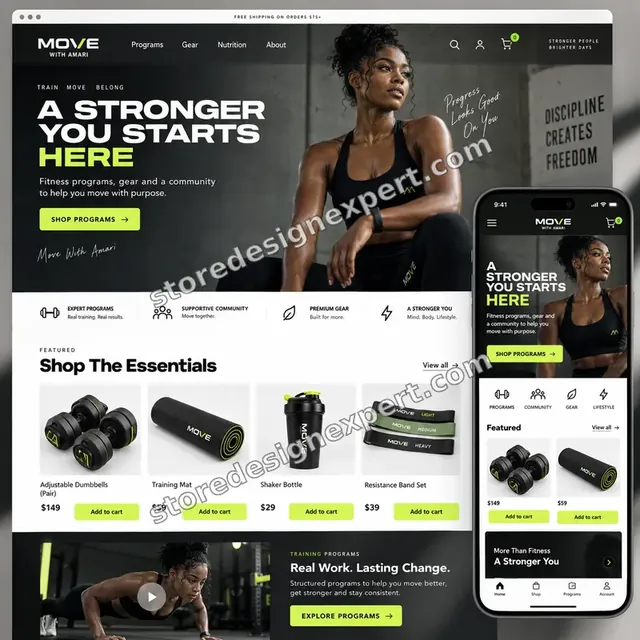
Food creator store design
Food creator
Salon supplies store design
Salon supplies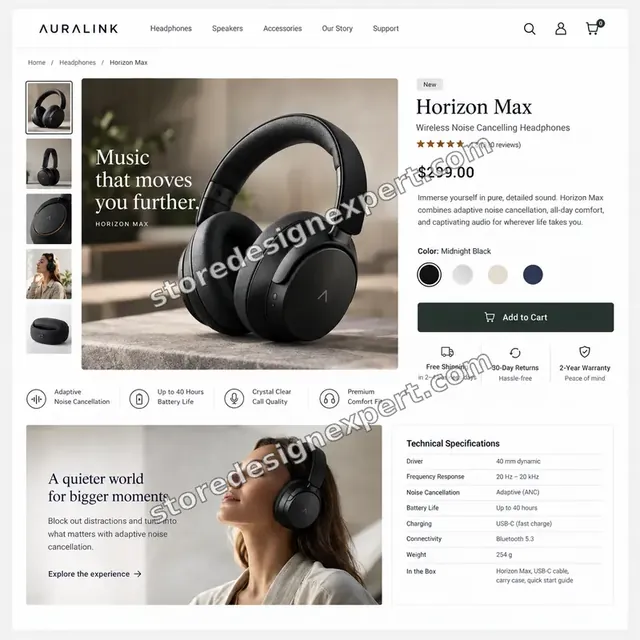
Audio store design
Audio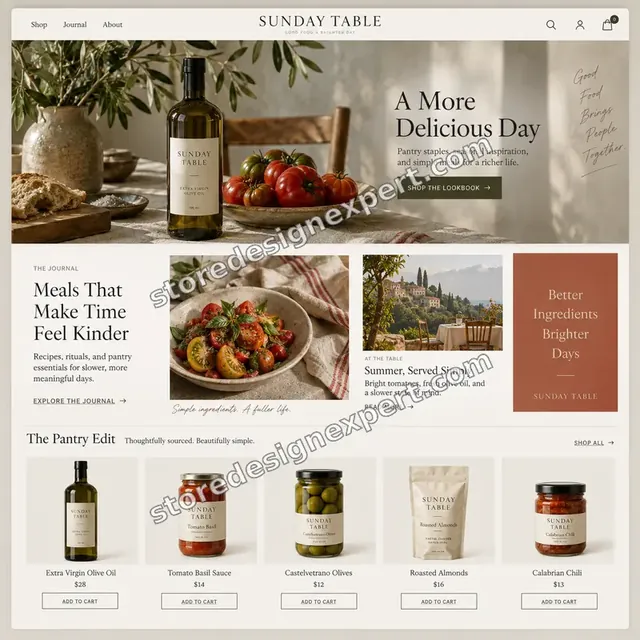
Food store design
FoodProcess and timeline
From Theme Choice to Published Store in Six Steps
Every project runs through the same six stages. The work happens on an unpublished copy or development store, and the ranges in the calculator show how long your own mix of options takes.
- 01
Theme check
We open your chosen theme, confirm it suits your catalog and plan, and flag anything it cannot do. If you are unsure, we recommend one from the free and paid options.
- 02
Safe install
We add the theme to your library or a development store and take a copy of anything live. Nothing is published, so customers see no change.
- 03
Brand and settings
Logo, color schemes, fonts, buttons and global layout options are set, then you receive a private preview link to react to.
- 04
Pages and menus
Sections, templates, menus, collections and the product page are configured. Leftover demo content is replaced or removed as you approve each page.
- 05
Testing
We check several widths, every link and form, and a full test order. Anything that fails is fixed and rechecked before you see it again.
- 06
Publish and handover
On your word we publish, confirm the live store behaves, and send a recorded walkthrough and notes covering what we set and where.
Compare your options
Install It Yourself, Hire a Gig, Use an Agency or Choose a Fixed Package?
Owners usually weigh four routes for getting a theme working, and a Shopify store setup service is only one of them. This table sets them side by side on the points that decide whether the store is ready to take orders.
| What matters | Do it yourself | Marketplace gig | Traditional agency | Store Design Expert |
|---|---|---|---|---|
| Installed on a safe unpublished copy | You manage | Varies | Yes | Yes |
| Brand settings, menus and templates set | Slow | Logo only | Yes | Yes |
| Test order placed before launch | You do it | Rarely | Yes | Yes |
| Old theme features rebuilt | Easy to miss | No | Quote only | Yes |
| Price known before work starts | Yes | Yes | Quote only | Yes |
| Recorded handover and notes | No | No | Extra cost | Yes |
| No retainer or minimum spend | Yes | Yes | No | Yes |
| You own the theme and the store | Yes | Varies | Varies | Yes |
Inside every project
What Keeps a Live Store Safe While the Theme Changes
Changing a theme touches the one thing customers see. These six habits are why a fixed price from us is more than the cost of an upload, and why owners with active stores feel comfortable letting us start.
Nothing goes live by accident
The new theme stays unpublished until you tell us to publish. Until then you preview it on a private link, and the old theme keeps taking orders without any change.
A rollback copy before any edit
We save the live theme first. If you dislike the switch the day after launch, going back is a matter of minutes, not a rebuild.
Access you can withdraw
A collaborator request is our first choice: ownership stays with you and one click ends our access. The permissions we ask for are the ones theme work needs, and none that reach payments.
A clear definition of done
A page is finished when it passes our device checks, its links work, its images are the right size and the test order completes. You review work that has already met that bar.
Notes you can use later
You receive a recorded walkthrough and a short guide listing the settings we changed, any code we added and how to update the theme without undoing our work.
Fixed scope, two revision rounds
You see the price before paying. Changes inside the agreed scope never trigger an hourly bill, and two structured rounds of feedback are built in.
Interactive price calculator
Build Your Shopify Theme Installation Package
Pick a package, say which theme you are using and how much content needs setting up, then choose your speed. The fixed price and the finish date change as you tick each option.
Request a custom quote
Shopify Plus stores, migrations from another platform, multi-language or multi-store rollouts, custom theme code and catalogs above 300 products are priced as separate projects with agreed deliverables.
Request a QuoteChanged your mind? Choose Theme Ready, Brand Configured or Launch Configured above to return to the instant calculator.
Packages and comparison
Shopify Theme Setup Packages Compared Row by Row
Comparing Shopify theme setup packages from other providers is easier when you can see exactly which line sits in which tier. This table shows ours, along with typical delivery time for each.
| What is included | Theme Ready $490 | Brand Configured $890Recommended | Launch Configured $1,490 |
|---|---|---|---|
| Theme installed on an unpublished copy | Included | Included | Included |
| Logo, favicon, colors and fonts | Included | Included | Included |
| Header, footer and main menu | Included | Included | Included |
| Home page sections arranged | Included | Included | Included |
| Phone and desktop checks | Included | Included | Included |
| Product, collection and cart templates | Not included | Included | Included |
| Policy and contact pages | Not included | Included | Included |
| Basic title and alt text setup | Not included | Included | Included |
| Test checkout with a discount code | Not included | Included | Included |
| Old theme features rebuilt in the new theme | Not included | Not included | Included |
| Pixel and tracking tag check | Not included | Not included | Included |
| Speed and image review | Not included | Not included | Included |
| 14 days of fixes after launch | Not included | Not included | Included |
| Typical delivery | 3 to 5 days | 5 to 9 days | 8 to 14 days |
Your Shopify Theme Installation & Configuration price and delivery estimate come from the calculator above, so there is no surprise at checkout.
Why Store Design Expert
Why Owners Pick This Theme Setup Over a Cheap Upload
Low-priced install gigs and expensive agency setups both exist. We sit between them, and six things explain the choice owners tell us they made.
Shopify only, since 2015
We have set up themes through several generations of the platform, including the move to sections everywhere. That history means fewer surprises with templates, app blocks and settings.
We finish what a gig leaves open
A cheap upload usually ends with the theme added and a logo placed. We keep going through menus, templates, devices and a test order, which is where most stores actually go wrong.
You deal with the people doing the work
Questions go straight to the person configuring your theme. Replies are quicker and decisions clearer, and nothing passes through an account manager.
Prices you can add up yourself
Each package has a fixed scope, and the calculator shows the cost of every option before you pay. What you see at the start is what you pay at the end.
Rated 4.9+ by verified clients
Reviews come from real, verified customers of Store Design Expert, so you can read how projects went before choosing a package.
You own the theme and the store
The theme license, the settings and the admin all belong to you. When we start in our Partner account, we hand the store across before you pay for a plan.
What we need to get started
What We Need From You to Install Your Theme
You do not need a finished brand book, only a way into Shopify and a theme to work with. Pick the access route that suits you, then send the project inputs below.
Send us a collaborator request
If your store already exists, send the web address and approve our collaborator request. Ownership never leaves you, nothing secret is passed around, and one click in your settings ends our access.
No store yet? We build it for you
We open a development store in our own Shopify Partner account, install and configure the theme there, then transfer ownership to you at the end. You pick a Shopify plan only when the work is complete.
Or share staff login details
A staff account works too if collaborator access is awkward for you. We still recommend the request route because it is easy to revoke, and we never ask for payment details.
The theme and your brand files
Tell us which theme you want, or send the marketplace zip and your license details. Add your logo, colors, fonts and a few stores whose look you like, or ask us to suggest options.
Products, copy and page content
Send a spreadsheet or supplier link for products, plus the text you want on the home, about and policy pages. Where something is missing, we tell you before building and do not invent wording.
Old theme notes and one decision maker
List any apps, tracking codes or custom features on your current theme, and name the person who approves each stage, so nothing important is lost in the switch.
We never ask for your owner password or any card details. A live store is only touched after a backup is saved, and each change we make is written down.
Testimonials
What Store Owners Say After We Set Up Their Theme
Verified clients describe working with Store Design Expert, from the first message to the day their store went live.
Verified
The website development work was truly impressive. Their attention to detail and ability to exceed expectations made the project a success. Working with them was a breeze, thanks to quick responsiveness and a willingness to go above and beyond.
KD
Kevin D.United States
Verified
Super great to work with, and super fair!
RO
Robert O.United States
Verified
Store Design Expert was very knowledgeable about what I needed done to fix my Shopify store and how to improve the store layout. The project was completed very quickly, and I will definitely use them for support as my business grows.
ST
Samuel T.United States
Verified
Very satisfied with the work. Most importantly, Store Design Expert responded promptly to my questions and concerns. Thank you!
KB
Kyle B.United States
Verified
Outstanding work and outstanding customer service. Five stars! I will absolutely use Store Design Expert again for my next book.
KM
Katharine M.United States
Verified
Store Design Expert was great! They delivered exactly what I asked for and even offered helpful extra suggestions. Highly recommended.
PW
Paul W.United States
Verified
I request Store Design Expert every time I have a project. They are professional and give real attention to detail, which makes the work stand out.
LK
Laura K.United States
Verified
They kept communicating until the problem was fully resolved, and the result was great.
HJ
Henry J.United States
Verified
Super helpful and patient. I am new to ecommerce and Store Design Expert talked me through the whole process and even fixed my payment bridging for me!
LR
Lois R.United Kingdom
Related searches
What People Search For Before Ordering Shopify Theme Installation & Configuration
Owners reach this page from different searches. Here is how the common ones relate to Shopify Theme Installation & Configuration.
People who look up “shopify theme installation and configuration”, “shopify new theme installation”, “shopify theme setup service” or “shopify theme setup packages” usually want Shopify Theme Installation & Configuration; the calculator above shows the price and delivery estimate before you commit.
People who look up “shopify store theme setup”, “shopify dawn theme setup”, “how to install shopify theme” or “how to upload theme on shopify” usually want Shopify Theme Installation & Configuration; the calculator above shows the price and delivery estimate before you commit.
People who look up “how to change theme on shopify store”, “how to purchase theme on shopify”, “which shopify theme do i need” or “install shopify theme for me” usually want Shopify Theme Installation & Configuration; the calculator above shows the price and delivery estimate before you commit.
Related searches include “shopify store setup service”.
FAQ
Shopify Theme Installation Service FAQs
Direct answers about price, timing, what happens to your live store and what you receive at the end.
How much does a Shopify theme installation service cost?
Packages start at $490 for Theme Ready, $890 for Brand Configured and $1,490 for Launch Configured. The theme source, how many pages and how many products we set up add to that in the calculator, so most projects land between roughly $600 and $2,400. The fixed price is on screen before any payment.
How long does Shopify new theme installation take?
Theme Ready takes 3 to 5 working days, Brand Configured 5 to 9 and Launch Configured 8 to 14, before options. Shopify new theme installation on a store that already sells takes the same time, because the work is done on a copy. Faster speeds are available in the calculator when you have a deadline.
Will installing a new theme change my live store?
No. We add the theme unpublished, so customers keep seeing and buying from your current one. You review the new theme on a private preview link, and we publish it only after you approve it. Your products, customers, orders and settings stay where they are.
Can you install Shopify theme for me if I bought it elsewhere?
Yes. If you want us to install a Shopify theme for you from a third-party marketplace, send the zip file and license details. We upload it, import only the demo content you want, remove leftover demo items and check that the layout works with your own images.
How do I know which Shopify theme I need?
Which Shopify theme do I need depends on catalog size, product type and how much you want to edit yourself. Tell us your range and your plan, and we recommend a free or paid option with reasons. A good fit usually means fewer apps and less custom code later.
What does Shopify theme installation and configuration include beyond the upload?
Shopify theme installation and configuration here covers brand settings, menus, home page sections, key templates, product and cart setup, device checks and a test order. Higher packages add old theme features, a tracking tag check and a speed review. It ends with a recorded walkthrough.
Do you offer Shopify theme setup packages for a small budget?
Yes. Theme Ready at $490 is our smallest fixed package, with the brand basics, menus and home page done properly. Cheaper Shopify theme setup packages exist, but they usually stop after the upload. If your catalog is tiny, this is the right place to start.
Is a Shopify theme setup service worth it compared with doing it myself?
If you have the hours, you can do it yourself. A Shopify theme setup service is worth it when time is tight or the store is already live. We handle settings, testing and the details that are easy to miss, and you review a finished result.
How do I install a Shopify theme on my own?
How to install Shopify theme files yourself: open Online Store, then Themes, add the theme from the Theme Store or upload a zip, and then customize it before publishing. Tell us if you want to try first, and send over the result if anything breaks.
How to upload theme on Shopify if I only have a zip file?
How to upload theme on Shopify from a zip: in Themes, choose Add theme, then Upload zip file, and wait for the new theme to appear in the library. It stays unpublished until you publish it. If the upload fails, the file may be packaged wrongly, which we can repair.
How to change theme on Shopify store without losing content?
How to change theme on Shopify store safely: products, pages and orders live outside the theme, so they remain. What can be lost is theme-level settings, custom code and app blocks. We list those from your old theme first and rebuild what is needed.
How to purchase theme on Shopify, and who holds the license?
How to purchase theme on Shopify: pick a paid theme in the Theme Store and buy it from your own account, so the license is yours. We can then configure it. If you prefer, we can buy it inside the development store we build for you and transfer it.
Can you set up a Shopify Dawn theme and keep it light?
Yes. Shopify Dawn theme setup is popular because it is free and fast. We configure it to your brand, switch off unused features, size the images and add only the sections you need, which keeps pages quick and the editor easy for your team.
Do I get help after the theme goes live?
You get a recorded walkthrough and written notes. Launch Configured includes 14 days of fixes, and a 30-day support option can be added to any package in the calculator, covering questions and small adjustments while you start selling.
Ready when you are
Start Your Shopify Theme Installation Service Order Today
Pick a package, see the fixed price and finish date, and order a Shopify theme installation service from a team that has launched over 450 stores. Your theme is installed safely, configured around your brand, tested with a real order and handed over with notes you can use.
Secure checkout · 2 revision rounds · Video walkthrough with every theme