
Shopify stores designed and launched
Handover and training for new Shopify owners
Shopify Training on Your Own Store, So You Can Run It Without Us
Shopify training courses teach the platform in general. We teach your store: how to edit pages, add products, process orders and read reports, with recordings and a manual you keep. From $240, fixed price.
- A live session on your own store, not a demo
- Recorded videos of every task you practise
- A written manual made for your team
- Accounts and access handed over cleanly
Our track record
450+ Shopify Stores Launched Since 2015. Your Handover Gets the Same Care.
A store is only finished when its owner can run it. We have handed over hundreds of stores, so we know which tasks owners need first and which can wait for later.
Average rating from verified clients
Building Shopify stores since
Secure checkout
Pay through a protected checkout and keep a full order record.
Two revision rounds
Included in every package, so the result matches what you pictured.
Backup before changes
We work on a duplicate of your theme, never on your live store.
Who this is for
Who Needs a Shopify Handover and Training Session
Owners ask for training when a store is theirs for the first time. Most people ask about Shopify store handover & training session in one of these six situations.
You are a good fit if
- You own a Shopify store or are about to
- You want a fixed price and written scope for training
- You can set aside time for the session
- You will practise on your own store
Owners whose new store has just launched
The build is done, and you want to be confident editing it without help.
Teams who will run the store day to day
Several people need to learn the same tasks the same way.
Merchants taking over from an agency
You inherited a store and want a guided tour of how it works.
Founders who edit content often
You change banners, collections and pages weekly and want to do it safely.
Stores with a growing catalog
You add products and variants and want a repeatable method.
Owners who dislike learning from videos alone
You want someone to teach on your own store and answer your questions.
Problems solved
Why Generic Shopify Training Leaves Owners Stuck
General courses cover the platform, not your store. These six patterns are what we usually find for training.
Courses teach every feature.
Outcome: Owners learn dozens of things they will never use and still miss the few they need.
Examples are not your store.
Outcome: A demo shop looks different from your theme, apps and settings.
Fear of breaking things.
Outcome: Owners avoid editing because they cannot tell which changes are safe.
No time to watch hours of video.
Outcome: A long course competes with running the business.
Knowledge sits with one person.
Outcome: When one person leaves, nobody else knows how the store works.
No manual for your own setup.
Outcome: Custom sections, apps and rules are written down nowhere.
What we can do
What Our Handover and Training Session Covers
Six jobs make up the service. Your package decides how many sessions, people and videos are included.
Needs review
We list the tasks you and your team will do each week, so training covers what matters.
Live training session
We walk through your own store on a call, with you practising each task as we go.
Recorded videos
Each task is recorded on your store, so you can replay it any time you forget.
Written manual
A short manual covers your sections, apps and routines in plain language.
Access handover
We help you confirm that you own your domain, accounts and admin access, and remove ours.
Follow-up check
After a short period of practice, we answer your questions and fix anything that was unclear.
What is included
What Is Inside Your Handover and Training
Six groups cover every deliverable in Shopify Store Handover & Training Session. The comparison table below shows how far each group goes by package for training.
Planning
- Task list for your team
- Skill check
- Session plan
- Priority order
Live session
- Guided tour of your admin
- Practice on your store
- Questions answered
- Session notes
Videos
- Recorded tasks
- Short clips per task
- Shared library
- Index of clips
Manual
- Plain-language manual
- Custom section guides
- App notes
- Quick reference sheet
Handover
- Account ownership check
- Access list
- Our access removed
- Contacts sheet
Follow-up
- Question round
- Fix list
- Further reading
- Next steps
You provide time and access to your team. We handle the planning, teaching and documents.
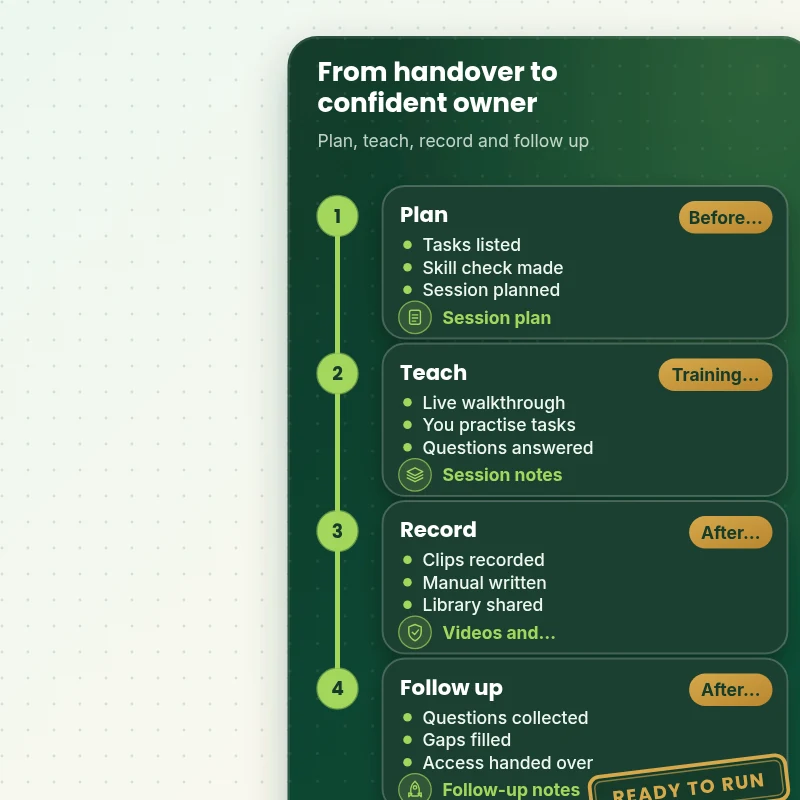
Training path
How a Handover and Training Programme Runs, Stage by Stage
The walkthrough shows the path: planning around your tasks, a live session on your store, recordings and a manual, then a follow-up. Each stage has a named deliverable you keep.
Portfolio
Shopify Store Designs We Create
Different niches need different layouts. These store designs show how we shape a storefront around its products, and Shopify Store Handover & Training Session follows the same approach.
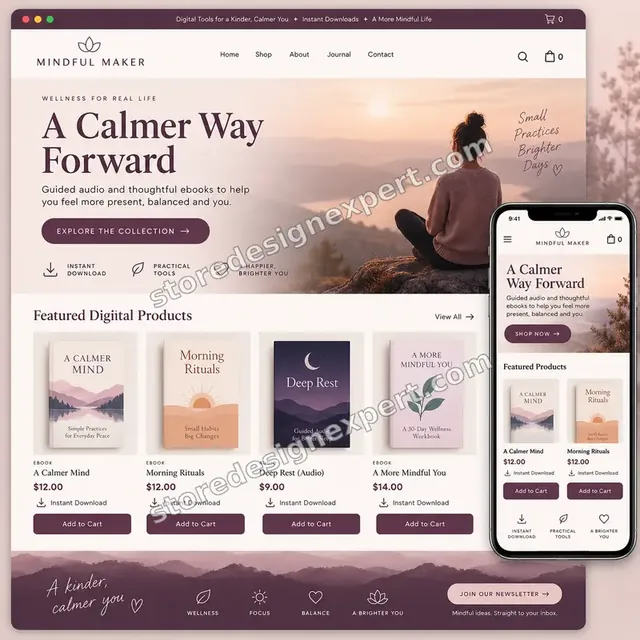
Wellness ebooks store design
Wellness ebooks
Wall art store design
Wall art
Beauty tools store design
Beauty tools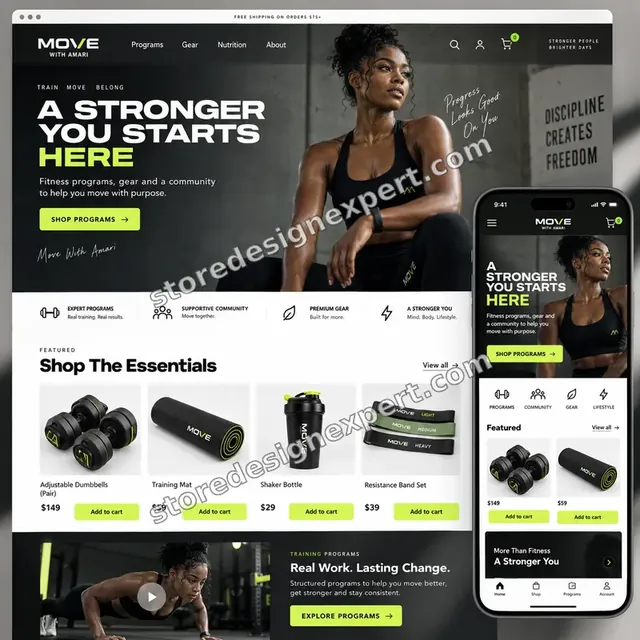
Food creator store design
Food creator
Salon supplies store design
Salon supplies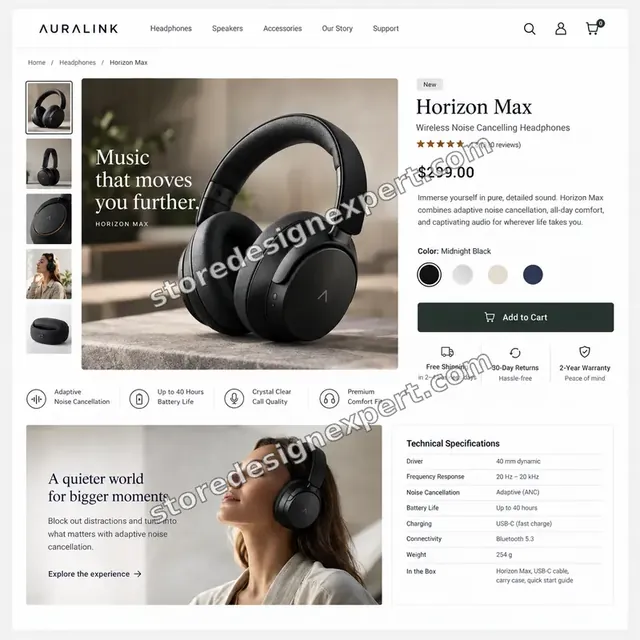
Audio store design
AudioProcess and timeline
How Handover and Training Runs, Start to Finish
Six steps, all taught on your own store. Your calculator choices decide how long each step takes for training.
- 01
Brief and task list
You tell us who will run the store and what each person does.
- 02
Access
You add us as a collaborator. We never ask for passwords.
- 03
Prepare the session
We review your store and plan the tasks to teach in order of importance.
- 04
Live training
We teach on a call, with each person practising on your store.
- 05
Record and write
We record the tasks and write the manual from what you asked.
- 06
Follow up and hand over
We answer questions, fill gaps and confirm you own every account.
Compare your options
Free Courses, Marketplace Gig, Private Tutor or Our Training?
Four usual routes to learning Shopify. This comparison shows who teaches your store, records the session and writes your manual.
| What matters | Free courses | Marketplace gig | Private tutor | Store Design Expert |
|---|---|---|---|---|
| Taught on your own store | No | Sometimes | Sometimes | Yes |
| Recorded tasks you keep | Generic videos | Rarely | Extra cost | Yes |
| Manual for your sections and apps | No | No | Rarely | Yes |
| Knows how your store was built | No | No | No | Yes |
| Account and access handover | No | Rarely | No | Yes |
| Price known before work begins | Free | Yes | Hourly | Yes |
| Shopify admin expertise | General | Varies | Varies | Yes |
| Follow-up after practice | No | Rarely | Extra cost | Yes |
Inside every project
What Protects Your Store While We Train You
Training happens on your live store, so these six habits come with every package.
Least access needed
We ask for the narrowest access that lets us teach, and remove it when we finish.
Safe practice
We show you the safe way to change things, and which edits to test on a duplicate first.
Videos you keep
Recordings belong to you. We do not reuse them or show your store to others.
Everything written
Each routine is written down, so a new team member can learn from the manual.
No certification offered
We teach your store. We do not issue Shopify certifications, and we do not claim any.
Fixed scope, two revision rounds
The price is agreed before work starts, and changes to the manual run in two structured rounds.
Interactive price calculator
Build Your Handover and Training Package
Choose a package, then tell us how many people will be trained, how many apps the store uses and how much custom work was built. The fixed price and delivery window update with every click for training.
Request a custom quote
Shopify Plus teams, several stores, custom app training, multi-language training and on-site sessions are scoped separately and quoted at a fixed price.
Request a QuoteChanged your mind? Choose Live Training Session, Training Session and Videos or Full Handover Programme above to return to the instant calculator.
Packages and comparison
Training Package Comparison
Line-by-line detail of what each package covers, useful when choosing between one call and a full handover programme.
| What is included | Live Training Session $240 | Training Session and Videos $540Recommended | Full Handover Programme $1,090 |
|---|---|---|---|
| Needs review | Included | Included | Included |
| One live training call | Included | Included | Included |
| Practice on your store | Included | Included | Included |
| Session notes | Included | Included | Included |
| Quick reference sheet | Included | Included | Included |
| Recorded task videos | Not included | Included | Included |
| Plain-language manual | Not included | Included | Included |
| App and section notes | Not included | Included | Included |
| Follow-up question round | Not included | Included | Included |
| Second live session | Not included | Not included | Included |
| Role-based guides | Not included | Not included | Included |
| Account ownership handover | Not included | Not included | Included |
| Review call after two weeks | Not included | Not included | Included |
| Typical delivery | 2 to 3 days | 3 to 5 days | 5 to 7 days |
Choose your options in the calculator above: the total and the delivery estimate it shows for Shopify Store Handover & Training Session are final.
Why Store Design Expert
Why Owners Choose Us for Shopify Training
Anyone can recommend a course. Owners hire us because we built the store and can teach it as it is.
We know how your store was built
The same team that builds stores teaches you to run them, so nothing is guesswork.
Rated 4.9+ by verified clients
The reviews below come from verified Store Design Expert clients and are shown in their own words.
Prices you can plan around
Every package, option and extra has a visible price, sized by people, apps and custom work.
A direct line to the person teaching
You ask the person who taught you, not a ticket queue.
Honest about what to learn first
We tell you which tasks matter now and which can wait.
Experience since 2015
More than 450 Shopify stores launched means we know the questions owners ask.
What we need to get started
What We Need Before Your Training Session
Three ways to give access, then a short list of facts about your team for training.
Accept our collaborator request
Give us your store address and approve the request we send. The owner can grant what we need and remove us in one click for training.
Taking over a store? That is fine
Tell us what you inherited. We start with a guided tour.
Or have the owner add us as staff for training
A restricted staff account works too, though the collaborator route is easier to revoke for training.
Who will be trained
List the people and the tasks each will do.
Tasks you dread
Tell us the jobs you avoid, so we start with those.
Times that suit you
Share your available times and time zone for the live call.
Passwords are never requested. Access is granted through the store's own tools and removed when we finish for training.
Testimonials
What Store Owners Say Before You Order Shopify Store Handover & Training Session
Verified Store Design Expert clients describe the brief, the build and the handover in their own words.
Verified
The website development work was truly impressive. Their attention to detail and ability to exceed expectations made the project a success. Working with them was a breeze, thanks to quick responsiveness and a willingness to go above and beyond.
KD
Kevin D.United States
Verified
Super great to work with, and super fair!
RO
Robert O.United States
Verified
Store Design Expert was very knowledgeable about what I needed done to fix my Shopify store and how to improve the store layout. The project was completed very quickly, and I will definitely use them for support as my business grows.
ST
Samuel T.United States
Verified
Very satisfied with the work. Most importantly, Store Design Expert responded promptly to my questions and concerns. Thank you!
KB
Kyle B.United States
Verified
Outstanding work and outstanding customer service. Five stars! I will absolutely use Store Design Expert again for my next book.
KM
Katharine M.United States
Verified
Store Design Expert was great! They delivered exactly what I asked for and even offered helpful extra suggestions. Highly recommended.
PW
Paul W.United States
Verified
I request Store Design Expert every time I have a project. They are professional and give real attention to detail, which makes the work stand out.
LK
Laura K.United States
Verified
They kept communicating until the problem was fully resolved, and the result was great.
HJ
Henry J.United States
Verified
Super helpful and patient. I am new to ecommerce and Store Design Expert talked me through the whole process and even fixed my payment bridging for me!
LR
Lois R.United Kingdom
Related searches
Related Searches for Shopify Store Handover & Training Session
People describe Shopify Store Handover & Training Session in different ways when they search. These are the common ones.
If you searched for “shopify store handover and training session”, “shopify training for beginners”, “shopify training courses” or “shopify expert training”, Shopify Store Handover & Training Session is the work that answers it.
People who look up “shopify training videos”, “shopify training manual”, “shopify training free” or “shopify training certification” usually want Shopify Store Handover & Training Session; the calculator above shows the price and delivery estimate before you commit.
Owners also search for “shopify done for you store”, “shopify store help guide”, “how to become a shopify expert” or “how long does it take to learn shopify”.
Owners also search for “shopify done for you service” or “shopify store help center”.
FAQ
Shopify Training FAQs
Answers on cost, content, recordings, free options and learning time.
How much does Shopify handover and training cost?
Live Training Session is $240, Training Session and Videos $540 and Full Handover Programme $1,090. People, apps and custom work add to that, and the calculator shows the total before you pay.
What does Shopify training with you cover?
Our Shopify training covers the tasks your team does: editing pages, adding products, processing orders, reading reports and using your apps, all taught on your own store.
Is this Shopify training for beginners?
Shopify training for beginners is our usual starting point. You do not need experience, because we begin with the tasks you will do first and build from there.
How is this different from Shopify training courses?
Shopify training courses teach the platform in general. Ours teaches your store, with your theme, apps and settings, and records the session for you.
Do you offer Shopify expert training for my team?
Shopify expert training for a team means sessions by role: content editors, order handlers and managers. We split the live calls so each person learns what they need.
Do you make Shopify training videos?
Our Shopify training videos are short recordings of each task on your own store. They are shared in a library you keep, and they are not reused for other clients.
What goes in a Shopify training manual?
A Shopify training manual from us explains your sections, apps and routines in plain language, with screenshots, so a new team member can follow it alone.
What is a Shopify done for you store, and does handover apply?
A Shopify done for you store is one we build for you. Handover is the last step: we teach you to run it, give you the manual and confirm that you own every account.
Is there a Shopify store help guide I can keep?
A Shopify store help guide from us is your manual and quick reference sheet. It covers the questions your team will ask most.
Is Shopify training free if I learn alone?
Shopify training free resources exist, including Shopify's help documentation and videos. We recommend the best ones, and our session fills the gaps for your store.
Do you give a Shopify training certification?
No. A Shopify training certification comes from Shopify's own programmes. We teach your store and give notes, videos and a manual, not a certificate.
How to become a Shopify expert as an owner?
How to become a Shopify expert as an owner: learn the tasks you do every week first, then add depth over time. We give you that order for your store.
How long does it take to learn Shopify?
How long it takes to learn Shopify depends on your tasks. Most owners can handle everyday edits after one session and some practice, and our follow-up covers what is left.
Is a Shopify done for you service the same as training?
A Shopify done for you service means we do the work. Training means we teach you to do it. Many clients choose both, with training at handover.
Where is the Shopify store help center, and do you replace it?
The Shopify store help center is Shopify's own documentation. We do not replace it. We point you to the right pages and explain how they apply to your store.
Ready when you are
Order Your Shopify Training and Store Handover
Choose a package, watch the fixed price settle and have a team that has launched 450+ Shopify stores teach you and your team to run your own, with videos and a manual you keep.
Fixed price · Taught on your own store · Videos and manual included