
Shopify stores designed and launched
Shopify dark mode implementation
Shopify Dark Mode Built Into Your Theme, Not Pasted On Top Of It
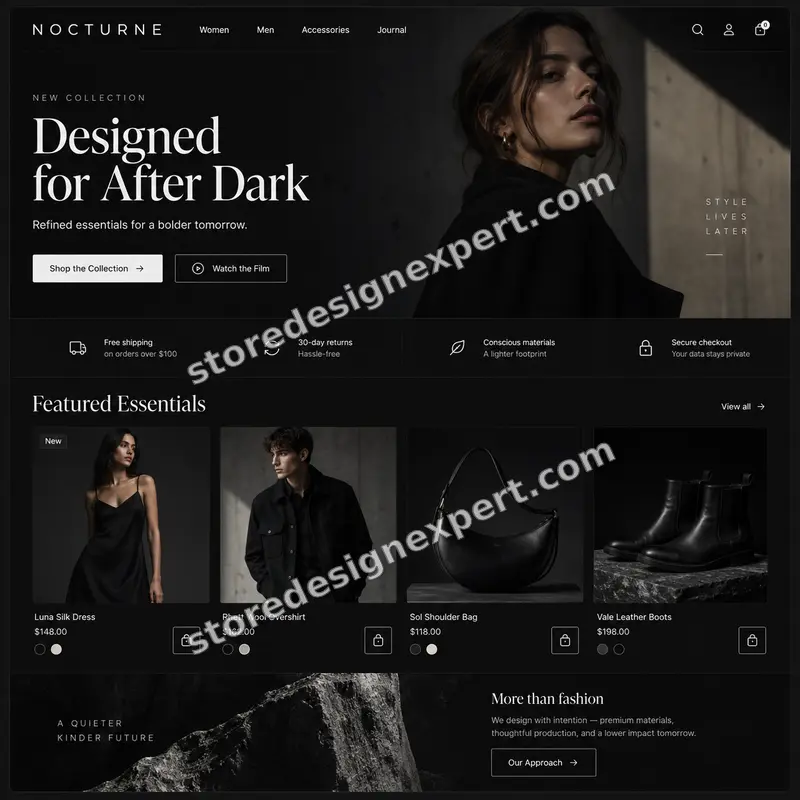
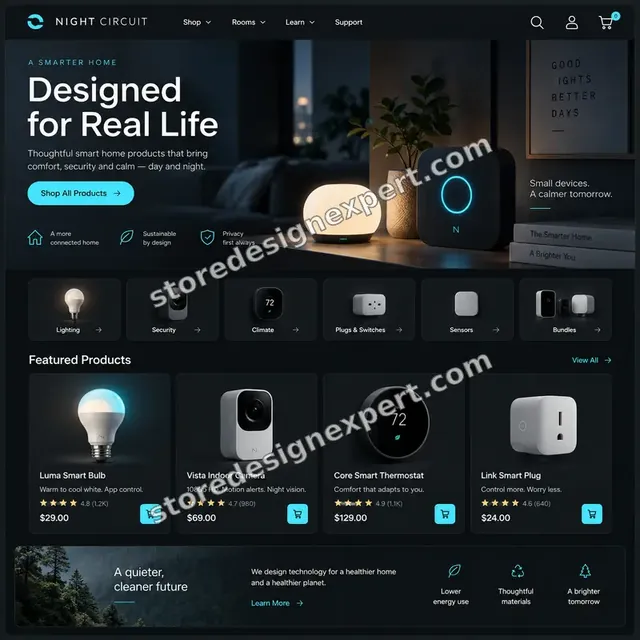
Shopify dark mode that is designed as a second palette for your theme: tokens, a toggle that remembers each visitor, logos and photos that work in both modes and no bright flash while pages load. Fixed prices from $390. Store Design Expert has launched 450+ Shopify stores since 2015 and holds a 4.9+ average rating from verified clients. Work out your fixed price in the calculator below.
- A true dark palette that keeps text readable and buttons obvious
- A toggle that follows the device and remembers the visitor's choice
- Logos, icons and images checked in both modes
- Two revision rounds and a recorded walkthrough
Our track record
450+ Shopify Stores Launched Since 2015, Now Built for Two Looks
A second colour mode touches every template, every image and every app that paints something on screen. Our years of theme work show where the hidden white boxes and unreadable buttons hide, so they get caught before your visitors find them.
Average rating from verified clients
Building Shopify stores since
Secure checkout
Pay through a protected checkout and keep a full order record.
Two revision rounds
Included in every package, so the result matches what you pictured.
Backup before changes
We work on a duplicate of your theme, never on your live store.
Who this is for
Who Needs Shopify Dark Mode Implementation
Dark mode is not for every shop, but for some it is a real product decision. These are the six situations where we are asked for it most often.
You are a good fit if
- You know your brand suits a dark look
- You want a toggle visitors can find
- You want pages checked on real phones
- You want a fixed price before you commit
Photography, art and creator stores
Your images glow against a near-black background, and a white page makes them look flat. You want the look of a gallery wall without a separate microsite.
Gaming, tech and music brands
Your audience lives in dark interfaces all day. A bright storefront feels out of step with the products, the packaging and the social channels they came from.
Stores with late-evening traffic
Orders arrive after dark and on phones in bed. Offering a calmer screen is a kindness that also shows you pay attention to how people really shop.
Brands focused on accessibility
Some visitors find bright screens painful or tiring. You want a choice that respects their device setting and still meets contrast guidance in both modes.
Owners with a half-finished app or hack
An app inverted your colours and now buttons vanish, logos turn into black boxes and one section stays white. You need it rebuilt cleanly, then the app removed.
Merchants on Online Store 2.0 themes
Your theme already has colour schemes, but you want a full light and dark system tied to the visitor's device, with a switch in the header and every page covered.
Problems solved
Why Quick Fixes for Dark Mode Shopify Stores Go Wrong
Inverting colours takes a minute, which is why so many stores do it and then look broken. These are the failures we meet most and the way we avoid each one.
The page flashes white for a moment before turning dark, which looks like a bug on every visit.
Outcome: We set the visitor's chosen mode in a tiny script at the top of the page, before anything paints, so there is no flash on first load or on later pages.
Logos and icons with transparent backgrounds disappear into the dark, and product photos with white backdrops look like stickers.
Outcome: We supply light and dark logo versions, soften white-background photos where it helps and test each image style across the catalogue.
Colours were simply inverted, so brand reds turn muddy and low-contrast text is hard to read.
Outcome: We build a dark palette by hand, with softened surfaces, adjusted accents and text pairs that clear contrast checks in both modes.
Review widgets, popups and chat tools stay white because they paint their own styles.
Outcome: We find each app that draws on the page and write targeted overrides, or tell you plainly when an app cannot be matched and suggest a swap.
The toggle is hidden in the footer, ignores the phone's own setting or forgets the choice after a refresh.
Outcome: We place the switch in the header, follow the device setting by default and save any manual choice so it survives refreshes and return visits.
Only the home page was tested, so the cart drawer, search results or account pages are unreadable.
Outcome: We walk every template in both modes on phone, tablet and desktop and give you a list of what was checked and fixed.
What we can do
What We Build When You Add a Shopify Dark Theme
Doing this properly means rethinking colour at the foundation of your theme. These six areas make up most of the work, with decisions made case by case.
A Shopify dark mode theme palette from your brand
We translate your brand colours into a second set of tokens for background, surfaces, borders, text, links, buttons and badges, with every pair checked for contrast before it goes live.
Colour tokens in the theme code
We organise colours as variables or Shopify colour schemes, so each section reads from one source. That keeps future edits easy and stops a stray hard-coded white from slipping through.
A toggle that behaves
We add an accessible switch with a clear label and focus state, default to the device's light or dark setting and store a manual choice so visitors do not have to repeat it.
Logo, icon and image handling
We prepare logo variants, recolour inline icons, check transparent PNGs and decide where product imagery needs a subtle backdrop so it sits correctly on dark surfaces.
Section-level control in the theme editor
Where your theme supports it, merchants can pick light or dark for individual sections, such as a dark hero over a light collection, without touching code.
Third-party app compatibility
Reviews, subscriptions, popups, size guides and chat widgets are tested in both modes. We override the styles we can and flag the ones that need the app vendor.
What is included
What Your Shopify Light and Dark Mode Build Includes
Work falls into six streams. Each package goes deeper into some of them, and the comparison table below shows exactly where.
Palette and tokens
- Dark palette designed from your brand colours
- Contrast pairs checked for text and buttons
- Colours organised as tokens in the theme
- Separate accent tuning in higher packages
Toggle and memory
- Accessible switch placed in the header
- Device light or dark setting followed by default
- Visitor's choice saved between visits
- No white flash when pages load
Templates covered
- Home, collection, product and cart in every package
- Blog, search, account and policy pages in higher tiers
- Custom landing pages in the largest option
- Cart drawer and menus included
Logos and imagery
- Light and dark logo handling
- Icons recoloured for both modes
- White-background photo treatment
- Hero and banner variants in higher packages
App compatibility
- Installed apps listed and reviewed
- Style overrides for the apps that allow them
- Plain report on apps that cannot be matched
- Extra app testing as an option
Testing and handover
- Phone, tablet and desktop checks in both modes
- Speed check so the second palette adds no weight
- Recorded walkthrough and written notes
- Two revision rounds before sign-off
Every package ends with a device test on real phones, so a mode that looks fine on a laptop is also proven on the screen most shoppers hold.
See the palette move
From Brand Palette to a Shopify Dark Mode Theme
Follow how one brand becomes two modes. We start with the identity you already have, derive a dark set of colours with readable pairs, tune the type and logo and then apply both across the storefront, ready for the toggle.
Portfolio
Store Designs From Our Studio
A look at store designs across fashion, home, beauty, pets and gifts, to show the standard of layout and finish behind Shopify Dark Mode Implementation.
Technology store design
Technology
Fragrance store design
FragranceProcess and timeline
How We Add Shopify Dark Mode, Step by Step
Everything is built in a duplicate of your theme, so the live store carries on selling. The calculator shows how long your own mix of templates, images and apps will take.
- 01
Audit of what paints colour
We list your templates, theme colour settings, hard-coded values, installed apps and image styles, so we know where the second palette must reach before we write any code.
- 02
Dark palette for approval
We show a dark set built from your brand for the home and product page, with contrast numbers, so you approve the look before the whole theme is changed.
- 03
Tokens and toggle
We move colours into variables, add the early-load script and header switch, and make the choice persist, which stops the white flash and the forgotten setting.
- 04
Images, logos and apps
We handle logo variants, icons and photos, then restyle each app that draws on the page, one by one, in both modes.
- 05
Template by template testing
We walk every covered template on phone, tablet and desktop with the toggle in both positions, then fix contrast, spacing and any stray light panels.
- 06
Publish and handover
We publish on your approval and send a recorded walkthrough with notes on changing colours later and adding new sections that respect both modes.
Compare your options
App, Freelancer or a Shopify Dark Theme Built by Specialists?
Merchants usually weigh a ready-made app, a freelancer found through Shopify experts for hire lists and a specialist team. This table compares them on what shoppers will actually see.
| What matters | Dark mode app | Cheap gig | Freelance developer | Store Design Expert |
|---|---|---|---|---|
| Palette hand-tuned to your brand | Inverted | Basic | Varies | Yes |
| Toggle remembered between visits | Usually | Sometimes | Varies | Yes |
| No white flash on load | Often flashes | Rarely | Varies | Yes |
| Logos and photos checked in both modes | No | Rarely | Varies | Yes |
| Other apps restyled to match | No | No | Varies | Yes |
| Extra script added to every page | Yes | No | Varies | No |
| Contrast measured for readability | No | Rarely | Rarely | Yes |
| Fixed price known up front | Monthly fee | Yes | Varies | Yes |
Inside every project
What Keeps Your Theme Safe While We Work
A colour change that reaches every page is a wide edit, so process matters. These safeguards come with every project and explain why a fixed price from us beats a quick app install.
Built in a copy, never on the live theme
Your selling theme stays untouched until you approve the finished version. A visitor never sees a half-converted page in the middle of an edit.
A saved original to return to
We keep a duplicate of your theme from before the first change. If you decide dark mode is not for you, switching back takes minutes and loses nothing.
Access that stays in your hands
We work through a collaborator request or a Partner-account build that is transferred to you, so passwords and billing details never change owners or leave your control.
Contrast measured, not guessed
Text and button colours are checked against contrast guidance in both modes, which helps readability and keeps the toggle from becoming an accessibility problem.
Notes you can follow later
A recorded tour and written guide show where the colours live, how to adjust them and how to add a new section that behaves in both modes.
Fixed scope, two revision rounds
The price is shown before you pay, and changes inside the scope do not trigger hourly charges. Two structured rounds of feedback are built into every package.
Interactive price calculator
Build Your Shopify Dark Mode Package
Choose a package, tell us how many templates, images and apps need to look right in both modes, then set your speed. The price and the delivery estimate move with each choice you make.
Request a custom quote
Shopify Plus checkout work, several storefronts or markets, a headless front end or a theme that is heavily customised by another developer are quoted separately, with a written scope and a fixed price.
Request a QuoteChanged your mind? Choose Night Switch, Two-Tone Studio or After Dark System above to return to the instant calculator.
Packages and comparison
Shopify Dark Mode Package Comparison
Features sit in separate rows per package. Add template, imagery and app choices to a package in the calculator to get the cost and timing of your dark mode build.
| What is included | Night Switch $390 | Two-Tone Studio $890Recommended | After Dark System $1,690 |
|---|---|---|---|
| Hand-tuned dark palette | Included | Included | Included |
| Header toggle with saved choice | Included | Included | Included |
| Device setting followed by default | Included | Included | Included |
| No white flash on load | Included | Included | Included |
| Core shopping pages in both modes | Included | Included | Included |
| Phone and desktop checks | Included | Included | Included |
| Content pages and icon treatment | Not included | Included | Included |
| Contrast audit with fixes | Not included | Included | Included |
| Installed app review and overrides | Not included | Included | Included |
| Custom landing pages covered | Not included | Not included | Included |
| Hero and banner variants per mode | Not included | Not included | Included |
| Speed check after the build | Not included | Not included | Included |
| 14 days of post-launch fixes | Not included | Not included | Included |
| Typical delivery | 4 to 6 days | 7 to 10 days | 10 to 14 days |
Your Shopify Dark Mode Implementation price and delivery estimate come from the calculator above, so there is no surprise at checkout.
Why Store Design Expert
Why Brands Choose Us for Shopify Dark Mode Implementation
You get a specialist theme team without a retainer. These six reasons come up most when clients explain their decision.
Shopify theme work since 2015
We build only on Shopify, so we know how colour schemes, Liquid, the theme editor and app embeds fit together and what an update is likely to break.
A build, not a plugin sticker
Where an app only overlays inverted colours, we change the theme's own colour system. Visitors get a faster, steadier page that does not depend on an outside script.
Rated 4.9+ by verified clients
Reviews on this page come from real clients of Store Design Expert, so you can read how projects went before you spend anything.
Prices known before you commit
A visible package price and a calculator for options mean you can compare us with Shopify experts for hire who quote by the hour and then run over.
You speak to the person building it
Feedback goes straight to the developer and designer, with no account manager in between, so a note about a muddy button is fixed rather than relayed.
The finished store belongs to you
You keep the theme, the code and the admin access. Anything we build in our own Partner account is transferred to you once the work is done.
What we need to get started
What We Need From You to Start Shopify Dark Mode
You do not need a brief written in code. Access to your store and a few brand details are enough. Pick the route that suits you first.
Send a collaborator request
Give us your store address and approve our request in the Shopify admin. You remain the owner, no password is shared and removing us takes a single click.
Build in our account, then transfer
Without a store of your own yet, we build the whole theme in our Shopify Partner account and hand over ownership when it is ready. Picking a Shopify plan can wait until the work is finished.
Share a staff login instead
If you prefer, create a staff account for us with limited permissions. We suggest the collaborator route because it is simpler to end, though either one works.
Brand colours and logo files
Send hex values, logo files with transparent backgrounds and any style guide you have. If these do not exist, we pull the colours from your current theme and propose a set.
Your installed apps
List the apps that show things on your pages, such as reviews, popups, subscriptions or chat, so we can test and restyle each in both modes.
Which pages matter most
Tell us your best-selling templates and any pages with special layouts. We cover those first and make sure the mode switch never breaks a page that earns.
We never ask for your owner password or card details. Changes happen in a duplicate theme after a backup, and you receive written notes on everything we touched.
Testimonials
What Store Owners Say After Launch
Verified clients describe working with Store Design Expert on theme work, redesigns and fixes.
Verified
The website development work was truly impressive. Their attention to detail and ability to exceed expectations made the project a success. Working with them was a breeze, thanks to quick responsiveness and a willingness to go above and beyond.
KD
Kevin D.United States
Verified
Store Design Expert was very knowledgeable about what I needed done to fix my Shopify store and how to improve the store layout. The project was completed very quickly, and I will definitely use them for support as my business grows.
ST
Samuel T.United States
Verified
Very satisfied with the work. Most importantly, Store Design Expert responded promptly to my questions and concerns. Thank you!
KB
Kyle B.United States
Verified
Outstanding work and outstanding customer service. Five stars! I will absolutely use Store Design Expert again for my next book.
KM
Katharine M.United States
Verified
Store Design Expert was great! They delivered exactly what I asked for and even offered helpful extra suggestions. Highly recommended.
PW
Paul W.United States
Verified
I request Store Design Expert every time I have a project. They are professional and give real attention to detail, which makes the work stand out.
LK
Laura K.United States
Verified
They kept communicating until the problem was fully resolved, and the result was great.
HJ
Henry J.United States
Verified
Super helpful and patient. I am new to ecommerce and Store Design Expert talked me through the whole process and even fixed my payment bridging for me!
LR
Lois R.United Kingdom
Verified
I am beyond satisfied! Store Design Expert went above and beyond on my project. Highly recommended!
MD
Michael D.United States
Related searches
Searches That Bring Owners to Shopify Dark Mode Implementation
Owners reach this page from different searches. Here is how the common ones relate to Shopify Dark Mode Implementation.
“how to make shopify dark mode”, “does shopify have dark mode”, “shopify dark theme” or “dark mode shopify”: owners type these when they need Shopify Dark Mode Implementation, and the packages above are priced for that job.
“shopify dark mode theme”, “shopify dark mode app”, “shopify store dark mode” or “how to add dark mode to shopify”: owners type these when they need Shopify Dark Mode Implementation, and the packages above are priced for that job.
“shopify light and dark mode”, “shopify website dark mode”, “can you make shopify dark mode” or “adding dark mode to website” all point to the same job, which Shopify Dark Mode Implementation covers from start to finish.
“dark mode ecommerce website” all point to the same job, which Shopify Dark Mode Implementation covers from start to finish.
You may also have come across “shopify experts for hire” while reading about Shopify Dark Mode Implementation.
FAQ
Shopify Dark Mode FAQs
Straight answers on price, timing, apps, speed and what you receive when you order.
How much does Shopify dark mode cost?
Packages start at $390 for Night Switch, $890 for Two-Tone Studio and $1,690 for After Dark System. Extra templates, imagery and apps are added in the calculator, so most complete builds land between about $500 and $2,800. An app costs less per month but does less. The fixed price is displayed ahead of payment.
Does Shopify have dark mode for the storefront?
Not as a one-click setting. Shopify has dark options in the admin, but a customer-facing dark storefront needs a theme that supports it, an app or custom code. Online Store 2.0 colour schemes help, though a full light and dark system still needs a toggle, images and app testing.
How to make Shopify dark mode work without a white flash?
A tiny script in the page head reads the saved choice or the device setting and sets the mode before the first paint. Colours then come from variables instead of fixed values. We build it that way, which is why pages do not blink white on load or between pages.
How to add dark mode to Shopify if my theme has no setting?
We create the second palette in your theme code, using variables or colour schemes, then add a toggle and the early-load script. Your sections are updated to read those variables. It is done in a copy of the theme, tested and published when you approve it.
Can you make Shopify dark mode follow my customer's phone setting?
Yes. We read the device's colour preference as the default, so someone who uses dark mode all day sees your store dark immediately. If they press the toggle, that choice is saved and wins over the device setting on later visits.
Is a Shopify dark mode app enough for my store?
Sometimes. An app suits a small test and costs a few dollars a month, but it usually inverts colours on top of your theme, which can break logos, photos and widgets, and it adds another script. A build in the theme is steadier, faster and fully matched to your brand.
Will adding dark mode slow my store down?
A properly built second palette adds very little, since it is a block of colour variables and a few lines of script. Problems come from apps that add extra files. We check speed after the build in the higher package and as an optional extra in the smaller ones.
Can dark mode cover the cart, search and account pages too?
Yes, if you choose the content-pages option or the full template option in the calculator. Core packages cover home, collection, product, cart and menus. Account, search, blog, contact and policy pages come with the next tiers, and custom landing pages with the largest.
What happens to my logo and product photos in dark mode?
Transparent logos need a light variant, otherwise they vanish. Photos with white backgrounds can look like stickers, so we soften them with a subtle surface or frame. We test each image style in your catalogue and tell you if any set needs replacement.
Can you handle Shopify light and dark mode with my reviews and popup apps?
We test every app that draws on the page and write style overrides for the ones that allow it. A few lock their styling. For those we tell you plainly and suggest an alternative, rather than leaving a white box in the middle of a dark page.
Do you work on dark mode ecommerce website projects for other platforms?
Our work is on Shopify only. That focus is why we know how its colour schemes, Liquid and checkout rules behave. If you are still choosing a platform, we are happy to say whether a dark-first design is realistic on Shopify for your products.
Can you do Shopify website dark mode on checkout as well?
Only as far as Shopify allows. Checkout branding settings let us match background, accent and button colours on plans that include them, but a full custom dark checkout is not open to every store. We say what your plan permits before you pay for it.
How long does adding dark mode to website templates on Shopify take?
Night Switch takes 4 to 6 working days, Two-Tone Studio 7 to 10 and After Dark System 10 to 14, before options. More templates, images and apps add days, shown in the calculator. The Sooner and Fastest options help when you have a launch date.
Do I own the code and can I turn dark mode off later?
Yes to both. The theme and its code are yours. Because we keep a copy of the original theme, and the toggle is a setting you can hide in the editor, removing dark mode later is quick and it does not harm your store.
Ready when you are
Order Your Shopify Dark Mode Build Today
Pick a package, see the exact price and delivery estimate and book Shopify dark mode from a team that has launched over 450 stores. You get a hand-built dark palette, a toggle that remembers and a device test before launch.
Secure checkout · Two rounds of changes · Walkthrough video and notes