
Shopify stores designed and launched
Design, image and video tools wired to the store
Shopify Media Integration That Gets Every Asset to the Right Product
Shopify media integration for stores whose product images, videos and graphics live in design and video tools. Choose your tool, see a fixed price first and launch a path that names, sizes and attaches each file correctly.
- A page for every design, image, video and meeting tool
- Files named, sized and attached to the right product
- Video added without slowing the page
- Tested on real products before launch
Media tools covered48 integrations
From$390
Delivery3 to 14 working days
Our track record
Product Media That Arrives Where It Belongs
A designer exports an image, someone renames it, someone else uploads it to the wrong product and the video that should sit beside it lives on another platform. The packages below connect your design, video and image tools to Shopify, so media follows rules instead of memory.
Average rating from verified clients
Building Shopify stores since
Secure checkout
Pay through a protected checkout and keep a full order record.
Two revision rounds
Included in every package, so the result matches what you pictured.
Backup before changes
We work on a duplicate of your theme, never on your live store.
Who this is for
Who Needs Shopify Media Integration
The signs are slow launches, mismatched images and videos that never reach product pages. These are the owners and teams we help.
Stores launching many products
Each product needs images, a banner and social tiles. We connect design tools so the set is created and attached from a template.
Brands that edit images in bulk
Backgrounds, sizes and compression take hours by hand. We connect an image tool so files are cleaned and sized before upload.
Sellers who rely on video
Product videos should load fast and sit on the right page. We connect the video host and set how it plays.
Teams that run webinars and live sessions
Recordings and replays belong with the product or course. We connect the meeting tool and store the link on the order.
Owners with a messy asset library
Hundreds of files with unclear names are hard to reuse. We set naming and folder rules and clean up what exists.
Teams with a media pipeline of their own
An in-house media server or a custom renderer can receive Shopify products through the API as a fixed build.
No integration matches “”. Send a quote request with the tool’s name and we will check its API and scope it.
Featured integrations
Choose Your Tool From 48 Shopify Media Integrations
Each card opens a service page for one design, image, video or meeting tool, with three packages and a fixed price. The featured tools are the ones store owners ask us about most. Further tools are in the index below, and the quote card handles anything unusual.
01Design
Design and image tools
For stores that want a custom Shopify image optimization path or branded graphics created from product data.
From $390
Canva
Canva templates filled from Shopify product data to produce banners and social tiles, with brand colours and fonts locked. Exports are named and attached by rule, and a sample collection proves it.
Brand colours and fonts are locked in the template, and a sample collection proves that names and attachments are right.
Best for: Teams that make graphics in Canva
3 to 14 working days
View integrationFrom $390
Figma
Figma designs connected so approved assets are exported at the right sizes and uploaded to the right products, with a clear naming rule. Design handoff is tested on a sample product.
Exports are tested at each size, and a sample product shows the design handoff arriving where it should.
Best for: Design teams that work in Figma
3 to 14 working days
View integrationFrom $390
PhotoRoom
PhotoRoom edits applied to product photos in bulk, with backgrounds and sizes standardised before upload. We test with difficult images such as glass and fur.
Difficult images such as glass and fur are tested, so bulk edits do not ruin your hardest product shots.
Best for: Stores cleaning product photos in volume
3 to 14 working days
View integrationFrom $390
Picsart
Picsart tools used in a repeatable path for product images, with outputs checked for size and format before Shopify receives them. Brand rules are written down.
Outputs are checked for size and format before Shopify receives them, with brand rules written down for your team.
Best for: Teams producing quick edits and creative
3 to 14 working days
View integrationFrom $390
remove.bg
Background removal applied as products are added, with a review step for images that need a person. Results are saved with consistent names and sizes.
A review step catches images the tool cannot cut cleanly, so a person decides on the awkward ones.
Best for: Stores that need clean cut-outs
3 to 14 working days
View integrationFrom $390
Bannerbear
Bannerbear templates populated from Shopify products and sales to create banners, social images and Open Graph images. Text overflow and long names are tested.
Long product names and text overflow are tested, so generated banners never clip a title or a price.
Best for: Stores generating many branded images
3 to 14 working days
View integrationFrom $390
Abyssale
Abyssale designs filled from product data to create ad and social creatives in several sizes, with each output named and stored by rule. Brand locks keep layouts consistent.
Brand locks keep layouts consistent across sizes, and each creative is named and stored by rule.
Best for: Teams generating ad creatives from products
3 to 14 working days
View integration02Video hosting
Video hosting and creation
For stores that want a Shopify video integration, with video hosted well and shown on the right page.
From $390
YouTube
YouTube videos attached to products and collections with a lightweight embed, so pages stay fast. A Shopify video integration with YouTube also records which products carry which video.
The embed is lightweight and tested on slow connections, and the product-to-video mapping is recorded.
Best for: Brands that publish product videos on YouTube
3 to 14 working days
View integrationFrom $390
Vimeo
Vimeo videos linked to product pages with privacy and player settings agreed, plus a clean fallback on slow connections. We test playback on phones.
Privacy and player settings are agreed, with a clean fallback on poor connections, and playback is tested on phones.
Best for: Brands that want a clean, ad-free player
3 to 14 working days
View integrationFrom $390
SproutVideo
SproutVideo hosting connected to product pages with controlled access for members or buyers, and player settings set to match your theme. Access rules are tested.
Access rules for members or buyers are tested, so gated video stays gated and paid video is reachable.
Best for: Stores that sell or gate video
3 to 14 working days
View integrationFrom $390
Gumlet
Gumlet used for image and video delivery with sizing rules and fast loading, set up so existing product media keeps working. We test on a sample collection before switching on.
Sizing rules are tested on a sample collection before switching on, so existing product media keeps working.
Best for: Stores that serve lots of media
3 to 14 working days
View integrationFrom $390
Descript
Descript projects connected to a repeatable path for product demo videos, with transcripts and captions stored with the product. Review steps are agreed first.
Transcripts and captions are stored with the product, and review steps are agreed before anything is published.
Best for: Teams making demo and how-to videos
3 to 14 working days
View integrationFrom $390
Sendspark
Sendspark personalised videos triggered from Shopify events, such as a thank-you after a first order, with the link stored on the customer. We test personalisation fields.
Personalisation fields are tested, including missing names, so a thank-you video never greets someone with a blank.
Best for: Brands that send personal video thank-yous
3 to 14 working days
View integrationFrom $390
Uscreen
Uscreen video memberships connected to Shopify purchases so buyers get access and lose it on refund. Login hand-off and plan changes are tested on phones.
Login hand-off and plan changes are tested on phones, and refunds withdraw access from the video library.
Best for: Creators selling video subscriptions
3 to 14 working days
View integration03Meetings
Meetings, webinars and audio
For brands that sell sessions or use recordings and transcripts around products.
From $390
Zoom
Zoom meetings and webinars linked to Shopify orders so buyers are registered automatically and receive joining details. Recordings can be filed against the order.
Registration, joining details and recordings are tested with a real order, and cancellations remove the registration.
Best for: Brands that sell live sessions
3 to 14 working days
View integrationFrom $390
Google Meet
Google Meet links created for booked sessions from Shopify orders, with calendar invites sent to the buyer. Changes and cancellations are tested.
Calendar invites are sent to the buyer, and changes and cancellations are tested so links stay valid.
Best for: Teams that run sessions in Google Meet
3 to 14 working days
View integrationFrom $390
GoTo Meeting
GoTo Meeting sessions created and shared after a purchase, with attendee details taken from the order. We test capacity and reminders.
Capacity and reminders are tested, and attendee details come from the order without retyping.
Best for: Teams that host paid meetings
3 to 14 working days
View integrationFrom $390
JetWebinar
JetWebinar registrations created from Shopify orders so buyers receive access to the right session, with replays linked afterwards. Registration paths are tested.
Registration paths are tested, and replays are linked afterwards so buyers can catch up.
Best for: Brands that sell webinar access
3 to 14 working days
View integrationFrom $390
Spotify
Spotify podcast or playlist links shown on product pages and attached to orders where audio is part of the offer. We test links on phones and desktop.
Links are tested on phones and desktops, and the right episode or playlist sits beside the right product.
Best for: Brands that publish audio beside products
3 to 14 working days
View integrationFrom $390
Rev
Rev transcripts and captions ordered for product videos and recordings, with results stored beside the media. Naming and ordering rules are tested.
Ordering and naming rules are tested, so a transcript always lands beside the video it belongs to.
Best for: Teams that caption and transcribe videos
3 to 14 working days
View integrationFrom $390
HappyScribe
HappyScribe transcripts and subtitles created for product videos and sessions, with files attached to the right product or order. We test several languages.
Several languages are tested, and subtitle files are attached to the right product or order.
Best for: Brands that need subtitles in several languages
3 to 14 working days
View integrationIs your media tool missing?
Name the design, video or meeting tool and what should flow to or from Shopify. We see what its API allows and reply with a fixed quote, or say plainly if a different route is better.
Request a QuoteNeed media plus product import?
Media usually arrives with product data. Request a combined quote and we scope the work as one project with a single test plan.
Request a QuoteEvery integration in this hub
All 48 Shopify Media Integrations, A to Z
Every design, image, video and meeting tool we cover has its own page with packages and a fixed price. Find your tool among these and open its page to read the packages.
A1 integration
C5 integrations
F3 integrations
G5 integrations
H5 integrations
I2 integrations
K1 integration
L1 integration
M3 integrations
P3 integrations
Q1 integration
R4 integrations
S3 integrations
T1 integration
U1 integration
V1 integration
Y1 integration
Z1 integration
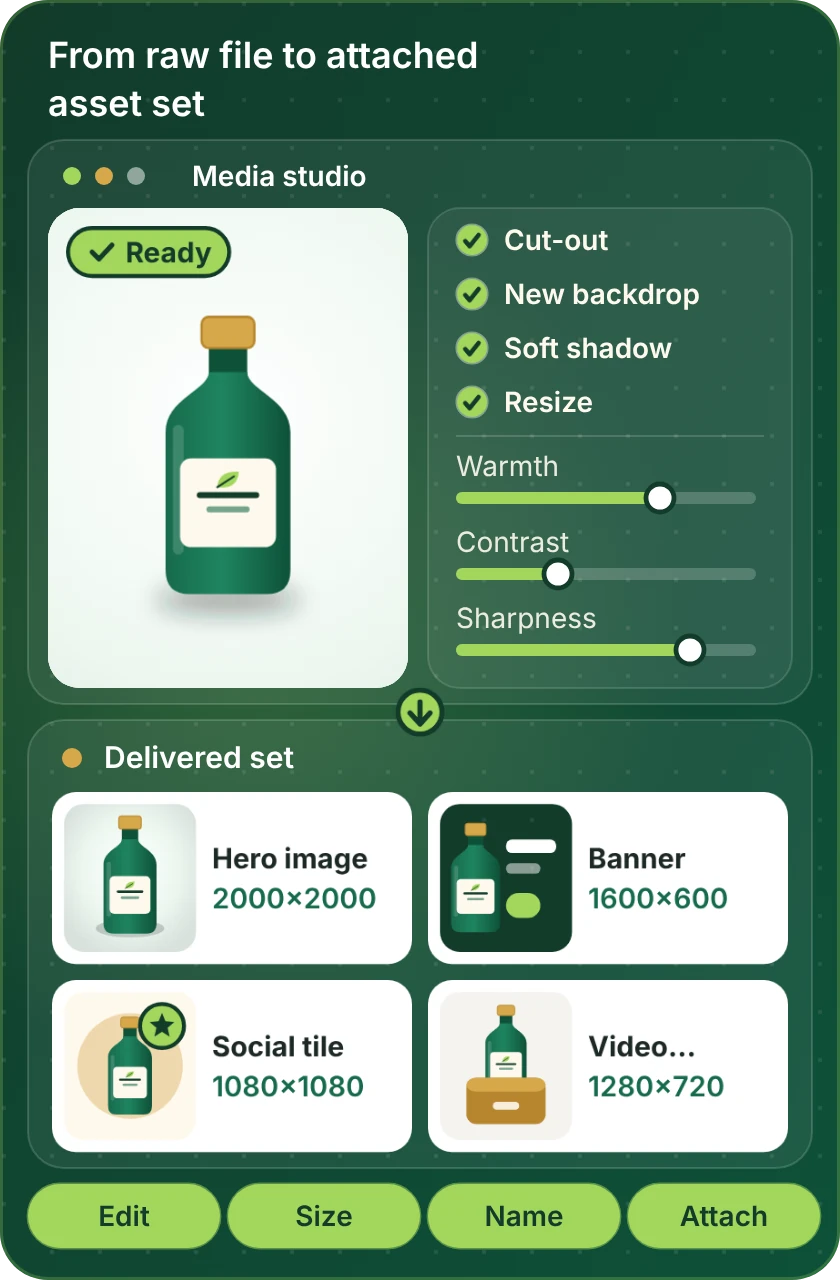
From raw file to product page
How a Raw Asset Becomes a Delivered Set on the Product
Every media project turns a raw file into a set of correctly sized, correctly named assets and attaches them to the right product. The studio panel shows the stages we automate and then check.
Compare your options
Which Shopify Media Route Fits Your Store?
Media tools reach Shopify in three ways. Read down the first column for your need and across for the route that handles it.
| What matters | Tool's own Shopify app | Tool plus automation | Custom API build |
|---|---|---|---|
| Graphics generated from product data | Sometimes | Yes | Yes, any template |
| Custom Shopify image optimization on upload | Apps exist | Yes | Yes, with your rules |
| Images renamed and attached to the right product | Rarely | Yes | Yes |
| Video hosted and shown without slowing pages | App dependent | Partly | Designed per theme |
| Customers uploading images with orders | Apps exist | Yes | Yes, to your storage |
| Sessions and recordings tied to orders | Rare | Yes | Yes |
| A media tool with no Shopify app | Not available | If the platform lists it | Yes, through its API |
| Typical fit for our packages | Setup and templates | Most single-tool builds | Larger or unusual builds |
Process and timeline
How a Shopify Media Integration Project Runs
A single image rule and a full video and graphics pipeline follow the same six steps. The volume of work changes, the route does not, and your live products are never touched during testing.
- 1
Choose the tool and package
Open the page for your design, video or meeting tool and choose a package. The price and the delivery time are shown first.
- 2
Choose how we get access
Offer a collaborator request, a Partner-account build that we transfer once finished, or a staff login that only has the permissions we need. In the media tool we use a user you create.
- 3
Write the asset rules
We list each asset type, its size, its name pattern, where it is stored and which product field it attaches to. You approve the rules first.
- 4
Build and run on sample products
The path is built and run on a few sample products in a draft state, so live products stay untouched while names, sizes and quality are tuned.
- 5
Test odd files and failures
We test very large files, odd formats, missing products and failed uploads and check what Shopify holds after each.
- 6
Go live and hand over
After approval the path runs on real products in stages. You receive a recorded walkthrough and notes on adding new templates.
Why Store Design Expert
Why Brands Hire Us for Shopify Media Integration
Uploading an image is easy. Brands hire us for the naming, sizing and attachment rules that keep thousands of files tidy and pages fast.
Shopify is the one platform we use
Since 2015 Shopify has been our only platform, and more than 450 stores have launched with us. Product, variant and media behaviour are familiar before your project starts.
Prices you can read first
Every media tool has a page with three packages and its price shown first. Plans are between you and the vendors.
Pages stay fast
We check what media adds to a page and set sizes and loading so launches do not slow the store.
Odd files tested
We test large, odd and missing files on purpose, because that is where media paths fail.
Files and accounts stay yours
Your assets, tools and store remain under your logins, with access we use removed at handover.
Rated 4.9+ by verified clients
Clients who were verified gave the 4.9+ average, and the reviews below are theirs, with comments about scope, communication and handover.
Testimonials
What Clients Say After Launch
Verified clients describe working with Store Design Expert on builds, integrations and fixes.
Verified
Store Design Expert delivered an outstanding website development experience! Their professionalism and attention to detail exceeded my expectations, and their proactive communication kept everything running smoothly. Truly impressed by their deep understanding and dedication.
WG
Warren G.United States
Verified
Very quick and detailed work! Store Design Expert does exactly what you want, in a very professional manner.
LF
Lena F.Germany
Verified
Store Design Expert did an outstanding job with top-notch professionalism on my website project. Everything was delivered quickly without compromising quality. I could not have asked for better!
JM
Jason M.United States
Verified
The website development work was nothing short of professional, with top-notch quality. Their exceptional level of cooperation made the collaboration seamless and enjoyable. Highly recommend working with Store Design Expert!
JC
Jeremy C.United States
Verified
Super great to work with, and super fair!
RO
Robert O.United States
Verified
The website development work was truly impressive. Their attention to detail and ability to exceed expectations made the project a success. Working with them was a breeze, thanks to quick responsiveness and a willingness to go above and beyond.
KD
Kevin D.United States
Verified
Store Design Expert was very knowledgeable about what I needed done to fix my Shopify store and how to improve the store layout. The project was completed very quickly, and I will definitely use them for support as my business grows.
ST
Samuel T.United States
Verified
Very satisfied with the work. Most importantly, Store Design Expert responded promptly to my questions and concerns. Thank you!
KB
Kyle B.United States
Verified
Outstanding work and outstanding customer service. Five stars! I will absolutely use Store Design Expert again for my next book.
KM
Katharine M.United States
FAQ
Shopify Media Integration FAQs
Direct answers on cost, tools, images and video.
How much does a Shopify media integration cost?
Packages start at $390 for a single media path and rise with the number of asset types, the tool and the rules involved. Every media tool page gives three packages and a delivery estimate before you pay. Media tool plans are billed by the vendors.
How to set up Shopify video on product pages?
Host the video on a platform such as YouTube or Vimeo, attach it to products and choose how it plays. We build and test that path so pages stay fast and videos stay on the right product.
What is a good video CMS platform integration with Shopify?
A video CMS platform integration with Shopify depends on whether you need public, private or paid video. The video cards above cover the main hosts, and we help you pick before building.
Can you build a Shopify video integration for tutorials I sell?
Yes. To sell video tutorials on Shopify, we connect the purchase to a gated video host so buyers get access and lose it on refund. The Uscreen and SproutVideo pages cover this.
Do you offer custom Shopify image optimization?
Yes. We set sizes, formats and compression rules and apply them as files are uploaded. We test on a sample collection first and keep your originals safe.
Which image optimizer Shopify app should I use?
Several apps do the job. We look at your catalogue size, theme and media sources, tell you plainly if an app is enough and connect a tool when you need a custom path.
Can I make Shopify allow customers to upload image files with an order?
Yes. You can let customers upload images with an order and have the files routed to your storage with the order number in the name. We test file types, sizes and abuse cases.
What is the right product image size Shopify themes expect?
Use one consistent size per image type and keep a larger master. We set rules for each type, resize on upload and test how images look on phones and desktop.
How to change product image on Shopify in bulk?
Bulk changes are done through an import, the API or a media tool, matched by product handle or SKU. We build the path, test it on sample products and keep a rollback.
How long does a media integration take?
A single design or image path usually takes 3 to 5 working days. Video, meeting and multi-asset pipelines take longer, up to 14 working days, depending on the package.
Do I give you my Shopify or media tool password?
No. A collaborator request, a restricted staff login or a Partner-account build with transfer are the three routes we use. In the media tool we use a user you create and remove at handover.
What if a media tool changes its connection later?
Vendors change connectors. Tools change their connections. Each build is documented so it can be adjusted, and repair or maintenance plans are available from the automation maintenance page.
Ready when you are
Get Your Shopify Media Integration Working
Open the page for your design, video or meeting tool, read what is included and see a fixed price before you commit. If your media comes from several tools, send a short quote request and we will scope them as one project.
- Fixed price shown first
- Tested on real products
- Your files and accounts stay yours