
Shopify stores designed and launched
Seal Subscriptions Shopify setup
Seal Subscriptions Shopify Setup That Charges the Right Customer Every Cycle
Seal Subscriptions Shopify setup looks finished the moment a rule is saved, yet the widget may be missing from the product form, the portal link may lead nowhere and a gateway may refuse to auto-charge. We configure the rules, widget, portal and billing mode, then buy, renew, pause and cancel real test subscriptions before launch. Fixed price from $420; choose a package below and watch the total update.
- Subscription rules built around your products and intervals
- Widget confirmed on every template it should appear on
- Customer portal reachable from the account area
- Test subscriptions bought, skipped, paused and cancelled
From$420
Delivery3 to 14 working days
Revisions2 rounds
Our track record
Over 450 Shopify Stores Launched Since 2015. Your Subscription Offer Gets the Same Rigor.
Recurring revenue punishes sloppy setup, because a mistake repeats on every renewal. Years of living inside Shopify themes and checkouts taught us where selling plans, theme code and payment settings collide, so we look for those collisions before a customer subscribes.
Average rating from verified clients
Building Shopify stores since
Secure checkout
Pay through a protected checkout and keep a full order record.
Two revision rounds
Included in every package, so the result matches what you pictured.
Backup before changes
We work on a duplicate of your theme, never on your live store.
Who this is for
Who Needs Seal Subscriptions Shopify Setup Help
Plenty of owners install the app and get a first subscription working. These are the situations in which they ask us to take over, or to check the work before real customers start paying.
You are a good fit if
- You sell products people reorder on a schedule
- You want one fixed price rather than hourly billing
- You can name who approves plan wording and discounts
- You will own the app account and the store
Brands launching a first subscription
You sell coffee, supplements, pet food or razors that people reorder, and want a subscribe-and-save option on the product page without breaking the normal one-time purchase path.
Stores switching from another subscription tool
You are leaving a costlier app or an old setup. We plan how existing subscribers move, which cannot be a silent swap, and build the new rules cleanly beside the old ones.
Owners whose widget will not appear
Rules exist, the app says active, yet product pages look unchanged. We trace whether it is the embed, a custom theme form or a template that was never given the block.
Membership and box sellers
You offer prepaid plans, a monthly box or a free trial and need intervals, discounts and delivery profiles that match what customers were promised on the page.
Stores on a heavily edited theme
A page builder or custom product form hides the add-to-cart markup the app looks for. We install the widget by hand where automatic placement fails and test it on mobile.
Agencies handing off client stores
You designed the store but would rather not become a billing specialist. We deliver a subscription layer with notes your client can follow after you leave.
Problems solved
What Goes Wrong After a Quick Seal Subscriptions App Install
The installer finishes in minutes. The faults show up days later, when a shopper cannot find the option or a card is declined on renewal. These are the six we fix most, with the remedy for each.
- The subscription widget never renders on the product form.
Seal places its widget by finding the form that holds the add-to-cart button. On themes where that structure differs, we add the documented target element inside the form and confirm it on every product template.
- Shoppers can still buy once, even though you meant subscription only.
Seal's own guidance is to disable one-time purchase per product in Shopify's purchase options. We apply it only to the products you choose and verify the cart behavior afterward.
- The gateway cannot auto-charge, so renewals turn into payment emails.
Auto-charging depends on the payment provider. We check which one you use, switch the charging mode accordingly and warn you plainly when a gateway will force manual invoices.
- Customers cannot find where to pause or cancel.
The portal needs a visible link in the account area and in subscription emails. We add the profile-page block, test the magic link and read each customer action as a subscriber would.
- Free or flat shipping for subscribers is calculated wrongly.
Delivery profiles can carry their own shipping cost, including zero. We assign them to the right rules so a subscriber is not charged shipping you promised to waive.
- Plan limits are reached sooner than expected, with no warning.
Limits count active subscriptions, not customers or rules. We explain what counts, note where your plan sits and tell you how to track it so growth never freezes new sign-ups.
What we can do
What We Configure Inside Seal Subscriptions for Your Store
The job divides into six pieces. Packages decide how many of them you receive, and each note below names an edge case that we handle so it does not surface after launch.
Subscription rules, intervals and discounts
A rule decides which products can be subscribed to, which intervals customers choose and what discount applies. We build one rule per product family, avoid overlaps that confuse the widget and write interval labels that sound natural, such as every four weeks.
Widget placement and manual installation
On Online Store 2.0 themes we add the subscription block to the product template. Where it still fails, we handle Seal manual installation by placing the target element inside the add-to-cart form, and repeat it for featured product sections on the home page.
Seal Subscriptions customer portal
We enable the portal, add its link to the account area, restyle colors and rewrite texts so customers can skip, pause, swap or cancel without writing to you. We also test magic links from the actual reminder emails.
Payment mode and renewal behavior
Some gateways charge automatically, others fall back to recurring invoices. We confirm yours, run a renewal on a test subscription and document what the customer sees if a card fails, so there are no surprises on the first billing date.
Delivery profiles and shipping cost
Subscribers often expect cheaper or free shipping. We create delivery profiles, attach them to the right rules and check totals in the cart, at checkout and on the order that gets created for each renewal.
Connected apps and the API
Seal lists integrations such as Klaviyo and Gorgias. We connect those you already use and test that subscription events reach them. Work that needs the Seal API, such as custom webhooks, is quoted separately before any code is written.
What is included
What Is Inside Your Seal Subscriptions Setup
Every deliverable falls into one of six streams. The package table further down shows how deep each stream goes at each price, so a larger package is easy to justify or skip.
Rules and plans
- Subscription rules created for the products you name
- Intervals, discounts and trial or prepaid options configured
- Subscription-only products set where you want them
- Rule names and widget labels written clearly
Widget and theme
- Seal app embed enabled in the live theme
- Subscription block added to the product template
- Manual target element installed when auto placement fails
- Mobile and desktop product pages checked
Customer portal
- Portal enabled and linked from the account area
- Portal colors and texts adjusted to your brand
- Skip, pause, swap and cancel actions tested
- Extra languages and custom CSS in the larger packages
Billing and shipping
- Auto-charging or recurring-invoice mode confirmed
- Delivery profiles attached to the right rules
- Test renewal observed from start to finish
- Second gateway tested in the largest package
Emails and integrations
- Subscription emails and reminders reviewed
- Klaviyo, Gorgias or similar connected on request
- Notification wording aligned with your tone
- Seal API work quoted separately if needed
Handover
- Test log of every subscription we created
- Recorded walkthrough of the app and portal
- Written notes on rules, limits and settings
- Two revision rounds after your review
Because the work is done for you, your part is to share access, confirm the products and intervals and approve the wording that customers will read.
Follow the order
How a Subscriber Moves From Product Page to Portal
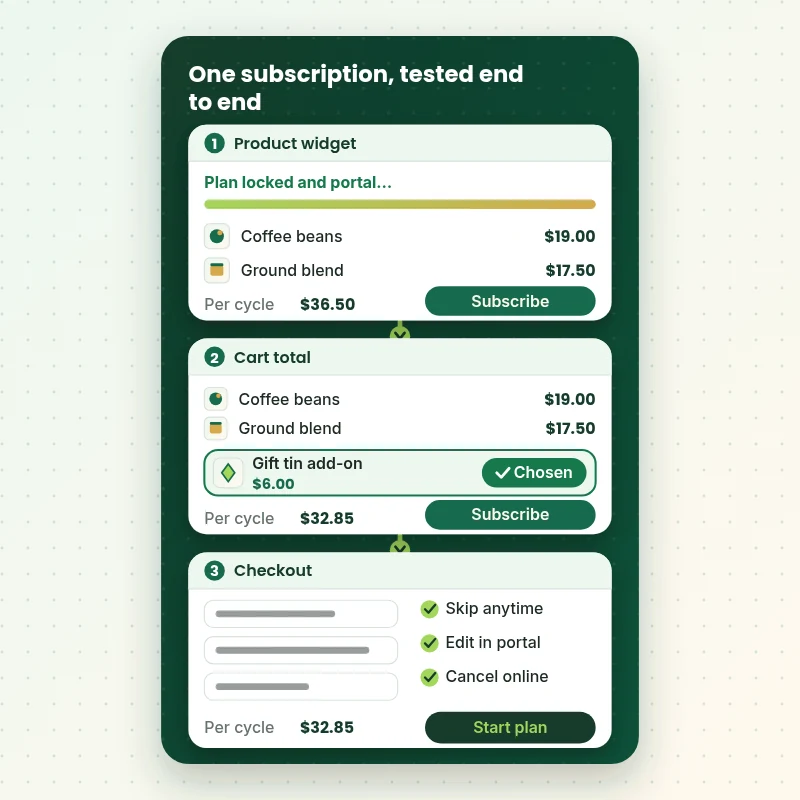
This walkthrough shows the path we test end to end. A shopper chooses a plan on the product page, sees the subscription total in the cart, pays at checkout and later opens the portal to skip or change it. If any step breaks, the subscription offer fails, so each one is checked by hand.
Portfolio
Shopify Storefront Designs by Niche
Seal Subscriptions App Setup for Shopify gets the same attention to layout, spacing and detail as each design below, every one built around a single catalog and one kind of buyer.

Furniture store design
Furniture
Food store design
Food
School supplies store design
School supplies
Digital course store design
Digital course
Fitness technology store design
Fitness technology
Skincare store design
SkincareProcess and timeline
From Store Access to First Renewal: How Seal Subscriptions Shopify Setup Runs
Six stages, and nothing customer-facing changes until you have seen it. The options you choose in the calculator decide how long each stage takes.
- 1
Brief and audit
We read what you sell, how often it should ship and what discount you can afford. If Seal is already installed, we look at the rules, the plan tier and which themes carry the embed.
- 2
Rule design
Products, intervals and discounts are written down in plain words before anything is clicked. You approve the plan names and savings, because customers will read them on the page.
- 3
Widget and theme
The embed and block go into a duplicate theme first. Where the widget cannot find your form, we place the target element by hand and check each product template.
- 4
Billing and portal
We confirm the payment mode, attach delivery profiles, link the portal to the account area and style it. A test renewal shows how an actual charge behaves.
- 5
Test
We buy subscriptions on phone and desktop, then skip, pause, change and cancel them. Every action and every email is logged as passed or fixed.
- 6
Launch and handover
After your approval we publish the theme, record a walkthrough and leave written notes on rules, limits and what to watch during the first billing cycles.
Compare your options
DIY Install, Marketplace Gig, Agency Retainer or Our Seal Setup?
There are four common ways to get Seal running. This comparison covers the checks that decide whether subscribers can sign up, get charged and manage their plan.
| What matters | Install it yourself | Marketplace gig | Agency retainer | Store Design Expert |
|---|---|---|---|---|
| Widget confirmed on every template | Often one page | Varies | Yes | Yes |
| Manual placement when needed | Trial and error | Rarely | Yes | Yes |
| Portal linked in the account area | Often missed | Rarely | Yes | Yes |
| Payment mode checked against gateway | Assumed | Rarely | Yes | Yes |
| Cancel and skip tested end to end | You test | Rarely | Yes | Yes |
| Price known before work begins | Yes | Yes | Quote only | Yes |
| Written test log and handover | No | Rarely | Extra cost | Yes |
| Account owned by you | Yes | Varies | Varies | Yes |
Inside every project
What Protects Your Customers and Your Recurring Revenue
Subscription mistakes recur on every billing date, so we work with more caution than on a normal store change. These six practices come with every package and explain why a fixed price can still be a safe one.
Theme changes happen in a copy
The widget and portal are installed in a duplicate theme after a backup. Shoppers keep buying on the live theme until you approve, and the original stays available for a quick rollback.
Test subscriptions, never real customers
We use test orders and your own email addresses, then cancel them. No genuine customer is enrolled, charged or emailed while we are checking that a flow behaves.
Access stays under your control
You remain the Shopify owner and hold the Seal account. We ask only for the permissions the work needs, and you can remove our access whenever you like without losing anything.
Limits and gateway rules are explained
Plan limits and charging modes affect your budget and your customers. We write down what counts toward a limit and what a failed card does, so decisions are made with facts.
A written definition of done
A rule is finished when the widget appears, the price is right in the cart, the order is created and the portal action works. The test log shows each result.
Fixed scope and two revision rounds
You see the price before paying. Changes to wording, intervals or portal styling within scope go through two structured revision rounds, without hourly top-ups.
Interactive price calculator
Build Your Seal Subscriptions Setup Package
Pick a package, then answer three questions about your product range, portal and payment setup. Your fixed price and the delivery window move with every choice you make.
Request a custom quote
Migrating live subscribers from another app, custom Seal API or webhook work, Shopify Plus checkout changes and multi-store programs are scoped separately with a written fixed quote.
Request a QuoteChanged your mind? Choose Plan and Widget, Portal and Billing or Subscription Program above to return to the instant calculator.
Packages and comparison
Seal Subscriptions App Setup Package Comparison
This table lists each package line by line. When you set a hired job beside a cheap marketplace listing, count how many of these items the listing actually names.
| What is included | Plan and Widget $420 | Portal and Billing $790Recommended | Subscription Program $1,390 |
|---|---|---|---|
| Seal app reviewed and rules configured | Included | Included | Included |
| App embed and product block enabled | Included | Included | Included |
| Manual widget placement when needed | Included | Included | Included |
| One test subscription purchased | Included | Included | Included |
| Test log and recorded handover | Included | Included | Included |
| Customer portal linked and restyled | Not included | Included | Included |
| Delivery profiles and shipping rules | Not included | Included | Included |
| Auto-charge or invoice mode confirmed | Not included | Included | Included |
| Skip, pause and cancel tested | Not included | Included | Included |
| Prepaid, trial or box options | Not included | Not included | Included |
| Klaviyo or Gorgias connected | Not included | Not included | Included |
| Test renewal observed end to end | Not included | Not included | Included |
| 14 days of fixes | Not included | Not included | Included |
| Typical delivery | 3 to 5 days | 6 to 9 days | 9 to 14 days |
Your Seal Subscriptions App Setup for Shopify price and delivery estimate come from the calculator above, so there is no surprise at checkout.
Why Store Design Expert
Why Store Owners Hire Us for Seal Subscriptions Setup
You could follow Seal's own guides in an afternoon. People hire us because the quiet details decide whether the offer earns money, and those details sit between the app, the theme and checkout.
Shopify Seal Subscriptions work, Shopify-native
We spend our days in themes, checkouts and apps, so we know whether a problem lives in the widget, the form markup or a payment setting. That shortens every diagnosis.
Rated 4.9+ by verified clients
The reviews on this page come from verified Store Design Expert clients, so you can read how earlier projects went before you spend anything.
A price you can plan around
Package, option and extra prices appear before checkout. Seal's own monthly plan is separate and billed to you directly by the app, so check its current pricing page.
Direct contact with the builder
You message the person who has your store open. Questions about an interval, a discount or a strange renewal get answered by someone who can look at the settings.
Notes another team can follow
The handover explains how rules, widget and portal are wired, so a colleague or a future agency can maintain the setup without guessing.
Experience since 2015
More than 450 Shopify stores launched means we have met most theme quirks and app conflicts that could hide a subscription widget or distort a cart.
What we need to get started
What We Need From You to Begin Your Seal Setup
You need a way into Shopify, a Seal account or permission for us to create one, and a short brief about what ships and how often. Pick the access route you are comfortable with.
Approve our collaborator request
Send the store address of your live shop and accept the collaborator request we raise. You stay the owner, we see only what the role allows, and you can withdraw us at any moment.
No store yet? We start in our account
We can build the store inside our Shopify Partner account, install and configure Seal there and transfer ownership afterwards. You choose a Shopify plan only when it is handed over.
Or share staff login details
A staff login also works if that is simpler. We still recommend collaborator access, since it can be revoked with one click and leaves no password lying around.
Your products and intervals
List the products to be subscribed to, how often each can ship, the discount you can afford and whether customers may still buy once. A spreadsheet or plain email is enough.
Payment provider details
Tell us which gateway handles your checkout so we can confirm whether renewals charge automatically or fall back to invoice mode. We never need card numbers.
Wording and an approver
Name who approves plan names, savings text and emails. Share any promises already made to customers, such as free shipping for subscribers, so the setup honors them.
Your Shopify owner password and payment card details never come to us. Theme changes are made in a duplicate after a backup, and we write down every setting we touched.
Testimonials
What Store Owners Say Before You Order Seal Subscriptions App Setup for Shopify
Verified Store Design Expert clients describe the brief, the build and the handover in their own words.
Verified
The website development work was truly impressive. Their attention to detail and ability to exceed expectations made the project a success. Working with them was a breeze, thanks to quick responsiveness and a willingness to go above and beyond.
KD
Kevin D.United States
Verified
Super great to work with, and super fair!
RO
Robert O.United States
Verified
Store Design Expert was very knowledgeable about what I needed done to fix my Shopify store and how to improve the store layout. The project was completed very quickly, and I will definitely use them for support as my business grows.
ST
Samuel T.United States
Verified
Very satisfied with the work. Most importantly, Store Design Expert responded promptly to my questions and concerns. Thank you!
KB
Kyle B.United States
Verified
Outstanding work and outstanding customer service. Five stars! I will absolutely use Store Design Expert again for my next book.
KM
Katharine M.United States
Verified
Store Design Expert was great! They delivered exactly what I asked for and even offered helpful extra suggestions. Highly recommended.
PW
Paul W.United States
Verified
I request Store Design Expert every time I have a project. They are professional and give real attention to detail, which makes the work stand out.
LK
Laura K.United States
Verified
They kept communicating until the problem was fully resolved, and the result was great.
HJ
Henry J.United States
Verified
Super helpful and patient. I am new to ecommerce and Store Design Expert talked me through the whole process and even fixed my payment bridging for me!
LR
Lois R.United Kingdom
Related searches
Related Searches for Seal Subscriptions App Setup for Shopify
Owners reach this page from different searches. Here is how the common ones relate to Seal Subscriptions App Setup for Shopify.
“seal subscriptions app setup”, “seal subscriptions app”, “shopify seal subscriptions” or “seal subscriptions customer portal” all point to the same job, which Seal Subscriptions App Setup for Shopify covers from start to finish.
People who look up “seal subscriptions documentation”, “seal subscriptions api”, “seal subscription pricing” or “seal subscriptions vs recharge” usually want Seal Subscriptions App Setup for Shopify; the calculator above shows the price and delivery estimate before you commit.
If you searched for “seal subscriptions remove one time purchase”, “how to set up subscriptions on shopify”, “seal subscriptions manual installation” or “seal subscriptions widget not showing”, Seal Subscriptions App Setup for Shopify is the work that answers it.
Owners also search for “best shopify subscription app”.
FAQ
Seal Subscriptions Setup FAQs
Answers on cost, timing, access, the widget, the portal and how Seal compares with other subscription tools.
How much does Seal Subscriptions Shopify setup cost with you?
Plan and Widget costs $420, Portal and Billing $790 and Subscription Program $1,390. Product range, portal depth, payment mode and extras change the total, and the calculator shows it before you pay. Most projects land between about $420 and $2,000, with delivery from 3 to roughly 18 working days.
How long does Seal Subscriptions app setup take?
Seal setups take 3 to 5 working days at the smallest package, 6 to 9 in the middle and 9 to 14 at the largest. Theme complexity and your approval time are the usual variables. The Sooner and Fastest speed options compress the schedule if you have a launch date to hit.
How to set up subscriptions on Shopify using Seal without breaking my theme?
Install the app, create a rule, switch on the widget and enable its app embed in the theme editor. We follow that order inside a duplicate theme, so the live store is never the place we experiment. If the widget hides, we add the documented target element by hand.
Why is my Seal subscriptions widget not showing?
Common causes are a rule that does not include the product, an app embed that is off, a theme without the product block or a form the app cannot detect. We check them in that order and install the widget manually inside the add-to-cart form when automatic placement fails.
Do you need my Shopify password for Seal Subscriptions App Setup for Shopify?
No. We prefer a collaborator request for Seal too, so you remain the owner and can revoke access at once. No store yet? We build the Seal setup in our Partner account and hand it to you. Staff login details are only a last resort for Seal work, and we never need the owner password.
Can you do a Seal subscriptions manual installation on a custom theme?
Yes. For older or heavily edited themes, Seal manual installation means adding a target element inside the product form that holds the add-to-cart button. We do it in a duplicate theme, repeat it for featured product sections and test variant switching, since some themes rebuild the form.
Can you remove the one-time purchase option?
Yes. For Seal subscriptions remove one time purchase is handled per product by turning on the subscription-only setting in Shopify's purchase options. We apply it only where you want it and check the product page, cart and checkout, so nobody is left unable to buy.
How does the Seal Subscriptions customer portal work?
Customers reach the Seal Subscriptions customer portal through magic links in subscription emails or by signing in to their account. It lets them skip, pause, change quantity, edit addresses or cancel. We add the account-area link, adjust colors and texts and test every action.
Does Seal charge automatically for renewals?
Only with supported payment providers; other gateways use recurring invoice mode, where customers receive an email to pay. Seal also notes that recurring invoices cannot be turned into auto-charging, so customers must place a new order. We confirm which mode applies to you before building.
Is there documentation for Seal, and why hire someone?
Seal publishes helpful guides, and Seal Subscriptions documentation covers the basics well. What it cannot do is look at your theme, your gateway and your promises together. We turn the guides into a tested setup and leave you notes written for your store.
Can you use the Seal Subscriptions API for custom work?
Seal Subscriptions API work such as custom webhooks or data syncs is outside our packages and is quoted separately with a written scope. Most stores do not need it, because the app's own rules, portal and integrations cover the usual cases. We tell you honestly which side you fall on.
How does Seal compare in Seal Subscriptions vs Recharge?
Seal Subscriptions vs Recharge usually turns on cost model, checkout approach and how much customization you need. Seal uses flat plans scaled by active subscriptions and suits many small and mid-sized stores. We can build on either, and we say plainly which suits your volume.
What is the best Shopify subscription app for my store?
The best Shopify subscription app depends on your gateway, theme, volume and budget, not on a ranking list. Seal fits many stores that want simple rules and a portal. We will tell you if your needs point elsewhere, and we do not receive commissions from any app.
What does Seal subscription pricing look like each month?
Seal subscription pricing is a flat monthly plan that scales with the number of active subscriptions, and plans change over time, so check the app's current pricing page before deciding. Our fee covers setup only, and we can tell you which tier your launch plan suggests.
Ready when you are
Order Your Seal Subscriptions Shopify Setup Today
Choose a package, watch the fixed price settle and book a Seal subscriptions Shopify setup from a team that has launched 450+ Shopify stores. Rules, widget, portal and billing are tested with real orders before a single customer subscribes.
Secure checkout · Two revision rounds · Seal test log and walkthrough included