
Shopify stores designed and launched
Shopify homepage task
Customize Shopify Website Layout: Put the Right Section in the Right Place
Looking to customize Shopify website layout without breaking anything? We reorder your homepage sections in a duplicate theme, tidy the spacing and check the result on real phones. From $39, fixed price.
- Sections reordered into a clear flow
- Unused sections hidden or removed
- Mobile-only rules where useful
- Spacing and backgrounds evened out
From$39
Delivery1 to 3 working days
Revisions2 rounds
Our track record
Over 450 Stores Launched Since 2015. Here Is What That Means for Your Homepage Layout.
Our team has launched more than 450 Shopify stores and holds a 4.9+ rating from verified clients. That experience goes into a task as small as a homepage layout, which is why the scope and price are fixed up front.
Average rating from verified clients
Building Shopify stores since
Secure checkout
Pay through a protected checkout and keep a full order record.
Two revision rounds
Included in every package, so the result matches what you pictured.
Backup before changes
We work on a duplicate of your theme, never on your live store.
Problem and result
Customize Shopify Website Layout: A Homepage That Leads Shoppers Somewhere
Many homepages grow by accident: a banner here, a gallery there, a block nobody remembers adding. A deliberate order puts the offer first, proof in the middle and the next step at the end, which makes the same sections work much harder for the visitor.
Sections in the wrong order, or too many
Proof appears before the visitor knows what you sell, a sign-up sits above the products and half the page is made of blocks you stopped using. Phones scroll forever past things nobody needs.
A page with a clear order
Sections follow a logical flow from offer to products to proof to action. Unused blocks are gone, spacing is even and mobile visitors see a shorter page without losing anything important.
What is included
What Your Homepage Layout Review Includes
When you ask to customize your Shopify website layout, you get a reviewed order, a clean-up of unused sections and a tested result, with a written note of what changed and why.
Implementation checklist
- Review of every homepage section and what it is doing for the page
- Sections dragged into a clear order from offer to products to proof to action
- Unused, duplicate or empty sections hidden or removed
- Spacing, background colours and dividers evened out so the page has rhythm
- Sections hidden on mobile or desktop where it helps, using theme settings or small CSS
- Page checked on phones for length and scroll depth
- Anchor links between sections if you want a short in-page menu
- A written note of the new order, with the reasoning for each move
This task rearranges and tidies sections that already exist. If a section you want does not exist yet, such as a collection list or testimonial carousel, it is a separate task, and we can add it alongside the reorder. We do not promise any change in sales from a new order.
See how it works
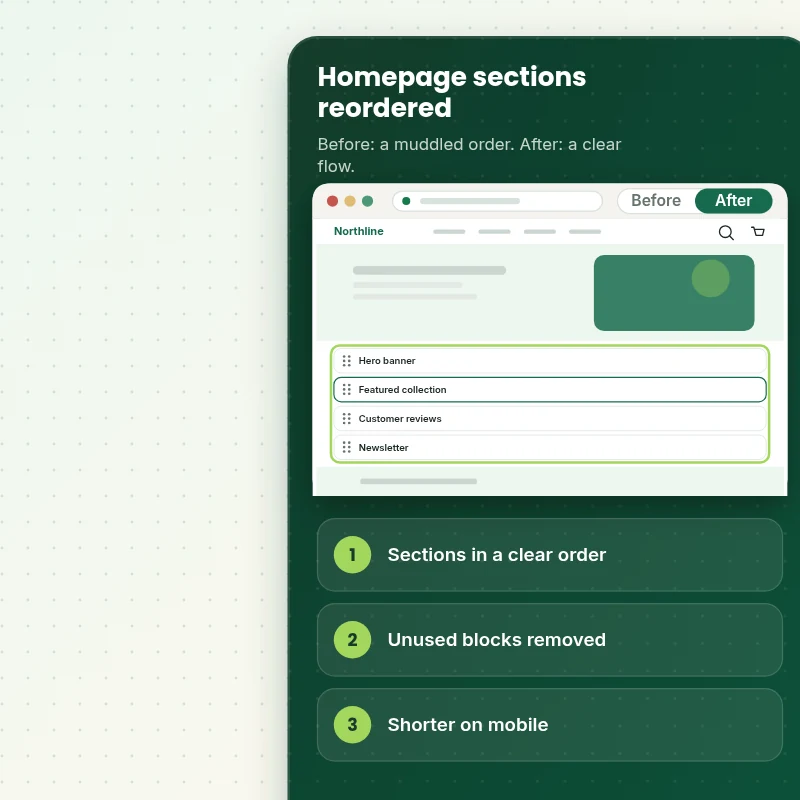
From a Muddled Order to a Clear Page Flow
Follow the build. Your homepage is assembled section by section in a duplicate theme, and each section is placed where it does most for the visitor, with the order checked on phones before anything goes live.
Scope boundaries
Exactly What Is and Is Not Covered for Your Homepage Layout
A fixed price only works with a fixed scope, so this is what your homepage layout package covers, what it leaves out and when we would rather quote it separately.
Included
- Reordering your live homepage sections
- Removing or hiding unused sections
- Spacing and mobile checks
- Two revision rounds and a written note
Not included
- Designing brand new sections
- Writing copy for the page
- Rebuilding the theme
- Changes to the part of checkout that Shopify controls
Access we need
- Collaborator access to your Shopify store
- Your goal for the homepage
- Sections that must stay put
Quote triggers
- Several templates to reorder
- A theme older than Online Store 2.0
- A theme that page builder apps have changed heavily
Typical turnaround
- 1 to 2 working days for most homepage layout jobs
- Faster options in the calculator
- Timing confirmed before work starts
After launch
- Two revision rounds before go-live
- A short handover note for your homepage layout
- Questions answered; anything bigger than Rearrange / Reorder Homepage Sections quoted as a separate task
Compare your options
Customize Shopify Website Layout With the Theme Editor, an App or a Freelancer?
Four routes to a homepage layout are compared below, so you can see what each one includes and what it leaves for you to sort out.
| What matters | DIY or app | Freelance gig | General agency | Store Design Expert |
|---|---|---|---|---|
| Written note of the new order | No | No | Sometimes | Yes |
| Unused sections cleaned out | You do it | Sometimes | Sometimes | Yes |
| Mobile rules set and tested | Limited | Sometimes | Varies | Yes |
| Spacing and rhythm evened out | No | Sometimes | Varies | Yes |
| Price known before work begins | Free but time-costly | Varies | Quote only | Yes |
| Theme backup before any change | No | Rarely | Usually | Yes |
| Two revision rounds included | No | Varies | Extra cost | Yes |
| Handover note for what changed | No | Rarely | Sometimes | Yes |
Price calculator
Price Your Homepage Layout
Pick a package, adjust the options for your homepage layout and set your speed. The fixed price and delivery estimate update with every click, with no hidden fees.
Request a custom quote
Several templates, themes older than Online Store 2.0 and themes heavily modified by page builder apps are scoped separately and quoted at a fixed price.
Request a QuoteChanged your mind? Choose Arrange Basic, Arrange Standard or Arrange Plus above to return to the instant calculator.
How it works
How We Handle Your Homepage Layout, Step by Step
Your homepage layout moves through six stages, from the order to the written handover, with testing built in before launch.
- 1
Purchase
Choose your package and options in the calculator and check out securely, which locks the scope and the price of the homepage layout.
- 2
Access
Give us collaborator access and answer a few questions, and your store stays yours with no owner password needed for the homepage layout.
- 3
Build in a duplicate theme
Every change for the homepage layout goes into a safe theme copy before anything is considered for the live store.
- 4
QA
Nothing is shown to you until the homepage layout passes our written checks on the devices your shoppers use.
- 5
Handover
On your go-ahead the homepage layout is published, and you get a short document explaining where everything lives.
- 6
Support
We stay available after the homepage layout goes live, and anything beyond the original scope is quoted before work starts.
Compatibility and QA
Homepage Layout Checks and Acceptance Criteria
We check the homepage layout against a written list on phones, tablets and desktops, keep a backup of your theme throughout and treat the criteria below as the definition of done.
What we test
- OrderSections follow the order we agreed, with nothing left orphaned or duplicated.
- SpacingGaps and background colours are even from top to bottom.
- MobileHidden sections stay hidden on phones and visible on desktop, as set.
- DevicesWe open the homepage layout on real iPhones, Android phones, a tablet and a desktop browser, including the narrowest 320 pixel width.
- BrowsersUp-to-date Chrome, Safari, Firefox and Edge.
- SpeedThe total page weight is checked so removing sections has helped, not hurt.
Acceptance criteria
- Sections appear in the order you approved
- Unused sections are removed or hidden
- Spacing is even on every screen
- Mobile rules work as set
- You have a written note of the new order
What we need to get started
What We Need to Get Rearrange / Reorder Homepage Sections Started
Start by choosing an access route, then supply the details below for the homepage layout, while the build itself stays in a copy of your theme.
Collaborator access
The simplest route for the homepage layout: send the store URL and accept our collaborator request, so no password changes hands and access ends when you say so.
No store yet? We build it first
With no store yet, we set one up in our Partner account, build the homepage layout there and transfer ownership to you, so the only thing left for you is choosing a plan.
Prefer to share a login?
You can send staff login details for the homepage layout instead, though we recommend collaborator access because it is easier to revoke.
Your goal
Tell us what the homepage is for, for example sales, sign-ups or bookings, so the order supports it.
Fixed sections
Tell us any section that must stay where it is, such as a legal banner or a campaign block.
Access
Collaborator access lets us work in a duplicate of your theme without touching the live page.
If the access options for the homepage layout feel unclear, ask in the short form after checkout and we will walk you through the right one.
Testimonials
What Store Owners Say Before You Order Rearrange / Reorder Homepage Sections
Verified feedback from clients who trusted us with their Shopify stores and quick tasks alike.
Verified
The website development work was truly impressive. Their attention to detail and ability to exceed expectations made the project a success. Working with them was a breeze, thanks to quick responsiveness and a willingness to go above and beyond.
KD
Kevin D.United States
Verified
Super great to work with, and super fair!
RO
Robert O.United States
Verified
Store Design Expert was very knowledgeable about what I needed done to fix my Shopify store and how to improve the store layout. The project was completed very quickly, and I will definitely use them for support as my business grows.
ST
Samuel T.United States
Verified
Very satisfied with the work. Most importantly, Store Design Expert responded promptly to my questions and concerns. Thank you!
KB
Kyle B.United States
Verified
Outstanding work and outstanding customer service. Five stars! I will absolutely use Store Design Expert again for my next book.
KM
Katharine M.United States
Verified
Store Design Expert was great! They delivered exactly what I asked for and even offered helpful extra suggestions. Highly recommended.
PW
Paul W.United States
Verified
I request Store Design Expert every time I have a project. They are professional and give real attention to detail, which makes the work stand out.
LK
Laura K.United States
Verified
They kept communicating until the problem was fully resolved, and the result was great.
HJ
Henry J.United States
Verified
Super helpful and patient. I am new to ecommerce and Store Design Expert talked me through the whole process and even fixed my payment bridging for me!
LR
Lois R.United Kingdom
Related searches
Searches That Bring Owners to Rearrange / Reorder Homepage Sections
The searches below are the ones that lead people to Rearrange / Reorder Homepage Sections.
People who look up “rearrange reorder homepage sections”, “how to change the layout on shopify” or “customize shopify with sections” usually want Rearrange / Reorder Homepage Sections; the calculator above shows the price and delivery estimate before you commit.
“shopify section website size”: owners type these when they need Rearrange / Reorder Homepage Sections, and the packages above are priced for that job.
Owners also search for “shopify hide section on mobile”, “shopify add custom section tutorial” or “shopify add custom section code”.
FAQ
Customize Shopify Website Layout Questions
Straight answers about cost, scope, timing, apps and what we need from you for your homepage layout.
Can you help me customize Shopify website layout, and what does it cost?
Yes. Packages start at $39. The calculator adds options such as spacing, anchor links, a written note and a speed check, and shows your exact price and delivery estimate before checkout.
What is the turnaround for the homepage layout?
A typical homepage layout is finished in 1 to 3 working days after we receive access, and the calculator shows faster delivery options for tighter deadlines.
Will reordering change my sales?
We cannot promise a result. A clear order often helps visitors find what they need, and we explain our reasoning in the written note so you can judge for yourself.
Is Rearrange / Reorder Homepage Sections safe for my live store?
Yes. The homepage layout is made in a copy of your theme, tested on devices and only then published, and the untouched original remains available if you ever want to roll back.
What do you need from me for Rearrange / Reorder Homepage Sections?
Collaborator access to your store and your goal for the homepage. With no store yet, we create one in our Partner account, complete the homepage layout and transfer ownership to you at the end.
Which Rearrange / Reorder Homepage Sections package should I choose?
You can choose between Arrange Basic at $39 (1 working day), Arrange Standard at $69 (1 to 2 working days) and Arrange Plus at $119 (2 to 3 working days) for Rearrange / Reorder Homepage Sections.
What is in the Arrange Basic package of Rearrange / Reorder Homepage Sections?
Your homepage sections reordered into a sensible flow, with unused sections removed and spacing evened out. It includes: Sections reordered in a clear flow; Unused sections hidden or removed; Spacing and backgrounds evened out; Desktop and mobile checked; Sections hidden on mobile where useful. Arrange Basic costs $39 and takes 1 working day.
What does the Rearrange / Reorder Homepage Sections calculator ask me?
Beyond the package, Rearrange / Reorder Homepage Sections needs 3 decisions from you: how much needs reordering (Up to eight sections, Up to fifteen sections, More than fifteen sections); any mobile rules (Same sections on every screen, Hide some sections on mobile); how soon do you need it live (Standard, Sooner, Fastest).
Which extras can I add to Rearrange / Reorder Homepage Sections?
Optional extras for Rearrange / Reorder Homepage Sections include Spacing and background rhythm (+$15), In-page anchor menu (+$15), Written note with reasons (+$10), Speed check of the final page (+$15) and Add one missing section (+$40).
Ready when you are
Customize Shopify Website Layout: Give the Page a Clear Beginning, Middle and End
Pick your package, see the exact price and delivery estimate and get a homepage that flows from offer to proof to action on every device. If you need several templates reordered, request a quote and we will scope it with you.
- Fixed price
- Two revision rounds
- Backup before changes