
Shopify stores designed and launched
Weights, units and shipping fields that make rates add up
How to Change Product Weight Shopify: Rates That Match the Parcel on the Doorstep
Learning how to change product weight Shopify for one product is easy; getting it right for hundreds is not. We enter weights and units, set customs fields and profiles and test real baskets through your rates. From $170, fixed price.
- Weights and units entered per variant
- Customs fields set where you ship abroad
- Product-specific shipping profiles
- Test baskets run through your rates
From$170
Delivery2 to 9 working days
Revisions2 rounds
Our track record
450+ Shopify Stores Built Since 2015. Here Is What That Means for Weight and Shipping Data.
Shipping charges are only as good as the weights behind them. We enter them carefully and test real baskets, so customers see sensible prices and you are not caught by a heavy parcel.
Average rating from verified clients
Building Shopify stores since
Secure checkout
Pay through a protected checkout and keep a full order record.
Two revision rounds
Included in every package, so the result matches what you pictured.
Backup before changes
We work on a duplicate of your theme, never on your live store.
Who this is for
How to Change Product Weight Shopify: Who We Work For
Shipping data jobs start from different problems. Here are the six situations that bring owners to product weight & shipping info setup.
You are a good fit if
- You ship physical products
- You want a fixed price and a written scope for Product Weight & Shipping Info Setup
- You can share weights or supplier specs
- You own the store and decide the shipping rules
Stores with surprising shipping charges
Weights are missing or wrong.
Sellers of heavy or bulky items
Furniture and bulk goods need their own rates.
Brands shipping abroad
Customs fields are blank.
Owners offering free shipping on some items
Rules apply to the wrong products.
Catalogs with mixed unit styles
Grams, kilograms and ounces sit together.
Founders short on time
You would rather hand over the specs and review the tests.
Problems solved
Why Shipping Rates Go Wrong at the Data Level
Most surprising shipping charges begin as missing data. These are the six problems owners raise most often.
- Weights are blank or zero.
Rates calculate from nothing.
- Units are mixed.
A 2 kg item entered as 2 g.
- Customs fields are empty.
International parcels are delayed or held.
- One rate for everything.
A light accessory pays the same as a heavy item.
- Free-shipping rules misfire.
The wrong products qualify.
- Handling is forgotten.
Packing costs are never recovered.
What we can do
How to Change Product Weight Shopify: What the Work Covers
Six jobs make up the set-up. Your package decides how far each one goes for your products.
Weight and unit entry
Weights are entered per variant in one unit, from your specs or supplier data.
Shipping flags
Requires-shipping is checked so digital items do not ask for an address.
Customs fields
Country of origin and HS codes are added where you ship abroad.
Shipping profiles
Products with different rates or origins are grouped into profiles.
Free-shipping rules
Conditions are set so only the intended products qualify.
Basket tests
Real baskets are run through the rates and compared with expectations.
What is included
What Is Inside Your Weight and Shipping Data Package
Everything in your Product Weight & Shipping Info Setup order falls into one of six groups. The comparison table below shows how far each group goes by package for weight and shipping data.
Weights
- Weight per variant
- One unit across the catalog
- Packaging allowance rule
- Outlier list
Flags
- Requires-shipping check
- Digital item check
- Gift card exclusion
- Pre-order note
Customs
- Country of origin
- HS codes if supplied
- Declared value check
- Restricted-item list
Profiles
- Profile per product group
- Origin per profile
- Rate per profile
- Exclusions
Rules
- Free-shipping condition
- Handling fee rule
- Minimum and maximum order checks
- Cart message wording
Hand-over
- Weight audit file
- Basket test record
- Written notes
- Recorded walkthrough
You bring the products and brand assets, and you approve each step. We handle the weight and shipping data work and the checks.
Shipping data checklist
How Shipping Data Is Checked Before Rates Go Live
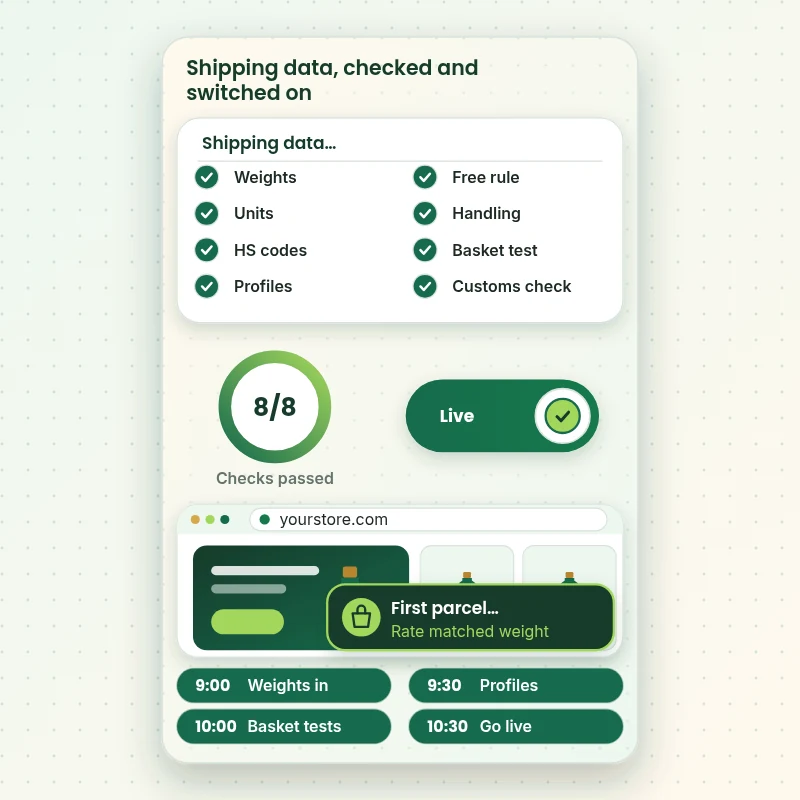
The walkthrough shows the checklist a shipping set-up passes: weights, units, customs, profiles and finally real baskets run through the rates. Each tick is something we have tested, not assumed.
Portfolio
Store Design Styles We Build
A look at store designs across fashion, home, beauty, pets and gifts, to show the standard of layout and finish behind Product Weight & Shipping Info Setup.

Fine jewelry and watches store design
Fine jewelry and watches
Pet store design
Pet
Jewelry store design
Jewelry
Electronics store design
Electronics
Interior design store design
Interior design
Craft creator store design
Craft creatorProcess and timeline
How Your Weight and Shipping Data Is Delivered, Start to Finish
Six clear steps. Nothing goes live without your approval, and your calculator choices set how long each one runs for the weight and shipping data.
- 1
Brief and asset review
You describe what good weight and shipping data looks like for your store and customers. We write the plan down.
- 2
Choose how we get access
A collaborator request is enough; working in our Partner account and then transferring it works too. We never ask for your password during the weight and shipping data job.
- 3
Gather weights and review your rates
We collect product weights, read your current shipping rates and profiles and agree which products should be grouped and how.
- 4
Enter data and test real baskets
We enter weights, units and customs fields, set profiles and rules, then run typical baskets through checkout and compare each rate with what you expect.
- 5
Check against your brief and your store
Every weight and shipping data item is compared with the brief, and anything that lands in your store is checked across devices. Anything that is off is corrected before you see it.
- 6
Deliver and hand over
We hand over the weight and shipping data after sign-off with files and written notes. Revision rounds come with the package, with no lock-in.
Compare your options
Free tool alone, Gig marketplace, Generalist studio or Our Weight and Shipping Data Service?
Four usual ways to set shipping data. This comparison shows who enters, groups and tests it.
| What matters | Free tool alone | Gig marketplace | Generalist studio | Store Design Expert |
|---|---|---|---|---|
| Weights in one unit for every variant | Mixed units | Sometimes | Sometimes | Yes |
| Customs fields where you ship abroad | No | Rarely | Extra cost | Yes |
| Profiles for different product groups | One rate | Sometimes | Yes | Yes |
| Baskets tested through checkout | No | Rarely | Sometimes | Yes |
| Price known before work begins | Cheap but open-ended | Yes | Quote only | Yes |
| Shopify store and checkout expertise | Learning | Varies | General | Yes |
| Two structured revision rounds | No | Varies | Extra cost | Yes |
| Written notes and source files at handover | No | Rarely | Sometimes | Yes |
Inside every project
What Protects Your Store and Your Budget During Product Weight & Shipping Info Setup
Six habits keep your store, your brand and your budget safe while we handle the weight and shipping data.
Rates and duties stay with you
You decide your shipping prices and confirm customs and duty obligations for each destination, and we do not give legal or tax advice.
Least access needed
We ask only for the access your weight and shipping data needs, through Shopify's own sharing tools where a store is involved, and remove it when we finish.
Working files are yours
Final and working files for your weight and shipping data are handed over, so another person could use them later.
Checked before you look
Every weight and shipping data item is checked against the brief first, so your review covers taste and wording, not faults.
No promised sales
We make weight and shipping data to help shoppers decide, and we never promise revenue, rankings or reach.
Rights respected
We only use images, fonts, music and text you own or that are properly licensed in your weight and shipping data, and we say which.
Interactive price calculator
Build Your Weight and Shipping Data Package
Choose a package, then tell us about your volume, your weight and shipping data needs and how soon you want it. The fixed price and delivery window update with every click.
Request a custom quote
Very large volumes, several brands or stores, rush schedules and unusual formats for weight and shipping data are scoped separately and quoted at a fixed price.
Request a QuoteChanged your mind? Choose Parcel Essential, Parcel Plus or Parcel Premier above to return to the instant calculator.
Packages and comparison
Weight and Shipping Data Package Comparison
Line-by-line detail of what each package covers, useful when choosing between a light pass and a full weight and shipping data service.
| What is included | Parcel Essential $170 | Parcel Plus $370Recommended | Parcel Premier $750 |
|---|---|---|---|
| Up to 100 products with weights | Included | Included | Included |
| Weight units standardised | Included | Included | Included |
| Requires-shipping flags checked | Included | Included | Included |
| Test baskets through rates | Included | Included | Included |
| Short handover note | Included | Included | Included |
| Up to 400 products | Not included | Included | Included |
| Country of origin and HS code fields | Not included | Included | Included |
| Product-specific shipping profiles | Not included | Included | Included |
| Free-shipping rules for chosen items | Not included | Included | Included |
| Rate tests across zones | Not included | Included | Included |
| Up to 1,500 products | Not included | Not included | Included |
| Handling-fee rules | Not included | Not included | Included |
| Weight audit against supplier data | Not included | Not included | Included |
| Edge-case basket tests | Not included | Not included | Included |
| Written shipping data guide | Not included | Not included | Included |
| Typical delivery | 2 to 3 days | 3 to 5 days | 5 to 9 days |
Choose your options in the calculator above: the total and the delivery estimate it shows for Product Weight & Shipping Info Setup are final.
Why Store Design Expert
How to Change Product Weight Shopify: Why Brands Choose Us
Anyone can type a weight. Store owners hire us for the unit discipline, the profile design and the basket tests that make shipping charges predictable.
We test baskets, not just fields
A weight is right only when the rate at checkout looks right.
Daily work on Shopify shipping
Weights, profiles and customs fields are everyday material for us.
Rated 4.9+ by verified clients
These reviews come from verified Store Design Expert clients, in their own words, and your weight and shipping data follows the same process.
Prices you can plan around
Every package, option and extra has a visible price, sized by volume, detail and speed for your weight and shipping data.
You talk directly to the person doing your Product Weight & Shipping Info Setup work
You write to the person handling your weight and shipping data, not a ticket queue.
Experience since 2015
More than 450 Shopify stores launched means few catalog, content or launch problems are new to us, weight and shipping data included.
What we need to get started
What We Need Before We Start Your Weight and Shipping Data
Three ways to give access, then a short list of facts about your weight and shipping data.
Weights or specs
Send weights, packaging notes or supplier sheets.
Where you ship
List the countries and any customs details you hold.
Free-shipping intentions
Tell us which products or baskets should ship free.
Accept our collaborator request
Tell us your store address and say yes to our access request. The owner can grant what we need for your weight and shipping data and remove us in one click.
Taking over existing work? That is fine
Tell us what exists today and who made it. We review your weight and shipping data first and agree what to keep.
Or share a restricted staff login
A staff account with limited permissions works too for weight and shipping data, though the collaborator route is easier to revoke.
Owner passwords and card details are never requested for your weight and shipping data. Access for Product Weight & Shipping Info Setup is granted through Shopify's own tools and removed when the work is done.
Testimonials
What Store Owners Say Before You Order Product Weight & Shipping Info Setup
Verified Store Design Expert clients describe the brief, the work and the handover in their own words, and your weight and shipping data follows the same path.
Verified
Super helpful and patient. I am new to ecommerce and Store Design Expert talked me through the whole process and even fixed my payment bridging for me!
LR
Lois R.United Kingdom
Verified
Very satisfied with the work. Most importantly, Store Design Expert responded promptly to my questions and concerns. Thank you!
KB
Kyle B.United States
Verified
Outstanding work and outstanding customer service. Five stars! I will absolutely use Store Design Expert again for my next book.
KM
Katharine M.United States
Verified
Store Design Expert was great! They delivered exactly what I asked for and even offered helpful extra suggestions. Highly recommended.
PW
Paul W.United States
Verified
I request Store Design Expert every time I have a project. They are professional and give real attention to detail, which makes the work stand out.
LK
Laura K.United States
Verified
They kept communicating until the problem was fully resolved, and the result was great.
HJ
Henry J.United States
Verified
I am beyond satisfied! Store Design Expert went above and beyond on my project. Highly recommended!
MD
Michael D.United States
Verified
The experience was tailored to my brand and specifications to the letter. I love the result.
EP
Eric P.United States
Verified
They definitely get the job done. Very patient and understanding throughout the whole project.
BS
Brian S.United States
Related searches
Related Searches for Product Weight & Shipping Info Setup
People describe Product Weight & Shipping Info Setup in different ways when they search. These are the common ones.
“shopify product weight and shipping info setup”, “how to add product weight in shopify” or “shopify free shipping for specific product”: owners type these when they need Product Weight & Shipping Info Setup, and the packages above are priced for that job.
People who look up “shopify free shipping on certain products”, “shipping profiles in shopify” or “how to calculate shipping cost on shopify” usually want Product Weight & Shipping Info Setup; the calculator above shows the price and delivery estimate before you commit.
“shopify shipping handling fee”, “does shopify calculate shipping” or “shopify custom shipping rates” all point to the same job, which Product Weight & Shipping Info Setup covers from start to finish.
“shopify product shipping weight” all point to the same job, which Product Weight & Shipping Info Setup covers from start to finish.
FAQ
How to Change Product Weight Shopify: Your Questions Answered
Answers on cost, timing, access, files and what happens after delivery for weight and shipping data.
How long does shipping data set-up take?
Most jobs take 2 to 9 working days, depending on package, product count and where your weights come from. Before you pay, the calculator shows what Product Weight & Shipping Info Setup will cost and how long it takes.
Do you weigh my products?
No. We enter the weights you or your suppliers provide and flag any that look odd. If you need weights gathered, you can send measurements of samples or a supplier sheet.
What do you need from me to start Product Weight & Shipping Info Setup?
Send weights or supplier sheets, your shipping countries and a collaborator request for your store. We start by reviewing your current rates.
How much does Product Weight & Shipping Info Setup cost?
You can order Product Weight & Shipping Info Setup from $170; the most it reaches, with all options selected, is $2,920.
How are the Product Weight & Shipping Info Setup packages different?
You can choose between Parcel Essential at $170 (2 to 3 working days), Parcel Plus at $370 (3 to 5 working days) and Parcel Premier at $750 (5 to 9 working days) for Product Weight & Shipping Info Setup.
What do I get with Parcel Essential for Product Weight & Shipping Info Setup?
Weights and units entered for up to 100 products, shipping flags checked and a few test baskets run through the shipping rates. It includes: Up to 100 products with weights; Weight units standardised; Requires-shipping flags checked; Test baskets through rates; Short handover note. Parcel Essential costs $170 and takes 2 to 3 working days.
What do I choose when I order Product Weight & Shipping Info Setup?
When you order Product Weight & Shipping Info Setup you pick a package and then answer 4 short questions in the calculator: how many products need weights (Up to 100 products, Up to 400 products, Up to 1,500 products); where do the weights come from (You have them, From supplier sheets, Weigh and enter); where do you ship (One country, A few countries, Worldwide); how soon do you need it live (Standard, Sooner, Fastest).
Which extras can I add to Product Weight & Shipping Info Setup?
Optional extras for Product Weight & Shipping Info Setup include Extra shipping profiles (+$160), Customs description pass (+$190), Product-page delivery note (+$150), Packaging weight rules (+$120), Existing weight audit (+$170) and Recorded shipping data walkthrough (+$90).
Can I get a custom quote for Product Weight & Shipping Info Setup?
Ask for a custom quote on this page if your Product Weight & Shipping Info Setup job goes beyond the packages: we scope it in writing and quote a fixed price first.
Ready when you are
How to Change Product Weight Shopify: Order Your Package
Choose a package, watch the fixed price settle and have a team that has launched 450+ Shopify stores enter, group and test your shipping data before a customer sees a rate.
Fixed price · Two revision rounds · Files handed over