
Shopify stores designed and launched
Turn raw phone footage into a demo shoppers can follow
Demo Videos for Products: Show How It Works in Ninety Seconds
You have the footage; the edit is what makes it watchable. For demo videos for products we cut your clips into a clear sequence with captions and labels, ready for your page and ads. From $290, fixed price.
- Result first, then steps in order
- Captions and on-screen feature labels
- Web, vertical and short ad cuts
- Thumbnail and call-to-action end card
From$290
Delivery3 to 15 working days
Revisions2 rounds
Our track record
450+ Shopify Stores Built Since 2015. Here Is What That Means for Demo Video Editing.
A demo video earns its place when someone can follow it without sound. We edit for clarity and pace, so the product is understood before attention wanders.
Average rating from verified clients
Building Shopify stores since
Secure checkout
Pay through a protected checkout and keep a full order record.
Two revision rounds
Included in every package, so the result matches what you pictured.
Backup before changes
We work on a duplicate of your theme, never on your live store.
Who this is for
Demo Videos for Products: Who We Work For
Demo editing suits particular sellers. Here are the six situations that bring owners to product demo video editing.
You are a good fit if
- You have footage of the product in use
- You need a fixed price and a written scope before work starts
- You can share files and a short brief
- You own the store and approve the final videos
Sellers of products that need explaining
Use, assembly or care is not obvious.
Gadget and tool brands
A demo shows what a spec sheet cannot.
Owners with raw phone footage
Clips sit in a folder, unedited.
Stores running video ads
Short cuts are needed from a longer demo.
Brands replacing supplier videos
Manufacturer clips are shared with every seller.
Founders short on time
You would rather send clips and receive finished videos.
Problems solved
Why Raw Demo Footage Does Not Convert on Its Own
Unedited clips ramble and bury the point. These are the six problems owners raise most often.
- The point comes too late.
Viewers leave before the result appears.
- No captions.
Muted viewers see action without meaning.
- Steps are out of order.
The sequence follows filming order, not use order.
- Files are huge.
The video slows the product page.
- One shape for all.
A wide clip is cropped badly for vertical use.
- Editing never gets done.
Footage waits for weeks.
What we can do
Demo Videos for Products: What the Work Covers
Six jobs make up the work. Your package decides how far each one goes for your demos.
Footage review and outline
We watch your clips and write a short outline: result, steps, call to action.
Edit and pacing
Clips are cut, ordered and paced for short viewing.
Captions and labels
Captions and on-screen labels make the demo work without sound.
Versions
Web, vertical and short ad cuts are exported.
Compression and poster frame
Files are compressed and a poster image is set.
Review rounds
You review and we revise within the included rounds.
What is included
What Is Inside Your Demo Video Editing Package
Six groups cover every deliverable in Product Demo Video Editing. The comparison table below shows how far each group goes by package for demo video editing.
Plan
- Footage review
- Outline
- Missing-shot list
- Caption plan
Edit
- Cut and order
- Pacing
- Basic colour correction
- Audio levelling
Text
- Burned-in captions
- Feature labels
- Title and end card
- Call to action
Versions
- Web version
- Vertical version
- 15-second ad cut
- Poster frames
Delivery
- Compressed files
- Naming scheme
- Hosting guidance
- Thumbnail
Hand-over
- Final files
- Template for future demos
- Written notes
- Recorded walkthrough
You provide the products, the brand assets and your approvals. We handle the demo video editing work and the checks.
Demo edit pipeline
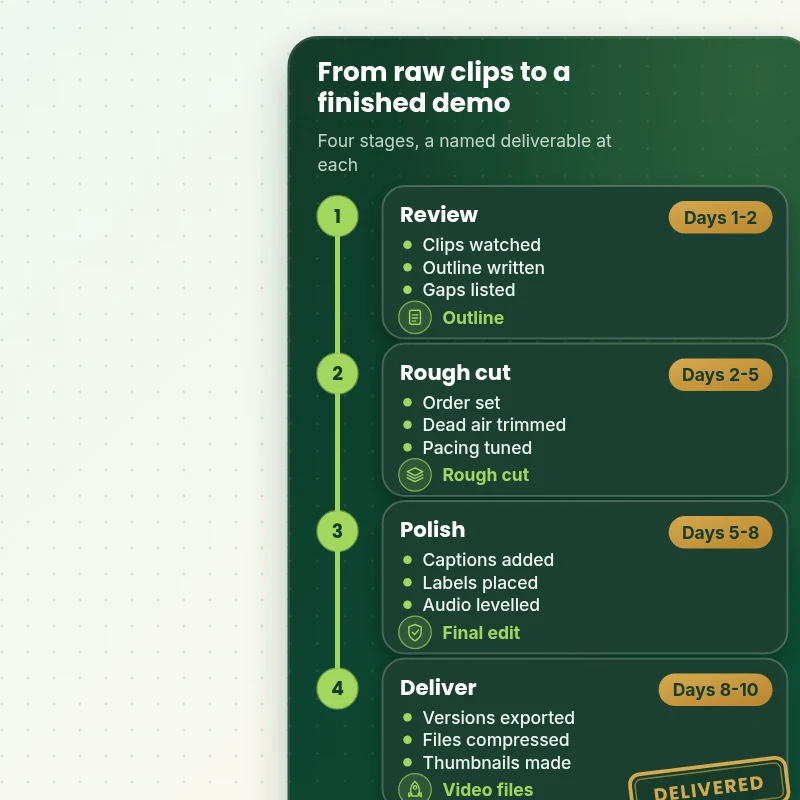
How Raw Footage Becomes a Finished Demo Video in Four Stages
The walkthrough shows the four stages a demo passes through: a footage review, a rough cut, a captioned edit and the delivered versions. Each stage ends with something you can watch, so the structure is settled before polish.
Portfolio
Shopify Store Designs We Create
These storefront designs show how layout, product detail and trust cues change from one niche to the next, which is the same care that goes into Product Demo Video Editing.

Barber store design
Barber
Travel creator store design
Travel creator
Skincare store design
Skincare
Technology store design
Technology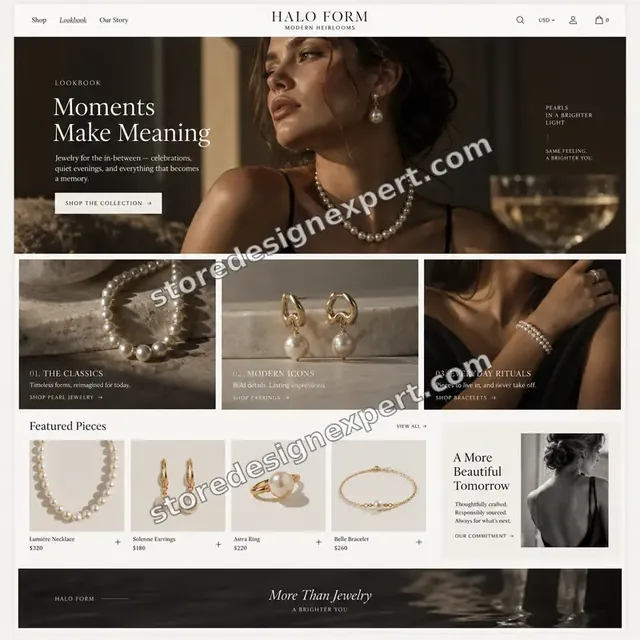
Jewelry store design
Jewelry
Outdoor apparel store design
Outdoor apparelProcess and timeline
How Your Demo Video Editing Is Delivered, Start to Finish
Six clear steps. Nothing goes live without your approval, and your calculator choices set how long each one runs for the demo video editing.
- 1
Brief and asset review
You describe what good demo video editing looks like for your store and customers. We write the plan down.
- 2
Choose how we get access
A collaborator request is all it takes, though a Partner-account build and transfer is fine too. We never ask for your password during the demo video editing job.
- 3
Review the footage and write the outline
We watch your clips, note what is missing and write an outline that opens with the result, shows the steps in order and ends with a clear next step.
- 4
Cut, caption and export every version
We cut and pace the demo, add captions and labels, level the audio and export web, vertical and short ad versions, compressed and ready to upload.
- 5
Compare the result with the brief and with your store
Every demo video editing item is compared with the brief, and anything that lands in your store is checked across devices. If something is off, it is put right before it gets to you.
- 6
Deliver and hand over
We hand over the demo video editing after sign-off with files and written notes. Your revisions are included and you are never locked in.
Compare your options
Free tool alone, Gig marketplace, Generalist studio or Our Demo Video Editing Service?
Four usual ways to edit a product demo. This comparison shows who outlines, captions and exports every version.
| What matters | Free tool alone | Gig marketplace | Generalist studio | Store Design Expert |
|---|---|---|---|---|
| Outline with the result first | Cut in filming order | Sometimes | Sometimes | Yes |
| Captions and on-screen labels | No | Extra cost | Sometimes | Yes |
| Web, vertical and ad cuts | One export | Extra cost | Sometimes | Yes |
| Compressed with a poster frame | No | Rarely | Extra cost | Yes |
| Price known before work begins | Cheap but open-ended | Yes | Quote only | Yes |
| Shopify store and checkout expertise | Learning | Varies | General | Yes |
| Two structured revision rounds | No | Varies | Extra cost | Yes |
| Source files and notes delivered in writing | No | Rarely | Sometimes | Yes |
Inside every project
What Protects Your Store and Your Budget During Product Demo Video Editing
Six habits keep your store, your brand and your budget safe while we handle the demo video editing.
Footage and music rights stay clear
We edit the footage you own and use only licensed music, and we tell you if any clip appears to need a release.
Least access needed
We ask only for the access your demo video editing needs, through Shopify's own sharing tools where a store is involved, and remove it when we finish.
Working files are yours
Final and working files for your demo video editing are handed over, so another person could use them later.
Checked before you look
Every demo video editing item is checked against the brief first, so your review covers taste and wording, not faults.
No promised sales
We make demo video editing to help shoppers decide, and we never promise revenue, rankings or reach.
Rights respected
We only use images, fonts, music and text you own or that are properly licensed in your demo video editing, and we say which.
Interactive price calculator
Build Your Demo Video Editing Package
Choose a package, then tell us about your volume, your demo video editing needs and how soon you want it. The fixed price and delivery window update with every click.
Request a custom quote
Very large volumes, several brands or stores, rush schedules and unusual formats for demo video editing are scoped separately and quoted at a fixed price.
Request a QuoteChanged your mind? Choose Walkthru Essential, Walkthru Plus or Walkthru Premier above to return to the instant calculator.
Packages and comparison
Demo Video Editing Package Comparison
Line-by-line detail of what each package covers, useful when choosing between a light pass and a full demo video editing service.
| What is included | Walkthru Essential $290 | Walkthru Plus $590Recommended | Walkthru Premier $1,190 |
|---|---|---|---|
| One demo video up to 90 seconds | Included | Included | Included |
| Steps cut into a clear order | Included | Included | Included |
| Captions burned in | Included | Included | Included |
| Call-to-action end card | Included | Included | Included |
| Web and vertical versions | Included | Included | Included |
| Up to 3 demo videos | Not included | Included | Included |
| Consistent style | Not included | Included | Included |
| On-screen feature labels | Not included | Included | Included |
| 15-second ad cut | Not included | Included | Included |
| Thumbnails for each video | Not included | Included | Included |
| Up to 6 demo videos | Not included | Not included | Included |
| Chapter markers | Not included | Not included | Included |
| Voice-over option | Not included | Not included | Included |
| How-to library layout | Not included | Not included | Included |
| Template for future demos | Not included | Not included | Included |
| Typical delivery | 3 to 5 days | 5 to 9 days | 9 to 15 days |
Your Product Demo Video Editing price and delivery estimate come from the calculator above, so there is no surprise at checkout.
Why Store Design Expert
Demo Videos for Products: Why Brands Choose Us
Anyone can trim clips. Store owners hire us for the outline, the captions and the compressed versions that turn footage into a demo shoppers follow.
We edit for sound-off viewing
Captions and labels are part of every cut.
Daily work on Shopify product pages
Media order, hosting and mobile behaviour are everyday material for us.
Rated 4.9+ by verified clients
These reviews come from verified Store Design Expert clients, in their own words, and your demo video editing follows the same process.
Prices you can plan around
Every package, option and extra has a visible price, sized by volume, detail and speed for your demo video editing.
Questions about Product Demo Video Editing go straight to the person doing it
You write to the person handling your demo video editing, not a ticket queue.
Experience since 2015
More than 450 Shopify stores launched means few catalog, content or launch problems are new to us, demo video editing included.
What we need to get started
What We Need Before We Start Your Demo Video Editing
Three ways to give access, then a short list of facts about your demo video editing.
Your footage
Share clips through a folder link as they are.
Your brief
Tell us the result to show and any steps to include.
Brand assets
Share your logo, colours and fonts.
Accept our collaborator request
Send your store address, then approve the access request for Product Demo Video Editing. The owner can grant what we need for your demo video editing and remove us in one click.
Taking over existing work? That is fine
Let us know what exists, and who made it. We review your demo video editing first and agree what to keep.
Or share a restricted staff login
A staff account with limited permissions works too for demo video editing, though the collaborator route is easier to revoke.
Owner passwords and card details are never requested for your demo video editing. Everything runs through Shopify's built-in access settings, and our access ends with the project.
Testimonials
What Store Owners Say Before You Order Product Demo Video Editing
Verified Store Design Expert clients describe the brief, the work and the handover in their own words, and your demo video editing follows the same path.
Verified
Store Design Expert delivered an outstanding website development experience! Their professionalism and attention to detail exceeded my expectations, and their proactive communication kept everything running smoothly. Truly impressed by their deep understanding and dedication.
WG
Warren G.United States
Verified
Very patient, informative and transparent, and they did exactly what they said they would do. Thanks for all the help!
RO
Raymond O.United States
Verified
Store Design Expert is the only one I use for all things WordPress. They have a high level of understanding, deliver quality work and are easy to deal with.
SC
Scott C.United States
Verified
A pleasure to work with. They did pretty much everything I asked and definitely exceeded my expectations. I will be working with Store Design Expert again soon.
JL
Jerry L.United States
Verified
Superb work! Store Design Expert is incredibly patient, and even when I did not fully understand my own questions, everything was explained again in detail. My vision was implemented perfectly, and the work is worth every cent I spent.
KB
Katrin B.Germany
Verified
Very impressed with the build-out. My store is ready to get started, and I am sure I will reach out for edits down the road, but this is everything I could ask for to get the party started. Thanks again, and I will be in touch for future projects.
DH
Dale H.United States
Verified
Very quick and detailed work! Store Design Expert does exactly what you want, in a very professional manner.
LF
Lena F.Germany
Verified
Store Design Expert did an outstanding job with top-notch professionalism on my website project. Everything was delivered quickly without compromising quality. I could not have asked for better!
JM
Jason M.United States
Verified
The website development work was nothing short of professional, with top-notch quality. Their exceptional level of cooperation made the collaboration seamless and enjoyable. Highly recommend working with Store Design Expert!
JC
Jeremy C.United States
Related searches
What People Search For Before Ordering Product Demo Video Editing
People describe Product Demo Video Editing in different ways when they search. These are the common ones.
“shopify product demo video editing”, “product demo video examples” or “how to make a demo video”: owners type these when they need Product Demo Video Editing, and the packages above are priced for that job.
“product demo video maker” or “video editor for products”: owners type these when they need Product Demo Video Editing, and the packages above are priced for that job.
FAQ
Demo Videos for Products: Your Questions Answered
Answers on cost, timing, access, files and what happens after delivery for demo video editing.
How long does demo video editing take?
Most jobs take 3 to 15 working days, depending on package, video count and footage quality. You see the estimate in the calculator before any payment.
Do I need professional footage?
No. Clear phone footage is enough if it is steady and well lit. We tell you in the review what is missing, and give filming tips if you want to reshoot.
What do you need from me to start Product Demo Video Editing?
Send your clips, a short brief and a collaborator request for your store. We start by watching the footage and writing an outline.
What does Product Demo Video Editing cost?
The price for Product Demo Video Editing begins at $290 and tops out at $3,850 when every option is on.
How are the Product Demo Video Editing packages different?
There are 3 Product Demo Video Editing packages: Walkthru Essential at $290 (3 to 5 working days), Walkthru Plus at $590 (5 to 9 working days) and Walkthru Premier at $1,190 (9 to 15 working days).
What is in the Walkthru Essential package of Product Demo Video Editing?
One demo video of up to 90 seconds edited from your footage: a clear opening, steps in order, captions and a call to action. It includes: One demo video up to 90 seconds; Steps cut into a clear order; Captions burned in; Call-to-action end card; Web and vertical versions. Walkthru Essential costs $290 and takes 3 to 5 working days.
What does the Product Demo Video Editing calculator ask me?
Beyond the package, Product Demo Video Editing needs 4 decisions from you: how many demo videos (One video, Up to 3 videos, Up to 6 videos); how long is each video (Up to 60 seconds, Up to 2 minutes, Up to 4 minutes); how good is your footage (Clear, steady footage, Usable but uneven, Rough or shaky); how soon do you need it live (Standard, Sooner, Fastest).
What can I add on top of Product Demo Video Editing?
Optional extras for Product Demo Video Editing include Voice-over (+$280), Second-language captions (+$160), Extra ad cuts (+$140), Chapter markers (+$90), Animated step graphics (+$240) and Recorded walkthrough (+$90).
What if my Product Demo Video Editing job needs more than the packages cover?
For Product Demo Video Editing work outside the packages, choose Request a custom quote. We put the scope in writing and give you one fixed price before we begin.
Ready when you are
Demo Videos for Products: Order Your Package
Choose a package, watch the fixed price settle and have a team that has launched 450+ Shopify stores outline, edit and export your demo before a shopper presses play.
Fixed price · Two revision rounds · Files handed over