
Shopify stores designed and launched
Data only, no redesign required
Shopify Data Migration for Products and Customers, Verified Row by Row
Shopify data migration done for you: we take the products, customers, orders and reviews from your current platform, map and clean them, import them into your Shopify store and reconcile every count against the source. No theme project attached. Packages start at $390 and finish in 3 to 10 working days, from a team with 450+ Shopify launches since 2015 and a 4.9+ average rating from verified clients.
- Products, variants, images and collections imported intact
- Customers with consent flags, tags and addresses
- Orders and reviews brought over through the right tools
- Reconciliation sheet showing source and Shopify counts
From$390
Delivery3 to 10 working days
Revisions2 rounds
Our track record
450+ Shopify Stores Launched Since 2015, and Data Is Where Most Moves Break
A storefront can be restyled after launch, but a customer row imported wrongly or a product with its variants scrambled costs sales and trust at once. Our job here is the records themselves, done once and verified.
Average rating from verified clients
Building Shopify stores since
Secure checkout
Pay through a protected checkout and keep a full order record.
Two revision rounds
Included in every package, so the result matches what you pictured.
Backup before changes
We work on a duplicate of your theme, never on your live store.
Who this is for
Who Needs a Data-Only Move to Shopify
You may already have a theme you like, or a designer finishing the front end. These are the stores where records are the whole job.
Owners whose designer already built the store
The look is done, the shelves are empty. We fill them with your real catalog and customers so the launch date depends on data, not on another design round.
Stores swapping platforms with a quiet front end
Your site is fine and the platform is the problem. We handle the records and leave the visual side to whoever owns it.
Merchants who tried the app and got a mess
A one-click run left duplicate customers, orphaned variants or empty images. We clean the aftermath and rerun the move properly.
Sellers consolidating several shops
Two or three small stores are becoming one. We merge the catalogs, resolve handle clashes and deduplicate buyers before anything is imported.
Brands adding Shopify as a second channel
You keep the old system running and want the same records live in Shopify. We load them once and give you the mapping so later syncs follow the same rules.
Agencies with data they would rather not handle
You own the design and the client relationship. We take the row-level work and return a reconciled store you can build on.
Problems solved
Why Shopify Data Migration Done as a Weekend Project Goes Wrong
CSV imports look simple until the first error log arrives. These are the rules Shopify enforces and the places a rushed import slips, with how we handle each.
The product file is rejected or silently altered.
Outcome: Shopify needs UTF-8 text, strict headers, clean URL handles and public HTTPS image links. We validate the file before uploading, so the import log is short instead of endless.
Variants break when option values change.
Outcome: Shopify allows three options per product, and editing option values can recreate variants with new IDs. We settle the option structure first and lock it before the live import.
Duplicate emails collapse your customer list.
Outcome: Shopify skips customers sharing an email or phone number and keeps only the last one. We deduplicate deliberately, merge notes and tags, and keep the record that has the history.
Passwords and spend totals cannot travel.
Outcome: Passwords cannot be exported from most platforms and Shopify does not import Total Spent or Total Orders. We plan the invitation emails and carry lifetime value in a tag where it matters.
Orders have no native importer.
Outcome: Shopify's own order CSV is export only. We bring history in through a migration app or bulk tool, with notification emails off so customers never hear about last year's purchase.
Reviews arrive with nowhere to live.
Outcome: Product ratings sit in a review app, not in core Shopify. We pick the app, import the review file and attach each one to the right product by handle.
What we can do
Everything We Handle Before and During the Import
The import button is the shortest step. These six areas are where the time goes and where a data-only project earns its fee.
A Shopify product import CSV template filled the right way
We build the file from your source in the format Shopify expects: one row per image, option columns in order, handles that survive scrutiny and tags in the limits allowed.
Import products into Shopify from CSV file or API batches
Small catalogs go through the admin import, larger ones through scripted batches. Either way we run a sample first, so surprises appear on ten rows instead of ten thousand.
Customers imported with consent that holds up
Marketing consent is carried as yes or no exactly as recorded at the source. Anyone who never opted in stays off your marketing list, whatever the old system allowed.
Orders matched to products and customers
History is loaded after catalog and customers so each order lands on a real customer and a real product. Historical orders are stamped as past events and do not change current stock.
Inventory quantities set per location
Stock levels are loaded by location and checked against your last count. We flag negative, oversold and unlisted quantities before they turn into live oversells.
Reconciliation you can sign
A single sheet compares products, variants, images, customers, orders and reviews at the source and in Shopify, with every difference explained in plain words.
What is included
What Your Shopify Data Migration Includes
The work is split by record type so you can see what each one involves. The comparison grid below places every line in its package.
Products
- Titles, descriptions and prices
- Variants with up to three options
- Images with alt text
- Handles kept or cleaned on request
Structure
- Collections and tags
- Product type and vendor fields
- Metafields from your attribute list
- Inventory quantities by location
Customers
- Names, emails and addresses
- Marketing consent kept as recorded
- Tags for segments and spend bands
- Duplicates merged by rule
Orders and reviews
- Historical orders on the right customers
- Order notes and tracking numbers
- Review file imported through an app
- No customer emails triggered
Safety work
- Dated copy of every source file
- Sample import before the full run
- Rollback by batch if needed
- Duplicate theme untouched
Handover
- Reconciliation sheet with counts
- Error log with every fix explained
- Notes for future imports
- Two revision rounds
Because the scope is data only, the budget goes into mapping and checking rather than layouts, which is why this costs less than a full replatform.
See how it works
How Each Record Type Is Checked Before You Go Live
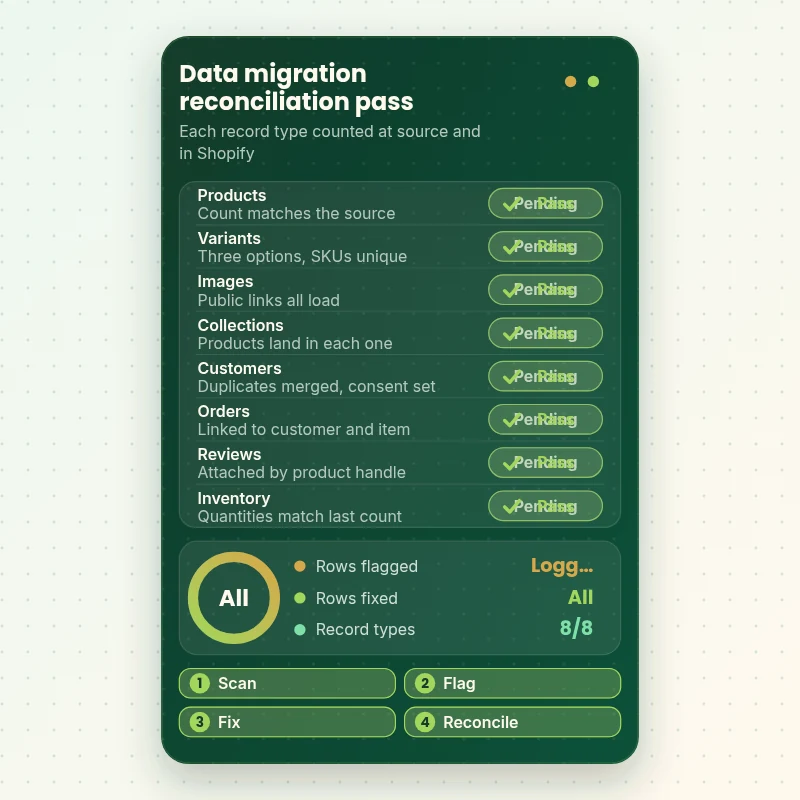
Every record type goes through the same loop: scan the source, flag anything Shopify will reject, fix it and confirm the count after import. The table shows the kinds of checks that run before a migration is signed off.
Portfolio
Store Design Styles We Build
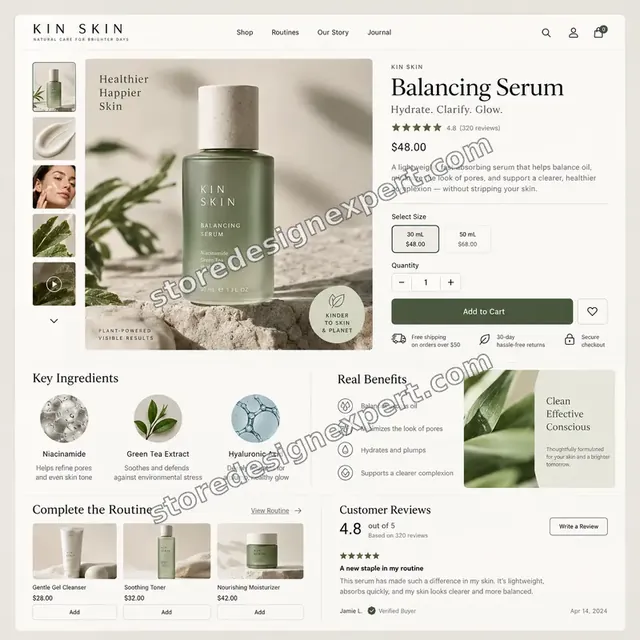
A look at store designs across fashion, home, beauty, pets and gifts, to show the standard of layout and finish behind Shopify Product and Customer Data Migration.
Skincare store design
Skincare
Interiors store design
Interiors
Stationery store design
Stationery
Outdoor camping gear store design
Outdoor camping gear
Artist creator store design
Artist creator
Restaurant ingredients store design
Restaurant ingredientsProcess and timeline
Our Shopify Data Migration Process, Step by Step
Six stages, all in your Shopify store or a staging store while the current platform keeps trading. Catalog-only projects finish in 3 to 4 working days, and the calculator shows larger scopes.
- 01
Source inventory
You give us exports or read-only access. We count products, variants, images, customers, orders and reviews, and note odd fields, duplicates and gaps.
- 02
Field mapping sign-off
A mapping sheet pairs each source field with its Shopify home or marks it as dropped. You approve it once and the scope is fixed.
- 03
Clean and convert
Files are rebuilt to Shopify's format, handles fixed, options reshaped, duplicates merged and images tested for public links.
- 04
Sample then full import
Ten to fifty rows go in first and we inspect them in the admin. Only then do products, customers and orders run in batches.
- 05
Reconcile and repair
Counts, sums and random records are compared with the source. Any difference is fixed or explained before you see the result.
- 06
Handover
You get the sheet, the error log and notes for future imports, plus up to two revision rounds to correct anything you spot.
Compare your options
Shopify Data Migration Options: DIY, App, Gig or Done For You
Four routes are common. They differ in how much you check yourself and who is accountable if records go missing.
| What matters | DIY CSV | Importer app | Freelance gig | Store Design Expert |
|---|---|---|---|---|
| Files validated before import | You do it | Partly | Varies | Yes |
| Option and variant structure planned | You decide | Dropped | Rarely | Yes |
| Duplicate customers merged by rule | Skipped | Skipped | Varies | Yes |
| Consent flags audited | You check | Copied blind | Rarely | Yes |
| Historical orders imported | No | Add-on | Varies | Yes |
| Reviews imported to an app | No | Rarely | Varies | Yes |
| Reconciliation sheet with counts | No | Report only | No | Yes |
| Fixed price, no theme work forced | Yes | Yes | Varies | Yes |
Inside every project
What Protects Your Data While We Move It
Records are the part of a business that cannot be recreated, so every step has a safety net. This is what the fixed fee covers.
Untouched originals
Every source file is stored with a date and never edited in place. Cleaning happens on copies, so the original is always there to compare.
Source platform left alone
We read from your current store and change nothing in it. If a fix belongs there, we tell you and wait for your word.
Notifications switched off
Imports run with customer emails disabled, and staff alerts are checked beforehand, so nobody is flooded with old orders.
Batches that can be undone
Large imports run in labeled batches. If a batch looks wrong we remove it and rerun it, instead of hunting through the whole store.
Consent respected throughout
Opt-in status is carried over exactly as recorded and nobody who opted out gets a new marketing flag.
Scope fixed by the mapping sheet
What the signed sheet lists is delivered at the quoted price, with two revision rounds before handover.
Interactive price calculator
Price Your Shopify Data Migration
Choose what to move, tell us how many products, customers and orders you have, then pick a speed. The quote and the completion date recalculate with each answer you give.
Request a custom quote
More than 25,000 products, 100,000 customers or 250,000 orders, several source systems, or Shopify Plus markets with price lists need a custom quote and a written scope.
Request a QuoteChanged your mind? Choose Catalog Only, Catalog and Customers or Full Record Set above to return to the instant calculator.
Packages and comparison
Shopify Data Migration Package Comparison
Every line below sits in one tier or another. The calculator above adds the volumes you actually have to the base price.
| What is included | Catalog Only $390 | Catalog and Customers $790Recommended | Full Record Set $1,390 |
|---|---|---|---|
| Products, variants and images | Included | Included | Included |
| Collections, tags and inventory | Included | Included | Included |
| Sample import before full run | Included | Included | Included |
| Reconciliation sheet | Included | Included | Included |
| Customers with consent flags | Not included | Included | Included |
| Duplicate customers merged | Not included | Included | Included |
| Account invitation plan | Not included | Included | Included |
| Historical orders imported | Not included | Not included | Included |
| Reviews imported through an app | Not included | Not included | Included |
| Content pages and blog posts | Not included | Not included | Included |
| Batch rollback plan | Not included | Not included | Included |
| Typical delivery | 3 to 4 days | 5 to 7 days | 7 to 10 days |
Choose your options in the calculator above: the total and the delivery estimate it shows for Shopify Product and Customer Data Migration are final.
Why Store Design Expert
Why Stores Hire Us for Data-Only Migrations
Plenty of tools will move rows. What you are paying for is someone who knows where the rows go wrong.
Shopify exclusively since 2015
Having launched more than 450 stores, we know the import quirks: handle collisions, image fetch failures and the places a CSV quietly truncates.
We find problems before importing
Validation catches bad rows on your file, not on your live store. You see the issues list before anything is loaded.
Priced between a tool and a replatform
Apps start at $29 and agency projects near $2,000 because theme work is bundled in. A $390 start covers a checked move with no design attached.
Platform-agnostic experience
Magento, Squarespace, Wix, WooCommerce, spreadsheets and custom systems all end up in the same Shopify structure after mapping.
One person answers for the result
From the first file to the last count, you speak to the same builder and get plain answers about what moved and what did not.
Your store, your account
Everything lands in a store you own. If we create it for you, it is transferred at the end, with no fee to keep your own data.
What we need to get started
What We Need to Start Your Data Migration
You do not have to prepare the files. We need to see the data and reach your Shopify store.
Add us as a store collaborator
Give us the link to your Shopify store and allow the collaborator invite that follows. You keep ownership and your password stays private, and you can remove us whenever you like.
No Shopify store yet? We build one for you
We prepare it in our Shopify Partner account, run the whole import there and hand ownership to you afterwards, so a plan is only chosen at the end.
Prefer to share a staff login?
A staff account for us is the alternative. Collaborator access is easier to withdraw, though either route works.
Exports or source access
Send CSV exports for products, customers and orders, or give read-only access to the platform. If you are unsure how to export, we will guide you.
Rules for what to leave out
List what should not move: discontinued products, test customers, guest orders, old coupons or spam accounts.
Your Shopify structure choices
Tell us how you want products grouped, which tags matter to you, and who approves the mapping sheet and the final counts.
Your owner login and payment cards stay with you, and we ask for neither. Source access can be read-only, and we do not alter your current platform.
Testimonials
What Store Owners Say After Launch
Verified clients describe working with Store Design Expert on store builds, fixes and redesigns.
Verified
Store Design Expert delivered an outstanding website development experience! Their professionalism and attention to detail exceeded my expectations, and their proactive communication kept everything running smoothly. Truly impressed by their deep understanding and dedication.
WG
Warren G.United States
Verified
The website development work was nothing short of professional, with top-notch quality. Their exceptional level of cooperation made the collaboration seamless and enjoyable. Highly recommend working with Store Design Expert!
JC
Jeremy C.United States
Verified
Super great to work with, and super fair!
RO
Robert O.United States
Verified
The website development work was truly impressive. Their attention to detail and ability to exceed expectations made the project a success. Working with them was a breeze, thanks to quick responsiveness and a willingness to go above and beyond.
KD
Kevin D.United States
Verified
Store Design Expert was very knowledgeable about what I needed done to fix my Shopify store and how to improve the store layout. The project was completed very quickly, and I will definitely use them for support as my business grows.
ST
Samuel T.United States
Verified
Very satisfied with the work. Most importantly, Store Design Expert responded promptly to my questions and concerns. Thank you!
KB
Kyle B.United States
Verified
Outstanding work and outstanding customer service. Five stars! I will absolutely use Store Design Expert again for my next book.
KM
Katharine M.United States
Verified
Store Design Expert was great! They delivered exactly what I asked for and even offered helpful extra suggestions. Highly recommended.
PW
Paul W.United States
Verified
I request Store Design Expert every time I have a project. They are professional and give real attention to detail, which makes the work stand out.
LK
Laura K.United States
Related searches
Related Searches for Shopify Product and Customer Data Migration
The searches below are the ones that lead people to Shopify Product and Customer Data Migration.
“shopify store migration app”, “shopify product import csv template”, “magento to shopify data migration” or “squarespace to shopify migration”: owners type these when they need Shopify Product and Customer Data Migration, and the packages above are priced for that job.
“wix to shopify migration” all point to the same job, which Shopify Product and Customer Data Migration covers from start to finish.
Owners also search for “how to import customers into shopify”, “import products to shopify”, “import orders to shopify” or “import reviews to shopify”.
Related searches include “how to import inventory to shopify”, “shopify store importer app”, “import products into shopify from csv file” or “how to upload csv file to shopify”.
FAQ
Shopify Data Migration FAQs
Answers on what can be imported, what cannot, what it costs and how we prove nothing went missing.
How much does Shopify data migration cost?
Catalog Only starts at $390, Catalog and Customers at $790 and Full Record Set at $1,390. Product, customer and order volumes are priced in the calculator, so most projects land between about $400 and $2,200. You see the fixed price before you check out.
What does your Shopify data migration include?
Each tier imports your products, variants, images, collections and inventory and ends with a reconciliation sheet. Higher tiers add customers with consent, historical orders, reviews and content pages. No theme or design work is included.
Why not use a Shopify store migration app or a Shopify store importer app?
Apps are fast and cheap, and Shopify's own is free, but they stop at the data run. Mapping decisions, clean-up, deduplication and checking are left to you. We use these tools ourselves and do the parts they skip.
How to import customers into Shopify without losing consent?
Your file needs an email column and an accepts-marketing value of yes or no for each person. We carry the recorded status exactly and leave anyone without clear consent unsubscribed, because Shopify warns that mailing non-opted contacts harms your sender reputation.
Where can I get a Shopify product import CSV template?
Shopify publishes a sample file in its Help Center with every column it accepts. We build your file in that layout from your source data, check headers, handles and image links, then run a small sample import before the full one.
Can you import products to Shopify from any platform?
Yes. Magento, WooCommerce, BigCommerce, Squarespace, Wix, Etsy, marketplaces, spreadsheets and bespoke systems all work, provided we can export or read the data. The mapping step turns each into the same Shopify structure.
Can you import orders to Shopify?
Yes, though Shopify's own CSV tool only exports orders. We use a migration app or bulk-import tool, load customers and products first and keep customer emails off. Historical orders do not change current stock, so we set inventory separately.
Can you import reviews to Shopify?
Yes, through a review app, since core Shopify holds no ratings. We pick one, import your review file and attach each review to its product by handle. Where the old platform will not export reviews, we tell you before quoting.
How to import inventory to Shopify across several locations?
Stock goes in by location, using SKUs or handles as keys, and we compare totals against your last count. Negative or oversold quantities are flagged before launch so the new store never sells what you cannot ship.
Can you handle a Magento to Shopify data migration only?
Yes, as long as you want the records and not the theme. We export products, customers and orders from Magento, map custom attributes to metafields or tags and reconcile counts. Redirects can be added if URLs are changing.
Do you handle Squarespace to Shopify migration and Wix to Shopify migration data?
Yes. Squarespace and Wix export products and customers in limited formats, so we fill gaps from other reports and the live pages. Orders, blog posts and member data are covered in the larger tiers when the platform allows an export.
Can you import products into Shopify from a CSV file I made myself?
Yes. We check it against Shopify's rules for headers, encoding, handles, options and public image links, fix what fails and import. If the file is messy, our clean-up extra turns it into a proper catalog.
How to upload CSV file to Shopify without errors?
Use UTF-8 text, keep headers exactly as published, make handles letters, numbers and dashes, and host images at public HTTPS addresses. Even then, test ten rows first. We do this for you and keep the error log.
How long does a Shopify data migration take?
Catalog Only takes 3 to 4 working days, Catalog and Customers 5 to 7 and Full Record Set 7 to 10, before options. Large order histories add days, and sooner or fastest delivery shortens the range.
Ready when you are
Order Your Shopify Data Migration Today
Choose what should move, enter your volumes and see your fixed price at once. Your Shopify data migration is run by a team that has launched over 450 Shopify stores, and it finishes with reconciled counts and a written handover.
Secure checkout · Counts reconciled · Two revision rounds