
Shopify stores designed and launched
Shopify bug fix
Fix Shopify Wrong Variant Added to Cart Before It Costs You Another Order
Fix Shopify wrong variant added to cart errors with a developer who traces the real cause. If you need to fix wrong variant added to cart on Shopify, you already know the pattern: the shopper picks Blue and Large and the cart says Red and Medium. Every wrong shipment means a refund, a reshipment and a customer who may not return. We find where the variant ID goes wrong, repair it in your theme and prove it works on every option.
- Root-cause diagnosis of the variant ID mismatch
- Repair in theme code, not a patch on top of a patch
- Tested across variants, devices and your installed apps
- Emergency turnaround available for live stores
From$89
Delivery1 to 3 working days
Revisions2 rounds
Our track record
Over 450 Shopify Stores Launched Since 2015, So We Know How to Fix Shopify Wrong Variant Added to Cart Bugs
Variant pickers, product forms and add to cart handlers are the parts of a Shopify theme we touch on almost every build. That daily familiarity is why a cart that adds the wrong option is a problem we can trace quickly and repair properly.
Average rating from verified clients
Building Shopify stores since
Secure checkout
Pay through a protected checkout and keep a full order record.
Two revision rounds
Included in every package, so the result matches what you pictured.
Backup before changes
We work on a duplicate of your theme, never on your live store.
Problem and result
From Mismatched Orders to a Cart That Matches the Selection
A wrong variant in the cart is not a cosmetic glitch. It changes what gets packed, what gets charged and what your customer finds in the parcel. Whether it is a Shopify theme wrong variant added to cart bug or a clash with an app, the symptom looks the same from the outside, and the repair depends entirely on finding the exact point where the choice is lost.
The selected variant and the added variant disagree
The product page shows one choice while the cart request carries a different variant ID. You see it as mixed-up orders, support tickets and refunds. It can seem random, appearing only on some products, some phones or some shoppers, which makes it hard to reproduce and easy to blame on the wrong thing.
One variant ID, from selection to checkout
We find where the ID is dropped, stale or overwritten, fix that exact point and then verify every variant adds correctly, including sold-out options, bundles, subscriptions and products with three option sets. You get a cart you can trust again and a short note explaining what was wrong.
What is included
What We Check When You Hire Us to Fix Shopify Wrong Variant Added to Cart
A professional Shopify wrong variant added to cart fix is a diagnosis first and a repair second. Patching the symptom while the cause stays in the code means the bug returns after the next theme or app update. We trace the cause, remove it and document what we changed, so the fix lasts and your team understands it.
Diagnosis and repair checklist
- Reproduction of the bug on your live product, then again in a duplicate theme with apps switched off
- Comparison of the variant ID selected on the page against the ID sent in the cart request
- Review of the theme's variant change handler and add to cart JavaScript
- Check for app scripts that overwrite the form or the ID, such as bundle, upsell, swatch and quick view apps
- Check of selling plans, bundles and product options that change the line item
- Repair of the faulty handler, hidden form field, option order or URL parameter
- Re-test of every affected variant on desktop and mobile, including sold-out options
- Short root-cause note and handover with what changed and why
Because we work in a duplicate theme, your live store keeps selling while we test. The repaired code is only published after it passes the full variant check.
See how it works
From Blue Large to Red Medium, and Back to Right
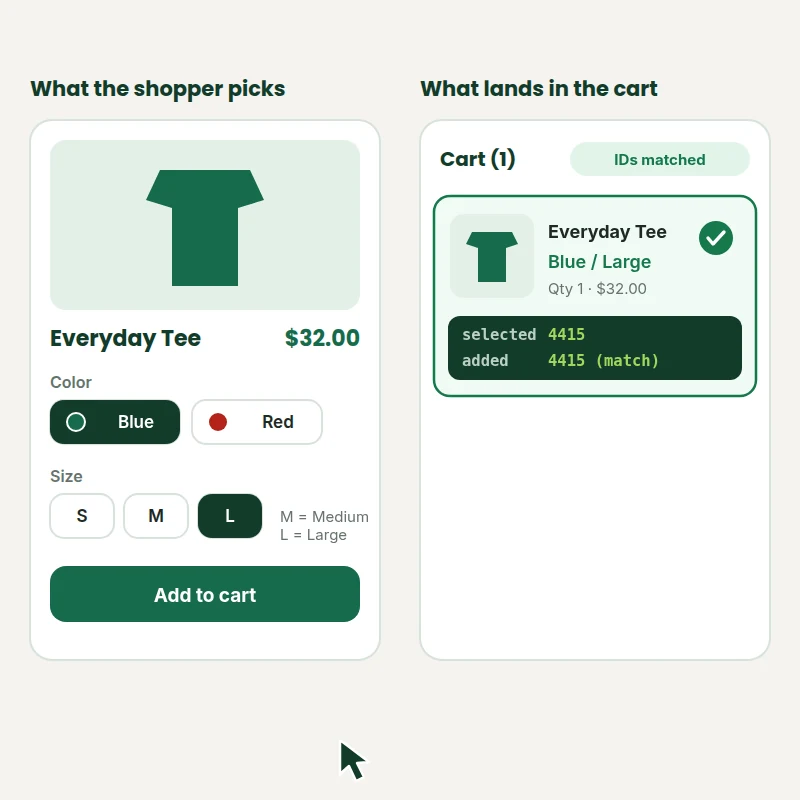
Follow one order through the bug and the repair. The animation compares what the shopper picked with what landed in the cart, then shows the diagnostic sweep that checks the variant ID, the theme code and any app conflicts before the cart line corrects itself.
Animated walkthrough
- 1
The shopper picks Blue and Large
Color and size are chosen on the product page, then add to cart is tapped.
- 2
The cart shows something else
Red and Medium appears, and the selected and added variant IDs do not match.
- 3
We trace where the ID goes wrong
The picker, the theme add-to-cart handler and app scripts are checked in order.
- 4
The IDs match and the cart is right
After the repair, the variant the shopper chose is the one that is added.
Scope boundaries
What Our Shopify Wrong Variant Added to Cart Repair Service Covers
Our Shopify wrong variant added to cart repair service has a clearly defined scope, so the price stays fixed. If we find something bigger than the bug you reported, we tell you before spending any more of your money.
Included
- Diagnosis of the wrong variant bug on the products you list
- Repair of the theme code that causes it
- Testing of every variant on the affected products
- A short root-cause note with what changed
Not included
- Rebuilding your product page or cart
- Editing the code of a closed-source app, though we advise and can work around it
- Fixing wrong variant prices, images or SKUs, which are separate tasks
- Unrelated theme bugs found along the way
Access we need
- Collaborator access to your Shopify store
- A product URL where the bug appears
- Details of recent theme or app changes
- A list of apps touching the cart
Quote triggers
- Dozens of templates or custom product forms
- Headless or custom storefronts
- Bugs caused by a closed-source app with no workaround
Typical turnaround
- Basic fixes in 1 to 2 working days
- Standard diagnosis in 2 to 3 working days
- Plus hardening in 3 to 5 working days
- Faster options available in the calculator
After the fix
- Handover note listing every change
- Two revision rounds included
- Backup theme kept so changes are reversible
- Thirty-day fix window on the Plus package
Compare your options
App, DIY Debugging, Marketplace Freelancer or a Shopify Developer to Fix Wrong Variant Added to Cart?
There are four common ways to deal with a cart that adds the wrong option. Here is how they compare on diagnosis, testing, risk to your live store and what you are left with afterward, because every wrong order costs you a refund and a reshipment.
| What matters | Variant or cart app | DIY debugging | Freelancer marketplace | Store Design Expert |
|---|---|---|---|---|
| Finds the root cause | Rarely | If you can code | Varies | Yes |
| Adds another script | Usually | No | Varies | No |
| Tested on every option combo | You check | You check | Rarely | Yes |
| Tested on mobile | You check | You check | Varies | Yes |
| Theme backup before changes | No | Up to you | Rarely | Yes |
| Fixed scope price | Monthly plan | Your time | Varies | Yes |
| Handover note of what changed | No | No | Rarely | Yes |
| Emergency priority option | No | No | Varies | Yes |
Price calculator
Price to Fix Shopify Wrong Variant Added to Cart
Choose the depth of diagnosis, how many products and forms are affected and how fast you need it. Your fixed price and delivery estimate update instantly.
Request a custom quote
Headless storefronts, closed-source apps without a workaround or dozens of custom templates receive a custom quote after a short review of your store.
Request a QuoteChanged your mind? Choose Basic, Standard or Plus above to return to the instant calculator.
How it works
From Bug Report to a Verified Fix
Six steps that put diagnosis first and testing last, with your live theme untouched until the repair has passed every check.
- 1
Order
Choose the scope and speed and check out securely. Your fixed price is shown before you pay, so there is no hourly billing.
- 2
Access
Send collaborator access and the product URL where the wrong variant appears, plus any steps that reproduce it.
- 3
Diagnose
We reproduce the bug and trace the variant ID from the picker through the theme code to the cart request.
- 4
Repair and test
We fix the cause in a duplicate theme, then test every affected variant on desktop and mobile with your apps active.
- 5
Review and revise
You check the result and can request up to two rounds of changes, so the final fix matches what you expected.
- 6
Publish and hand over
We publish the fix and send a short root-cause note covering what changed, so your team or agency can follow it.
Compatibility and QA
Shopify Wrong Variant Added to Cart Troubleshooting: Where the Bug Hides and How We Verify the Fix
Shopify wrong variant added to cart troubleshooting usually ends at a short list of causes. We check each one in order, keep a backup so every change can be reversed and only call the job done when the acceptance criteria below all pass.
What we test
- Variant IDsThe ID in the hidden form field, the URL parameter and the cart request must all agree.
- Theme JavaScriptVariant change handlers that read stale state, the wrong option order or the first variant by default.
- App conflictsQuick view, bundle, upsell and swatch apps that replace the product form or overwrite the ID.
- Edge casesSelling plans, bundles, sold-out options and products with three option sets.
- DevicesRecent iPhone, Android, tablet and desktop widths, since touch-only bugs are common.
- RollbackA duplicate of your theme is made first, so you can revert at any time.
Acceptance criteria
- The cart line matches the selected options on every affected variant
- The ID in the cart request equals the ID selected on the page
- The bug does not return after a refresh, the back button or quick view
- Other products and checkout are unaffected
- You receive a short root-cause note and handover
What we need to get started
What We Need to Get Started on Your Wrong Variant Fix
To hire Shopify expert for wrong variant added to cart work you only need to give us a way into the store and show us where the bug happens. Pick whichever access route suits you.
Collaborator access
If you already have a store, send us the store URL and approve our Shopify collaborator request. You stay the owner, no password is shared and you can remove our access whenever you like.
No store yet? We build it for you
If the store is still to be built, we set it up in our own Shopify Partner account as a development store and transfer ownership to you when the work is done, so you only pick a plan at the end.
Or send staff login details
You can send staff login details instead. We recommend collaborator access because it is easy to revoke, but a staff account works if you prefer it.
A product URL that shows the bug
Send the link to one product where the wrong variant is added, and tell us which option you chose and which one landed in the cart.
A list of your apps
Tell us which apps touch the product form or cart, such as bundles, upsells, swatches and quick view, so we test with them active.
Who approves the fix
Name the person who signs off, and tell us if you need the fix published urgently so we can book emergency priority.
We never need your Shopify owner password. Everything is done in a duplicate theme with a backup, and every change is listed in the handover note.
Testimonials
What Store Owners Say About Quick Shopify Fixes
Verified clients describe working with Store Design Expert, from first message to finished result.
Verified
Store Design Expert is the best. The work is very professional, they pay close attention to detail and, more importantly, they listen. Their level of cooperation is second to none, and everything was delivered in a very timely manner. I will keep them in mind for future projects.
BN
Barbara N.United States
Verified
Super helpful and patient. I am new to ecommerce and Store Design Expert talked me through the whole process and even fixed my payment bridging for me!
LR
Lois R.United Kingdom
Verified
I am beyond satisfied! Store Design Expert went above and beyond on my project. Highly recommended!
MD
Michael D.United States
Verified
The experience was tailored to my brand and specifications to the letter. I love the result.
EP
Eric P.United States
Verified
They definitely get the job done. Very patient and understanding throughout the whole project.
BS
Brian S.United States
Verified
Thank you so much to Store Design Expert and the team. My site looks far more appealing to customers, and I will happily recommend your services to other new small businesses.
JS
Jennifer S.United States
Verified
Very patient, informative and transparent, and they did exactly what they said they would do. Thanks for all the help!
RO
Raymond O.United States
Verified
Store Design Expert is the only one I use for all things WordPress. They have a high level of understanding, deliver quality work and are easy to deal with.
SC
Scott C.United States
Verified
A pleasure to work with. They did pretty much everything I asked and definitely exceeded my expectations. I will be working with Store Design Expert again soon.
JL
Jerry L.United States
Related searches
Searches That Bring Owners to Fix Shopify Wrong Variant Added to Cart
The searches below are the ones that lead people to Fix Shopify Wrong Variant Added to Cart.
People who look up “fix wrong variant added to cart on shopify”, “shopify wrong variant added to cart troubleshooting” or “shopify wrong variant added to cart repair service” usually want Fix Shopify Wrong Variant Added to Cart; the calculator above shows the price and delivery estimate before you commit.
If you searched for “shopify developer to fix wrong variant added to cart”, “wrong variant added to cart not working on shopify” or “why is wrong variant added to cart broken on shopify”, Fix Shopify Wrong Variant Added to Cart is the work that answers it.
People who look up “professional shopify wrong variant added to cart fix”, “emergency shopify wrong variant added to cart help” or “shopify theme wrong variant added to cart bug” usually want Fix Shopify Wrong Variant Added to Cart; the calculator above shows the price and delivery estimate before you commit.
“shopify mobile wrong variant added to cart issue”, “cost to fix wrong variant added to cart on shopify” or “hire shopify expert for wrong variant added to cart” all point to the same job, which Fix Shopify Wrong Variant Added to Cart covers from start to finish.
FAQ
Wrong Variant Added to Cart Questions
Quick answers about cost, speed, causes, mobile bugs and what we need from you.
How much does it cost to fix wrong variant added to cart on Shopify?
Packages start at $89. The cost to fix wrong variant added to cart on Shopify depends on how many products and forms are affected, how deep the diagnosis must go and how fast you need it. The calculator adds each choice and shows your fixed price before checkout, with no hourly billing.
How fast can you fix Shopify wrong variant added to cart errors?
Most fixes are finished in one to three working days. The Fastest option reserves capacity so diagnosis starts as soon as we have access, which matters when orders are being lost every hour the bug stays live.
Wrong variant added to cart not working on Shopify: what usually causes it?
It usually comes down to a short list: a mismatched variant ID in the product form, theme JavaScript reading outdated selection, an app overwriting the form, or a bundle or selling plan changing the line item. We check each cause in order instead of guessing.
Why is wrong variant added to cart broken on Shopify after an update?
Theme and app updates often change how the product form is built. A script that used to read the selected option now reads the first variant, or two scripts fight over the same field. Updates also reset custom code, which is why the bug can appear overnight.
Is the problem my theme or one of my apps?
We find out by testing. We reproduce the bug in a duplicate theme with apps switched off, then switch them back on one at a time. This separates theme code from app conflicts, so you know exactly which one to blame and what to do about it.
Is a Shopify mobile wrong variant added to cart issue harder to fix?
Not harder, but different. Mobile-only bugs often come from touch handlers, sticky add to cart bars or quick view popups that behave differently from the main form. We test on real phone widths and in both orientations.
Do you offer emergency Shopify wrong variant added to cart help?
Yes. If a live store is shipping wrong items today, choose the Fastest option and send access as soon as you order. We start with the diagnosis first, and we tell you at once if the cause is outside the theme.
Can a Shopify developer to fix wrong variant added to cart bugs avoid breaking my live store?
Yes, and that is the point of working in a duplicate theme. The live theme is never edited while we test. The repair is published only after every affected variant passes, and the backup stays available if you ever want to roll back.
Hire Shopify expert for wrong variant added to cart: what is the process?
You order the package that fits, send collaborator access and the product URL, and we reproduce, diagnose, repair and test. You receive a short note explaining the cause. Two revision rounds are included, so the result matches what you expected.
Do you fix wrong variant prices, images or SKUs too?
Those are related but separate problems. If we spot one while tracing the ID we flag it in the note, and you can order that fix separately. We do not widen the scope or the price without asking you first.
What if the fix needs more work than I bought?
We tell you before spending more of your money. You can approve an upgrade, ask for a custom quote, or stop at the diagnosis and the written report. Nothing extra is ever added to your invoice without your agreement.
Ready when you are
Fix Shopify Wrong Variant Added to Cart and Stop Shipping the Wrong Item
Pick your scope and speed, see your exact price and delivery estimate and get a diagnosed, tested fix. We will fix Shopify wrong variant added to cart errors at the source, so customers receive the option they chose.
Secure checkout · Two revision rounds · Backup made before any change