
Shopify stores designed and launched
The smallest part of your brand, made to read at 32 pixels
Favicon Shopify: A Tiny Icon That Still Says Who You Are
A favicon is your brand in a browser tab. For favicon Shopify work we simplify your logo into a square mark, upload it, check it on desktop and phone and fix it if it will not update. From $90, fixed price.
- Logo simplified into a square mark
- Light and dark tab versions
- Phone home-screen icon
- Uploaded and checked in tabs and search
From$90
Delivery1 to 7 working days
Revisions2 rounds
Our track record
450+ Shopify Stores Launched Since 2015. Now Let Us Handle Your Favicon.
Shoppers glance at tabs when they have several stores open. A clear favicon helps them find yours again, and a missing one makes the store look unfinished.
Average rating from verified clients
Building Shopify stores since
Secure checkout
Pay through a protected checkout and keep a full order record.
Two revision rounds
Included in every package, so the result matches what you pictured.
Backup before changes
We work on a duplicate of your theme, never on your live store.
Who this is for
Favicon Shopify: Who We Work For
Favicon work comes up for different reasons. Most people ask about favicon design for Shopify store in one of these six situations.
You are a good fit if
- You have a Shopify store and a logo
- You need a fixed price and a written scope before work starts
- You can share your logo file
- You own the store and approve the final icon
New stores before launch
The tab shows a default icon.
Owners who changed their logo
The old favicon still shows.
Sellers whose favicon is missing in search
Results show a generic globe.
Stores with a favicon that will not update
Caching hides the change.
Brands wanting a home-screen icon
Phones show a screenshot instead.
Founders short on time
You would rather hand over the logo and see a finished tab.
Problems solved
Why Favicons Look Wrong or Refuse to Show
A favicon is tiny and cached, which makes mistakes hard to spot. The six problems below are what owners tell us most.
- The full logo is squeezed in.
Details vanish and text becomes a smudge.
- The favicon is not showing.
The file is the wrong shape or too small.
- It never updates.
Browsers keep showing the old image.
- It disappears on dark tabs.
A dark icon meets a dark browser theme.
- Search shows a globe.
Search engines have not picked the icon up.
- The wrong file type was used.
A flat photo with a background blocks the icon.
What we can do
Favicon Shopify: What the Work Covers
Six jobs make up the favicon work. Your package decides how far each one goes for your icon.
Logo review
We choose the part of your logo that survives at 32 pixels.
Square icon design
A square mark is drawn with padding and weight chosen for tiny sizes.
Light and dark versions
Versions are made for light and dark browser themes.
Home-screen icon
A larger touch icon is made for phones.
Upload and cache steps
The icon is added in your theme settings with steps to see it update.
Tab and search check
The icon is checked in tabs and, over time, in search results.
What is included
What Is Inside Your Favicon Package
Six groups cover every deliverable in Favicon Design for Shopify Store. The comparison table below shows how far each group goes by package for favicon.
Review
- Logo review
- Icon element choice
- Padding rule
- Direction note
Design
- Square favicon
- Size tests
- Contrast check
- Final artwork
Versions
- Light-tab version
- Dark-tab version
- Transparent PNG
- SVG source
Phone
- Touch icon
- Home-screen preview
- Rounded-corner check
- Avatar crop
Upload
- Theme settings upload
- Cache-clearing steps
- Tab check on desktop
- Tab check on phone
Hand-over
- File set
- Written notes
- Search-result guidance
- Recorded walkthrough
You provide the products, the brand assets and your approvals. We handle the favicon work and the checks.
Favicon checklist
How a Favicon Is Checked Before You Rely on It
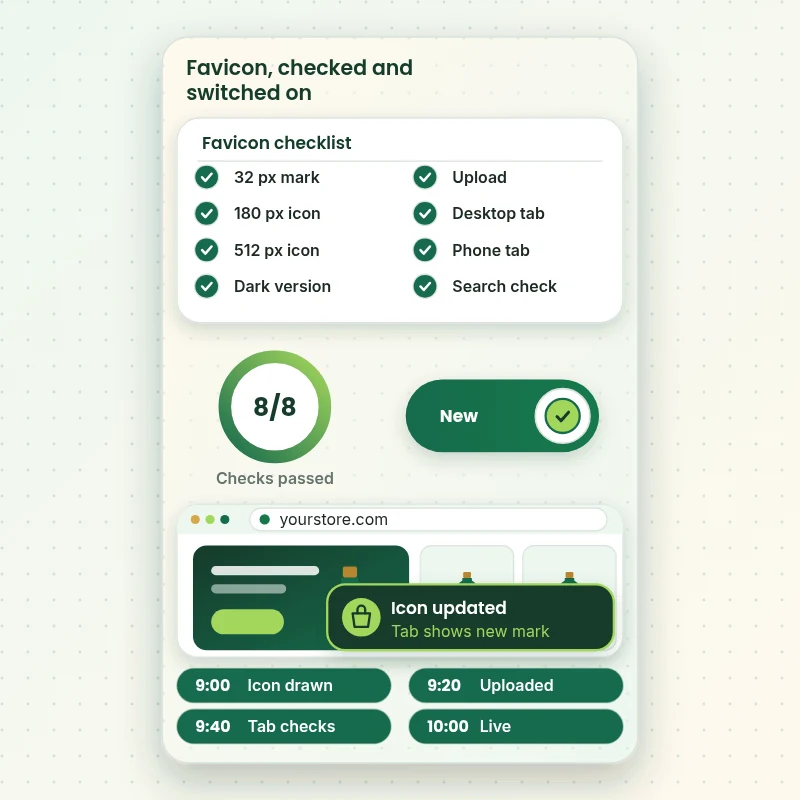
The walkthrough shows the checklist a favicon passes: the right sizes, a dark-tab version, the upload and the checks in a tab and on a phone. Each tick is something we have tried, not assumed.
Portfolio
Store Designs From Our Studio
A look at store designs across fashion, home, beauty, pets and gifts, to show the standard of layout and finish behind Favicon Design for Shopify Store.

Outdoor drinkware store design
Outdoor drinkware
Barber store design
Barber
Travel creator store design
Travel creator
Skincare store design
Skincare
Technology store design
Technology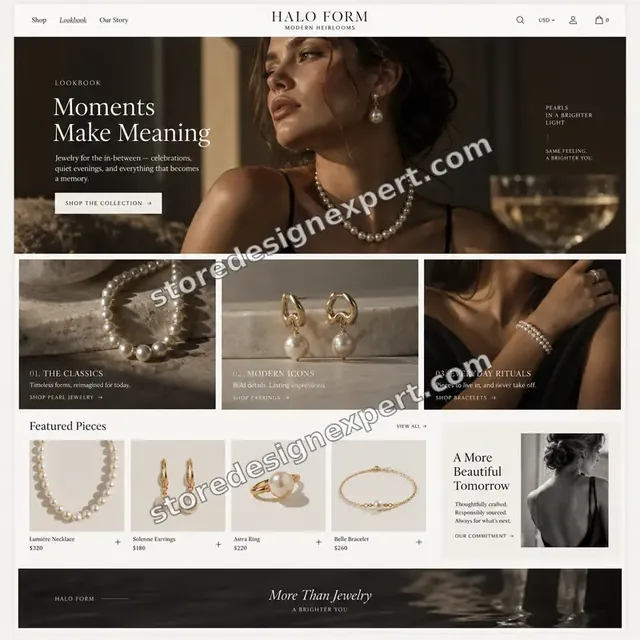
Jewelry store design
JewelryProcess and timeline
How Your Favicon Is Delivered, Start to Finish
Six steps, and nothing changes on your live store until you approve it. Your calculator choices decide how long each step of the favicon takes.
- 1
Brief and asset review
You tell us what your favicon must achieve, who it is for and what you admire. We agree the plan in writing.
- 2
Choose how we get access
Invite us to your store as a collaborator, or we work in our own Partner account and transfer what we make. We never ask for owner passwords while we work on the favicon.
- 3
Review the logo and choose what shrinks
We look at your logo, pick the element that stays clear at 32 pixels and agree the padding and colour on both light and dark tabs.
- 4
Draw, upload and check in place
We draw the square icon, upload it in your theme settings, clear caches on our devices and check it in tabs on desktop and phone.
- 5
Review against the brief and your store
We check every favicon deliverable against the brief and, where it goes into a store, on phones, tablets and desktops. If a detail does not match the plan, we fix it first.
- 6
Deliver and hand over
After your approval we deliver the favicon with source files and written notes. Included revision rounds, with every account staying in your name.
Compare your options
Do it yourself, Marketplace gig, Large agency or Our Favicon Service?
Four usual ways to get a favicon. This comparison shows who designs, uploads and checks the icon.
| What matters | Do it yourself | Marketplace gig | Large agency | Store Design Expert |
|---|---|---|---|---|
| Logo simplified for 32 pixels | Full logo squeezed | Sometimes | Sometimes | Yes |
| Light and dark tab versions | No | Extra cost | Sometimes | Yes |
| Uploaded and checked on phone and desktop | Upload only | Sometimes | Sometimes | Yes |
| Stuck-icon troubleshooting | No | No | Extra cost | Yes |
| Price known before work begins | Cheap but open-ended | Yes | Quote only | Yes |
| Shopify store and checkout expertise | Learning | Varies | General | Yes |
| Two structured revision rounds | No | Varies | Extra cost | Yes |
| Source files and notes delivered in writing | No | Rarely | Sometimes | Yes |
Inside every project
What Protects Your Store and Your Budget During Favicon Design for Shopify Store
Doing this work touches your store, your brand and your budget, so these six habits come with every favicon package.
Search icons take time
Search engines choose when to show a favicon, so we check the file and the page markup but cannot promise when results update.
Least access needed
We ask only for the access your favicon needs, through Shopify's own sharing tools where a store is involved, and remove it when we finish.
Working files are yours
Final and working files for your favicon are handed over, so another person could use them later.
Checked before you look
Every favicon item is checked against the brief first, so your review covers taste and wording, not faults.
No promised sales
We make favicon to help shoppers decide, and we never promise revenue, rankings or reach.
Rights respected
We only use images, fonts, music and text you own or that are properly licensed in your favicon, and we say which.
Interactive price calculator
Build Your Favicon Package
Choose a package, then tell us about your volume, your favicon needs and how soon you want it. The fixed price and delivery window update with every click.
Request a custom quote
Very large volumes, several brands or stores, rush schedules and unusual formats for favicon are scoped separately and quoted at a fixed price.
Request a QuoteChanged your mind? Choose Tabmark Essential, Tabmark Plus or Tabmark Premier above to return to the instant calculator.
Packages and comparison
Favicon Package Comparison
Line-by-line detail of what each package covers, useful when choosing between a light pass and a full favicon service.
| What is included | Tabmark Essential $90 | Tabmark Plus $190Recommended | Tabmark Premier $390 |
|---|---|---|---|
| One favicon design | Included | Included | Included |
| Upload to your Shopify theme | Included | Included | Included |
| Desktop and phone tab check | Included | Included | Included |
| Square crop of your mark | Included | Included | Included |
| Short handover note | Included | Included | Included |
| Favicon with light and dark versions | Not included | Included | Included |
| Home-screen touch icon | Not included | Included | Included |
| Search result check | Not included | Included | Included |
| Browser cache clearing steps | Not included | Included | Included |
| File set for future use | Not included | Included | Included |
| Full icon set | Not included | Not included | Included |
| Browser, phone and tab sizes | Not included | Not included | Included |
| Social avatar versions | Not included | Not included | Included |
| Troubleshooting of stuck favicons | Not included | Not included | Included |
| Source files handed over | Not included | Not included | Included |
| Typical delivery | 1 to 2 days | 2 to 4 days | 4 to 7 days |
Choose your options in the calculator above: the total and the delivery estimate it shows for Favicon Design for Shopify Store are final.
Why Store Design Expert
Favicon Shopify: Why Brands Choose Us
Anyone can upload a square image. Store owners hire us for the simplification, the dark-tab version and the checks that make a favicon actually show.
We check the tab, not just the file
An icon is done when it shows correctly on desktop and phone.
Daily work on Shopify themes
Theme settings, caching and favicons are everyday material for us.
Rated 4.9+ by verified clients
These reviews come from verified Store Design Expert clients, in their own words, and your favicon follows the same process.
Prices you can plan around
Every package, option and extra has a visible price, sized by volume, detail and speed for your favicon.
You talk directly to the person doing your Favicon Design for Shopify Store work
You write to the person handling your favicon, not a ticket queue.
Experience since 2015
More than 450 Shopify stores launched means few catalog, content or launch problems are new to us, favicon included.
What we need to get started
What We Need Before We Start Your Favicon
Three ways to give access, then a short list of facts about your favicon.
Your logo file
Send the best logo file you have.
Brand colours
Share colour codes or a logo that carries them.
Your store address
Send the address so we can check the live tab.
Accept our collaborator request
Send your store address, then approve the access request for Favicon Design for Shopify Store. The owner can grant what we need for your favicon and remove us in one click.
Taking over existing work? That is fine
Say what is already there and who made it. We review your favicon first and agree what to keep.
Or share a restricted staff login
A staff account with limited permissions works too for favicon, though the collaborator route is easier to revoke.
Owner passwords and card details are never requested for your favicon. Access for Favicon Design for Shopify Store is granted through Shopify's own tools and removed when the work is done.
Testimonials
What Store Owners Say Before You Order Favicon Design for Shopify Store
Verified Store Design Expert clients describe the brief, the work and the handover in their own words, and your favicon follows the same path.
Verified
Store Design Expert is the best. The work is very professional, they pay close attention to detail and, more importantly, they listen. Their level of cooperation is second to none, and everything was delivered in a very timely manner. I will keep them in mind for future projects.
BN
Barbara N.United States
Verified
They definitely get the job done. Very patient and understanding throughout the whole project.
BS
Brian S.United States
Verified
Thank you so much to Store Design Expert and the team. My site looks far more appealing to customers, and I will happily recommend your services to other new small businesses.
JS
Jennifer S.United States
Verified
Very patient, informative and transparent, and they did exactly what they said they would do. Thanks for all the help!
RO
Raymond O.United States
Verified
Store Design Expert is the only one I use for all things WordPress. They have a high level of understanding, deliver quality work and are easy to deal with.
SC
Scott C.United States
Verified
A pleasure to work with. They did pretty much everything I asked and definitely exceeded my expectations. I will be working with Store Design Expert again soon.
JL
Jerry L.United States
Verified
Superb work! Store Design Expert is incredibly patient, and even when I did not fully understand my own questions, everything was explained again in detail. My vision was implemented perfectly, and the work is worth every cent I spent.
KB
Katrin B.Germany
Verified
Very impressed with the build-out. My store is ready to get started, and I am sure I will reach out for edits down the road, but this is everything I could ask for to get the party started. Thanks again, and I will be in touch for future projects.
DH
Dale H.United States
Verified
Very quick and detailed work! Store Design Expert does exactly what you want, in a very professional manner.
LF
Lena F.Germany
Related searches
Searches That Bring Owners to Favicon Design for Shopify Store
People describe Favicon Design for Shopify Store in different ways when they search. These are the common ones.
People who look up “favicon design for shopify store”, “how to add favicon shopify”, “change favicon shopify” or “shopify favicon not showing on google search” usually want Favicon Design for Shopify Store; the calculator above shows the price and delivery estimate before you commit.
If you searched for “what is favicon image on shopify”, “how to add favicon to shopify store”, “how to change favicon on shopify” or “what is a favicon shopify”, Favicon Design for Shopify Store is the work that answers it.
“shopify favicon size”, “shopify favicon upload”, “shopify favicon not showing” or “favicon for ecommerce website” all point to the same job, which Favicon Design for Shopify Store covers from start to finish.
“favicon shopify setup”: owners type these when they need Favicon Design for Shopify Store, and the packages above are priced for that job.
FAQ
Favicon Shopify: Your Questions Answered
Answers on cost, timing, access, files and what happens after delivery for favicon.
How long does favicon design take?
Most jobs take 1 to 7 working days, depending on package and the state of your logo file. Before you pay, the calculator shows what Favicon Design for Shopify Store will cost and how long it takes.
Why does my favicon not update after uploading?
Browsers and search engines cache the old icon. We upload the new file, clear caches on our devices to confirm it works and give you steps to refresh yours.
What do you need from me to start Favicon Design for Shopify Store?
Send your logo and a collaborator request for your store. We start by choosing the part of the logo that reads at 32 pixels.
What does Favicon Design for Shopify Store cost?
The price for Favicon Design for Shopify Store begins at $90 and tops out at $1,450 when every option is on.
How are the Favicon Design for Shopify Store packages different?
There are 3 Favicon Design for Shopify Store packages: Tabmark Essential at $90 (1 to 2 working days), Tabmark Plus at $190 (2 to 4 working days) and Tabmark Premier at $390 (4 to 7 working days).
What is in the Tabmark Essential package of Favicon Design for Shopify Store?
A favicon drawn from your logo and uploaded to your store, checked in a browser tab on desktop and phone. It includes: One favicon design; Upload to your Shopify theme; Desktop and phone tab check; Square crop of your mark; Short handover note. Tabmark Essential costs $90 and takes 1 to 2 working days.
What do I choose when I order Favicon Design for Shopify Store?
Beyond the package, Favicon Design for Shopify Store needs 4 decisions from you: which versions do you need (One favicon, Light and dark versions, Full icon set); what logo do you have (Vector logo, A flat image, Only a screenshot); who uploads it (You upload it, We upload it, We upload it and fix a stuck icon); how soon do you need it live (Standard, Sooner, Fastest).
Which extras can I add to Favicon Design for Shopify Store?
For Favicon Design for Shopify Store you can add Social avatar set (+$90), Email header icon (+$70), Simplified logo mark (+$140), Icon audit across channels (+$80), Home-screen icon set (+$70) and Recorded favicon walkthrough (+$60).
What if Favicon Design for Shopify Store is not quite what I need?
If Favicon Design for Shopify Store needs more than the packages cover, use Request a custom quote on this page. We write the scope for your job and quote one fixed price before any work starts.
Ready when you are
Favicon Shopify: Order Your Package
Choose a package, watch the fixed price settle and have a team that has launched 450+ Shopify stores design, upload and check your favicon before the next shopper opens a tab.
Fixed price · Two revision rounds · Files handed over