
Shopify stores designed and launched
Shopify browse abandonment email flow
Browse Abandonment Flow for Shopify: Follow Up With Shoppers Who Looked and Left
A browse abandonment flow that reacts to the Viewed Product event, shows the product the person actually looked at, and stands down the moment they add to cart, check out or buy, from $490. We verify the tracking first, because the flow only reaches visitors you can identify. The team behind it has worked on Shopify since 2015, launched 450+ stores and keeps a 4.9+ average rating from verified clients.
- Viewed Product tracking verified with real test sessions
- Product block that pulls image, name, price and link
- Exit rules for cart, checkout and order
- Coordinated with your abandoned cart and checkout flows
From$490
Delivery4 to 12 working days
Revisions2 rounds
Our track record
450+ Shopify Stores Launched Since 2015, Built to Be Followed Up Properly
Most visitors look at products and leave without a trace. Because we have designed over 450 Shopify storefronts, we know where the product data, variants and tracking live, which is what makes a browse follow-up accurate instead of embarrassing.
Average rating from verified clients
Building Shopify stores since
Secure checkout
Pay through a protected checkout and keep a full order record.
Two revision rounds
Included in every package, so the result matches what you pictured.
Backup before changes
We work on a duplicate of your theme, never on your live store.
Who this is for
Stores Where Browsing Is the Main Way People Shop
A browse follow-up fits shops where people look at several items before deciding, and where one view is not yet a cart. If shoppers rarely add to cart on a first visit, this flow reaches a group your cart emails never see.
Stores with large catalogs
Hundreds of products mean shoppers wander. A reminder of the one item they lingered on is more useful than a general promotion, and it brings them straight back to the right page.
Higher-priced or considered purchases
Furniture, electronics and gear are bought after days of thought. A calm second look an hour or two later suits that pace better than a pushy discount.
Brands buying traffic
Every ad click that lands, looks and leaves has already cost money. Capturing the identified part of that audience gives the click a second chance to pay off.
Stores with a growing email list
Subscribers who return to browse are the easiest audience to follow up with, because they are already identifiable. The flow makes use of every product page they visit.
Shops running separate cart and checkout flows
If cart and checkout emails exist but nothing covers the earlier step, a browse flow completes the ladder, as long as the three are told how to share contacts.
Owners whose current flow misfires
Wrong product shown, broken images, or the same email repeated every day. We repair what is wrong or rebuild it from the trigger up.
Problems solved
Why Most Browse Follow-Ups Fire Rarely, Or Fire Wrongly
A browse follow-up looks simple, a product view and an email, but it hides several traps. The reasons it disappoints are mostly technical, and most are fixable before launch.
The problem
Only identified visitors can trigger it.
The outcome
An anonymous visitor has no email address on file, so no flow can reach them. We show you how identification actually happens on your store and where it can be widened.
The problem
The Viewed Product event never fires properly.
The outcome
A theme change, a missing app embed or a blocked script can silently stop events. We test with real sessions and read the profile activity feed to confirm.
The problem
Shoppers who already added to cart get a browse email.
The outcome
Without flow filters, someone mid-purchase receives a reminder about the page they just left. Exit conditions at the flow level keep emails honest.
The problem
Out-of-stock and hidden products appear in emails.
The outcome
Nothing wastes a click like an unavailable item. We add stock and publication checks so the email only promotes something a person can buy.
The problem
The same shopper gets the flow every few days.
The outcome
Viewed Product fires often. A re-entry throttle and a coordinated suppression window stop a busy browser from filling an inbox.
The problem
Consent banners block tracking without anyone noticing.
The outcome
Where visitors decline cookies, events may not attach to a profile. We map how your consent setup affects the flow and report the limits plainly.
What we can do
What Our Browse Abandonment Flow Build Covers
This flow sits between your storefront code, your product data and your email platform. These are the six areas we work in, each with the situations that tend to go wrong.
Klaviyo browse abandonment flow with the right trigger
We build the klaviyo browse abandonment flow on the Viewed Product metric, with the first email at least an hour after the view, flow filters for cart, checkout and order, and a re-entry throttle.
Tracking verification with real sessions
We browse your store as a test shopper, identify ourselves through a form or an email click, and confirm the event reaches the activity feed with image, name, price and link intact.
Product block built from event data
Details come from the moment of the view, so we test cases where the price or image changed afterwards. Variants, sale prices and bundles each get a check before approval.
Shopify email automation workflows that cooperate
Browse, cart and checkout flows should not compete. We set exits and suppression rules so a shopper moves from one flow to the next and never receives two at once.
Stock, exclusions and consent
Gift cards, hidden items and out-of-stock products are filtered out, and the flow honours email marketing consent. Your rules on excluded customers are applied before any send.
Email design for a phone first
Most browse emails are opened on a phone. Product cards, buttons and image sizes are tested on small screens and in dark mode so the email reads cleanly.
What is included
What Your Browse Abandonment Flow Includes, Stream by Stream
Six streams make up the deliverable. Packages differ in how many shopper types they handle and how deeply tracking is checked, with the comparison table showing the split.
Tracking and events
- Viewed Product event confirmed in your platform's activity feed
- App embed or snippet installed and checked on every theme
- Identification routes mapped: forms, email clicks, checkout
- Notes on what your consent setup allows
Flow logic
- Trigger, minimum delay and re-entry throttle configured
- Exit on Added to Cart, Started Checkout and Placed Order
- Branches for first-time browsers and past buyers
- High-intent split for repeat viewers in Intent Split and above
Product content
- Product image, name, price and link pulled from the event
- Out-of-stock and hidden products filtered
- Related items block based on collection where chosen
- Variant and sale price display tested
Email design
- Template matched to your brand or built new
- Subject lines and preview text for each email
- Phone, desktop and dark mode previews
- Plain, honest tone that does not pressure
Coordination
- Skip and suppression rules with cart and checkout flows
- Priority order across abandonment flows in Full Ladder
- Overlap check against welcome and post-purchase flows
- Smart sending behaviour confirmed for this flow
Handover
- Recorded walkthrough of the flow and its filters
- Written logic map and a test checklist
- Two rounds of edits after your first look
- Draft status until you approve launch
Everything is built inside your own accounts and left readable. If you ever replace the email platform, the written logic and the templates tell the next person precisely what to rebuild.
See the events
How a Product View Becomes a Follow-Up Email
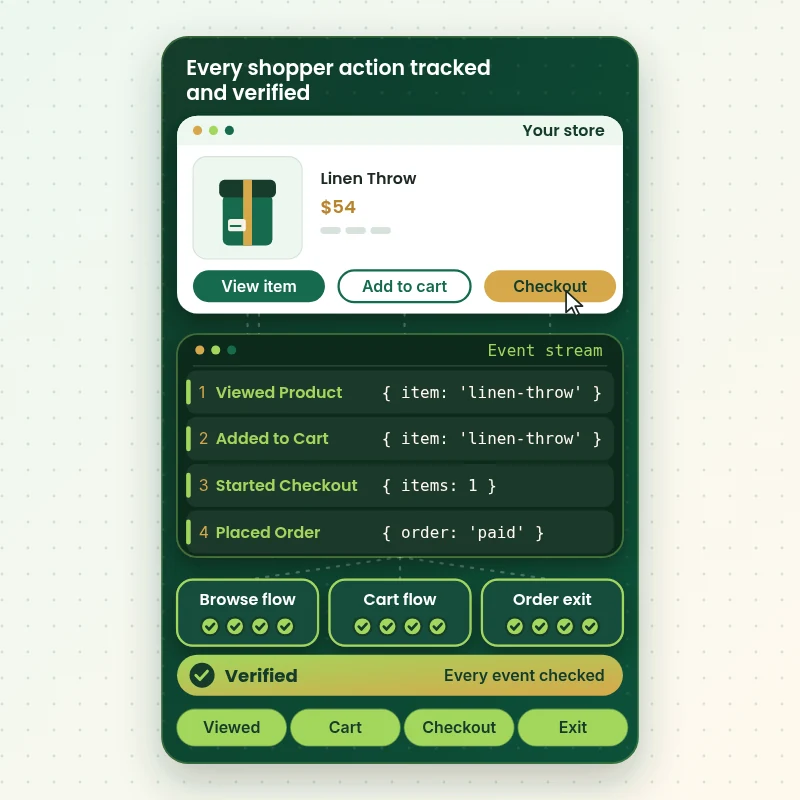
A browse flow lives or dies on events. The walkthrough follows one shopper through the store and shows the signals the flow listens for: a product view that starts it, then cart, checkout and order events that stop it. We verify every one of them with test sessions before any email is switched on.
Portfolio
Shopify Storefront Designs by Niche
Shopify Browse Abandonment Email Flow gets the same attention to layout, spacing and detail as each design below, every one built around a single catalog and one kind of buyer.
School supplies store design
School supplies
Digital course store design
Digital course
Fitness technology store design
Fitness technology
Skincare store design
Skincare
Music samples store design
Music samples
Sleep and recovery store design
Sleep and recoveryProcess and timeline
How We Build Your Browse Abandonment Flow, Step by Step
Six steps move from access to launch, and the tracking check comes first because everything else depends on it. A Single Browse Flow usually launches within 4 to 6 working days of access.
- 1
Access and review
You add us as a Shopify collaborator and give us a seat in your email platform. We look at what is already installed, what flows exist and what your theme sends.
- 2
Tracking test
We run test sessions, identify as a known contact and read the activity feed. If Viewed Product does not appear with full product details, we stop and fix that before any email is designed.
- 3
Flow build
Trigger, delay, filters, throttle and branches are assembled as a draft. Exit conditions for cart, checkout and order are added at the flow level, not buried inside single emails.
- 4
Email creation
We build the product block and templates, write or load the copy, and preview everything on phone, desktop and in dark mode before you see it.
- 5
Testing
Test profiles trigger the flow, add to cart mid-sequence, buy, and view an unavailable product. Each case is logged against the checklist, and failures are fixed and retested.
- 6
Launch and watch
With your approval the flow goes live, and we check the first real sends. The walkthrough and logic map then go to you for your records.
Compare your options
Do It Yourself, Marketplace Gig, App Default or a Fixed Browse Abandonment Flow?
Owners tend to choose among four routes: switch on an app template, hire a cheap gig, build it themselves in the platform, or pay a specialist for a fixed build. They differ most in how much of the tracking and exit logic is checked.
| What matters | App template | Marketplace gig | DIY in platform | Store Design Expert |
|---|---|---|---|---|
| Viewed Product event confirmed with test sessions | No | Rarely | You check | Yes |
| Exits on cart, checkout and order | Basic | Varies | You build | Yes |
| Re-entry throttle set | Default | Varies | You set | Yes |
| Out-of-stock products filtered | No | Rarely | You build | Mid and top |
| Coordinated with cart and checkout flows | No | Rarely | You plan | Top package |
| Consent and identification limits explained | No | Rarely | No | Yes |
| Fixed price and defined end | Subscription | Yes | Your time | Yes |
| Logic map and test checklist kept | No | Rarely | No | Yes |
Inside every project
What Keeps the Flow Accurate and Your Store Safe
A browse email is shown to real customers with real product data, so details matter. These habits sit behind every build.
Draft first, live later
The flow stays in draft while we build and test. Customers see nothing until you have approved the finished sequence.
Limited access only
We work as a collaborator on Shopify and a limited seat in your email platform. No owner password is shared, and access ends when you remove us.
A written test checklist
Every build ends with a checklist: event fired, product shown, cart exit, checkout exit, order exit, out-of-stock case and unsubscribe. You get the completed list.
Event data inspected, not assumed
We read the real event payload in the activity feed. If a field is empty or wrong, the email would be too, so we catch it before launch.
Consent and exclusions honoured
The flow respects marketing consent, and anyone you name as excluded is filtered out. Where your cookie settings limit tracking, the report says so.
Fixed scope with two revisions
The price covers the scope you chose and two rounds of changes. Additional work is quoted before it starts, never billed by surprise.
Interactive price calculator
Build Your Browse Abandonment Flow Package
Pick the depth of flow, choose your email platform and tell us how visitors get identified on your store. The fixed fee and delivery estimate update as you choose.
Request a custom quote
Headless storefronts, multi-store setups, or catalogs that need custom feed logic receive a written quote with the scope itemised before you commit.
Request a QuoteChanged your mind? Choose Single Browse Flow, Intent Split or Full Abandonment Ladder above to return to the instant calculator.
Packages and comparison
Compare Browse Abandonment Flow Packages Line by Line
Each row is something you can verify in your own account. Platform, identification and catalog choices change the final fee, and the calculator above totals them as you go.
| What is included | Single Browse Flow $490 | Intent Split $890Recommended | Full Abandonment Ladder $1,490 |
|---|---|---|---|
| Viewed Product tracking verified | Included | Included | Included |
| Two-email browse flow | Included | Included | Included |
| Cart, checkout and order exits | Included | Included | Included |
| Re-entry throttle | Included | Included | Included |
| Test sends and previews | Included | Included | Included |
| Recorded handover and two revision rounds | Included | Included | Included |
| Past-buyer branch | Not included | Included | Included |
| High-intent repeat-view branch | Not included | Included | Included |
| Stock and visibility filters | Not included | Included | Included |
| Related items block | Not included | Included | Included |
| Review of cart and checkout flows | Not included | Not included | Included |
| Priority and suppression map | Not included | Not included | Included |
| Consent behaviour report | Not included | Not included | Included |
| 14 days of fixes | Not included | Not included | Included |
| Typical delivery | 4 to 6 days | 6 to 9 days | 9 to 12 days |
For Shopify Browse Abandonment Email Flow, the price and the delivery estimate shown in the calculator above are the ones that apply.
Why Store Design Expert
Klaviyo Flow Setup Agency Depth Without the Ongoing Fee
You get specialist care for one well-defined job. The price is fixed, the end is clear, and the flow is built to be read and edited by your own team afterward.
We know the storefront side
Many email specialists never touch the theme. We have built over 450 Shopify stores, so we can tell when a missing embed or theme change is why events are not arriving.
A Klaviyo flow setup agency that tests the data first
Before writing a word of copy, we confirm the event really fires and carries what the email needs. A flow without trustworthy data only looks finished.
Priced for a single flow
Gig listings bundle browse abandonment into a cheap package, and agencies price a full stack in the thousands. A focused build with checks sits between those two.
Built to coexist with your other flows
Your cart and checkout emails stay in charge when they should. We plan the order of priority, so each shopper gets the single most relevant message.
Honest about reach
We say plainly that the flow reaches identifiable visitors only, and we show how to widen that group. No inflated promises, no invented percentages.
Everything stays with you
Flow, templates and documents sit in your accounts. You can hand them to another marketer, change them later or leave us entirely, with nothing held back.
What we need to get started
What We Need to Begin Your Browse Flow
A route into your store and email platform, plus some decisions about how you want to treat browsers. Nothing more is needed to start.
Approve our collaborator request
Send the store address and accept the invitation from our Partner account. You stay the owner and no password is shared, and you can end our access whenever you decide.
Starting from nothing? We build, then transfer
When there is no store yet, we create it in our own Shopify Partner account and hand over ownership at the end. Choosing a Shopify plan is the only step left for you.
Or give us a staff account
If staff login details are easier, send those instead. We prefer collaborator access because removing it takes one click, but both routes work.
Email platform seat
Invite us to Klaviyo or your chosen tool with permission to edit flows, templates and segments, so the flow is created where it will run.
Products and rules
Tell us which products or collections should never trigger a browse email, such as gift cards or restricted items, and whether you offer discounts at all.
Tone and an approver
Share an email you like and your brand fonts and colors, and name the person who signs off, so review rounds stay quick.
Your owner login and payment details stay with you. The flow remains in draft until you approve it.
Testimonials
What Store Owners Say About Working With Us
Verified clients describe their experience with Store Design Expert on store builds, fixes and email automation.
Verified
Store Design Expert delivered an outstanding website development experience! Their professionalism and attention to detail exceeded my expectations, and their proactive communication kept everything running smoothly. Truly impressed by their deep understanding and dedication.
WG
Warren G.United States
Verified
Very quick and detailed work! Store Design Expert does exactly what you want, in a very professional manner.
LF
Lena F.Germany
Verified
Store Design Expert did an outstanding job with top-notch professionalism on my website project. Everything was delivered quickly without compromising quality. I could not have asked for better!
JM
Jason M.United States
Verified
The website development work was nothing short of professional, with top-notch quality. Their exceptional level of cooperation made the collaboration seamless and enjoyable. Highly recommend working with Store Design Expert!
JC
Jeremy C.United States
Verified
Super great to work with, and super fair!
RO
Robert O.United States
Verified
The website development work was truly impressive. Their attention to detail and ability to exceed expectations made the project a success. Working with them was a breeze, thanks to quick responsiveness and a willingness to go above and beyond.
KD
Kevin D.United States
Verified
Store Design Expert was very knowledgeable about what I needed done to fix my Shopify store and how to improve the store layout. The project was completed very quickly, and I will definitely use them for support as my business grows.
ST
Samuel T.United States
Verified
Very satisfied with the work. Most importantly, Store Design Expert responded promptly to my questions and concerns. Thank you!
KB
Kyle B.United States
Verified
Outstanding work and outstanding customer service. Five stars! I will absolutely use Store Design Expert again for my next book.
KM
Katharine M.United States
Related searches
Searches That Bring Owners to Shopify Browse Abandonment Email Flow
People describe Shopify Browse Abandonment Email Flow in different ways when they search. These are the common ones.
“browse abandonment email flow”, “browse abandonment email”, “klaviyo browse abandonment” or “klaviyo browse abandonment flow”: owners type these when they need Shopify Browse Abandonment Email Flow, and the packages above are priced for that job.
“browse abandonment email examples”, “browse abandonment flow best practices”, “browse abandonment email subject lines” or “browse abandonment email template” all point to the same job, which Shopify Browse Abandonment Email Flow covers from start to finish.
“what is a browse abandonment flow”, “site abandonment flow klaviyo”, “shopify browse abandonment” or “klaviyo flow setup agency”: owners type these when they need Shopify Browse Abandonment Email Flow, and the packages above are priced for that job.
People who look up “shopify email automation workflows” usually want Shopify Browse Abandonment Email Flow; the calculator above shows the price and delivery estimate before you commit.
You may also have come across “hire klaviyo expert” while reading about Shopify Browse Abandonment Email Flow.
FAQ
Browse Abandonment Flow FAQs
Straight answers on price, tracking limits, platforms and timing before you decide.
How much does a browse abandonment flow cost?
Packages start at $490 for Single Browse Flow, $890 for Intent Split and $1,490 for Full Abandonment Ladder. Platform, identification and catalog options add their own prices, so most projects land between about $600 and $1,900. You see the fixed fee in the calculator before paying.
What is a browse abandonment flow?
It is an automated email sequence triggered when an identified shopper views a product and leaves without adding it to cart. What is a browse abandonment flow compared with a cart flow? It acts earlier and softer, because the shopper has shown interest, not intent to buy.
Who can actually receive these emails?
Only visitors your platform can recognise: people who signed up through a form, clicked an earlier email or entered an address at checkout. Anonymous visitors cannot be emailed. We map how your store identifies people and suggest ways to widen that group.
Is a Klaviyo browse abandonment flow different from Shopify Email?
Yes. A klaviyo browse abandonment setup uses the Viewed Product metric and flow filters, while Shopify's own tools cover cart and checkout reminders. If you want a browse sequence with exits and branches, you need a platform with product-view events such as Klaviyo or Omnisend.
What do you mean by a klaviyo browse abandonment flow with filters?
A klaviyo browse abandonment flow should exclude anyone who added to cart, started checkout or ordered since entering, and anyone who received the flow recently. Those filters stop the flow from emailing people who are already buying or have just been emailed.
Is a site abandonment flow in Klaviyo the same thing?
Klaviyo's help centre sometimes uses site abandonment flow klaviyo wording for the same idea. There are subtle differences in tracking approach, because some site-level triggers use Active on Site rather than a product view. We pick the metric that carries the product details you need.
Can you show browse abandonment email examples?
Yes, as structures rather than copied text. Browse abandonment email examples usually run: a short reminder of the viewed item an hour or so later, then a second with related products or reviews a day later. We tailor each to your catalog and tone.
Which browse abandonment flow best practices do you follow?
Wait at least an hour, lead with the product the person viewed, keep it to two or three emails, throttle re-entry, exit on cart, checkout and order, filter unavailable products and avoid heavy discounting. We write these into the logic map so you can see each one at work.
What goes into browse abandonment email subject lines?
Browse abandonment email subject lines work best when they name the product or category and sound like a helpful nudge. We write them in your voice, avoid pressure and false urgency, and can set up two variants for testing as an extra.
Do you supply a browse abandonment email template?
We build a browse abandonment email template inside your platform in your brand, with a dynamic product block and a related items area. You keep it and can reuse it for other flows. We do not hand over a generic file.
Can I hire a Klaviyo expert for this one task?
Yes. If you want to hire Klaviyo expert help for just this flow, we work to a fixed price with a defined end, without a retainer or minimum term. You receive the flow, the test checklist and a recorded walkthrough.
How long does it take to launch?
Single Browse Flow takes 4 to 6 working days, Intent Split 6 to 9 and Full Abandonment Ladder 9 to 12, counted from receiving access. A platform connection, server-side tracking or heavy catalog logic adds days, shown in the calculator.
What if tracking turns out to be broken?
We find that in the first step and tell you before building further. Fixing the app embed, theme code or consent behaviour is part of verification in every package, and larger tracking work is quoted separately with the scope written down.
Do you guarantee extra sales?
No. Browse emails can only reach identifiable shoppers, and results depend on traffic, product and offer. We guarantee the fixed scope, verified tracking, a tested flow and a written handover with two rounds of revisions.
Ready when you are
Order Your Browse Abandonment Flow Today
Choose a package, see the fixed fee and delivery date, and set up a browse abandonment flow that follows up on the products shoppers actually viewed. It is built by a team that has launched over 450 Shopify stores, tracked and tested before it sends a single email.
- Secure checkout
- Two revision rounds
- Tracking verified before launch