
Shopify stores designed and launched
Back-in-stock alert setup for Shopify
Shopify Back in Stock App Setup That Turns Sold-Out Pages Into Waiting Lists
A Shopify back in stock app is one of the few tools that earns money from products you do not currently have. We choose and install the app, place the notify form where sold-out shoppers see it, write the alert and test a real restock. From $490, fixed scope.
- A notify-me form on every sold-out product
- Alert emails and SMS written in your voice
- Connected to Klaviyo or your email tool if you use one
- A restock tested from signup to alert
From$490
Delivery3 to 11 working days
Revisions2 rounds
Our track record
450+ Shopify Stores Launched Since 2015. Your Restock Alerts Get the Same Care.
A sold-out page is the worst moment in a shopper's visit and the best moment to ask for a way to reach them later. We build that moment carefully, then check that the alert fires when stock returns.
Average rating from verified clients
Building Shopify stores since
Secure checkout
Pay through a protected checkout and keep a full order record.
Two revision rounds
Included in every package, so the result matches what you pictured.
Backup before changes
We work on a duplicate of your theme, never on your live store.
Who this is for
Who Needs Help With a Back-in-Stock Alert App Setup
Owners usually lose sales to empty product pages before they notice. These are the six restock alert situations we meet most.
You are a good fit if
- Products sell out
- You want a fixed price and written restock alert scope
- You will own the restock alert account and its plan
- You can approve alert wording quickly
Stores with limited drops and restocks
Small batches sell out. A waiting list turns the sell-out into demand for the next batch.
Owners whose sold-out pages are dead ends
The product shows Sold out and nothing else. Shoppers leave and never return.
Teams already using Klaviyo
Alerts should live in the same system as your other flows, with consistent branding and consent.
Merchants who also need backorders
Some products can still be sold when out of stock. We set rules so each product follows the right path.
Stores comparing alert apps
You want a plain recommendation among several apps for your catalog, email tool and budget.
Founders short on time
You would rather hand over access and receive a tested alert than learn every setting.
Problems solved
Why Restock Alerts Often Miss Their Moment
A notify form that is not seen or an alert that does not fire wastes the signal. These six restock alert problems are the most common.
- The form is not where shoppers look.
A link hidden below the description is rarely tapped. The form belongs beside the disabled buy button.
- Alerts arrive too late.
Alerts that send hours after stock returns miss shoppers who are ready now, and products sell out again before they arrive.
- Everyone is alerted at once.
If 500 people are told about 20 units, most are disappointed. Limits and order of sending matter.
- The link goes to the wrong place.
A link to the home page or to a variant that is still out of stock wastes the click.
- Consent is unclear.
Email and SMS signups need clear wording about what shoppers agree to, so lists stay clean.
- Variants confuse the form.
A form that does not follow the chosen size or colour asks for alerts on the wrong item.
What we can do
What Our Back-in-Stock Alert App Setup Covers
Six jobs make up the service. Your package decides how many channels and flows are included.
App choice and install
We compare two or three apps against your catalog, email tool and budget, then install the one you choose and confirm its plan limits.
Notify form placement
The notify form is placed beside the disabled buy button, follows the selected variant and works on phone, tablet and desktop.
Alert emails and SMS
Alert messages are written in your voice with product image, price and a link straight to the item, plus a signup confirmation.
Flows and rules
Rules decide when alerts go out, in what order and with what limits, and whether products can still be sold as backorders.
Klaviyo and email tool connection
If you use Klaviyo or another platform, signups and alerts are connected so they appear in your normal flows and reports.
Restock testing
We mark a test product out of stock, sign up, restock it and confirm that the alert arrives with the right link.
What is included
What Is Inside Your Back-in-Stock Setup Package
Every restock alert deliverable belongs to one of six groups. The comparison table below shows how far each group goes in each restock alert package.
App choice
- Options compared
- Plan limits checked
- Choice recorded
- Install and permissions
Form
- Form placed by the buy button
- Variant behaviour set
- Consent wording
- Mobile layout checked
Messages
- Signup confirmation
- Restock alert email
- SMS wording
- Sender details aligned
Rules
- Send limits
- Order of sending
- Backorder rules
- Low-stock handling
Connections
- Email tool connected
- Events tested
- Segments created
- Reporting tags
Handover
- Restock test log
- Dashboard video
- Notes on editing wording
- Two revision rounds
You provide access and approve wording. We handle choice, placement, writing and testing.
Alert timeline
From a Sold-Out Page to a Sale, Message by Message
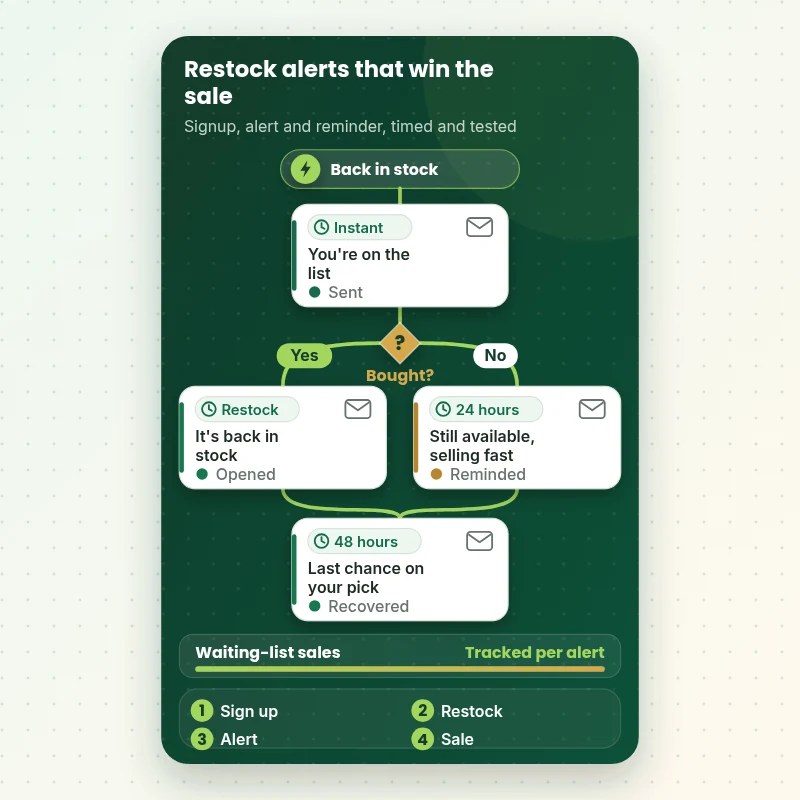
The walkthrough follows one shopper who signs up on a sold-out product. They get a confirmation, then an alert when stock returns, then a short reminder if they have not bought. Each message is written and tested so it arrives when it can still win the sale.
Portfolio
Store Design Styles We Build
Back-in-Stock Alert App Setup for Shopify gets the same attention to layout, spacing and detail as each design below, every one built around a single catalog and one kind of buyer.
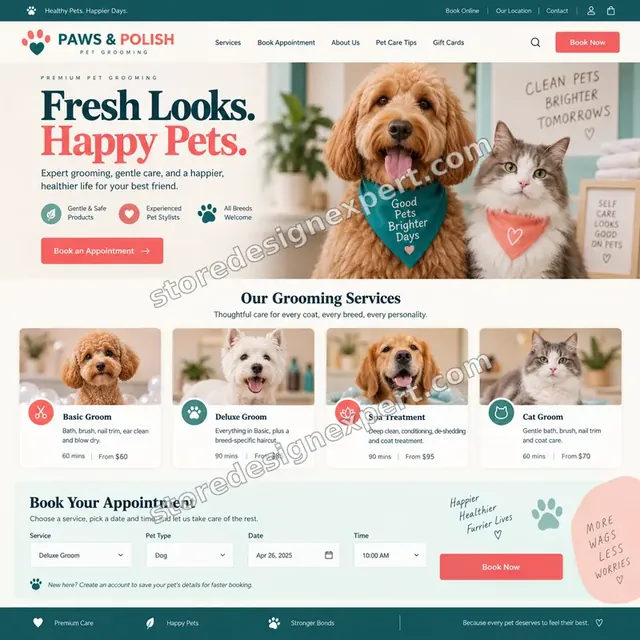
Pet grooming store design
Pet grooming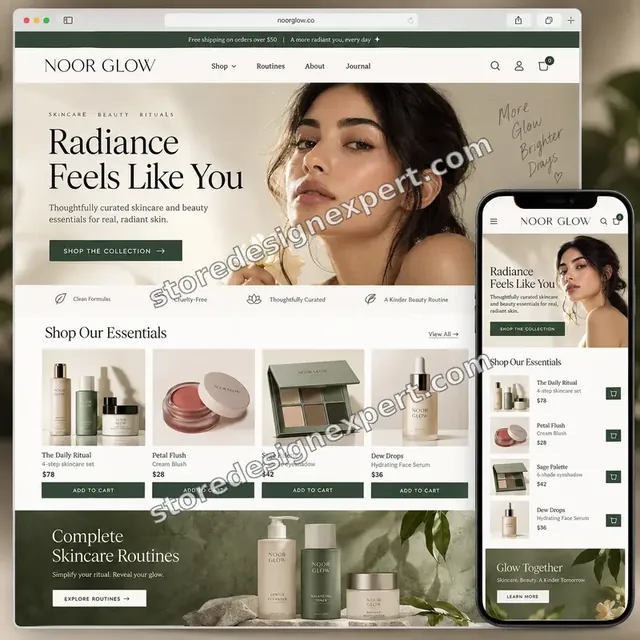
Beauty creator store design
Beauty creator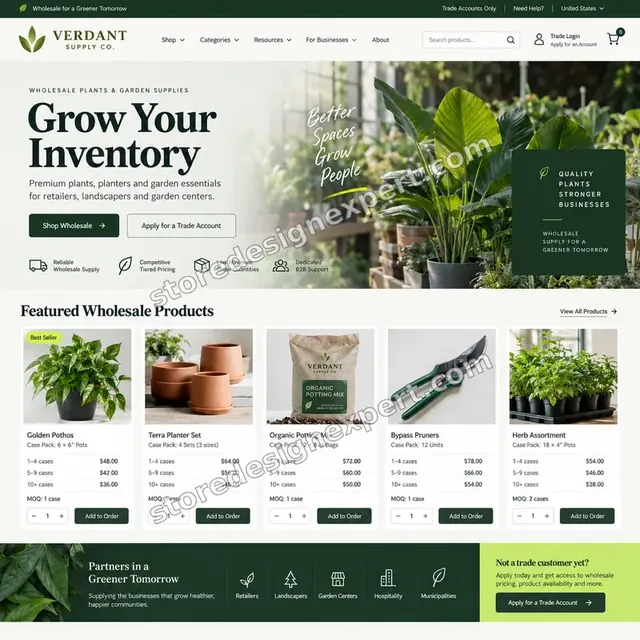
Garden supplies store design
Garden supplies
Coffee store design
Coffee
Outdoor store design
Outdoor
Home goods store design
Home goodsProcess and timeline
How a Back-in-Stock Project Runs, Start to Finish
Six restock alert steps, with nothing changing on your live theme until you approve a preview. Your calculator choices decide how long each restock alert step takes.
- 1
Brief and app choice
You tell us what sells out, how often and which email tool you use. We recommend an app in writing.
- 2
Install and connect
The app is installed in a duplicate theme, permissions approved and plan limits noted.
- 3
Place the form
The notify form is placed beside the buy button, follows variants and is checked on phone and desktop.
- 4
Write the alerts
Signup and alert messages are written and test sends checked.
- 5
Run a restock test
A test product is marked out of stock, signed up for, restocked and checked for a correct alert.
- 6
Publish and hand over
After sign-off the preview goes live. You receive the restock alert test log and a dashboard video.
Compare your options
DIY, Marketplace Gig, Agency or Our Back-in-Stock Setup?
Four usual routes to a working restock alert. This comparison shows who checks the parts that decide whether the alert wins a sale.
| What matters | Set it up yourself | Marketplace gig | Agency retainer | Store Design Expert |
|---|---|---|---|---|
| Apps compared for your catalog | No | No | Sometimes | Yes |
| Notify form follows the chosen variant | Default | Rarely | Yes | Yes |
| Alert written and test-sent | Default | Rarely | Extra cost | Yes |
| Email platform connected | You connect | Rarely | Yes | Yes |
| Real restock tested end to end | No | No | Sometimes | Yes |
| Price known before work begins | Yes | Yes | Quote only | Yes |
| Written test log and video | No | Rarely | Extra cost | Yes |
| No retainer or minimum spend | Yes | Yes | No | Yes |
Inside every project
What Protects Your Store and Your Subscribers During Restock alert Setup
Alerts reach people who gave you their contact details, so these six habits come with every package.
Changes in a duplicate theme
Your live theme stays untouched by restock alert work until you approve a preview. A backup is saved first.
Test sends before launch
Alerts go to test addresses first, so no subscriber receives an untested message.
Least access needed
A collaborator request is enough. Card details and owner passwords are never requested during restock alert work.
Clear consent wording
Signup text states what people agree to, and we flag where local rules may need your adviser's review.
A real restock is tested
The job is not finished until a test product restocks and the alert arrives with the right link.
Fixed scope, two revision rounds
The restock alert price is agreed before work starts, and changes inside scope run in two structured rounds.
Interactive price calculator
Build Your Back-in-Stock Package
Choose a package, then tell us your theme type, your email tool and how many products sell out. The fixed price and restock alert delivery window update with every click.
Request a custom quote
Headless storefronts, multi-location inventory rules, wholesale restocks, custom inventory feeds and pre-order and backorder systems at scale are scoped separately and quoted at a fixed price.
Request a QuoteChanged your mind? Choose Notify Form, Alert Flow or Restock Engine above to return to the instant calculator.
Packages and comparison
Back-in-Stock Setup Package Comparison
Line-by-line detail of what each package covers, useful when choosing between setting up an alert app yourself and having it built and tested.
| What is included | Notify Form $490 | Alert Flow $950Recommended | Restock Engine $1,690 |
|---|---|---|---|
| App compared, chosen and installed | Included | Included | Included |
| Notify form placed | Included | Included | Included |
| Variant behaviour set | Included | Included | Included |
| Alert email written | Included | Included | Included |
| Restock test log | Included | Included | Included |
| Signup confirmation | Not included | Included | Included |
| SMS wording | Not included | Included | Included |
| Send limits and order | Not included | Included | Included |
| Collection badges | Not included | Included | Included |
| Email platform connection | Not included | Not included | Included |
| Backorder rules | Not included | Not included | Included |
| Low-stock messaging | Not included | Not included | Included |
| Fixes after launch | Not included | Not included | 30 days |
| Typical delivery | 3 to 5 days | 5 to 8 days | 8 to 11 days |
Your Back-in-Stock Alert App Setup for Shopify price and delivery estimate come from the calculator above, so there is no surprise at checkout.
Why Store Design Expert
Why Owners Choose Us for Back-in-Stock Work
Plenty of apps ask for an email address. Owners hire us for the placement, wording and testing that make the alert actually sell.
Daily work on product pages
Product pages and variants are everyday material for us.
Rated 4.9+ by verified clients
The reviews shown here come from verified Store Design Expert clients, so you can weigh them before ordering restock alert work.
Prices you can plan around
Every restock alert package, option and extra has a visible price. The fee for the restock alert app goes to the vendor, so check current plans.
A direct line to the builder
You speak with the person with your theme open while restock alert is configured, not a ticket queue.
Honest advice on apps
If Shopify's own tools or your email platform already do the job, we tell you before you pay.
Experience since 2015
More than 450 Shopify stores launched means we have met most variant and inventory edge cases.
What we need to get started
What We Need Before We Open the restock alert app and Your Theme
Three ways to give access for restock alert work, then a short list of decisions only you can make.
Accept our collaborator request
Send your store address and approve the restock alert request. You stay the owner and can remove our restock alert access in one click.
No store yet? We build it first
We can create the store in our Partner account, set alerts up there and transfer ownership when finished.
Or share a staff login
A restricted staff account works too for restock alert access, though the collaborator route is easier to revoke.
Your sell-out patterns
Tell us which products sell out, how often and whether you can sell them as backorders.
Your email tool
Tell us whether you use Klaviyo or another platform so alerts are connected correctly.
Your brand voice
Send tone notes and any wording rules so signup and alert messages sound like you.
For restock alert work, owner passwords and card details are never requested. Restock alert edits are made in a duplicate theme after a backup, and we log what changed.
Testimonials
What Store Owners Say Before You Order Back-in-Stock Alert App Setup for Shopify
Verified Store Design Expert clients describe the brief, the build and the handover in their own words.
Verified
Store Design Expert is the best. The work is very professional, they pay close attention to detail and, more importantly, they listen. Their level of cooperation is second to none, and everything was delivered in a very timely manner. I will keep them in mind for future projects.
BN
Barbara N.United States
Verified
The experience was tailored to my brand and specifications to the letter. I love the result.
EP
Eric P.United States
Verified
They definitely get the job done. Very patient and understanding throughout the whole project.
BS
Brian S.United States
Verified
Thank you so much to Store Design Expert and the team. My site looks far more appealing to customers, and I will happily recommend your services to other new small businesses.
JS
Jennifer S.United States
Verified
Very patient, informative and transparent, and they did exactly what they said they would do. Thanks for all the help!
RO
Raymond O.United States
Verified
Store Design Expert is the only one I use for all things WordPress. They have a high level of understanding, deliver quality work and are easy to deal with.
SC
Scott C.United States
Verified
A pleasure to work with. They did pretty much everything I asked and definitely exceeded my expectations. I will be working with Store Design Expert again soon.
JL
Jerry L.United States
Verified
Superb work! Store Design Expert is incredibly patient, and even when I did not fully understand my own questions, everything was explained again in detail. My vision was implemented perfectly, and the work is worth every cent I spent.
KB
Katrin B.Germany
Verified
Very impressed with the build-out. My store is ready to get started, and I am sure I will reach out for edits down the road, but this is everything I could ask for to get the party started. Thanks again, and I will be in touch for future projects.
DH
Dale H.United States
Related searches
What People Search For Before Ordering Back-in-Stock Alert App Setup for Shopify
People describe Back-in-Stock Alert App Setup for Shopify in different ways when they search. These are the common ones.
“back in stock alert app setup”, “back in stock shopify”, “best back in stock app for shopify” or “shopify back in stock notifications” all point to the same job, which Back-in-Stock Alert App Setup for Shopify covers from start to finish.
If you searched for “shopify notify me when back in stock”, “notify when back in stock shopify”, “back in stock notification for shopify” or “klaviyo back in stock shopify”, Back-in-Stock Alert App Setup for Shopify is the work that answers it.
People who look up “back in stock shopify flow”, “back in stock email shopify”, “shopify sell when out of stock” or “notify back in stock shopify” usually want Back-in-Stock Alert App Setup for Shopify; the calculator above shows the price and delivery estimate before you commit.
People who look up “back in stock shopify app” usually want Back-in-Stock Alert App Setup for Shopify; the calculator above shows the price and delivery estimate before you commit.
Related searches include “cheapest shopify app for backorders”.
FAQ
Shopify Back in Stock App FAQs
Answers on cost, apps, Klaviyo, backorders and testing.
How much does Shopify back in stock app setup cost?
Notify Form is $490, Alert Flow $950 and Restock Engine $1,690. Theme type, email tool and catalog size add to that, and the calculator shows the total before you pay. Fees for the restock alert app are billed by the app vendor.
What is the best back in stock app for Shopify?
What is the best back in stock app for Shopify? It depends on your email tool, whether you need SMS and your budget. We compare two or three apps against your needs and give a written recommendation.
How long does a back in stock alert app setup take?
A placed notify form takes 3 to 5 working days, a full alert flow 5 to 8 and a connected restock engine 8 to 11. Older themes, many products and email platforms add days.
How do Shopify back in stock notifications work?
A shopper on a sold-out product enters an email or number. When you restock, the app sends a message with a link to the product. We test that whole path with a real restock.
How does Shopify notify me when back in stock for each variant?
Shopify notify me when back in stock forms should ask for the chosen size or colour, so the alert is about the right item. We test each variant type on your theme.
Can I notify when back in stock on Shopify by SMS?
Yes, if the app supports it and shoppers consent. To notify when back in stock Shopify stores need clear signup wording, which we write and you approve.
Do you set up a back in stock notification for Shopify with Klaviyo?
Yes. Klaviyo back in stock Shopify flows use Klaviyo's own feature, and we connect it, write the messages and test a restock. You keep everything in one platform.
What is a back in stock Shopify flow and do I need one?
A back in stock Shopify flow is the sequence of messages triggered by a restock. A single alert is enough for many stores, and longer sequences suit popular products. We recommend one in the brief.
Can a back in stock email Shopify send include a discount?
Yes, but we advise caution. A back in stock email Shopify shoppers receive works best as a plain alert, because the product is the draw. We can test an offer on one product.
Can I sell on Shopify when out of stock instead?
Yes for some products. Shopify sell when out of stock rules can allow backorders. We set which products follow which path and word the product page so shoppers know the wait.
What is the cheapest Shopify app for backorders?
The cheapest Shopify app for backorders is not always the best fit. We compare plans against your order volume and tell you where a free tool or a theme setting is enough.
Do you need my Shopify password for Back-in-Stock Alert App Setup for Shopify?
No. A collaborator request keeps you as owner of the restock alert setup and can be revoked instantly. If you have no store yet we build the restock alert setup in our Partner account and transfer it.
Can you notify back in stock Shopify shoppers in a set order?
Yes. Some apps can notify back in stock Shopify subscribers in the order they signed up and cap sends to stock levels. We configure whichever your app supports and test it.
Is a back in stock Shopify app the same as a pre-order app?
No. The back in stock Shopify app alerts people after stock returns, while a pre-order app takes orders beforehand. We can set up either or both.
Ready when you are
Order Your Shopify Back in Stock App Setup
Choose a package, watch the fixed price settle and have the notify form, alerts and rules built and tested by a team that has launched 450+ Shopify stores. A real restock is tested before any shopper signs up.
Secure payment · Two rounds of changes · Restock alert test log and video included