
Shopify stores designed and launched
Shopify header and navigation task
Scrolling Announcement Bar Shopify: Fit More Offers Into One Strip Without Cluttering the Header
Looking for a scrolling announcement bar Shopify that moves smoothly, pauses when asked and does not hurt readability? We build it in a duplicate theme, tune the speed and test it on real phones. From $49, fixed price.
- Smooth, continuous scrolling text
- Pause on hover and reduced-motion support
- Speed tuned to your message length
- Tested on phones and desktops
From$49
Delivery1 to 4 working days
Revisions2 rounds
Our track record
450+ Shopify Stores Launched Since 2015. Now Let Us Handle Your Scrolling Announcement Bar.
More than 450 Shopify stores launched since 2015 and a 4.9+ average from verified clients sit behind this task. Your scrolling announcement bar is small in scope and handled with the same planning and testing as our biggest builds.
Average rating from verified clients
Building Shopify stores since
Secure checkout
Pay through a protected checkout and keep a full order record.
Two revision rounds
Included in every package, so the result matches what you pictured.
Backup before changes
We work on a duplicate of your theme, never on your live store.
Problem and result
Scrolling Announcement Bar Shopify: Several Messages, One Slim Strip
A static bar holds one short line. A ticker lets you carry shipping, returns and a sale in the same strip, and movement draws the eye. Done badly it is jerky or unreadable, so the speed, spacing and accessibility settings matter as much as the animation itself.
One short line is all that fits
A static bar forces you to choose between shipping, returns and a promotion. Anything left out goes unseen, and cramming more text in makes the bar wrap or get cut off on phones.
A ticker that carries every message
Your messages scroll in a smooth loop across the bar, separated by small icons. Shoppers can pause it, visitors who prefer reduced motion get a static line and the speed suits the screen.
What is included
What Your Scrolling Announcement Bar Includes
When you ask for a scrolling announcement bar Shopify, you get a seamless loop built with modern CSS, tuned for your messages and tested on real devices, with accessibility controls that many pasted snippets leave out.
Implementation checklist
- Seamless looping ticker built with CSS animation, not the deprecated marquee tag
- Your messages set in one line with separator icons between them
- Speed tuned to message length and screen width
- Pause on hover, focus and touch
- Static fallback for visitors who prefer reduced motion
- Brand colours, font size and spacing matched to your header
- Optional links on individual messages
- Handover note showing how to edit the messages and the speed
Your theme may already include an announcement bar. If it does, we build the ticker into it so you can keep editing the messages in the theme editor. Rotating one message at a time is a different effect and a separate task.
See how it works
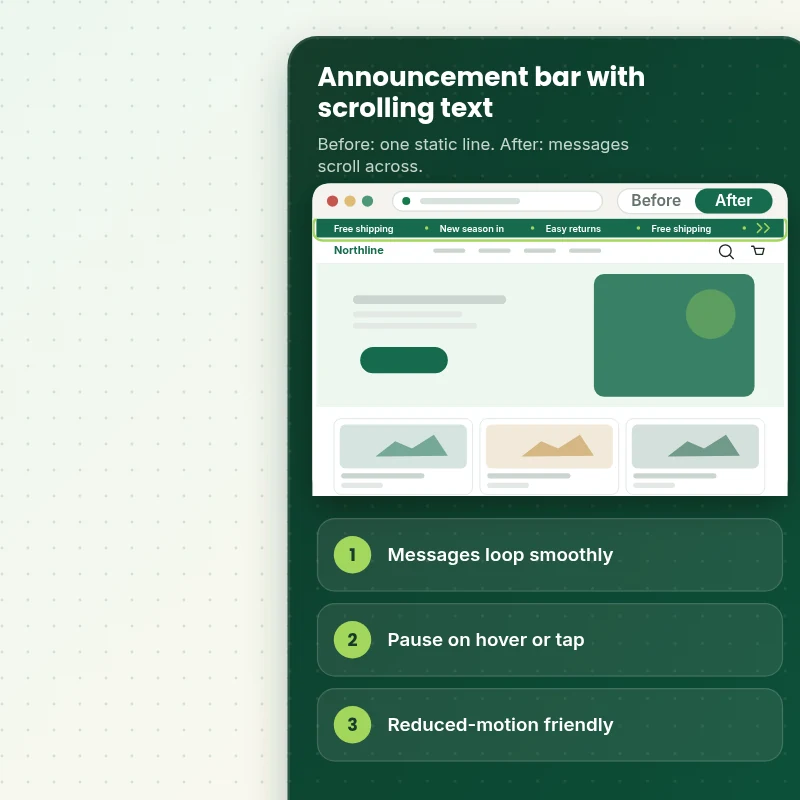
From a Static Line to a Ticker Shoppers Can Pause
Follow one visit. The shopper lands, the messages drift across the bar and a hover pauses them.
Scope boundaries
Exactly What Is and Is Not Covered for Your Scrolling Announcement Bar
Clear boundaries keep the scrolling announcement bar a fixed-price task, so here is what it covers, what it does not, what we need and when a custom quote is fairer than forcing it into a package.
Included
- A scrolling announcement bar on your live theme
- Speed, pause and reduced-motion handling
- Mobile and sticky header checks
- Two rounds of revisions, then a handover note for Add Scrolling / Marquee Text to Announcement Bar
Not included
- Rotating or fading single messages
- A countdown timer inside the bar
- Writing the offers or campaign
- Checkout changes that Shopify itself controls
Access we need
- Collaborator access to your Shopify store
- The messages to scroll
- Speed and colour preferences
Quote triggers
- Different tickers on many templates
- Messages that change by country
- A store theme modified at length by page builder apps
Typical turnaround
- 1 to 3 working days for most scrolling announcement bar jobs
- Faster options in the calculator
- Timing confirmed before work starts
After launch
- Two revision rounds before go-live
- A short handover note for your scrolling announcement bar
- Questions answered; larger changes quoted on their own
Compare your options
Scrolling Announcement Bar Shopify With a Snippet, an App or a Developer?
A scrolling announcement bar can be done in several ways, and this table lines them up on cost, care and what you are left with afterwards.
| What matters | DIY or app | Freelance gig | General agency | Store Design Expert |
|---|---|---|---|---|
| Seamless loop without jumps | Varies | Often | If you code it | Yes |
| Pause and reduced-motion support | No | Sometimes | Rarely | Yes |
| No extra app or monthly fee | Yes | No | Yes | Yes |
| Handover note for later edits | No | No | Sometimes | Yes |
| Price known before work begins | Free but time-costly | Varies | Quote only | Yes |
| Theme backup before any change | No | Rarely | Usually | Yes |
| Two revision rounds included | No | Varies | Extra cost | Yes |
| Handover note for what changed | No | Rarely | Sometimes | Yes |
Price calculator
Price Your Scrolling Announcement Bar
Pick a package, adjust the options for your scrolling announcement bar and set your speed. The fixed price and delivery estimate update with every click, with no hidden fees.
Request a custom quote
Different tickers on many templates, country-specific messages and themes heavily modified by page builder apps are scoped separately and quoted at a fixed price.
Request a QuoteChanged your mind? Choose Ticker Basic, Ticker Standard or Ticker Plus above to return to the instant calculator.
How it works
How We Handle Your Scrolling Announcement Bar, Step by Step
From purchase to handover in six steps, with a duplicate theme and a test pass in the middle, so the scrolling announcement bar never surprises you.
- 1
Purchase
Decide how far you want the scrolling announcement bar to go, pay at checkout and receive a written confirmation of the scope.
- 2
Access
Give us collaborator access and answer a few questions, and your store stays yours with no owner password needed for the scrolling announcement bar.
- 3
Build in a duplicate theme
We make the scrolling announcement bar in a duplicate of your theme, so your live store keeps selling while we work.
- 4
QA
Nothing is shown to you until the scrolling announcement bar passes our written checks on the devices your shoppers use.
- 5
Handover
Following your approval we release the scrolling announcement bar and leave you with a clear record of the changes.
- 6
Support
Once the scrolling announcement bar is live we remain on hand for questions, and further changes are scoped and priced first.
Compatibility and QA
Scrolling Bar Checks and Acceptance Criteria
Each scrolling announcement bar is tested on actual phones and browsers against the list below before you review it, and the theme backup we keep makes the whole job reversible.
What we test
- LoopThe loop is seamless with no jump or gap at the join.
- SpeedText is readable at the chosen speed on phones and desktops.
- AccessibilityPause on hover, focus and touch work, and reduced-motion visitors see a static line.
- DevicesThe scrolling announcement bar is reviewed on current iOS and Android phones, on tablets and on desktop screens of several sizes.
- BrowsersChrome, Safari, Firefox and Edge, each in its current version.
- PerformanceThe animation uses CSS transforms only, with no scripts running continuously.
Acceptance criteria
- Messages scroll smoothly in a seamless loop
- The ticker pauses on hover, focus and touch
- Reduced-motion visitors see a static message
- It works with your sticky header
- You can update the ticker messages later using the handover note
What we need to get started
What We Need to Get Add Scrolling / Marquee Text to Announcement Bar Started
Pick the access route that suits you, because whichever one you choose, the scrolling announcement bar is built in a duplicate of your theme and we tell you before anything goes live, so only the items below are needed for it.
Collaborator access
Send your store URL and approve our Shopify collaborator request for the scrolling announcement bar, and you stay the owner, no password is shared and you can remove our access once the work is live.
No store yet? We build it first
With no store yet, we set one up in our Partner account, build the scrolling announcement bar there and transfer ownership to you, so the only thing left for you is choosing a plan.
Prefer to share a login?
Sharing a staff login is possible for the scrolling announcement bar, but we lean towards collaborator access since it is quicker to remove afterwards.
Your messages
Send the lines to scroll. Short phrases work best, and we help trim longer ones.
Speed and feel
Tell us whether you want a calm drift or a faster ticker, and we will tune it on real screens.
One decision maker
Name one approver for the scrolling announcement bar and revisions stay neatly within the two rounds we include.
For any doubt about how to share access for the scrolling announcement bar, the form after checkout has a box for it and we reply with a recommendation.
Testimonials
What Store Owners Say Before You Order Add Scrolling / Marquee Text to Announcement Bar
Verified feedback from clients who trusted us with their Shopify stores and quick tasks alike.
Verified
Store Design Expert is the best. The work is very professional, they pay close attention to detail and, more importantly, they listen. Their level of cooperation is second to none, and everything was delivered in a very timely manner. I will keep them in mind for future projects.
BN
Barbara N.United States
Verified
The experience was tailored to my brand and specifications to the letter. I love the result.
EP
Eric P.United States
Verified
They definitely get the job done. Very patient and understanding throughout the whole project.
BS
Brian S.United States
Verified
Thank you so much to Store Design Expert and the team. My site looks far more appealing to customers, and I will happily recommend your services to other new small businesses.
JS
Jennifer S.United States
Verified
Very patient, informative and transparent, and they did exactly what they said they would do. Thanks for all the help!
RO
Raymond O.United States
Verified
Store Design Expert is the only one I use for all things WordPress. They have a high level of understanding, deliver quality work and are easy to deal with.
SC
Scott C.United States
Verified
A pleasure to work with. They did pretty much everything I asked and definitely exceeded my expectations. I will be working with Store Design Expert again soon.
JL
Jerry L.United States
Verified
Superb work! Store Design Expert is incredibly patient, and even when I did not fully understand my own questions, everything was explained again in detail. My vision was implemented perfectly, and the work is worth every cent I spent.
KB
Katrin B.Germany
Verified
Very impressed with the build-out. My store is ready to get started, and I am sure I will reach out for edits down the road, but this is everything I could ask for to get the party started. Thanks again, and I will be in touch for future projects.
DH
Dale H.United States
Related searches
What People Search For Before Ordering Add Scrolling / Marquee Text to Announcement Bar
Owners reach this page from different searches. Here is how the common ones relate to Add Scrolling / Marquee Text to Announcement Bar.
People who look up “add scrolling marquee text to announcement bar”, “how to make shopify announcement bar move”, “how to add moving announcement bar shopify” or “shopify announcement bar moving” usually want Add Scrolling / Marquee Text to Announcement Bar; the calculator above shows the price and delivery estimate before you commit.
People who look up “sliding announcement bar shopify code”, “how to add scrolling announcement bar shopify”, “how to make announcement bar scroll shopify” or “shopify marquee announcement bar” usually want Add Scrolling / Marquee Text to Announcement Bar; the calculator above shows the price and delivery estimate before you commit.
“marquee announcement bar shopify”, “shopify marquee announcement bar code”, “how to add marquee in shopify announcement bar” or “how to add marquee text in shopify”: owners type these when they need Add Scrolling / Marquee Text to Announcement Bar, and the packages above are priced for that job.
If you searched for “marquee text shopify”, “shopify scrolling text banner” or “shopify scrolling text”, Add Scrolling / Marquee Text to Announcement Bar is the work that answers it.
FAQ
Scrolling Announcement Bar Shopify Questions
Straight answers about cost, scope, timing, apps and what we need from you for your scrolling announcement bar.
Can you add a scrolling announcement bar Shopify to my store, and what does it cost?
Yes. Packages start at $49. The calculator adds options such as more messages, full accessibility controls, links on each message and a separate phone speed, and shows your exact price and delivery estimate before checkout.
How long does it take to get the scrolling announcement bar done?
Most scrolling announcement bar jobs take 1 to 4 working days from the day we have access, and the Sooner and Fastest options in the calculator shorten that if you have a launch or campaign date.
Will it be accessible?
Yes. The ticker pauses on hover, focus and touch, and visitors who ask their device for reduced motion see a static line instead of moving text.
Is Add Scrolling / Marquee Text to Announcement Bar safe for my live store?
Yes. Because the scrolling announcement bar lives in a theme copy until you approve it, a problem cannot reach shoppers and the original is one click from being restored.
What do you need from me for Add Scrolling / Marquee Text to Announcement Bar?
Collaborator access to your store and the messages you want to scroll. Where there is no store yet, we build the scrolling announcement bar in a development store of our own and transfer it to you afterwards.
Which Add Scrolling / Marquee Text to Announcement Bar package should I choose?
You can choose between Ticker Basic at $49 (1 to 2 working days), Ticker Standard at $89 (2 to 3 working days) and Ticker Plus at $149 (3 to 4 working days) for Add Scrolling / Marquee Text to Announcement Bar.
What do I get with Ticker Basic for Add Scrolling / Marquee Text to Announcement Bar?
Your announcement bar message scrolling smoothly across the bar in a continuous loop, in your brand colours. It includes: Continuous scrolling text; Speed set to your taste; Brand colours and font; Desktop and mobile tested; Several messages in one ticker. Ticker Basic costs $49 and takes 1 to 2 working days.
What does the Add Scrolling / Marquee Text to Announcement Bar calculator ask me?
When you order Add Scrolling / Marquee Text to Announcement Bar you pick a package and then answer 3 short questions in the calculator: how many messages will scroll (One message repeated, Up to four messages, Up to eight messages); how much control do visitors get (Pause on hover, Pause, reduced motion and links); how soon do you need it live (Standard, Sooner, Fastest).
Which extras can I add to Add Scrolling / Marquee Text to Announcement Bar?
For Add Scrolling / Marquee Text to Announcement Bar you can add Different speed on phones (+$10), Reverse direction (+$5), Links on each message (+$20), Custom separator icons (+$10) and Edge fade effect (+$10).
Ready when you are
Scrolling Announcement Bar Shopify: Carry Every Offer in One Smooth Strip
Pick your package, see the exact price and delivery estimate and get a ticker that scrolls smoothly, pauses on request and respects reduced-motion settings. If you need different messages by country or template, request a quote and we will scope it with you.
Fixed price · Two revision rounds · Backup before changes