
Shopify stores designed and launched
Shopify pages task
Shopify Add Page to Menu: A New Page Is Only Useful If People Can Find It
Stuck on Shopify add page to menu, or the new item will not show? We add it in the right place, find why a menu is missing and test the phone menu. From $29, fixed price.
- Page added to the menu
- Clear label, right place
- Phone menu checked
- Missing menu found
Our track record
Over 450 Stores Launched Since 2015. Here Is What That Means for Your Menu Page Link.
More than 450 Shopify stores launched since 2015 and a 4.9+ average from verified clients sit behind this task. Your menu page link is small in scope and handled with the same planning and testing as our biggest builds.
Average rating from verified clients
Building Shopify stores since
Secure checkout
Pay through a protected checkout and keep a full order record.
Two revision rounds
Included in every package, so the result matches what you pictured.
Backup before changes
We work on a duplicate of your theme, never on your live store.
Problem and result
Shopify Add Page to Menu: Make New Pages Findable
A page nobody can reach from the menu might as well not exist. The usual snags are a menu not set in the theme, a page not published, or a dropdown that works on desktop and breaks on a phone, and all are quick to fix when you know where to look.
A page that exists but cannot be found
The page is published but not in any menu, or the menu item was added and nothing appears. On phones the dropdown hides the new item.
A page in the right place on every screen
The page appears in the menu with a clear label, under the right heading. It works on desktop and in the phone menu, and every link is tested.
What is included
What Your Menu Change Includes
When you add a page to a navigation menu in Shopify, you get it placed, labelled and checked on every screen.
Implementation checklist
- The page added to your header or footer menu with a clear label
- The item nested under a dropdown, if you want it
- The menu reordered where it helps
- The menu checked as the one your theme actually uses
- A menu that has gone missing found and restored
- The page confirmed as published and visible
- Desktop and phone menus tested, with every link opened
- A short map of your menus and where each shows
The page itself must already exist, as creating pages is covered by other tasks. Very deep dropdowns can be limited by the theme on phones, and we say so and suggest a flatter structure.
See how it works
From a Page Nobody Finds to One in the Menu
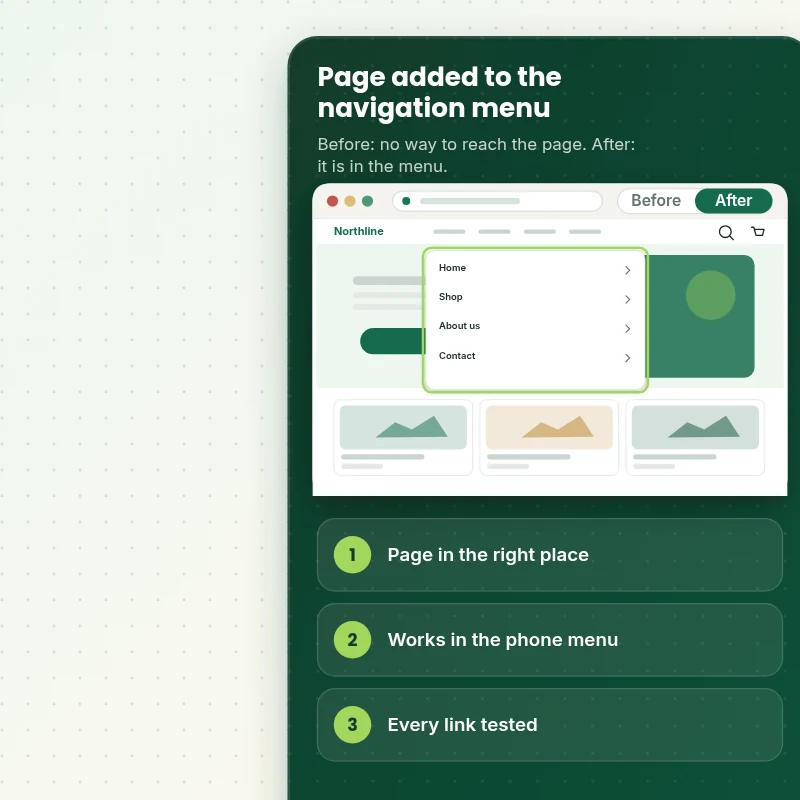
Follow the build. We find the menu your theme uses, add the page in the right place, check the phone menu and test every link.
Scope boundaries
Exactly What Is and Is Not Covered for Your Menu Page Link
A fixed price only works with a fixed scope, so this is what your menu page link package covers, what it leaves out and when we would rather quote it separately.
Included
- Your page added to the live menu
- Placement, label and dropdown
- Desktop and phone menu checks
- Two revision rounds and a menu map
Not included
- Creating the page
- A mega menu build
- Redesigning your whole navigation
- Any change inside the checkout that Shopify controls
Access we need
- Collaborator access to your Shopify store
- The page and its label
- Where it should sit
Quote triggers
- A mega menu
- A menu restructure for many pages
- A theme that page builder apps have changed heavily
Typical turnaround
- 1 to 1 working days for most menu page link jobs
- Faster options in the calculator
- Timing confirmed before work starts
After launch
- Two revision rounds before go-live
- A short handover note for your menu page link
- Questions answered; anything bigger than Add Page to Navigation Menu quoted as a separate task
Compare your options
Shopify Add Page to Menu With Doing It Yourself, an App or a Freelancer?
Four routes to a menu page link are compared below, so you can see what each one includes and what it leaves for you to sort out.
| What matters | Do it yourself | Marketplace seller | Full-service agency | Store Design Expert |
|---|---|---|---|---|
| Phone menu checked | No | No | Sometimes | Yes |
| Missing menu restored | Sometimes | No | Sometimes | Yes |
| No monthly fee | Yes | No | Yes | Yes |
| Every link tested | Sometimes | No | Rarely | Yes |
| Price known before work begins | Free but time-costly | Varies | Quote only | Yes |
| Theme backup before any change | No | Rarely | Usually | Yes |
| Two revision rounds included | No | Varies | Extra cost | Yes |
| Handover note for what changed | No | Rarely | Sometimes | Yes |
Price calculator
Price Your Menu Page Link
Pick a package, adjust the options for your menu page link and set your speed. The fixed price and delivery estimate update with every click, with no hidden fees.
Request a custom quote
A mega menu, a menu restructure for many pages and themes heavily modified by page builder apps are scoped separately and quoted at a fixed price.
Request a QuoteChanged your mind? Choose Menuadd Basic, Menuadd Standard or Menuadd Plus above to return to the instant calculator.
How it works
How We Handle Your Menu Page Link, Step by Step
Your menu page link moves through six stages, from the order to the written handover, with testing built in before launch.
- 01
Purchase
Choose your package and options in the calculator and check out securely, which locks the scope and the price of the menu page link.
- 02
Access
Share the store through a collaborator request and tell us what you want from the menu page link, and you can remove our access whenever you choose.
- 03
Build in a duplicate theme
We build the menu page link in a duplicate theme first, so a mistake can never reach your live checkout.
- 04
QA
A checklist drives the testing of the menu page link, so you review something that already meets the agreed criteria.
- 05
Handover
On your go-ahead the menu page link is published, and you get a short document explaining where everything lives.
- 06
Support
Support does not end at handover, so questions on the menu page link are welcome and new requests get a clear quote.
Compatibility and QA
Menu Change Checks and Acceptance Criteria
We check the menu page link against a written list on phones, tablets and desktops, keep a backup of your theme throughout and treat the criteria below as the definition of done.
What we test
- PlacementThe page appears where agreed with the label you chose.
- LinksEvery item in the menu opens the right page.
- PhoneThe phone menu shows the item and any dropdown opens correctly.
- DevicesWe open the menu page link on real iPhones, Android phones, a tablet and a desktop browser, including the narrowest 320 pixel width.
- BrowsersChrome, Safari, Firefox and Edge, each in its current version.
- PublishedThe page is published and visible to visitors.
Acceptance criteria
- The page is in the menu
- The label and place are as agreed
- Every menu link works
- The phone menu shows the new item
- The menu map names each menu
What we need to get started
What We Need to Get Add Page to Navigation Menu Started
Start by choosing an access route, then supply the details below for the menu page link, while the build itself stays in a copy of your theme.
Collaborator access
Invite us from your Shopify admin and we can begin the menu page link without anyone sharing a password, and you remove us when the work ends.
No store yet? We build it first
If you are still planning your store, we build the menu page link in a development store and pass it to you complete, with your plan chosen last.
Prefer to share a login?
You can send staff login details for the menu page link instead, though we recommend collaborator access because it is easier to revoke.
The page
Tell us which page to add, what to call it and where it should sit.
Menus
Tell us whether it goes in the header, the footer or both.
One decision maker
One approver for the menu page link keeps the feedback in one place and inside the two included rounds.
If the access options for the menu page link feel unclear, ask in the short form after checkout and we will walk you through the right one.
Testimonials
What Store Owners Say Before You Order Add Page to Navigation Menu
Verified feedback from clients who trusted us with their Shopify stores and quick tasks alike.
Verified
Store Design Expert is the best. The work is very professional, they pay close attention to detail and, more importantly, they listen. Their level of cooperation is second to none, and everything was delivered in a very timely manner. I will keep them in mind for future projects.
BN
Barbara N.United States
Verified
They definitely get the job done. Very patient and understanding throughout the whole project.
BS
Brian S.United States
Verified
Thank you so much to Store Design Expert and the team. My site looks far more appealing to customers, and I will happily recommend your services to other new small businesses.
JS
Jennifer S.United States
Verified
Very patient, informative and transparent, and they did exactly what they said they would do. Thanks for all the help!
RO
Raymond O.United States
Verified
Store Design Expert is the only one I use for all things WordPress. They have a high level of understanding, deliver quality work and are easy to deal with.
SC
Scott C.United States
Verified
A pleasure to work with. They did pretty much everything I asked and definitely exceeded my expectations. I will be working with Store Design Expert again soon.
JL
Jerry L.United States
Verified
Superb work! Store Design Expert is incredibly patient, and even when I did not fully understand my own questions, everything was explained again in detail. My vision was implemented perfectly, and the work is worth every cent I spent.
KB
Katrin B.Germany
Verified
Very impressed with the build-out. My store is ready to get started, and I am sure I will reach out for edits down the road, but this is everything I could ask for to get the party started. Thanks again, and I will be in touch for future projects.
DH
Dale H.United States
Verified
Very quick and detailed work! Store Design Expert does exactly what you want, in a very professional manner.
LF
Lena F.Germany
Related searches
Searches That Bring Owners to Add Page to Navigation Menu
Owners reach this page from different searches. Here is how the common ones relate to Add Page to Navigation Menu.
“how to add page to navigation menu shopify”, “how to add page to navigation bar shopify” or “how to add page to drop down menu shopify”: owners type these when they need Add Page to Navigation Menu, and the packages above are priced for that job.
People who look up “how to set up navigation in shopify”, “navigation not showing in shopify” or “shopify navigation menu missing” usually want Add Page to Navigation Menu; the calculator above shows the price and delivery estimate before you commit.
People who look up “where is navigation on shopify”, “how to find navigation in shopify” or “add page to navigation menu to shopify store” usually want Add Page to Navigation Menu; the calculator above shows the price and delivery estimate before you commit.
FAQ
Shopify Add Page to Menu Questions
Straight answers about cost, scope, timing, apps and what we need from you for your menu page link.
Can you add page to menu on Shopify for me, and what does it cost?
Yes. Packages start at $29. The calculator adds options such as a dropdown, reordering, restoring a missing menu and a menu map, and shows your exact price and delivery estimate.
What is the turnaround for the menu page link?
A typical menu page link is finished in 1 to 2 working days after we receive access, and the calculator shows faster delivery options for tighter deadlines.
Is Add Page to Navigation Menu safe for my live store?
Yes. The menu page link is made in a copy of your theme, tested on devices and only then published, and the untouched original remains available if you ever want to roll back.
What do you need from me for Add Page to Navigation Menu?
Collaborator access to your store and the page you want added. With no store yet, we create one in our Partner account, complete the menu page link and transfer ownership to you at the end.
How are the Add Page to Navigation Menu packages different?
You can choose between Menuadd Basic at $29 (1 working day), Menuadd Standard at $49 (1 working day) and Menuadd Plus at $79 (1 to 2 working days) for Add Page to Navigation Menu.
What is in the Menuadd Basic package of Add Page to Navigation Menu?
A page added to your header or footer menu in the right place, with a clear label, and checked on desktop and the phone menu. It includes: Page added to the menu; Clear label, right place; Desktop and phone menu checked; Link tested; Under a dropdown. Menuadd Basic costs $29 and takes 1 working day.
Which choices do I make for Add Page to Navigation Menu?
The Add Page to Navigation Menu calculator asks for a package and 3 more choices: how many pages (One page, Up to five pages); which menu (Header menu, Header and footer); how soon do you need it live (Standard, Sooner, Fastest).
Are there optional extras for Add Page to Navigation Menu?
For Add Page to Navigation Menu you can add Nest under a dropdown (+$10), Reorder the menu (+$10), Restore a missing menu (+$15), Menu map document (+$5) and Mend a menu item that opens the wrong page (+$10).
What if my Add Page to Navigation Menu job needs more than the packages cover?
If Add Page to Navigation Menu needs more than the packages cover, use Request a custom quote on this page. We write the scope for your job and quote one fixed price before any work starts.
Ready when you are
Shopify Add Page to Menu: Make Every Page Reachable
Pick your package, see the exact price and delivery estimate and get your page in the right menu, working on every device. If you need a mega menu or a bigger restructure, request a quote and we will scope it with you.
Fixed price · Two revision rounds · Backup before changes