
Shopify stores designed and launched
Shopify product page task
Add Next Previous Product Navigation: Let Shoppers Browse a Range Without Going Back
Wondering how to add next previous product navigation so shoppers can flick through a collection? We build the links in a duplicate theme, handle the collection context and test them on real phones. From $49, fixed price.
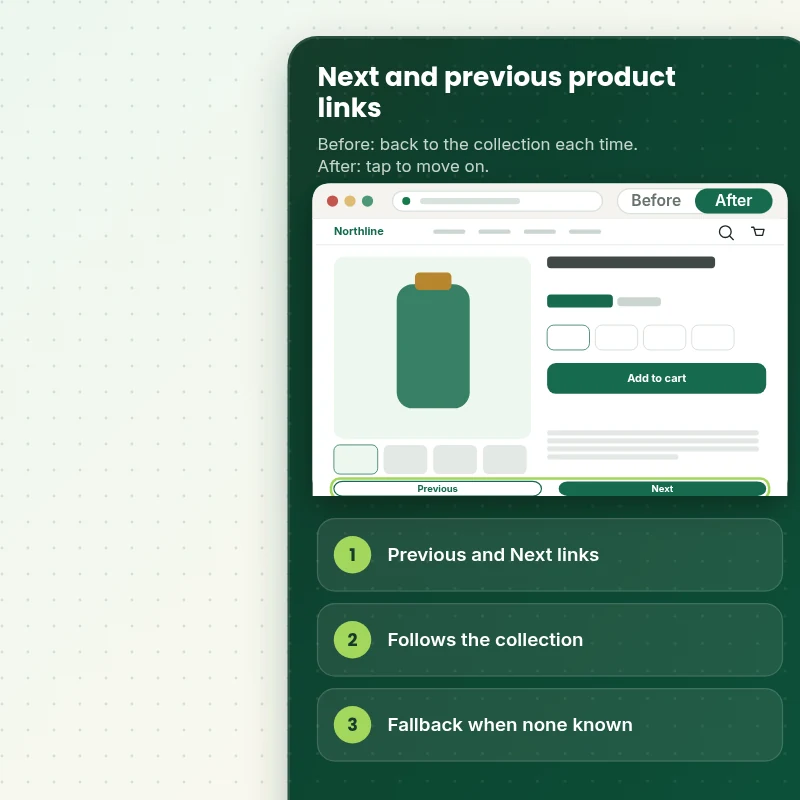
- Previous and Next links on the product page
- Follows the collection the shopper came from
- Small thumbnail and title
- Fallback when no collection is known
Our track record
Over 450 Stores Launched Since 2015. Here Is What That Means for Your Next and Previous Links.
More than 450 Shopify stores launched since 2015 and a 4.9+ average from verified clients sit behind this task. Your next and previous links is small in scope and handled with the same planning and testing as our biggest builds.
Average rating from verified clients
Building Shopify stores since
Secure checkout
Pay through a protected checkout and keep a full order record.
Two revision rounds
Included in every package, so the result matches what you pictured.
Backup before changes
We work on a duplicate of your theme, never on your live store.
Problem and result
Add Next Previous Product Navigation: Browse a Whole Range in a Few Taps
Shoppers who like a style often want to see the next one without returning to the collection page, scrolling and clicking again. Next and Previous links keep them moving through the range in a single tap, which suits fashion, art and any catalog where products are browsed rather than searched.
Every product is a dead end
To see another product, shoppers must go back to the collection, find their place and open the next one. Many give up after two or three, and the range never gets a proper look.
A way to keep moving
Previous and Next links sit on the product page with a small thumbnail and title. They follow the collection the shopper came from, skip sold-out items if you wish and stay out of the way of the buy box.
What is included
What Your Next and Previous Links Include
When you ask how to add next and previous product navigation and want it done, you get the links built in your theme, the collection context handled and every case tested.
Implementation checklist
- Previous and Next links added to your product template in the position you choose
- Links that step through the collection the shopper came from
- Small thumbnail and product title on each link
- Links hidden or looped at the first and last product, as you prefer
- Fallback to a chosen collection when a shopper lands from search or an ad
- Sold-out products skipped if you want them skipped
- Accessible links with clear labels and visible focus
- Handover note showing how to change the position and the fallback collection
The links rely on the shopper arriving through a collection. When they arrive from search, an ad or a shared link there is no collection to follow, which is why a fallback collection is part of the task.
See how it works
From Dead-End Product Pages to a Range You Can Flick Through
Follow one visit. The shopper opens a product from a collection, likes the style and taps Next to see the following product without going back.
Scope boundaries
Exactly What Is and Is Not Covered for Your Next and Previous Links
Your next and previous links is priced against a defined scope, so check what is covered, what is excluded, what we need and when a separate quote makes more sense.
Included
- Previous and Next links on your live product template
- Collection context and fallback
- Thumbnails, skipping and mobile checks
- Two revision rounds and a written handover note
Not included
- Redesigning collection pages
- Product recommendations or related products
- Breadcrumb design
- Changes to the part of checkout that Shopify controls
Access we need
- Collaborator access to your Shopify store
- The fallback collection
- Skip sold-out preference
Quote triggers
- Navigation across several collections at once
- Links with filters carried through
- A theme that page builder apps have changed heavily
Typical turnaround
- 1 to 3 working days for most next and previous links jobs
- Faster options in the calculator
- Timing confirmed before work starts
After launch
- Two revision rounds before go-live
- A short handover note for your next and previous links
- Questions answered; anything bigger than Add Next / Previous Product Navigation quoted as a separate task
Compare your options
Add Next Previous Product Navigation With a Theme Feature, an App or a Freelancer?
See how the main ways of handling a next and previous links stack up on the points that tend to cause trouble later.
| What matters | Do it yourself | Marketplace seller | Full-service agency | Store Design Expert |
|---|---|---|---|---|
| Follows the collection the shopper came from | No | Often | If coded | Yes |
| Fallback when no collection is known | No | Sometimes | Rarely | Yes |
| No monthly fee | Yes | No | Yes | Yes |
| Sold-out products skipped | No | Sometimes | Sometimes | Yes |
| Price known before work begins | Free but time-costly | Varies | Quote only | Yes |
| Theme backup before any change | No | Rarely | Usually | Yes |
| Two revision rounds included | No | Varies | Extra cost | Yes |
| Handover note for what changed | No | Rarely | Sometimes | Yes |
Price calculator
Price Your Next and Previous Links
Pick a package, adjust the options for your next and previous links and set your speed. The fixed price and delivery estimate update with every click, with no hidden fees.
Request a custom quote
Navigation across several collections at once, links that carry filters through and themes heavily modified by page builder apps are scoped separately and quoted at a fixed price.
Request a QuoteChanged your mind? Choose Stepper Basic, Stepper Standard or Stepper Plus above to return to the instant calculator.
How it works
How We Handle Your Next and Previous Links, Step by Step
Here is the route your next and previous links takes in six steps, ending with a published result and a note on how it works.
- 01
Purchase
Select the package and options that fit your next and previous links, and checkout locks in a fixed price and a delivery estimate.
- 02
Access
Grant collaborator access and answer the brief, and we begin the next and previous links with only the permissions the job needs.
- 03
Build in a duplicate theme
Every change for the next and previous links goes into a safe theme copy before anything is considered for the live store.
- 04
QA
The next and previous links is verified in the main browsers and on real phones before we ask for your approval.
- 05
Handover
Following your approval we release the next and previous links and leave you with a clear record of the changes.
- 06
Support
Follow-up questions about the next and previous links are part of the service, while new work is quoted as a separate fixed-price task.
Compatibility and QA
Next and Previous Links Checks and Acceptance Criteria
The next and previous links is only handed over once it meets the acceptance list below, and a saved copy of your theme means nothing is ever final until you say so.
What we test
- ContextOpening a product from a collection gives links that step through that collection in order.
- FallbackOpening a product from search or a direct link uses the fallback collection.
- EndsThe first and last products behave as agreed.
- DevicesThe next and previous links is checked on recent iPhone, Android, tablet and desktop widths, including small phones at 320 pixels.
- BrowsersUp-to-date Chrome, Safari, Firefox and Edge.
- SkippingSold-out products are skipped or shown, as you chose.
Acceptance criteria
- Previous and Next links show on your product pages
- They follow the collection the shopper came from
- The fallback works from search and direct links
- The ends of a collection behave as agreed
- You can change the fallback later using the handover note
What we need to get started
What We Need to Get Add Next / Previous Product Navigation Started
Give access in whichever way you prefer, then send the short list of details for the next and previous links, and nothing reaches your live theme before you approve it.
Collaborator access
The simplest route for the next and previous links: send the store URL and accept our collaborator request, so no password changes hands and access ends when you say so.
No store yet? We build it first
Without a store of your own, we put the next and previous links together in a development store first and transfer it to you before you choose a plan.
Prefer to share a login?
If you would rather not use the collaborator route for the next and previous links, send staff login details, although we always recommend the easier-to-revoke option.
Collection context
Tell us which collection should be used when a shopper arrives with no collection, such as from search.
Skipping
Tell us whether sold-out products should be skipped or shown.
One decision maker
Pick one reviewer for the next and previous links so every change request lands at once and fits the two included rounds.
If you are unsure which route suits the next and previous links, say so in the short form after checkout and we will suggest the simplest one.
Testimonials
What Store Owners Say Before You Order Add Next / Previous Product Navigation
Verified feedback from clients who trusted us with their Shopify stores and quick tasks alike.
Verified
Thank you so much to Store Design Expert and the team. My site looks far more appealing to customers, and I will happily recommend your services to other new small businesses.
JS
Jennifer S.United States
Verified
Outstanding work and outstanding customer service. Five stars! I will absolutely use Store Design Expert again for my next book.
KM
Katharine M.United States
Verified
Store Design Expert was great! They delivered exactly what I asked for and even offered helpful extra suggestions. Highly recommended.
PW
Paul W.United States
Verified
I request Store Design Expert every time I have a project. They are professional and give real attention to detail, which makes the work stand out.
LK
Laura K.United States
Verified
They kept communicating until the problem was fully resolved, and the result was great.
HJ
Henry J.United States
Verified
Super helpful and patient. I am new to ecommerce and Store Design Expert talked me through the whole process and even fixed my payment bridging for me!
LR
Lois R.United Kingdom
Verified
I am beyond satisfied! Store Design Expert went above and beyond on my project. Highly recommended!
MD
Michael D.United States
Verified
The experience was tailored to my brand and specifications to the letter. I love the result.
EP
Eric P.United States
Verified
They definitely get the job done. Very patient and understanding throughout the whole project.
BS
Brian S.United States
FAQ
Add Next Previous Product Navigation Questions
Straight answers about cost, scope, timing, apps and what we need from you for your next and previous links.
How do I add next previous product navigation, and can you do it for me?
Yes, we do it for you. Packages start at $49. The calculator adds options such as skipping sold-out products, a fallback collection, arrow-key shortcuts and a swipe gesture, and shows your exact price and delivery estimate before checkout.
When will the next and previous links be ready after I order?
Expect 1 to 4 working days for the next and previous links once we have access to your store, with faster delivery available in the calculator when you need it.
What happens when a shopper arrives from search?
There is no collection to follow, so the links use a fallback collection you choose, for example your best sellers, or they stay hidden if you prefer.
Is Add Next / Previous Product Navigation safe for my live store?
Yes. We work on the next and previous links in a duplicate theme first, check it against a written list and publish it only after you say yes, leaving your original theme as a backup.
What do you need from me for Add Next / Previous Product Navigation?
Collaborator access to your store and your fallback collection. With no store yet, we set one up in our Partner account, build the next and previous links there and hand ownership over to you.
How much does Add Next / Previous Product Navigation cost?
The price for Add Next / Previous Product Navigation begins at $49 and tops out at $287 when every option is on.
How are the Add Next / Previous Product Navigation packages different?
There are 3 Add Next / Previous Product Navigation packages: Stepper Basic at $49 (1 to 2 working days), Stepper Standard at $89 (2 to 3 working days) and Stepper Plus at $149 (3 to 4 working days).
What is in the Stepper Basic package of Add Next / Previous Product Navigation?
Previous and Next product links on the product page that step through the collection the shopper came from, with a small thumbnail and title. It includes: Previous and Next links; Steps through the same collection; Small thumbnail and title; Desktop and mobile tested; Stays inside the viewed collection. Stepper Basic costs $49 and takes 1 to 2 working days.
What do I choose when I order Add Next / Previous Product Navigation?
Beyond the package, Add Next / Previous Product Navigation needs 3 decisions from you: what do the links show (Text links only, Thumbnail and title); what happens at the ends (Hide the link at the ends, Loop to the other end); how soon do you need it live (Standard, Sooner, Fastest).
Ready when you are
Add Next Previous Product Navigation: Keep Shoppers Moving Through the Range
Pick your package, see the exact price and delivery estimate and get Previous and Next links that follow the collection and work on every device. If you need several collections or filters carried through, request a quote and we will scope it with you.
Fixed price · Two revision rounds · Backup before changes