
Shopify stores designed and launched
Shopify collection page task
Shopify Infinite Scroll: Let the Grid Keep Going Without Getting Lost
Need Shopify infinite scroll on your collections without breaking the footer or the Back button? We build it in a duplicate theme with search-friendly links and test on real phones. From $69, fixed price.
- More products load on scroll
- Back and footer still work
- Filters and sorting work
- Search-friendly page links
From$69
Delivery1 to 5 working days
Revisions2 rounds
Our track record
450+ Shopify Stores Built Since 2015. Your Infinite Scroll Gets the Same Care.
More than 450 Shopify stores launched since 2015 and a 4.9+ average from verified clients sit behind this task. Your infinite scroll is small in scope and handled with the same planning and testing as our biggest builds.
Average rating from verified clients
Building Shopify stores since
Secure checkout
Pay through a protected checkout and keep a full order record.
Two revision rounds
Included in every package, so the result matches what you pictured.
Backup before changes
We work on a duplicate of your theme, never on your live store.
Problem and result
Shopify Infinite Scroll: Remove the Click Between Page One and Page Two
Numbered pages make shoppers stop and decide to click, and many never do. Infinite scroll, or a Load more button, keeps products coming as they browse, but done carelessly it hides the footer, forgets the position on Back and hides products from search engines.
Browsing stops at the bottom of page one
Shoppers reach the bottom of a page of products and must click through numbered pages. Many leave, and those who go back lose their place.
Browsing that keeps flowing
The next products load as the shopper nears the end, or on a Load more tap. Back returns to the same spot, filters restart the list and paginated links remain for search engines.
What is included
What Your Infinite Scroll Includes
When you add infinite scroll to a Shopify theme, you get the loader, the history handling and the safeguards that make it usable.
Implementation checklist
- The next page of products fetched and added as the shopper nears the end
- A Load more button option after a set number of automatic loads
- A product count such as Showing 48 of 212
- The scroll position kept when the shopper opens a product and goes back
- A footer that remains reachable through a stop point or the button
- Filters and sorting restarting the loader correctly
- Numbered pagination links kept in the page for search engines
- Handover note showing how to switch between scroll and button
Infinite scroll changes how products reach shoppers and search engines, so we keep paginated links in place and explain the trade-offs. We do not promise ranking or sales results, and very large catalogues may suit a Load more button better.
See how it works
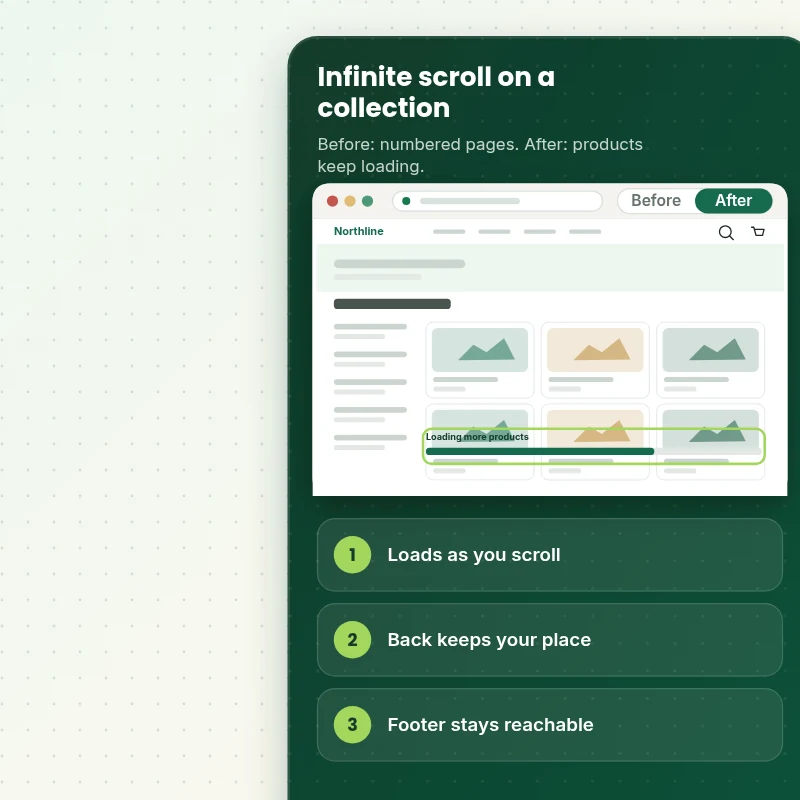
From Numbered Pages to a Grid That Keeps Going
Follow one visit. The shopper scrolls through a collection, products keep loading, a product opens and Back returns to the same spot.
Scope boundaries
Exactly What Is and Is Not Covered for Your Infinite Scroll
Clear boundaries keep the infinite scroll a fixed-price task, so here is what it covers, what it does not, what we need and when a custom quote is fairer than forcing it into a package.
Included
- Infinite scroll on your live collection templates
- Load more option and product count
- Back, filter and phone checks
- Handover note plus two revision rounds
Not included
- Search ranking promises
- Rebuilding filters
- Infinite scroll on blog or search pages
- Edits to checkout areas that only Shopify can change
Access we need
- Collaborator access to your Shopify store
- Your loading choice
- A list of filter or sort apps
Quote triggers
- Infinite scroll on search results
- A heavily customised filter app
- Themes that have been heavily modified by page builders
Typical turnaround
- 1 to 3 working days for most infinite scroll jobs
- Faster options in the calculator
- Timing confirmed before work starts
After launch
- Two revision rounds before go-live
- A short handover note for your infinite scroll
- Questions about Add Infinite Scroll answered; larger changes priced as small tasks
Compare your options
Shopify Infinite Scroll With a Theme Option, an App or a Freelancer?
A infinite scroll can be done in several ways, and this table lines them up on cost, care and what you are left with afterwards.
| What matters | Free app or DIY | Gig marketplace | Large agency | Store Design Expert |
|---|---|---|---|---|
| Back keeps your place | Sometimes | Sometimes | Rarely | Yes |
| Footer stays reachable | Sometimes | Sometimes | Rarely | Yes |
| No monthly fee | Yes | No | Yes | Yes |
| Search-friendly page links | Rarely | Sometimes | Rarely | Yes |
| Price known before work begins | Free but time-costly | Varies | Quote only | Yes |
| Theme backup before any change | No | Rarely | Usually | Yes |
| Two revision rounds included | No | Varies | Extra cost | Yes |
| Handover note for what changed | No | Rarely | Sometimes | Yes |
Price calculator
Price Your Infinite Scroll
Pick a package, adjust the options for your infinite scroll and set your speed. The fixed price and delivery estimate update with every click, with no hidden fees.
Request a custom quote
Infinite scroll on search results, heavily customised filter apps and themes heavily modified by page builder apps are scoped separately and quoted at a fixed price.
Request a QuoteChanged your mind? Choose Endless Basic, Endless Standard or Endless Plus above to return to the instant calculator.
How it works
How We Handle Your Infinite Scroll, Step by Step
From purchase to handover in six steps, with a duplicate theme and a test pass in the middle, so the infinite scroll never surprises you.
- 1
Purchase
Decide how far you want the infinite scroll to go, pay at checkout and receive a written confirmation of the scope.
- 2
Access
Send collaborator access and the details we ask for in a short form, and you stay the store owner with no password shared for the infinite scroll.
- 3
Build in a duplicate theme
The infinite scroll is created in an unpublished theme copy, so shoppers keep seeing a stable store until we are done.
- 4
QA
Before review, the infinite scroll is checked on real devices and in the main browsers against a written list.
- 5
Handover
Following your approval we release the infinite scroll and leave you with a clear record of the changes.
- 6
Support
Support does not end at handover, so questions on the infinite scroll are welcome and new requests get a clear quote.
Compatibility and QA
Infinite Scroll Checks and Acceptance Criteria
Each infinite scroll is tested on actual phones and browsers against the list below before you review it, and the theme backup we keep makes the whole job reversible.
What we test
- LoadingThe next page loads once as the shopper nears the end, with no repeats or gaps.
- BackOpening a product and going back returns to the same position.
- FiltersChanging a filter or sort restarts the list from the top.
- DevicesThe infinite scroll is reviewed on current iOS and Android phones, on tablets and on desktop screens of several sizes.
- BrowsersAdd Infinite Scroll is checked in current Chrome, Safari, Firefox and Edge.
- SearchPaginated links remain in the page for search engines.
Acceptance criteria
- More products load without a reload
- Back returns to the same position
- Filters and sorting work
- The footer can be reached
- The handover note explains how to switch modes
What we need to get started
What We Need to Get Add Infinite Scroll Started
Pick the access route that suits you, because whichever one you choose, the infinite scroll is built in a duplicate of your theme and we tell you before anything goes live, so only the items below are needed for it.
Collaborator access
Accept our collaborator request and the infinite scroll can begin right away, with your passwords untouched and access removable by you whenever you like.
No store yet? We build it first
If your store does not exist yet, the infinite scroll is built inside our Partner account and the whole store moves to you when it is ready.
Prefer to share a login?
Sharing a staff login is possible for the infinite scroll, but we lean towards collaborator access since it is quicker to remove afterwards.
Loading style
Tell us whether you want automatic loading, a Load more button or both.
Filter apps
List any filter or sort apps that must keep working with the loader.
One decision maker
Name one approver for the infinite scroll and revisions stay neatly within the two rounds we include.
For any doubt about how to share access for the infinite scroll, the form after checkout has a box for it and we reply with a recommendation.
Testimonials
What Store Owners Say Before You Order Add Infinite Scroll
Verified feedback from clients who trusted us with their Shopify stores and quick tasks alike.
Verified
Store Design Expert is the best. The work is very professional, they pay close attention to detail and, more importantly, they listen. Their level of cooperation is second to none, and everything was delivered in a very timely manner. I will keep them in mind for future projects.
BN
Barbara N.United States
Verified
Thank you so much to Store Design Expert and the team. My site looks far more appealing to customers, and I will happily recommend your services to other new small businesses.
JS
Jennifer S.United States
Verified
Very patient, informative and transparent, and they did exactly what they said they would do. Thanks for all the help!
RO
Raymond O.United States
Verified
Store Design Expert is the only one I use for all things WordPress. They have a high level of understanding, deliver quality work and are easy to deal with.
SC
Scott C.United States
Verified
A pleasure to work with. They did pretty much everything I asked and definitely exceeded my expectations. I will be working with Store Design Expert again soon.
JL
Jerry L.United States
Verified
Superb work! Store Design Expert is incredibly patient, and even when I did not fully understand my own questions, everything was explained again in detail. My vision was implemented perfectly, and the work is worth every cent I spent.
KB
Katrin B.Germany
Verified
Very impressed with the build-out. My store is ready to get started, and I am sure I will reach out for edits down the road, but this is everything I could ask for to get the party started. Thanks again, and I will be in touch for future projects.
DH
Dale H.United States
Verified
Very quick and detailed work! Store Design Expert does exactly what you want, in a very professional manner.
LF
Lena F.Germany
Verified
Store Design Expert did an outstanding job with top-notch professionalism on my website project. Everything was delivered quickly without compromising quality. I could not have asked for better!
JM
Jason M.United States
Related searches
Related Searches for Add Infinite Scroll
The searches below are the ones that lead people to Add Infinite Scroll.
“how to add infinite scroll in shopify”, “shopify infinite scroll app”, “infinite scroll shopify code” or “what is infinite scroll shopify” all point to the same job, which Add Infinite Scroll covers from start to finish.
“shopify infinite scroll collection”, “infinite scroll shopify dawn theme”, “infinite scroll shopify collection page” or “shopify endless scroll” all point to the same job, which Add Infinite Scroll covers from start to finish.
If you searched for “shopify theme infinite scroll”, “how to turn off infinite scroll”, “how does infinite scroll work” or “what is infinite scroll”, Add Infinite Scroll is the work that answers it.
“infinite scroll example” all point to the same job, which Add Infinite Scroll covers from start to finish.
FAQ
Shopify Infinite Scroll Questions
Straight answers about cost, scope, timing, apps and what we need from you for your infinite scroll.
How do I add Shopify infinite scroll to my collections, and can you do it for me?
Yes, we do it for you. Packages start at $69. The calculator adds options such as a product count, back to top, loading placeholders and a pagination link check, and shows your exact price and delivery estimate before checkout.
How long does it take to get the infinite scroll done?
Most infinite scroll jobs take 1 to 5 working days from the day we have access, and the Sooner and Fastest options in the calculator shorten that if you have a launch or campaign date.
Is Add Infinite Scroll safe for my live store?
Yes. Because the infinite scroll lives in a theme copy until you approve it, a problem cannot reach shoppers and the original is one click from being restored.
What do you need from me for Add Infinite Scroll?
Collaborator access to your store and your loading choice. Where there is no store yet, we build the infinite scroll in a development store of our own and transfer it to you afterwards.
What is the price of Add Infinite Scroll?
Add Infinite Scroll starts at $69. With every option switched on the total reaches $370.
Which Add Infinite Scroll package should I choose?
You can choose between Endless Basic at $69 (1 to 2 working days), Endless Standard at $119 (2 to 3 working days) and Endless Plus at $199 (3 to 5 working days) for Add Infinite Scroll.
What do I get with Endless Basic for Add Infinite Scroll?
More products loading as the shopper nears the end of the grid, with no page reload, and a footer that stays reachable. It includes: More products load on scroll; No page reload; Footer stays reachable; Desktop and mobile tested; Load more button option. Endless Basic costs $69 and takes 1 to 2 working days.
What does the Add Infinite Scroll calculator ask me?
When you order Add Infinite Scroll you pick a package and then answer 3 short questions in the calculator: how should it load (Automatically on scroll, Load more button, Auto, then a button); where should it work (Collection pages, Collections and search); how soon do you need it live (Standard, Sooner, Fastest).
Are there optional extras for Add Infinite Scroll?
For Add Infinite Scroll you can add Product count line (+$5), Back to top button (+$5), Loading placeholders (+$10), Pagination links check (+$15) and Fix a scroll that loops or skips (+$20).
Ready when you are
Shopify Infinite Scroll: Keep Browsing Smooth and Safe
Pick your package, see the exact price and delivery estimate and get a loader that keeps products coming without losing the footer, the Back button or search engines on every device. If you need infinite scroll on search results or a heavily customised filter app, request a quote and we will scope it with you.
Fixed price · Two revision rounds · Backup before changes