
Shopify stores designed and launched
Shopify homepage task
Add Google Maps to My Shopify Store: Help Local Customers Find You in One Look
Want to add google maps to my Shopify store the right way, responsive and without slowing the page? We embed it in a duplicate theme, add your details and test it on real phones. From $39, fixed price.
- Responsive Google map on the homepage
- Address, hours and directions link
- Several locations if you have them
- Lazy loaded for speed
From$39
Delivery1 to 3 working days
Revisions2 rounds
Our track record
Over 450 Stores Launched Since 2015. Here Is What That Means for Your Google Map Embed.
Store Design Expert has designed and launched more than 450 Shopify stores, and verified clients rate us 4.9+ on average. A Google map embed is a small task, so it gets a fixed price, a clear scope and the same checking as a large project.
Average rating from verified clients
Building Shopify stores since
Secure checkout
Pay through a protected checkout and keep a full order record.
Two revision rounds
Included in every package, so the result matches what you pictured.
Backup before changes
We work on a duplicate of your theme, never on your live store.
Problem and result
Add Google Maps to My Shopify Store: A Physical Address Shoppers Can Trust
If you have a shop, a studio or a pickup point, a map on the homepage proves the business is real and tells local customers exactly where to go. It is also one of the first things shoppers look for before visiting, so it should be accurate, tidy and quick to load.
Customers cannot see where you are
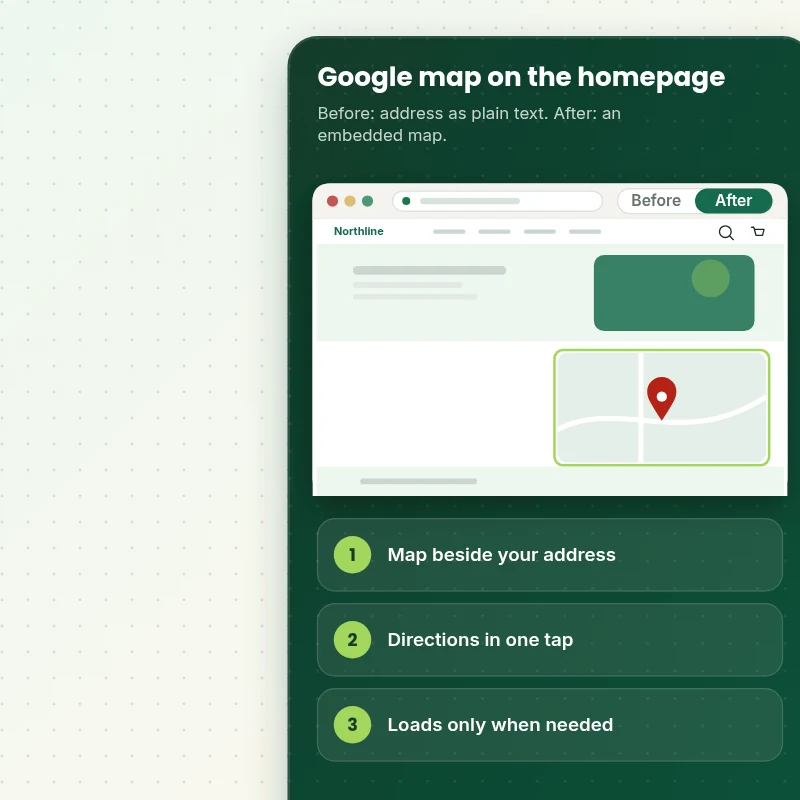
Your address sits in the footer as plain text. Visitors cannot picture the location, and a pasted map is often too wide for phones, too heavy for the page or points at the wrong place.
A map that shows the way
A neat map sits beside your address and opening hours with a Get directions link. It resizes for phones, loads only when scrolled into view and points to the right spot.
What is included
What Your Google Map Embed Includes
When you ask to add google maps to my Shopify store, you get the map embedded in your theme, matched to your address and details, and tested so it neither breaks on phones nor slows the page.
Implementation checklist
- Google map embedded in a homepage section in the order you choose
- Pin placed on your exact address and checked against the live map
- Address, opening hours and phone number shown beside the map
- A Get directions link that opens the map app on phones
- Map sized to resize cleanly on phones, tablets and desktops
- Lazy loading so the map is requested only when it nears the screen
- Several locations shown with a list of branches, if you have them
- Handover note showing how to change the address and hours
A basic embedded map needs no API key. A custom-styled map or one with several pins uses Google's Maps API, which needs a key held in your own Google account and is subject to Google's terms and billing, and we explain that before we build.
See how it works
From an Address in Plain Text to a Map Shoppers Can Use
Follow the build. Your homepage is assembled section by section in a duplicate theme, and the map goes in at step six, with the pin checked against your address and the page speed tested before anything goes live.
Scope boundaries
Exactly What Is and Is Not Covered for Your Google Map Embed
To keep the Google map embed predictable, this is what is included, what is not, what we ask of you and which situations call for a tailored quote.
Included
- A Google map embed on your live homepage
- Address, hours and directions link
- Lazy loading and mobile checks
- A handover note and two rounds of revisions
Not included
- Creating or verifying your Google Business profile
- Paying for Google Maps usage on your behalf
- Local search ranking work
- Checkout changes that Shopify itself controls
Access we need
- Collaborator access to your Shopify store
- Your address and opening hours
- A Google API key, only if a styled map is needed
Quote triggers
- More than five locations with filters
- A fully styled custom map
- A store theme modified at length by page builder apps
Typical turnaround
- 1 to 2 working days for most Google map embed jobs
- Faster options in the calculator
- Timing confirmed before work starts
After launch
- Two revision rounds before go-live
- A short handover note for your Google map embed
- Questions answered; anything bigger than Add Google Map Embed quoted as a separate task
Compare your options
Add Google Maps to My Shopify Store With a Pasted Iframe, an App or a Freelancer?
If you are deciding how to approach a Google map embed, this comparison shows what you get from each route and what you do not.
| What matters | Free app or DIY | Gig marketplace | Large agency | Store Design Expert |
|---|---|---|---|---|
| Responsive on phones | Often not | Sometimes | Varies | Yes |
| Lazy loaded so it does not slow the page | No | Sometimes | Rarely | Yes |
| Several locations on one map | No | Yes | If coded | Yes |
| Handover note for later edits | No | No | Sometimes | Yes |
| Price known before work begins | Free but time-costly | Varies | Quote only | Yes |
| Theme backup before any change | No | Rarely | Usually | Yes |
| Two revision rounds included | No | Varies | Extra cost | Yes |
| Handover note for what changed | No | Rarely | Sometimes | Yes |
Price calculator
Price Your Google Map Embed
Pick a package, adjust the options for your Google map embed and set your speed. The fixed price and delivery estimate update with every click, with no hidden fees.
Request a custom quote
More than five locations, fully styled custom maps and themes heavily modified by page builder apps are scoped separately and quoted at a fixed price.
Request a QuoteChanged your mind? Choose Locate Basic, Locate Standard or Locate Plus above to return to the instant calculator.
How it works
How We Handle Your Google Map Embed, Step by Step
Six steps take the Google map embed from your order to a live, tested result, and nothing changes on the live store until you approve it.
- 1
Purchase
Pick a package, set the options for your Google map embed and pay at checkout, and the price you see is the price you pay.
- 2
Access
Grant collaborator access and answer the brief, and we begin the Google map embed with only the permissions the job needs.
- 3
Build in a duplicate theme
Building the Google map embed in a duplicate theme means your sales continue as normal while the work takes shape.
- 4
QA
Every Google map embed is tested across devices and browsers, and anything that does not match the list is fixed first.
- 5
Handover
When you approve the Google map embed we move it to the live theme and give you a plain summary of what was done.
- 6
Support
Should the Google map embed need a tweak once it is live, tell us and we will either fix it or quote it, never surprise you.
Compatibility and QA
Google Map Embed Checks and Acceptance Criteria
To call the Google map embed done we verify the points below on real devices, and your untouched theme backup lets you reverse the work whenever you like.
What we test
- LocationThe pin sits on the exact address and the directions link opens the right place.
- DevicesPhones, tablets and desktops are all used to test the Google map embed, down to a 320 pixel screen.
- BrowsersThe current versions of Chrome, Safari, Firefox and Edge.
- SpeedThe map loads lazily, so it adds nothing to the first screen.
- DetailsAddress, hours and phone number are accurate and readable beside the map.
- KeysIf an API key is used, it is restricted to your domain and the steps are noted.
Acceptance criteria
- The map shows your address on your homepage
- Directions open the right place on a phone
- The map resizes cleanly on small screens
- The page is not slowed by the map
- You can change the address later using the handover note
What we need to get started
What We Need to Get Add Google Map Embed Started
We need a way into the store and a few facts about the Google map embed, and the options below keep both simple and reversible.
Collaborator access
For the Google map embed we only need a collaborator request approved in your admin, because that gives us the access the job needs and nothing more.
No store yet? We build it first
Without a store of your own, we put the Google map embed together in a development store first and transfer it to you before you choose a plan.
Prefer to share a login?
For the Google map embed you may share a staff login instead, though the collaborator route is easier to revoke and is what we usually advise.
Your address
Send the exact address and a link to your Google Business profile if you have one, so the pin lands in the right place.
Hours and details
Send your opening hours, phone number and any pickup notes you want beside the map.
Placement
Tell us where the map should appear, for example above the footer or on a contact page too.
If you are not sure which route fits your Google map embed, tell us in the short form after checkout and we will recommend one.
Testimonials
What Store Owners Say Before You Order Add Google Map Embed
Verified feedback from clients who trusted us with their Shopify stores and quick tasks alike.
Verified
Super helpful and patient. I am new to ecommerce and Store Design Expert talked me through the whole process and even fixed my payment bridging for me!
LR
Lois R.United Kingdom
Verified
Very satisfied with the work. Most importantly, Store Design Expert responded promptly to my questions and concerns. Thank you!
KB
Kyle B.United States
Verified
Outstanding work and outstanding customer service. Five stars! I will absolutely use Store Design Expert again for my next book.
KM
Katharine M.United States
Verified
Store Design Expert was great! They delivered exactly what I asked for and even offered helpful extra suggestions. Highly recommended.
PW
Paul W.United States
Verified
I request Store Design Expert every time I have a project. They are professional and give real attention to detail, which makes the work stand out.
LK
Laura K.United States
Verified
They kept communicating until the problem was fully resolved, and the result was great.
HJ
Henry J.United States
Verified
I am beyond satisfied! Store Design Expert went above and beyond on my project. Highly recommended!
MD
Michael D.United States
Verified
The experience was tailored to my brand and specifications to the letter. I love the result.
EP
Eric P.United States
Verified
They definitely get the job done. Very patient and understanding throughout the whole project.
BS
Brian S.United States
Related searches
Related Searches for Add Google Map Embed
Owners reach this page from different searches. Here is how the common ones relate to Add Google Map Embed.
“add google map embed”, “add google maps to website shopify” or “how to add google map to shopify” all point to the same job, which Add Google Map Embed covers from start to finish.
“google maps integration with shopify”, “embed google map with multiple locations” or “add my shop to google map” all point to the same job, which Add Google Map Embed covers from start to finish.
Owners also search for “how to add locations on shopify”.
FAQ
Add Google Maps to My Shopify Store Questions
Straight answers about cost, scope, timing, apps and what we need from you for your Google map embed.
Can you add google maps to my Shopify store for me, and what does it cost?
Yes. Packages start at $39. The calculator adds options such as several locations, a styled card, pickup notes and lazy loading, and shows your exact price and delivery estimate before checkout.
How many days does the Google map embed usually take?
Our usual turnaround for a Google map embed is 1 to 3 working days from receiving access, with expedited choices available in the calculator.
Do I need a Google API key?
Not for a standard embedded map. A custom-styled map or several pins uses Google's Maps API, which needs a key from your own Google account and is subject to Google's terms, and we explain it before we build.
Is Add Google Map Embed safe for my live store?
Yes. Nothing about the Google map embed touches your live theme until you approve the tested copy, and your original theme is kept as a fallback.
What do you need from me for Add Google Map Embed?
Collaborator access to your store and your address and opening hours. Starting without a store is fine: we build the Google map embed in our development store and transfer it to you when the work is finished.
How are the Add Google Map Embed packages different?
There are 3 Add Google Map Embed packages: Locate Basic at $39 (1 working day), Locate Standard at $69 (1 to 2 working days) and Locate Plus at $119 (2 to 3 working days).
What do I get with Locate Basic for Add Google Map Embed?
A Google map of your shop or studio on the homepage, with your address and opening hours beside it, responsive on every screen. It includes: Map embedded on the homepage; Address and opening hours beside it; Responsive on phones; Get directions link; Map with several pins. Locate Basic costs $39 and takes 1 working day.
What do I choose when I order Add Google Map Embed?
Beyond the package, Add Google Map Embed needs 3 decisions from you: what kind of map (Standard Google embed, Several locations on one map, Custom-styled map); how much detail beside it (Address and hours, Address, hours, phone and pickup notes); how soon do you need it live (Standard, Sooner, Fastest).
Which extras can I add to Add Google Map Embed?
Extras available with Add Google Map Embed: Styled location card (+$15), Lazy loading (+$10), Pickup instructions (+$10), Local business markup guidance (+$15) and Reuse on contact and location pages (+$15).
Ready when you are
Add Google Maps to My Shopify Store: Put Your Location in Front of Every Visitor
Pick your package, see the exact price and delivery estimate and get a map that shows the way on every device without slowing the page. If you have many locations or need a styled map, request a quote and we will scope it with you.
- Fixed price
- Two revision rounds
- Backup before changes